
Android ViewDragHelper及移动处理总结
概述
2013年谷歌i/o大会上介绍了两个新的layout: SlidingPaneLayout和DrawerLayout,现在这俩个类被广泛的运用。我们知道在我们实际的开发中往往会涉及到很多的拖动效果,而ViewDragHelper解决了android中手势处理过于复杂的问题。
其实ViewDragHelper并不是第一个用于分析手势处理的类,gesturedetector也是,但是在和拖动相关的手势分析方面gesturedetector只能说是勉为其难,其拓展性并不好。
为了方便大家的理解,我们首先来看一下android View对移动事件的处理。
View移动方法总结
layout
在自定义控件中,View绘制的一个重写方法layout(),用来设置显示的位置。所以,可以通过修改View的坐标值来改变view在父View的位置,以此可以达到移动的效果!但是缺点是只能移动指定的View,如常见的:
view.layout(l,t,r,b);- 1
offsetLeftAndRight /offsetTopAndBottom
非常方便的封装方法,只需提供水平、垂直方向上的偏移量,展示效果与layout()方法相同。
view.offsetLeftAndRight(offset);//同时改变left和right view.offsetTopAndBottom(offset);//同时改变top和bottom- 1
LayoutParams
此类保存了一个View的布局参数,可通过LayoutParams动态改变一个布局的位置参数,以此动态地修改布局,达到View位置移动的效果!但是在获取getLayoutParams()时,要根据该子View对应的父View布局来决定自身的LayoutParams 。所以一切的前提是:必须要有一个父View,否则无法获取LayoutParams。
LinearLayout.LayoutParamslayoutParams = (LinearLayout.LayoutParams)getLayoutParams();

layoutParams.leftMargin = getLeft() + dx; layoutParams.topMargin = getTop() + dy; setLayoutParams(layoutParams); - 1
- 2
scrollTo/scrollBy
通过改变scrollX和scrollY来移动,但是可以移动所有的子View。scrollTo(x,y)表示移动到一个具体的坐标点(x,y),而scrollBy(x,y)表示移动的增量为dx,dy。
注意:这里使用scrollBy(xOffset,yOffset);,你会发现并没有效果,因为以上两个方法移动的是View的content。若在ViewGroup中使用,移动的是所有子View;若在View中使用,移动的是View的内容(比如TextView)。所以,不可在view中使用以上方法!
要想使用scrollBy,应该在View所在的ViewGroup中使用:
((View)getParent()).scrollBy(offsetX, offsetY); - 1
canvas
通过改变Canvas绘制的位置来移动View的内容,用的少,一般用在自定义的View中,比如老早之前实现手写板:
canvas.drawBitmap(bitmap, left, top, paint)- 1
说完View的移动相关的属性,我们来看一下大名鼎鼎的ViewDragHelper。
ViewDragHelper
要理解ViewDragHelper,我们需要掌握以下几点:
- ViewDragHelper.Callback是连接ViewDragHelper与view之间的桥梁;
- ViewDragHelper的实例是通过静态工厂方法创建的;
- ViewDragHelper可以检测到是否触及到边缘;
- ViewDragHelper并不是直接作用于要被拖动的View,而是使其控制的视图容器中的子View可以被拖动,如果要指定某个子view的行为,需要在Callback中实现;
- ViewDragHelper的本质其实是分析onInterceptTouchEvent和onTouchEvent的MotionEvent参数,然后根据分析的结果去改变一个容器中被拖动子View的位置。
ViewDragHelper使用
- ViewDragHelper的初始化
ViewDragHelper一般用在一个自定义ViewGroup的内部,比如下面自定义了一个继承于LinearLayout的DragLayout,DragLayout内部有一个子view mDragView作为成员变量:
public class DragLayout extends LinearLayout {

private final ViewDragHelper mDragHelper;

private View mDragView;

public DragLayout(Context context) {

  this(context, null);

}

public DragLayout(Context context, AttributeSet attrs) {

  this(context, attrs, 0);

}

public DragLayout(Context context, AttributeSet attrs, int defStyle) {

  super(context, attrs, defStyle);

}- 1
- 2
- 3
- 4
- 5
- 6
- 7
- 8
- 9
- 10
- 11
- 12
创建一个带有回调接口的ViewDragHelper。
public DragLayout(Context context, AttributeSet attrs, int defStyle) {

  super(context, attrs, defStyle);

  mDragHelper = ViewDragHelper.create(this, 1.0f, new DragHelperCallback());

}- 1
- 2
- 3
- 4
说明:其中其二个参数是敏感度,参数参数越大越敏感。
然后ViewDragHelper将触摸事件传递给ViewDragHelper进行处理。如:
@Override

public boolean onInterceptTouchEvent(MotionEvent ev) {

  final int action = MotionEventCompat.getActionMasked(ev);

  if (action == MotionEvent.ACTION_CANCEL || action == MotionEvent.ACTION_UP) {

      mDragHelper.cancel();

      return false;

  }

  return mDragHelper.shouldInterceptTouchEvent(ev);

}

@Override

public boolean onTouchEvent(MotionEvent ev) {

  mDragHelper.processTouchEvent(ev);

  return true;

}- 1
- 2
- 3
- 4
- 5
- 6
- 7
- 8
- 9
- 10
- 11
- 12
- 13
- 14
- 拖动行为处理
在DragHelperCallback的回调方法中有很多的方法可以检测View的事件,如常见的clampViewPositionHorizontal、clampViewPositionVertical,并且clampViewPositionHorizontal
和 clampViewPositionVertical必须要重写,因为默认它返回的是0。
来看clampViewPositionHorizontal的处理。
在DragHelperCallback中实现clampViewPositionHorizontal方法, 并且返回一个适当的数值就能实现横向拖动效果。
@Override

public int clampViewPositionHorizontal(View child, int left, int dx) {

  Log.d("DragLayout", "clampViewPositionHorizontal " + left + "," + dx);

  final int leftBound = getPaddingLeft();

  final int rightBound = getWidth() - mDragView.getWidth();

  final int newLeft = Math.min(Math.max(left, leftBound), rightBound);

  return newLeft;

}- 1
- 2
- 3
- 4
- 5
- 6
- 7
- 8
- 其他事件处理
滑动边缘事件检测
分为滑动左边缘还是右边缘:EDGE_LEFT和EDGE_RIGHT,下面的代码设置了可以处理滑动左边缘:
mDragHelper.setEdgeTrackingEnabled(ViewDragHelper.EDGE_LEFT);- 1
如上,我们设置为左边缘检测,当onEdgeTouched方法会在左边缘滑动的时候被调用,这种情况下一般都是没有和子view接触的情况。
@Override

public void onEdgeTouched(int edgeFlags, int pointerId) {

    super.onEdgeTouched(edgeFlags, pointerId);

    Toast.makeText(getContext(), "edgeTouched", Toast.LENGTH_SHORT).show();

}- 1
- 2
- 3
- 4
- 5
如果你想在边缘滑动的时候根据滑动距离移动一个子view,可以通过实现onEdgeDragStarted方法,并在onEdgeDragStarted方法中手动指定要移动的子View,如之前仿音悦台的页面交互就用到了子View的检测。
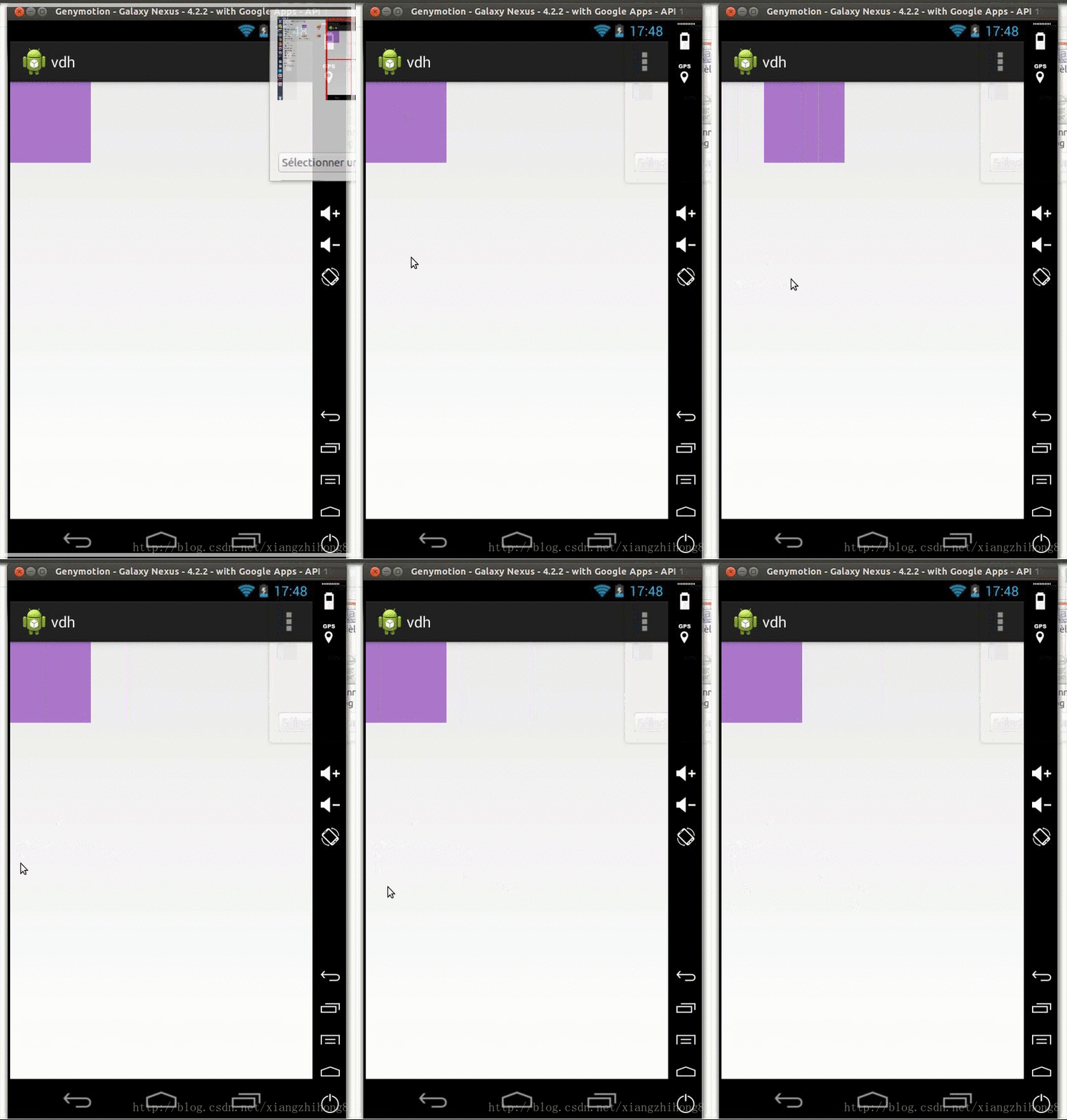
ViewDragHelper实战
其实就之前是的的仿音悦台的页面交互效果吧,在13年就有国外的大神实现了https://github.com/flavienlaurent/flavienlaurent.com

我们来看一段完整的代码:
public class YoutubeLayout extends ViewGroup {

private final ViewDragHelper mDragHelper;

private View mHeaderView;

private View mDescView;

private float mInitialMotionX;

private float mInitialMotionY;

private int mDragRange;

private int mTop;

private float mDragOffset;

public YoutubeLayout(Context context) {

  this(context, null);

}

public YoutubeLayout(Context context, AttributeSet attrs) {

  this(context, attrs, 0);

}

@Override

protected void onFinishInflate() {

    mHeaderView = findViewById(R.id.viewHeader);

    mDescView = findViewById(R.id.viewDesc);

}

public YoutubeLayout(Context context, AttributeSet attrs, int defStyle) {

  super(context, attrs, defStyle);

  mDragHelper = ViewDragHelper.create(this, 1f, new DragHelperCallback());

}

public void maximize() {

    smoothSlideTo(0f);

}

boolean smoothSlideTo(float slideOffset) {

    final int topBound = getPaddingTop();

    int y = (int) (topBound + slideOffset * mDragRange);

    if (mDragHelper.smoothSlideViewTo(mHeaderView, mHeaderView.getLeft(), y)) {

        ViewCompat.postInvalidateOnAnimation(this);

        return true;

    }

    return false;

}

private class DragHelperCallback extends ViewDragHelper.Callback {

  @Override

  public boolean tryCaptureView(View child, int pointerId) {

        return child == mHeaderView;

  }

    @Override

  public void onViewPositionChanged(View changedView, int left, int top, int dx, int dy) {

      mTop = top;

      mDragOffset = (float) top / mDragRange;

        mHeaderView.setPivotX(mHeaderView.getWidth());

        mHeaderView.setPivotY(mHeaderView.getHeight());

        mHeaderView.setScaleX(1 - mDragOffset / 2);

        mHeaderView.setScaleY(1 - mDragOffset / 2);

        mDescView.setAlpha(1 - mDragOffset);

        requestLayout();

  }

  @Override

  public void onViewReleased(View releasedChild, float xvel, float yvel) {

      int top = getPaddingTop();

      if (yvel > 0 || (yvel == 0 && mDragOffset > 0.5f)) {

          top += mDragRange;

      }

      mDragHelper.settleCapturedViewAt(releasedChild.getLeft(), top);

  }

  @Override

  public int getViewVerticalDragRange(View child) {

      return mDragRange;

  }

  @Override

  public int clampViewPositionVertical(View child, int top, int dy) {

      final int topBound = getPaddingTop();

      final int bottomBound = getHeight() - mHeaderView.getHeight() - mHeaderView.getPaddingBottom();

      final int newTop = Math.min(Math.max(top, topBound), bottomBound);

      return newTop;

  }

}

@Override

public void computeScroll() {

  if (mDragHelper.continueSettling(true)) {

      ViewCompat.postInvalidateOnAnimation(this);

  }

}

@Override

public boolean onInterceptTouchEvent(MotionEvent ev) {

  final int action = MotionEventCompat.getActionMasked(ev);

  if (( action != MotionEvent.ACTION_DOWN)) {

      mDragHelper.cancel();

      return super.onInterceptTouchEvent(ev);

  }

  if (action == MotionEvent.ACTION_CANCEL || action == MotionEvent.ACTION_UP) {

      mDragHelper.cancel();

      return false;

  }

  final float x = ev.getX();

  final float y = ev.getY();

  boolean interceptTap = false;

  switch (action) {

      case MotionEvent.ACTION_DOWN: {

          mInitialMotionX = x;

          mInitialMotionY = y;

            interceptTap = mDragHelper.isViewUnder(mHeaderView, (int) x, (int) y);

          break;

      }

      case MotionEvent.ACTION_MOVE: {

          final float adx = Math.abs(x - mInitialMotionX);

          final float ady = Math.abs(y - mInitialMotionY);

          final int slop = mDragHelper.getTouchSlop();

          if (ady > slop && adx > ady) {

              mDragHelper.cancel();

              return false;

          }

      }

  }

  return mDragHelper.shouldInterceptTouchEvent(ev) || interceptTap;

}

@Override

public boolean onTouchEvent(MotionEvent ev) {

  mDragHelper.processTouchEvent(ev);

  final int action = ev.getAction();

    final float x = ev.getX();

    final float y = ev.getY();

    boolean isHeaderViewUnder = mDragHelper.isViewUnder(mHeaderView, (int) x, (int) y);

    switch (action & MotionEventCompat.ACTION_MASK) {

      case MotionEvent.ACTION_DOWN: {

          mInitialMotionX = x;

          mInitialMotionY = y;

          break;

      }

      case MotionEvent.ACTION_UP: {

          final float dx = x - mInitialMotionX;

          final float dy = y - mInitialMotionY;

          final int slop = mDragHelper.getTouchSlop();

          if (dx * dx + dy * dy < slop * slop && isHeaderViewUnder) {

              if (mDragOffset == 0) {

                  smoothSlideTo(1f);

              } else {

                  smoothSlideTo(0f);

              }

          }

          break;

      }

  }

  return isHeaderViewUnder && isViewHit(mHeaderView, (int) x, (int) y) || isViewHit(mDescView, (int) x, (int) y);

}

private boolean isViewHit(View view, int x, int y) {

    int[] viewLocation = new int[2];

    view.getLocationOnScreen(viewLocation);

    int[] parentLocation = new int[2];

    this.getLocationOnScreen(parentLocation);

    int screenX = parentLocation[0] + x;

    int screenY = parentLocation[1] + y;

    return screenX >= viewLocation[0] && screenX < viewLocation[0] + view.getWidth() &&

            screenY >= viewLocation[1] && screenY < viewLocation[1] + view.getHeight();

}

@Override

protected void onMeasure(int widthMeasureSpec, int heightMeasureSpec) {

    measureChildren(widthMeasureSpec, heightMeasureSpec);

    int maxWidth = MeasureSpec.getSize(widthMeasureSpec);

    int maxHeight = MeasureSpec.getSize(heightMeasureSpec);

    setMeasuredDimension(resolveSizeAndState(maxWidth, widthMeasureSpec, 0),

            resolveSizeAndState(maxHeight, heightMeasureSpec, 0));

}

@Override

protected void onLayout(boolean changed, int l, int t, int r, int b) {

  mDragRange = getHeight() - mHeaderView.getHeight();

    mHeaderView.layout(

            0,

            mTop,

            r,

            mTop + mHeaderView.getMeasuredHeight());

    mDescView.layout(

            0,

            mTop + mHeaderView.getMeasuredHeight(),

            r,

            mTop  + b);

}- 1
- 2
- 3
- 4
- 5
- 6
- 7
- 8
- 9
- 10
- 11
- 12
- 13
- 14
- 15
- 16
- 17
- 18
- 19
- 20
- 21
- 22
- 23
- 24
- 25
- 26
- 27
- 28
- 29
- 30
- 31
- 32
- 33
- 34
- 35
- 36
- 37
- 38
- 39
- 40
- 41
- 42
- 43
- 44
- 45
- 46
- 47
- 48
- 49
- 50
- 51
- 52
- 53
- 54
- 55
- 56
- 57
- 58
- 59
- 60
- 61
- 62
- 63
- 64
- 65
- 66
- 67
- 68
- 69
- 70
- 71
- 72
- 73
- 74
- 75
- 76
- 77
- 78
- 79
- 80
- 81
- 82
- 83
- 84
- 85
- 86
- 87
- 88
- 89
- 90
- 91
- 92
- 93
- 94
- 95
- 96
- 97
- 98
- 99
- 100
- 101
- 102
- 103
- 104
- 105
- 106
- 107
- 108
- 109
- 110
- 111
- 112
- 113
- 114
- 115
- 116
- 117
- 118
- 119
- 120
- 121
- 122
- 123
- 124
- 125
- 126
- 127
- 128
- 129
- 130
- 131
- 132
- 133
- 134
- 135
- 136
- 137
- 138
- 139
- 140
- 141
- 142
- 143
- 144
- 145
- 146
- 147
- 148
- 149
- 150
- 151
- 152
- 153
- 154
- 155
- 156
- 157
- 158
- 159
- 160
- 161
- 162
- 163
- 164
- 165
- 166
- 167
- 168
- 169
- 170
- 171
- 172
页面引用xml
<FrameLayout

        xmlns:android="http://schemas.android.com/apk/res/android"

        android:layout_width="match_parent"

        android:layout_height="match_parent">

    <ListView

            android:id="@+id/listView"

            android:layout_width="match_parent"

            android:layout_height="match_parent"

            android:tag="list"

            />

    <com.example.vdh.YoutubeLayout

            android:layout_width="match_parent"

            android:layout_height="match_parent"

            android:id="@+id/youtubeLayout"

            android:orientation="vertical"

            android:visibility="visible">

        <TextView

                android:id="@+id/viewHeader"

                android:layout_width="match_parent"

                android:layout_height="128dp"

                android:fontFamily="sans-serif-thin"

                android:textSize="25sp"

                android:tag="text"

                android:gravity="center"

                android:textColor="@android:color/white"

                android:background="#AD78CC"/>

        <TextView

                android:id="@+id/viewDesc"

                android:tag="desc"

                android:textSize="35sp"

                android:gravity="center"

                android:text="Loreum Loreum"

                android:textColor="@android:color/white"

                android:layout_width="match_parent"

                android:layout_height="match_parent"

                android:background="#FF00FF"/>

    </com.example.vdh.YoutubeLayout>

</FrameLayout>- 1
- 2
- 3
- 4
- 5
- 6
- 7
- 8
- 9
- 10
- 11
- 12
- 13
- 14
- 15
- 16
- 17
- 18
- 19
- 20
- 21
- 22
- 23
- 24
- 25
- 26
- 27
- 28
- 29
- 30
- 31
- 32
- 33
- 34
- 35
- 36
- 37
- 38
其实就是两个子2View,ViewDragHelper的事件检测,然后回调里面的方法 进行页面的Onlayout,进而控制页面刷新等等。
Android ViewDragHelper及移动处理总结的更多相关文章
- Android ViewDragHelper完全解析 自定义ViewGroup神器
Android ViewDragHelper完全解析 自定义ViewGroup神器 转载请标明出处: http://blog.csdn.net/lmj623565791/article/detai ...
- Android -- ViewDragHelper
ViewDragHelper SlidingPaneLayout和DrawerLayout,现在这俩个类被广泛的运用,其实研究他们的源码你会发现这两个类都运用了ViewDragHelper来处理拖动. ...
- Android ViewDragHelper源码解析
在自定义ViewGroup的过程中,如果涉及到View的拖动滑动,ViewDragHelper的使用应该是少不了的,它提供了一系列用于用户拖动子View的辅助方法和相关的状态记录,像Navigatio ...
- Android ViewDragHelper全然解析 自己定义ViewGroup神器
转载请标明出处: http://blog.csdn.net/lmj623565791/article/details/46858663. 本文出自:[张鸿洋的博客] 一.概述 在自己定义ViewGro ...
- Android之ViewDragHelper
在自定义ViewGroup中,很多效果都包含用户手指去拖动其内部的某个View(eg:侧滑菜单等),针对具体的需要去写好onInterceptTouchEvent和onTouchEvent这两个方法是 ...
- [转]Android自定义控件三部曲系列完全解析(动画, 绘图, 自定义View)
来源:http://blog.csdn.net/harvic880925/article/details/50995268 一.自定义控件三部曲之动画篇 1.<自定义控件三部曲之动画篇(一)—— ...
- Android -- View移动的六种方法
layout() 如果你将滑动后的目标位置的坐标传递给layout(),这样子就会把view的位置给重新布置了一下,在视觉上就是view的一个滑动的效果. public class DragView ...
- Android主流UI开源库整理(转载)
http://www.jianshu.com/p/47a4a7b99364 标题隐含了两个层面的意思,一个是主流,另一个是UI.主流既通用,一些常规的按钮.Switch.进度条等控件都是通用控件,因此 ...
- Android开发中,那些让您觉得相见恨晚的方法、类或接口
Android开发中,那些让你觉得相见恨晚的方法.类或接口本篇文章内容提取自知乎Android开发中,有哪些让你觉得相见恨晚的方法.类或接口?,其实有一部是JAVA的,但是在android开发中也算常 ...
随机推荐
- linux 管道符号 | ,以及&& ||等等特殊符号笔记
管道和重导向:“|”.“>”.“>>”.“<” 重导向就是使命令改变它所认定的标准输出.“>”可将结果输出到文件中,该文件原有内容会被删除,“>>”则将结果附 ...
- MYsql 锁详解 锁 与索引的关系
原文:http://blog.csdn.net/xifeijian/article/details/20313977#t10 mysql innodb的锁是通过锁索引来实现的. select ...
- (47)C#运行时序列化
序列化是将对象或对象图转化成字节流的过程.反序列化是将字节流转换回对象图的过程.
- ssh的安装和使用
1.ssh的安装 服务器端:sudo apt-get install openssh-serve 客户端:sudo apt-get install openssh-client 2.ssh的操作 查看 ...
- STM32调试问题
1.JLINK V8 error:flash download failed - could not load file: Options for Target 'Targer 1'下的菜单下Outp ...
- amplab
https://github.com/amplab/SparkNet https://amplab.cs.berkeley.edu/
- Java8 ChronoUnits枚举
原文:http://www.yiibai.com/java8/java8_chronounits.html java.time.temporal.ChronoUnit 枚举在 Java8 中添加,以取 ...
- 【postman】安装使用说明
1.下载 下载地址:https://pan.baidu.com/s/1miyYjig?errno=0&errmsg=Auth%20Login%20Sucess&&bduss=& ...
- 编资源bundle时图片文件变成tiff的解决方法
一般,编写SDK的时候,如果SDK还带了一些资源文件,那么最理想的是将资源文件也打包成为bundle给应用方一起使用.而在编资源bundle时,有时会发现编译好后的图片文件从png转成了tiff,这样 ...
- Vue 基础
1. data 数据 methods 方法 watch 监听变化 2. 模版指令(类似 angular) {{}} v-text 渲染数据 v-html html 结构 3. v-if v-show ...