
git 设置ss代理
| git config --global https.proxy http://127.0.0.1:1080 | |
| git config --global https.proxy https://127.0.0.1:1080 | |
| git config --global --unset http.proxy | |
| git config --global --unset https.proxy | |
| npm config delete proxy |
|
git config --local https.proxy https://127.0.0.1:1080 我这样配置有什么问题么?为什么还是没走ss代理呢? |
|
git config --global http.proxy 'socks5://127.0.0.1:1080' |
|
请问一下,我只设置了git config --global https 而没设置git config --global http的时候,clone一个google的git仓库依然不行,后来加上了http的设置才可以,我也是ss代理 端口都和你们一样,有人知道这是为什么吗? 我的clone仓库url是https的啊,但还是需要把http和https代理都挂上才可以吗? |
|
@zhuyingda 显然是 https 不起作用,只有 http 起作用 |
按照
#只对github.com

git config --global http.https://github.com.proxy socks5://127.0.0.1:1080

#取消代理

git config --global --unset http.https://github.com.proxy)
设置
速度感人!!!
我如此设置之后clone gist同样没有被代理git设置 本地ss5端口 $ nmap localhost ss查看开放端口信息 我确信ss5已经打开并且能用,毕竟浏览器能用。 $ git clone https://gist.github.com/666dd7b27e9116faece6.git 出现如上错误,我不知道是不是我的git设置问题呢。在这里提问抱歉了。我也google搜索了很久,只有在您这里提到了设置ss5。 |
|
|
|
注意: 代理地址不要加引号! |
|
问下 我想代理 git://git.com 这种开头应该怎么加 ,试了下 不行 |
@zhangle1 使用 git@xxoo.com 这种方式,是用的 SSH 协议。需要在 ~/.ssh/config 目录下配置
Host xxoo.com(改成你的站点)
ProxyCommand connect -H 127.0.0.1:1080 %h %p
|
补充两点: |
|
对于使用git@协议的,可以配置socks5代理 |
|
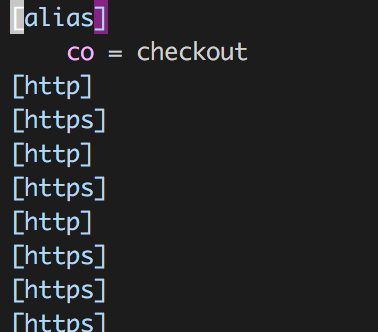
多次 set/unset 之后, 通过 怎么能够不产生多余的内容? |
|
https.proxy 根本就不存在这个设置好吗 |
|
git 是没有 https 这个 config section 的 |
为什么我还是不行啊 socks代理127.0.0.1:1080
git config --global http.proxy 'socks5://127.0.0.1:1080'
https加上也不行
都是
: gnutls_handshake() failed: The TLS connection was non-properly terminated.
curl: (35) gnutls_handshake() failed: The TLS connection was non-properly terminated.
新装的系统,装docker的时候出现这个报错
解决方案是:
瞅下本机dns配置,/etc/resolv.conf
sudo vim /etc/resolv.conf
添加阿里的dns
nameserver 223.5.5.5
nameserver 223.6.6.6
就可以了
git 设置ss代理的更多相关文章
- git设置ss代理
// 查看当前代理设置 git config --global http.proxy http/https协议 //设置代理(clone https://前缀的repo会走代理) git config ...
- git设置HTTP代理
git设置HTTP代理 设置HTTP代理 如果公司使用代理,git就需要设置代理才能克隆远程仓库 执行下面两条语句 git config --global http.proxy 10.167.32.1 ...
- 主机设置ss代理,虚拟机共享代理
代理的原理: 关于代理的具体的书面定义你百度谷歌可以知道.这里,我想简单通过一个例子,说明代理的原理: 假如,你在北京,但你女朋友在广州,你有东西要给你的女朋友,但是正好你这几天公司有事,所以你不能去 ...
- ssh协议git利用ss代理
前言 不知道ss为何物的绕道 求帐号的绕道 这里只是亲测 ssh协议下的git, 如何判断是什么协议出门左拐 判断是否需要代理 我遇到的问题是: ssh_exchange_identification ...
- 为 git 设置 http 代理
最近基于 PDFium 项目做一些东西.之前得了代码,今天想要更新到最新的,发现怎么都 pull 不下来.后来想起来,可能是 git 没有使用代理的原因.于是添加代理,果然更新成功. 在 git ba ...
- Git设置/取消代理
设置代理 git config --global http.proxy http://proxy.com:1234 git config --global https.proxy http://pro ...
- intellij idea设置ss代理
- Git 设置 SOCKS 代理
$ export all_proxy=socks5://127.0.0.1:1080
- powershell设置SS代理
$env:HTTPS_PROXY="http://127.0.0.1:1080" $env:HTTP_PROXY="http://127.0.0.1:1080"
随机推荐
- Cocos2d-x 3.2 创建新应用
1.cd 到 Cocos2d-x 3.2 的目录: 2.python setup.py: 3.source /Users/netty/.bash_profile ; 4.cocos new TestP ...
- Ubuntu16.04 : 用友善提供的4.5.1解压后,运行/opt/FriendlyARM/toolschain/4.5.1/bin/arm-linux-gcc -v出错
通过查阅百度和谷歌,以下解决方法: The problem has been solved, because I installed the amd64.iso linux system,so fir ...
- Tomcat黑窗口改变Title
start cmd /K " && call startup.bat && pause && exit " 设置Title之后,再手 ...
- 洛谷 - P2444 - 病毒 - AC自动机
https://www.luogu.org/problemnew/show/P2444 有点恶心,不太明白fail的意义. #include<bits/stdc++.h> using na ...
- 51nod1266【水】
最短,两半分开走 最长,一边走,比较一下两端就好了. #include <bits/stdc++.h> using namespace std; typedef long long LL; ...
- springcloud(一) 服务拆分
一般我们的项目如果需要从单应用服务升级到微服务,必须要将原来的服务做拆分,我这边的拆分也是基于将之前spb-demo的springboot单应用做拆分,拆分出三个应用,spb-brian-query- ...
- 二分优化的lis
/*此题为一个女大佬教我的,%%%%%%%%%%%%*/ 题目描述 给出1-n的两个排列P1和P2,求它们的最长公共子序列. 输入输出格式 输入格式: 第一行是一个数n, 接下来两行,每行为n个数,为 ...
- 求导四则运算以及三角函数求导 Derivative formulas
对特定函数的求导. 1:sin(x) 对其进行求斜率.带入公式得:[ sin(x+Δx)- sin(x)]/Δx = [ sinx*cosΔx + cosx*sinΔx -sin x ]/ Δx = ...
- SSM报错:No converter found for return value of type: class java.util.ArrayList at org.springframework.web.servlet.mvc.method.annotation.AbstractMessageConverterMethodProcessor.writeWithMessageConverter
我使用的是SSM框架,是在编写测试RESTFUL接口的时候出现, @RequestMapping(value = "/selectAll", method = RequestMet ...
- 跟我一起玩Win32开发(18):使用对话框的两个技巧
相信大家知道对话框怎么用了,就是先用“资源编辑器”设计一个对话框,然后在代码中加载处理.今天,我向大家分享两个使用对话框的技巧,还是比较实用的.不用担心,先喝杯茶,很简单的,一点也不复杂,总之,看俺写 ...