
使用RPi-Monitor监控、统计Guitar的运行状态
前言
之前发在ickey社区上的一系列文章:
- 犹抱琵琶半遮面,无人知是荔枝来——unboxing & interview 一、二、三
- 葡萄美酒夜光杯,巧妇难为无米炊——资料与社区
- 一支穿云箭,板子要加散热片——系统监控与发热问题
- 念去去千里烟波,暮霭沉沉楚天阔——远程控制相关
- 竹喧归浣女,莲动小轻舟——延长板载eMMC寿命、优化性能
RPi-Monitor简介
前文 讲到如何通过一个shell脚本获取CPU状态和PMU温度,而RPi-Monitor基于perl,内置webserver,通过优化后对sd卡占用更少。由于其极强的可定制性与拓展性,你可以换用熟悉的Web Server,显示服务状态,甚至作为视频监控。最早是基于树莓派的项目,后来在XApple社区发现有人移植到蓮霧派,今天cnx-software也报道了,特此记录下来。之前都是使用的phpsysinfo
项目主页:http://rpi-experiences.blogspot.com/
Github主页: https://github.com/XavierBerger/RPi-Monitor
开始页面:

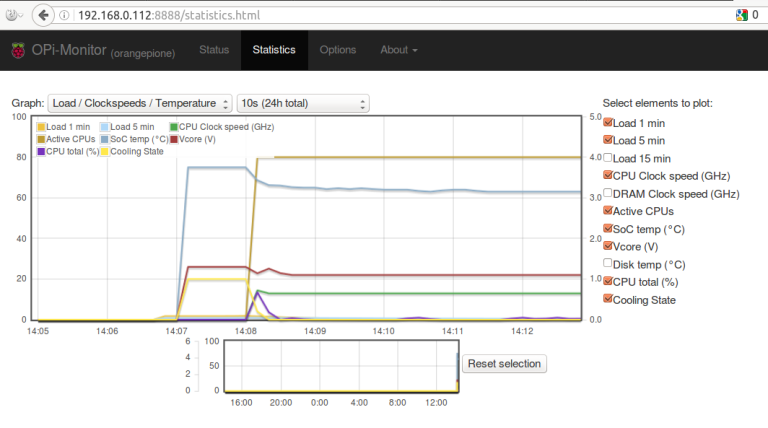
统计页面:
安装配置
添加rpimonitor源
sudo -s

apt-get install apt-transport-https ca-certificates

wget https://raw.githubusercontent.com/XavierBerger/RPi-Monitor/master/init/apt/sources.list.d/rpimonitor.list -O /etc/apt/sources.list.d/rpimonitor.list

apt-key adv --recv-keys --keyserver keyserver.ubuntu.com 2C0D3C0F
安装升级RPi-Monitor
apt-get update && apt-get install rpimonitor && apt-get upgrade
停止服务添加自定义模块
systemctl stop rpimonitor

nano /etc/rpimonitor/template/S500_ATC2603.conf
输入以下内容:
########################################################################

# Extract S500/ATC2603 information

#  Page: 1

#  Information               Status     Statistics

#  - cpu frequency           - yes      - yes

#  - cpu load 1, 5, 15       - yes      - yes

#  - cpu scaling governor    - yes      - no

#  - power in voltage        - yes      - yes

#  - power in consumption    - yes      - yes

#  - USB OTG voltage         - yes      - yes

#  - USB OTG consumption     - yes      - yes

#  - battery consumption     - yes      - yes

#  - total consumption       - yes      - yes

#  - power in current        - yes      - yes

#  - USB OTG current         - yes      - yes

#  - soc temperature         - yes      - yes

#  - pmu temperature         - yes      - yes

########################################################################

dynamic.1.name=cpu_frequency

dynamic.1.source=/sys/devices/system/cpu/cpu0/cpufreq/cpuinfo_cur_freq

dynamic.1.regexp=(.*)

dynamic.1.postprocess=$1/1000

dynamic.1.rrd=GAUGE

dynamic.2.name=load1,load5,load15

dynamic.2.source=/proc/loadavg

dynamic.2.regexp=^(\S+)\s(\S+)\s(\S+)

dynamic.2.postprocess=

dynamic.2.rrd=GAUGE

dynamic.3.name=scaling_governor

dynamic.3.source=/sys/devices/system/cpu/cpu0/cpufreq/scaling_governor

dynamic.3.regexp=(.*)

dynamic.3.postprocess=

dynamic.3.rrd=

dynamic.4.name=ac_voltage

dynamic.4.source=/sys/devices/b0170000.i2c/i2c-0/0-0065/atc2603c-hwmon.0/wall_voltage

dynamic.4.regexp=(.*)

dynamic.4.postprocess=sprintf("%.2f", $1/1000)

dynamic.4.rrd=GAUGE

dynamic.5.name=ac_consumption

dynamic.5.source=/sys/devices/b0170000.i2c/i2c-0/0-0065/atc2603c-hwmon.0/wall_current

dynamic.5.regexp=(.*)

dynamic.5.postprocess=sprintf("%.2f", $1/153 * $this->{'dynamic'}->{'ac_voltage'})

dynamic.5.rrd=GAUGE

dynamic.6.name=usb_voltage

dynamic.6.source=/sys/devices/b0170000.i2c/i2c-0/0-0065/atc2603c-hwmon.0/vbus_voltage

dynamic.6.regexp=(.*)

dynamic.6.postprocess=sprintf("%.2f", $1/1000)

dynamic.6.rrd=GAUGE

dynamic.7.name=usb_consumption

dynamic.7.source=/sys/devices/b0170000.i2c/i2c-0/0-0065/atc2603c-hwmon.0/vbus_current

dynamic.7.regexp=(.*)

dynamic.7.postprocess=sprintf("%.2f", $1/1000 * $this->{'dynamic'}->{'usb_voltage'})

dynamic.7.rrd=GAUGE

dynamic.8.name=battery_consumption

dynamic.8.source=/sys/devices/b0170000.i2c/i2c-0/0-0065/atc2603c-hwmon.0/bat_current

dynamic.8.regexp=(.*)

dynamic.8.postprocess=sprintf("%.2f", $1/1000)

dynamic.8.rrd=GAUGE

dynamic.9.name=total_consumption

dynamic.9.source=/sys/devices/b0170000.i2c/i2c-0/0-0065/atc2603c-hwmon.0/bat_voltage

dynamic.9.regexp=(.*)

dynamic.9.postprocess=sprintf("%.2f", $1/1000 + $this->{'dynamic'}->{'ac_consumption'} + $this->{'dynamic'}->{'usb_consumption'})

dynamic.9.rrd=GAUGE

dynamic.10.name=usb_current

dynamic.10.source=/sys/devices/b0170000.i2c/i2c-0/0-0065/atc2603c-hwmon.0/vbus_current

dynamic.10.regexp=(.*)

dynamic.10.postprocess=sprintf("%.2f", $1/1000)

dynamic.10.rrd=GAUGE

dynamic.11.name=ac_current

dynamic.11.source=/sys/devices/b0170000.i2c/i2c-0/0-0065/atc2603c-hwmon.0/wall_current

dynamic.11.regexp=(.*)

dynamic.11.postprocess=sprintf("%.2f", $1/153)

dynamic.11.rrd=GAUGE

dynamic.12.name=soc_temp

dynamic.12.source=/sys/devices/virtual/thermal/thermal_zone1/temp

dynamic.12.regexp=(.*)

dynamic.12.postprocess=sprintf("%.1f", $1/1000)

dynamic.12.rrd=GAUGE

dynamic.13.name=pmu_temp

dynamic.13.source=/sys/devices/b0170000.i2c/i2c-0/0-0065/atc2603c-hwmon.0/ic_temperature

dynamic.13.regexp=(.*)

dynamic.13.postprocess=sprintf("%.1f", $1/1000)

dynamic.13.rrd=GAUGE

web.status.1.content.1.name=CPU

web.status.1.content.1.icon=cpu.png

web.status.1.content.1.line.1="Loads: <b>" + data.load1 + "</b> [1min] - <b>" + data.load5 + "</b> [5min] - <b>" + data.load15 + "</b> [15min]"

web.status.1.content.1.line.2="CPU frequency: <b>" + data.cpu_frequency + "MHz</b>  Governor: <b>" + data.scaling_governor + "</b>"

web.status.1.content.2.name=PMU

web.status.1.content.2.icon=pmu.png

web.status.1.content.2.line.1="Total PMU Consumption: <b>" + data.total_consumption + " W</b>"

web.status.1.content.2.line.2="PWR in: <b>" + data.ac_consumption + " W</b> USB OTG in: <b>" + data.usb_consumption + " W</b> BATT in: <b>" + data.battery_consumption + " W</b>"

web.status.1.content.3.name=Temperature

web.status.1.content.3.icon=cpu_temp.png

web.status.1.content.3.line.1=JustGageBar("SoC", "°C",0, data.soc_temp , 125,100,80,percentColors,70,85)+" "+JustGageBar("PMU", "°C",0, data.pmu_temp , 125,100,80,percentColors,70,85)

web.statistics.1.content.1.name=Load / cpufreq / Consumption

web.statistics.1.content.1.graph.1=load1

web.statistics.1.content.1.graph.2=load5

web.statistics.1.content.1.graph.3=load15

web.statistics.1.content.1.graph.4=total_consumption

web.statistics.1.content.1.graph.5=cpu_frequency

web.statistics.1.content.1.ds_graph_options.load1.label=Load 1 min

web.statistics.1.content.1.ds_graph_options.load5.label=Load 5 min

web.statistics.1.content.1.ds_graph_options.load15.label=Load 15 min

web.statistics.1.content.1.ds_graph_options.total_consumption.label=Consumption (W)

web.statistics.1.content.1.ds_graph_options.cpu_frequency.label=Clock speed (MHz)

web.statistics.1.content.1.ds_graph_options.cpu_frequency.yaxis=2

web.statistics.1.content.1.graph_options.y2axis={ position: "right" }

web.statistics.1.content.2.name=PMU current/voltage

web.statistics.1.content.2.graph.1=ac_voltage

web.statistics.1.content.2.graph.2=usb_voltage

web.statistics.1.content.2.graph.3=ac_current

web.statistics.1.content.2.graph.4=usb_current

web.statistics.1.content.2.graph.5=battery_consumption

web.statistics.1.content.2.ds_graph_options.ac_voltage.label=Voltage PWR in (V)

web.statistics.1.content.2.ds_graph_options.usb_voltage.label=Voltage USB OTG (V)

web.statistics.1.content.2.ds_graph_options.ac_current.label=Current PWR in (A)

web.statistics.1.content.2.ds_graph_options.usb_current.label=Current USB OTG (mA)

web.statistics.1.content.2.ds_graph_options.battery_consumption.label=Consumption Battery (W)

web.statistics.1.content.2.ds_graph_options.ac_voltage.yaxis=1

web.statistics.1.content.2.ds_graph_options.usb_voltage.yaxis=1

web.statistics.1.content.2.ds_graph_options.ac_current.yaxis=2

web.statistics.1.content.2.ds_graph_options.usb_current.yaxis=2

web.statistics.1.content.2.ds_graph_options.battery_consumption.yaxis=1

web.statistics.1.content.2.graph_options.y1axis={ position: "left", min: 1.5, max: 11 }

web.statistics.1.content.2.graph_options.y2axis={ position: "right" }

web.statistics.1.content.3.name=Temperature / Consumption

web.statistics.1.content.3.graph.1=pmu_temp

web.statistics.1.content.3.graph.2=soc_temp

web.statistics.1.content.3.graph.3=total_consumption

web.statistics.1.content.3.ds_graph_options.pmu_temp.label=PMU temperature (°C)

web.statistics.1.content.3.ds_graph_options.soc_temp.label=SoC temperature (°C)

web.statistics.1.content.3.ds_graph_options.total_consumption.label=Consumption (W)

web.statistics.1.content.3.ds_graph_options.total_consumption.yaxis=2

web.statistics.1.content.3.graph_options.y1axis={ position: "left", min: 0, max: 125 }

web.statistics.1.content.3.graph_options.y2axis={ position: "right" }
nano /etc/rpimonitor/template/lemaker_guitar.conf
添加以下内容,创建主配置文件,根据自己需要启用|禁用模块:
web.page.icon='img/logo.png'

web.page.menutitle='RPi-Monitor  <sub>('+data.hostname+')</sub>'

web.page.pagetitle='RPi-Monitor ('+data.hostname+')'

web.status.1.name=lemaker_guitar

web.statistics.1.name=lemaker_guitar

include=/etc/rpimonitor/template/version.conf

include=/etc/rpimonitor/template/uptime.conf

include=/etc/rpimonitor/template/S500_ATC2603.conf

include=/etc/rpimonitor/template/memory.conf

include=/etc/rpimonitor/template/swap.conf

include=/etc/rpimonitor/template/sdcard.conf

include=/etc/rpimonitor/template/network.conf

include=/etc/rpimonitor/template/wlan.conf
创建软链接:
ln -sf /etc/rpimonitor/template/lemaker_guitar.conf /etc/rpimonitor/data.conf
重启rpimonitor服务
systemctl start rpimonitor
访问网页前端
假如Guitar的IP为192.168.1.111,那么在浏览器里输入192.168.1.111:8888 即可打开状态页面。经过配置可以远程访问Guitar之后,无论身处何地都可以及时监控Guitar的运行状态。
软件使用GPL3 协议,所以可以对界面进行一些改造。
自定义功能与添加模块
使用配置文件生成助手
2.6版本之后引入了一个新工具:RPi-Monitor交互式配置文件生成助手 (RPi-Monitor Interactive Configuration Helper),通过运行
rpimonitord -i
可以非常方便地创建自己的监视点。Via
添加传感器数据
以DHT温湿度传感器为例,可以监视温湿度变化,绘制折线图,修改之后可以显示诸多传感器数值。Via

使用标签显示状态
2.7版本之后引入标签显示服务状态的功能,支持6种颜色:

效果如图所示:

根据模板修改/etc/rpimonitor/template/services.conf文件即可。稍加改造可以实现更多功能。
注意:最新2.10版/etc/rpimonitor/template/services.conf文件最后一行少一个")",需要自己补上。
nano中可通过Ctrl+E快速跳至行尾。Via
进阶用法
其他进阶用法及自定义功能。Via
其他模板
总结
使用RPi-Monitor监控、统计Guitar的运行状态的更多相关文章
- Druid Monitor监控Java Web和Java SE项目
Druid Monitor 对于数据源,大家已经接触了不少了.比如c3p0.dhcp.proxool等,之后又发现使用tomcat-jdbc可以大大的提高性能.但是针对于我们的高并发的系统来说,总希望 ...
- 运用Real Spy Monitor监控网络
Real Spy Monitor是一个监测互联网和个人电脑,以保障其安全的软件.包括键盘敲击.网页站点.视窗开关.程序执行.屏幕扫描以及文件的出入等都是其监控的对象. 1.添加使用密码 在使用Real ...
- Springboot项目配置druid数据库连接池,并监控统计功能
pom.xml配置依赖 <!-- https://mvnrepository.com/artifact/com.alibaba/druid --> <dependency> & ...
- Jmeter性能测试之Monitor监控(SSHMon Samples Collector)
前面写的一篇Monitor监控有缺陷, 这篇文章使用Jmeter4.0+的版本, 使用插件SSHMon Samples Collector来做资源监控 1. 官网下载插件: plugins-manag ...
- 数据库阿里连接池 Druid配置详解以及web监控统计
java程序很大一部分要操作数据库,为了提高性能操作数据库的时候,有不得不使用数据库连接池.数据库连接池有很多选择,c3p.dhcp.proxool等,druid作为一名后起之秀,凭借其出色的性能,也 ...
- JUC - Monitor监控ThreadPoolExecutor
JUC - Monitor监控ThreadPoolExecutor 一个自定义Monitor监控ThreadPoolExecutor的执行情况 TASK WokerTask class WorkerT ...
- Process Monitor监控进程操作注册表如何实现?
http://zhidao.baidu.com/link?url=Kqav4qkQSprC5FnpHPOGJvhqvY9fJ9-Vdx9g_SWh4w5VOusdRJo4Vl7qIdrG4LwRJvr ...
- 基于.NetCore开发博客项目 StarBlog - (16) 一些新功能 (监控/统计/配置/初始化)
系列文章 基于.NetCore开发博客项目 StarBlog - (1) 为什么需要自己写一个博客? 基于.NetCore开发博客项目 StarBlog - (2) 环境准备和创建项目 基于.NetC ...
- 字节跳动 DanceCC 工具链系列之Xcode LLDB耗时监控统计方案
作者:李卓立 仲凯宁 背景介绍 在<字节跳动 DanceCC 工具链系列之Swift 调试性能的优化方案>[1]一文中,我们介绍了如何使用自定义的工具链,来针对性优化调试器的性能,解决大型 ...
随机推荐
- python爬虫基础07-selenium大全1/8-安装和简单使用
Selenium笔记(1)安装和简单使用 本文集链接:https://www.jianshu.com/nb/25338984 简介 Selenium是一个用于Web应用程序测试的工具. Seleniu ...
- Python_sort函数结合functools.cmp_to_key(func)分析
举例如下: from functools import cmp_to_key persons = [ { 'name':'zhangsan', 'age':20, 'grade':98 }, { 'n ...
- mac下secureCRT 客户端 $redis-cli回车后没有反应的解决办法
启动redis server后,SecureCRT进入redis-cli,输入不断在后面追加IP:Port显示设置当前的Session Options-->Terminal-->Emula ...
- 大数据学习——Kafka集群部署
1下载安装包 2解压安装包 -0.9.0.1.tgz -0.9.0.1 kafka 3修改配置文件 cp server.properties server.properties.bak # Lice ...
- pytorch中Math operation操作:torch.ger()
torch.ger(vec1, vec2, out=None) → Tensor Outer product of vec1 and vec2. If vec1 is a vector of size ...
- SQL 优化案例之变更表结构
从慢日志报表中看到一条很长的SQL select id from myinfo and (( SUBSTRING_INDEX(location_axis, ) ) ) ), '$%') ) or ( ...
- iOS学习笔记22-推送通知
一.推送通知 推送通知就是向用户推送一条信息来通知用户某件事件,可以在应用退到后台后,或者关闭后,能够通过推送一条消息通知用户某件事情,比如版本更新等等. 推送通知的常用应用场景: 一些任务管理APP ...
- UOJ 274 【清华集训2016】温暖会指引我们前行 ——Link-Cut Tree
魔法森林高清重置, 只需要维护关于t的最大生成树,然后链上边权求和即可. 直接上LCT 调了将近2h 吃枣药丸 #include <cstdio> #include <cstring ...
- POJ1861 Network
Time Limit: 1000MS Memory Limit: 30000KB 64bit IO Format: %lld & %llu Description Andrew is ...
- 转 Linux文件管理
Linux文件管理 http://www.cnblogs.com/vamei/archive/2012/09/09/2676792.html 作者:Vamei 出处:http://www.cnblog ...