
Centos部署nagios+apache实现服务器监控
1.Nagios介绍
nagios是 一款功能强大的网络监视工具,它可以有效的监控windows、linux、unix主机状态以及路由器交换机的网络设置,打印机工作状态等,并将状态出 现异常的服务及时以邮件、msn短信等形式第一时间通告管理员。由于它是一款遵循GPLv2的开源网络监控软件,以其出色的性能低廉的使用成本,深受广大 用户的好评。
2.安装前提
2. 1确定是否有以下组件:
gcc glibc glibc-common gd gd-devel xinetd openssl-devel
proc-devel pcre-devel perl libxml2-devel
直接通过yum安装:
yum install -y gcc glibc glibc-common gd gd-devel xinetd openssl-devel proc-devel pcre-devel perl libxml2-devel
3.安装nagios,nagios-plugin
创建nagios用户
# adduser nagios
安装nagios
# tar xvf nagios-cn-3.2.0.tar
# cd nagios-cn-3.2.0
# ./configure –prefix=/usr/local/nagios
# make all
# make install
# make install-init
# make install-commandmode
# make install-config
安装nagios-plugin
# tar xvf nagios-plugins-2.0.tar.gz
# cd nagios-plugins-2.0
# ./configure –prefix=/usr/local/nagios
# make && make install
4.安装apache
# tar xvf httpd-2.4.9.tar.gz
#cd httpd-2.4.9
#./configure --prefix=/usr/local/apache2
# make && make install
如果安装提示缺少apr和apr-util包
#tar xvf apr-1.5.0.tar.gz
#cd apr-1.5.0
#./configure –prefix=/usr/local/apr
#make && make install
#tar xvf apr-1.5.0.tar.gz
#cd apr-1.5.0
#./configure –prefix=/usr/local/apr-util –with-apr=/usr/local/apr
#make && make install
安装好了之后在安装apache
#./configure --prefix=/usr/local/apache2 –with-apr-util=/usr/local/apr-util
#make && make install
5.安装php
#tar xvf php-5.4.10.tar.gz
#cd php-5.4.10
#./configure --prefix=/usr/local/php --with-apxs2=/usr/local/apache2/bin/apxs
#make && make install
6.配置apahe
找到apache 的配置文件/usr/local/apache2/conf/httpd.conf
找到:
User daemon
Group daemon
修改为
User nagios
Group nagios
然后找到
<IfModule dir_module>
DirectoryIndex index.html
</IfModule>
修改为
<IfModule dir_module>
DirectoryIndex index.html index.php
AddType application/x-httpd-php .php
</IfModule>
为了安全起见,一般情况下要让nagios 的web 监控页面必须经过授权才能访问,这需要增加验证配置,即在httpd.conf 文件最后添加如下信息:
#setting for nagios
ScriptAlias /nagios/cgi-bin "/usr/local/nagios/sbin"
<Directory "/usr/local/nagios/sbin">
AuthType Basic
Options ExecCGI
AllowOverride None
Order allow,deny
Allow from all
AuthName "Nagios Access"
AuthUserFile /usr/local/nagios/etc/htpasswd
Require valid-user
</Directory>
Alias /nagios "/usr/local/nagios/share"
<Directory "/usr/local/nagios/share">
AuthType Basic
Options None
AllowOverride None
Order allow,deny
Allow from all
AuthName "nagios Access"
AuthUserFile /usr/local/nagios/etc/htpasswd
Require valid-user
</Directory>
创建apache目录验证文件
# /usr/local/apache2/bin/htpasswd -c /usr/local/nagios/etc/htpasswd ssap
7.启动apache和nagios
启动apache
# /usr/local/apache2/bin/apachectl start
启动nagios
Service nagios start
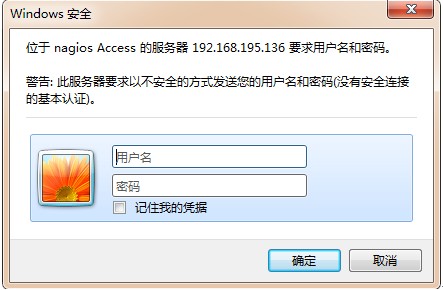
nagios登录
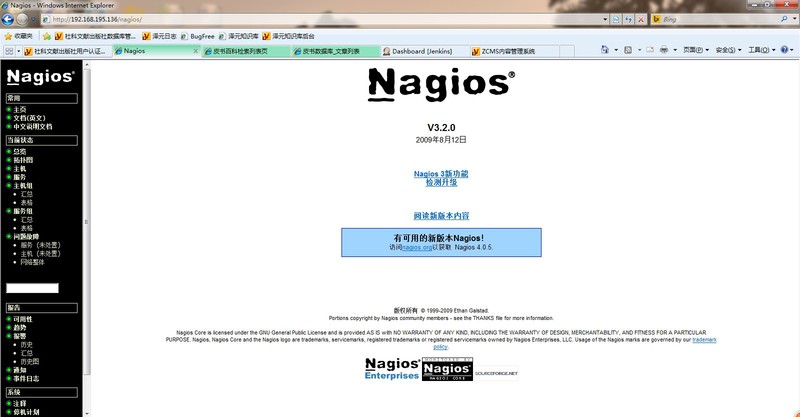
nagios首页
8.配置nagios
Nagios安装完毕后,需要配置nagios,配置文件在/usr/local/nagios/etc目录下。
|
文件名或目录名 |
用途 |
|
cgi.cfg |
控制CGI访问的配置文件 |
|
nagios.cfg |
Nagios 主配置文件 |
|
resource.cfg |
变量定义文件,又称为资源文件,在些文件中定义变量,以便由其他配置文件引用,如$USER1$ |
|
objects |
objects 是一个目录,在此目录下有很多配置文件模板,用于定义Nagios 对象 |
|
objects/commands.cfg |
命令定义配置文件,其中定义的命令可以被其他配置文件引用 |
|
objects/contacts.cfg |
定义联系人和联系人组的配置文件 |
|
objects/localhost.cfg |
定义监控本地主机的配置文件 |
|
objects/printer.cfg |
定义监控打印机的一个配置文件模板,默认没有启用此文件 |
|
objects/switch.cfg |
定义监控路由器的一个配置文件模板,默认没有启用此文件 |
|
objects/templates.cfg |
定义主机和服务的一个模板配置文件,可以在其他配置文件中引用 |
|
objects/timeperiods.cfg |
定义Nagios 监控时间段的配置文件 |
|
objects/windows.cfg |
监控Windows 主机的一个配置文件模板,默认没有启用此文件 |
假设我们nagios安装在IP为192.168.195.136的服务器上,需要监控192.168.195.136服务器,将对配置文件做以下修改:
修改localhost.cfg
define host{
use linux-server
host_name Nagios-Server
alias Nagios-Server
address 127.0.0.1
}
define hostgroup{
hostgroup_name linux-servers
alias Linux Servers
members Nagios-Server
}
define service{
use local-service
host_name Nagios-Server
service_description PING
check_command check_ping!100.0,20%!500.0,60%
}
define service{
use local-service
host_name Nagios-Server
service_description Root Partition
check_command check_local_disk!20%!10%!/
}
define service{
use local-service
host_name Nagios-Server
service_description Current Users
check_command check_local_users!20!50
}
define service{
use local-service
host_name Nagios-Server
service_description Total Processes
check_command check_local_procs!250!400!RSZDT
}
define service{
use local-service,srv-pnp
host_name Nagios-Server
service_description Current Load
check_command check_local_load!5.0,4.0,3.0!10.0,6.0,4.0
}
define service{
use local-service
host_name Nagios-Server
service_description Swap Usage
check_command check_local_swap!20!10
}
define service{
use local-service
host_name Nagios-Server
service_description SSH
check_command check_ssh
notifications_enabled 0
}
define service{
use local-service
host_name Nagios-Server
service_description HTTP
check_command check_http
notifications_enabled 0
}
新增hosts.cfg
define host{
use linux-server
host_name test-Linux
alias test-Linux
address 192.168.195.137
}
新增service.cfg
define service{
use local-service
host_name test-Linux
service_description check-host-alive
check_command check-host-alive
}
修改nagios.cfg
添加配置文件hosts.cfg,service.cfg
cfg_file=/usr/local/nagios/etc/objects/hosts.cfg
cfg_file=/usr/local/nagios/etc/objects/service.cfg
检测修改的配置
/usr/local/nagios/bin/nagios –v /usr/local/nagios/etc/nagios.cfg
检测无误后,重新启动nagios服务
Service nagios restart
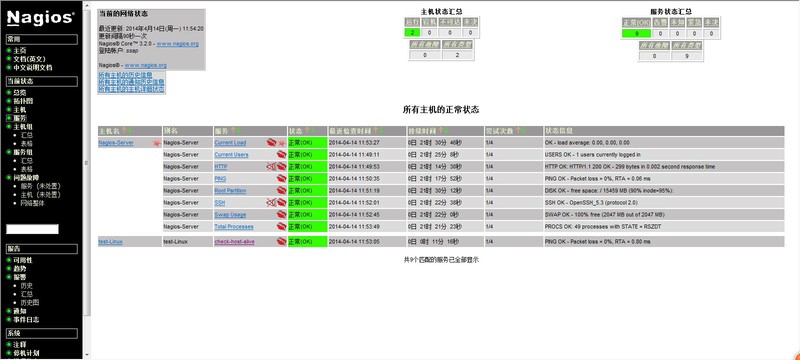
nagios监控页
注意事项:
1) 如果设置的用户名不是nagiosadmin,会存在权限问题,不能访问监控页面,需要修改cgi.cfg,在nagiosadmin后追加自己设置的用户名。
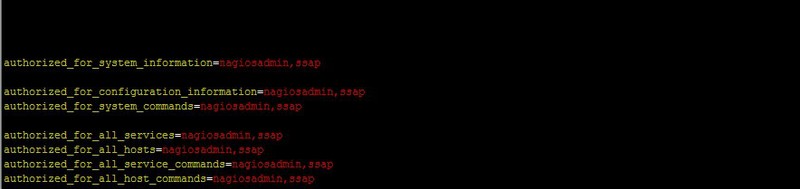
nagios登录用户权限配置
2)Nagios乱码问题
主要是apache没有开启cgi脚本的缘故,进入apache的主配置文件httpd.conf;
#LoadModule cgid_module modules/mod_cgid.so;
#LoadModule actions_module modules/mod_actions.so;
将上面2行的#去掉,重启apache就OK了。
Centos部署nagios+apache实现服务器监控的更多相关文章
- Vue Cli 3 打包上线 部署到Apache Tomcat服务器
使用 npm run build 打包项目 在根目录中有一个dist文件夹 我使用的服务器是 Apache Tomcat 把项目放进tomcat /webapps 中 启动服务器 <mac O ...
- CentOS 7.4 下安装部署Nagios监控系统详细攻略(三)
Nagios是一个流行的电脑系统和网络监控程序,它检测主机和服务,当异常发生和解除时能提醒用户.它是基于GPLv2开发的开源软件,可免费获得及使用. nagios工作原理 nagios的功能是监控服务 ...
- 使用saltstack批量部署服务器运行环境事例——批量部署nagios客户端
之前关于搭建web服务器集群实验的这篇文章http://www.cnblogs.com/cjyfff/p/3553579.html中,关于如何用saltstack批量部署服务器这一点当时没有记录到文章 ...
- Ubuntu Server 安装部署 Cacti 服务器监控
本文的英文版本链接是 http://xuri.me/2013/10/20/install-the-cacti-server-monitor-on-ubuntu-server.html Cacti是一套 ...
- (转)CentOS搭建Nagios监控
A.Nagios服务端1.安装软件包 yum install -y httpd 2.下载nagios wget http://syslab.comsenz.com/downloads/linux/na ...
- Django项目部署到Apache服务器
本文讲述的是在阿里云服务器(ECS)上部署Django项目于Apache,服务器操作系统为ubuntu,公网Ip地址为123.56.30.151. 将Django部署到Apache服务器的原因 Dja ...
- 为什么使用centos部署服务器
这个是实验室同学面试的时候,面试官问的一个问题? 为什么选择centos系统,为什么centos系统用的比较多呢? 首先我们说下redhat红帽公司,它是全球最大的linux服务提供商,它的服务是最好 ...
- django项目部署在Apache服务器中,静态文件路径的注意点
django Apache部署静态文件的路径注意点 静态文件放在对应的 app 下的 static 文件夹中 或者 STATICFILES_DIRS 中的文件夹中. 当 DEBUG = True 时, ...
- 部署Django到云服务器(centos+nginx+mysql+uwsgi+python3)【操作篇(1)】
开篇 笛卡尔说:"你不能教会一个人任何东西,你只能帮助他发现他自己内心本来就有的东西!" jacky能教你的,只能是经验和建议,要逆袭还得通过自己对数据的不断领悟,数据领域的技能都 ...
随机推荐
- UVa 1645 (递推) Count
题意: 有多少个n个节点的有根树,满足每层节点的子节点个数相同,输出该数目除以1e9+7的余数. 分析: 这种题目就属于那种,看起来很高冷,读完题更高冷.想了N久想不出来,一搜题解,卧槽,这么sb的题 ...
- HDU 4571 Travel in time ★(2013 ACM/ICPC长沙邀请赛)
[题意]给定N个点,每个点有一个停留所需的时间Ci,和停留能够获得的满意度Si,有M条边,每条边代表着两个点走动所需的时间ti,现在问在规定的T时间内从指定的一点S到E能够获得的最大的满意度是多少?要 ...
- js变量作用域
for(var i =0;i<100;i++) { } alert(i);//100 if(true){ var i="91d"; } alert(i);//91d func ...
- [Bhatia.Matrix Analysis.Solutions to Exercises and Problems]ExI.5.8
Prove that for any matrices $A,B$ we have $$\bex |\per (AB)|^2\leq \per (AA^*)\cdot \per (B^*B). \ee ...
- Mtom Encoding in WCF
http://www.codeproject.com/Articles/632101/Mtom-Encoding-in-WCF http://msdn.microsoft.com/zh-cn/libr ...
- GTK+布局管理
GTK+布局管理 GTK+ 布局管理 在本章中,我们将讲述如何将构件布置在窗口与对话框中. 当我们在设计应用程序的图形界面时,我们首先要决定的是在程序中用到哪种构件和管理应用程序中的这些构件.为了方便 ...
- Ajax异步请求-简单模版
<script type="text/javascript"> window.onload = function () { document.getElementByI ...
- 设计模式_Iterator_迭代器模式
形象例子: 我爱上了Mary,不顾一切的向她求婚. Mary:“想要我跟你结婚,得答应我的条件” 我:“什么条件我都答应,你说吧” Mary:“我 ...
- 平面上画n条直线,最多能将平面分成多少部分?
转自:http://blog.csdn.net/cywosp/article/details/6724522 在一个平面上画1999条直线,最多能将这一平面划分成多少个部分? 没有直线时有一个空间:( ...
- codeforce 609A - USB Flash Drives
排序水题 #include<iostream> #include<cstdlib> #include<cstdio> #include<algorithm&g ...