
☀【SeaJS】SeaJS Grunt构建
如何使用Grunt构建一个中型项目?
https://github.com/twinstony/seajs-grunt-build
spmjs
http://docs.spmjs.org/doc/index
package.json
{

    "name": "hi",

    "version": "0.0.1",

    "devDependencies": {

        "grunt": "*",

        "grunt-cmd-transport": "*",

        "grunt-cmd-concat": "*",

        "grunt-contrib-clean": "*"

    }

}
Gruntfile.js
module.exports = function(grunt) {

    grunt.initConfig({

        transport: {

            options: {

                idleading: 'dist/'

            },

            target: {

                expand: true,

                cwd: '.',

                src: ['module1.js', 'module2.js'],

                dest: '.build'

            }

        },

        concat: {

            options: {

                include: 'relative'

            },

            target: {

                expand: true,

                cwd: '.build',

                src: ['*.js'],

                dest: 'dist'

            }

        },

        clean: {

            build: ['.build']

        }

    });

    grunt.loadNpmTasks('grunt-cmd-transport')

    grunt.loadNpmTasks('grunt-cmd-concat')

    grunt.loadNpmTasks('grunt-contrib-clean')

    grunt.registerTask('build', ['transport', 'concat'/*, 'clean'*/])

}
module1.js
define(function(require, exports, module) {

    var module1 = {}

    module1.say = function(word) {

        console.log(word)

    }

    module.exports = module1

})
module2.js
define(function(require, exports, module) {

    var module1 = require('./module1')

    module1.say('hi')

})
test.html
<!doctype html>

<html>

<head>

    <meta charset="utf-8">

    <title></title>

</head>

<body>

    <script src="sea.js"></script>

    <script>

        seajs.use('./dist/module2')

    </script>

</body>

</html>
grunt build → dist/module2.js
define("dist/module2", [ "./module1" ], function(require, exports, module) { // 执行路径匹配的

    var module1 = require("./module1");

    module1.say("hi");

});

define("dist/module1", [], function(require, exports, module) {

    var module1 = {};

    module1.say = function(word) {

        console.log(word);

    };

    module.exports = module1;

});
grunt-cmd-transport
spmjs / grunt-cmd-transport
https://github.com/spmjs/grunt-cmd-transport
grunt-cmd-concat
spmjs / grunt-cmd-concat
https://github.com/spmjs/grunt-cmd-concat

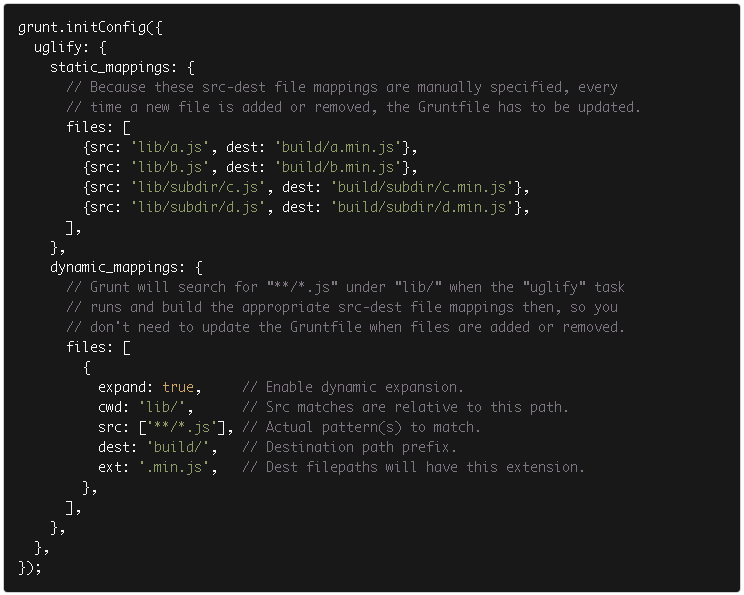
dynamic mappings
☀【SeaJS】SeaJS Grunt构建的更多相关文章
- Grunt 构建SeaJS
GitHub地址:https://github.com/MrLeo/SeaJS 目录结构 目录结构说明 web存放HTML文件 static存放所有HTML需要用到静态资源文件(css.js.img- ...
- Grunt构建工具能做哪些事?
Grunt到底有什么作用?一般用来干嘛? 很多前端的工作,包括Less编译.javascript压缩.Css压缩等零零碎碎的工作, 都可以让Grunt来做. 实际上在项目开发中,一般是前端代码 与 后 ...
- 前端工程化系列[04]-Grunt构建工具的使用进阶
在前端工程化系列[02]-Grunt构建工具的基本使用和前端工程化系列[03]-Grunt构建工具的运转机制这两篇文章中,我们对Grunt以及Grunt插件的使用已经有了初步的认识,并探讨了Grunt ...
- 前端工程化系列[03]-Grunt构建工具的运转机制
在前端工程化系列[02]-Grunt构建工具的基本使用这篇文章中,已经对Grunt做了简单的介绍,此外,我们还知道了该如何来安装Grunt环境,以及使用一些常见的插件了,这篇文章主要介绍Grunt的核 ...
- 使用grunt构建前端项目
1. grunt构建工具是基于nodejs上的,所以在使用之前一定要先安装好nodejs 2. 安装好nodejs后,node -v查看node版本 npm-v 查看npm版本信息 3. 在需要用到的 ...
- 使用grunt构建seajs项目
1.安装nodejs 2.安装grunt-cli npm install -g grunt-cli 3.进入到项目目录,同时准备好package.json和Gruntfile.js文件 //packa ...
- 实战案例--Grunt构建Web程序
GruntJS构建Web程序.使用Gruntjs来搭建一个前端项目,然后使用grunt合并,压缩JS文件,熟练了node.js安装和grunt.js安装后,接下来来实战一个案例,案例是根据snandy ...
- grunt 构建工具(build tool)初体验
操作环境:win8 系统,建议使用 git bash (window下的命令行工具) 1,安装node.js 官网下载:https://nodejs.org/ 直接点击install ,会根据你的操 ...
- Grunt构建工具插件篇——之less工具2
Grunt任务分为两部分,一部分是任务,即Grunt要执行的代码,找到对应功能的插件就成.所以等会要下载grunt-contrib- less包,这个插件便是把less文件编译成能直接使用的css.另 ...
随机推荐
- Razor的理解
[原创]Razor非常智能非常实用,不了解的人可能会觉得有没有都无所谓,其实不然,起初对Razor不是太了解,现在想想Razor就是来标示出C#语法的,但是HTML和C#混合输出时到底@这个小老鼠到底 ...
- order by跟group by 跟having----------------sum() 求和 avg()求平均 count() 求个数--------------like
aaarticlea/png;base64,iVBORw0KGgoAAAANSUhEUgAAAoEAAACdCAIAAABEujUmAAAABmJLR0QA/wD/AP+gvaeTAAAACXBIWX ...
- ios>android>javaee
外面就业很多年的认识给出来我这个结论,请问各位有什么看法?
- Java-Junit 的Hello world
这里介绍junit 4的基本配置: <1>建立一个java project项目. <2>在src目录下面建一个包,com.sun.junit4,在包下面写一点文件T.java ...
- C# 展开和折叠代码的快捷键
C# 展开和折叠代码的快捷键 VS2005代码编辑器的展开和折叠代码确实很方便和实用.以下是展开代码和折叠代码所用到的快捷键,很常用: Ctrl + M + O: 折叠所有方法 Ctrl + M + ...
- wordpress 后台显示空白现象
简单的说两句,出现此种现象的因素可能在于主题或者插件再或者是因为(恶意)插件(误更改)更改了某个重要的文件出现错误.本次我遇到的是插件的错误,具体是什么错误,我也没有去深究,重要的是结果! 使用排查的 ...
- KMP算法_读书笔记
下面是KMP算法的实现伪代码: KMP_MATCHER ( T, P ) . n = T.length . m = P.length . next = COMPUTE_PREFIX_FUNCTION ...
- CI 笔记,使用 json的参考文档(废弃)
Json的处理转换, Json转换步骤, a) 先设置json为空字符串, b) While循环,遍历, While(!!$row = mysql_fetch_arra ...
- SQL反模式部分内容笔记
规范化: 1, 以一种我们能够理解的方式表达这个世界中的事物; 2, 减少数据冗余存储, 防止异常或者不一致的数据; 3, 支持完整性约束. Tips: 提高数据的性能不在此列表中. 意义: 规范化 ...
- CentOS 6.4 64位 搭建MySQL-Cluster 7.3.8 集群
准备:1.下载 MySQL-Cluster-gpl-7.3.8-1.el6.x86_64.rpm-bundle.tar 下载地址: http://mirrors.sohu.com/mysql/MySQ ...