
Grunt 构建SeaJS
GitHub地址:https://github.com/MrLeo/SeaJS
目录结构
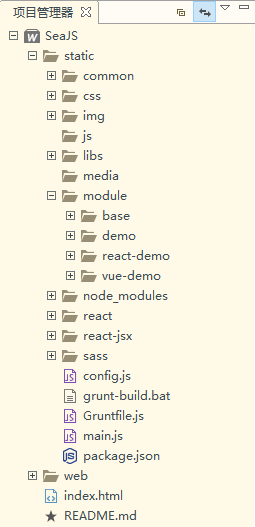
目录结构说明
web存放HTML文件
static存放所有HTML需要用到静态资源文件(css、js、img…)
module存放HTML对应的业务模块common存放与业务无关的模块
Get Start
准备工作
安装
Node.js及npm安装
grunt-cli(允许安装多版本grunt)
$ npm install -g grunt-cli
```
用命令行进入到项目所在目录
$ cd /d F:\WWW\SeaJS\static
```
安装
grunt及 插件 到项目所在目录(--save-dev)
$ npm install grunt --save-dev //grunt
$ npm install grunt-cmd-transport --save-dev //提取模块ID
$ npm install grunt-cmd-concat --save-dev //合并文件
$ npm install grunt-contrib-uglify --save-dev //压缩文件
$ npm install grunt-contrib-clean --save-dev //清理临时目录
```
构建项目
此文件被npm用于存储项目的元数据,以便将此项目发布为npm模块。你可以在此文件中列出项目依赖的grunt和Grunt插件,放置于devDependencies配置段内。
```

{

  "name": "SeaJS",

  "version": "1.0.0",

  "author": "Leo",

  "spm": {

    "alias": { //同 seajs.config 中设置的别名

    	"base": "module/base/base",

    	"jquery": "libs/jquery/jquery-1.8.3.min"

    }

  },

  "devDependencies": { //grunt 构建用到的依赖包

    "grunt": "*", //"*"代表最新版本;"~0.4.1"代表指定版本

    "grunt-cmd-transport": "*",

    "grunt-cmd-concat": "*",

    "grunt-contrib-uglify": "*",

    "grunt-contrib-clean": "*"

  }

}

```
此文件用来配置或定义任务(task)并加载Grunt插件的。Gruntfile.js 是有效的 JavaScript 文件,和package.json文件在同一目录层级。
```js

module.exports = function(grunt) {

    require('time-grunt')(grunt);//Time how long tasks take

    //require('load-grunt-tasks')(grunt);//Load grunt tasks automatically

	grunt.initConfig({

		pkg: grunt.file.readJSON("package.json"), //引入package.json的JSON元数据

		/**

		 * step 1:

		 * 创建一个临时目录

		 * 将需要合并的js文件转为具名函数,并保持独立地保存在这个临时目录

		 */

		transport: {//task任务

			options: {

				paths: ['.'], //模块的路径,'.'代表相对路径,默认的是 sea-modules

				alias: '<%= pkg.spm.alias %>' //模板字符串语法来从package.json引入模块别名

			},

			common: {//target

				options: {

					idleading: 'common-dist/', //构建后的模块ID的前缀

				},

				files: [{

					expand: true, //开启处理动态的src-dest文件映射

					filter: 'isFile', //匹配过滤src文件路径

					cwd: 'common', //所有src指定的匹配都将相对于此处指定的路径(但不包括此路径)

					src: '**/*.js', //相对于cwd路径的匹配模式(**代表当前路径以及子路径)

					dest: '.build/common' //目标文件路径前缀

				}]

			},

			base: {

				options: {

					idleading: 'module/base-dist/',

				},

				files: [{

					expand: true,

					filter: 'isFile',

					cwd: 'module/base',

					src: '**/*.js',

					dest: '.build/module/base'

				}]

			},

			demo: {

				options: {

					idleading: 'module/page-dist/demo/',

				},

				files: [{

					expand: true,

					filter: 'isFile',

					cwd: 'module/page/demo',

					src: '**/*.js',

					dest: '.build/module/page/demo'

				}]

			}

		},

		/**

		 * step 2:

		 * 将临时目录下独立的具名函数文件 合并为 1个 js 文件

		 * 将这个合并的 js 文件 拷贝到 我们的输出目录

		 */

		concat: {

			options: {

				separator: ';', // 定义一个用于插入合并输出文件之间的字符

				include: 'relative' //relative(默认)只会合并相对标识的依赖;;all会合并所有依赖

			},

			common: {

				files: [{

					expand: true,

					ext: '.js',

					cwd: '.build/common/',

					src: ['**/*.js'],

					dest: 'common-dist/'

				}]

			},

			demo: {

				files: {

					'module/page-dist/demo/index.js': ['.build/module/page/demo/index.js'],

					'module/page-dist/demo/index-debug.js': ['.build/module/page/demo/index-debug.js']

				}

			}

		},

		/**

		 * step 3:

		 * 压缩 这个 合并后的 文件

		 */

		uglify: {

			common: {

				options: {

					// 此处定义的banner注释将插入到输出文件的顶部

					banner: '/*! <%= pkg.author %>  @  <%= grunt.template.today("dd-mm-yyyy") %> */\n'

				},

				files: [{

					expand: true,

					ext: '.js',

					cwd: 'common-dist/',

					src: ['**/*.js', '!**/*-debug.js'],

					dest: 'common-dist/'

				}]

			},

			main: {

				options: {

					// 此处定义的banner注释将插入到输出文件的顶部

					banner: '/*! <%= pkg.author %>  @  <%= grunt.template.today("dd-mm-yyyy") %> */\n'

				},

				files: {

					'module/page-dist/demo/index.js': ['module/page-dist/demo/index.js']

				}

			}

		},

		/**

		 * step 4:

		 * 将这个临时目录删除

		 */

		clean: {

			spm: ['.build']

		}

	});

	grunt.loadNpmTasks('grunt-cmd-transport');

	grunt.loadNpmTasks('grunt-cmd-concat');

	grunt.loadNpmTasks('grunt-contrib-clean');

	grunt.loadNpmTasks('grunt-contrib-uglify');

	grunt.registerTask('build', ['transport', 'concat', 'uglify', 'clean']);

};

```
- 用命令行进入到 Gruntfile.js 所在目录,执行 grunt
grunt build
参考
- Grunt中文文档
- https://github.com/seajs/seajs/issues/672
- https://github.com/jixiangac/lili/tree/master/public/js
- http://www.cnblogs.com/hongchenok/p/3924633.html
- http://www.jackness.org/2015/01/02/grunt-实例之-构建-seajs-项目/
Grunt 构建SeaJS的更多相关文章
- 使用grunt构建seajs项目
1.安装nodejs 2.安装grunt-cli npm install -g grunt-cli 3.进入到项目目录,同时准备好package.json和Gruntfile.js文件 //packa ...
- ☀【SeaJS】SeaJS Grunt构建
如何使用Grunt构建一个中型项目?https://github.com/twinstony/seajs-grunt-build spmjshttp://docs.spmjs.org/doc/inde ...
- Grunt打包seajs项目
在使用seajs时,常常将若干脚本分为多次require进来,这样开发中比较方便,但是,会增加http请求次数,在生产环境中需要进行打包合并.压缩等操作. 以Grunt构建工具为例,对一个seajs项 ...
- grunt与seajs结合应用
9.seajs构建的问题 01.png和02.jpg 10.seajs与grunt如何结合开发.两个插件:grunt-cmd-transport grunt-cmd-contact ,去grunt官网 ...
- Grunt构建工具能做哪些事?
Grunt到底有什么作用?一般用来干嘛? 很多前端的工作,包括Less编译.javascript压缩.Css压缩等零零碎碎的工作, 都可以让Grunt来做. 实际上在项目开发中,一般是前端代码 与 后 ...
- 前端工程化系列[04]-Grunt构建工具的使用进阶
在前端工程化系列[02]-Grunt构建工具的基本使用和前端工程化系列[03]-Grunt构建工具的运转机制这两篇文章中,我们对Grunt以及Grunt插件的使用已经有了初步的认识,并探讨了Grunt ...
- 前端工程化系列[03]-Grunt构建工具的运转机制
在前端工程化系列[02]-Grunt构建工具的基本使用这篇文章中,已经对Grunt做了简单的介绍,此外,我们还知道了该如何来安装Grunt环境,以及使用一些常见的插件了,这篇文章主要介绍Grunt的核 ...
- 使用grunt构建前端项目
1. grunt构建工具是基于nodejs上的,所以在使用之前一定要先安装好nodejs 2. 安装好nodejs后,node -v查看node版本 npm-v 查看npm版本信息 3. 在需要用到的 ...
- 构建seajs业务模块之grunt VS spm build
在最开始,我并不知道grunt可以构建CMD模块.(以下spm指代spm build) 当时正困惑于如何用spm方便的构建业务模块,后来看到@twinstony (感谢@twinstony的分享)使用 ...
随机推荐
- java 删除字符串中的反斜杠\
Java中有时候会打印出来会含有反斜杠(\)的字符串,我们需要删除时,可以使用 replace() 或 replaceAll() 但是要注意的是replaceAll()里面用的是正则表达式,所以一个斜 ...
- python 接口测试 、提交数据
在测试过程中经常会遇见需要向服务器提交数据.或者进行接口测试,这个有很多方法,但是我经常用的就是使用python 编写脚本提交,方便.说说方法: 思路: 1.首先有一个提交数据的url 2.按照字典的 ...
- ProcMon启用调试符
1.设置 _NT_SYMBOL_PATH 如果在 _NT_SYMBOL_PATH 环境变量中提供了正确的?symsrv?语法,则常见的 Mircoroft 调试工具将使用 SymSrv 技术.这些工具 ...
- 在CentOS下安装配置MySQL
经常需要在linux环境下部署项目或安装Mysql数据库,由于记性不好,每次都是求助度娘,每次搜到的步骤都不一样,所以每次都在尝试.冒险:于是乎,把安装的重要步骤贴出,供自己以后参照. 1.首先要看看 ...
- 重构13-Extract Method Object(提取方法对象)
重构来自于Martin Fowler的重构目录.你可以在这里找到包含简介的原始文章. 在我看来,这是一个比较罕见的重构,但有时却终能派上用场.当你尝试进行提取方法的重构时,需要引入大量的方法.在一个 ...
- 10 个顶级 JavaScript 动画框架推荐
使用JavaScript可以做出一些引人注目的动画效果,但通常不太容易实现.本文为你整理了10个非常优秀的JavaScript动画框架,使用它们你可以轻松实现动画效果.1. RaphaëlRaphaë ...
- ZOJ 1586 QS Network (最小生成树)
QS Network Time Limit:2000MS Memory Limit:65536KB 64bit IO Format:%lld & %llu Submit Sta ...
- SVN管理规范
命名规范 tags 正式版 REL-X.X.X branches 发版前 RB-X.X.X 新功能 TRY-XXX 修BUG BUG-XXXX trunk 开发 使用注意事项 负责而谨慎地提交自己的代 ...
- subilme增加对markdown的高亮支持
sublime2对markdown原生主题支持都没有, 需要通过插件补充 1.插件安装 通过Package Control安装下列插件: Markdown Extended Monokai Exten ...
- Java实现邮箱找回密码 --转载
通过邮件找回密码功能的实现 1.最近开发一个系统,有个需求就是,忘记密码后通过邮箱找回.现在的系统在注册的时候都会强制输入邮箱,其一目的就是 通过邮件绑定找回,可以进行密码找回.通过java发送邮件的 ...