
☀【SeaJS】SeaJS Grunt构建
如何使用Grunt构建一个中型项目?
https://github.com/twinstony/seajs-grunt-build
spmjs
http://docs.spmjs.org/doc/index
package.json
{

    "name": "hi",

    "version": "0.0.1",

    "devDependencies": {

        "grunt": "*",

        "grunt-cmd-transport": "*",

        "grunt-cmd-concat": "*",

        "grunt-contrib-clean": "*"

    }

}
Gruntfile.js
module.exports = function(grunt) {

    grunt.initConfig({

        transport: {

            options: {

                idleading: 'dist/'

            },

            target: {

                expand: true,

                cwd: '.',

                src: ['module1.js', 'module2.js'],

                dest: '.build'

            }

        },

        concat: {

            options: {

                include: 'relative'

            },

            target: {

                expand: true,

                cwd: '.build',

                src: ['*.js'],

                dest: 'dist'

            }

        },

        clean: {

            build: ['.build']

        }

    });

    grunt.loadNpmTasks('grunt-cmd-transport')

    grunt.loadNpmTasks('grunt-cmd-concat')

    grunt.loadNpmTasks('grunt-contrib-clean')

    grunt.registerTask('build', ['transport', 'concat'/*, 'clean'*/])

}
module1.js
define(function(require, exports, module) {

    var module1 = {}

    module1.say = function(word) {

        console.log(word)

    }

    module.exports = module1

})
module2.js
define(function(require, exports, module) {

    var module1 = require('./module1')

    module1.say('hi')

})
test.html
<!doctype html>

<html>

<head>

    <meta charset="utf-8">

    <title></title>

</head>

<body>

    <script src="sea.js"></script>

    <script>

        seajs.use('./dist/module2')

    </script>

</body>

</html>
grunt build → dist/module2.js
define("dist/module2", [ "./module1" ], function(require, exports, module) { // 执行路径匹配的

    var module1 = require("./module1");

    module1.say("hi");

});

define("dist/module1", [], function(require, exports, module) {

    var module1 = {};

    module1.say = function(word) {

        console.log(word);

    };

    module.exports = module1;

});
grunt-cmd-transport
spmjs / grunt-cmd-transport
https://github.com/spmjs/grunt-cmd-transport
grunt-cmd-concat
spmjs / grunt-cmd-concat
https://github.com/spmjs/grunt-cmd-concat

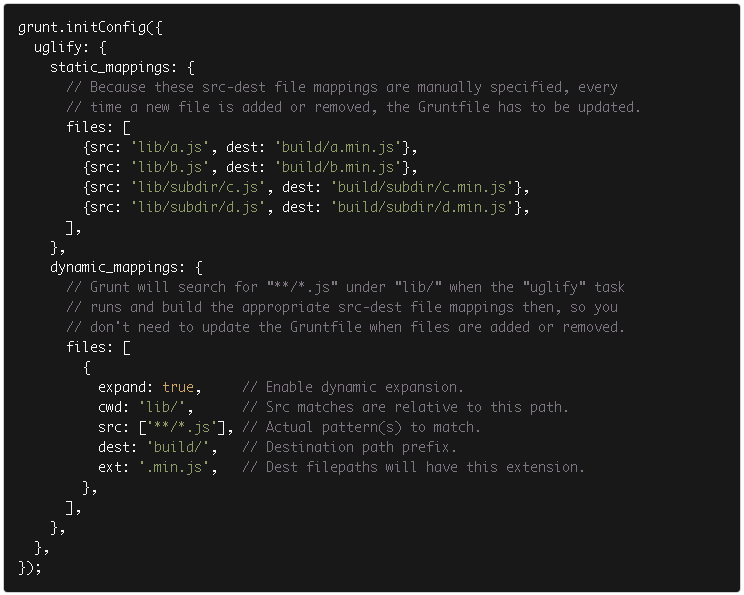
dynamic mappings
☀【SeaJS】SeaJS Grunt构建的更多相关文章
- Grunt 构建SeaJS
GitHub地址:https://github.com/MrLeo/SeaJS 目录结构 目录结构说明 web存放HTML文件 static存放所有HTML需要用到静态资源文件(css.js.img- ...
- Grunt构建工具能做哪些事?
Grunt到底有什么作用?一般用来干嘛? 很多前端的工作,包括Less编译.javascript压缩.Css压缩等零零碎碎的工作, 都可以让Grunt来做. 实际上在项目开发中,一般是前端代码 与 后 ...
- 前端工程化系列[04]-Grunt构建工具的使用进阶
在前端工程化系列[02]-Grunt构建工具的基本使用和前端工程化系列[03]-Grunt构建工具的运转机制这两篇文章中,我们对Grunt以及Grunt插件的使用已经有了初步的认识,并探讨了Grunt ...
- 前端工程化系列[03]-Grunt构建工具的运转机制
在前端工程化系列[02]-Grunt构建工具的基本使用这篇文章中,已经对Grunt做了简单的介绍,此外,我们还知道了该如何来安装Grunt环境,以及使用一些常见的插件了,这篇文章主要介绍Grunt的核 ...
- 使用grunt构建前端项目
1. grunt构建工具是基于nodejs上的,所以在使用之前一定要先安装好nodejs 2. 安装好nodejs后,node -v查看node版本 npm-v 查看npm版本信息 3. 在需要用到的 ...
- 使用grunt构建seajs项目
1.安装nodejs 2.安装grunt-cli npm install -g grunt-cli 3.进入到项目目录,同时准备好package.json和Gruntfile.js文件 //packa ...
- 实战案例--Grunt构建Web程序
GruntJS构建Web程序.使用Gruntjs来搭建一个前端项目,然后使用grunt合并,压缩JS文件,熟练了node.js安装和grunt.js安装后,接下来来实战一个案例,案例是根据snandy ...
- grunt 构建工具(build tool)初体验
操作环境:win8 系统,建议使用 git bash (window下的命令行工具) 1,安装node.js 官网下载:https://nodejs.org/ 直接点击install ,会根据你的操 ...
- Grunt构建工具插件篇——之less工具2
Grunt任务分为两部分,一部分是任务,即Grunt要执行的代码,找到对应功能的插件就成.所以等会要下载grunt-contrib- less包,这个插件便是把less文件编译成能直接使用的css.另 ...
随机推荐
- Spring定时任务,Spring4整合quartz2.2,quartz-scheduler定时任务
Spring4整合quartz2.2,quartz-scheduler定时任务,Spring定时任务 >>>>>>>>>>>>& ...
- 程序员带你十天快速入门Python,玩转电脑软件开发(一)
关注今日头条-做全栈攻城狮,学代码也要读书,爱全栈,更爱生活.提供程序员技术及生活指导干货. 如果你真想学习,请评论学过的每篇文章,记录学习的痕迹. 请把所有教程文章中所提及的代码,最少敲写三遍,达到 ...
- JavaScript单例模式
一.什么是单例 意思是指获取的对象只有一份. 二.最通用的单例 任何时刻获取SingLeton.instance都是同一个对象 var SingLeton={ instance:{ property: ...
- MySQL数字类型中的三种常用种类
数字类型 MySQL数字类型按照我的分类方法分为三类:整数类.小数类和数字类. MySQL数字类型之一我所谓的“数字类” 就是指 DECIMAL 和 NUMERIC,它们是同一种类型.它严格的说不是一 ...
- SQL_server 的基本操作
1.---------------数据库基本操作 主键 : 1.不重复 2.不为NULL外键 1.取消重复行(消除完全一样的行,保留一行)select distinct cloumname1,clou ...
- [弹出消息] C#MessageBox帮助类 (转载)
点击下载 MessageBox.rar 主要功能如下所示1.显示消息提示对话框 2.控件点击 消息确认提示框 3.显示消息提示对话框,并进行页面跳转 4.输出自定义脚本信息 /// <summa ...
- VS2008 未找到编译器可执行文件 csc.exe【当网上其他方法试玩了之后不起作用的时候再用这个方法】
被公司派遣到中国海洋石油惠州炼化公司做项目,做的是生产管理,来了发现他们的项目结构简直烂的要命,和同学们写的毕业设计差不多,然后开发工具用的是vs2008,我电脑是安装了vs2005和vs2010,v ...
- 导出文本、表格、图像到PDF格式文件中(学习整理)
1.测试例子: 需要导入的外部jar包: 相关API http://www.coderanch.com/how-to/javadoc/itext-2.1.7/com/lowagie/text/pack ...
- Java实现单向链表
/* 先定义一个Node类用来存储节点的值域和指针域 * 即当前节点中的值和后面节点的方法 * 在C中就是相当与定义一个结构体类型一个数据域和指针域的方法 */class LNode{//这个写法已经 ...
- thinkphp路径引用问题
查看ThinkPHP\Library\Behavior\ContentReplaceBehavior.class文件,常量定义如下定义: '__ROOT__' => __ROOT__ ...