
MyBatis+PageHelper实现分页
转载请注明出处:http://www.cnblogs.com/Joanna-Yan/p/7256105.html
前面讲到Spring+SpringMVC+MyBatis深入学习及搭建(十七)——SpringMVC拦截器
本文通过MyBatis+PageHelper实现列表分页,先上效果图:
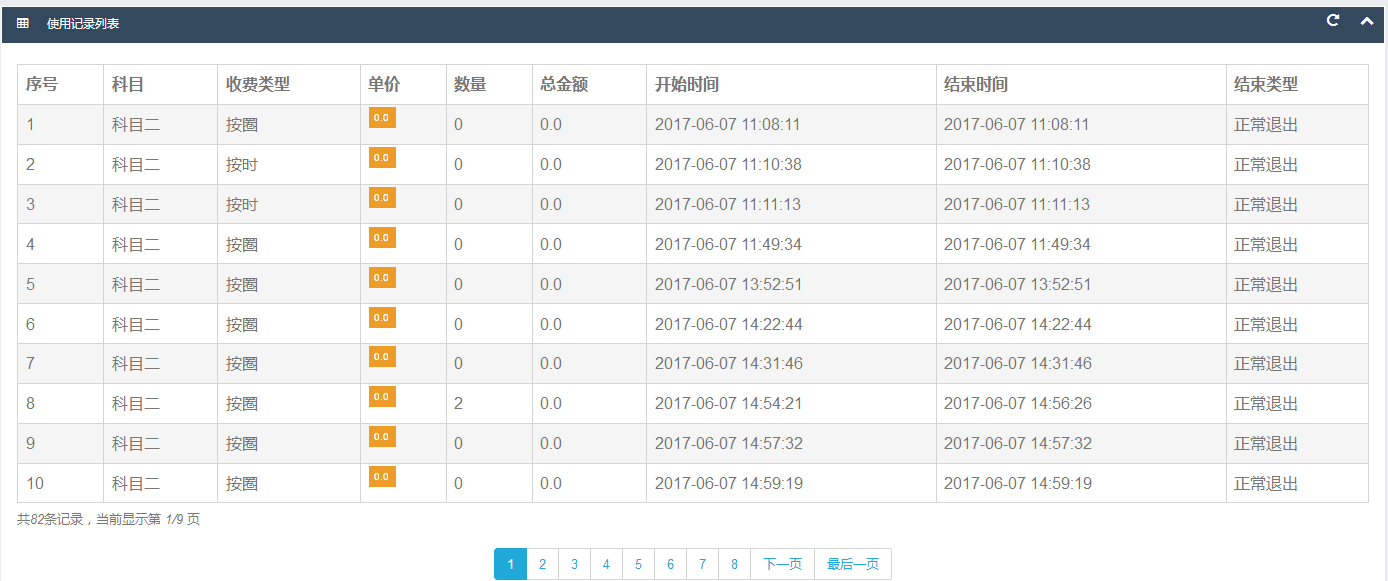
注意:MyBaits最低版本不能低于3.3。
PageHelper插件及依赖jar包:jsqlparser-0.9.5.jar pagehelper-4.2.1.jar
sqlMapConfig.xml中,配置PageHelper插件:
<?xml version="1.0" encoding="UTF-8"?>

<!DOCTYPE configuration

PUBLIC "-//mybatis.org//DTD Config 3.0//EN"

"http://mybatis.org/dtd/mybatis-3-config.dtd">

 <configuration>

     <!-- 全局setting配置,根据需要添加 -->

     <settings>

         <setting name="logImpl" value="LOG4J" />

     </settings>

    <!-- 配置别名 -->

    <typeAliases>

        <package name="pojo对象所在包名"/>

    </typeAliases>

    <!-- 插件 -->

    <plugins>

        <plugin interceptor="com.github.pagehelper.PageHelper">

            <!-- 4.0.0以后版本可以不设置该参数  -->

            <property name="diaect" value="mysql"/>

            <!--

                该参数默认为false

                设置为true时,会将RowBounds第一个参数offset当成pageNum页码使用

                和startPage中的pageNum效果一样

             -->

            <property name="offsetAsPageNum" value="true"/>

            <!--

                该参数默认为false

                设置为true时,使用RowBounds分页会进行count查询

              -->

            <property name="rowBoundsWithCount" value="true"/>

            <!--

                设置为true时,如果pageSize=0或者RowBounds.limit=0就会查询出全部的结果

                (相当于没有执行分页查询,只是返回结果仍然是Page类型)

             -->

            <property name="pageSizeZero" value="true"/>

            <!--

                3.3.0版本可用-分页参数合理化,默认false禁用

                启用合理化时,如果pageNum<1会查询第一页,如果pageNum>pages会查询最后一页

                禁用合理化时,如果pageNum<1或pages会返回空数据

             -->

            <property name="reasonable" value="true"/>

            <!--

                3.5.0版本可用-为了支持startPage(Object params)方法

                增加了一个'params'参数来配置参数映射,用于从Map或ServletRequest中取值

                可以配置pageNum,pageSize,count,pageSizeZero,reasonable,orderBy,不配置映射的用默认值

                 不理解该含义的前提下,不要随便复制该配置

             -->

            <property name="params" value="pageNum=start;pageSize=limit;"/>

            <!-- 支持通过Mapper接口参数来传递分页参数  -->

            <property name="supportMethodsArguments" value="true"/>

            <!-- always重视返回PageInfo类型,check检查返回类型是否为PageInfo,none返回Page -->

            <property name="returnPageInfo" value="check"/>

        </plugin>

    </plugins>

 </configuration>
后台代码:
    //查询单个item

    @RequestMapping(value={"/query"})

    public String query(HttpSession session,Model model,@RequestParam(required=true)Integer id,@RequestParam(required=true)Integer pageNum) throws Exception{

        MaindeviceCustom maindeviceCustom=maindeviceService.findById(id);

        model.addAttribute("maindevice", maindeviceCustom);

        int roleId=(int) session.getAttribute("roleId");

        RoleFunction rfListAble=roleFunctionService.find(roleId, 27);

        RoleFunction rfUpdateAble=roleFunctionService.find(roleId, 32);

        if(rfListAble!=null){

            model.addAttribute("listAble", 1);

           int pageSize=10;

        Page<?> page=PageHelper.startPage(pageNum, pageSize);

        List<DeviceUserecordCustom> deviceUserecordCustomList=deviceUserecordService.itemRecords(id);

        PageInfo<?> pagehelper=page.toPageInfo();

        model.addAttribute("deviceUserecordCustomList", deviceUserecordCustomList);

        model.addAttribute("pagehelper", pagehelper);

        }else{

            model.addAttribute("listAble", 0);

        }

        if(rfUpdateAble!=null){

            model.addAttribute("updateAble", 1);

        }else{

            model.addAttribute("updateAble", 0);

        }

        return "devices/query_device";

    }
前端代码:
<div class="row" id="deviceRecordList">
<div class="col-lg-12" style="height: 15px;top:700px" id="paging">
<div class="panel">
<div class="panel-heading bk-bg-primary">
<h6><i class="fa fa-table red"></i><span class="break"></span>使用记录列表</h6>
<div class="panel-actions">
<a href="table.html#" class="btn-setting"><i class="fa fa-rotate-right"></i></a>
<a href="table.html#" class="btn-minimize"><i class="fa fa-chevron-up"></i></a>
</div>
</div>
<div class="panel-body" style="height: 900px;">
<div class="table-responsive">
<table class="table table-striped table-bordered bootstrap-datatable datatable">
<thead>
<tr>
<th>序号</th>
<th>科目</th>
<th>收费类型</th>
<th>单价</th>
<th>数量</th>
<th>总金额</th>
<th>开始时间</th>
<th>结束时间</th>
<th>结束类型</th>
</tr>
</thead>
<tbody> <c:forEach items="${deviceUserecordCustomList }" var="deviceUserecordCustom" varStatus="status">
<tr>
<td>${status.index+1 }</td>
<td>${deviceUserecordCustom.courseName }</td>
<td>${deviceUserecordCustom.paymenttypeName }</td>
<td>
<span class="label label-warning">${deviceUserecordCustom.price }</span>
</td>
<td>${deviceUserecordCustom.usedamount }</td>
<td>${deviceUserecordCustom.monetary }</td>
<td>${deviceUserecordCustom.begintimeStr }</td>
<td>${deviceUserecordCustom.endtimeStr }</td>
<td>${deviceUserecordCustom.endtypeName }</td>
</tr>
</c:forEach> </tbody>
</table>
<!-- 分页 -->
<div class="message">
共<i class="blue">${pagehelper.total}</i>条记录,当前显示第 <i
class="blue">${pagehelper.pageNum}/${pagehelper.pages}</i> 页
</div>
<div style="text-align:center;">
<ul class="pagination">
<c:if test="${!pagehelper.isFirstPage}">
<li><a href="javascript:queryDeviceRecords(${pagehelper.firstPage});">首页</a></li>
<li><a href="javascript:queryDeviceRecords(${pagehelper.prePage});">上一页</a></li>
</c:if>
<c:forEach items="${pagehelper.navigatepageNums}" var="navigatepageNum"> <c:if test="${navigatepageNum==pagehelper.pageNum}">
<li class="active"><a href="javascript:queryAllDevices(${navigatepageNum});">${navigatepageNum}</a></li>
</c:if>
<c:if test="${navigatepageNum!=pagehelper.pageNum}">
<li><a href="javascript:queryDeviceRecords(${navigatepageNum});">${navigatepageNum}</a></li>
</c:if>
</c:forEach>
<c:if test="${!pagehelper.isLastPage}">
<li><a href="javascript:queryDeviceRecords(${pagehelper.nextPage});">下一页</a></li>
<li><a href="javascript:queryDeviceRecords(${pagehelper.lastPage});">最后一页</a></li>
</c:if>
</ul>
</div>
</div>
</div>
</div>
</div>
</div>
其中id="paging",为需要局部重新加载的代码块。
    <script type="text/javascript">

        function queryDeviceRecords(pageNum) {

            var id=$("#deviceId").val();

            $("#paging").load("<%=basePath %>/maindevice/query.html?id="+id+"&pageNum=" + pageNum);

        }

    </script>
如果此文对您有帮助,微信打赏我一下吧~

MyBatis+PageHelper实现分页的更多相关文章
- SpringBoot+Mybatis+PageHelper实现分页
SpringBoot+Mybatis+PageHelper实现分页 mybatis自己没有分页功能,我们可以通过PageHelper工具来实现分页,非常简单方便 第一步:添加依赖 <depend ...
- Python分页转Mybatis pagehelper格式分页
最近工作里遇到一个需求要把之前用Java写的一个http接口替换成用Python写的,出参是带了mybatis pageHelper中PageInfo信息的一个JSON串,而Python这边分页不会涉 ...
- SpringBoot+Mybatis+PageHelper简化分页实现
前言 经过一段时间的测试和修改PageHelper插件逐渐走到了让我觉得靠谱的时候,它功能的就是简化分页的实现,让分页不需要麻烦的多写很多重复的代码. 已经加入我的github模版中:https:// ...
- spring-boot + mybatis +pagehelper 使用分页
转自:https://segmentfault.com/a/1190000015668715?utm_medium=referral&utm_source=tuicool 最近自己搭建一个sp ...
- SpringBoot 整合Mybatis + PageHelper 实现分页
前言: 现在公司大多数都实现了前后端分离,前端使用Vue.React.AngularJS 等框架,不用完全依赖后端.但是如果对于比较小型的项目,没必要前后端分离,而SpringBoot也基本抛弃了Js ...
- Mybatis下collections使用pageHelper进行分页
pageHelper在对mybatis一对多分页时造成查询总页数结果不对的情况. 可以做出如下修改: service层: public CommonResult worksList(String us ...
- SpringBoot集成Mybatis并具有分页功能PageHelper
SpringBoot集成Mybatis并具有分页功能PageHelper 环境:IDEA编译工具 第一步:生成测试的数据库表和数据 SET FOREIGN_KEY_CHECKS=0; ...
- mybatis pagehelper 分页 失效
pagehelper 不分页几种情况的解决方法 - web洋仔 - CSDN博客https://blog.csdn.net/csdn___lyy/article/details/77160488 分页 ...
- 后端分页神器,mybatis pagehelper 在SSM与springboot项目中的使用
mybatis pagehelper想必大家都耳熟能详了,是java后端用于做分页查询时一款非常好用的分页插件,同时也被人们称为mybatis三剑客之一,下面 就给大家讲讲如何在SSM项目和sprin ...
随机推荐
- js获取页面宽高
网页可见区域宽:document.body.clientWidth网页可见区域高:document.body.clientHeight网页可见区域宽:document.body.offsetWidth ...
- 学习总结------Servlet的简单理解
1.什么是Servlet Servlet是一个Java编写的程序,在服务器端运行的(如tomcat) Java Servlet 是运行在 Web 服务器或应用服务器上的程序,它是作为来自 Web 浏览 ...
- CSS实现矩形按钮右边缘的中间有个往里凹的小半圆
<!DOCTYPE html> <html> <head> <meta charset="UTF-8"> <title> ...
- mysqldump 用法总结
mysqldump 备份 备份数据库 my_database $ mysqldump -uUSER -pPASSWD my_database > my_database.sql 备份数据库 my ...
- ThinkPHP 整合 PHPExcel ,数据导出功能实现,解决Invalid cell coordinate
PHPExcel想必大家都不陌生,是用来操作Office Excel 文档的一个PHP类库,它基于微软的OpenXML标准和PHP语言.可以使用它来读取.写入不同格式的电子表格 本次只做数据导出功能的 ...
- Kubernetes部分Volume类型介绍及yaml示例
1.EmptyDir(本地数据卷) EmptyDir类型的volume创建于pod被调度到某个宿主机上的时候,而同一个pod内的容器都能读写EmptyDir中的同一个文件.一旦这个pod离开了这个宿主 ...
- grid栅格布局
前面的话 Grid布局方式借鉴了平面装帧设计中的格线系统,将格线运用在屏幕上,而不再是单一的静态页面,可以称之为真正的栅格.本文将详细介绍grid布局 引入 对于Web开发者来说,网页布局一直是个比较 ...
- js将字符串转化成函数:eval(logOutCallbackFun+"()");
js将字符串转化成函数:eval(logOutCallbackFun+"()");
- 将百度坐标转换的javascript api官方示例改写成传统的回调函数形式
改写前: 百度地图中坐标转换的JavaScript API示例官方示例如下: var points = [new BMap.Point(116.3786889372559,39.90762965106 ...
- DataFrame操作方式
DataFrame/DataSet 操作 Databricks 不止一次提到过希望未来在编写 Spark 应用程序过程中,对于结构化/半结构化数据,使用 Datasets(DataFrame 的扩展) ...