
SpringBoot集成Mybatis并具有分页功能PageHelper
SpringBoot集成Mybatis并具有分页功能PageHelper
- SET FOREIGN_KEY_CHECKS=0;
- -- ----------------------------
- -- Table structure for user
- -- ----------------------------
- DROP TABLE IF EXISTS `user`;
- CREATE TABLE `user` (
- `test_id` bigint(20) NOT NULL COMMENT '主键ID',
- `tenant_id` bigint(20) NOT NULL COMMENT '租户ID',
- `name` varchar(30) DEFAULT NULL COMMENT '名称',
- `age` int(11) DEFAULT NULL COMMENT '年龄',
- `test_type` int(11) DEFAULT NULL COMMENT '测试下划线字段命名类型',
- `test_date` datetime DEFAULT NULL COMMENT '日期',
- `role` bigint(20) DEFAULT NULL COMMENT '测试',
- `phone` varchar(11) DEFAULT NULL COMMENT '手机号码',
- PRIMARY KEY (`test_id`)
- ) ENGINE=InnoDB DEFAULT CHARSET=utf8;
- -- ----------------------------
- -- Records of user
- -- ----------------------------
- INSERT INTO `user` VALUES ('0', '1', '雷锋', '1', '1', '2017-01-01 01:01:01', '1', '10010');
- INSERT INTO `user` VALUES ('1', '1', '三毛', '2', '1', '2017-02-02 01:01:01', '1', '10086');
- INSERT INTO `user` VALUES ('2', '1', '小马', '1', '1', '2017-03-03 01:01:01', '1', '10000');
- INSERT INTO `user` VALUES ('3', '2', '麻花藤', '1', '1', '2017-03-03 01:01:01', '1', '10000');
- INSERT INTO `user` VALUES ('4', '2', '东狗', '2', '1', '2017-03-03 01:01:01', '1', '10086');
- INSERT INTO `user` VALUES ('5', '1', '王五', '2', '1', '2017-03-03 01:01:01', '1', '10010');
- INSERT INTO `user` VALUES ('6', '1', '小小三毛', '2', '1', '2017-02-02 01:01:01', '1', '10086');
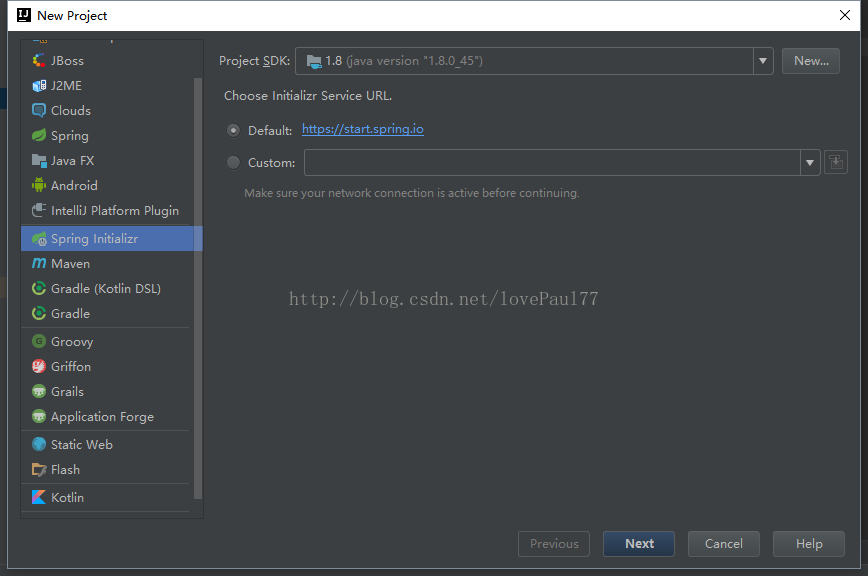
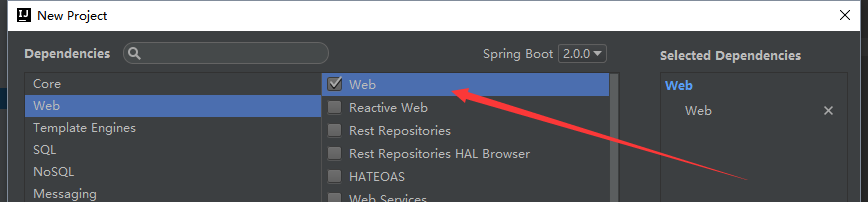
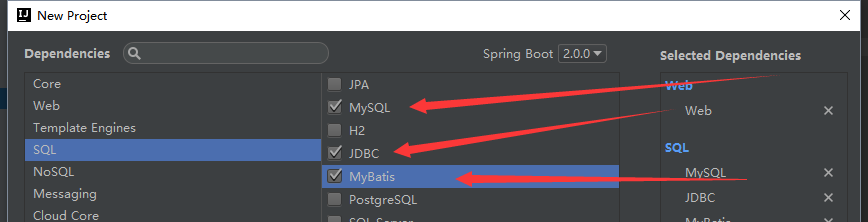
<dependency>

   <groupId>com.github.pagehelper</groupId>

   <artifactId>pagehelper-spring-boot-starter</artifactId>

   <version>1.2.3</version>

</dependency>
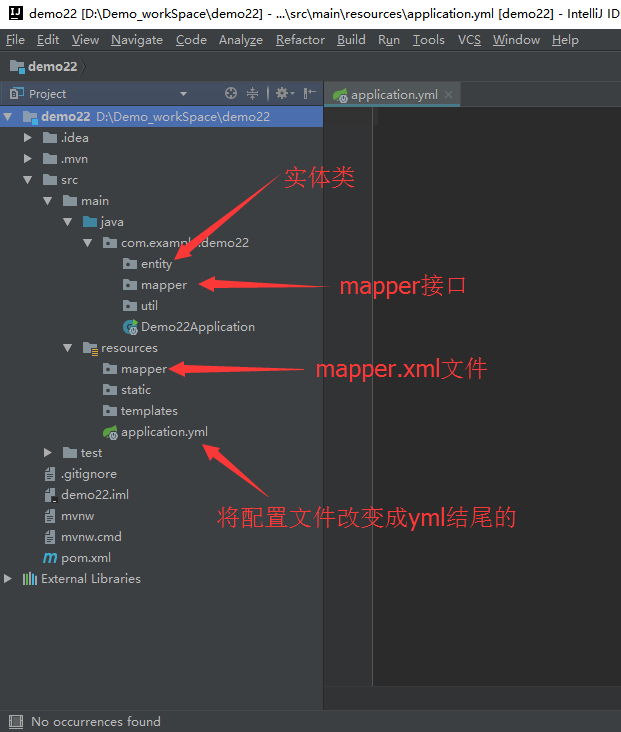
package com.example.demo.entity;

import lombok.Data;

import java.util.Date;

@Data

public class User {

    private Integer testId;

    private Integer tenantId;

    private String name;

    private Integer age;

    private Integer testType;

    private Date testDate;

    private Integer role;

    private String phone;

    @Override

    public String toString() {

        return "User{" +

                "testId=" + testId +

                ", tenantId=" + tenantId +

                ", name='" + name + '\'' +

                ", age=" + age +

                ", testType=" + testType +

                ", testDate=" + testDate +

                ", role=" + role +

                ", phone='" + phone + '\'' +

                '}';

    }

}
#运行的端口

server:

  port: 8088

#数据库连接池

spring:

  datasource:

    driver-class-name: com.mysql.jdbc.Driver

    username: root

    password: 521521

    url: jdbc:mysql://localhost:3306/springmvc?characterEncoding=utf-8&useSSL=false

#让mybatis知道mapper在哪里

mybatis:

    mapper-locations: classpath:mapper/*.xml

#分页的配置

pagehelper:

  offset-as-page-num: true

  row-bounds-with-count: true

  reasonable: true
package com.example.demo.mapper;

import com.example.demo.entity.User;

import org.apache.ibatis.annotations.Mapper;

import org.springframework.stereotype.Component;

import java.util.List;

@Mapper

@Component

public interface UserDao {

    List<User> findAll();

}
<?xml version="1.0" encoding="UTF-8" ?>

<!DOCTYPE mapper PUBLIC "-//mybatis.org//DTD Mapper 3.0//EN" "http://mybatis.org/dtd/mybatis-3-mapper.dtd" >

<mapper namespace="com.example.demo.mapper.UserDao">

    <select id="findAll" resultType="com.example.demo.entity.User">

        SELECT

            u.test_id   AS testId,

            u.age,

            u.name,

            u.phone,

            u.role,

            u.tenant_id AS tenantId,

            u.test_date AS testDate

        FROM user u

    </select>

</mapper>
package com.example.demo.mapper;

import com.example.demo.entity.User;

import com.github.pagehelper.PageHelper;

import org.junit.Test;

import org.junit.runner.RunWith;

import org.springframework.beans.factory.annotation.Autowired;

import org.springframework.boot.test.context.SpringBootTest;

import org.springframework.test.context.junit4.SpringRunner;

import java.util.List;

@RunWith(SpringRunner.class)

@SpringBootTest

public class UserDaoTest {

    @Autowired

    private UserDao userDao;

    @Test

    public void findAll() {

        PageHelper.startPage(4, 2);

        List<User> all = userDao.findAll();

        for (User user : all) {

            System.out.println(user);

        }

    }

}
SpringBoot集成Mybatis并具有分页功能PageHelper的更多相关文章
- BindingException: Invalid bound statement (not found)问题排查:SpringBoot集成Mybatis重点分析
重构代码,方法抛出异常:BindingException: Invalid bound statement (not found) 提示信息很明显:mybatis没有提供某方法 先不解释问题原因和排查 ...
- 0120 springboot集成Mybatis和代码生成器
在日常开发中,数据持久技术使用的架子使用频率最高的有3个,即spring-jdbc , spring-jpa, spring-mybatis.详情可以看我之前的一篇文章spring操作数据库的3个架子 ...
- SpringBoot集成MyBatis底层原理及简易实现
MyBatis是可以说是目前最主流的Spring持久层框架了,本文主要探讨SpringBoot集成MyBatis的底层原理.完整代码可移步Github. 如何使用MyBatis 一般情况下,我们在Sp ...
- springboot集成mybatis(逆向工程),热部署以及整合Swagger2
本文是作者原创,版权归作者所有.若要转载,请注明出处. springboot集成mybatis和mybatis-generator插件 1.新建Springboot项目(略) 2.导入相关依赖 < ...
- springboot集成mybatis(二)
上篇文章<springboot集成mybatis(一)>介绍了SpringBoot集成MyBatis注解版.本文还是使用上篇中的案例,咱们换个姿势来一遍^_^ 二.MyBatis配置版(X ...
- springboot集成mybatis(一)
MyBatis简介 MyBatis本是apache的一个开源项目iBatis, 2010年这个项目由apache software foundation迁移到了google code,并且改名为MyB ...
- Mybatis Generator实现分页功能
Mybatis Generator实现分页功能 分类: IBATIS2013-07-17 17:03 882人阅读 评论(1) 收藏 举报 mybatisibatisgeneratorpage分页 众 ...
- SpringBoot 集成Mybatis 连接Mysql数据库
记录SpringBoot 集成Mybatis 连接数据库 防止后面忘记 1.添加Mybatis和Mysql依赖 <dependency> <groupId>org.mybati ...
- SpringBoot Mybatis整合(注解版),SpringBoot集成Mybatis(注解版)
SpringBoot Mybatis整合(注解版),SpringBoot集成Mybatis(注解版) ================================ ©Copyright 蕃薯耀 2 ...
随机推荐
- 【转】【Python】Python网络编程
Socket简介 在网络上的两个程序通过一个双向的通信连接实现数据的交换,这个链接的一端称为一个Socket(套接字),用于描述IP地址和端口. 建立网络通信连接至少要一对端口号(Socket),So ...
- ORACLE 几个我忍了他很多年的问题
① DataGuard环境,主库创建的临时文件,不在备库上创建 ② 创建11G R2 Rac环境时,在RHEL 6.0及以后版本上,最后执行root.sh命令时,以及重新启动OS后启动ohasd,都需 ...
- sublime3 docblocker插件定制自己的注释,配置步骤
DocBlockr很好用,不仅仅可以自动生成注释,还可以手动编辑注释的格式. 安装方法: Cmd+Shift+P -> Install Package -> docblockr wi ...
- Linux服务器 java生成的图片验证码乱码问题
问题:如图所示项目中生成的图形验证码不能正常显示出需要的字体 原因: linux下没有对应的字体 查找项目中使用到系统字体的地方,如下: 解决: 1. 在本地 路径 C:\Windows\Fonts ...
- 通过NAT转发实现私网对外发布信息
我们可以在防火墙的外部网卡上绑定多个合法IP地址,然后通过ip映射使发给其中某一个IP地址的包转发至内部某一用户的WWW服务器上,然后再将该内部WWW服务器响应包伪装成该合法IP发出的包. 具体的IP ...
- UpdateData()用法
一.总结UpdateData()函数 UpdateData(true);//用于将屏幕上控件中的数据交换到变量中. UpdateData(false);//用于将数据在屏幕中对应控件中显示出来. ...
- appium的xpath定位问题及常用方法
关于类似的帖子好像很多,但是没有找到具体能帮我解决问题的办法.还是自己深究了好久才基本知道app上面的xpath定位和web上的不同点: 先放一个图: A,先说说不用xpath的场景,一般是用于存在i ...
- Maven Missing artifact jar
maven error:Multiple annotations found at this line: - Missing artifact log4j:log4j:jar:1.2.15:compi ...
- Maven 与 IntelliJ IDEA 的完美结合
你是否正在学习Maven?是否因为Maven难用而又不得不用而苦恼?是否对Eclipse于Maven的冲突而困惑? 那么我告诉你一个更直接更简单的解决方案: IntelliJ IDEA! 1. 什么是 ...
- 图解HTTP学习笔记——确认访问用户身份的认证
前言 认证功能能让Web页面只被有权限的人访问.而认证机制究竟是怎样一个原理呢?通过今天的学习能对这个有个大致的了解. 正文 什么是认证 计算机无法判断对方的身份,需要客户端自报家门. 服务端为确认客 ...