
[Unity工具]批量修改字体
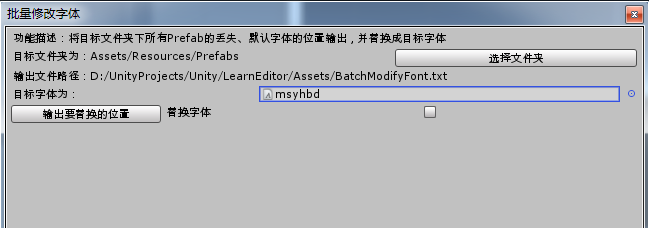
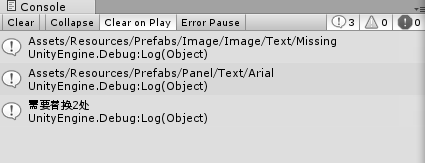
效果图:
 using System.IO;

 using System.Text;

 using UnityEditor;

 using UnityEngine;

 using UnityEngine.UI;

 /// <summary>

 /// 将目标文件夹下所有Prefab的丢失、默认字体的位置输出,并替换成目标字体

 /// </summary>

 public class BatchModifyFontWindow : EditorWindow {

     Font toFont = new Font("Arial");//目标字体

     string searchFolder = "Assets/Resources/Prefabs";//目标文件夹

     string outputPath = Application.dataPath + "/BatchModifyFont.txt";//输出文件路径

     bool needReplace = false;//是否要进行替换

     [MenuItem("Window/Custom/BatchModifyFontWindow")]

     private static void ShowWindow()

     {

         EditorWindow.GetWindow<BatchModifyFontWindow>(true, "批量修改字体", true);

     }

     void OnGUI()

     {

         EditorGUILayout.LabelField("功能描述:将目标文件夹下所有Prefab的丢失、默认字体的位置输出,并替换成目标字体");

         GUILayout.BeginHorizontal();

         EditorGUILayout.LabelField("目标文件夹为:" + searchFolder);

         if (GUILayout.Button("选择文件夹"))

         {

             string temp = EditorUtility.OpenFolderPanel("请选择目标文件夹", Application.dataPath, "");

             if (!string.IsNullOrEmpty(temp))

             {

                 temp = temp.Substring(temp.IndexOf("Assets"));

                 searchFolder = temp;

             }

         }

         GUILayout.EndHorizontal();

         EditorGUILayout.LabelField("输出文件路径:" + outputPath);

         GUILayout.BeginHorizontal();

         GUILayout.Label("目标字体为:");

         toFont = (Font)EditorGUILayout.ObjectField(toFont, typeof(Font), true, GUILayout.MinWidth(100f));

         GUILayout.EndHorizontal();

         GUILayout.BeginHorizontal();

         string replaceBtnStr;

         if (needReplace)

         {

             replaceBtnStr = "输出要替换的位置并替换字体";

         }

         else

         {

             replaceBtnStr = "输出要替换的位置";

         }

         if (GUILayout.Button(replaceBtnStr))

         {

             StringBuilder builder = new StringBuilder();

             int counter = ;

             string[] guids = AssetDatabase.FindAssets("t:Prefab", new string[] { searchFolder });

             for (int i = ; i < guids.Length; i++)

             {

                 string path = AssetDatabase.GUIDToAssetPath(guids[i]);

                 //Debug.Log(path);

                 EditorUtility.DisplayProgressBar("Hold on", path, (float)(i + ) / guids.Length);

                 bool hasModifyFont = false;

                 GameObject go = AssetDatabase.LoadAssetAtPath<GameObject>(path);

                 Text[] texts = go.GetComponentsInChildren<Text>(true);

                 for (int j = ; j < texts.Length; j++)

                 {

                     Text text = texts[j];

                     string fontName;

                     string log;

                     if (text.font)

                     {

                         fontName = text.font.name;

                     }

                     else

                     {

                         fontName = "Missing";

                     }

                     log = path.Substring(, path.LastIndexOf("/")) + "/" + GetFontPath(go.transform, text.transform) + fontName;

                     //Debug.Log(log);

                     //对丢失、默认字体进行处理

                     if ((fontName == "Missing") || (fontName == "Arial"))

                     {

                         if (needReplace)

                         {

                             text.font = toFont;

                             hasModifyFont = true;

                         }

                         counter++;

                         builder.Append(log + "\r\n");

                         Debug.Log(log);

                     }

                 }

                 if (hasModifyFont)

                 {

                     EditorUtility.SetDirty(go);

                 }

             }

             if (needReplace)

             {

                 Debug.Log(string.Format("替换完成。替换了{0}处", counter));

             }

             else

             {

                 Debug.Log(string.Format("需要替换{0}处", counter));

             }

             File.WriteAllText(outputPath, builder.ToString());

             AssetDatabase.Refresh();

             EditorUtility.ClearProgressBar();

         }

         EditorGUILayout.LabelField("替换字体");

         needReplace = EditorGUILayout.Toggle(needReplace);

         GUILayout.EndHorizontal();

     }

     string GetFontPath(Transform parentTra, Transform fontTra)

     {

         string path = "";

         while (parentTra != fontTra)

         {

             path = fontTra.gameObject.name + "/" + path;

             fontTra = fontTra.parent;

         }

         return parentTra.gameObject.name + "/" + path;

     }

 }
[Unity工具]批量修改字体的更多相关文章
- [Unity工具]批量修改Texture
BatchModifyTexture.cs using UnityEngine; using System.Collections; using UnityEditor; using System.I ...
- Orcad CIS怎么批量修改字体大小
选中DSN,右键,design properties, schematic design,选择design properties.
- ansible非root用户批量修改root密码
前言: 由于线上服务器密码长久没有更新,现领导要求批量更换密码.线上的之前部署过salt,但由于各种因素没有正常使用. 使用自动化工具批量修改的计划搁浅了,后来领导给了个python多线程修改密码脚本 ...
- MathType中如何批量修改公式字体和大小
MathType中如何批量修改公式字体和大小 关于MathType : MathType 是由美国Design Science公司开发的功能强大的数学公式编辑器,它同时支持Windows和Macint ...
- unity工具IGamesTools之批量生成帧动画
unity工具IGamesTools批量生成帧动画,可批量的将指定文件夹下的帧动画图片自动生成对应的资源文件(Animation,AnimationController,Prefabs) unity工 ...
- 详解MathType中如何批量修改公式字体和大小
MathType应用在论文中时,有时会因为排版问题批量修改公式字体和大小,一个一个的修改不仅费时费力,还容易出现错误,本教程将详解如何在MathType公式编辑器中批量修改公式字体和大小. MathT ...
- C#代码生成工具:文本模板初体验 使用T4批量修改实体框架(Entity Framework)的类名
转自:http://www.cnblogs.com/huangcong/archive/2011/07/20/1931107.html 在之前的文本模板(T4)初体验中我们已经知道了T4的用处,下面就 ...
- unity批量修改AssetBundleName与Variant
批量修改指定路径下的资源的AssetBundleName与Variant. 脚本代码如下: using System.Collections; using System.Collections.Gen ...
- Word技巧杂记(二)——批量修改修订格式并接受
今天的题目好奇怪啊,呵呵,起因如下: 今天老婆在修改论文,她的老板提出一个非常**的要求——把Word中所有修订后的文字用特殊的字体(蓝色)标出来,然后再接受修订.我勒个去,明明有修订后的模式啊,为什 ...
随机推荐
- MySQL数据库分区操作【RANGE】
客服平台,线上查询存在性能问题,为了解决或者说是缓解这个问题,除了加必要的索引,另外就是将表进行分区. 这里主要是针对既有的表进行分区,采用的是alter table xxx的方式,当然,也可以采用c ...
- 用DDE控制Word
DDE(Dynamic Data Exchange),称为动态数据交换.用于进程间的通讯,看看他如何来和Word交互. 在System页签下有TDdeClientConv组件,拖一个放到界面上,然后我 ...
- RichEdit文字背景色的处理
uses RichEdit; procedure RichEditSetBackColor( // 设置RichEdit文字背景色 mRichEdit: TRichEdit; // Rich编辑框 m ...
- Python Flask 构建微电影视频网站
前言 学完本教程,你将掌握: 1.学会使用整形.浮点型.路径型.字符串型正则表达式路由转化器 2.学会使用post与get请求.上传文件.cookie获取与相应.404处理 3.学会适应模板自动转义. ...
- 【springboot】之整合ActiveMQ
1.引入依赖的jar <parent> <groupId>org.springframework.boot</groupId> <artifactId> ...
- Ubuntu 16.04安装Pycharm2017.1.1
安装pycharm 1.到官网下载安装包. 2.到下载目录下进行解压. 3.运行解压后的文件夹中的bin目录下的pycharm.sh文件. cd pycharm-community-2017.1.1/ ...
- Eclipse代码提示补全问题,自动选择第一个
原地址 http://blog.csdn.net/liuhhaiffeng/article/details/7179243 Eclipse具有代码提示功能, 但是默认的提示只有在输入".&q ...
- datetime模块常用功能小结
- 云计算的三种服务模式:IaaS,PaaS和SaaS
云服务”现在已经快成了一个家喻户晓的词了.如果你不知道PaaS, IaaS 和SaaS的区别,那么也没啥,因为很多人确实不知道. “云”其实是互联网的一个隐喻,“云计算”其实就是使用互联网来接入存储或 ...
- 游戏设计思考:对COK的理解和思考
转自:http://www.gameres.com/804983.html 一.前言 发此文的起因是最近加入了一个游戏研究群,受到大家对游戏研究热情的感染,也想将自己对游戏的理解和感悟发出来和大家一起 ...