
C# 根据注册表获取当前用户的常用目录整理
1.使用C#获取当前程序或解决方案的路径
2.使用C#获取当前登录用户的相关目录
3.也可以获取当前系统通用目录
4.获取Windows系统的目录,从注册表中获取。
一、当前用户的目录,HKEY_Current_User
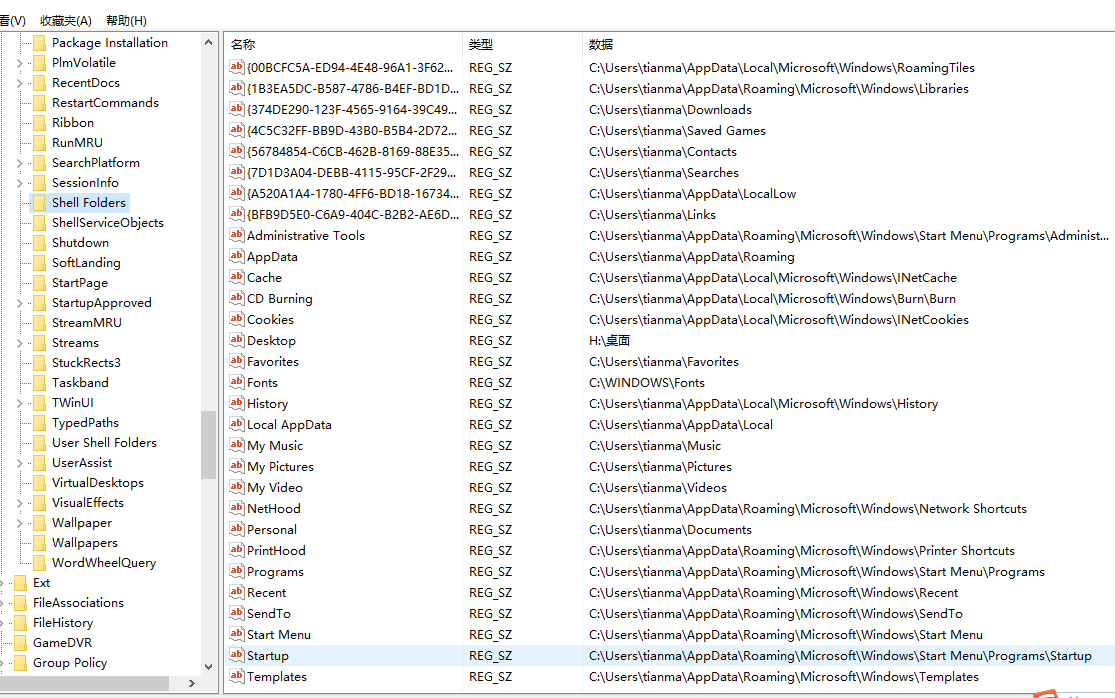
二、系统通用目录,当前机器,Hkey_Local_Machine

三、代码实例
 class LocalPathHelper

    {

        //windows当前用户的注册表键

        private static RegistryKey folders;

        /// <summary>

        /// 全局指定当前获取注册表的根节点

        /// 一般只有管理员身份运行,才能操作Registry.LocalMachine 对应的文件

        /// </summary>

        public static RegistryKey RootKey { get; set; }

        static LocalPathHelper()

        {

            SetAsCurrentUser();

        }

        /// <summary>

        /// 设置根节点为LocalMachine

        /// </summary>

        public static void SetAsLocalMachine()

        {

            RootKey = Registry.LocalMachine;

            folders = OpenRegistryKey(Registry.LocalMachine, @"/software/microsoft/windows/currentversion/explorer/shell folders");

        }

        /// <summary>

        /// 设置根节点为LocalMachine

        /// </summary>

        public static void SetAsCurrentUser()

        {

            RootKey = Registry.CurrentUser;

            folders = OpenRegistryKey(Registry.CurrentUser, @"/software/microsoft/windows/currentversion/explorer/shell folders");

        }

        #region 当前用户路径

        /// <summary>

        /// windows用户字体目录路径

        /// </summary>

        public static string FontsPath

        {

            get { return GetPath("Fonts"); }

        }

        /// <summary>

        /// windows用户网络邻居路径

        /// </summary>

        public static string NetHoodPath

        {

            get { return GetPath("Nethood"); }

        }

        /// <summary>

        /// windows用户我的文档路径

        /// </summary>

        public static string PersonalPath

        {

            get { return GetPath("Personal"); }

        }

        /// <summary>

        /// windows用户最近访问文档快捷方式目录

        /// </summary>

        public static string RecentPath

        {

            get { return GetPath("Recent"); }

        }

        /// <summary>

        /// windows用户发送到目录路径

        /// </summary>

        public static string SendToPath

        {

            get { return GetPath("Sendto"); }

        }

        /// <summary>

        /// windows用户收藏夹目录路径

        /// </summary>

        public static string FavoritesPath

        {

            get { return GetPath("Favorites"); }

        }

        /// <summary>

        /// windows用户网页历史目录路径

        /// </summary>

        public static string HistoryPath

        {

            get { return GetPath("History"); }

        }

        /// <summary>

        /// windows用户cookies目录路径

        /// </summary>

        public static string CookiePath

        {

            get { return GetPath("Cookies"); }

        }

        /// <summary>

        /// windows用户Cache目录路径

        /// </summary>

        public static string CachePath

        {

            get { return GetPath("Cache"); }

        }

        #endregion

        #region //系统路径

        /// <summary>

        /// widnows用户桌面路径

        /// </summary>

        public static string DesktopPath

        {

            get { return GetPath("Desktop"); }

        }

        /// <summary>

        /// windows用户开始菜单程序路径

        /// </summary>

        public static string ProgramsPath

        {

            get { return GetPath("Programs"); }

        }

        /// <summary>

        /// windows用户开始菜单目录路径

        /// </summary>

        public static string StartMenuPath

        {

            get { return GetPath("StartMenu"); }

        }

        /// <summary>

        /// windows用户开始菜单启动项目路径

        /// </summary>

        public static string StartupPath

        {

            get { return GetPath("Startup"); }

        }

        /// <summary>

        /// windows用户应用程序数据目录

        /// </summary>

        public static string AppdataPath

        {

            get { return GetPath("Appdata"); }

        }

        /// <summary>

        /// 公共文档

        /// </summary>

        public static string Documents

        {

            get { return GetPath("Documents"); }

        }

        #endregion

        /// <summary>

        /// 当前应用程序的工作目录,不是程序文件目录

        /// </summary>

        public static string CurrentProgramPath

        {

            get { return Directory.GetCurrentDirectory(); }

        }

        /// <summary>

        /// 当前应用程序解决方案路径

        /// </summary>

        public static string CurrentSolutionPath

        {

            get

            {

                string program = CurrentProgramPath;

                DirectoryInfo info = new DirectoryInfo(program);

                return info.Parent.Parent.FullName;

            }

        }

        #region //私有方法

        /// <summary>

        /// 获取键值对应的文件夹

        /// </summary>

        /// <param name="key">键</param>

        /// <returns>值</returns>

        private static string GetPath(string key)

        {

            if (RootKey == Registry.LocalMachine)

                key = "Common " + key;

            string path = folders.GetValue(key).ToString();

            if (!string.IsNullOrEmpty(path))

            {

                if (Directory.Exists(path))

                {

                    return path;

                }

            }

            return "'" + key + "'对应的文件夹不存在";

        }

        //打开,指定根节点和路径的注册表项

        private static RegistryKey OpenRegistryKey(RegistryKey root, string str)

        {

            str = str.Remove(, ) + @"/";

            while (str.IndexOf(@"/") != -)

            {

                root = root.OpenSubKey(str.Substring(, str.IndexOf(@"/")));

                str = str.Remove(, str.IndexOf(@"/") + );

            }

            return root;

        }

        #endregion

    }
更多:
要将程序集“xxx.dll”标记为系统必备组件,必须对其进行强签名
设置c#windows服务描述及允许服务与桌面交互的几种方法(转)
C# 根据注册表获取当前用户的常用目录整理的更多相关文章
- C# 系统应用之通过注册表获取USB使用记录(一)
该文章是“个人电脑历史记录清除软件”项目的系统应用系列文章.前面已经讲述了如何清除IE浏览器的历史记录.获取Windows最近访问文件记录.清除回收站等功能.现在我需要完成的是删除USB设备上的U盘. ...
- 获取客户端用户真实ip方法整理(jekyll迁移)
layout: post title: 获取客户端用户真实ip方法整理 date: 2019-08-22 author: xiepl1997 tags: springboot 由请求获取客户端ip地址 ...
- C#根据字体名通过注册表获取该字体文件路径(win10)两种方法推荐第二种
方法一: 直接先上源码: private System.Collections.Generic.SortedDictionary<string, string> ReadFontInfor ...
- Inno Setup中做补丁通过注册表获取原程序安装目录
今天找VM补丁看到的,是个innosetup封装的,所以习惯性的喜欢去看人家的iss文件是怎么编写的. DefaultDirName={reg:HKLM\SOFTWARE\VMware%2c%20In ...
- 『练手』通过注册表 获取 VS 和 SQLServer 文件路径
获取任意 VS 和 SQLServer 的 磁盘安装目录. 背景需求:如果磁盘电脑安装了 VS 或者 SQLServer 则 认定这台计算机 的使用者 是一名 软件研发人员,则让程序 以最高权限运行. ...
- 读取注册表获取Windows系统XP/7/8/10类型(使用wcscmp比较wchar[]内容)
很多方案是采用GetVersion.GetVersionEx这两个API来查询操作系统的版本号来判断当前的操作系统是Windows系列中的哪个,在Win10没有出现前,这种方法是行的通的,但是Win1 ...
- C#注册表操作类(完整版) 整理完整
/// <summary> /// 注册表基项静态域 /// /// 主要包括: /// 1.Registry.ClassesRoot 对应于HKEY_CLASSES_ROOT主键 /// ...
- 利用C#访问注册表获取软件的安装路径
文章地址:https://blog.csdn.net/yl2isoft/article/details/17332139
- Win查询注册表获取CPU与内存参数
#include "stdafx.h" void dump_machine_info( HANDLE fh ) { CHAR Str[MAX_PATH*3]; CHAR MHzSt ...
随机推荐
- Net WebAPI2
SwaggerUI ASP.Net WebAPI2 目前在用ASP.NET的 WebAPI2来做后台接口开发,在与前台做测试的时候,总是需要发送一个demo给他,但是这样很麻烦的,他还有可能记不住 ...
- Codeforces Round #530 (Div. 2) F - Cookies
F - Cookies 思路:我们先考虑如何算出在每个节点结束最多能吃多少饼干, 这个dfs的时候用线段树维护一下就好了, 然后有个这个信息之后树上小dp一下就好啦. #include<bits ...
- 新手:Qt之QLabel类的应用
在Qt中,我们不可避免的会用到QLabel类.而Qlabel的强大功能作为程序员的你有多少了解? 下面,跟着我一起在来学习一下吧! 1.添加文本 Qlabel类添加文本有两种方式,一种是直接在实现时添 ...
- springmvc防止重复提交拦截器
一.拦截器实现,ResubmitInterceptorHandler.java import org.apache.commons.lang3.StringUtils; import org.spri ...
- bzoj 2809 可并堆维护子树信息
对于每个节点,要在其子树中选尽量多的节点,并且节点的权值和小于一个定值. 建立大根堆,每个节点从儿子节点合并,并弹出最大值直到和满足要求. /***************************** ...
- 吴恩达-coursera-机器学习-week2
四.多变量线性回归(Linear Regression with Multiple Variables) 4.1 多维特征 4.2 多变量梯度下降 4.3 梯度下降法实践1-特征缩放 4.4 梯度下降 ...
- CAP原则(CAP定理)、BASE理论
CAP原则又称CAP定理,指的是在一个分布式系统中, Consistency(一致性). Availability(可用性).Partition tolerance(分区容错性),三者不可得兼. CA ...
- IntraWeb XIV 类型速查表
tkClass ================== IWUserSessionBase.TIWUserSessionBase < TDataModule < TComponent < ...
- jquery json 格式教程
介绍 我们知道AJAX技术能够使得每一次请求更加迅捷,对于每一次请求返回的不是整个页面,也仅仅是所需要返回的数据.通常AJAX通过返回XML格式的数据,然后再通过客户端复杂的JavaScript脚本解 ...
- Fiddler可以支持Websocket抓包了
今天试了一下,Fiddler已经可以支持客户端Websocket抓包了,并且查看的方式也非常方便. websocket作为一个标准的应用层的协议,在CS端程序用起来也比传统的tcp协议方便了,比较常见 ...