
『练手』通过注册表 获取 VS 和 SQLServer 文件路径
获取任意 VS 和 SQLServer 的 磁盘安装目录。
背景需求:如果磁盘电脑安装了 VS 或者 SQLServer 则 认定这台计算机 的使用者 是一名 软件研发人员,则让程序 以最高权限运行。
代码如下:(基于注册表读取、exe版权信息校验)
        static void Main(string[] args)

        {

            string vsPath = FindVisualStudioPath();

            Console.WriteLine(vsPath);

            string sqlPath = FindSQLServerPath();

            Console.WriteLine(sqlPath);

            Console.ReadKey();

        }

        private static string FindVisualStudioPath()

        {

            RegistryKey studioKey = Registry.LocalMachine.CreateSubKey(@"SOFTWARE\MICROSOFT\VISUALSTUDIO");

            string studioPath = studioKey == null ? string.Empty : (studioKey.GetValue("VSPATH") ?? string.Empty).ToString();

            if (File.Exists(studioPath))

            {

                if (studioKey != null) studioKey.Close();

                return studioPath;

            }

            RegistryKey devenvKey = Registry.LocalMachine.OpenSubKey(@"SOFTWARE\MICROSOFT\WINDOWS\CURRENTVERSION\APP PATHS\DEVENV.EXE");

            string devenvPath = devenvKey == null ? string.Empty : (devenvKey.GetValue(string.Empty) ?? string.Empty).ToString();

            if (devenvKey != null) devenvKey.Close();

            if (File.Exists(devenvPath))

            {

                FileVersionInfo fileVersion = FileVersionInfo.GetVersionInfo(devenvPath);

                string companyName = fileVersion.CompanyName ?? string.Empty;

                string productName = fileVersion.ProductName ?? string.Empty;

                if (companyName.IndexOf("Microsoft", StringComparison.InvariantCultureIgnoreCase) >=  && productName.IndexOf("Visual Studio", StringComparison.InvariantCultureIgnoreCase) >= )

                {

                    studioPath = fileVersion.FileName;

                    if (studioKey != null && File.Exists(studioPath))

                    {

                        studioKey.SetValue("VSPATH", studioPath);

                        studioKey.Flush();

                        studioKey.Close();

                        return studioPath;

                    }

                }

            }

            return string.Empty;

        }

        private static string FindSQLServerPath()

        {

            RegistryKey sqlKey = Registry.LocalMachine.CreateSubKey(@"SOFTWARE\MICROSOFT\MICROSOFT SQL SERVER");

            string sqlPath = sqlKey == null ? string.Empty : (sqlKey.GetValue("MSSQLPATH") ?? string.Empty).ToString();

            if (File.Exists(sqlPath))

            {

                if (sqlKey != null) sqlKey.Close();

                return sqlPath;

            }

            RegistryKey svcRootKey = Registry.LocalMachine.OpenSubKey(@"SYSTEM\CURRENTCONTROLSET\SERVICES");

            if (svcRootKey != null)

            {

                string[] svcArray = svcRootKey.GetSubKeyNames();

                foreach (string svc in svcArray)

                {

                    RegistryKey svcKey = svcRootKey.OpenSubKey(svc);

                    if (svcKey == null) { continue; }

                    string tempPath = (svcKey.GetValue("ImagePath") ?? string.Empty).ToString();

                    svcKey.Close();

                    if (string.IsNullOrEmpty(tempPath)) { continue; }

                    int index = tempPath.IndexOf("sqlservr.exe", StringComparison.InvariantCultureIgnoreCase);

                    if (index < ) { continue; }

                    tempPath = tempPath.Substring(, index + "sqlservr.exe".Length).Trim().Trim('\'', '"').Trim();

                    if (File.Exists(tempPath))

                    {

                        FileVersionInfo fileVersion = FileVersionInfo.GetVersionInfo(tempPath);

                        string companyName = fileVersion.CompanyName ?? string.Empty;

                        string productName = fileVersion.ProductName ?? string.Empty;

                        if (companyName.IndexOf("Microsoft", StringComparison.InvariantCultureIgnoreCase) >=  && productName.IndexOf("Microsoft SQL Server", StringComparison.InvariantCultureIgnoreCase) >= )

                        {

                            sqlPath = fileVersion.FileName;

                            if (File.Exists(sqlPath))

                            {

                                if (sqlKey != null) { sqlKey.SetValue("MSSQLPATH", sqlPath); sqlKey.Flush(); sqlKey.Close(); }

                                return sqlPath;

                            }

                        }

                    }

                }

            }

            return string.Empty;

        }
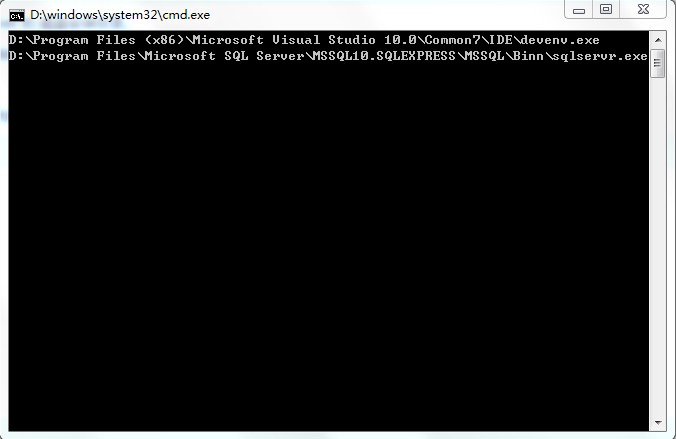
运行结果:
『练手』通过注册表 获取 VS 和 SQLServer 文件路径的更多相关文章
- 『练手』005 Laura.SqlForever历史遗留 的 架构思想缺陷
005 Laura.SqlForever历史遗留 的 架构思想缺陷 我们 比较一下 Laura.WinFramework 和 Laura.XtraFramework 的差异: Laura.WinFra ...
- 『练手』003 Laura.SqlForever如何扩展 兼容更多数据库引擎
003 Laura.SqlForever如何扩展 兼容更多数据库引擎 数据库引擎插件 在 界面上的体现 导航窗体 的 工具栏 中的 引擎下拉列表 导航窗体 的 树形控件 中的 引擎主节 ...
- 『练手』手写一个独立Json算法 JsonHelper
背景: > 一直使用 Newtonsoft.Json.dll 也算挺稳定的. > 但这个框架也挺闹心的: > 1.影响编译失败:https://www.cnblogs.com/zih ...
- 『练手』001 Laura.SqlForever架构基础(Laura.XtraFramework 的变迁)
001 Laura.SqlForever架构的基础(Laura.XtraFramework 的变迁之路) Laura.XtraFramework 到底是 做什么的? Laura.XtraFramewo ...
- 『练手』004 Laura.SqlForever如何扩展 导航栏 工具栏 右键菜单 插件
004 Laura.SqlForever如何扩展 导航栏 工具栏 右键菜单 插件 导航栏 插件扩展 比如下图的 窗口 > 关闭所有文档 这个导航栏: 在 任何程序集,任何命名空间,任 ...
- C# 系统应用之通过注册表获取USB使用记录(一)
该文章是“个人电脑历史记录清除软件”项目的系统应用系列文章.前面已经讲述了如何清除IE浏览器的历史记录.获取Windows最近访问文件记录.清除回收站等功能.现在我需要完成的是删除USB设备上的U盘. ...
- 练手爬虫用urllib模块获取
练手爬虫用urllib模块获取 有个人看一段python2的代码有很多错误 import re import urllib def getHtml(url): page = urllib.urlope ...
- delphi 获取 TreeView选中的文件路径
//获取 TreeView选中的文件路径 unit Unit1; interface uses Windows, Messages, SysUtils, Variants, Classes, G ...
- C# 根据注册表获取当前用户的常用目录整理
1.使用C#获取当前程序或解决方案的路径 2.使用C#获取当前登录用户的相关目录 3.也可以获取当前系统通用目录 4.获取Windows系统的目录,从注册表中获取. 一.当前用户的目录,HKEY_Cu ...
随机推荐
- 完美的js运动框架
//完美运动框架, 对象,json,函数function move(obj,json,funEnd){clearInterval(obj.timer);//清除定时器obj.timer= setInt ...
- java实现在线支付
国内电子商务系统实现的基本流程如下: 客户在系统内下订单 -> 系统根据订单生成支付宝接口url -> 客户通过url使用支付宝(网上银行)付款 -> 支付宝将客户的付款完成信息发送 ...
- js小括号的作用
js中小括号()的用法详解:对于小括号无论是菜鸟还是高手一定都不会陌生,可以说它几乎是随处可见,虽然熟悉但并非真正的理解,由此可能会产生很多莫名其妙的错误,下面就通过代码实例详细介绍一下小括号的用法. ...
- 转:SQL进阶之变量、事务、存储过程与触发器
一.变量那点事儿 1.1 局部变量 (1)声明局部变量 DECLARE @变量名 数据类型 DECLARE @name varchar(20) DECLARE @id int (2)为变量赋值 SET ...
- TP5 数组分页
需要 use think\Page; 我这个是 Page是从tp3.2的移到5.0来用的,如果你的里面没有这个也可以移动过来 PHP代码: $page= $this->request->p ...
- 浏览器之window对象--javascript
window对象代表打开的浏览器窗口,是Web浏览器所有内容的主容器.window对象是整个对象链条结构的最高层,是其他对象的父对象,在调用window对象的方法和属性时,可以省略window对象的引 ...
- [POJ2774]Long Long Message
vjudge 一句话题意 给两个串,求最长公共子串. sol 把两个串接在一起求后缀数组.其实中间最好用一个没有出现过的字符连接起来. 判断如果\(SA[i]\)和\(SA[i-1]\)不属于同一个串 ...
- 踩坑系列の Oracle dbms_job简单使用
二话不说先上代码 --创建存储过程 create or replace procedure job_truncateState is begin --此处就是要定时执行的sql execute imm ...
- 【python学习笔记】6.抽象
[python学习笔记]6.抽象 创建函数: 使用def语句定义函数,不用声明参数类型,和返回值类型 def function_name(param1, param2): 'this is docum ...
- C++中 Rand随机序列函数
标准库<cstdlib>(被包含于<iostream>中)提供两个帮助生成伪随机数的函数: 函数一:int rand(void): 从srand (seed ...