
C# 根据注册表获取当前用户的常用目录整理
1.使用C#获取当前程序或解决方案的路径
2.使用C#获取当前登录用户的相关目录
3.也可以获取当前系统通用目录
4.获取Windows系统的目录,从注册表中获取。
一、当前用户的目录,HKEY_Current_User
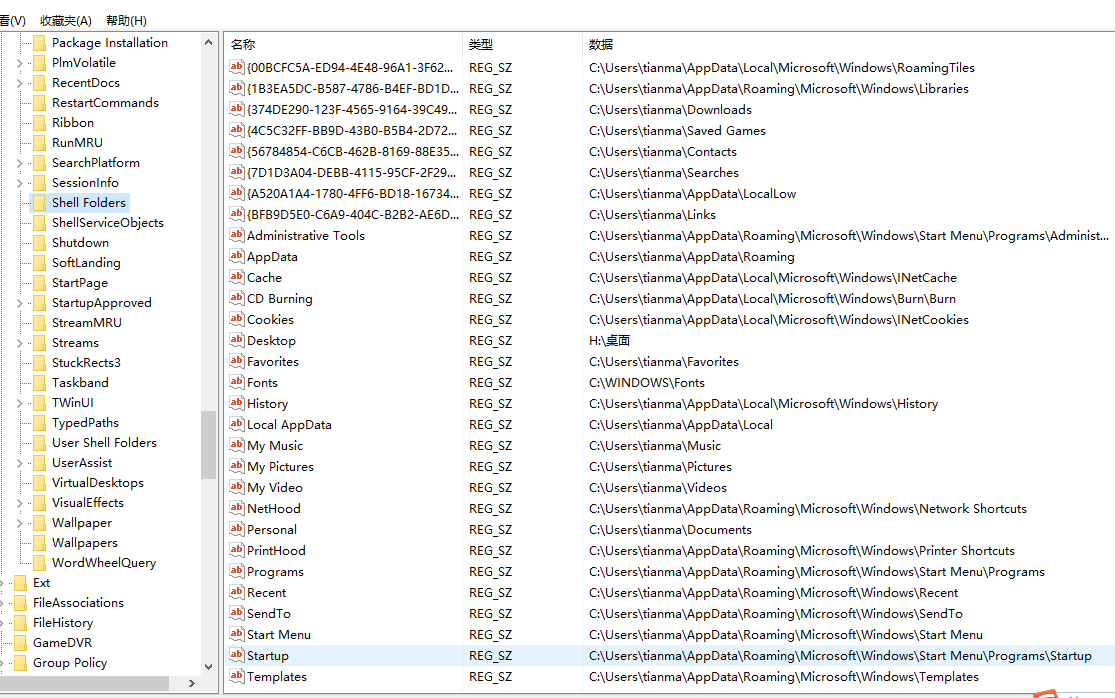
二、系统通用目录,当前机器,Hkey_Local_Machine

三、代码实例
 class LocalPathHelper

    {

        //windows当前用户的注册表键

        private static RegistryKey folders;

        /// <summary>

        /// 全局指定当前获取注册表的根节点

        /// 一般只有管理员身份运行,才能操作Registry.LocalMachine 对应的文件

        /// </summary>

        public static RegistryKey RootKey { get; set; }

        static LocalPathHelper()

        {

            SetAsCurrentUser();

        }

        /// <summary>

        /// 设置根节点为LocalMachine

        /// </summary>

        public static void SetAsLocalMachine()

        {

            RootKey = Registry.LocalMachine;

            folders = OpenRegistryKey(Registry.LocalMachine, @"/software/microsoft/windows/currentversion/explorer/shell folders");

        }

        /// <summary>

        /// 设置根节点为LocalMachine

        /// </summary>

        public static void SetAsCurrentUser()

        {

            RootKey = Registry.CurrentUser;

            folders = OpenRegistryKey(Registry.CurrentUser, @"/software/microsoft/windows/currentversion/explorer/shell folders");

        }

        #region 当前用户路径

        /// <summary>

        /// windows用户字体目录路径

        /// </summary>

        public static string FontsPath

        {

            get { return GetPath("Fonts"); }

        }

        /// <summary>

        /// windows用户网络邻居路径

        /// </summary>

        public static string NetHoodPath

        {

            get { return GetPath("Nethood"); }

        }

        /// <summary>

        /// windows用户我的文档路径

        /// </summary>

        public static string PersonalPath

        {

            get { return GetPath("Personal"); }

        }

        /// <summary>

        /// windows用户最近访问文档快捷方式目录

        /// </summary>

        public static string RecentPath

        {

            get { return GetPath("Recent"); }

        }

        /// <summary>

        /// windows用户发送到目录路径

        /// </summary>

        public static string SendToPath

        {

            get { return GetPath("Sendto"); }

        }

        /// <summary>

        /// windows用户收藏夹目录路径

        /// </summary>

        public static string FavoritesPath

        {

            get { return GetPath("Favorites"); }

        }

        /// <summary>

        /// windows用户网页历史目录路径

        /// </summary>

        public static string HistoryPath

        {

            get { return GetPath("History"); }

        }

        /// <summary>

        /// windows用户cookies目录路径

        /// </summary>

        public static string CookiePath

        {

            get { return GetPath("Cookies"); }

        }

        /// <summary>

        /// windows用户Cache目录路径

        /// </summary>

        public static string CachePath

        {

            get { return GetPath("Cache"); }

        }

        #endregion

        #region //系统路径

        /// <summary>

        /// widnows用户桌面路径

        /// </summary>

        public static string DesktopPath

        {

            get { return GetPath("Desktop"); }

        }

        /// <summary>

        /// windows用户开始菜单程序路径

        /// </summary>

        public static string ProgramsPath

        {

            get { return GetPath("Programs"); }

        }

        /// <summary>

        /// windows用户开始菜单目录路径

        /// </summary>

        public static string StartMenuPath

        {

            get { return GetPath("StartMenu"); }

        }

        /// <summary>

        /// windows用户开始菜单启动项目路径

        /// </summary>

        public static string StartupPath

        {

            get { return GetPath("Startup"); }

        }

        /// <summary>

        /// windows用户应用程序数据目录

        /// </summary>

        public static string AppdataPath

        {

            get { return GetPath("Appdata"); }

        }

        /// <summary>

        /// 公共文档

        /// </summary>

        public static string Documents

        {

            get { return GetPath("Documents"); }

        }

        #endregion

        /// <summary>

        /// 当前应用程序的工作目录,不是程序文件目录

        /// </summary>

        public static string CurrentProgramPath

        {

            get { return Directory.GetCurrentDirectory(); }

        }

        /// <summary>

        /// 当前应用程序解决方案路径

        /// </summary>

        public static string CurrentSolutionPath

        {

            get

            {

                string program = CurrentProgramPath;

                DirectoryInfo info = new DirectoryInfo(program);

                return info.Parent.Parent.FullName;

            }

        }

        #region //私有方法

        /// <summary>

        /// 获取键值对应的文件夹

        /// </summary>

        /// <param name="key">键</param>

        /// <returns>值</returns>

        private static string GetPath(string key)

        {

            if (RootKey == Registry.LocalMachine)

                key = "Common " + key;

            string path = folders.GetValue(key).ToString();

            if (!string.IsNullOrEmpty(path))

            {

                if (Directory.Exists(path))

                {

                    return path;

                }

            }

            return "'" + key + "'对应的文件夹不存在";

        }

        //打开,指定根节点和路径的注册表项

        private static RegistryKey OpenRegistryKey(RegistryKey root, string str)

        {

            str = str.Remove(, ) + @"/";

            while (str.IndexOf(@"/") != -)

            {

                root = root.OpenSubKey(str.Substring(, str.IndexOf(@"/")));

                str = str.Remove(, str.IndexOf(@"/") + );

            }

            return root;

        }

        #endregion

    }
更多:
要将程序集“xxx.dll”标记为系统必备组件,必须对其进行强签名
设置c#windows服务描述及允许服务与桌面交互的几种方法(转)
C# 根据注册表获取当前用户的常用目录整理的更多相关文章
- C# 系统应用之通过注册表获取USB使用记录(一)
该文章是“个人电脑历史记录清除软件”项目的系统应用系列文章.前面已经讲述了如何清除IE浏览器的历史记录.获取Windows最近访问文件记录.清除回收站等功能.现在我需要完成的是删除USB设备上的U盘. ...
- 获取客户端用户真实ip方法整理(jekyll迁移)
layout: post title: 获取客户端用户真实ip方法整理 date: 2019-08-22 author: xiepl1997 tags: springboot 由请求获取客户端ip地址 ...
- C#根据字体名通过注册表获取该字体文件路径(win10)两种方法推荐第二种
方法一: 直接先上源码: private System.Collections.Generic.SortedDictionary<string, string> ReadFontInfor ...
- Inno Setup中做补丁通过注册表获取原程序安装目录
今天找VM补丁看到的,是个innosetup封装的,所以习惯性的喜欢去看人家的iss文件是怎么编写的. DefaultDirName={reg:HKLM\SOFTWARE\VMware%2c%20In ...
- 『练手』通过注册表 获取 VS 和 SQLServer 文件路径
获取任意 VS 和 SQLServer 的 磁盘安装目录. 背景需求:如果磁盘电脑安装了 VS 或者 SQLServer 则 认定这台计算机 的使用者 是一名 软件研发人员,则让程序 以最高权限运行. ...
- 读取注册表获取Windows系统XP/7/8/10类型(使用wcscmp比较wchar[]内容)
很多方案是采用GetVersion.GetVersionEx这两个API来查询操作系统的版本号来判断当前的操作系统是Windows系列中的哪个,在Win10没有出现前,这种方法是行的通的,但是Win1 ...
- C#注册表操作类(完整版) 整理完整
/// <summary> /// 注册表基项静态域 /// /// 主要包括: /// 1.Registry.ClassesRoot 对应于HKEY_CLASSES_ROOT主键 /// ...
- 利用C#访问注册表获取软件的安装路径
文章地址:https://blog.csdn.net/yl2isoft/article/details/17332139
- Win查询注册表获取CPU与内存参数
#include "stdafx.h" void dump_machine_info( HANDLE fh ) { CHAR Str[MAX_PATH*3]; CHAR MHzSt ...
随机推荐
- webstorm减少内存占用
首先,按照我说的设置之后要重启才行. 在项目里找到不需要监听的文件夹右键:Mark Directory As => Cancel Exclusion 然后重启,嘿嘿,成功了!
- MySQL 中国省市区SQL表数据
MySQL 中国省市区SQL表数据 1.查省SELECT * FROM china WHERE china.Pid=02.查市SELECT * FROM chinaWHERE china.Pid= ...
- [代码审计]phpshe开源商城后台两处任意文件删除至getshell
0x00 背景 这套系统审了很久了,审计的版本是1.6,前台审不出个所以然来.前台的限制做的很死. 入库的数据都是经过mysql_real_escape_string,htmlspecialchars ...
- java 中的同步机制
对于有些场景,需要a.b线程按照顺序去执行,因为b线程要依赖a线程对某共享资源或 状态处理后,对于这种情况可以使用 private CountDownLatch connectedSignal = n ...
- 面向对象设计原则 单一职责原则(Single responsibility principle)
单一职责原则(SRP:Single responsibility principle) 又称单一功能原则,面向对象的基本原则之一.它规定 一个类应该只有一个发生变化的原因. 该原则由罗伯特·C·马丁( ...
- BZOJ 3253 Fence Repair 哈夫曼树 水题
http://poj.org/problem?id=3253 这道题约等于合并果子,但是通过这道题能够看出来哈夫曼树是什么了. #include<cstdio> #include<c ...
- hdu 5821 Ball 贪心
Ball 题目连接: http://acm.hdu.edu.cn/showproblem.php?pid=5821 Description ZZX has a sequence of boxes nu ...
- 如何利用JS判断当前来路域名并跳转到指定页面
1.如何利用JS判断当前来路域名并跳转到指定页面 获取当前请求路径var href = location.href ;if(href.indexOf("baidu")>-1) ...
- 使用Python中的HTMLParser、cookielib抓取和解析网页、从HTML文档中提取链接、图像、文本、Cookies(二)(转)
对搜索引擎.文件索引.文档转换.数据检索.站点备份或迁移等应用程序来说,经常用到对网页(即HTML文件)的解析处理.事实上,通过 Python语言提供的各种模块,我们无需借助Web服务器或者Web浏览 ...
- 狗日的系统之家下载的Windows 10 1803/1809系统不干净,捆绑自动安装腾讯关键等软件
特此记录一下,如果网友看到这篇文章请不要下载它们家的,捆绑软件,并且安装自动设置了账号,这还不是修改,是啥? 我们都知道现在iso文件基本都是网友自行制作的,从微软下载的文件自行制作成iso,也就是现 ...