
Python 爬取 中关村CPU名字和主频
0.准备工作
1.相关教程
2.说明
3.效果
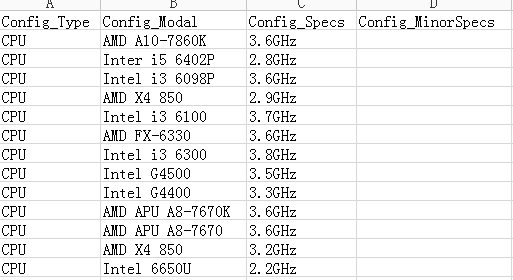
1.获取CPU型号和主频信息
1.神伤的AJAX
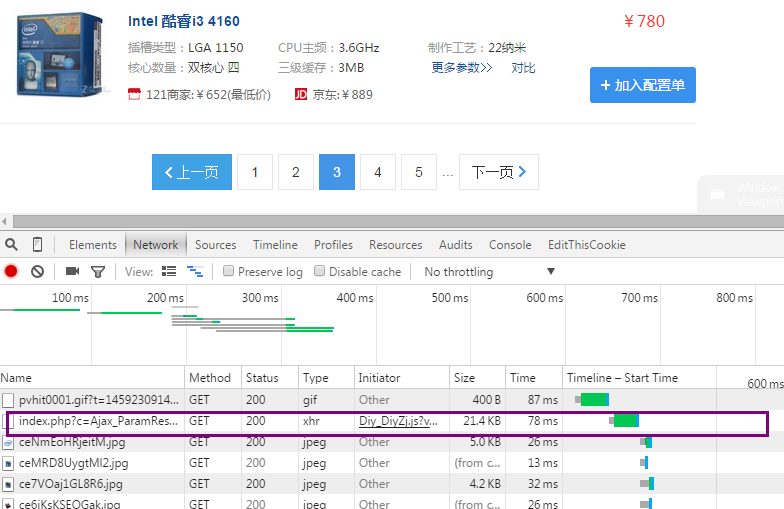
2.获取CPU名字
#-*- coding: UTF-8 -*-
import urllib
import re
from bs4 import BeautifulSoup
url='http://zj.zol.com.cn/index.php?c=Ajax_ParamResponse&a=GetGoods&subcateId=28&type=0&priceId=noPrice&page=2&manuId=¶mStr=&keyword=&locationId=1&queryType=0'
html = urllib.urlopen(url).read()
soup=BeautifulSoup(html,"html.parser")
listModal=[]
listSpecs=[]
tags = soup.find_all("a",attrs={"target":"\\\"_blank\\\""})
cnt=0
for tag in tags:
cnt+=1
modalSubstr=tag.contents[0]
#print 'modalSubstr:'+modalSubstr
manufacturer=re.findall('(.+?) ',modalSubstr)[0]#非贪心匹配 遇到空格即中止,返回第一个匹配项
#print 'manufacturer:'+manufacturer
detailSubstr=re.findall(' ([0-9a-zA-Z- ]+)',modalSubstr)
#print detailSubstr
detailSubstr0=detailSubstr[0]
#针对i3、i5、i7的处理
if "i3" in modalSubstr:
modalDetail="i3 "+detailSubstr0
elif "i5" in modalSubstr:
modalDetail="i5 "+detailSubstr0
elif "i7" in modalSubstr:
modalDetail="i7 "+detailSubstr0
else:
modalDetail=detailSubstr0
#针对APU的处理
if modalDetail=="APU":
modalDetail+=" "+detailSubstr[1] modal=manufacturer+" "+modalDetail
print "modal:"+modal
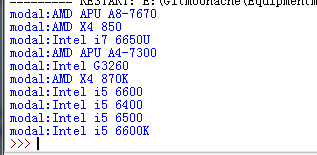
3.获取CPU主频
#-*- coding: UTF-8 -*-
import urllib
import re
from bs4 import BeautifulSoup
url='http://zj.zol.com.cn/index.php?c=Ajax_ParamResponse&a=GetGoods&subcateId=28&type=0&priceId=noPrice&page=2&manuId=¶mStr=&keyword=&locationId=1&queryType=0'
html = urllib.urlopen(url).read()
soup=BeautifulSoup(html,"html.parser")
listModal=[]
listSpecs=[]
tags = soup.find_all("a",attrs={"target":"\\\"_blank\\\""})
cnt=0
for tag in tags:
cnt+=1
print cnt
substr=str(tag)[100:500]
#以title='\"开头+任意小数+ GHz结尾
specsDictionary=re.findall(r'title=\'\\\"([0-9.]+GHz)',substr)
try:
specs=specsDictionary[0]
except IndexError:
specs="Data Missed"
print specs
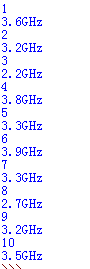
4.循环读取下一页并自动终止

urlLeft='http://zj.zol.com.cn/index.php?c=Ajax_ParamResponse&a=GetGoods&subcateId=28&type=0&priceId=noPrice&page='
urlRight='&manuId=¶mStr=&keyword=&locationId=1&queryType=0'
urlPageIndex=1
while (1):
url=urlLeft+str(urlPageIndex)+urlRight
html = urllib.urlopen(url).read()
soup=BeautifulSoup(html,"html.parser")
soupSub=str(soup)[0:50]
pageIndex=int(re.findall('page\":([0-9]+)',soupSub)[0])
if urlPageIndex==pageIndex:
tags = soup.find_all("a",attrs={"target":"\\\"_blank\\\""})
cnt=0
for tag in tags:
......省略
print "yes"+str(urlPageIndex)
urlPageIndex+=1
else:
print "no"+str(urlPageIndex)
break
5.输出为csv
import csv

with open('excel_2010_ms-dos.csv', 'rb') as csvfile:

    spamreader = csv.reader(csvfile, dialect='excel')

    for row in spamreader:

        print ', '.join(row)
6.最终代码
#-*- coding: UTF-8 -*-
import urllib
import re
import csv
from bs4 import BeautifulSoup
listModal=[]
listSpecs=[]
urlLeft='http://zj.zol.com.cn/index.php?c=Ajax_ParamResponse&a=GetGoods&subcateId=28&type=0&priceId=noPrice&page='
urlRight='&manuId=¶mStr=&keyword=&locationId=1&queryType=0'
urlPageIndex=1
while (1):
url=urlLeft+str(urlPageIndex)+urlRight
html = urllib.urlopen(url).read()
soup=BeautifulSoup(html,"html.parser")
soupSub=str(soup)[0:50]
pageIndex=int(re.findall('page\":([0-9]+)',soupSub)[0])
if urlPageIndex==pageIndex:
tags = soup.find_all("a",attrs={"target":"\\\"_blank\\\""})
cnt=0
for tag in tags:
cnt+=1
modalSubstr=tag.contents[0]
manufacturer=re.findall('(.+?) ',modalSubstr)[0]#非贪心匹配 遇到空格即中止,返回第一个匹配项
detailSubstr=re.findall(' ([0-9a-zA-Z- ]+)',modalSubstr)
detailSubstr0=detailSubstr[0]
#针对i3、i5、i7的处理
if "i3" in modalSubstr:
modalDetail="i3 "+detailSubstr0
elif "i5" in modalSubstr:
modalDetail="i5 "+detailSubstr0
elif "i7" in modalSubstr:
modalDetail="i7 "+detailSubstr0
else:
modalDetail=detailSubstr0
#针对APU的处理
if modalDetail=="APU":
modalDetail+=" "+detailSubstr[1]
modal=manufacturer+" "+modalDetail
listModal.append(modal)
substr=str(tag)[100:500]
#以title='\"开头+任意小数+ GHz结尾
specsDictionary=re.findall(r'title=\'\\\"([0-9.]+GHz)',substr)
try:
specs=specsDictionary[0]
except IndexError:
specs="Data Missed"
listSpecs.append(specs)
print "yes"+str(urlPageIndex)
urlPageIndex+=1
else:
print "no"+str(urlPageIndex)
break
with open('Config.csv', 'wb') as csvfile:
spamwriter = csv.writer(csvfile, dialect='excel')
#write 标题行
spamwriter.writerow(['Config_Type','Config_Modal','Config_Specs','Config_MinorSpecs'])
i=0
for elementModal in listModal:
spamwriter.writerow(['CPU',listModal[i], listSpecs[i]])
i+=1
Python 爬取 中关村CPU名字和主频的更多相关文章
- 利用python爬取58同城简历数据
利用python爬取58同城简历数据 利用python爬取58同城简历数据 最近接到一个工作,需要获取58同城上面的简历信息(http://gz.58.com/qzyewu/).最开始想到是用pyth ...
- 利用Python爬取豆瓣电影
目标:使用Python爬取豆瓣电影并保存MongoDB数据库中 我们先来看一下通过浏览器的方式来筛选某些特定的电影: 我们把URL来复制出来分析分析: https://movie.douban.com ...
- Python爬取LOL英雄皮肤
Python爬取LOL英雄皮肤 Python 爬虫 一 实现分析 在官网上找到英雄皮肤的真实链接,查看多个后发现前缀相同,后面对应为英雄的ID和皮肤的ID,皮肤的ID从00开始顺序递增,而英雄ID跟 ...
- 萌新学习Python爬取B站弹幕+R语言分词demo说明
代码地址如下:http://www.demodashi.com/demo/11578.html 一.写在前面 之前在简书首页看到了Python爬虫的介绍,于是就想着爬取B站弹幕并绘制词云,因此有了这样 ...
- Python爬取网页信息
Python爬取网页信息的步骤 以爬取英文名字网站(https://nameberry.com/)中每个名字的评论内容,包括英文名,用户名,评论的时间和评论的内容为例. 1.确认网址 在浏览器中输入初 ...
- steam夏日促销悄然开始,用Python爬取排行榜上的游戏打折信息
前言 本文的文字及图片来源于网络,仅供学习.交流使用,不具有任何商业用途,版权归原作者所有,如有问题请及时联系我们以作处理. 不知不觉,一年一度如火如荼的steam夏日促销悄然开始了.每年通过大大小小 ...
- Python爬取 | 唯美女生图片
这里只是代码展示,且复制后不能直接运行,需要配置一些设置才行,具体请查看下方链接介绍: Python爬取 | 唯美女生图片 from selenium import webdriver from fa ...
- Python爬取 | 王者荣耀英雄皮肤海报
这里只展示代码,具体介绍请点击下方链接. Python爬取 | 王者荣耀英雄皮肤海报 import requests import re import os import time import wi ...
- Python 爬取途虎养车 全系车型 轮胎 保养 数据
Python 爬取途虎养车 全系车型 轮胎 保养 数据 2021.7.27 更新 增加标题.发布时间参数 demo文末自行下载,需要完整数据私聊我 2021.2.19 更新 增加大保养数据 2020. ...
随机推荐
- AJAX入门第一篇就够了
什么是Ajax Ajax(Asynchronous JavaScript and XML) 异步JavaScript和XML Ajax实际上是下面这几种技术的融合: (1)XHTML和CSS的基于标准 ...
- 《算法导论》Chapter 4 Divide-and-Conquer的学习笔记
Introduction Divide-and-Conquer的三个步骤: Divide the problem into a number of subproblems that are small ...
- git使用步骤_2017
(部署项目) zbot deploy developer git对文件chmod 777后导致status发生变化,使用: git config core.fileMode false [当 ...
- 十年磨一剑 Delphi重新崛起再写传奇
新年伊始,英巴卡迪诺公司(Embarcadero)就在其官网发布了"激动人心的RAD Studio2018年发展规划"公告(见上图).公告中指出,将在于2018年第一季度发布10. ...
- MySQL如何正确查询字段为NULL的字段
//++++++++++++++++++++++++++++++++++++++++++++++++++++++++++++++++++++++++++++++++++++++++++++++++++ ...
- Spring boot 整合mybatis
第一步:创建maven项目并添加spring boot依赖: <project xmlns="http://maven.apache.org/POM/4.0.0" xmlns ...
- BroadcastReceiver工作过程
动态注册过程: ContextWrapper.registerReceiver--> ContextImpl.registerReceiver--> ContextImpl.registe ...
- numpy模块中的sum(axis)方法
1.sum函数声明 sum(a, axis=None, dtype=None, out=None, keepdims=<class 'numpy._globals._NoValue'>) ...
- C. Vasya and String
原题链接 C. Vasya and String High school student Vasya got a string of length n as a birthday present. T ...
- SpringBoot,Security4, redis共享session,分布式SESSION并发控制,同账号只能登录一次
由于集成了spring session ,redis 共享session,导致SpringSecurity单节点的session并发控制失效, springSession 号称 无缝整合httpses ...