
emqtt 试用(五)emq 的用户密码认证
MQTT 认证设置
EMQ 消息服务器认证由一系列认证插件(Plugin)提供,系统支持按用户名密码、ClientID 或匿名认证。
系统默认开启匿名认证(anonymous),通过加载认证插件可开启的多个认证模块组成认证链:
           ----------------           ----------------           ------------

Client --> | Username认证 | -ignore-> | ClientID认证 | -ignore-> | 匿名认证 |

           ----------------           ----------------           ------------

                  |                         |                         |

                 \|/                       \|/                       \|/

            allow | deny              allow | deny              allow | deny
注解
EMQ 2.0 消息服务器还提供了 MySQL、PostgreSQL、Redis、MongoDB、HTTP、LDAP 认证插件。
开启匿名认证
etc/emq.conf 配置启用匿名认证:
## Allow Anonymous authentication

mqtt.allow_anonymous = true
EMQ 2.0 版本提供的认证插件包括:
| 插件 | 说明 |
|---|---|
| emq_auth_clientid | ClientId 认证/鉴权插件 |
| emq_auth_username | 用户名密码认证/鉴权插件 |
| emq_auth_ldap | LDAP 认证/鉴权插件 |
| emq_auth_http | HTTP 认证/鉴权插件 |
| emq_auth_mysql | MySQ L认证/鉴权插件 |
| emq_auth_pgsql | Postgre 认证/鉴权插件 |
| emq_auth_redis | Redis 认证/鉴权插件 |
| emq_auth_mongo | MongoDB 认证/鉴权插件 |
用户名密码认证
基于 MQTT 登录用户名(username)、密码(password)认证。
etc/plugins/emq_auth_username.conf 中配置默认用户:
auth.user.$N.username = admin

auth.user.$N.password = public
启用 emq_auth_username 插件:
./bin/emqttd_ctl plugins load emq_auth_username
使用 ./bin/emqttd_ctl users 命令添加用户:
$ ./bin/emqttd_ctl users add <Username> <Password>
ClientId 认证
基于 MQTT 客户端 ID 认证。
etc/plugins/emq_auth_clientid.conf:
auth.client.$N.clientid = clientid

auth.client.$N.password = passwd
启用 emq_auth_clientid 插件:
./bin/emqttd_ctl plugins load emq_auth_clientid
LDAP 插件认证
etc/plugins/emq_auth_ldap.conf 配置 LDAP 参数:
auth.ldap.servers = 127.0.0.1

auth.ldap.port = 389

auth.ldap.timeout = 30

auth.ldap.user_dn = uid=%u,ou=People,dc=example,dc=com

auth.ldap.ssl = false
启用 LDAP 认证插件:
./bin/emqttd_ctl plugins load emq_auth_ldap
HTTP 插件认证
注解
开启 HTTP 认证插件后,会终结认证链
etc/plugins/emq_auth_http.conf 配置 ‘super_req’, ‘auth_req’:
## Variables: %u = username, %c = clientid, %a = ipaddress, %P = password, %t = topic

auth.http.auth_req = http://127.0.0.1:8080/mqtt/auth

auth.http.auth_req.method = post

auth.http.auth_req.params = clientid=%c,username=%u,password=%P

auth.http.super_req = http://127.0.0.1:8080/mqtt/superuser

auth.http.super_req.method = post

auth.http.super_req.params = clientid=%c,username=%u
启用 HTTP 认证插件:
./bin/emqttd_ctl plugins load emq_auth_http
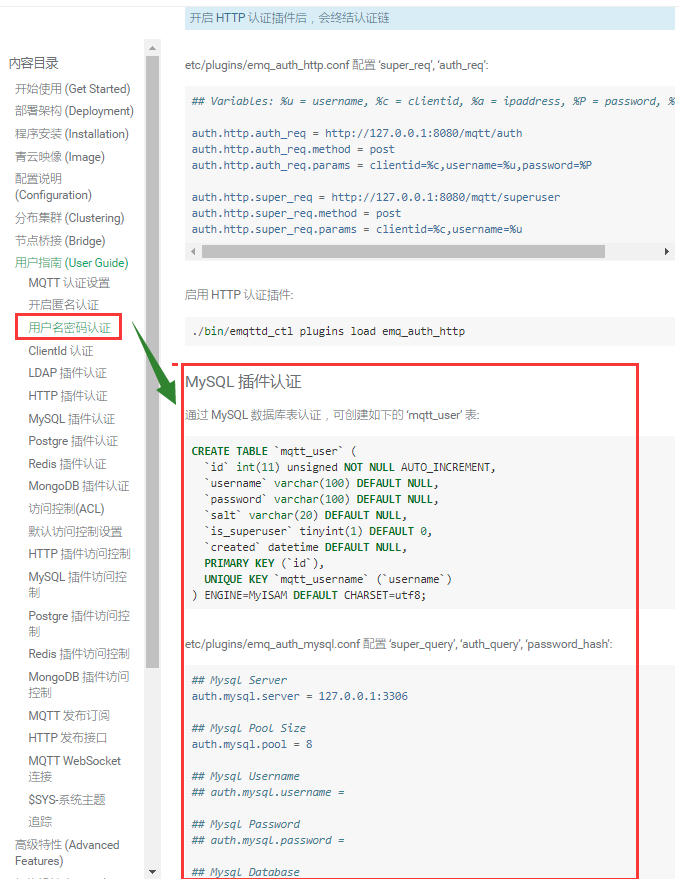
MySQL 插件认证
通过 MySQL 数据库表认证,可创建如下的 ‘mqtt_user’ 表:
CREATE TABLE `mqtt_user` (

  `id` int(11) unsigned NOT NULL AUTO_INCREMENT,

  `username` varchar(100) DEFAULT NULL,

  `password` varchar(100) DEFAULT NULL,

  `salt` varchar(20) DEFAULT NULL,

  `is_superuser` tinyint(1) DEFAULT 0,

  `created` datetime DEFAULT NULL,

  PRIMARY KEY (`id`),

  UNIQUE KEY `mqtt_username` (`username`)

) ENGINE=MyISAM DEFAULT CHARSET=utf8;
etc/plugins/emq_auth_mysql.conf 配置 ‘super_query’, ‘auth_query’, ‘password_hash’:
## Mysql Server

auth.mysql.server = 127.0.0.1:3306

## Mysql Pool Size

auth.mysql.pool = 8

## Mysql Username

## auth.mysql.username =

## Mysql Password

## auth.mysql.password =

## Mysql Database

auth.mysql.database = mqtt

## Variables: %u = username, %c = clientid

## Authentication Query: select password only

auth.mysql.auth_query = select password from mqtt_user where username = '%u' limit 1

## Password hash: plain, md5, sha, sha256, pbkdf2

auth.mysql.password_hash = sha256

## %% Superuser Query

auth.mysql.super_query = select is_superuser from mqtt_user where username = '%u' limit 1
注解
如果系统已有MQTT认证表,可通过配置’auth_query’查询语句集成。
启用 MySQL 认证插件:
./bin/emqttd_ctl plugins load emq_auth_mysql
Postgre 插件认证
通过 PostgreSQL 数据库表认证,可创建如下的 ‘mqtt_user’ 表:
CREATE TABLE mqtt_user (

  id SERIAL primary key,

  is_superuser boolean,

  username character varying(100),

  password character varying(100),

  salt character varying(40)

);
etc/plugins/emq_auth_pgsql.conf 配置 ‘auth_query’、’password_hash’:
## Postgre Server

auth.pgsql.server = 127.0.0.1:5432

auth.pgsql.pool = 8

auth.pgsql.username = root

#auth.pgsql.password =

auth.pgsql.database = mqtt

auth.pgsql.encoding = utf8

auth.pgsql.ssl = false

## Variables: %u = username, %c = clientid, %a = ipaddress

## Authentication Query: select password only

auth.pgsql.auth_query = select password from mqtt_user where username = '%u' limit 1

## Password hash: plain, md5, sha, sha256, pbkdf2

auth.pgsql.password_hash = sha256

## sha256 with salt prefix

## auth.pgsql.password_hash = salt sha256

## sha256 with salt suffix

## auth.pgsql.password_hash = sha256 salt

## Superuser Query

auth.pgsql.super_query = select is_superuser from mqtt_user where username = '%u' limit 1
启用 Postgre 认证插件:
./bin/emqttd_ctl plugins load emq_auth_pgsql
Redis 插件认证
Redis 认证。MQTT 用户记录存储在 Redis Hash, 键值: “mqtt_user:<Username>”
etc/plugins/emq_auth_redis.conf 设置 ‘super_cmd’、’auth_cmd’、’password_hash’:
## Redis Server

auth.redis.server = 127.0.0.1:6379

## Redis Pool Size

auth.redis.pool = 8

## Redis Database

auth.redis.database = 0

## Redis Password

## auth.redis.password =

## Variables: %u = username, %c = clientid

## Authentication Query Command

auth.redis.auth_cmd = HGET mqtt_user:%u password

## Password hash: plain, md5, sha, sha256, pbkdf2

auth.redis.password_hash = sha256

## Superuser Query Command

auth.redis.super_cmd = HGET mqtt_user:%u is_superuser
启用 Redis 认证插件:
./bin/emqttd_ctl plugins load emq_auth_redis
MongoDB 插件认证
按 MongoDB 用户集合认证,例如创建 ‘mqtt_user’ 集合:
{

    username: "user",

    password: "password hash",

    is_superuser: boolean (true, false),

    created: "datetime"

}
etc/plugins/emq_auth_mongo.conf 设置 ‘super_query’、’auth_query’:
## Mongo Server

auth.mongo.server = 127.0.0.1:27017

## Mongo Pool Size

auth.mongo.pool = 8

## Mongo User

## auth.mongo.user =

## Mongo Password

## auth.mongo.password =

## Mongo Database

auth.mongo.database = mqtt

## auth_query

auth.mongo.auth_query.collection = mqtt_user

auth.mongo.auth_query.password_field = password

auth.mongo.auth_query.password_hash = sha256

auth.mongo.auth_query.selector = username=%u

## super_query

auth.mongo.super_query.collection = mqtt_user

auth.mongo.super_query.super_field = is_superuser

auth.mongo.super_query.selector = username=%u
启用 MongoDB 认证插件:
./bin/emqttd_ctl plugins load emq_auth_mongo
emqtt 试用(五)emq 的用户密码认证的更多相关文章
- emqtt emq 的用户密码认证
MQTT 认证设置 EMQ 消息服务器认证由一系列认证插件(Plugin)提供,系统支持按用户名密码.ClientID 或匿名认证. 系统默认开启匿名认证(anonymous),通过加载认证插件可开启 ...
- EMQ -- 用户密码认证
emq 的用户密码认证 MQTT 认证设置 EMQ 消息服务器认证由一系列认证插件(Plugin)提供,系统支持按用户名密码.ClientID 或匿名认证. 系统默认开启匿名认证(anonymous) ...
- squid+stunnel+用户密码认证的三种玩法
没办法,应用越来越深入,就会越来越多要求. squid+stunnel+用户密码认证的场景至少以下三个,我会遇到. 1,标准玩法 在服务器上建一个SQUID,加密码认证,然后,其它人通过它上网.(不要 ...
- elasticsearch 6.2.4添加用户密码认证
elasticsearch 6.3版本之前的添加认证需安装x-pack插件,6.3之后貌似去掉了这个. 1.安装x-pack 先切换到elastic用户下,在执行以下命令 $cd /data/elas ...
- Oracle用户密码认证方式
oracle用户有两种认证方式: 操作系统认证(要求该用户属于本地DBA组,然后通过操作系统认证登录oracle,从而启动数据库) 密码文件认证 oracle使用哪种认证方式决定在于两个参数: 1.r ...
- scylladb docker-compose 用户密码认证配置
scylladb 对于用户的认证配置还是比较简单的,以下是一个docker-compose 配置的说明 环境准备 docker-compose 文件 version: "3" se ...
- python装饰器实现用户密码认证(简单初形)
import timecurrent_user={'user':None}def auth(engine = 'file'): def deco(func): #func=最初始的index和最初始的 ...
- 搭建Docker私有仓库&用户密码认证&web可视化界面
1.拉取镜像 docker pull hyper/docker-registry-web docker pull registry 2.安装 yum install docker-compose 3. ...
- ansible不配ssh连接,用户密码登录
ansible 不配ssh免密链接,直接用ssh用户密码连接,要先装sshpass. 否则会报错: sshpass安装 sshpass下载地址:http://sourceforge.net/proje ...
随机推荐
- call是什么?一次说个明白
首先简单粗暴的从例子中看概念 var a = {}; function foo() { this.name = "hello"; this.age = 100 } foo.call ...
- Python3数据库模块(sqlite3,SQLite3)
一.sqlite命令 创建数据库:在控制台sqlite3 name .databases 查看数据库 .tables 查看表格名 databaseName .dump & ...
- Django基础(二):环境配置
前戏 WEB框架简介 具体介绍Django之前,必须先介绍WEB框架等概念. web框架: 别人已经设定好的一个web网站模板,你学习它的规则,然后“填空”或“修改”成你自己需要的样子. 一般web框 ...
- java反射机制(先马再看)
http://blog.csdn.net/sinat_38259539/article/details/71799078
- 并查集(Java实现)
(最好在电脑下浏览本篇博客...手机上看代码不方便) 当时学的时候看的一本印度的数据结构书(好像是..有点忘了..反正跟同学们看的都不一样...)...里面把本文提到的所有情况都提到了,我这里只是重复 ...
- 1-1 struts2 基本配置 struts.xml配置文件详解
详见http://www.cnblogs.com/dooor/p/5323716.html 一. struts2工作原理(网友总结,千遍一律) 1 客户端初始化一个指向Servlet容器(例如Tomc ...
- 重读 必须知道的.NET
1 .public ,对访问成员无限制,属于访问级别最高的权限. protected 访问包含类或者丛类派生类的类. internal 仅限于程序集, protected inernal 访问仅限于 ...
- 面试题中遇到的算法与js技巧
近一周在忙着面试,本月第一次更博,甚是想念. 基本上大公司都会要求一些算法或者数据结构类的东西,这方面自己还不是很精通,只能一步一个脚印来积累了. 1.查询字符串获取对象数据,可自行根据需求选择格式, ...
- 前端的UI设计与交互之反馈示篇
为了帮助用户了解应用当前要做什么,也给用户的下一步行为做参考,以及了解操作后所产生的结果 ,当用户和系统需要交互时,使用不同的模式来反馈信息或结果.当设计者使用反馈或者自定义一些反馈时,请注意:为用户 ...
- jenkins忘记密码怎么办?
在nginx配置文件中加上域名访问,重定向到本机的8080端口. server { listen 80; server_name tomcat.qinyj.top; root /application ...