
ssm上传图片
ssm上传图片
1 需求
添加客户时上传图片和客户修改信息是上传图片。
2 思路
首先,数据库创建pic字段,类型为varchar,通过逆向工程重新生成mapper接口和xml文件。
其次,service层注入mapper接口,调用mapper接口中的添加和更新方法。
然后,controller层注入service接口,用MultipartFile接受jsp传入的图片,经过处理写入客户po类中,调用service的方法更新和添加方法。
最后,编写jsp界面,通过js将要上传的图片显示添加页面或更改页面。Form表单配置提交多部件的属性enctype="multipart/form-data"。
3 环境准备
3.1 导入所需Jar包

3.2 配置springmvc.xml文件
在页面form中提交enctype="multipart/form-data"的数据时,需要springmvc对multipart类型的数据进行解析,在springmvc.xml中配置multipart类型解析器
<!-- 文件上传 -->

   <bean id="multipartResolver" class="org.springframework.web.multipart.commons.CommonsMultipartResolver">

      <!-- 设置上传文件的最大尺寸为5MB -->

      <property name="maxUploadSize">

         <value>5242880</value>

      </property>

   </bean>
4 dao层
逆向工程参考http://how2j.cn/k/mybatis/mybatis-generator/1376.html
dao层运用逆向工程生成mapper接口中的方法和自定义的接口的方法
参考这篇文章的 https://www.cnblogs.com/peter-hao/p/ssm_custom.html
的dao层
5 service层
参考这篇文章的https://www.cnblogs.com/peter-hao/p/ssm_custom.html 中的service层
6 controller层
参考https://www.cnblogs.com/peter-hao/p/ssm_custom.html 中的controller层,
6.1 修改addCustomSubmit方法
  @RequestMapping("/addCustomSubmit")

   public String addCustomSubmit(HhCustom hhCustom, MultipartFile custom_pic) throws Exception {

      // 上传图片

      // 原始名称

      String originalFilename = custom_pic.getOriginalFilename();

      if (custom_pic != null && originalFilename != null && originalFilename.length() > 0) {

         // 存储图片的物理路径

         String pic_path = "C:\\Users\\Peter.Hao\\Desktop\\ssm_doc\\image\\";

         // 新的图片名称

         String newFileName = UUID.randomUUID() + originalFilename.substring(originalFilename.lastIndexOf("."));

         // 新的图片(物理路径+图片名)

         File newFile = new File(pic_path + newFileName);

         // 将内存中的数据写到磁盘

         custom_pic.transferTo(newFile);

         // 将图片加入到HhCustom中

         hhCustom.setPic(newFileName);

      }

      // 调用service更新客户信息

      customService.addCustom(hhCustom);

      // 重定向

      return "redirect:findAllCustom.action";

   }
6.2 修改updateCustomSubmit方法
  // 更新客户信息submit

   @RequestMapping("/updateCustomSubmit")

   public String updateCustomSubmit(Integer id, HhCustom hhCustom, MultipartFile custom_pic) throws Exception {

      // 上传图片

      // 原始名称

      String originalFilename = custom_pic.getOriginalFilename();

      if (custom_pic != null && originalFilename != null && originalFilename.length() > 0) {

         // 存储图片的物理路径

         String pic_path = "C:\\Users\\Peter.Hao\\Desktop\\ssm_doc\\image\\";

         // 新的图片名称

         String newFileName = UUID.randomUUID() + originalFilename.substring(originalFilename.lastIndexOf("."));

         // 新的图片(物理路径+图片名)

         File newFile = new File(pic_path + newFileName);

         // 将内存中的数据写到磁盘

         custom_pic.transferTo(newFile);

         // 将图片加入到HhCustom中

         hhCustom.setPic(newFileName);

      }

      // 调用service更新客户信息

      customService.updateCustom(id, hhCustom);

      return "redirect:findAllCustom.action";

   }
7 jsp页面
7.1 customlist.jsp
<%@ page language="java" contentType="text/html; charset=UTF-8"

   pageEncoding="UTF-8"%>

<%@ taglib uri="http://java.sun.com/jsp/jstl/core" prefix="c"%>

<%@ taglib uri="http://java.sun.com/jsp/jstl/fmt" prefix="fmt"%>

<!DOCTYPE html PUBLIC "-//W3C//DTD HTML 4.01 Transitional//EN" "http://www.w3.org/TR/html4/loose.dtd">

<html>

<head>

<meta http-equiv="Content-Type" content="text/html; charset=UTF-8">

<script type="text/javascript">

function addCustom(){

document.customForm.action="${pageContext.request.contextPath}/addCustom.action";

   document.customForm.submit();

}

</script>

<title>客戶列表</title>

</head>

<body>

   <form name="customForm"    action="${pageContext.request.contextPath}/findAllCustom.action"      method="post">

      查询条件:

      <table width="100%" border=1>

         <tr>

            <td>客戶名称:<input name="hhCustom.name" />

            </td>

            <td>客戶类型: <select name="hhCustom.category">

                   <option selected="selected"></option>

                   <c:forEach items="${customTypes}" var="customType">

                      <option value="${customType.value }">${customType.value}</option>

                   </c:forEach>

            </select>

            </td>

            <td><button type="submit" value="查询" >查询</button></td>

            <td><input type="button" value="添加客户" onclick="addCustom()"/></td>

         </tr>

      </table>

      客戶列表:

      <table width="100%" border=1>

         <tr>

            <!-- <th>选择</th>  -->

            <th>客戶名称</th>

            <th>客戶邮箱</th>

            <th>客戶电话</th>

            <th>客户类型</th>

            <th>客户头像</th>

            <th>操作</th>

         </tr>

         <c:forEach items="${customlist}" var="custom">

            <tr>

                <%-- <td><input type="checkbox" name="custom_id" value="${custom.id}" /></td> --%>

                <td>${custom.name }</td>

                <td>${custom.mail }</td>

                <td>${custom.phoneNumber }</td>

                <td>${custom.category }</td>

                <td align="center"><img src="/pic/${custom.pic }" width="100px" height="100px"/></td>

               <%--<td><fmt:formatDate value="${custom.birthday }" pattern="yyyy-MM-dd HH:mm:ss"/></td>--%>

                <td><a href="${pageContext.request.contextPath }/updateCustom.action?id=${custom.id }">修改</a>

                   <a href="${pageContext.request.contextPath }/deleteCustom.action?id=${custom.id }">删除</a>

                </td>

            </tr>

         </c:forEach>

      </table>

   </form>

</body>

</html>
7.2 add_custom.jsp
<%@ page language="java" contentType="text/html; charset=UTF-8"

   pageEncoding="UTF-8"%>

<%@ taglib uri="http://java.sun.com/jsp/jstl/core" prefix="c"%>

<%@ taglib uri="http://java.sun.com/jsp/jstl/fmt" prefix="fmt"%>

<!DOCTYPE html PUBLIC "-//W3C//DTD HTML 4.01 Transitional//EN" "http://www.w3.org/TR/html4/loose.dtd">

<html>

<head>

<meta http-equiv="Content-Type" content="text/html; charset=UTF-8">

<script type="text/javascript">

function showImg(thisimg) {

   var file = thisimg.files[0];

   if(window.FileReader) {

      var fr = new FileReader();

      var showimg = document.getElementById('showimg');

      fr.onloadend = function(e) {

      showimg.src = e.target.result;

   };

   fr.readAsDataURL(file);

   showimg.style.display = 'block';

   }

}

</script>

<title>添加客户</title>

</head>

<body>

   <form id="customForm"     action="${pageContext.request.contextPath}/addCustomSubmit.action"

      method="post" enctype="multipart/form-data">

      添加客户信息:

      <table width="100%" border=1>

         <tr>

            <td>客户名称</td>

            <td><input type="text" name="name" /></td>

         </tr>

         <tr>

            <td>客户邮箱</td>

            <td><input type="text" name="mail" /></td>

         </tr>

         <tr>

            <td>客户电话号码</td>

            <td><input type="text" name="phoneNumber" /></td>

         </tr>

         <tr>

            <td>客户类型</td>

            <td><select name="category">

                   <c:forEach items="${customTypes}" var="customType">

                      <%-- <option value="${customType.key }">${customType.value}</option> --%>

                      <option value="${customType.value }">${customType.value}</option>

                   </c:forEach>

            </select></td>

         </tr>

         <tr>

            <td>客户头像</td>

            <td><img id="showimg" src="" style="display:none;" />

               <input type="file" name="custom_pic" onchange="showImg(this)"/>

                </td>

         </tr>

      </table>

      <input type="submit" value="提交"> <input type="reset"

         value="重置">

   </form>

</body>

</html>
7.3 update_custom.jsp
<%@ page language="java" contentType="text/html; charset=UTF-8"

   pageEncoding="UTF-8"%>

<%@ taglib uri="http://java.sun.com/jsp/jstl/core" prefix="c"%>

<%@ taglib uri="http://java.sun.com/jsp/jstl/fmt" prefix="fmt"%>

<!DOCTYPE html PUBLIC "-//W3C//DTD HTML 4.01 Transitional//EN" "http://www.w3.org/TR/html4/loose.dtd">

<html>

<head>

<meta http-equiv="Content-Type" content="text/html; charset=UTF-8">

<script type="text/javascript">

function showImg(thisimg) {

   document.getElementById("img_old").style.display="none";

   var file = thisimg.files[0];

   if(window.FileReader) {

      var fr = new FileReader();

      var showimg = document.getElementById('showimg');

      fr.onloadend = function(e) {

      showimg.src = e.target.result;

   };

   fr.readAsDataURL(file);

   showimg.style.display = 'block';

   }

}

</script>

<title>修改客户信息</title>

</head>

<body>

   <form name="customForm"

 action="${pageContext.request.contextPath}/updateCustomSubmit.action"

      method="post" enctype="multipart/form-data">

      <input type="hidden" name="id" value="${hhCustom.id }" /> 修改客户信息:

      <table width="100%" border=1>

         <tr>

            <td>客户名称</td>

           <td><input type="text" name="name" value="${hhCustom.name }" /></td>

         </tr>

         <tr>

            <td>客户邮箱</td>

           <td><input type="text" name="mail" value="${hhCustom.mail }" /></td>

         </tr>

         <tr>

            <td>客户电话号码</td>

            <td><input type="text" name="phoneNumber"

                value="${hhCustom.phoneNumber }" /></td>

         </tr>

         <tr>

            <td>客户类型</td>

            <td><select name="category">

                  <c:forEach items="${customTypes}" var="customType">

                     <%-- <option value="${customType.key }">${customType.value}</option> --%>

                     <c:if test="${hhCustom.category==customType.value }">

                        <option value="${customType.value }" selected="selected">${customType.value }</option>

                      </c:if>

                     <option value="${customType.value }">${customType.value}</option>

                   </c:forEach>

            </select></td>

         </tr>

         <tr>

            <td>客户头像</td>

            <td><c:if test="${hhCustom.pic!=null }">

                  <img id="img_old" src="/pic/${hhCustom.pic }" width="100" height="100" />

                </c:if>

                <img id="showimg" src="" style="display:none;" width="100" height="100"/>

               <input type="file" name="custom_pic" onchange="showImg(this)"/>

            </td>

         </tr>

      </table>

      <input type="submit" value="提交"/>

   </form>

</body>

</html>
8 结果展示
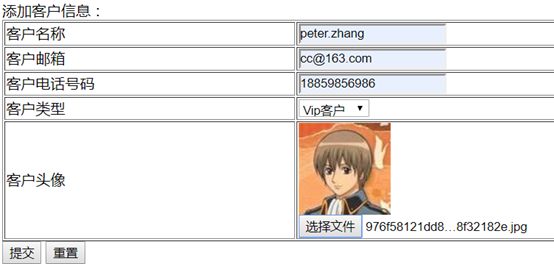
8.1 添加客户

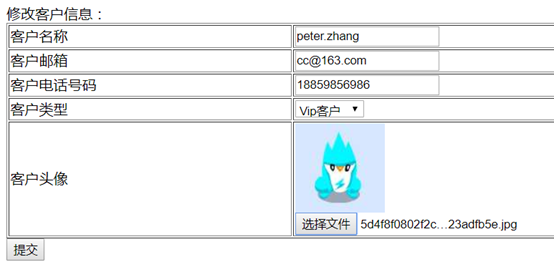
8.2 更新客户

8.3 数据库

ssm上传图片的更多相关文章
- MySQL+SSM+Ajax上传图片问题
第一次写上传图片的代码,碰到很多问题.昨天做了整整一天,终于在晚上的时候成功了.大声欢呼. 但是,做完之后,还是有很多问题想不通.所以在这里也算是写个笔记,日后忘记了可以回顾,也算请教各路朋友.(^_ ...
- ssm异步上传图片
1.首先引入jersey jar包 2.在配置文件中,配置允许上传图片 3.修改增加商品页面 <%@ page language="java" import=" ...
- ssm框架下上传图片及其他信息
先引入这两个包: <dependency> <groupId>commons-fileupload</groupId> <artifactId>comm ...
- SSM中如何上传图片
1.文件配置 2.jsp页面 文件的name值不能跟数据库列名一致 3.控制层收集数据转发到逻辑层 4.逻辑层处理把用户信息存到数据库 5.注册成功后跳到jsp页面进行展示
- springmvc 多数据源 SSM java redis shiro ehcache 头像裁剪
获取下载地址 QQ 313596790 A 调用摄像头拍照,自定义裁剪编辑头像 B 集成代码生成器 [正反双向](单表.主表.明细表.树形表,开发利器)+快速构建表单; 技术:31359679 ...
- springmvc 多数据源 SSM java redis
A集成代码生成器 [正反双向(单表.主表.明细表.树形表,开发利器)+快速构建表单; freemaker模版技术 ,0个代码不用写,生成完整的一个模块,带页面.建表sql脚本,处理类,servic ...
- spring MVC框架入门(外加SSM整合)
spring MVC框架 一.什么是sping MVC Spring MVC属于SpringFrameWork的后续产品,已经融合在Spring Web Flow里面.Spring 框架提供了构建 W ...
- SpringMVC总结(SSM)
Day1 1. springMvc:是一个表现层框架: 作用:就是从请求中接收传入的参数, 将处理后的结果数据返回给页面展示2. ssm整合: 1)Dao层 pojo和映射文件以及接口手动编写(或使用 ...
- ssm实现图片上传
在使用ssm完成前后端对接时,总免不了前台传过来的文件问题,而html中的<input>框直接使用时,往往会获取不到路径,今天在完成图片上传后的来做个总结 首先,前台页面 <!DOC ...
随机推荐
- Docker快速入门(二)
上篇文章<Docker快速入门(一)>介绍了docker的基本概念和image的相关操作,本篇将进一步介绍image,容器和Dockerfile. 1 image文件 (1)Docker ...
- MariaDB/MySQL备份和恢复(一):mysqldump工具用法详述
本文目录:1.备份分类2.备份内容和备份工具3.mysqldump用法详述 3.1 语法选项 3.1.1 连接选项 3.1.2 筛选选项 3.1.3 DDL选项 3.1.4 字符集选项 3.1.5 复 ...
- java数据库之JDBC
任何一个项目,都离不开数据,而对于数据的存储以及其他操作,就会用到数据库了. 在这里是主要针对MySQL数据库的操作. 1.软件 当然首先要下载MySQL,为了操作起来更加方便,这里推荐一个比较方便的 ...
- ScalaPB(3): gRPC streaming
接着上期讨论的gRPC unary服务我们跟着介绍gRPC streaming,包括: Server-Streaming, Client-Streaming及Bidirectional-Streami ...
- 记录一次坑爹的Python脚本抢购低价手机经历!
无意间浏览到魅族官网,说魅族3限量100台.30号中午12点抢购.正好我爪机目前处于报废状态,就来一试手气了.11点多种,习惯性的看了下网页脚本,发现了检测是否到抢购时间,并返回抢购消息的ajax.于 ...
- 利用VMWare 11 在 Windows 8.1 下安装与优化 OS X 10.10
此文中相关工具点击我从百度网盘下载 一.安装 第一步安装参考百度经验:点击这里,鉴于其中提供的文件全部不能用,替换成了上面的,亲测Intel Core I5 4200M 可用. 二.优化 这里给出一些 ...
- redis的持久化之RDB的配置和原理
Redis优秀的性能是由于其将所有的数据都存储在内存中,同样memcached也是这样做的,内存中的数据会在服务器重启后就没有了,也就是不能保证持久化.但是为什么Redis能够脱颖而出呢,很大程度上是 ...
- Struts2文件上传--多文件上传(插件uploadify)
公司需要把以前的Struts2自带的图片上传替换掉,因为不能一个file选择多个文件,本人直接百度搜索图片插件, 貌似就它(uploadify3.2.1)在最前面,也找过很多案例, 其中有不少问题, ...
- zookeeper应用场景-java
声明,本文是复制别人的文章,感觉还行,原文:http://www.cnblogs.com/xymqx/p/4465610.html 本人热爱技术,跪求有好的技术文章希望大家多多分享,谢谢.... Zo ...
- 自动化测试--protractor
前戏 面向模型编程: 测试驱动开发: 先保障交互逻辑,再调整细节.---by 雪狼. 为什么要自动化测试? 1,提高产出质量. 2,减少重构时的痛.反正我最近重构多了,痛苦经历多了. 3,便于新人接手 ...