
Oracle 12c(12.1.0.5) oem agent silent install(静默安装agent)
注释:
文章自oracle support 文档 ID 1360083.1,静默安装agent采用的是把OMS服务端(即oem server端)的agent用压缩包download,远程传到agent端,利用编译的rsp文件进行编译,静默安装agent。
1、server参数配置参照:http://www.cnblogs.com/hmwh/p/8649751.html
2、agent参数配置参照:http://www.cnblogs.com/hmwh/p/8649751.html
3、silent install(静默安装) agent
[oracle@bpmDBmonitor oracle]$ /u01/app/oracle/Middleware/oms/bin/emcli login -username=sysman
Error: Already logged in as user "sysman". Use "emcli logout" to logout the current user.
未登陆需要提示登陆输入密码
[oracle@bpmDBmonitor oracle]$ /u01/app/oracle/Middleware/oms/bin/emcli get_supported_platforms
-----------------------------------------------
Version = 12.1.0.5.0
Platform = Linux x86-64
-----------------------------------------------
Platforms list displayed successfully.
[oracle@bpmDBmonitor oracle]$ pwd
/u01/app/oracle
[oracle@bpmDBmonitor oracle]$ ls -lh
total 16K
drwxr-xr-x. 6 oracle oinstall 4.0K Sep 28 17:16 agent
drwxr-xr-x. 6 oracle oinstall 4.0K Sep 28 17:07 gc_inst
drwxr-x---. 16 oracle oinstall 4.0K Sep 28 17:07 Middleware
drwxr-xr-x. 75 oracle oinstall 4.0K Sep 28 17:13 swlib
[oracle@bpmDBmonitor oracle]$ mkdir zip
[oracle@bpmDBmonitor oracle]$ /u01/app/oracle/Middleware/oms/bin/emcli get_agentimage -destination=/u01/app/oracle/zip/ -platform="Linux x86-64" -version=12.1.0.5.0
=== Partition Detail ===
Space free : 86 GB
Space required : 1 GB
Check the logs at /u01/app/oracle/gc_inst/em/EMGC_OMS1/sysman/emcli/setup/.emcli/get_agentimage_2018-03-26_16-12-53-PM.log
Downloading /u01/app/oracle/zip//12.1.0.5.0_AgentCore_226.zip
查看download agent
[oracle@bpmDBmonitor oracle]$ ls -lh zip/
total 246M
-rw-r--r--. 1 oracle oinstall 246M Mar 26 16:13 12.1.0.5.0_AgentCore_226.zip
[oracle@bpmDBmonitor oracle]$ scp zip/12.1.0.5.0_AgentCore_226.zip IP:/u01/agent/
Authorized only . All activity will be monitored and reported
oracle@bpminrac1's password:
stty: standard input: Invalid argument
12.1.0.5.0_AgentCore_226.zip 100% 245MB 106.6MB/s 00:02
[oracle@bpmDBmonitor oracle]$ scp zip/12.1.0.5.0_AgentCore_226.zip bpminrac2:/u01/agent/
The authenticity of host 'bpminrac2 (23.120.101.8)' can't be established.
RSA key fingerprint is SHA256:lA7Dqw1jqtfJxTBfVWcuXu2Usv7Q1CFkkeo6qXZL4AY.
Are you sure you want to continue connecting (yes/no)? yes
Warning: Permanently added 'bpminrac2,23.120.101.8' (RSA) to the list of known hosts.
Authorized only . All activity will be monitored and reported
oracle@bpminrac2's password:
stty: standard input: Invalid argument
12.1.0.5.0_AgentCore_226.zip 100% 245MB 99.3MB/s 00:02
[oracle@bpmDBmonitor oracle]$ cat /tmp/agent.rsp
OMS_HOST=IP
EM_UPLOAD_PORT=4903
AGENT_REGISTRATION_PASSWORD=abc123
#AGENT_INSTANCE_HOME=<Value Unspecified>
AGENT_PORT=3872
#b_startAgent=true
ORACLE_HOSTNAME=XXX
#s_agentHomeName=<Value Unspecified>
[oracle@bpmexrac2 tmp]$ sh agentDeploy.sh AGENT_BASE_DIR=/u01/app/agent RESPONSE_FILE=/tmp/agent.rsp
Validating the OMS_HOST & EM_UPLOAD_PORT
Executing command : /u01/app/agent/core/12.1.0.5.0/jdk/bin/java -classpath /u01/app/agent/core/12.1.0.5.0/jlib/agentInstaller.jar:/u01/app/agent/core/12.1.0.5.0/oui/jlib/OraInstaller.jar oracle.sysman.agent.installer.AgentInstaller /u01/app/agent/core/12.1.0.5.0 /tmp /u01/app/agent AGENT_BASE_DIR=/u01/app/agent RESPONSE_FILE=/tmp/agent.rsp -prereq
Validating oms host & port with url: http://XXX:4903/empbs/genwallet
Validating oms host & port with url: https://XXX:4903/empbs/genwallet
Return status:3-oms https port is passed
Unzipping the agentcoreimage.zip to /u01/app/agent ....
12.1.0.5.0_PluginsOneoffs_226.zip
Executing command : /tmp/unzip -o /tmp/12.1.0.5.0_PluginsOneoffs_226.zip -d /u01/app/agent
Successfully unzipped /tmp/12.1.0.5.0_PluginsOneoffs_226.zip to /u01/app/agent !
Executing command : /u01/app/agent/core/12.1.0.5.0/jdk/bin/java -classpath /u01/app/agent/core/12.1.0.5.0/oui/jlib/OraInstaller.jar:/u01/app/agent/core/12.1.0.5.0/oui/jlib/xmlparserv2.jar:/u01/app/agent/core/12.1.0.5.0/oui/jlib/srvm.jar:/u01/app/agent/core/12.1.0.5.0/oui/jlib/emCfg.jar:/u01/app/agent/core/12.1.0.5.0/jlib/agentInstaller.jar:/u01/app/agent/core/12.1.0.5.0/oui/jlib/share.jar oracle.sysman.agent.installer.AgentInstaller /u01/app/agent/core/12.1.0.5.0 /tmp /u01/app/agent /u01/app/agent/agent_inst AGENT_BASE_DIR=/u01/app/agent
Executing agent install prereqs...
Executing command: /u01/app/agent/core/12.1.0.5.0/oui/bin/runInstaller -debug -ignoreSysPrereqs -prereqchecker -silent -ignoreSysPrereqs -waitForCompletion -prereqlogloc /u01/app/agent/core/12.1.0.5.0/cfgtoollogs/agentDeploy -entryPoint oracle.sysman.top.agent_Complete -detailedExitCodes PREREQ_CONFIG_LOCATION=/u01/app/agent/core/12.1.0.5.0/prereqs -J-DORACLE_HOSTNAME=bpmexrac2.biz.jy.neeq.com.cn -J-DAGENT_PORT=3872 -J-DAGENT_BASE_DIR=/u01/app/agent
Agent install prereqs completed successfully
Cloning the agent home...
Executing command: /u01/app/agent/core/12.1.0.5.0/oui/bin/runInstaller -debug -ignoreSysPrereqs -clone -forceClone -silent -waitForCompletion -nowait ORACLE_HOME=/u01/app/agent/core/12.1.0.5.0 -responseFile /tmp/agent.rsp AGENT_BASE_DIR=/u01/app/agent AGENT_BASE_DIR=/u01/app/agent RESPONSE_FILE=/tmp/agent.rsp -noconfig ORACLE_HOME_NAME=agent12c1 -force b_noUpgrade=true EMCTLCFG_MODE=NONE
Cloning of agent home completed successfully
Attaching sbin home...
Executing command: /u01/app/agent/core/12.1.0.5.0/oui/bin/runInstaller -debug -ignoreSysPrereqs -attachHome -waitForCompletion -nowait ORACLE_HOME=/u01/app/agent/sbin ORACLE_HOME_NAME=sbin12c1 -force
Attach home for sbin home completed successfully.
Updating home dependencies...
Executing command: /u01/app/agent/core/12.1.0.5.0/oui/bin/runInstaller -debug -ignoreSysPrereqs -updateHomeDeps -waitForCompletion HOME_DEPENDENCY_LIST={/u01/app/agent/sbin:/u01/app/agent/core/12.1.0.5.0} -invPtrLoc /u01/app/agent/core/12.1.0.5.0/oraInst.loc -force
Update home dependency completed successfully.
Executing command: /u01/app/agent/core/12.1.0.5.0/oui/bin/runConfig.sh ORACLE_HOME=/u01/app/agent/core/12.1.0.5.0 RESPONSE_FILE=/u01/app/agent/core/12.1.0.5.0/agent.rsp ACTION=configure MODE=perform COMPONENT_XML={oracle.sysman.top.agent.11_1_0_1_0.xml} RERUN=true
Agent Configuration completed successfully
The following configuration scripts need to be executed as the "root" user.
#!/bin/sh
#Root script to run
/u01/app/agent/core/12.1.0.5.0/root.sh
To execute the configuration scripts:
1. Open a terminal window
2. Log in as "root"
3. Run the scripts
Agent Deployment Successful.
Agent deployment log location: /u01/app/agent/core/12.1.0.5.0/cfgtoollogs/agentDeploy/agentDeploy_2018-03-26_17-49-59-PM.log
Agent deployment completed successfully.
[oracle@bpmexrac2 tmp]$ /u01/app/agent/core/12.1.0.5.0/root.sh
This script must be run as root
[oracle@bpmexrac2 tmp]$ exit
logout
[root@bpmexrac2 app]# /u01/app/agent/core/12.1.0.5.0/root.sh
Finished product-specific root actions.
/etc exist
Creating /etc/oragchomelist file...
[oracle@bpmexrac2 bin]$ cd /u01/app/agent/agent_inst/bin
[oracle@bpmexrac2 bin]$ ./emctl start agent
Oracle Enterprise Manager Cloud Control 12c Release 5
Copyright (c) 1996, 2015 Oracle Corporation. All rights reserved.
Agent is already running
[oracle@bpmexrac2 bin]$ ./emctl status agent
Oracle Enterprise Manager Cloud Control 12c Release 5
Copyright (c) 1996, 2015 Oracle Corporation. All rights reserved.
---------------------------------------------------------------
Agent Version : 12.1.0.5.0
OMS Version : 12.1.0.5.0
Protocol Version : 12.1.0.1.0
Agent Home : /u01/app/agent/agent_inst
Agent Log Directory : /u01/app/agent/agent_inst/sysman/log
Agent Binaries : /u01/app/agent/core/12.1.0.5.0
Agent Process ID : 26923
Parent Process ID : 26755
Agent URL : https://bpmexrac2.biz.jy.neeq.com.cn:3872/emd/main/
Local Agent URL in NAT : https://bpmexrac2.biz.jy.neeq.com.cn:3872/emd/main/
Repository URL : https://bpmDBmonitor:4903/empbs/upload
Started at : 2018-03-26 17:51:28
Started by user : oracle
Operating System : Linux version 2.6.32-573.el6.x86_64 (amd64)
Last Reload : (none)
Last successful upload : 2018-03-26 17:51:41
Last attempted upload : 2018-03-26 17:51:41
Total Megabytes of XML files uploaded so far : 0
Number of XML files pending upload : 0
Size of XML files pending upload(MB) : 0
Available disk space on upload filesystem : 64.53%
Collection Status : Collections enabled
Heartbeat Status : Ok
Last attempted heartbeat to OMS : 2018-03-26 17:52:32
Last successful heartbeat to OMS : 2018-03-26 17:52:32
Next scheduled heartbeat to OMS : 2018-03-26 17:53:32
---------------------------------------------------------------
Agent is Running and Ready
4、添加RAC监控数据库
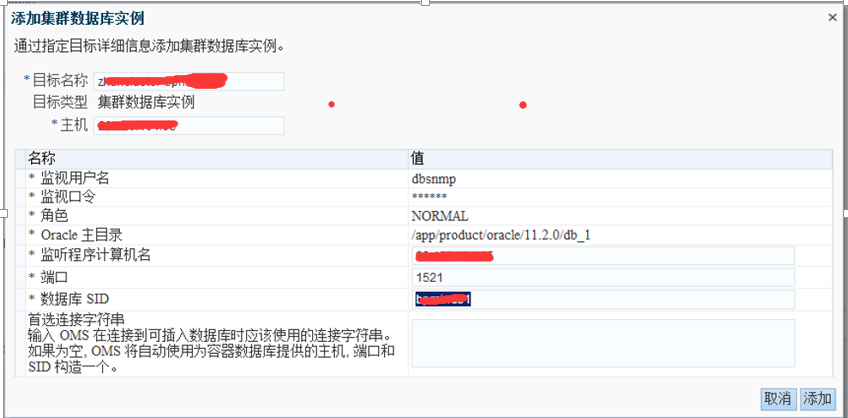
点击 Target -> Database -> add 添加数据库配置信息:
如果此方法行不通,可参照:http://www.cnblogs.com/hmwh/p/8649751.html 添加高可用服务,再添加数据库。
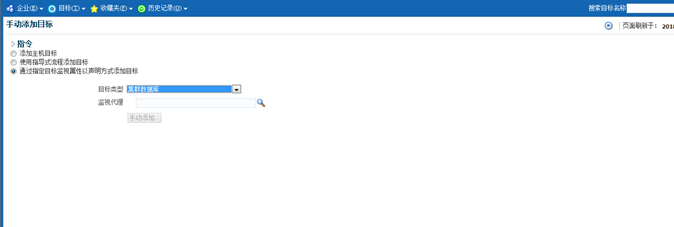
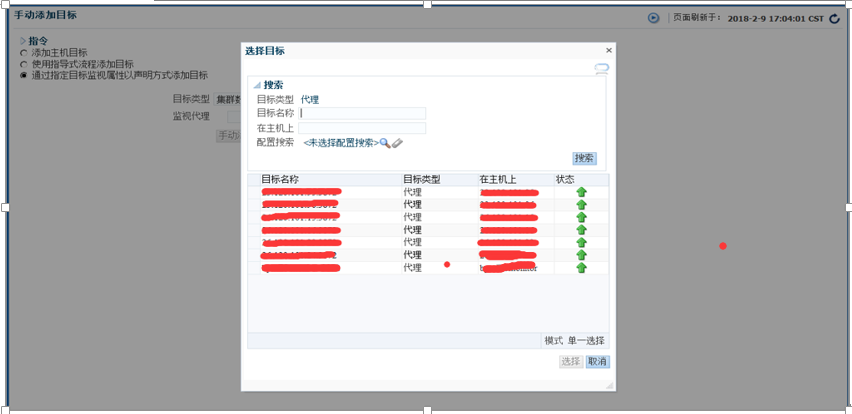
点击搜索按钮:
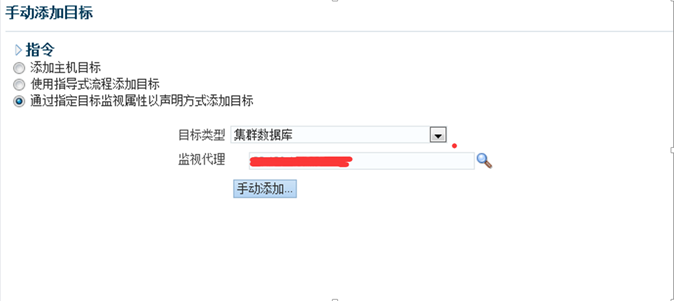
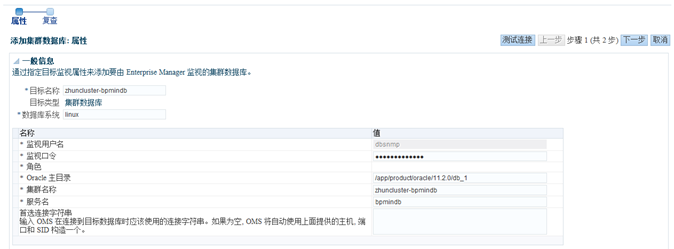
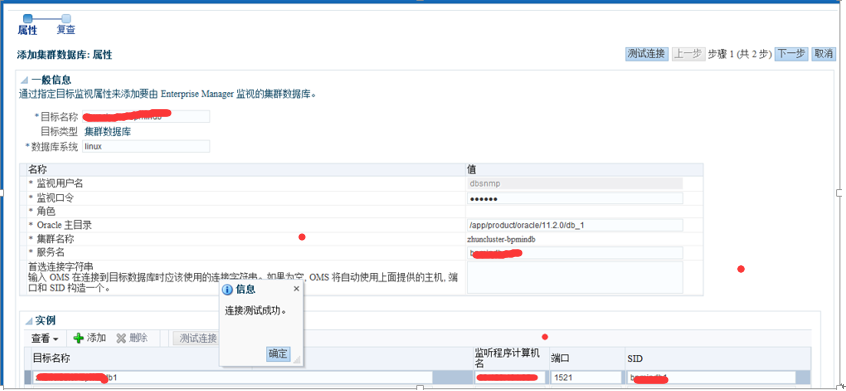
测试连接:
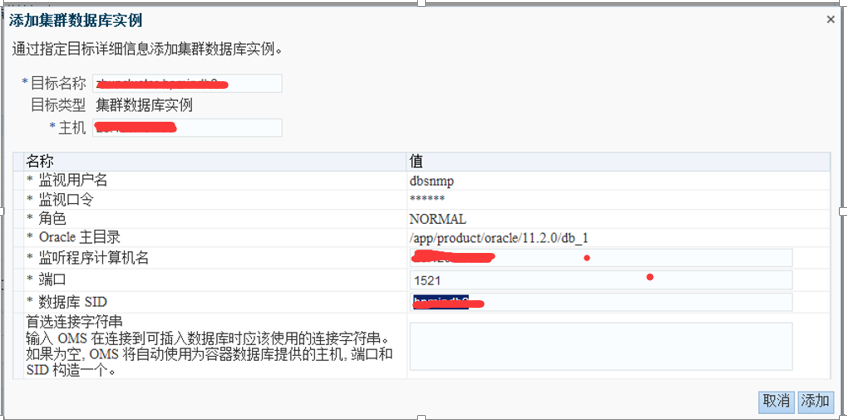
同理添加节点2实例2:
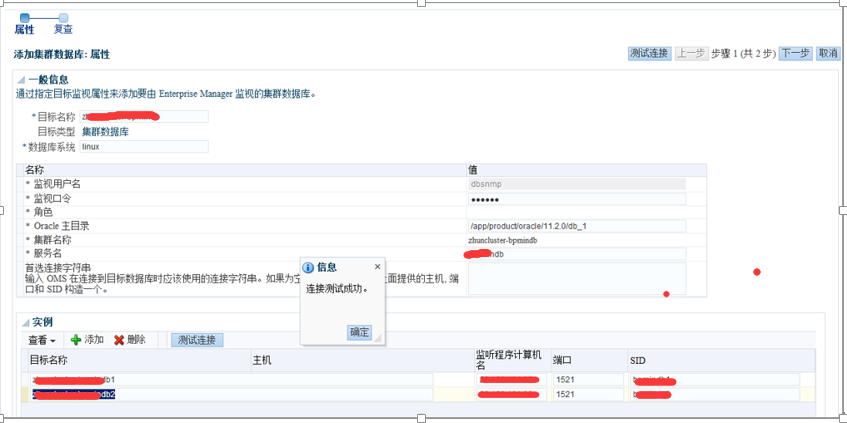
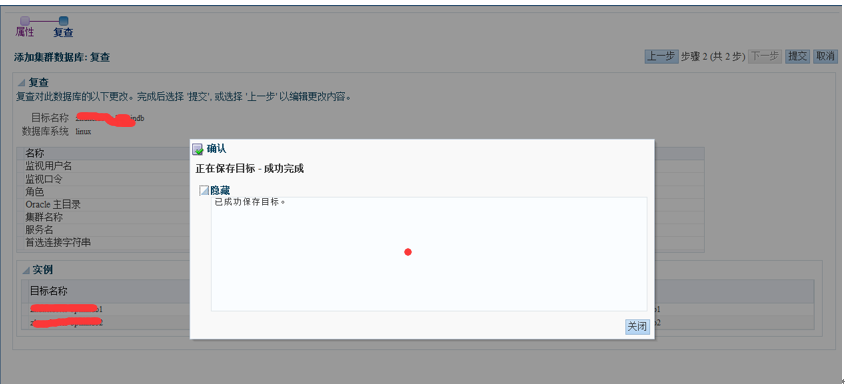
完成后结果如下:

Oracle 12c(12.1.0.5) oem agent silent install(静默安装agent)的更多相关文章
- ORACLE RAC 11.2.0.4 CentOS release 6.9 静默安装1.0版本
RAC11.2.0.4静默安装 1.0版本,20180613 #本文档IP地址使用X隐藏,个人可按照自己的当前环境IP进行适当修改 1. 清除原环境中的单实例软件 #清除原环境: 删除/etc/ora ...
- oracle 12c 12.1.0.2.0 BUG 22562145
Wed May 23 17:46:14 2018TT01: Standby redo logfile selected for thread 1 sequence 42251 for destinat ...
- oracle之 12.1.0.1.0 C 在 linux 7 上安装报错处理
环境说明:-- os[root@host-172-16-3-132 ~]# cat /etc/redhat-release CentOS Linux release 7.2.1511 (Core) - ...
- ORACLE官方全托管驱动 Oracle.ManagedDataAccess 12.1.0.1.0
以前用Oracle的时候,必须得装他臃肿的客户端,网上虽然也有提供直连Oracle的驱动,但也是要收费的,最近Oracle终于开窍了,提供了官方的全托管驱动. 这次是随Oracle ODAC 12c ...
- LRM-00109: could not open parameter file '/u01/app/oracle/product/12.1.0/db_1/dbs/initepps.ora'
安装好oracle后,起动时报如下错误: [oracle@Oracle-A ~]$ export ORACLE_SID=ORCL [oracle@Oracle-A ~]$ sqlplus / as s ...
- 【Service】【Database】【Oracle】Oracle client 12.1.0.2 for MacOS
1. 概述:为了在我的macos上搭建python的cx_Oracle开发环境,首先需要配置oracle client 2. 环境与版本: 2.1. OS:Mac OS Sierra 10.12.2 ...
- Oracle 11g RAC for LINUX rhel 6.X silent install(静默安装)
一.前期规划 1.硬件环境 CPU: Intel(R) Xeon(R) CPU E7-4820 v4 @ 2.00GHz 8*10核 内存:512GB OCR:2147*5 MB DATA1:2TB ...
- [转帖]在VirtualBox Linux 7u2 中安装Oracle RAC 12.2.0.1.0
https://xiaoyu.blog.csdn.net/article/details/81980936
- Oracle 12c 单实例安装
准备工作 实验环境:Redhat 6.6 Oracle 12c 12.2.0.1 1.官网下载 https://www.oracle.com/technetwork/database/enterp ...
随机推荐
- R语言︱画图
笔者寄语:不论画啥,你先plot准没错. plot 二维坐标绘图 dotchart 点图 barplot 条形图 hist 直方图 pie 饼图 points 添加点 lines 添加线 text 添 ...
- Go基础之--操作Mysql(三)
事务是数据库的一个非常重要的特性,尤其对于银行,支付系统,等等.database/sql提供了事务处理的功能.通过Tx对象实现.db.Begin会创建tx对象,后者的Exec和Query执行事务的数据 ...
- 指针数组与带参main函数
(一)指针数组 指针数组就是每一个元素存放一个地址,相当于一个指针变量.如:int *p[4]指针数组比较适合用来指向若干字符串,使得处理字符串更加灵活.例如,现在要将若干字符串按字母顺序由小到大输出 ...
- 神级程序员:让你的爬虫就像人类的用户行为! 你敢封我IP吗?
1 前言 近期,有些朋友问我一些关于如何应对反爬虫的问题.由于好多朋友都在问,因此决定写一篇此类的博客.把我知道的一些方法,分享给大家.博主属于小菜级别,玩爬虫也完全是处于兴趣爱好,如有不足之处,还望 ...
- 【Luogu1414】又是毕业季II(数论)
[Luogu1414]又是毕业季II(数论) 题面 题目背景 "叮铃铃铃",随着高考最后一科结考铃声的敲响,三年青春时光顿时凝固于此刻.毕业的欣喜怎敌那离别的不舍,憧憬着未来仍毋忘 ...
- djang-tastypie学习整理
quick start: 配置环境(pip install: Python 2.7+ or Python 3.4+ Django 1.8+ python-mimeparse 0.1.4+ (http: ...
- Delphi子窗体随主窗体大小而变化
当然办法有很多种,我建议用TRzsplitter更好点, TRzsplitter分割,在其上边放置panel,然后把align置为alClient,则可以随着主窗体的大小而一起变动 选中此控件右键ed ...
- 详解MySQL数据类型
原文地址http://www.cnblogs.com/xrq730/p/5260294.html,转载请注明出处,谢谢! 前言 很久没写文章,也有博友在我的有些文章中留言,希望我可以写一些文章,公司项 ...
- springboot dubbo filter之依赖注入null
@Autowiredprivate ICallerRepository callerRepository;...用dubbo提供的ServiceBean即可获取bean,因为该类已经实现了Applic ...
- Kendo UI ASP.Net MVC 实现多图片及时显示加上传(其中有借鉴别人的代码,自己又精简了一下,如有冒犯,请多原谅!)
View: <div class="demo-section k-content"> @(Html.Kendo().Upload() .Name("files ...