
[C#] .NET Core/Standard 2.0 编译时报“CS0579: Duplicate 'AssemblyFileVersionAttribute' attribute”错误的解决办法
作者: zyl910
一、缘由
当创建 .NET Core/Standard 2.0项目时,VS不会像.NET Framework项目一样自动生成AssemblyInfo.cs文件。
而且,若是手工在项目中加入以前写好的 AssemblyInfo.cs 文件,编译时会报告“CS0579: Duplicate 'AssemblyFileVersionAttribute' attribute”错误。
查了一下资料,发现是因为“.NET Core/Standard 2.0会自动填写程序集信息”而引起的。
具体来说——
- .NET Core/Standard 2.0 推荐在项目属性的“Package”页配置程序集的 版本、描述 等信息。
- 编译时,会自动根据“Package”页的配置,生成 “<项目名>.AssemblyInfo.cs”。其中便使用了 AssemblyFileVersionAttribute 等特性。
- 我们的 AssemblyInfo.cs 中也使用 AssemblyFileVersionAttribute 等特性。因为 AssemblyFileVersionAttribute 等特性是不允许重复,于是便报出CS0579错误了。
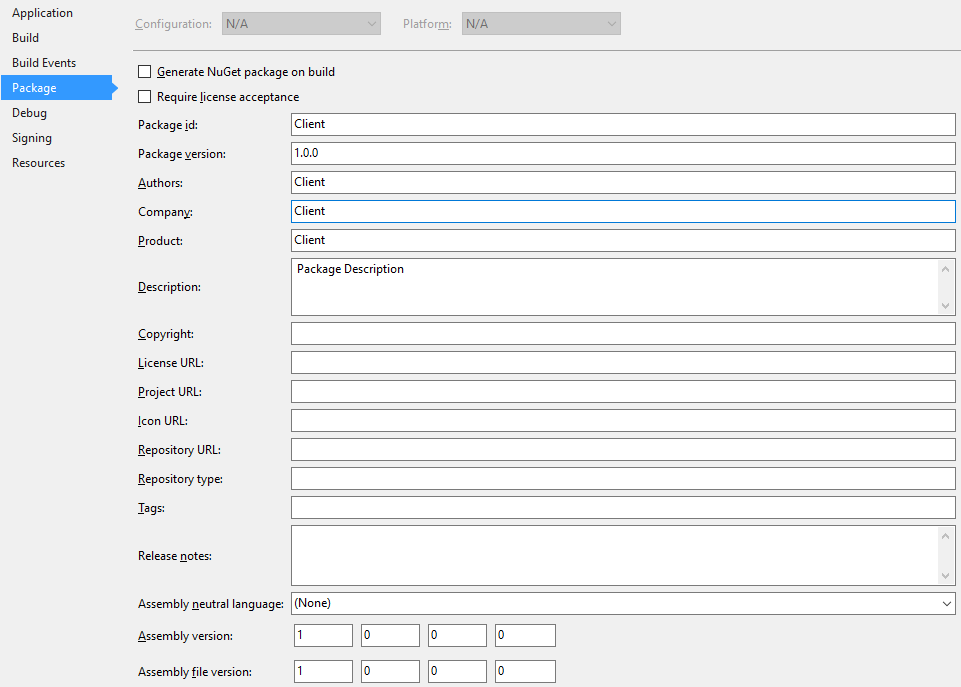
删除自己的 AssemblyInfo.cs,完全使用推荐做法(项目属性的“Package”页),当然是可以解决该问题、使项目能成功编译的。但是该方案的缺点是没有AssemblyInfo.cs,无法再用“利用条件编译控制程序集特性”等技巧。
第二种办法是在 AssemblyInfo.cs 中加上条件编译,若发现是 .NET Core/Standard 2.0(#if NETCOREAPP2_0 || NETSTANDARD2_0)时,便屏蔽掉 AssemblyFileVersionAttribute 等特性。但该方法比较繁琐。
有没有办法“禁止自动生成程序集特性,完全使用自己的AssemblyInfo.cs”呢?
二、解决
查了一下资料,找到了“.NET Core/Standard 2.0 禁止自动生成程序集特性”的办法。就是——修改项目的csproj文件,在PropertyGroup节点内加上“false”
例如修改前是这样的——
<Project Sdk="Microsoft.NET.Sdk">

  <PropertyGroup>

    <OutputType>Exe</OutputType>

    <TargetFramework>netcoreapp2.0</TargetFramework>

    <AssemblyName>ConsoleExample</AssemblyName>

    <RootNamespace>ConsoleExample</RootNamespace>

  </PropertyGroup>

</Project>
修改后变为这样——
<Project Sdk="Microsoft.NET.Sdk">

  <PropertyGroup>

    <OutputType>Exe</OutputType>

    <TargetFramework>netcoreapp2.0</TargetFramework>

    <AssemblyName>ConsoleExample</AssemblyName>

    <RootNamespace>ConsoleExample</RootNamespace>

    <GenerateAssemblyInfo>false</GenerateAssemblyInfo>

  </PropertyGroup>

</Project>
改好后便会发现不再自动生成 “<项目名>.AssemblyInfo.cs”了,能使用自己的AssemblyInfo.cs,顺利编译了。
三、深入
3.1 自动生成的机制
“<项目名>.AssemblyInfo.cs”的内容一般是这样的——
//------------------------------------------------------------------------------

// <auto-generated>

//     This code was generated by a tool.

//     Runtime Version:4.0.30319.42000

//

//     Changes to this file may cause incorrect behavior and will be lost if

//     the code is regenerated.

// </auto-generated>

//------------------------------------------------------------------------------

using System;

using System.Reflection;

[assembly: System.Reflection.AssemblyCompanyAttribute("ConsoleExample")]

[assembly: System.Reflection.AssemblyConfigurationAttribute("Debug")]

[assembly: System.Reflection.AssemblyDescriptionAttribute("Package Description")]

[assembly: System.Reflection.AssemblyFileVersionAttribute("1.0.0.0")]

[assembly: System.Reflection.AssemblyInformationalVersionAttribute("1.0.0")]

[assembly: System.Reflection.AssemblyProductAttribute("ConsoleExample")]

[assembly: System.Reflection.AssemblyTitleAttribute("ConsoleExample")]

[assembly: System.Reflection.AssemblyVersionAttribute("1.0.0.0")]

// Generated by the MSBuild WriteCodeFragment class.
上面这段自动生成的代码,实际上是由 c:\Program Files\dotnet\sdk\2.0.0\Sdks\Microsoft.NET.Sdk\build\Microsoft.NET.GenerateAssemblyInfo.targets 控制的。该文件的内容是——
<!--

***********************************************************************************************

Microsoft.NET.GenerateAssemblyInfo.targets

WARNING:  DO NOT MODIFY this file unless you are knowledgeable about MSBuild and have

          created a backup copy.  Incorrect changes to this file will make it

          impossible to load or build your projects from the command-line or the IDE.

Copyright (c) .NET Foundation. All rights reserved.

***********************************************************************************************

-->

<Project xmlns="http://schemas.microsoft.com/developer/msbuild/2003">

  <!--

    ============================================================

                                    GenerateAssemblyInfo

    Generates assembly info source to intermediate directory

    ============================================================

    -->

  <PropertyGroup>

    <MSBuildAllProjects>$(MSBuildAllProjects);$(MSBuildThisFileFullPath)</MSBuildAllProjects>

    <GeneratedAssemblyInfoFile Condition="'$(GeneratedAssemblyInfoFile)' ==''">$(IntermediateOutputPath)$(MSBuildProjectName).AssemblyInfo$(DefaultLanguageSourceExtension)</GeneratedAssemblyInfoFile>

    <GenerateAssemblyInfo Condition="'$(GenerateAssemblyInfo)' == ''">true</GenerateAssemblyInfo>

  </PropertyGroup>

  <PropertyGroup Condition="'$(GenerateAssemblyInfo)' == 'true'">

    <GenerateAssemblyCompanyAttribute Condition="'$(GenerateAssemblyCompanyAttribute)' == ''">true</GenerateAssemblyCompanyAttribute>

    <GenerateAssemblyConfigurationAttribute Condition="'$(GenerateAssemblyConfigurationAttribute)' == ''">true</GenerateAssemblyConfigurationAttribute>

    <GenerateAssemblyCopyrightAttribute Condition="'$(GenerateAssemblyCopyrightAttribute)' == ''">true</GenerateAssemblyCopyrightAttribute>

    <GenerateAssemblyDescriptionAttribute Condition="'$(GenerateAssemblyDescriptionAttribute)' == ''">true</GenerateAssemblyDescriptionAttribute>

    <GenerateAssemblyFileVersionAttribute Condition="'$(GenerateAssemblyFileVersionAttribute)' == ''">true</GenerateAssemblyFileVersionAttribute>

    <GenerateAssemblyInformationalVersionAttribute Condition="'$(GenerateAssemblyInformationalVersionAttribute)' == ''">true</GenerateAssemblyInformationalVersionAttribute>

    <GenerateAssemblyProductAttribute Condition="'$(GenerateAssemblyProductAttribute)' == ''">true</GenerateAssemblyProductAttribute>

    <GenerateAssemblyTitleAttribute Condition="'$(GenerateAssemblyTitleAttribute)' == ''">true</GenerateAssemblyTitleAttribute>

    <GenerateAssemblyVersionAttribute Condition="'$(GenerateAssemblyVersionAttribute)' == ''">true</GenerateAssemblyVersionAttribute>

    <GenerateNeutralResourcesLanguageAttribute Condition="'$(GenerateNeutralResourcesLanguageAttribute)' == ''">true</GenerateNeutralResourcesLanguageAttribute>

  </PropertyGroup>

  <!--

    Note that this must run before every invocation of CoreCompile to ensure that all compiler

    runs see the generated assembly info. There is at least one scenario involving Xaml

    where CoreCompile is invoked without other potential hooks such as Compile or CoreBuild,

    etc., so we hook directly on to CoreCompile. Furthermore, we  must run *after*

    PrepareForBuild to ensure that the intermediate directory has been created.

  -->

  <Target Name="GenerateAssemblyInfo"

          BeforeTargets="CoreCompile"

          DependsOnTargets="PrepareForBuild;CoreGenerateAssemblyInfo"

          Condition="'$(GenerateAssemblyInfo)' == 'true'" />

  <Target Name="GetAssemblyAttributes"

          DependsOnTargets="GetAssemblyVersion">

    <ItemGroup>

      <AssemblyAttribute Include="System.Reflection.AssemblyCompanyAttribute" Condition="'$(Company)' != '' and '$(GenerateAssemblyCompanyAttribute)' == 'true'">

        <_Parameter1>$(Company)</_Parameter1>

      </AssemblyAttribute>

      <AssemblyAttribute Include="System.Reflection.AssemblyConfigurationAttribute" Condition="'$(Configuration)' != '' and '$(GenerateAssemblyConfigurationAttribute)' == 'true'">

        <_Parameter1>$(Configuration)</_Parameter1>

      </AssemblyAttribute>

      <AssemblyAttribute Include="System.Reflection.AssemblyCopyrightAttribute" Condition="'$(Copyright)' != '' and '$(GenerateAssemblyCopyrightAttribute)' == 'true'">

        <_Parameter1>$(Copyright)</_Parameter1>

      </AssemblyAttribute>

      <AssemblyAttribute Include="System.Reflection.AssemblyDescriptionAttribute" Condition="'$(Description)' != '' and '$(GenerateAssemblyDescriptionAttribute)' == 'true'">

        <_Parameter1>$(Description)</_Parameter1>

      </AssemblyAttribute>

      <AssemblyAttribute Include="System.Reflection.AssemblyFileVersionAttribute" Condition="'$(FileVersion)' != '' and '$(GenerateAssemblyFileVersionAttribute)' == 'true'">

        <_Parameter1>$(FileVersion)</_Parameter1>

      </AssemblyAttribute>

      <AssemblyAttribute Include="System.Reflection.AssemblyInformationalVersionAttribute" Condition="'$(InformationalVersion)' != '' and '$(GenerateAssemblyInformationalVersionAttribute)' == 'true'">

        <_Parameter1>$(InformationalVersion)</_Parameter1>

      </AssemblyAttribute>

      <AssemblyAttribute Include="System.Reflection.AssemblyProductAttribute" Condition="'$(Product)' != '' and '$(GenerateAssemblyProductAttribute)' == 'true'">

        <_Parameter1>$(Product)</_Parameter1>

      </AssemblyAttribute>

      <AssemblyAttribute Include="System.Reflection.AssemblyTitleAttribute" Condition="'$(AssemblyTitle)' != '' and '$(GenerateAssemblyTitleAttribute)' == 'true'">

        <_Parameter1>$(AssemblyTitle)</_Parameter1>

      </AssemblyAttribute>

      <AssemblyAttribute Include="System.Reflection.AssemblyVersionAttribute" Condition="'$(AssemblyVersion)' != '' and '$(GenerateAssemblyVersionAttribute)' == 'true'">

        <_Parameter1>$(AssemblyVersion)</_Parameter1>

      </AssemblyAttribute>

      <AssemblyAttribute Include="System.Resources.NeutralResourcesLanguageAttribute" Condition="'$(NeutralLanguage)' != '' and '$(GenerateNeutralResourcesLanguageAttribute)' == 'true'">

        <_Parameter1>$(NeutralLanguage)</_Parameter1>

      </AssemblyAttribute>

    </ItemGroup>

  </Target>

  <!--

    To allow version changes to be respected on incremental builds (e.g. through CLI parameters),

    create a hash of all assembly attributes so that the cache file will change with the calculated

    assembly attribute values and msbuild will then execute CoreGenerateAssembly to generate a new file.

  -->

  <Target Name="CreateGeneratedAssemblyInfoInputsCacheFile"

          DependsOnTargets="GetAssemblyAttributes">

    <PropertyGroup>

      <GeneratedAssemblyInfoInputsCacheFile>$(IntermediateOutputPath)$(MSBuildProjectName).AssemblyInfoInputs.cache</GeneratedAssemblyInfoInputsCacheFile>

    </PropertyGroup>

    <Hash ItemsToHash="@(AssemblyAttribute->'%(Identity)%(_Parameter1)')">

      <Output TaskParameter="HashResult" PropertyName="_AssemblyAttributesHash" />

    </Hash>

    <WriteLinesToFile Lines="$(_AssemblyAttributesHash)" File="$(GeneratedAssemblyInfoInputsCacheFile)" Overwrite="True" WriteOnlyWhenDifferent="True" />

    <ItemGroup>

      <FileWrites Include="$(GeneratedAssemblyInfoInputsCacheFile)" />

    </ItemGroup>

  </Target>

  <Target Name="CoreGenerateAssemblyInfo"

          Condition="'$(Language)'=='VB' or '$(Language)'=='C#'"

          DependsOnTargets="CreateGeneratedAssemblyInfoInputsCacheFile"

          Inputs="$(GeneratedAssemblyInfoInputsCacheFile)"

          Outputs="$(GeneratedAssemblyInfoFile)">

    <ItemGroup>

      <!-- Ensure the generated assemblyinfo file is not already part of the Compile sources, as a workaround for https://github.com/dotnet/sdk/issues/114 -->

      <Compile Remove="$(GeneratedAssemblyInfoFile)" />

    </ItemGroup>

    <WriteCodeFragment AssemblyAttributes="@(AssemblyAttribute)" Language="$(Language)" OutputFile="$(GeneratedAssemblyInfoFile)">

      <Output TaskParameter="OutputFile" ItemName="Compile" />

      <Output TaskParameter="OutputFile" ItemName="FileWrites" />

    </WriteCodeFragment>

  </Target>

  <!--

    ==================================================================

                                            GetAssemblyVersion

    Parses the nuget package version set in $(Version) and returns

    the implied $(AssemblyVersion) and $(FileVersion).

    e.g.:

        <Version>1.2.3-beta.4</Version>

    implies:

        <AssemblyVersion>1.2.3</AssemblyVersion>

        <FileVersion>1.2.3</FileVersion>

    Note that if $(AssemblyVersion) or $(FileVersion) are are already set, it

    is considered an override of the default inference from $(Version) and they

    are left unchanged by this target.

    ==================================================================

  -->

  <Target Name="GetAssemblyVersion">

    <GetAssemblyVersion Condition="'$(AssemblyVersion)' == ''" NuGetVersion="$(Version)">

      <Output TaskParameter="AssemblyVersion" PropertyName="AssemblyVersion" />

    </GetAssemblyVersion>

    <PropertyGroup>

      <FileVersion Condition="'$(FileVersion)' == ''">$(AssemblyVersion)</FileVersion>

      <InformationalVersion Condition="'$(InformationalVersion)' == ''">$(Version)</InformationalVersion>

    </PropertyGroup>

  </Target>

</Project>
3.2 部分自动生成
弄清楚机制后,我们可以做成部分自动生成的。即部分程序集特性自动生成,另外一部分来自我们自己的AssemblyInfo.cs。
具体办法是修改项目的csproj文件,在PropertyGroup节点内加上“false”等内容,而不用GenerateAssemblyInfo。
例如——
<PropertyGroup>

  <TargetFramework>netcoreapp1.1</TargetFramework>

  <OutputType>Exe</OutputType>

  <GenerateAssemblyConfigurationAttribute>false</GenerateAssemblyConfigurationAttribute>

  <GenerateAssemblyCompanyAttribute>false</GenerateAssemblyCompanyAttribute>

  <GenerateAssemblyProductAttribute>false</GenerateAssemblyProductAttribute>

</PropertyGroup>
GenerateAssemblyConfigurationAttribute这样的参数名详见 Microsoft.NET.GenerateAssemblyInfo.targets 。
参考文献
- Eric《Duplicate ‘System.Reflection.AssemblyCompanyAttribute’ attribute》. https://elanderson.net/2017/06/duplicate-system-reflection-assemblycompanyattribute-attribute/
- 《Duplicate 'System.Reflection.AssemblyCompanyAttribute' attribute #4710》. https://github.com/dotnet/cli/issues/4710
- 《Duplicate AssemblyVersion Attribute》. https://stackoverflow.com/questions/10311347/duplicate-assemblyversion-attribute
[C#] .NET Core/Standard 2.0 编译时报“CS0579: Duplicate 'AssemblyFileVersionAttribute' attribute”错误的解决办法的更多相关文章
- IIS7.5中调试.Net 4.0网站出现无厘头500错误的解决办法 (转)
刚刚 部署了ii7的dll的有x86写的,就会出现以下这样的问题 iis 7 x86,Could not load file or assembly 'Name' or one of its depe ...
- ASP.NET CORE MVC 2.0 项目中引用第三方DLL报错的解决办法 - InvalidOperationException: Cannot find compilation library location for package
目前在学习ASP.NET CORE MVC中,今天看到微软在ASP.NET CORE MVC 2.0中又恢复了允许开发人员引用第三方DLL程序集的功能,感到甚是高兴!于是我急忙写了个Demo想试试,我 ...
- Sublimetext (for windows)编译运行c出现Error 2错误的解决办法
错误描述大概如下: [Error 2] [cmd: [u'bash', u'-c', u"g++ 'D:\\codeblocks\\project\\test.c' -o 'D:\\ ...
- Mysql8.0 Public Key Retrieval is not allow错误的解决办法
在使用Mysql 8.0时重启后启动项目的事后会报错com.mysql.jdbc.exceptions.jdbc4.MysqlNonTransientConnectionException: Publ ...
- IDEA里运行代码时出现Error:scalac: error while loading JUnit4, Scala signature JUnit4 has wrong version expected: 5.0 found: 4.1 in JUnit4.class错误的解决办法(图文详解)
不多说,直接上干货! 问题详情 当出现这类错误时是由于版本不匹配造成的 Information:// : - Compilation completed with errors and warnin ...
- Quartus ii 12.1软件破解之后编译原有的工程出现报警错误的解决办法
在Quartus ii 12.1软件破解之后,想用来编译原来编译过的工程,但是编译到最后出现下面两个错误警告: 原来以为没有破解成功或者安装的时候有文件被杀毒软件吃了,导致安装错误,又重新安装了两次都 ...
- 数据库、ArcCatalog空间数据源正常访问,数据库设置没问题时,ArcEngine连接SDE时报"ORA-12560: TNS: 协议适配器错误"的解决办法;ArcEngine连接SDE总结
碰到的问题描述: 通过C# 基于ArcEngine写SDE直连的时候测试项目连接属性设置为如下: tPropSet.SetProperty("User", "GISDAT ...
- EF6.0 Code First使用mysql的各种错误和解决办法!!
1.修改或者添加connectionStrings <connectionStrings> <add name="MvcDBContext" connection ...
- VS2010出现FileTracker : error FTK1011编译错误的解决办法
VS2010出现FileTracker : error FTK1011不知道是不是vs2010的一个bug,反正有人提交了. FileTracker : error FTK1011编译错误的解决办法有 ...
随机推荐
- Hook 无侵入式埋点(页面统计)
一.技术原理 Method-Swizzling 黑魔法 方法交换(不懂的可以查) 二.页面统计 某盟页面统计SDK需要开发者在APP基类里实现ViewDidAppear和viewDidDisappea ...
- java多线程(二)-线程的生命周期及线程间通信
一.摘要 当我们将线程创建并start时候,它不会一直占据着cpu执行,而是多个线程间会去执行着这个cpu,此时这些线程就会在多个状态之间进行着切换. 在线程的生命周期中,它会有5种状态,分别为 ...
- springboot集成mybatisplus
介绍: Mybatis-Plus(简称MP)是一个 Mybatis 的增强工具,在 Mybatis 的基础上只做增强不做改变,为简化开发.提高效率而生.(摘自mybatis-plus官网)Mybati ...
- 构建微服务开发环境1————如何安装JDK
[内容指引] 下载JDK: Mac系统安装JDK: Mac系统配置环境变量: Windows系统安装JDK: Windows系统配置环境变量. 一.下载JDK 1.访问Oracle官网 http:// ...
- Alpha第一天
Alpha第一天 听说 031502543 周龙荣(队长) 031502615 李家鹏 031502632 伍晨薇 031502637 张柽 031502639 郑秦 1.前言 任务分配是VV.ZQ. ...
- C语言第五次作业--数据类型
7-2 区位码输入法: 1. 本题PTA提交列表: 2.设计思路: 1.simple定义输入数,character1和character2分别定义低字节和高字节区位码,digit存储取余后的数,sum ...
- C语言博客作业--数组
一.PTA实验作业 题目1.求整数序列中出现次数最多的数 1.本题PTA提交列表 2.设计思路 定义整形变量n,max,count分别表示整数个数,出现次数最大值,出现次数.定义循环变量i,j. 输入 ...
- 从源码角度看LinkedList一些基本操作(jdk1.7)
介绍 LinkedList是一个双向链表,就像下图展示那样,每个节点有个指向上个元素和一个指向下个元素的指针. 接下来我会对我们经常使用的方法进行介绍,代码如下 @Test public void t ...
- day-4 python多进程编程知识点汇总
1. python多进程简介 由于Python设计的限制(我说的是咱们常用的CPython).最多只能用满1个CPU核心.Python提供了非常好用的多进程包multiprocessing,他提供了一 ...
- nyoj Color the fence
Color the fence 时间限制:1000 ms | 内存限制:65535 KB 难度:2 描述 Tom has fallen in love with Mary. Now Tom w ...