
vue Transfer 穿梭框
Element Transfer组件默认支持单个list的穿梭
现业务需要支持两个list,效果如下
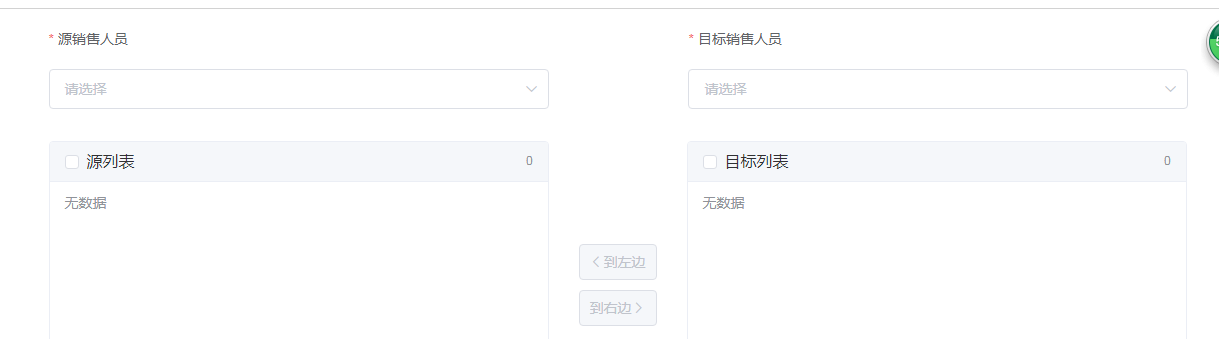
实现思路:
1、有选中才可穿梭
2、已穿梭源数据减少、目标增加(双向)
边界条件:
存储旧List((用于已穿梭后切换下拉框重置list等)
切下拉框时重置另一个list为旧list
左边下拉框选项同右边时 清空右边下拉的选项
代码
<template>

  <div class="page custom-MS custom-MS-ED">

    <el-button class="right-top" type="primary" @click="updateBdCompany('qryForm')">保存</el-button>

    <v-pageSection title="企业分配">

      <el-row>

        <el-form :inline="true" :model="qryInput" :rules="newRules" ref="qryForm" label-position="top">

          <el-col :span="8" :offset="2">

            <el-form-item label="源销售人员" prop="sourceAccount">

              <el-select v-model="qryInput.sourceAccount" filterable placeholder="请选择" clearable @change="handleSourceChange">

                <el-option v-for="item in bdList" :key="item.account" :label="item.name" :value="item.account">

                  <span style="float: left">{{ item.name }}</span>

                  <span style="float: right; color: #8492a6; font-size: 13px">{{ item.account }}</span>

                </el-option>

              </el-select>

            </el-form-item>

          </el-col>

          <el-col :span="8" :offset="4">

            <el-form-item label="目标销售人员" prop="targetAccount">

              <el-select v-model="qryInput.targetAccount" filterable placeholder="请选择" clearable @change="handleTargetChange">

                <el-option v-for="item in otherBdList" :key="item.account" :label="item.name" :value="item.account">

                  <span style="float: left">{{ item.name }}</span>

                  <span style="float: right; color: #8492a6; font-size: 13px">{{ item.account }}</span>

                </el-option>

              </el-select>

            </el-form-item>

          </el-col>

        </el-form>

      </el-row>

      <el-row>

        <el-col :span="8" :offset="2">

          <el-table border height="450"

            ref="multipleSourceTable"

            :data="sourceCL"

            tooltip-effect="dark"

            style="width: 100%"

            @selection-change="handleSourceSelectionChange">
       <!-- 使用Element表格的单选多选功能 -->

            <el-table-column

              type="selection"

              width="55">

            </el-table-column>

            <el-table-column label="操作">

              <template slot-scope="scope">{{scope.row.shortName}} -- {{scope.row.poi}}</template>

            </el-table-column>

          </el-table>

        </el-col>

        <el-col :span="2" :offset="1">

          <div style="height: 260px">

            <el-button type="primary" style="margin-top: 150px" :disabled="multipleSourceSelection.length == 0" @click="addToTarget">到右边<i class="el-icon-arrow-right el-icon--right"></i></el-button>

          </div>

          <div>

            <el-button type="primary" icon="el-icon-arrow-left" :disabled="multipleTargetSelection.length == 0" @click="addToSource">到左边</el-button>

          </div>

        </el-col>

        <el-col :span="8" :offset="1">

          <el-table border height="450"

            ref="multipleTargetTable"

            :data="targetCL"

            tooltip-effect="dark"

            style="width: 100%"

            @selection-change="handleTargetSelectionChange">

            <el-table-column

              type="selection"

              width="55">

            </el-table-column>

            <el-table-column label="操作">

              <template slot-scope="scope">{{scope.row.shortName}}-{{scope.row.poi}}</template>

            </el-table-column>

          </el-table>

        </el-col>

      </el-row>

    </v-pageSection>

  </div>

</template>

<script>
  //发ajax请求的服务

  import CMService from '@/services/companyManagement-service'

  export default {

    data() {

      return {

        qryInput: {

          sourceAccount: ''

        },

        updateParams: {},

        companyIds: [],

        bdList: [],

        sourceCL: [],

        targetCL: [],

        oldSourceCL: [],

        oldTargetCL: [],

        multipleSourceSelection: [],

        multipleTargetSelection: [],
     //Element 数据校验

        newRules: {

          sourceAccount: {

            required: true,

            message: '请选择源销售人员'

          },

          targetAccount: {

            required: true,

            message: '请选择目标销售人员'

          }

        },

      }

    },

    methods: {

      qry() {

        let vm = this

        CMService.qryUnderlingUser(this.qryInput, function(response) {

          vm.bdList = response.data.bdList

        })

      },

      // 封装的方法 start

      // 是否穿梭过

      isTransfer(curList, oldList) {

        if(curList.length != oldList.length){

          return true

        }else{

          return curList.every(function(item){

            return oldList.includes(item)

          })

        }

      },

      // 删除已选

      deleteSelected(curList, multipleSelection) {

        let resultList = []

        curList.forEach(function(itemC, indexC){

          let resultFlag =  multipleSelection.every(function(itemM, indexM){

            return itemM.id != itemC.id

          })

          if(resultFlag) resultList.push(itemC)

        })

        return resultList

      },

      // 获取id组成的数组

      getIdList(curList) {

        let idList = []

        curList.forEach(function(item, index){

          idList.push(item.id)

        })

        return idList

      },

      // 封装的方法 end

      qrySourceCL(account) {

        if(!account){

          this.sourceCL = []

          return

        }

        let vm = this

        if(this.isTransfer){

          this.targetCL = this.oldTargetCL

        }

        CMService.getBdCompanyList({account: account}, function(response) {

          debugger

          vm.sourceCL = response.data.companyList

          vm.oldSourceCL = vm._.clone(response.data.companyList)

        })

      },

      qryTargetCL(account) {

        if(!account){

          this.targetCL = []

          return

        }

        let vm = this

        if(this.isTransfer){

          this.sourceCL = this.oldSourceCL

        }

        CMService.getBdCompanyList({account: account}, function(response) {

          vm.targetCL = response.data.companyList

          vm.oldTargetCL = vm._.clone(response.data.companyList)

        })

      },

      addToTarget() {

        if(!this.qryInput.targetAccount){

          this.$alert('请先选择目标销售人员')

          return

        }

        this.sourceCL = this.deleteSelected(this.sourceCL, this.multipleSourceSelection)

        this.targetCL = this.targetCL.concat(this.multipleSourceSelection)

      },

      addToSource() {

        if(!this.qryInput.sourceAccount){

          this.$alert('请先选择目标销售人员')

          return

        }

        this.targetCL = this.deleteSelected(this.targetCL, this.multipleTargetSelection)

        this.sourceCL = this.sourceCL.concat(this.multipleTargetSelection)

      },

      updateBdCompany(formName) {

        let vm = this

        this.$refs[formName].validate((valid) => {

          if (valid) {

            this.updateParams.companyIds = this.getIdList(this.targetCL)

            CMService.updateBdCompany(this.updateParams, function(response) {

              vm.$alert('修改成功').then(() => {

                vm.dialogModifyFormVisible = false

                vm.qry()

              })

            })

          } else {

            console.log('error submit!!')

            return false

          }

        })

      },

      handleSourceChange(account) {

        this.qrySourceCL(account)

      },

      handleTargetChange(account) {

        this.qryTargetCL(account)

        this.updateParams.account = account

      },

      toggleSelection(rows) {

        if (rows) {

          rows.forEach(row => {

            this.$refs.multipleTable.toggleRowSelection(row);

          });

        } else {

          this.$refs.multipleTable.clearSelection();

        }

      },

      handleSourceSelectionChange(val) {

        this.multipleSourceSelection = val;

      },

      handleTargetSelectionChange(val) {

        this.multipleTargetSelection = val;

      }

    },

    mounted() {

      this.qry()

    },

    computed: {
    //目标销售人员由源销售人员过滤得到

      otherBdList: function(){

        let vm = this

        return this.bdList.filter(function(item, index){

          return item.account !== vm.qryInput.sourceAccount

        })

      }

    },

  }

</script>
vue Transfer 穿梭框的更多相关文章
- vue使用element Transfer 穿梭框实现ajax请求数据和自定义查询
vue使用element Transfer 穿梭框实现ajax请求数据和自定义查询 基于element Transfer http://element-cn.eleme.io/#/zh-CN/comp ...
- vue实现穿梭框效果
vue实现穿梭框效果 一.总结 一句话总结: 用两个数组分别记录左右框框里面的值,用两个数组绑定checkbox,用来记录选中的checkbox值,根据选中的checkbox的值实现删除增加即可 1. ...
- Ant Design Pro中Transfer穿梭框的实际用法(与后端交互)
Ant Design Pro中Transfer穿梭框的实际用法(与后端交互) 该控件的属性以及属性的作用在ADP的官方文档中都有介绍,但没有讲如何与后端交互,本文旨在讲解该控件与后端的交互. Ant ...
- 修改vue element Transfer 穿梭框里内容区的宽度
<template> <el-transfer v-model="value1" :data="data"></el-transf ...
- Transfer 穿梭框
基础用法 Transfer 的数据通过 data 属性传入.数据需要是一个对象数组,每个对象有以下属性:key 为数据的唯一性标识,label为显示文本,disabled 表示该项数据是否禁止转移.目 ...
- 如何在vue+element中实现选择框和穿梭框的根据拼音以及拼音首字母以及汉字的模糊搜索
1.汉字: 直接添加对应的 filterable 2.拼音: 穿梭框和选择器的实现方式有所不同 选择器: <1>下载pinyin-match: npm i --save ...
- Vue实现拖拽穿梭框功能四种方式
一.使用原生js实现拖拽 点击打开视频讲解更加详细 <html lang="en"> <head> <meta charset="UTF-8 ...
- 【vue系列】elementUI 穿梭框右侧获取当前选中项的值的思路
最近 做了一个需求 在查询结果的表格中,选取(可多选)一些值,获取到保单号后,打开一个elementUI的穿梭框,然后获取到所有业务员,选取一些业务员后,将上一步获取到的保单号传递给业务员. 画个示意 ...
- VUE+ElementUI实现左侧为树形结构、右侧无层级结构的穿梭框
工作中遇到一个需求,需要将一个数据选择做成穿梭框,但是要求穿梭框左侧为树形结构.右侧为无层级结构的数据展示,ElementUI自身无法在穿梭框中添加树形结构,网上搜到了大佬封装的插件但是对于右侧的无树 ...
随机推荐
- windows中用bat脚本更改环境变量
机房同传了新的系统,不使用dev的话每次开机都要重新更改环境变量(其实也可以在编译命令里添加绝对路径).所以就去学习了一下用bat脚本更改path.以便每次开机可以一键更改添加环境变量 wmic en ...
- 第二篇:用Android Studio编写Hello World
将Android Studio的环境搭建好后,第一个写Hello World测试程序.Android Studio v3.2.1. 一.新建工程 点击Start a new Android Studi ...
- 2050 Programming Competition (CCPC)
Pro&Sol 链接: https://pan.baidu.com/s/17Tt3EPKEQivP2-3OHkYD2A 提取码: wbnu 复制这段内容后打开百度网盘手机App,操作更方便哦 ...
- Spring 学习笔记一
1.IOC,DI. 2.装配bean基于xml(实例化,声明周期,后处理bean,属性注入).3.装配bean基于注解 1 spring框架概述 1.1 什么是spring l Sp ...
- python logging日志模块
一.logging模块的简介 logging模块是Python内置的标准模块,主要用于输出运行日志,可以设置输出日志的等级.日志保存路径.日志文件回滚等:相比print,具备如下优点: 可以通过设置不 ...
- python自动化开发-[第八天]-面向对象高级篇与网络编程
今日概要: 一.面向对象进阶 1.isinstance(obj,cls)和issubclass(sub,super) 2.__setattr__,__getattr__,__delattr__ 3.二 ...
- Shell 同步时间脚本
Linux系统同步时间脚本 Linux操作系统,如果时间和网络时间差距太大的话.可能会导致程序,进程启动不了.所以linux系统时间同步显得尤为重要,本文在借鉴网上众多资料后,以centos_6.X系 ...
- Spring Boot学习记录03_一些属性配置文件
转自:http://blog.didispace.com/springbootproperties/ 多环境配置(这个地方跟maven的profile配置有点类似) 我们在开发Spring Boot应 ...
- ES6checker ES6浏览器检测
检测地址如下: http://ruanyf.github.io/es-checker/index.cn.html Chrome 44检测结果如下:
- redis安全问题【原】
前提 假设redis安装在 IP 地址为 192.168.0.123 的linux服务器 . 我的本机Win10操作系统 IP地址为 192.168.0.45 , 有一套java客户端代码可调用lin ...