
MVC源码解析 - 配置注册 / 动态注册 HttpModule
本来这一篇, 是要继续 Pipeline 的, 但是在 Pipeline之前, 我看到了InitModules()方法, 所以决定, 在中间穿插一篇进来. 这一篇来讲一下 IHttpModule 的加载时机, 以及怎么动态注册 HttpModules.
一. 经典模式下的 InitModules 方法
首先来看一下 InitModules() 方法, 在这个方法中, 初始化了所有的module, 其中包括了配置文件中的和想要动态注册的.
接下来, 看一下方法:
private void InitModules()

{
   //注册配置文件中的

    HttpModuleCollection modules = RuntimeConfig.GetAppConfig().HttpModules.CreateModules();
   //注册想要动态注册的

    HttpModuleCollection other = this.CreateDynamicModules();

    modules.AppendCollection(other);

    this._moduleCollection = modules;

    this.InitModulesCommon();

}
1. 从配置文件中读取
RuntimeConfig.GetAppConfig().HttpModules.CreateModules()方法, 就是去获取并解析配置文件, 提取出其中的 HttpModule, 并将它加入到集合中.
internal HttpModuleCollection CreateModules()

{

    HttpModuleCollection modules = new HttpModuleCollection();

    foreach (HttpModuleAction action in this.Modules)

    {

        modules.AddModule(action.Entry.ModuleName, action.Entry.Create());

    }

    modules.AddModule("DefaultAuthentication", DefaultAuthenticationModule.CreateDefaultAuthenticationModuleWithAssert());

    return modules;

}
2. 动态注册
先看一下动态注册的方法吧.
private HttpModuleCollection CreateDynamicModules()

{

    HttpModuleCollection modules = new HttpModuleCollection();

    foreach (DynamicModuleRegistryEntry entry in _dynamicModuleRegistry.LockAndFetchList())

    {

        HttpModuleAction action = new HttpModuleAction(entry.Name, entry.Type);

        modules.AddModule(action.Entry.ModuleName, action.Entry.Create());

    }

    return modules;

}
注意到这个方法,与上个方法唯一不同的地方就是 遍历的来源不同. OK, 那在看一下那个方法里面干了些什么.
public ICollection<DynamicModuleRegistryEntry> LockAndFetchList()

{

    lock (this._lockObj)

    {

        this._entriesReadonly = true;

        return this._entries;

    }

}
也就是说, 动态注册的HttpModule必须要加入到 _entries 变量中.
恰好, HttpApplication 中, 有一个方法, RegisterModule 可以注册module. 来看一下这个方法.
public static void RegisterModule(Type moduleType)

{

    if (!RuntimeConfig.GetAppConfig().HttpRuntime.AllowDynamicModuleRegistration)

    {

        throw new InvalidOperationException(SR.GetString("DynamicModuleRegistrationOff"));

    }

    RegisterModuleInternal(moduleType);

}
继续看.
internal static void RegisterModuleInternal(Type moduleType)

{

    _dynamicModuleRegistry.Add(moduleType);

}
这里的 _dynamicModuleRegistry 变量是HttpApplication 中的一个私有字段.
private static readonly DynamicModuleRegistry _dynamicModuleRegistry;
继续看这个Add方法.
public void Add(Type moduleType)

{

    if (moduleType == null)

    {

        throw new ArgumentNullException("moduleType");

    }

    if (!typeof(IHttpModule).IsAssignableFrom(moduleType))

    {

        throw new ArgumentException(string.Format(CultureInfo.CurrentCulture,
        SR.GetString("DynamicModuleRegistry_TypeIsNotIHttpModule"),
        new object[] { moduleType }), "moduleType");

    }

    lock (this._lockObj)

    {

        if (this._entriesReadonly)

        {

            throw new InvalidOperationException(SR.GetString("DynamicModuleRegistry_ModulesAlreadyInitialized"));

        }

        this._entries.Add(new DynamicModuleRegistryEntry(MakeUniqueModuleName(moduleType), moduleType.AssemblyQualifiedName));

    }

}
看到上面这两句标红的没有, 是不是好像在哪里见过? 其实就是上面的 LockAndFetchList() 方法中的. 但是有一个问题, 在这个方法中, 将变量 _entriesReadonly 标记为 true 了, 也就是说, 如果我们想要动态注册上 HttpModule, 那必须是在这个方法执行之前注册进去才行, 否则是会报错的.
插叙:
在集成模式之前, 先插两个例子吧.
1. Web.config实现方式
我在类库中, 建了这么一个类:
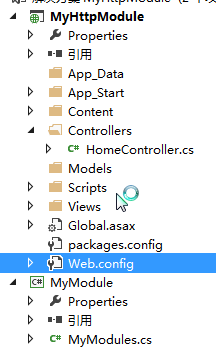
public class MyModules : IHttpModule

{

    public void Dispose() { }

    public void Init(HttpApplication context)

    {

        context.BeginRequest += new EventHandler(MyBeginRequest);

    }

    void MyBeginRequest(object sender, EventArgs e)

    {

        HttpApplication app = sender as HttpApplication;

        if (app != null)

        {

            app.Response.Write("<p>经过MyModules处理过了</p>");

        }

    }

}
然后在<system.webServer>节点下面, 添加一个注册节点.
<modules>

  <add name="MyModules" type="MyModule.MyModules"/>

</modules>
然后, 把程序运行起来, 看一下是否会报错.
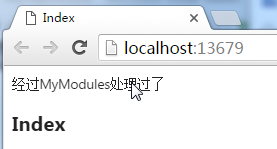
实践证明, 是可以的.
2. 动态注册
一般如果我想注册一个模块进项目, 首先想到的地方, 就是 Golabl.asax文件中 Application_Start 方法了, 可是写在这个方法里面, 显然并不能满足要求.
沿用上面的例子, 然后在 Application_Start()中去注册它, 看一下是否能注册成功.
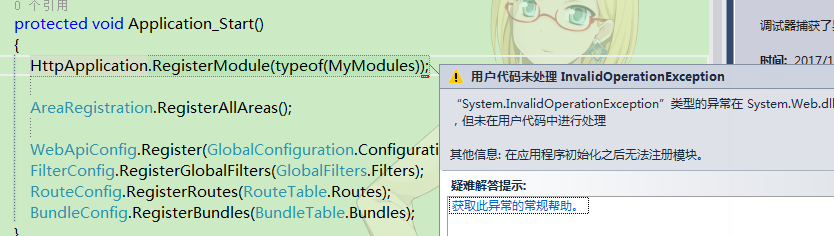
那如果我把它写到静态构造函数中去呢, 在这个类第一次加载的时候, 就注册一下试试.
static MvcApplication()

{

    HttpApplication.RegisterModule(typeof(MyModules));

}
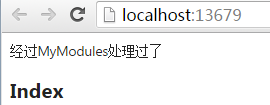
果然是可以的哦.
但是这里有一个非常大的问题, 让我想不通. 从之前的代码中, 其实可以看到, Application_Start方法的调用其实是非常早的, 但是为什么不能再 Application_Start方法里面注册HttpModules, 而要做到静态构造函数里面. 好吧, 这个问题困扰了我一天, 才发现自己走了岔路. 先不表, 接着看集成模式的吧. 答案就在下面.
二、集成模式下 InitIntegratedModules 方法
private void InitIntegratedModules()

{

    this._moduleCollection = this.BuildIntegratedModuleCollection(_moduleConfigInfo);

    this.InitModulesCommon();

}
1. 先看 BuildIntegratedModuleCollection 方法
private HttpModuleCollection BuildIntegratedModuleCollection(List<ModuleConfigurationInfo> moduleList)

{

    HttpModuleCollection modules = new HttpModuleCollection();

    foreach (ModuleConfigurationInfo info in moduleList)

    {

        ModulesEntry entry = new ModulesEntry(info.Name, info.Type, "type", null);

        modules.AddModule(entry.ModuleName, entry.Create());

    }

    return modules;

}
这里其实就是处理 HttpApplication._moduleConfigInfo 中存放的Module. 那么就产生了一个疑问, 这个HttpApplication._moduleConfigInfo在这里是直接拿出来用的, 但是好像没有任何地方对他进行赋值, 起码, 在我解析的过程中, 并没有看到在哪里对他进行了赋值. 肿么办呢?
我立马想到了, 在前面调用过 HttpApplicationFactory.GetSpecialApplicationInstance()方法来产生过一个特殊的HttpApplication对象, 是不是在那里面做了赋值操作呢? 来看一下这个方法.
private HttpApplication GetSpecialApplicationInstance(IntPtr appContext, HttpContext context)

{

    HttpApplication application = null;

    lock (this._specialFreeList)

    {

        if (this._numFreeSpecialAppInstances > )

        {

            application = (HttpApplication) this._specialFreeList.Pop();

            this._numFreeSpecialAppInstances--;

        }

    }

    if (application == null)

    {

        using (new DisposableHttpContextWrapper(context))

        {

            application = (HttpApplication) HttpRuntime.CreateNonPublicInstance(this._theApplicationType);

            using (new ApplicationImpersonationContext())

            {

                application.InitSpecial(this._state, this._eventHandlerMethods, appContext, context);

            }

        }

    }

    return application;

}
经典模式下看的是 InitInternal 方法, 这里就来看一下 InitSpecial 方法吧.
internal void InitSpecial(HttpApplicationState state, MethodInfo[] handlers, IntPtr appContext, HttpContext context)

{

    this._state = state;

    try

    {

        if (context != null)

        {

            this._initContext = context;

            this._initContext.ApplicationInstance = this;

        }

        if (appContext != IntPtr.Zero)

        {

            using (new ApplicationImpersonationContext())

            {

                HttpRuntime.CheckApplicationEnabled();

            }

            this.InitAppLevelCulture();

            this.RegisterEventSubscriptionsWithIIS(appContext, context, handlers);

        }

        else

        {

            this.InitAppLevelCulture();

            if (handlers != null)

            {

                this.HookupEventHandlersForApplicationAndModules(handlers);

            }

        }

        if ((appContext != IntPtr.Zero) && ((this._appPostNotifications != ) || (this._appRequestNotifications != )))

        {

            this.RegisterIntegratedEvent(appContext, "global.asax",
          this._appRequestNotifications,
          this._appPostNotifications,
          base.GetType().FullName, "managedHandler", false);
        }

    }

    finally

    {

        _initSpecialCompleted = true;

        if (this._initContext != null)

        {

            this._initContext.ApplicationInstance = null;

            this._initContext = null;

        }

    }

}
这里似乎并不能看出什么, 那么接着来看标红的方法.
private void RegisterEventSubscriptionsWithIIS(IntPtr appContext, HttpContext context, MethodInfo[] handlers)

{

    RequestNotification notification;

    RequestNotification notification2;

    this.RegisterIntegratedEvent(appContext, "AspNetFilterModule",
    RequestNotification.LogRequest | RequestNotification.UpdateRequestCache,
    0, string.Empty, string.Empty, true);

    this._moduleCollection = this.GetModuleCollection(appContext);

    if (handlers != null)

    {

        this.HookupEventHandlersForApplicationAndModules(handlers);

    }

    HttpApplicationFactory.EnsureAppStartCalledForIntegratedMode(context, this);

    this._currentModuleCollectionKey = "global.asax";

    try

    {

        this._hideRequestResponse = true;

        context.HideRequestResponse = true;

        this._context = context;

        this.Init();

    }

    catch (Exception exception)

    {

        this.RecordError(exception);

        Exception error = context.Error;

        if (error != null)

        {

            throw error;

        }

    }

    finally

    {

        this._context = null;

        context.HideRequestResponse = false;

        this._hideRequestResponse = false;

    }

    this.ProcessEventSubscriptions(out notification, out notification2);

    this._appRequestNotifications |= notification;

    this._appPostNotifications |= notification2;

    for (int i = ; i < this._moduleCollection.Count; i++)

    {

        this._currentModuleCollectionKey = this._moduleCollection.GetKey(i);

        IHttpModule module = this._moduleCollection.Get(i);

        ModuleConfigurationInfo info = _moduleConfigInfo[i];

        module.Init(this);

        this.ProcessEventSubscriptions(out notification, out notification2);

        if ((notification != ) || (notification2 != ))

        {

            this.RegisterIntegratedEvent(appContext, info.Name, notification, notification2, info.Type, info.Precondition, false);

        }

    }

    this.RegisterIntegratedEvent(appContext, "ManagedPipelineHandler", RequestNotification.ExecuteRequestHandler | RequestNotification.MapRequestHandler, RequestNotification.EndRequest, string.Empty, string.Empty, false);

}
这里有个方法叫 HttpApplication.GetModuleCollection(), 来看一下
private HttpModuleCollection GetModuleCollection(IntPtr appContext)

{

    if (_moduleConfigInfo == null)

    {

        List<ModuleConfigurationInfo> list = null;

        IntPtr zero = IntPtr.Zero;

        IntPtr bstrModuleName = IntPtr.Zero;

        int cchModuleName = ;

        IntPtr bstrModuleType = IntPtr.Zero;

        int cchModuleType = ;

        IntPtr bstrModulePrecondition = IntPtr.Zero;

        int cchModulePrecondition = ;

        try

        {

            int count = ;

            int num5 = UnsafeIISMethods.MgdGetModuleCollection(IntPtr.Zero, appContext, out zero, out count);

            if (num5 < )

            {

                throw new HttpException(SR.GetString("Cant_Read_Native_Modules", new object[] { num5.ToString("X8", CultureInfo.InvariantCulture) }));

            }

            list = new List<ModuleConfigurationInfo>(count);

            for (uint i = ; i < count; i++)

            {

                num5 = UnsafeIISMethods.MgdGetNextModule(zero, ref i, out bstrModuleName, out cchModuleName, out bstrModuleType, out cchModuleType, out bstrModulePrecondition, out cchModulePrecondition);

                if (num5 < )

                {

                    throw new HttpException(SR.GetString("Cant_Read_Native_Modules", new object[] { num5.ToString("X8", CultureInfo.InvariantCulture) }));

                }

                string str = (cchModuleName > ) ? StringUtil.StringFromWCharPtr(bstrModuleName, cchModuleName) : null;

                string str2 = (cchModuleType > ) ? StringUtil.StringFromWCharPtr(bstrModuleType, cchModuleType) : null;

                string condition = (cchModulePrecondition > ) ? StringUtil.StringFromWCharPtr(bstrModulePrecondition, cchModulePrecondition) : string.Empty;

                Marshal.FreeBSTR(bstrModuleName);

                bstrModuleName = IntPtr.Zero;

                cchModuleName = ;

                Marshal.FreeBSTR(bstrModuleType);

                bstrModuleType = IntPtr.Zero;

                cchModuleType = ;

                Marshal.FreeBSTR(bstrModulePrecondition);

                bstrModulePrecondition = IntPtr.Zero;

                cchModulePrecondition = ;

                if (!string.IsNullOrEmpty(str) && !string.IsNullOrEmpty(str2))

                {

                    list.Add(new ModuleConfigurationInfo(str, str2, condition));

                }

            }

        }

        finally

        {

            if (zero != IntPtr.Zero)

            {

                Marshal.Release(zero);

                zero = IntPtr.Zero;

            }

            if (bstrModuleName != IntPtr.Zero)

            {

                Marshal.FreeBSTR(bstrModuleName);

                bstrModuleName = IntPtr.Zero;

            }

            if (bstrModuleType != IntPtr.Zero)

            {

                Marshal.FreeBSTR(bstrModuleType);

                bstrModuleType = IntPtr.Zero;

            }

            if (bstrModulePrecondition != IntPtr.Zero)

            {

                Marshal.FreeBSTR(bstrModulePrecondition);

                bstrModulePrecondition = IntPtr.Zero;

            }

        }

        list.AddRange(this.GetConfigInfoForDynamicModules());

        _moduleConfigInfo = list;

    }

    return this.BuildIntegratedModuleCollection(_moduleConfigInfo);

}
好长啊, 很多都看不懂, 不过没关系, 直接看我标红的方法.
private IEnumerable<ModuleConfigurationInfo> GetConfigInfoForDynamicModules()

{

    return (from entry in _dynamicModuleRegistry.LockAndFetchList()

    select new ModuleConfigurationInfo(entry.Name, entry.Type, "managedHandler"));

}
这里也出现了 LockAndFetchList() 方法, 也就是说, 在产生特殊HttpApplication对象的时候, 集成模式下, 在创建特殊对象的过程中, 就已经注册了 HttpModules了, 然后才调用的 Application_Start方法, 这也就解释了, 之前我想不通的问题.
其实这里, 主要是我在之前忽略掉了一个问题, IIS的集成模式和经典模式的运行差异性问题. 他们实现的功能其实差不多, 就是过程稍有不同.
2. InitModulesCommon 方法
private void InitModulesCommon()

{

    int count = this._moduleCollection.Count;

    for (int i = ; i < count; i++)

    {

        this._currentModuleCollectionKey = this._moduleCollection.GetKey(i);

        this._moduleCollection[i].Init(this);

    }

    this._currentModuleCollectionKey = null;

    this.InitAppLevelCulture();

}
这里就是循环遍历集合中的HttpModules, 调用他的 Init 方法.
参考:
MVC源码解析 - 配置注册 / 动态注册 HttpModule的更多相关文章
- Spring-cloud & Netflix 源码解析:Eureka 服务注册发现接口 ****
http://www.idouba.net/spring-cloud-source-eureka-client-api/?utm_source=tuicool&utm_medium=refer ...
- MVC源码解析 - UrlRoutingModule / 路由注册
从前面篇章的解析, 其实能看的出来, IHttpModule 可以注册很多个, 而且可以从web.config注册, 可以动态注册. 但是有一个关键性的Module没有讲, 这里就先来讲一下这个关键性 ...
- springIOC源码解析之BeanDefinition的注册
ApplicationContext类结构 context是一个存储上下文结构的东西,里面会引用BeanFactory BeanFactory类结构 我们从这句代码开始分析,(本文spring采用的 ...
- 【Dubbo 源码解析】04_Dubbo 服务注册&暴露
Dubbo 服务注册&暴露 Dubbo 服务暴露过程是通过 com.alibaba.dubbo.config.spring.ServiceBean 来实现的.Spring 容器 refresh ...
- MVC源码解析 - 目录
尽管MVC6和MVC4,5已经有很大不同, 但是, 作为一个普通开发人员, 还真没有资格去选择使用哪个版本. So, 尽管已经是old的版本, 还是再次花点时间去温故知新. 我记得在15年初的时候, ...
- MVC源码解析 - Http Pipeline 解析(上)
IHttpHandler applicationInstance = HttpApplicationFactory.GetApplicationInstance(context); 上一篇说到了创建 ...
- spring mvc源码解析
1.从DispatcherServlet开始 与很多使用广泛的MVC框架一样,SpringMVC使用的是FrontController模式,所有的设计都围绕DispatcherServlet 为中心来 ...
- MVC源码解析 - Http Pipeline 解析(下)
接上一篇, 我在 HttpModule 的Init方法中, 添加了自己的事件, 在Pipeline里, 就会把握注册的事件给执行了. 那么Pipeline是如何执行并且按照什么顺序执行的呢? 现在我们 ...
- MVC源码解析 - 进入CLR
这一篇是转载自汤姆大叔的一篇随笔. IIS 5 的 ASP.net 请求处理过程 IIS5核心特征是:IIS是允许在一个叫InetInfo.exe的进程上的,所以无论是aspx页面还是html页面都是 ...
随机推荐
- android ListView隐藏FooterView(headerView)
安卓开发.正在使用listView时间,我们经常使用的footerView要么headerView 给ListView添加footer和header很多时间.它会基于隐藏和显示的情况下. 因为foot ...
- PHP+MYSQL分页原理
1.SQL语句中的limit用法 2.学习分页的一种公式 3.parse_url()解析URL函数 parse_url() 是将URL解析成有固定键值的数组的函数 4.$_SERVER["R ...
- beanutils中WrapDynaBean
public class Emp { private String firstName="李"; private String lastName; public ...
- ASP.NET MVC 例子演示如何在 Knockout JS 的配合下,使用 TypeScript 。
一个简单的 ASP.NET MVC 例子演示如何在 Knockout JS 的配合下,使用 TypeScript . 前言 TypeScript 是一种由微软开发的自由和开源的编程语言.它是JavaS ...
- NET实现仓库看板的一些感想
NET实现仓库看板的一些感想 从一名技术开发人员到实施人员的蜕变,从不同的角度看待同一个问题,或许会有不一样的结果.这里记录一下最近一个项目实施的案例,非常有感触! 一. 项目情况简介 本次项目是给一 ...
- Windows Server 服务器安全配置
Windows Server 服务器安全配置 好吧,我标题党了.我只了解一些基本的安全配置.如果你是大湿,请绕道或者给予我严厉的批评让我进步谢谢. 编辑这篇文章用的编辑器编辑的,当我单击查看的时候发现 ...
- Love myself...
Sometimes we feel as if our lives rely on that one person. We think 'If I do this, he/she will like ...
- iOS基础 - Modal展示控制器
一.利用Modal形式展示控制器 1.如何展示 // vc就是要展示的新控制器 [self presentViewController:vc animated:YES completion:^{ NS ...
- 测试驱动 ASP.NET MVC Type Aliase
Type Aliase 去掉Scala的糖衣(4) -- Type Aliase 我的新博客地址:http://cuipengfei.me/blog/2013/12/23/desugar-scala- ...
- DedeCms密码解密[转]
dede 的密码怎么破解,dede后台.32位的DEDE密码如何破解 dede 的密码是32位MD5减去头5位,减去尾七位,得到20 MD5密码,方法是,前减3后减1,得到16位MD5. 比如我的数据 ...