
Types of Windows
|
The Window's Real Estate |
|
Application's Instance |
|
A window is referred to as parent when it can be used to host, hold, or carry other windows. For examples, when the computer starts, it draws its main screen, also called the desktop, which occupies the widest area that the monitor screen can offer. This primary window becomes the host of all other window that will display as long as the computer is own. This desktop is also a complete window in its own right. As mentioned already, to get its handle, you can call the GetDesktopWindow() function. After the desktop has been created, a window of yours can display if the user starts your application. This means that an application must have been created for the user to use it. When the user opens an application, we also say that the application has been instantiated or an instance of the application has been created. Based on this, any time you create an application, you must provide an instance of it. This allows the operating system to manage your application with regards to its interaction with the user and also its relationship with other resources. Therefore, you must always create an instance for your application. This is taken care of by the first argument of the WinMain() function. If an application has already been created, to get its instance, you can call theGetWindowLong() function. Its syntax is:
Although this function is used for many other reasons, it can also help you get the instance of an application. To do this, pass the first argument as the handle to a window of the application you are examining and pass the second argument as GWL_HINSTANCE. |
|
Window Parenting |
|
There are two types of windows or object you will deal with in your applications. The type referred to here is defined by the relationship a window has with regards to other windows that are part of an application:
When a parent is created, made active, or made visible, it gives existence and visibility to its children. When a parent gets hidden, it also hides its children. If a parent moves, it moves with its children. The children keep their positions and dimensions inside the parent. When a parent is destroyed, it also destroys its children (sometimes it does not happen so smoothly; a parent may make a child unavailable but the memory space the child was occupying after the parent has been destroyed may still be in use, sometimes filled with garbage, but such memory may not be available to other applications until you explicitly recover it). Child controls depend on a parent because the parent "carries", "holds", or hosts them. All of the Windows controls you will use in your applications are child controls. A child window can also be a parent of another control. For example, a toolbar of the browser is the parent of the buttons on it. If you close or hide the toolbar, its children disappear. At the same time, the toolbar is a child of the application's frame. If you close the application, the toolbar disappears, along with its own children. In this example, the toolbar is a child of the frame but is a parent to its buttons. After initializing an application with either the WNDCLASS, or the WNDCLASSEX structure and registering it, as we have done so far, you must create the primary parent of all objects of your class. This is usually done with either the CreateWindow() or the CreateWindowEx()function. Here is an example:
|
|
A Window's Childhood |
|
After creating the main window, you can use it as a parent for other windows. To specify that a window is a child of another window, when creating it with either the CreateWindow() or the CreateWindowEx() function, pass the handle of the parent as the hWndParent argument. Here is an example:
If a window is a child of another window, to get a handle to its parent, you can call theGetParent() function. Its syntax is: HWND GetParent(HWND hWnd); The hWnd argument is a handle to the child window whose parent you want to find out. Alternatively, you can also use the GetWindowLong() function, passing the second argument as GWL_HWNDPARENT, to get a handle to the parent of a window. |
|
The Borders of a Window |
|
To distinguish a particular window from the other objects on a screen, a window can be defined by surrounding borders on the left, the top, the right, and the bottom. One of the effects the user may want to control on a window is its size. For example, the user may want to narrow, enlarge, shrink, or heighten a window. To do this, a user would position the mouse on one of the borders, click and drag in the desired direction. This action is referred to as resizing a window. For the user to be able to change the size of a window, the window must have a special type of border referred to as a thick frame. To provide this border, apply or add theWS_THICKFRAME style:
Because many windows will need this functionality, a special style can combine them and it is called WS_OVERLAPPEDWINDOW. Therefore, you can create a resizable window as follows: CreateWindow(ClsName, WndName, WS_OVERLAPPEDWINDOW, |
|
Window's Location and Size |
|
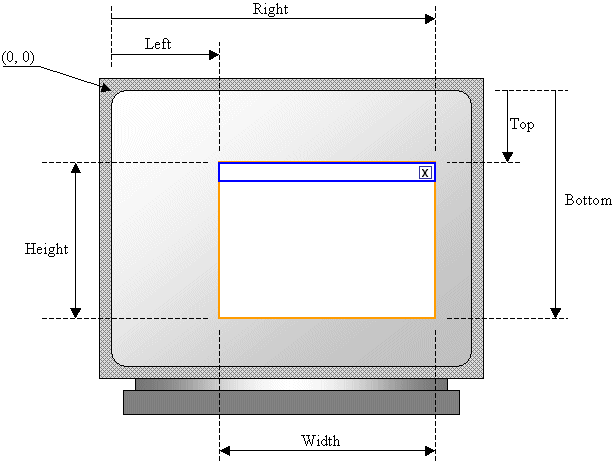
The location of a window is defined by the distance from the left border of the monitor to the window's left border and its distance from the top border of the monitor to its own top border. The size of a window is its width and its height. These can be illustrated for a main window frame as follows:
For a Win32 application, the original distance from the left border of the monitor is passed as the x argument to the CreateWindow() or the CreateWindowEx() function. The distance from top is specified using the y argument. The x and y arguments define the location of the window. The distance from the left border of the monitor to the right border of the window is specified as the nWidth argument. The distance from the top border of the monitor to the lower border of the window is specified with the nHeight value. If you cannot make up your mind for these four values, you can use the CW_USEDEFAULT(when-Creating-the-Window-USE-the-DEFAULT-value) constant for either one or all four arguments. In such a case, the compiler would select a value for the argument. Here is an example:
|
|
Displaying the Window |
|
Once a window has been created and if this was done successfully, you can display it to the user. This is done by calling the ShowWindow() function. Its syntax is:
The hWnd argument is a handle to the window that you want to display. It could be the window returned by the CreateWindow() or the CreateWindowEx() function. The nCmdShow specifies how the window must be displayed. Its possible values are:
To show its presence on the screen, the window must be painted. This can be done by calling the UpdateWindow() function. Its syntax is:
This function simply wants to know what window needs to be painted. This window is specified by its handle. Here is an example:
|
|
The Multiple Document Interface (MDI) |
|
Introduction |
|
A multiple document is the type of application that uses a main, external window that acts as a frame and hosts other, floating window that act as its children. This concept allows the user to open more than one document at a time in an application, making it possible to switch from one document to another without closing the application. |
|
MDI Application Creation |
|
You start an MDI like the types of applications we have created so far. One of the primary differences is that the window procedure must return the DefFrameProc() function. Its syntax is:
|
Types of Windows的更多相关文章
- windows消息机制详解(转载)
消息,就是指Windows发出的一个通知,告诉应用程序某个事情发生了.例如,单击鼠标.改变窗口尺寸.按下键盘上的一个键都会使Windows发送一个消息给应用程序.消息本身是作为一个记录传递给应用程序的 ...
- How to Fix Missing TortoiseSVN File Status Icons in Windows
For many Windows-based developers, Subversion and TortoiseSVN is a great source control solution. It ...
- windows窗口分析,父窗口,子窗口,所有者窗口
(本文尝试通过一些简单的实验,来分析Windows的窗口机制,并对微软的设计理由进行一定的猜测,需要读者具备C++.Windows编程及MFC经验,还得有一定动手能力.文中可能出现一些术语不统一的现象 ...
- [虾扯蛋] android界面框架-Window
从纯sdk及framwork的角度看,android中界面框架相关的类型有:Window,WindowManager,View等.下面就以这几个类为出发点来概览下安卓开发的"界面架构&quo ...
- PL/SQL常用设置 可看引用位置更清晰直观 引自:http://blog.csdn.net/xiaoqforever/article/details/27695569
引自:http://blog.csdn.net/xiaoqforever/article/details/27695569 1,登录后默认自动选中My Objects 默认情况下,PLSQL Deve ...
- Getting Text Metrics in Firemonkey(delphiscience的博客)
Firemonkey’s abstract TCanvas class has been providing the dimensions of the bounding rectangle of s ...
- WindowManager.LayoutParams的探究
上次在子线程更新UI时用了一下WindowManager.LayoutParams,当时觉得不太顺手.以前都是用空参构造器,这次用了type和flag属性,出现了意想不到的效果.也看看源码吧,多锻炼锻 ...
- SetWindowPos和SetForegroundWindow
There are many closely-related concepts involved, and related terms are often misused, even in the o ...
- wxWidgets与其它GUI工具库比较
WxWidgets Compared To Other Toolkits Some general notes: wxWidgets not only works for C++, but als ...
随机推荐
- 基于visual Studio2013解决C语言竞赛题之0806平均分
题目
- Unity Interface Serialization-Expose Interface field In Inspector
Unity has some quirks about their inspector, so as a preface they are listed here: If you add a [Ser ...
- Android TextView自己主动换行文字排版參差不齐的原因
今天项目没什么进展,公司后台出问题了.看了下刚刚学习Android时的笔记,发现TextView会自己主动换行,并且排版文字參差不齐.查了下资料,总结原因例如以下: 1.半角字符与全角字符混乱所致:这 ...
- 极限挑战—C#+ODP 100万条数据导入Oracle数据库仅用不到1秒
链接地址:http://www.cnblogs.com/armyfai/p/4646213.html 要:在这里我们将看到的是C#中利用ODP实现在Oracle数据库中瞬间导入百万级数据,这对快速批量 ...
- ul不加宽高
ul可以不加宽高,但是不能用margin(上下左右), 可以用margin(左右),否则里面的内容如果是要左右浮动的话,就会掉下来
- HDU 1425 sort 题解
选择出数列中前k个最大的数. 这里由于数据特殊.所以能够使用hash表的方法: #include <cstdio> #include <algorithm> #include ...
- poj3278Catch That Cow(BFS)
Catch That Cow Time Limit: 2000MS Memory Limit: 65536K Total Submissions: 37094 Accepted: 11466 ...
- Selenium 出现: Caused by: java.lang.ClassNotFoundException: org.w3c.dom.ElementTraversal
webDriver 运行的时候出现: Caused by: java.lang.ClassNotFoundException: org.w3c.dom.ElementTraversal 解决办法: 只 ...
- Swift - 设置网格UICollectionView的单元格间距
要设置单元格cell的间距(水平间距,垂直间距)可进行如下设置: 方法1:在storyboard中设置 选择Collection View后在面板里设置Min Spacing相关属性(这里也可以设置单 ...
- css selector: xpath:
css selector: $$(".mainLeft>div>h1") xpath: $x(".mainLeft>div>h1") n ...