
Debug / Inspect WebSocket traffic with Fiddler【转】
Introduction
I have recently written a project using SignalR, which supports HTML 5 WebSocket. However I cannot find good tools to debug or inspect WebSocket traffic. I know that both Chrome and Fiddler support inspecting the WebSocket traffic, but they are very basic. If you have very high volume of traffic or each frame is very large, it becomes very difficult to use them for debugging. (Please see more details in the Background section).
I am going to show you how to use Fiddler (and FiddlerScript) to inspect WebSocket traffic in the same way you inspect HTTP traffic. This technique applies to all WebSocket implementations including SignalR, Socket.IO and raw WebSocket implementation, etc.
Background
Limit of Chrome traffic inspector:
- WebSocket traffic is shown in Network tab -> "connect" packet (101 Switching Protocols) -> Frame tab. WebSocket traffic does not automatically refresh unless you click on the 101 packet again.
- It does not support "Continuation Frame", as shown below:
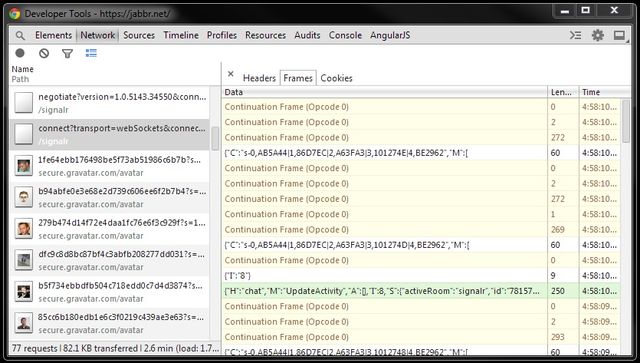
Limit of Fiddler Log tab:
- WebSocket traffic frames in the Fiddler Log tab are not grouped, therefore it is hard to navigate between frames.
- Continuation frames are not decoded, they are displayed as binary.
- In addition, if you have very high volume of traffic, Fiddler will use up 100% of your CPU and hang.

- Hint: Fiddler no longer spews WebSocket messages to the Log tab by default.
You can do so using FiddlerScript. Simply click Rules > Customize
Rules and add the following function inside your Handlers class:
static function OnWebSocketMessage(oMsg: WebSocketMessage) {

    // Log Message to the LOG tab

    FiddlerApplication.Log.LogString(oMsg.ToString());

}
Solution
With this solution, you get all following benefits:
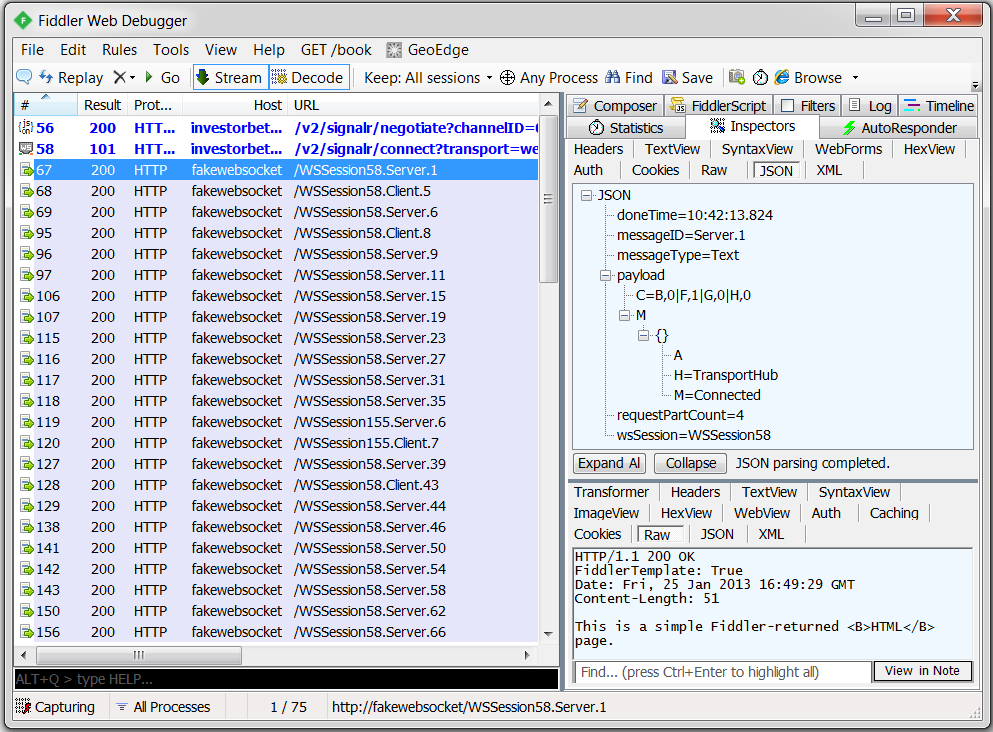
- You can see all WebSocket frames in Fiddler main window, and you can navigate between frames easily.
- You can see the frame details in the Inspector tab -> Request info -> JSON sub-tab.
- Continuation frames are automatically decoded and combined together.
- All frames are captured and displayed in Fiddler main window automatically without manual reload.
- CPU usage for Fiddler will still be low for high volume of traffic.
How it works?
1. Download Fiddler Web Debugger (v4.4.5.9)
2. Open Fiddler -> Rules -> Customize Rules... ->This will open the FiddlerScript
3. Add following codes FiddlerScript:
Hide ShrinkCopy Code
import System.Threading;

// ...

class Handlers

{

    // ...

    static function Main()

    {

        // ...

        //

        // Print Web Socket frame every 2 seconds

        //

        printSocketTimer =

            new System.Threading.Timer(PrintSocketMessage, null, 0, 2000);

    }

    // Create a first-in, first-out queue

    static var socketMessages = new System.Collections.Queue();

    static var printSocketTimer = null;

    static var requestBodyBuilder = new System.Text.StringBuilder();

    static var requestUrlBuilder = new System.Text.StringBuilder();

    static var requestPayloadIsJson = false;

    static var requestPartCount = 0;

    //

    // Listen to WebSocketMessage event, and add the socket messages

    // to the static queue.

    //

    static function OnWebSocketMessage(oMsg: WebSocketMessage)

    {

        Monitor.Enter(socketMessages);

        socketMessages.Enqueue(oMsg);

        Monitor.Exit(socketMessages);

    }

    //

    // Take socket messages from the static queue, and generate fake

    // HTTP requests that will be caught by Fiddler.

    //

    static function PrintSocketMessage(stateInfo: Object)

    {

        Monitor.Enter(socketMessages);

        while (socketMessages.Count > 0)

        {

            var oMsg = socketMessages.Dequeue();

            ExtractSocketMessage(oMsg);

        }

        Monitor.Exit(socketMessages);

    }

    //

    // Build web socket message information in JSON format, and send this JSON

    // information in a fake HTTP request that will be caught by Fiddler

    //

    // If a frame is split in multiple messages, following function will combine

    // them into one

    //

    static function ExtractSocketMessage(oMsg: WebSocketMessage)

    {

        if (oMsg.FrameType != WebSocketFrameTypes.Continuation)

        {

            var messageID = String.Format(

                "{0}.{1}", oMsg.IsOutbound ? "Client" : "Server", oMsg.ID);

            var wsSession = GetWsSession(oMsg);

            requestUrlBuilder.AppendFormat("{0}.{1}", wsSession, messageID);

            requestBodyBuilder.Append("{");

            requestBodyBuilder.AppendFormat("\"doneTime\": \"{0}\",",

                oMsg.Timers.dtDoneRead.ToString("hh:mm:ss.fff"));

            requestBodyBuilder.AppendFormat("\"messageType\": \"{0}\",",

                oMsg.FrameType);

            requestBodyBuilder.AppendFormat("\"messageID\": \"{0}\",", messageID);

            requestBodyBuilder.AppendFormat("\"wsSession\": \"{0}\",", wsSession);

            requestBodyBuilder.Append("\"payload\": ");

            var payloadString = oMsg.PayloadAsString();

          if (oMsg.FrameType == WebSocketFrameTypes.Binary)

            {

                payloadString = HexToString(payloadString);

            }

            if (payloadString.StartsWith("{"))

            {

                requestPayloadIsJson = true;

            }

            else

            {

                requestBodyBuilder.Append("\"");

            }

            requestBodyBuilder.AppendFormat("{0}", payloadString);

        }

        else

        {

            var payloadString = HexToString(oMsg.PayloadAsString());

            requestBodyBuilder.AppendFormat("{0}", payloadString);

        }

        requestPartCount++;

        if (oMsg.IsFinalFrame)

        {

            if (!requestPayloadIsJson)

            {

                requestBodyBuilder.Append("\"");

            }

            requestBodyBuilder.AppendFormat(", \"requestPartCount\": \"{0}\"",

                requestPartCount);

            requestBodyBuilder.Append("}");

            SendRequest(requestUrlBuilder.ToString(), requestBodyBuilder.ToString());

            requestBodyBuilder.Clear();

            requestUrlBuilder.Clear();

            requestPayloadIsJson = false;

            requestPartCount = 0;

        }

    }

    //

    // Generate fake HTTP request with JSON data that will be caught by Fiddler

    // We can inspect this request in "Inspectors" tab -> "JSON" sub-tab

    //

    static function SendRequest(urlPath: String, message: String)

    {

        var request = String.Format(

            "POST http://fakewebsocket/{0} HTTP/1.1\n" +

            "User-Agent: Fiddler\n" +

            "Content-Type: application/json; charset=utf-8\n" +

            "Host: fakewebsocket\n" +

            "Content-Length: {1}\n\n{2}",

            urlPath, message.Length, message);

            FiddlerApplication.oProxy.SendRequest(request, null);

    }

    //

    // Unfortunately, WebSocketMessage class does not have a member for

    // Web Socket session number. Therefore, we are extracting session number

    // from its string output.

    //

    static function GetWsSession(oMsg: WebSocketMessage)

    {

        var message = oMsg.ToString();

        var index = message.IndexOf(".");

        var wsSession = message.Substring(0, index);

        return wsSession;

    }

    //

    // Extract Hex to String.

    // E.g., 7B-22-48-22-3A-22-54-72-61-6E to {"H":"TransportHub","M":"

    //

    static function HexToString(sourceHex: String)

    {

        sourceHex = sourceHex.Replace("-", "");

        var sb = new System.Text.StringBuilder();

        for (var i = 0; i < sourceHex.Length; i += 2)

        {

            var hs = sourceHex.Substring(i, 2);

            sb.Append(Convert.ToChar(Convert.ToUInt32(hs, 16)));

        }

        var ascii = sb.ToString();

        return ascii;

    }

}
4. Setup Fiddler -> AutoResponder (Optional)

I have tested with Firefox 25.0, IE 11.0, Chrome 32.0. This solution should work with all browsers that support WebSocket, as long as the network proxy is setup correctly. Using IE as an example:
- Open Fiddler, this will setup the network proxy automatically, but it's not enough.
- Open IE -> Tools -> Internet Options -> Connections tab -> Click "LAN settings" button
- Click "Advanced" button
- Tick "Use the same proxy server for all protocols" checkbox.

Points of Interest
- You can test above solution by going to http://www.websocket.org/echo.html, http://socket.io/demos/chat/and https://jabbr.net/ (log-in required. This site is built using SignalR, which supports WebSocket).
- Above code is printing WebSocket frames every 2 seconds to avoid high CPU usage, which means the timestamps in Statistics tab may be delayed for up to 2 seconds. You may adjust this timer depending on your traffic volume.
- However, you can see the actual time when the frame is received, in the Inspector tab -> Request info -> JSON sub-tab -> doneTime.
- For simplicity, I have only created one Queue for all WebSocket sessions, Continuation frames are combined together regardless of their session ID. Feel free to extend my code. For now, just debug one WebSocket session at a time.
- Above code assumes that payload starts with '{' is JSON data, this works very well for me. If this assumptionis wrong in your situation, you can easily modify the code.
- Note: Socket.IO currently prefix a special meaning number before the payload, which makes the frames invalid JSON data, i.e., you cannot see nice formatted frames in JSON sub-tab. You can however still see the frames in Raw sub-tab. Alternatively, you can update my script to handle the number prefix from Socket.IO.
- Please vote my article if you find it useful. Thanks for your support.
转http://www.codeproject.com/Articles/718660/Debug-Inspect-WebSocket-traffic-with-Fiddler
Debug / Inspect WebSocket traffic with Fiddler【转】的更多相关文章
- How To: Capture Android & iOS Traffic with Fiddler
How To: Capture iOS Traffic with Fiddlerhttps://www.telerik.com/blogs/how-to-capture-ios-traffic-wit ...
- Cannot capture jmeter traffic in fiddler
Cannot capture jmeter traffic in fiddler First, change Fiddler's port back to 8888 as it was origina ...
- 两步让你的mobile traffic通过fiddler代理传送
mobile app运行时由于调试网络相关的内容非常不便,所以如果能够让iphone通过桌面主机来跑traffic,那么在pc上就能非常清楚地检查mobile app和后端之间有什么问题了. 幸运的是 ...
- [Debug] Inspect and Style an Element in DevTools that Normally Disappears when Inactive
It’s handy to inspect an element in your browser’s DevTools when you need to experiment or tweak it’ ...
- 使用Chrome或Fiddler抓取WebSocket包
首先,HTTP是建立在TCP协议基础上的,而WebSocket通常也是建立在TCP上,所以说为什么有些网页游戏抓不到包而有些又可以,这仅是因为你使用的抓包工具是针对了HTTP的通信协议. 我先从抽象的 ...
- Microsoft ASP.NET SignalR
SignalR类似与JavaScript实时框架,如Socket.IO.SignalR能够完成客户端向服务器的异步通信,并同时支持服务器向浏览器客户端推送事件.SignalR的连接通过日益流行的Web ...
- Fiddler抓包和修改WebSocket数据,支持wss
记录一下用Fiddler对WebSocket收发的数据进行抓包分析和篡改数据,只找到这么一个方法,能用就行吧. 时间:2019-3-29 环境: win7 + Fiddler 5.0 Fiddler抓 ...
- 【转】Fiddler抓包和修改WebSocket数据,支持wss
记录一下用Fiddler对WebSocket收发的数据进行抓包分析和篡改数据,只找到这么一个方法,能用就行吧.时间:2019-3-29环境: win7 + Fiddler 5.0 Fiddler抓取W ...
- Fiddler Web Debugger Tool
The Fiddler tool helps you debug web applications by capturing network traffic between the Internet ...
随机推荐
- 浅谈linux读写同步机制RCU
RCU是linux系统的一种读写同步机制,说到底他也是一种内核同步的手段,本问就RCU概率和实现机制,给出笔者的理解. [RCU概率] 我们先看下内核文档中对RCU的定义: RCU is a sync ...
- Hadoop集群搭建步骤
实验性操作是在虚拟机里进行的,除了搭建hadoop本身的操作之外,遇到的其它问题总结如下: 1. 虚拟机挂载windows磁盘: 添加硬件,要保证该硬件此时没有被读写访问等,因为挂载后,该磁盘在宿主机 ...
- Kindeditor JS 富文本编辑器图片上传指定路径
js //================== KindEditor.ready(function (K) { var hotelid = $("#hotelid").val(); ...
- Zabbix概念、安装以及快速入门
Zabbix is an enterprise-class open source distributed monitoring solution.[1] Zabbix是一个企业级的.开源的.分布式的 ...
- Ubuntu 14.04—Anaconda 相关
Anaconda 使用国内镜像: https://keyunluo.github.io/2016/07/17/2016-07-17-anaconda-python.html Anaconda下的 De ...
- U3D音频系统
一.基本信息 1.支持的声音格式 WAV OGG MP3 AIFF MOD S3M xm IT 导入以后,unity会选择的压缩方式: WAV:无损,音质好,文件大,适用于较短文件 OGG.MP ...
- java程序基础
- java基础3
包装类:
- nodejs 包引用的终极结论
通常我们用exports 或module.exports 来导出一个文件中的接口和字段,用require来引用导出的对象.那么这个exports 和 module.exports到底有啥关联呢? 1. ...
- 5.MyBaits调用存储过程
1.创建一个javaweb项目MyBatis_Part4_Procedure 2.在src下创建procedure.sql文件 --创建表 create table p_user( id number ...