
android中抽屉布局DrawerLayout的使用
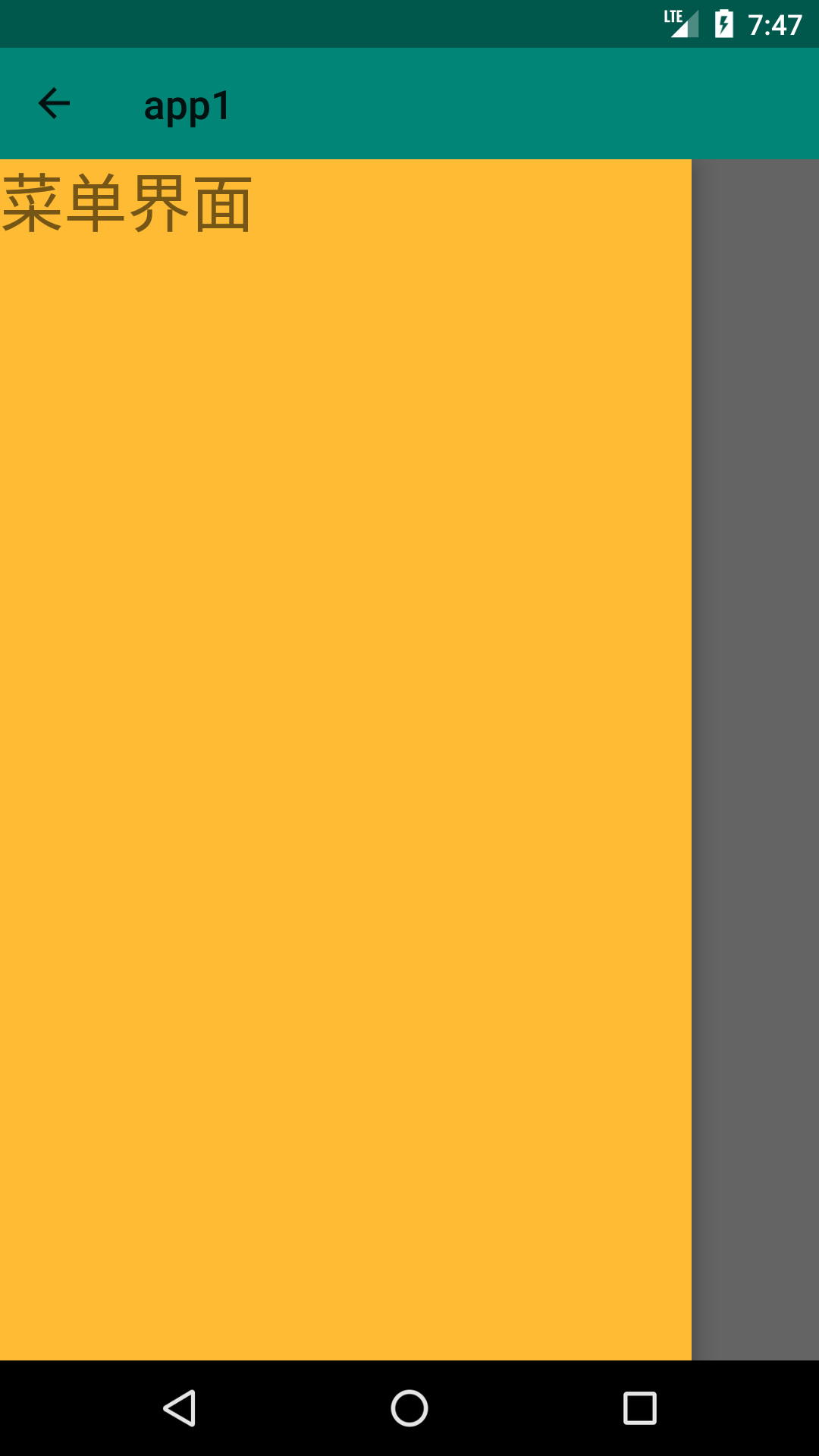
这个抽屉布局类似于手机QQ的主界面,点击左上角头像,会从界面左侧弹出一个抽屉,展示一些内容。
首先是布局界面activity_main.xml:
<?xml version="1.0" encoding="utf-8"?>

<LinearLayout xmlns:android="http://schemas.android.com/apk/res/android"

    xmlns:app="http://schemas.android.com/apk/res-auto"

    xmlns:tools="http://schemas.android.com/tools"

    android:layout_width="match_parent"

    android:layout_height="match_parent"

    android:orientation="vertical"

    tools:context=".MainActivity">

    <android.support.v7.widget.Toolbar

        android:id="@+id/toolbar1"

        android:layout_width="match_parent"

        android:layout_height="wrap_content"

        android:background="?attr/colorPrimary"

        android:minHeight="?attr/actionBarSize"

        android:theme="@style/ThemeOverlay.AppCompat.ActionBar" />

    <android.support.v4.widget.DrawerLayout xmlns:android="http://schemas.android.com/apk/res/android"

        android:id="@+id/drawer"

        android:layout_width="match_parent"

        android:layout_height="match_parent">

        <android.support.constraint.ConstraintLayout

            android:layout_width="match_parent"

            android:layout_height="match_parent">

            <TextView

                android:id="@+id/textView1"

                android:layout_width="wrap_content"

                android:layout_height="wrap_content"

                android:text="主界面"

                android:textSize="32dp" />

        </android.support.constraint.ConstraintLayout>

        <android.support.constraint.ConstraintLayout

            android:layout_width="match_parent"

            android:layout_height="match_parent"

            android:layout_gravity="start"

            android:background="@android:color/holo_orange_light">

            <TextView

                android:id="@+id/textView2"

                android:layout_width="wrap_content"

                android:layout_height="wrap_content"

                android:text="菜单界面"

                android:textSize="32dp" />

        </android.support.constraint.ConstraintLayout>

    </android.support.v4.widget.DrawerLayout>

</LinearLayout>
上面这个布局是这样的:
最外面是一个上下结构的LinearLayout,LinearLayout里面有两个组件,一个Toolbar,一个DrawerLayout,也就是本文主要用的组件。
然后DrawerLayout里面是有两个ConstraintLayout,第一个ConstraintLayout代表主界面,第二个ConstraintLayout代表抽屉界面。
注意DrawerLayout组件在可视化编辑界面没有,需要手工输入。
然后就是java类了MainActivity.java:
 package com.example.chenrui.app1;

 import android.os.Bundle;

 import android.support.v4.widget.DrawerLayout;

 import android.support.v7.app.ActionBarDrawerToggle;

 import android.support.v7.app.AppCompatActivity;

 import android.support.v7.widget.Toolbar;

 import android.view.View;

 public class MainActivity extends AppCompatActivity {

     @Override

     protected void onCreate(Bundle savedInstanceState) {

         super.onCreate(savedInstanceState);

         setContentView(R.layout.activity_main);

         Toolbar toolbar = findViewById(R.id.toolbar1);

         setSupportActionBar(toolbar);

         getSupportActionBar().setHomeButtonEnabled(true); //设置返回键可用

         getSupportActionBar().setDisplayHomeAsUpEnabled(true);

         final DrawerLayout drawerLayout = findViewById(R.id.drawer);

         ActionBarDrawerToggle toggle = new ActionBarDrawerToggle(this,drawerLayout,toolbar,R.string.open,R.string.close) {

             @Override

             public void onDrawerOpened(View drawerView) {

                 super.onDrawerOpened(drawerView);

             }

             @Override

             public void onDrawerClosed(View drawerView) {

                 super.onDrawerClosed(drawerView);

             }

         };

         toggle.syncState();

         drawerLayout.addDrawerListener(toggle);

     }

 }
上面代码的相关解释:
1、代码从23-35行主要是添加toolbar标题栏的按钮,通过点击按钮切换抽屉界面的显示和隐藏
注意是35行代码,用的是addDrawerListener方法,用来代替已经过期的setDrawerListener方法
2、显示和隐藏抽屉界面是通过addDrawerListener方法实现的,如果要手工切换抽屉界面的显示和隐藏,可以使用下面的方法:
显示:drawerLayout.openDrawer(Gravity.LEFT);
隐藏:drawerLayout.closeDrawer(Gravity.LEFT);
3、第23行代码中的R.string.open和R.string.close是在资源文件中自定义的,就是显示和隐藏时的提示内容,自己在资源文件中添加一下就可以了
执行效果:

android中抽屉布局DrawerLayout的使用的更多相关文章
- 无废话Android之常见adb指令、电话拨号器、点击事件的4种写法、短信发送器、Android 中各种布局(1)
1.Android是什么 手机设备的软件栈,包括一个完整的操作系统.中间件.关键的应用程序,底层是linux内核,安全管理.内存管理.进程管理.电源管理.硬件驱动 2.Dalvik VM 和 JVM ...
- Android中的布局优化方法
http://blog.csdn.net/rwecho/article/details/8951009 Android开发中的布局很重要吗?那是当然.一切的显示样式都是由这个布局决定的,你说能不重要吗 ...
- Android中得到布局文件对象有三种方式
Android中得到布局文件对象有三种方式 第一种,通过Activity对象 View view = Activity对象.getLayoutInflater().inflater(R.layout. ...
- Android笔记(七) Android中的布局——线性布局
我们的软件是由好多个界面组成的,而每个界面又由N多个控件组成,Android中借助布局来让各个空间有条不紊的摆放在界面上. 可以把布局看作是一个可以放置很多控件的容器,它可以按照一定的规律调整控件的位 ...
- 什么是布局?Android中的布局是怎样的?
布局管理器(通常被称为是布局)是对ViewGroup类的扩展,是用来控制子控件在UI中的位置. Android SDK包含了许多布局类,在为视图.Fragment和Activity创建UI时,可以使用 ...
- Android中常用布局单位
Android在UI布局时经常用到一些单位,对单位混用直接会影响UI的显示,要想正确的在布局中使用每种单位就必须先真正的熟悉它. UI显示效果的影响因素:屏幕尺寸.屏幕密度.分辨率:而android手 ...
- Android中相对布局的两个控件
<Button android:id="@+id/button3" android:layout_width="wrap_content" android ...
- Android中的布局动画
简介 布局动画是给布局的动画,会影响到布局中子对象 使用方法 给布局添加动画效果: 先找到要设置的layout的id,然后创建布局动画,创建一个LayoutAnimationController,并把 ...
- Android中帧布局-FrameLayout和网格布局-GridLayout
帧布局-FrameLayout 一.概念 帧布局中,容器为每个加入其中的空间创建一个空白的区域(成为一帧).每个空间占据一帧,这些帧会按gravity属性自动对齐. 帧布局的效果是将其中的所有空间叠加 ...
随机推荐
- 添加类似navigationController自带的返回按钮
添加类似navigationController自带的返回按钮,效果如下: 一.UINavigationcontroller自带的navigationBar 是无法添加左箭头的返回按钮的 在网上搜索了 ...
- dll 显示调用
今天尝试写了一个简单的C++DLL,并且用另一个CPP调用它,啥都不说,先贴代码 1.DLL(冒泡算法) extern "C" 必须最左 _declspec(dllexport)和 ...
- 黑吃黑第一季/全集Banshee迅雷下载
第一季 Banshee Season 1 (2013)看点:“Banshee”在爱尔兰盖尔语中被称为“bean sidhe”,意思是“拥有超能力的女人”.不过在鲍尔的新剧中,Banshee并不是指超自 ...
- 关于MySQL的行转列的简单应用
sql 脚本 -- 创建表 学生表 CREATE TABLE `student` ( `stuid` VARCHAR(16) NOT NULL COMMENT '学号', `stunm` VARCHA ...
- 为什么你的session不见了
一:现象 有小伙伴写了下面一段代码,然后发现,随着每次关闭浏览器,count的值重新开始计数了,如下: protected void doGet(HttpServletRequest request, ...
- 大话+图说:Java字节码指令——只为让你懂
前言 随着Java开发技术不断被推到新的高度,对于Java程序员来讲越来越需要具备对更深入的基础性技术的理解,比如Java字节码指令.不然,可能很难深入理解一些时下的新框架.新技术,盲目一味追新也会越 ...
- [转]hive metadata 存mysql 注释中文乱码的有关
FROM : http://blog.csdn.net/tswisdom/article/details/41444287 hive metadata 存mysql 注释中文乱码的问题 hive me ...
- [转]小心PHP的类定义顺序与继承的问题
FROM : http://www.pakey.net/blog/php-class-shunxu.html 以下代码的运行环境均为PHP5.3.11先来看一段代码 <?php class A ...
- Newtonsoft.Json高级用法DataContractJsonSerializer,JavaScriptSerializer 和 Json.NET即Newtonsoft.Json datatable,dataset,modle,序列化
原文地址:https://www.cnblogs.com/yanweidie/p/4605212.html Newtonsoft.Json介绍 在做开发的时候,很多数据交换都是以json格式传输的.而 ...
- Apache URL重写的配置 及其 apache500错误
1:如果apache报500错误时 ----->原因:可能是你的ReWrite模块没有打开(有时在apache重装时会忘记打开该模块) 将apache--->httpd.conf文件中Lo ...