
Qt——文件对话框
教程:https://www.devbean.net/2012/09/qt-study-road-2-file-dialog/
代码如下:
//mainwindow.h

#ifndef MAINWINDOW_H

#define MAINWINDOW_H

#include <QMainWindow>

class QTextEdit;

class MainWindow : public QMainWindow

{

    Q_OBJECT

public:

    explicit MainWindow(QWidget *parent = );

    ~MainWindow();

private slots:

    void openFile();

    void saveFile();

private:

    QAction *openAction;

    QAction *saveAction;

    QTextEdit *textEdit;

};

#endif // MAINWINDOW_H
//mainwindow.cpp

#include <QtGui>

#include <QtWidgets>

#include "mainwindow.h"

MainWindow::MainWindow(QWidget *parent) :

    QMainWindow(parent)

{

    openAction = new QAction(QIcon(":/images/file-open"), tr("&Open..."), this);

    openAction->setShortcuts(QKeySequence::Open);

    openAction->setStatusTip(tr("Open an existing file"));

    connect(openAction, &QAction::triggered, this, &MainWindow::openFile);

    saveAction = new QAction(QIcon(":/images/file-save"), tr("&Save..."), this);

    saveAction->setShortcuts(QKeySequence::Save);

    saveAction->setStatusTip(tr("Save a new file"));

    connect(saveAction, &QAction::triggered, this, &MainWindow::saveFile);

    QMenu *file = menuBar()->addMenu(tr("&File"));

    file->addAction(openAction);

    file->addAction(saveAction);

    QToolBar *toolBar = addToolBar(tr("&File"));

    toolBar->addAction(openAction);

    toolBar->addAction(saveAction);

    statusBar() ;

    textEdit = new QTextEdit(this);

    setCentralWidget(textEdit);

}

MainWindow::~MainWindow()

{

}

void MainWindow::openFile()

{

    QString path = QFileDialog::getOpenFileName(this, tr("Open File"), ".", tr("Text Files(*.txt)"));

    if(!path.isEmpty()) {

        QFile file(path);

        if (!file.open(QIODevice::ReadOnly | QIODevice::Text)) {

            QMessageBox::warning(this, tr("Read File"), tr("Cannot open file:\n%1").arg(path));

            return;

        }

        QTextStream in(&file);

        textEdit->setText(in.readAll());

        file.close();

    } else {

        QMessageBox::warning(this, tr("Path"), tr("You did not select any file."));

    }

}

void MainWindow::saveFile()

{

    QString path = QFileDialog::getSaveFileName(this, tr("Save File"), ".", tr("Text Files(*.txt)"));

    if(!path.isEmpty()) {

        QFile file(path);

        if (!file.open(QIODevice::WriteOnly | QIODevice::Text)) {

            QMessageBox::warning(this, tr("Write File"), tr("Cannot open file:\n%1").arg(path));

            return;

        }

        QTextStream out(&file);

        out << textEdit->toPlainText();

        file.close();

    } else {

        QMessageBox::warning(this, tr("Path"), tr("You did not select any file."));

    }

}
函数说明:
QString getOpenFileName(QWidget * parent = ,                        //父窗口

                        const QString & caption = QString(),         //对话框标题

                        const QString & dir = QString(),             //打开的默认目录

                        const QString & filter = QString(),          //过滤器

                        QString * selectedFilter = ,                //默认选择的过滤器

                        Options options = )                         //对话框的一些参数设定,比如只显示文件夹等等,它的取值是enum
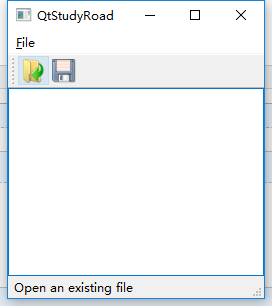
运行截图:
Qt——文件对话框的更多相关文章
- QT 文件对话框(QFileDialog)
1.选择文件(上传.打开...) QString QFileDialog::getOpenFileName( QWidget *parent = , //parent,用于指定父组件.注意,很多Qt组 ...
- QT学习 之 对话框 (四) 字体对话框、消息对话框、文件对话框、进程对话框(超详细中文注释)
QMessageBox类: 含有Question消息框.Information消息框.Warning消息框和Critical消息框等 通常有两种方式可以来创建标准消息对话框: 一种是采用“基于属性”的 ...
- QT 打开文件对话框汇总
Qstring fileName = QFileDialog::getOpenFileName(this, tr("open file"), " ", tr( ...
- Qt打开文件对话框
项目中需要打开文件对话框,就查了一下,不得不说Qt的帮助文档做的真好,非常详细.要实现这个功能有两种方式,使用QFileDialog的静态方法,实例化QFileDialog对象. 基本算是照抄帮助文档 ...
- Qt 学习之路 2(17):文件对话框
Home / Qt 学习之路 2 / Qt 学习之路 2(17):文件对话框 Qt 学习之路 2(17):文件对话框 豆子 2012年9月24日 Qt 学习之路 2 85条评论 在前面的章节中 ...
- QT+ 使用标准对话框+关于对话框+问题对话框+文件对话框
#include "mainwindow.h" #include <QMenuBar> #include <QMenu> #include <QAct ...
- QT设计UI:QT模式对话框打开文件
使用QT模式对话框,并使显示框 为背景色: 方法使用了QCheckBox *native; #include <QCheckBox> 初始化函数代码: //设置默认打开图像位置 nat ...
- 19.QT对话框(文件对话框,颜色对话框,字体框,自定义对话框)
文件对话框 #include<QFileDialog> //文件对话框 void Dialog::on_pushButton_clicked() { //定义显示文件的类型 窗口标题 可供 ...
- QT 文件操作
QT提供了QFile类用于文件读写 QFile可以读写文本文件,也可以读写二进制文件 #include "widget.h" #include <QGridLayout> ...
随机推荐
- adv7180驱动
http://download.csdn.net/download/u013308744/9945184 http://www.ebaina.com/bbs/thread-10121-1-1.html ...
- C++编程经验-返回局部变量的讨论(转)
返回局部变量没问题 如果返回局部变量有问题,函数的意义还有吗? 全局变量还用返回吗? 返回指向局部变量的指针才有问题, 函数退栈之后,局部变量消失, 指针将指向未知区域,所以出现问题. 返回局部 ...
- OpenStack配置解析库oslo.config的使用方法
OpenStack的oslo项目旨在独立出系统中可重用的基础功能,oslo.config就是其中一个被广泛使用的库,该项工作的主要目的就是解析OpenStack中命令行(CLI)或配置文件(.conf ...
- Java实践 — SSH远程执行Shell脚本
1. SSH简介 SSH是Secure Shell的缩写,一种建立在应用层和传输层基础上的安全协议.SSH在连接和传送过程中会加密所有数据,可以用来在不同系统或者服务器之间进行安全连接 ...
- C# 校验Email(电子邮件)地址是否合法
用于校验给定的Email地址是否合法,只针对用于提供的Email地址的格式,不对其是否真实存在进行校验. /// <summary> /// 验证EMail是否合法 /// </su ...
- Java设计模式之五大创建型模式(附实例和详解)
一.概况 总体来说设计模式分为三大类: (1)创建型模式,共五种:工厂方法模式.抽象工厂模式.单例模式.建造者模式.原型模式. (2)结构型模式,共七种:适配器模式.装饰器模式.代理模式.外观模式.桥 ...
- nginx搭建(centos7)
1.安装前准备: 系统: CentOS 7.5 x64 下载包:wget yum -y install wget 安装: 2.安装一下这些依赖条件: yum install gcc pcre pcre ...
- @Mock与@InjectMocks的区别
@Mock: 创建一个Mock. @InjectMocks: 创建一个实例,简单的说是这个Mock可以调用真实代码的方法,其余用@Mock(或@Spy)注解创建的mock将被注入到用该实例中. 注意: ...
- iOS模拟(糟糕的)网络环境
有时候为了模拟在糟糕的网络环境下app的表现,会故意拔网线(断wifi),苹果其实提供了专门的工具来精确地模拟你在几个预设的场景下的网络连接情况:Network Link Conditioner 点击 ...
- 提高OCR质量的技巧之区域未正确检测
ABBYY FineReader会在识别前分析页面图像并检测图片上不同类型的区域,如文本.图片.背景图片.表格和条形码区域,此分析确定识别的区域和识别顺序.在用户界面中,不同的区域类型按其边界的颜色进 ...