
[Canvas]碰撞球 增加小球间碰撞检测
请点此下载代码并用Chrome或是Firefox打开index.html
图例:
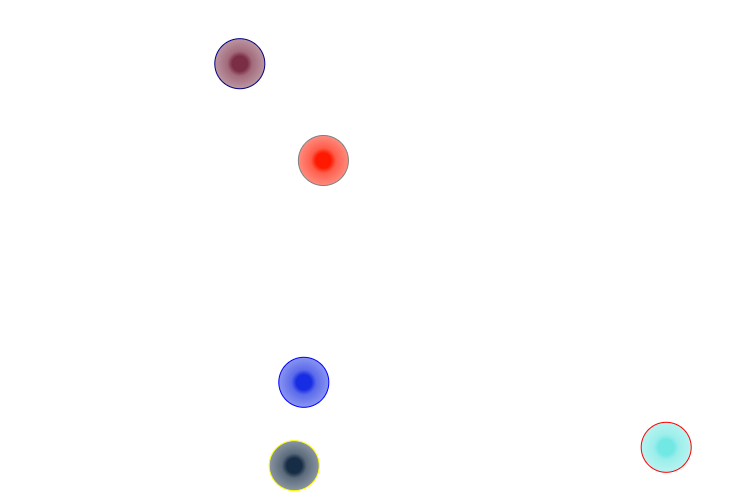
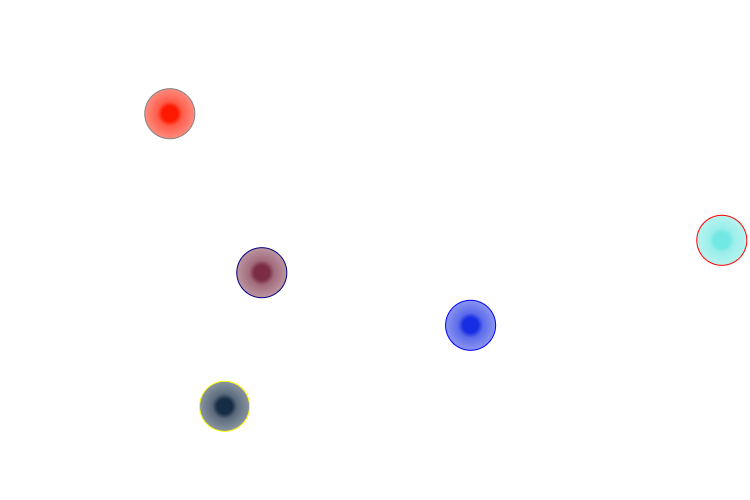
代码:
<!DOCTYPE html>
<html lang="utf-8">
<meta http-equiv="Content-Type" content="text/html; charset=utf-8"/>
<head>
     <title>碰撞球 19.3.3 18:11 by:逆火 horn19782016@163.com</title>

     <style>
     #canvas{
        background:#ffffff;
        cursor:pointer;
        margin-left:10px;
        margin-top:10px;
        -webkit-box-shadow:3px 3px 6px rgba(0,0,0,0.5);
        -moz-box-shadow:3px 3px 6px rgba(0,0,0,0.5);
        box-shadow:3px 3px 6px rgba(0,0,0,0.5);
     }

     #controls{
        margin-top:10px;
        margin-left:15px;
     }
     </style>

    </head>

     <body onload="init()">
        <div id="controls">
            <input id='animateBtn' type='button' value='运动'/>
        </div>

        <canvas id="canvas" width="750px" height="500px" >
            出现文字表示你的浏览器不支持HTML5
        </canvas>
     </body>
</html>
<script type="text/javascript">
<!--
var paused=true;
animateBtn.onclick=function(e){
    paused=! paused;

    if(paused){
        animateBtn.value="运动";
    }else{

        animateBtn.value="暂停";
        window.requestAnimationFrame(animate);
    }
}

var ctx;// 绘图环境
var balls;// 球数组
function init(){

    var canvas=document.getElementById('canvas');
    canvas.width=750;
    canvas.height=500;
    ctx=canvas.getContext('2d');

    balls=[
        {
            x:150,
            y:250,
            vx:-7.2,
            vy:3.8,
            radius:25,
            innerColor:'rgba(255,25,0,1)',
            middleColor:'rgba(255,25,0,0.7)',
            outerColor:'rgba(255,25,0,0.5)',
            strokeStyle:'gray',
        },

        {
            x:650,
            y:50,
            vx:-8.2,
            vy:2.5,
            radius:25,
            innerColor:'rgba(113,232,227,1)',
            middleColor:'rgba(113,232,227,0.7)',
            outerColor:'rgba(113,232,227,0.5)',
            strokeStyle:'red',
        },

        {
            x:50,
            y:150,
            vx:12,
            vy:-14,
            radius:25,
            innerColor:'rgba(23,45,227,1)',
            middleColor:'rgba(23,45,227,0.7)',
            outerColor:'rgba(23,45,227,0.5)',
            strokeStyle:'blue',
        },

        {
            x:30,
            y:60,
            vx:8,
            vy:-24,
            radius:25,
            innerColor:'rgba(23,45,69,1)',
            middleColor:'rgba(23,45,69,0.7)',
            outerColor:'rgba(23,45,69,0.5)',
            strokeStyle:'yellow',
        },

        {
            x:300,
            y:300,
            vx:80,
            vy:-34,
            radius:25,
            innerColor:'rgba(123,45,69,1)',
            middleColor:'rgba(123,45,69,0.7)',
            outerColor:'rgba(123,45,69,0.5)',
            strokeStyle:'navy',
        },
   ];

};

function update(){
    for(var i=0;i<balls.length;i++){
        var ball=balls[i];

        // 与左右墙壁的碰撞检测
        if(ball.x+ball.vx+ball.radius>ctx.canvas.width || ball.x+ball.vx-ball.radius<0){
            ball.vx=-ball.vx;
        }

        // 与上下墙壁的碰撞检测
        if(ball.y+ball.vy+ball.radius>ctx.canvas.height || ball.y+ball.vy-ball.radius<0){
            ball.vy=-ball.vy;
        }

        // 小球之前的碰撞检测
        for(var j=0;j<balls.length;j++){
            if(i!=j){
                var other=balls[j];

                var distance=Math.sqrt( Math.pow((ball.x+ball.vx-other.x-other.vx),2)+Math.pow((ball.y+ball.vy-other.y-other.vy),2));

                if(distance<ball.radius+other.radius){
                    // 如果两个碰撞小球的质量相等,联立动量守恒和能量守恒方程时可解得:两个小球碰撞后交换速度。
                    var x=ball.vx;
                    ball.vx=other.vx;
                    other.vx=x;

                    var y=ball.vy;
                    ball.vy=other.vy;
                    other.vy=y;
                }
            }
        }

        ball.x+=ball.vx;
        ball.y+=ball.vy;
    }
}

function draw(){
    ctx.clearRect(0,0,ctx.canvas.width,ctx.canvas.height);

    for(var i=0;i<balls.length;i++){
        var ball=balls[i];

        gradient=ctx.createRadialGradient(ball.x,ball.y,0,ball.x,ball.y,ball.radius);
        gradient.addColorStop(0.3,ball.innerColor);
        gradient.addColorStop(0.5,ball.middleColor);
        gradient.addColorStop(1.0,ball.outerColor);

        ctx.save();
        ctx.beginPath();
        ctx.arc(ball.x,ball.y,ball.radius,0,Math.PI*2,false);
        ctx.fillStyle=gradient;
        ctx.strokeStyle=ball.strokeStyle;
        ctx.fill();
        ctx.stroke();
        ctx.restore();
    }
}

function animate(){
    if(!paused){

        update();
        draw();

        setTimeout( function(){
            window.requestAnimationFrame(animate); /// 让浏览器自行决定帧速率
        }, 0.10 * 1000 );// 延时执行
    }
}
//-->
</script>
2019年3月3日20点17分
[Canvas]碰撞球 增加小球间碰撞检测的更多相关文章
- [Canvas]碰撞球
观赏动态效果请点此下载并用Chrome/Firefox打开index.html 图例: 代码: <!DOCTYPE html> <html lang="utf-8" ...
- 2017了,回家前 "年末" 分享:下雨,飘雪,红包雨,碰撞球,自定义View
(本博客为原创:http://www.cnblogs.com/linguanh/) 目录: 效果展示 感想 代码拆解 开源地址 效果展示 有没有兴趣继续看下去,直接看下"颜值"是第 ...
- [原创]基于html5新标签canvas写的一个小画板
最近刚学了canvas,写个小应用练习下 源代码 <!DOCTYPE> <html> <head> <meta http-equiv="Conten ...
- Html5 Canvas动画旋转的小方块;
<!DOCTYPE html> <html> <head> <meta charset="utf-8"> <meta http ...
- canvas学习笔记、小函数整理
http://bbs.csdn.net/topics/391493648 canvas实例分享 2016-3-16 http://bbs.csdn.net/topics/390582151 html5 ...
- 利用canvas写一个验证码小功能
刚刚开始接触canvas,写个验证码小功能练练手,实现效果图如下: 主要代码如下: html <!DOCTYPE html> <html lang="en"> ...
- 第八讲:HTML5中canvas实现小球击打小方块游戏
源码:http://download.csdn.net/detail/liumingm900913/7469969 游戏开发流程: 1.创建画布: 将画布放在div标签里面,这样能够控制画布居中的位置 ...
- canvas写的一个小时钟demo
<!DOCTYPE html> <html> <head> <title>HTML5 Canvas Demo of clock</title> ...
- opencv(4)实现数据增加小工具
数据增加(data augmentation),作为一种深度学习中的常用手段,数据增加对模型的泛化性和准确性都有帮助.数据增加的具体使用方式一般有两种,一种是实时增加,比如在Caffe中加入数据扰动层 ...
随机推荐
- 突破 BTrace 安全限制
http://blog.csdn.net/alivetime/article/details/6548615
- 网速4M等于多少KB/S,等于多少kbps
4M=512KB/S=4096Kbps 1KB/S=8Kbps 8倍速 转:http://zhidao.baidu.com/link?url=8GAyhcY9BbVstQr8pE3I7QP_M53Km ...
- C#中使用throw和throw ex抛出异常的区别
通常,我们使用try/catch/finally语句块来捕获异常,就像在这里说的.在抛出异常的时候,使用throw和throw ex有什么区别呢? 假设,按如下的方式调用几个方法: →在Main方法中 ...
- C#编程(三十)----------泛型结构,泛型方法,泛型委托
泛型结构 泛型结构和泛型类几乎是一直的,只是泛型结构没有继承的特性..NET平台提供的一个泛型结构是(可空类型)Nullablle<T>.可空类型的引入,主要是为了解决数据库语言中的数字与 ...
- 【gitlab】首次提交本次代码到gitlab上,报错:Updates were rejected because the remote contains work that you do
首次提交本次代码到gitlab上,报错:Updates were rejected because the remote contains work that you do 报错情况如下: 错误原因: ...
- ANDROID DisplayManager 服务解析一
from://http://blog.csdn.net/goohong/article/details/8536102 http://www.tuicool.com/articles/FJVFnu A ...
- 为什么不能用memcached存储Session
Memcached创建者Dormando很早就写过两篇文章[1][2], 告诫开发人员不要用memcached存储Session.他在第一篇文章中给出的理由大致是说,如果用memcached存储Ses ...
- Java 公历转农历,然后农历减一年(或者几天或者任意天),再把这个日期转成公历
由于系统的提醒有可能是农历的今天或指定时间要用quartz 实现定时任务 公历转农历,然后农历减一年(或者几天或者任意天),再把这个日期转成公历. 网上很多农历转公历的程序都有问题,QQ.百度的也有 ...
- [rrdtool]监控和自己主动绘图,简单的监控.md
如今想要监控服务的流量和并发数,但是又没那么多时间来写系统.其它的运维系统又不熟悉,于是就用现有的rrdtool shell做了个简单的监控界面,暂时用下,也算是个小实验把. rrdtool也是刚接触 ...
- TK1 设置最大频率
支持的值:cat /sys/kernel/debug/clock/gbus/possible_rates当前值:cat /sys/kernel/debug/clock/gbus/rate 设置最大值: ...