
Python项目--Scrapy框架(二)
本文主要是利用scrapy框架爬取果壳问答中热门问答, 精彩问答的相关信息
环境
win8, python3.7, pycharm
正文
1. 创建scrapy项目文件
在cmd命令行中任意目录下执行以下代码, 即可在该目录下创建GuoKeWenDa项目文件
scrapy startproject GuoKeWenDa
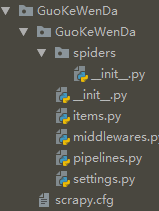
2. 创建爬虫主程序
在cmd中切换到GuoKeWenDa目录下, 执行以下代码:
cd GuoKeWenDa

scrapy genspider GuoKeWenDaSpider GuoKeWenDaSpider.toscrape.com
创建GuoKeWenDaSpider.py文件成功
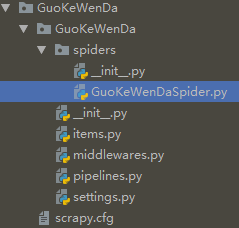
3. 定义要爬取的项目
分析果壳热门问答和果壳精彩问答, 发现两页面的结构一致, 我们爬取其中的主题, 简介, 关注数, 回答数, 标签, 文章链接等6个信息
在items.py中定义
 import scrapy

 from scrapy.item import Item, Field

 class GuokewendaItem(Item):

     # define the fields for your item here like:

     # name = scrapy.Field()

     title = Field()

     intro = Field()

     attention = Field()

     answer = Field()

     label = Field()

     link = Field()
4. 编写爬虫主程序
在GuoKeWenDaSpider.py文件中编写:
 import scrapy

 from scrapy.spiders import CrawlSpider

 from scrapy.selector import Selector

 from scrapy.http import Request

 from GuoKeWenDa.items import GuokewendaItem

 class GuoKeWenDa(CrawlSpider):

     name = 'GuoKeWenDa'

     allowed_domains = ['GuoKeWenDaSpider.toscrape.com']

     urls = ['hottest', 'highlight']

     #对urls进行遍历

     start_urls = ['https://www.guokr.com/ask/{0}/?page={1}'.format(str(m),str(n)) for m in urls for n in range(1, 101)]

     def parse(self, response):

         item = GuokewendaItem()

         #初始化源码

         selector = Selector(response)

         #用xpath进行解析

         infos = selector.xpath('//ul[@class="ask-list-cp"]/li')

         for info in infos:

             title = info.xpath('div[2]/h2/a/text()').extract()[0].strip()

             intro = info.xpath('div[2]/p/text()').extract()[0].strip()

             attention = info.xpath('div[1]/p[1]/span/text()').extract()[0]

             answer = info.xpath('div[1]/p[2]/span/text()').extract()[0]

             labels = info.xpath('div[2]/div/p/a/text()').extract()

             link = info.xpath('div[2]/h2/a/@href').extract()[0]

             if labels:

                 label = " ".join(labels)    #用join将列表转成以" "分隔的字符串

             else:

                 label =''

             item['title'] = title

             item['intro'] = intro

             item['attention'] = attention

             item['answer'] = answer

             item['label'] = label

             item['link'] = link

             yield item
5. 保存到MongoDB
import pymongo

class GuokewendaPipeline(object):

    def __init__(self):

        '''连接MongoDB'''

        client = pymongo.MongoClient(host='localhost')

        db = client['test']

        guokewenda = db['guokewenda']

        self.post= guokewenda

    def process_item(self, item, spider):

        '''写入MongoDB'''

        info = dict(item)

        self.post.insert(info)

        return item
6. 配置setting
在原有代码中去掉以下代码的注释 (快捷键"Ctrl" + "/")
USER_AGENT = 'Mozilla/5.0 (Windows NT 6.3; Win64; x64) AppleWebKit/537.36 (KHTML, like Gecko) Chrome/68.0.3440.106 Safari/537.36'

DOWNLOAD_DELAY = 5

DEFAULT_REQUEST_HEADERS = {

  'Accept': 'text/html,application/xhtml+xml,application/xml;q=0.9,*/*;q=0.8',

  'Accept-Language': 'en',

}

ITEM_PIPELINES = {

   'GuoKeWenDa.pipelines.GuokewendaPipeline': 300,

}
7. 新建main.py文件
在GuoKeWenDa文件目录下新建main.py文件, 编辑:
 from scrapy import cmdline

 cmdline.execute('scrapy crawl GuoKeWenDa'.split())
执行main.py文件
8. 爬取结果

总结
实际中热门问答只有2页, 因此遍历它的第3到100页就显得太多余:
urls = ['hottest', 'highlight']

start_urls = ['https://www.guokr.com/ask/{0}/?page={1}'.format(str(m),str(n)) for m in urls for n in range(1, 101)]
可利用"+"连接两个url(参考: https://www.jianshu.com/p/9006ddca23b6), 修改为:
start_urls = ['https://www.guokr.com/ask/hottest/?page={}'.format(str(m)) for m in range(1,3)] + ['https://www.guokr.com/ask/highlight/?page={}'.format(n) for n in range(1,101)]
Python项目--Scrapy框架(二)的更多相关文章
- Python项目--Scrapy框架(一)
环境 win8, python3.7, pycharm 正文 1.Scrapy框架的安装 在cmd命令行窗口执行: pip install Scrapy 即可完成Scrapy框架的安装 2. 创建Sc ...
- python爬虫scrapy框架——人工识别登录知乎倒立文字验证码和数字英文验证码(2)
操作环境:python3 在上一文中python爬虫scrapy框架--人工识别知乎登录知乎倒立文字验证码和数字英文验证码(1)我们已经介绍了用Requests库来登录知乎,本文如果看不懂可以先看之前 ...
- python爬虫scrapy框架
Scrapy 框架 关注公众号"轻松学编程"了解更多. 一.简介 Scrapy是用纯Python实现一个为了爬取网站数据.提取结构性数据而编写的应用框架,用途非常广泛. 框架的力量 ...
- Python爬虫Scrapy框架入门(1)
也许是很少接触python的原因,我觉得是Scrapy框架和以往Java框架很不一样:它真的是个框架. 从表层来看,与Java框架引入jar包.配置xml或.property文件不同,Scrapy的模 ...
- Python使用Scrapy框架爬取数据存入CSV文件(Python爬虫实战4)
1. Scrapy框架 Scrapy是python下实现爬虫功能的框架,能够将数据解析.数据处理.数据存储合为一体功能的爬虫框架. 2. Scrapy安装 1. 安装依赖包 yum install g ...
- 爬虫(十五):Scrapy框架(二) Selector、Spider、Downloader Middleware
1. Scrapy框架 1.1 Selector的用法 我们之前介绍了利用Beautiful Soup.正则表达式来提取网页数据,这确实非常方便.而Scrapy还提供了自己的数据提取方法,即Selec ...
- Python爬虫 ---scrapy框架初探及实战
目录 Scrapy框架安装 操作环境介绍 安装scrapy框架(linux系统下) 检测安装是否成功 Scrapy框架爬取原理 Scrapy框架的主体结构分为五个部分: 它还有两个可以自定义下载功能的 ...
- python的scrapy框架的使用 和xpath的使用 && scrapy中request和response的函数参数 && parse()函数运行机制
这篇博客主要是讲一下scrapy框架的使用,对于糗事百科爬取数据并未去专门处理 最后爬取的数据保存为json格式 一.先说一下pyharm怎么去看一些函数在源码中的代码实现 按着ctrl然后点击函数就 ...
- Python爬虫Scrapy框架入门(2)
本文是跟着大神博客,尝试从网站上爬一堆东西,一堆你懂得的东西 附上原创链接: http://www.cnblogs.com/qiyeboy/p/5428240.html 基本思路是,查看网页元素,填写 ...
随机推荐
- prettier-eslint 与 prettier-eslint-cli 区别
prettier-eslint 与 prettier-eslint-cli 区别: prettier-eslint 只能处理字符串 prettier-eslint-cli 能处理一个或多个文件 默认情 ...
- 记录一个Q版openstack搭建教程地址
https://blog.csdn.net/networken/article/details/80682437 感谢这篇文章的作者,文档很详细,记录一下,希望对大家有帮助.
- mysqlbinlog基于时间点恢复
基于时间点恢复 /data/mysq/mysqlbin.000026 #mysqlbinlog文件,恢复如下内容: 注意:按照时间点恢复时,可能同一个时间点有其他的操作,要结合上下文的时间选取~ # ...
- windows下有个目录名称中间有空格 java读目录空格变成%20 处理方法
String path=Parameter.class.getResource("").getPath();//得到路径//String path=Parameter.class. ...
- 【spring】之基于注解@ComponentScan的一些使用
基于xml形式ComponentScan的使用如下 <context:component-scan base-package="com.luna" use-default-f ...
- BasicConverter 基本数据类型转换器
package cn.ubibi.jettyboot.framework.commons; import com.alibaba.fastjson.JSON; import com.alibaba.f ...
- 如何让大小一定的span能够包含“容不下”的内容
overflow: hidden; text-overflow: ellipsis; width: 70px;(长度随意) 给span加上面的代码
- 性能测试day03_前端分析调优思路
刚刚看到有人支持我写的博客,表示还是比较感动的,发现热心的用户在我的博客留言说“一个系统每天有200万在线用户,问我怎么设计性能场景?”,其实这个问题呢就属于业务没理清,这个问题就像我问你,一个城市一 ...
- SHFileOperation 解决double-null terminated
void rubyTools::funStrToWstr(string str, wstring& strw) { const char* pData = str.c_str(); int l ...
- Android 开发 框架系列 Google的ORM框架 Room
目录 简介 导入工程 使用流程概况 一个简单的小Demo 深入学习 @Entity使用 自定义表名 tableName 自定义字段名@ColumnInfo 主键 @PrimaryKey 索引 @In ...