
Web开发——HTML基础(高级文本格式 列表/style)
文档资料参考:
目录:
- 1、标题、段落、列表和描述列表
- 2、报价(块内引用和内联引用)
- 3、缩写
- 4、标记联系人详细信息
- 5、上标和下标
- 6、代表计算机代码编辑
- 7、标记时间和日期
- 8、HTML样式
- 9、HTML文本格式化
- 9.1 文本格式化标签
- 9.2 “计算机输出”标签
- 9.3 引用、引用和术语定义
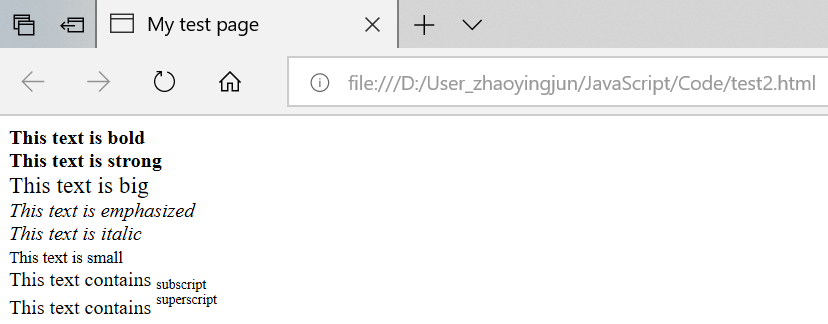
- 9.4 HTML文本格式化实例
- (1)文本格式化
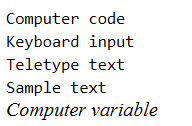
- (2)计算机输出标签
- (3)地址
- (4)缩写与首字母缩写
- (5)文字方向
- (6)块引用
- (7)删除字效果和插入字效果
- (8)定义著作标题的<cite>
本节中将学习如何标记引用,描述列表,计算机代码和其他相关文本,下标和上标,联系信息等。
1、标题、段落、列表和描述列表
1.1 标记文本
这一部分包含了一些基本的用来标记文本的 HTML 元素。
1.2 标题(不同于页面标题 title)
标题元素允许你指定内容的标题和子标题。就像一本书拥有主标题,然后每一章还有标题,然后还有更小的标题,HTML 文档也是一样。HTML 包括六个级别的标题, <h1>–<h6> ,虽然你可能只会用到 3-4 最多。
 <h1>My main title</h1>

 <h2>My top level heading</h2>

 <h3>My subheading</h3>

 <h4>My sub-subheading</h4>
现在尝试一下,在你的 <img> 元素上面添加一个合适的标题。
另一方面,可以使用任何元素看起来像顶级标题。考虑如下:
<span style="font-size: 32px; margin: 21px 0;">Is this a top level heading?</span>
这是一个<span>元素。它没有语义。当你想要将CSS应用到它(或用JavaScript做一些事情)时,你可以使用它来包装内容,而不会给它带来任何额外的意义(你将在课程的后面找到更多关于这些的内容。)我们已经应用了一些内容。它使CSS看起来像一个顶级标题,但由于它没有语义价值,它将不会获得上述任何额外的好处。最好为作业使用相关的HTML元素。
1.3 段落
像上面解释过的一样,<p> 元素是用来指定段落的。你会经常使用它来指定常规的文本内容:
<p>This is a single paragraph</p>
(从你的网站看起来是什么样的?)添加你的样本内容到一个或几个段落里,然后将它们放在 <img> 元素之下。
1.4 列表
很多Web上的内容都是列表,所以 HTML 为它们准备了一些特别的列表元素。要标记列表通常包括至少两个元素。最常用的列表类型是有序列表( ordered lists )和无序列表( unordered lists ):
列表内的每个项目被包括在一个 <li> (list item) 元素里。
所以,如果我们想要将下面的段落碎片改成一个列表:
<p>At Mozilla, we’re a global community of technologists, thinkers, and builders working together ... </p>
我们可以更改标记(无序列表):
 <p>At Mozilla, we’re a global community of</p>

 <ul>

   <li>technologists</li>

   <li>thinkers</li>

   <li>builders</li>

 </ul>

 <p>working together ... </p>
其它方式显示无须列表:增加type属性:
- type="disc":默认黑色圆点
- type="disc":空心方块
- type="disc":方块
三种横向列表举例如下所示(推荐使用第三种)。
横向列表1:
 <!DOCTYPE html>

 <html>

     <head>

         <meta charset="utf-8">

         <meta http-equiv="Content-Type" content="text/html; charset=gb2312" />

         <meta http-equiv="Content-Language" content="zh-cn" />

         <title>My test page</title>

         <script src="jquery-3.3.1.js"></script>

         <script type="text/javascript">

         </script>

         <style type="text/css">

             ul.ul1 li.li1 {

                 display: inline-block;

             }

         </style>

     </head>

     <body>

         <ul>

             <li>A1</li>

             <li>B1</li>

             <li>C1</li>

         </ul>

         <ul class="ul1">

             <li class="li1">A2</li>

             <li class="li1">B2</li>

             <li class="li1">C2</li>

         </ul>

     </body>

 </html>
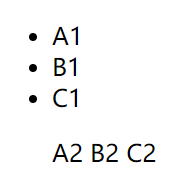
输出结果:
横向列表2:
 <!DOCTYPE html>

 <html>

     <head>

         <meta charset="utf-8">

         <meta http-equiv="Content-Type" content="text/html; charset=gb2312" />

         <meta http-equiv="Content-Language" content="zh-cn" />

         <title>My test page</title>

         <script src="jquery-3.3.1.js"></script>

         <script type="text/javascript">

         </script>

         <!--配置一个弹性盒模型

             父容器:display: flex;

             列表容器:flex-grow: 1;

         -->

         <!--去掉无序列表的点:list-style: none;-->

         <style type="text/css">

             ul li {

                 float: left;

                 width: 40px;

                 background: blue;

                 list-style: none;

                 margin: 10px;

             }

         </style>

     </head>

     <body>

         <ul>

             <li>A1</li>

             <li>B1</li>

             <li>C1</li>

             <li>D1</li>

             <li>E1</li>

         </ul>

     </body>

 </html>
输出结果(会随着浏览器窗口的改变而自适应改变样式):

横向列表3:
 <!DOCTYPE html>

 <html>

     <head>

         <meta charset="utf-8">

         <meta http-equiv="Content-Type" content="text/html; charset=gb2312" />

         <meta http-equiv="Content-Language" content="zh-cn" />

         <title>My test page</title>

         <script src="jquery-3.3.1.js"></script>

         <script type="text/javascript">

         </script>

         <!--配置浮动,使得列表从纵向变为横向:float: left;-->

         <style type="text/css">

             ul li {

                 float: left;

                 width: 40px;

                 background: blue;

                 list-style: none;

                 margin: 10px;

             }

         </style>

     </head>

     <body>

         <ul>

             <li>A1</li>

             <li>B1</li>

             <li>C1</li>

             <li>D1</li>

             <li>E1</li>

         </ul>

     </body>

 </html>
输出结果(自适应屏幕的横向列表,并且去掉了无序列表前面的点):

或者更改标记(有序列表):
 <p>At Mozilla, we’re a global community of</p>

 <ol>

   <li>technologists</li>

   <li>thinkers</li>

   <li>builders</li>

 </ol>

 <p>working together ... </p>ty
尝试添加一个有序列表和无序列表到你的示例页面。
加上type属性后,可以按照abc这样的序号进行列表说明:
<p>At Mozilla, we’re a global community of</p>

<ol type="a">

  <li>technologists</li>

  <li>thinkers</li>

  <li>builders</li>

</ol>

<p>working together ... </p>
输出结果:略。
1.5 链接
链接非常重要 — 它们让 Web 成为了 WEB(万维网)。要植入一个链接,我们需要使用一个简单的元素 — <a> — a 是 "anchor" (锚)的缩写。要将一些文本添加到链接中,只需如下几步:
- 选择一些文本。我们选择“Mozilla Manifesto”。
- 将文本包含在
<a>元素内,就像这样:<a>Mozilla Manifesto</a>
- 赋予
<a>元素一个href属性,就像这样:<a href="">Mozilla Manifesto</a>
- 把你想要链接的网址放到该属性内:
<a href="https://www.mozilla.org/en-US/about/manifesto/">Mozilla Manifesto</a>
如果你在网址开始部分省略了 https:// 或者 http:// 协议,你可能会得到错误的结果。在完成一个链接后,点击它并确保它去向了你指定的网址。
href 这个名字可能开始看起来有点晦涩难懂。如果你在记忆它的名字上有问题的话,记住它代表的是 hypertext reference (超文本引用)。
如果你还没有完成过上面的操作,现在就为你的页面添加一个链接吧。
 <!DOCTYPE html>

 <html>

   <head>

     <meta charset="utf-8">

     <title>My test page</title>

   </head>

   <body>

     <h1>My 1 level title</h1>

     <h2>My 2 level title</h2>

     <h3>My 3 level title</h3>

     <h4>My 4 level title</h4>

     <h5>My 5 level title</h5>

     <h6>My 6 level title</h6>

     <p>This is a single paragraph</p>

     <p>This is a <strong>single</strong> paragraph</p>

     <img src="data:images/Koala.png" alt="My test image">

     <p>At Mozilla, we're a globle community of technologists, thinkers, and builders working together...</p>

     <ul>

         <li>ul.technologists</li>

         <li>ul.thinkers</li>

         <li>ul.builders</li>

     </ul>

     <ol>

         <li>ol.technologists</li>

         <li>ol.thinkers</li>

         <li>ol.builders</li>

     </ol>

     <a href="https://www.baidu.com/">百度</a>

   </body>

 </html>
上述HTML代码解释如下:
 <!DOCTYPE html>

 <html>

   <head>

     <meta charset="utf-8">

     <title>My test page</title>

   </head>

   <body>

     <h1>My 1 level title</h1>                    解释:标记文本的标题,HTML包括六个级别的标题:<h1>-<h6>

     <h2>My 2 level title</h2>

     <h3>My 3 level title</h3>

     <h4>My 4 level title</h4>

     <h5>My 5 level title</h5>

     <h6>My 6 level title</h6>

     <p>This is a single paragraph</p>                解释:<p>元素用来指定段落

     <p>This is a <strong>single</strong> paragraph</p>      解释:<strong>元素标识强调

     <img src="data:images/Koala.png" alt="My test image">       解释:空元素,alt(alternative属性——这个属性是图像的描述内容)

     <p>At Mozilla, we're a globle community of technologists, thinkers, and builders working together...</p>

     <ul>                                 解释:<ul>元素表示无序列表,<li>(list item)表示元素的每个项目

         <li>ul.technologists</li>

         <li>ul.thinkers</li>

         <li>ul.builders</li>

     </ul>

     <ol>                                 解释:<ol>元素表示有序列表,<li>(list item)表示元素的每个项目

         <li>ol.technologists</li>

         <li>ol.thinkers</li>

         <li>ol.builders</li>

     </ol>

     <a href="https://www.baidu.com/">百度</a>           解释:添加链接 href(hypertext reference,超文本引用)

   </body>

 </html>
输出结果:略。
1.6 描述性列表
在HTML文本基础知识中,我们介绍了如何在HTML中标记基本列表,但我们没有提到您偶尔会遇到的第三种类型的列表 - 描述列表。这些列表的目的是标记一组项目及其相关描述,例如术语和定义,或问题和答案。让我们看一组术语和定义的示例:
自定义列表不仅仅是一列项目,而是项目及其注释的组合。
自定义列表以 <dl> 标签开始。每个自定义列表项以 <dt> 开始。每个自定义列表项的定义以 <dd> 开始。
定义列表的列表项内部可以使用段落、换行符、图片、链接以及其他列表等等。
举例1:
 <dl>

     <dt>soliloquy</dt>

     <dd>In drama, where a character speaks to themselves, representing their inner thoughts or feelings and in the process relaying them to the audience (but not to other characters.)</dd>

     <dt>monologue</dt>

     <dd>In drama, where a character speaks their thoughts out loud to share them with the audience and any other characters present.</dd>

     <dt>aside</dt>

     <dd>In drama, where a character shares a comment only with the audience for humorous or dramatic effect. This is usually a feeling, thought, or piece of additional background information.</dd>

 </dl>
输出结果(浏览器默认样式将显示描述列表,描述中的描述略有缩进。MDN的风格非常接近这一惯例,但也鼓励了额外定义的术语):
 soliloquy

     In drama, where a character speaks to themselves, representing their inner thoughts or feelings and in the process relaying them to the audience (but not to other characters.)

 monologue

     In drama, where a character speaks their thoughts out loud to share them with the audience and any other characters present.

 aside

     In drama, where a character shares a comment only with the audience for humorous or dramatic effect. This is usually a feeling, thought, or piece of additional background information.
举例2:
 <dl>

     <dt>Bacon</dt>

     <dd>The glue that binds the world together.</dd>

     <dt>Eggs</dt>

     <dd>The glue that binds the cake together.</dd>

     <dt>Coffee</dt>

     <dd>The drink that gets the world running in the morning.</dd>

     <dd>A light brown color.</dd>

 </dl>
输出结果:
 Bacon

     The glue that binds the world together.

 Eggs

     The glue that binds the cake together.

 Coffee

     The drink that gets the world running in the morning.

     A light brown color.
2、报价(块内引用和内联引用)
HTML还具有用于标记报价的功能;您使用哪个元素取决于您是标记块还是内联引用。
2.1 块内引用
如果从其他地方引用块级内容的一部分(可以是段落,多个段落,列表等),则应将其包含在<blockquote>元素内以表示这一点,并包含指向引用源的URL在一个cite属性里面。例如,以下标记取自MDN <blockquote>元素页面:
<p>The <strong>HTML <code><blockquote></code> Element</strong> (or <em>HTML Block
Quotation Element</em>) indicates that the enclosed text is an extended quotation.</p>
输出结果:The HTML <blockquote> Element (or HTML Block Quotation Element) indicates that the enclosed text is an extended quotation.
<code> 标签用于表示计算机源代码或者其他机器可以阅读的文本内容。
在HTML,比如<,>,",'和&特殊字符。它们是HTML语法本身的一部分,因此如何在文本中包含其中一个字符,例如,如果您真的想要使用&符号或少于符号,而不是像某些浏览器那样将其解释为代码?
我们必须使用字符引用 - 表示字符的特殊代码,并且可以在这些确切的情况下使用。每个字符引用以&符号(&)开头,以分号(;)结束。
| Literal character | Character reference equivalent |
|---|---|
| < | < |
| > | > |
| " | " |
| ' | ' |
| & | & |
要将上述例子转换为块引用,我们只需执行此操作:
<blockquote cite="https://developer.mozilla.org/en-US/docs/Web/HTML/Element/blockquote">
<p>The <strong>HTML <code><blockquote></code> Element</strong> (or <em>HTML Block
Quotation Element</em>) indicates that the enclosed text is an extended quotation.</p>
</blockquote>
输出结果(浏览器默认样式将此呈现为缩进段落,作为引用的指示符; MDN这样做,但也增加了一些额外的样式):
The HTML <blockquote> Element (or HTML Block Quotation Element) indicates that the enclosed text is an extended quotation.
2.2 内联引用
内联引用的工作方式完全相同,只是它们使用<q>元素。例如,下面的标记位包含来自MDN <q>页面的引用:
<p>The quote element — <code><q></code> — is <q cite="https://developer.mozilla.org/en-US/docs/Web/HTML/Element/q">intended
for short quotations that don't require paragraph breaks.</q></p>
输出结果:
The quote element — <q> — is intended for short quotations that don't require paragraph breaks.
2.3 引文
该cite属性的内容听起来很有用,但遗憾的是浏览器,屏幕阅读器等并没有真正做到这一点。没有cite使用JavaScript或CSS编写自己的解决方案,就无法让浏览器显示内容。如果您想在页面上提供引用的来源,则更好的标记方法是将<cite>元素放在quote元素的旁边(或内部)。这实际上是为了包含引用源的名称 - 即书的名称,或者说出引用的人的名字 - 但是没有理由不能将文本内部链接<cite>到引用来源中办法:
<!DOCTYPE html>
<html>
<head>
<meta charset="utf-8">
<title>Homepage</title>
<link rel="shortcut icon" href="favicon.ico" type="images/x-icon">
</head>
<body>
<p>According to the <a href="https://developer.mozilla.org/en-US/docs/Web/HTML/Element/blockquote">
<cite>MDN blockquote page</cite></a>:
</p> <blockquote cite="https://developer.mozilla.org/en-US/docs/Web/HTML/Element/blockquote">
<p>The <strong>HTML <code><blockquote></code> Element</strong> (or <em>HTML Block
Quotation Element</em>) indicates that the enclosed text is an extended quotation.</p>
</blockquote> <p>The quote element — <code><q></code> — is <q cite="https://developer.mozilla.org/en-US/docs/Web/HTML/Element/q">intended
for short quotations that don't require paragraph breaks.</q> -- <a href="https://developer.mozilla.org/en-US/docs/Web/HTML/Element/q">
<cite>MDN q page</cite></a>.</p> </body>
</html>
输出结果:

3、缩写
在环顾Web时你会遇到的另一个相当常见的元素是<abbr>- 这用于包含缩写或首字母缩略词,并提供术语的完整扩展(包含在title属性中)。让我们看几个例子:
举例1:
 <!DOCTYPE html>

 <html>

     <head>

         <meta charset="utf-8">

         <title>Homepage</title>

         <link rel="shortcut icon" href="favicon.ico" type="images/x-icon">

     </head>

     <body>

         <p>We use <abbr title="Hypertext Markup Language">HTML</abbr></p>

         <p>I think <abbr title="Reverend">Rev.</abbr> Green did it in the kitchen with the chainsaw.</p>

     </body>

 </html>
输出结果(这些看起来会像这样(当术语悬停时,扩展将出现在工具提示中)):
We use HTML
I think Rev. Green did it in the kitchen with the chainsaw.
注意:还有另一个元素,<acronym>它基本上做同样的事情<abbr>,并且专门用于缩略语而不是缩写。然而,这已被废弃 - 它在浏览器中不受支持<abbr>,并且具有如此类似的功能,以至于两者都被认为是没有意义的。只需使用<abbr>。
举例2:
<p><abbr title="National Aeronautics and Space Administration">NASA</abbr> sure does some exciting work.</p>
输出结果:NASA sure does some exciting work.
4、标记联系人详细信息
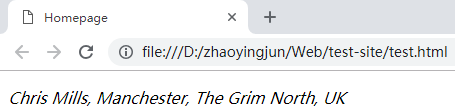
HTML有一个用于标记联系人详细信息的元素 - <address>。这简单地包含了您的联系方式,例如:
 <address>

     <p>Chris Mills, Manchester, The Grim North, UK</p>

 </address>
输出结果:
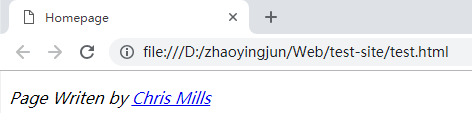
但要记住的一点是,该<address>元素用于标记编写HTML文档的人员的联系人详细信息,而不是任何地址。所以如果Chris写了标记出现的文件,上面的内容就没问题了。请注意,这样的使用方法也可以:
输出结果:
5、上标和下标
在标记日期,化学公式和数学方程等项目时,偶尔需要使用上标和下标,以便它们具有正确的含义。在<sup>和<sub>元素处理这个工作。例如:
 <!DOCTYPE html>

 <html>

     <head>

         <meta charset="utf-8">

         <title>Homepage</title>

         <link rel="shortcut icon" href="favicon.ico" type="images/x-icon">

     </head>

     <body>

         <p>My birthday is on the 25<sup>th</sup> of May 2001.</p>

         <p>Caffeine's chemical formula is C<sub>8</sub>H<sub>10</sub>N<sub>4</sub>O<sub>2</sub>.</p>

         <p>If x<sup>2</sup> is 9, x must equal 3 or -3.</p>

     </body>

 </html>
输出结果:
My birthday is on the 25th of May 2001.
Caffeine's chemical formula is C8H10N4O2.
If x2 is 9, x must equal 3 or -3.
6、代表计算机代码编辑
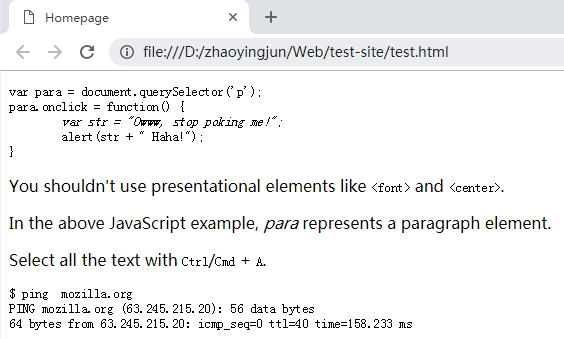
有许多元素可用于使用HTML标记计算机代码:
<code>:用于标记计算机代码的通用部分。<pre>:用于保留空格(通常是代码块) - 如果在文本中使用缩进或多余的空格,浏览器将忽略它,您将无法在渲染页面上看到它。<pre></pre>但是,如果将文本包装在标记中,则您的空白将与您在文本编辑器中看到的相同。<var>:用于专门标记变量名称。<kbd>:用于标记输入计算机的键盘(和其他类型)输入。<samp>:用于标记计算机程序的输出。
<!DOCTYPE html>
<html>
<head>
<meta charset="utf-8">
<title>Homepage</title>
<link rel="shortcut icon" href="favicon.ico" type="images/x-icon">
</head>
<body> <pre><code>var para = document.querySelector('p');
para.onclick = function() {
<var>var str = "Owww, stop poking me!";</var>
alert(str + " Haha!");
}</code></pre> <p>You shouldn't use presentational elements like <code><font></code> and <code><center></code>.</p>
<p>In the above JavaScript example, <var>para</var> represents a paragraph element.</p>
<p>Select all the text with <kbd>Ctrl</kbd>/<kbd>Cmd</kbd> + <kbd>A</kbd>.</p> <pre>$ <kbd>ping mozilla.org</kbd>
<samp>PING mozilla.org (63.245.215.20): 56 data bytes
64 bytes from 63.245.215.20: icmp_seq=0 ttl=40 time=158.233 ms</samp></pre> </body>
</html>
输出结果:
7、标记时间和日期
HTML还提供了<time>以机器可读格式标记时间和日期的元素。例如:
<time datetime="2018-10-11">11 October 2018</time>
为什么这有用?那么,人类写下日期的方式有很多种。上述日期可以写成:
- 2016年1月20日
- 2016年1月20日
- 2016年1月20日
- 20/01/16
- 16年1月20日
- 下个月20日
- 20e Janvier 2016
- 2016年1月20日
- 等等
但计算机无法轻易识别这些不同的形式 - 如果您想自动获取页面中所有事件的日期并将其插入日历中,该怎么办?该<time>元素允许您为此目的附加明确的,机器可读的时间/日期。
上面的基本示例只提供了一个简单的机器可读日期,但还有许多其他可能的选项,例如:
 <!-- Standard simple date -->

 <time datetime="2016-01-20">20 January 2016</time>

 <!-- Just year and month -->

 <time datetime="2016-01">January 2016</time>

 <!-- Just month and day -->

 <time datetime="01-20">20 January</time>

 <!-- Just time, hours and minutes -->

 <time datetime="19:30">19:30</time>

 <!-- You can do seconds and milliseconds too! -->

 <time datetime="19:30:01.856">19:30:01.856</time>

 <!-- Date and time -->

 <time datetime="2016-01-20T19:30">7.30pm, 20 January 2016</time>

 <!-- Date and time with timezone offset-->

 <time datetime="2016-01-20T19:30+01:00">7.30pm, 20 January 2016 is 8.30pm in France</time>

 <!-- Calling out a specific week number-->

 <time datetime="2016-W04">The fourth week of 2016</time>
举例如下:
 <!DOCTYPE html>

 <html>

     <head>

         <meta charset="utf-8">

         <title>Homepage</title>

         <link rel="shortcut icon" href="favicon.ico" type="images/x-icon">

     </head>

     <body>

         <!-- Standard simple date -->

         <p><time datetime="2016-01-20">20 January 2016</time></p>

         <!-- Just year and month -->

         <p><time datetime="2016-01">January 2016</time></p>

         <!-- Just month and day -->

         <p><time datetime="01-20">20 January</time></p>

         <!-- Just time, hours and minutes -->

         <p><time datetime="19:30">19:30</time></p>

         <!-- You can do seconds and milliseconds too! -->

         <p><time datetime="19:30:01.856">19:30:01.856</time></p>

         <!-- Date and time -->

         <p><time datetime="2016-01-20T19:30">7.30pm, 20 January 2016</time></p>

         <!-- Date and time with timezone offset-->

         <p><time datetime="2016-01-20T19:30+01:00">7.30pm, 20 January 2016 is 8.30pm in France</time></p>

         <!-- Calling out a specific week number-->

         <p><time datetime="2016-W04">The fourth week of 2016</time></p>

     </body>

 </html>
输出结果:
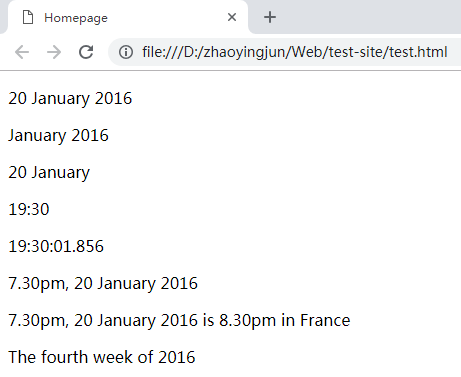
要查找更多HTML元素,您可以查看我们的HTML元素引用(内联文本语义部分将是一个很好的起点。
8、HTML样式
8.1 应该避免使用下面这些标签和属性
| 标签 | 描述 |
|---|---|
| <center> | 定义居中的内容。 |
| <font> 和 <basefont> | 定义 HTML 字体。 |
| <s> 和 <strike> | 定义删除线文本 |
| <u> | 定义下划线文本 |
| 属性 | 描述 |
| align | 定义文本的对齐方式 |
| bgcolor | 定义背景颜色 |
| color | 定义文本颜色 |
对于以上这些标签和属性:请使用样式代替!
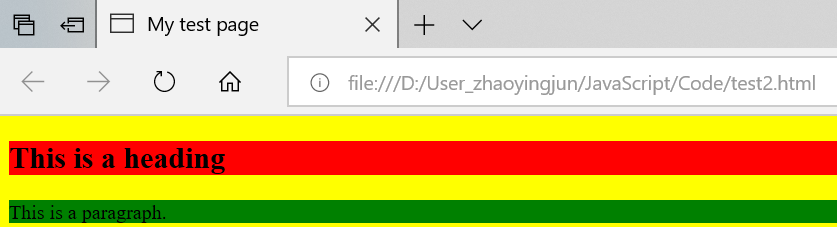
8.2 HTML 样式实例 - 背景颜色
举例:
 <!DOCTYPE html>

 <html>

     <head>

         <meta charset="utf-8">

         <title>My test page</title>

     </head>

     <!--拥有关于背景颜色的附加信息-->

     <body style="background-color:yellow">

         <h2 style="background-color:red">This is a heading</h2>

         <p style="background-color:green">This is a paragraph.</p>

     </body>

 </html>
输出结果(style 属性淘汰了“旧的” bgcolor 属性):
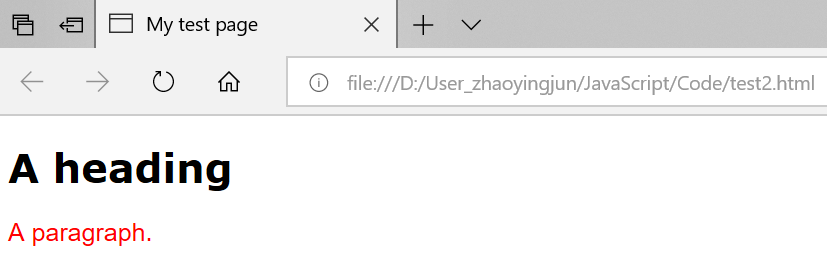
8.3 HTML 样式实例 - 字体、颜色和尺寸
举例:
 <!DOCTYPE html>

 <html>

     <head>

         <meta charset="utf-8">

         <title>My test page</title>

     </head>

     <!--拥有关于背景颜色的附加信息-->

     <body">

         <h1 style="font-family:verdana">A heading</h1>

         <p style="font-family:arial;color:red;font-size:20px;">A paragraph.</p>

     </body>

 </html>
输出结果(style 属性淘汰了旧的 <font> 标签):
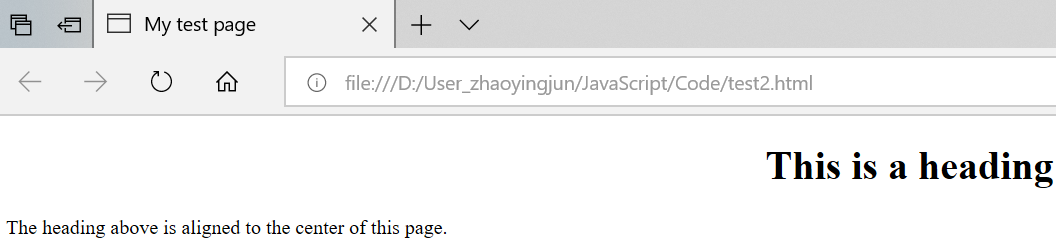
8.4 HTML 样式实例 - 文本对齐
举例:
 <!DOCTYPE html>

 <html>

     <head>

         <meta charset="utf-8">

         <title>My test page</title>

     </head>

     <!--拥有关于背景颜色的附加信息-->

     <body">

         <h1 style="text-align:center">This is a heading</h1>

         <p>The heading above is aligned to the center of this page.</p>

     </body>

 </html>
输出结果(style 属性淘汰了旧的 "align" 属性):
9、HTML文本格式化
9.1 文本格式化标签
| 标签 | 描述 |
|---|---|
| <b> | 定义粗体文本。 |
| <big> | 定义大号字。 |
| <em> | 定义着重文字。 |
| <i> | 定义斜体字。 |
| <small> | 定义小号字。 |
| <strong> | 定义加重语气。 |
| <sub> | 定义下标字。 |
| <sup> | 定义上标字。 |
| <ins> | 定义插入字。 |
| <del> | 定义删除字。 |
| <s> | 不赞成使用。使用 <del> 代替。 |
| <strike> | 不赞成使用。使用 <del> 代替。 |
| <u> | 不赞成使用。使用样式(style)代替。 |
9.2 “计算机输出”标签
| 标签 | 描述 |
|---|---|
| <code> | 定义计算机代码。 |
| <kbd> | 定义键盘码。 |
| <samp> | 定义计算机代码样本。 |
| <tt> | 定义打字机代码。 |
| <var> | 定义变量。 |
| <pre> | 定义预格式文本。 |
| <listing> | 不赞成使用。使用 <pre> 代替。 |
| <plaintext> | 不赞成使用。使用 <pre> 代替。 |
| <xmp> | 不赞成使用。使用 <pre> 代替。 |
9.3 引用、引用和术语定义
| 标签 | 描述 |
|---|---|
| <abbr> | 定义缩写。 |
| <acronym> | 定义首字母缩写。 |
| <address> | 定义地址。 |
| <bdo> | 定义文字方向。 |
| <blockquote> | 定义长的引用。 |
| <q> | 定义短的引用语。 |
| <cite> | 定义引用、引证。HTML <cite> 元素定义著作的标题。浏览器通常会以斜体显示 <cite> 元素。 |
| <dfn> | 定义一个定义项目。 |
9.4 HTML文本格式化实例
(1)文本格式化
 <!DOCTYPE html>

 <html>

     <head>

         <meta charset="utf-8">

         <title>My test page</title>

     </head>

     <body">

         <b>This text is bold</b>                <!--定义粗体文本-->

         <br />

         <strong>This text is strong</strong>    <!--定义加重语气-->

         <br />

         <big>This text is big</big>             <!--定义大号字体-->

         <br />

         <em>This text is emphasized</em>        <!--定义着重文字-->

         <br />

         <i>This text is italic</i>              <!--定义斜体字体-->

         <br />

         <small>This text is small</small>       <!--定义小号字体-->

         <br />

         This text contains

         <sub>subscript</sub>                    <!--定义下标字体-->

         <br />

         This text contains

         <sup>superscript</sup>                  <!--定义上标字体-->

     </body>

 </html>
输出结果:
(2)计算机输出标签
 <!DOCTYPE html>

 <html>

     <head>

         <meta charset="utf-8">

         <title>My test page</title>

     </head>

     <body">

         <code>Computer code</code>            <!--定义计算机代码-->

         <br />

         <kbd>Keyboard input</kbd>             <!--定义键盘码-->

         <br />

         <tt>Teletype text</tt>                <!--定义打字机代码-->

         <br />

         <samp>Sample text</samp>              <!--定义计算机代码样本-->

         <br />

         <var>Computer variable</var>          <!--定义变量-->

         <br />

         <p>

         <b>注释:</b>这些标签常用于显示计算机/编程代码。    <!--定义粗体文本-->

         </p>

     </body>

 </html>
输出结果:
(3)地址
HTML <address> 元素定义文档或文章的联系信息(作者/拥有者)。
此元素通常以斜体显示。大多数浏览器会在此元素前后添加折行。
 <!DOCTYPE html>

 <html>

     <head>

         <meta charset="utf-8">

         <title>My test page</title>

     </head>

     <body">

         <address>

             Written by <a href="mailto:webmaster@example.com">Donald Duck</a>.

             <br />

             Visit us at:<br />

             Example.com<br />

             Box 564, Disneyland<br />

             USA<br />

         </address>

     </body>

 </html>
输出结果:
Written by Donald Duck.
Visit us at:
Example.com
Box 564, Disneyland
USA
(4)缩写与首字母缩写
 <!DOCTYPE html>

 <html>

     <head>

         <meta charset="utf-8">

         <title>My test page</title>

     </head>

     <body">

         <abbr title="etcetera">etc.</abbr>                    <!--定义缩写-->

         <br />

         <abbr title="World Wide Web">WWW</abbr>

         <br />

         <acronym title="World Wide Web">WWW</acronym>        <!--定义首字母缩写-->

     </body>

 </html>
输出结果:
etc.
WWW
WWW
举例2:
HTML <dfn> 元素定义项目或缩写的定义。
<dfn> 的用法,按照 HTML5 标准中的描述,有点复杂:
1. 如果设置了 <dfn> 元素的 title 属性,则定义项目:
2. 如果 <dfn> 元素包含具有标题的 <abbr> 元素,则 title 定义项目:
3. 否则,<dfn> 文本内容即是项目,并且父元素包含定义。
 <!DOCTYPE html>

 <html>

     <head>

         <meta charset="utf-8">

         <title>My test page</title>

     </head>

     <body">

         <!--1. 如果设置了<dfn>元素的title属性,则定义项目-->

         <p>

             <dfn title="World Health Orignization">WHO</dfn> is create at 1948.

         </p>

         <!--2. 如果 <dfn> 元素包含具有标题的 <abbr> 元素,则 title 定义项目-->

         <p>

             <dfn><abbr title="World Health Orignization">WHO</abbr></dfn> is create at 1948.

         </p>

         <!--3. 否则,<dfn> 文本内容即是项目,并且父元素包含定义-->

         <p>

             <dfn>WHO</dfn> World Health Orignization is create at 1948.

         </p>

     </body>

 </html>
输出结果:
WHO is create at 1948.
WHO is create at 1948.
WHO World Health Orignization is create at 1948.
注释:如果您希望简而化之,请使用第一条,或使用 <abbr> 代替。
(5)文字方向
 <!DOCTYPE html>

 <html>

     <head>

         <meta charset="utf-8">

         <title>My test page</title>

     </head>

     <body">

         <bdo>This is a test.</bdo>

         <br />

         <bdo dir="rtl">This is a test.</bdo>

     </body>

 </html>
输出结果:
This is a test.
This is a test.
(6)块引用
使用 blockquote 元素的话,浏览器会插入换行和外边距,而 q 元素不会有任何特殊的呈现。
 <!DOCTYPE html>

 <html>

     <head>

         <meta charset="utf-8">

         <title>My test page</title>

     </head>

     <body">

         <blockquote >blockquote1:

             This is a blockquote test 1. This is a blockquote test 2.

             This is a blockquote test 3.

         </blockquote >

         <blockquote >blockquote2:

             This is a blockquote test 1. This is a blockquote test 2.

             This is a blockquote test 3.

         </blockquote >

         <br />

         <q>

             This is a q test 1. This is a q test 2.

             This is a q test 3.

         </q>

     </body>

 </html>
输出结果:
blockquote1: This is a blockquote test 1. This is a blockquote test 2. This is a blockquote test 3.
blockquote2: This is a blockquote test 1. This is a blockquote test 2. This is a blockquote test 3.
This is a q test 1. This is a q test 2.
This is a q test 3.
(7)删除字效果和插入字效果
大多数浏览器会改写为删除文本和下划线文本。
一些老式的浏览器会把删除文本和下划线文本显示为普通文本。
 <!DOCTYPE html>

 <html>

     <head>

         <meta charset="utf-8">

         <title>My test page</title>

     </head>

     <body">

         <p>

             This is a <del>delete</del> <ins>delete</ins> test.

         </p>

     </body>

 </html>
输出结果:This is a deletedelete test.
(8)定义著作标题的<cite>
 <!DOCTYPE html>

 <html>

     <head>

         <meta charset="utf-8">

         <title>My test page</title>

     </head>

     <body">

         <p><cite>The Scream</cite> by Edward Munch. Painted in 1893.</p>

     </body>

 </html>
输出结果:
The Scream by Edward Munch. Painted in 1893.
Web开发——HTML基础(高级文本格式 列表/style)的更多相关文章
- Web开发——HTML基础
文档资料参考: 参考:MDN官网 参考:http://www.runoob.com,W3School 参考:https://developer.mozilla.org/zh-CN/docs/Learn ...
- Web开发——HTML基础(图像、音频和视频内容)
参考: 参考:HTML中的图像 参考:视频和音频内容 目录: 1.HTML中的图像 1.1 我们如何在网页上放置图像? (1)替代文字(alt) (2)宽度和高度 (3)图片标题 1.2 用图形和图形 ...
- Web开发——jQuery基础
参考: 参考W3School:jQuery 教程 参考:jQuery 参考手册 参考(常用):jQuery API 测试 JavaScript 框架库 - jQuery 测试 JavaScript 框 ...
- Go语言web开发---Beego基础
一.框架 框架:可复用的设计组件,它规定了应用的体系结构,明确了整个设计,协作各个组件之间的依赖关系,责任分配,和流程控制.通俗解释框架就是一堆代码的集合,为了提高软件的开发效率和质量,一般都会使用框 ...
- 让ASP.NET Web API支持POST纯文本格式(text/plain)的数据
今天在web api中遇到了这样一个问题,虽然api的参数类型是string,但只能接收post body中json格式的string,不能接收原始string. web api是这样定义的: pub ...
- Web开发——JavaScript基础(JSON教程)
参考: JSON:JavaScript 对象表示法(JavaScript Object Notation). JSON 是存储和交换文本信息的语法.类似 XML. JSON 比 XML 更小.更快,更 ...
- web开发: css高级与盒模型
一.组合选择器 二.复制选择器优先级 三.伪类选择器 四.盒模型 五.盒模型显示区域 六.盒模型布局 一.组合选择器 <!DOCTYPE html> <html> <he ...
- Web开发——JavaScript基础
参考学习: MDN JavaScript:https://developer.mozilla.org/zh-CN/docs/Web/JavaScript ECMAScript 6入门(阮一峰):htt ...
- Web开发——HTML基础(HTML表单/下拉列表/多行输入)
参考: 参考:http://www.w3school.com.cn/html/html_forms.asp 目录: 1.<form> 元素 1.1 <input> 元素(输入属 ...
随机推荐
- OSI(Open System Interconnect) 网络七层协议
你作为用户想发个快递,你叫来了顺丰,顺丰快递员从你手里拿走了快递,又装进一个盒子,然后把一个快递单子贴在了上面. 快递员回到集散中心,将快递往那一扔不管了,分拣员把快递按投递的省市分开,发往同一地区的 ...
- IoC之AutoFac(一)——简单使用和组件注册
阅读目录 一.AutoFac简单使用 二.注册 2.1 注册方式 2.2 带参数注册 回到顶部 一.AutoFac简单使用 1 namespace AutofacDemo 2 { 3 class Pr ...
- linux下udev
如果你使用Linux比较长时间了,那你就知道,在对待设备文件这块,Linux改变了几次策略.在Linux早期,设备文件仅仅是是一些带有适当的属性集的普通文件,它由mknod命令创建,文件存放在/dev ...
- hive Spark SQL分析窗口函数
Spark1.4发布,支持了窗口分析函数(window functions).在离线平台中,90%以上的离线分析任务都是使用Hive实现,其中必然会使用很多窗口分析函数,如果SparkSQL支持窗口分 ...
- 突破拐点:企业成长的S曲线
1.企业成长的不同时期 初创期:初创前几年,最重要的创业激情,靠“蓝色小药丸”,断层期切入,不断试错玩命干(产品定位.商业模式.融资源.找关系.辅渠道),并最终完成赢利模式,得以生存. 成长期:通过快 ...
- C#批量删除注释与空行
代码发布时候有的时候需要删除代码注释与空行..方法如下 1.删除注释 方法: 第一步:打开vs2010,使用Ctrl+H快捷键,打开查询替换窗口 第二步:在‘查找选项’中,勾选‘使用’‘正则表达式’ ...
- Oracle中判断字段是否为数字
在我们平常的开发中可能会遇到这样的问题,就是判断某一列是否全部由数字组成,我们都知道oracle并没有给我们提供这样一个现成的函数,那么根据我的经验我总结了两个行之有效的方法(列名:column,表名 ...
- xorm中的几个坑
项目中使用的是xorm,虽然用了很顺手了,可是还是会遇到一些坑,这里纪录一些. 结构体自动忽略空字段 在xorm中,结构体会自动忽略空字段(或则说默认值,比如int 的0 ,string的" ...
- 手动安装mysql
需要在本机(mac)上装个mysql,看到压缩版的体积最小,结果进入了手工安装的坑(正常有界面可以安装,但安装目录将是/usr/local/mysql),既然入了坑就填上吧. 1.解压到自己选择的目录 ...
- HTTP 05 安全
TCP 打包时加密, 报文传输时 加密 通过证书来判断是否是可以访问的客户端/服务器. 公开秘钥 进行加密, 随便被人知道 私有秘钥 进行解密, 自己保留 http + 加密 + 认证 + 完整性保护 ...