方法一

1、创建证书

#cd /usr/local/nginx/conf
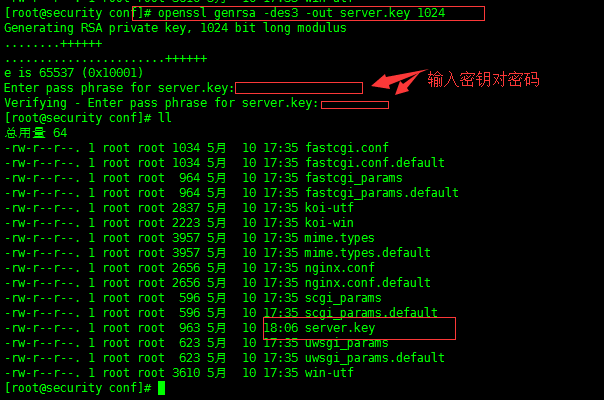
#openssl genrsa -des3 -out server.key 1024
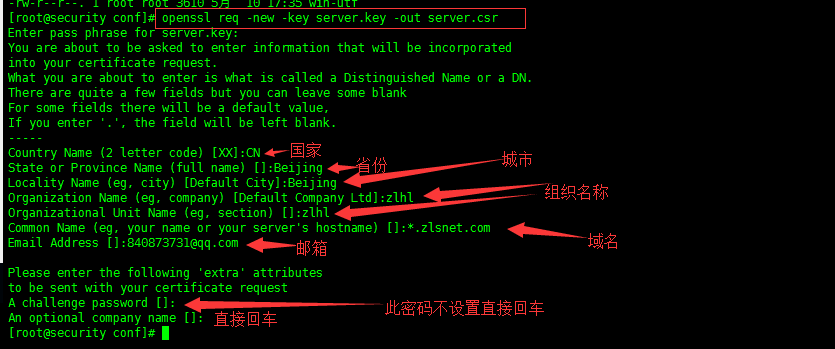
#openssl req -new -key server.key -out server.csr
#openssl rsa -in server.key -out server_nopwd.key
#openssl x509 -req -days 365 -in server.csr -signkey server_nopwd.key -out server.crt
*******************************完成以上步骤,证书生成完成*************************************  
2、配置Nginx
  server {
   listen 80;
   server_name www.域名.com;
   rewrite ^(.*) https://$server_name$1 permanent;
 } 
     设置80和443走443
     检测自定义配置文件的完整路径是否,并重新加载 
     nginx -t
3、启动Nginx
cd /usr/local/nginx/sbin
./nginx
4、访问页面(tomcat部署的应用)
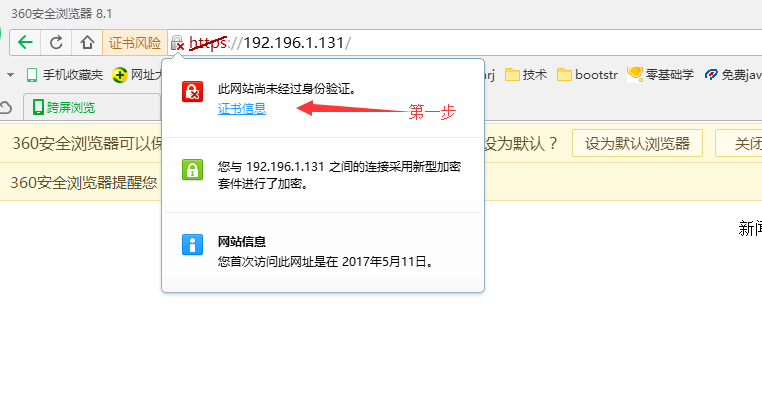
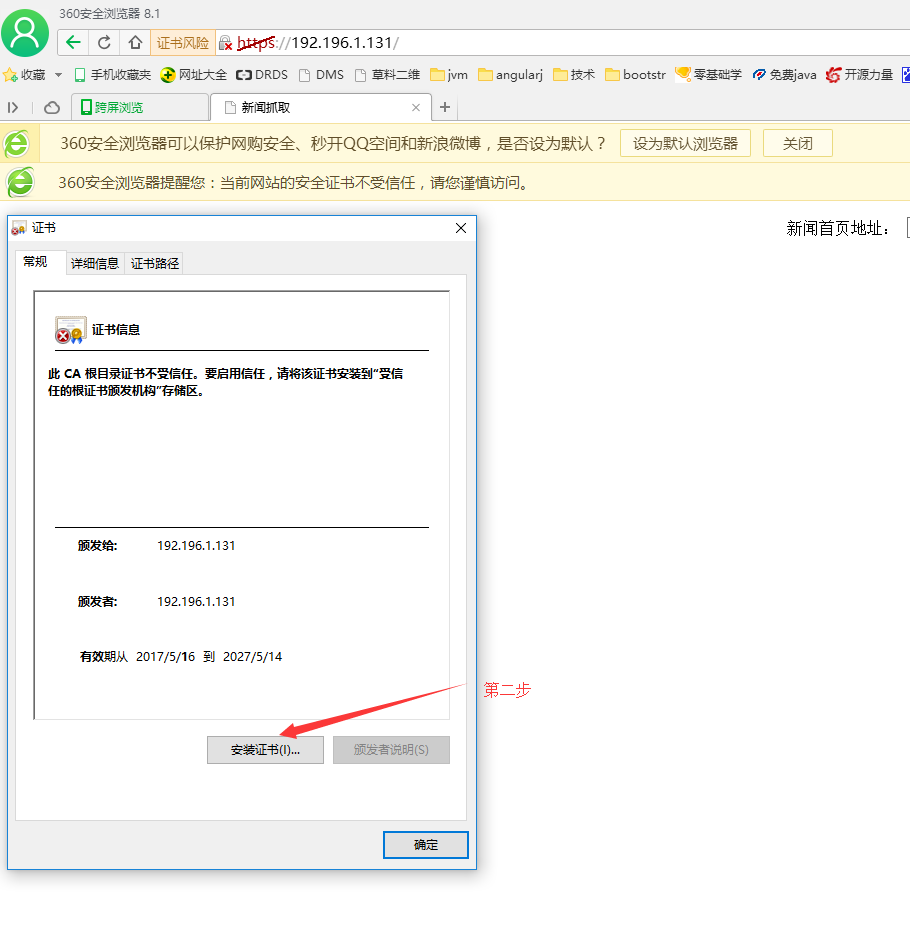
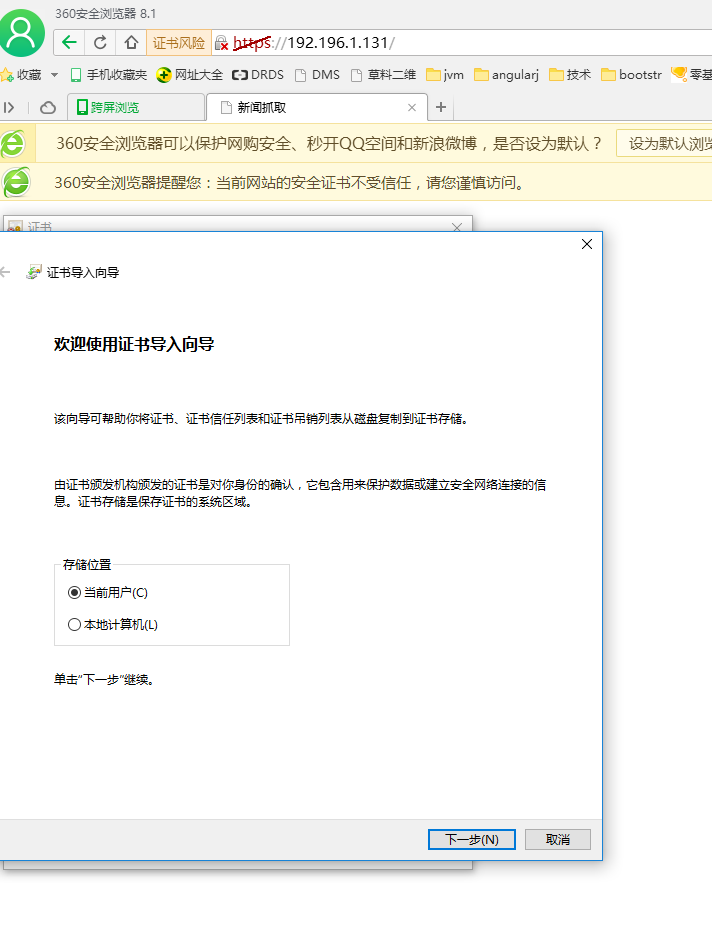
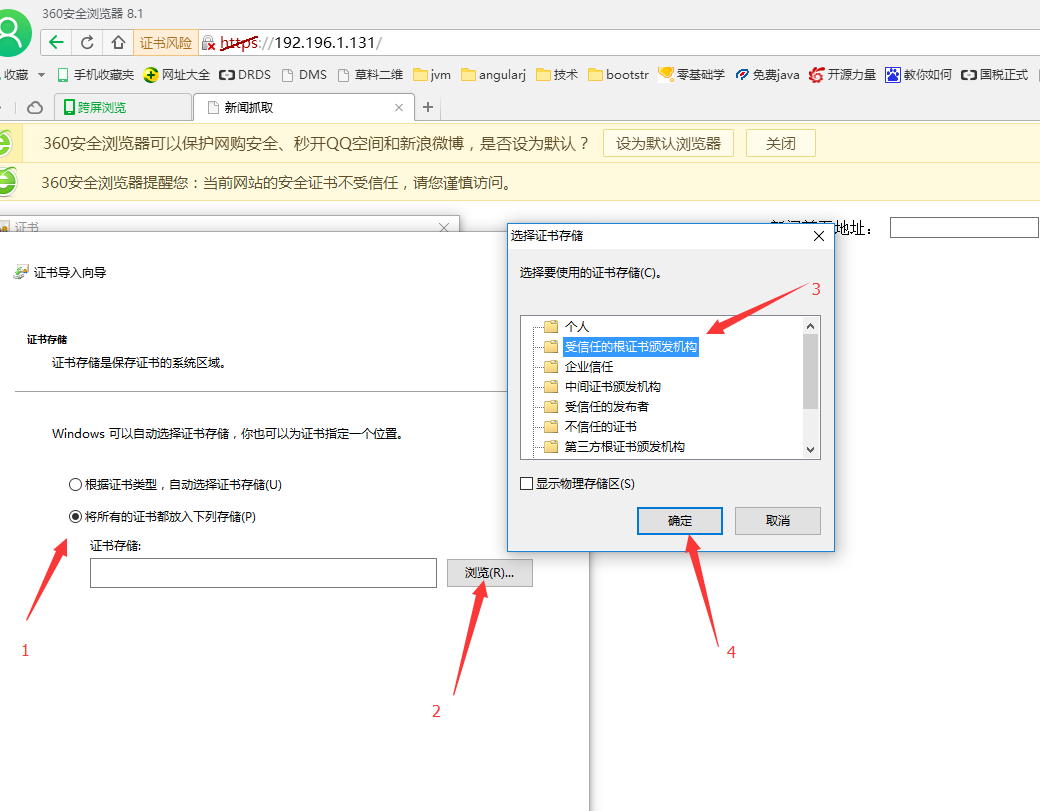
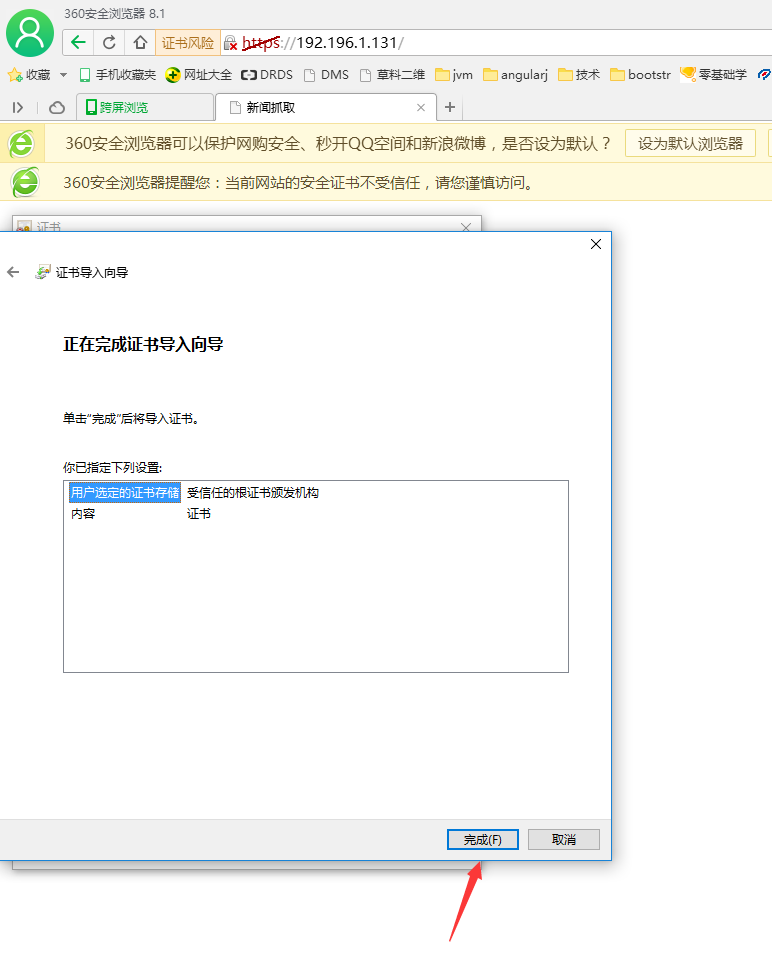
https服务器搭建,但如何让浏览器信任自己颁发的证书呢?
只要将之前生成的server.crt文件导入到系统的证书管理器就行了,具体方法:
控制面板 -> Internet选项 -> 内容 -> 发行者 -> 受信任的根证书颁发机构 -> 导入 -》选择server.crt
**********************************Nginx重启关闭命令*************************
nginx -s reload  :修改配置后重新加载生效
nginx -s reopen  :重新打开日志文件
nginx -t -c /path/to/nginx.conf 测试nginx配置文件是否正确
 
关闭nginx:
nginx -s stop  :快速停止nginx
         quit  :完整有序的停止nginx

其他的停止nginx 方式:
ps -ef | grep nginx
kill -QUIT 主进程号     :从容停止Nginx
kill -TERM 主进程号     :快速停止Nginx
pkill -9 nginx          :强制停止Nginx
 
启动nginx:
nginx -c /path/to/nginx.conf

平滑重启nginx:

kill -HUP 主进程号
**********************************Nginx重启关闭命令*************************
*****************************************************Nginx配置文件*****************************************************************
#user  nobody;
worker_processes  1;
error_log  logs/error.log;
error_log  logs/error.log  notice;
error_log  logs/error.log  debug;
pid        logs/nginx.pid;
events {
    worker_connections  1024;
http {
    include       mime.types;
    default_type  application/octet-stream;
    #log_format  main  '$remote_addr - $remote_user [$time_local] "$request" '
    #                  '$status $body_bytes_sent "$http_referer" '
    #                  '"$http_user_agent" "$http_x_forwarded_for"';
    #access_log  logs/access.log  main;
 
    sendfile        on;
    #tcp_nopush     on;
    #keepalive_timeout  0;
    keepalive_timeout  65;
 
    #gzip  on;
    #server {
    #    listen       80;
    #    server_name  localhost;
        #charset koi8-r;
        #access_log  logs/host.access.log  main;
    #    location / {
    #        root   html;
    #        index  index.html index.htm;
    #    }
 
        #error_page  404              /404.html;
        # redirect server error pages to the static page /50x.html
        #
    #    error_page   500 502 503 504  /50x.html;
    #    location = /50x.html {
    #        root   html;
    #    }
 
        # proxy the PHP scripts to Apache listening on 127.0.0.1:80
        #
        #location ~ \.php$ {
        #    proxy_pass   http://127.0.0.1;
        #}
 
        # pass the PHP scripts to FastCGI server listening on 127.0.0.1:9000
        #location ~ \.php$ {
        #    root           html;
        #    fastcgi_pass   127.0.0.1:9000;
        #    fastcgi_index  index.php;
        #    fastcgi_param  SCRIPT_FILENAME  /scripts$fastcgi_script_name;
        #    include        fastcgi_params;
        #}
 
        # deny access to .htaccess files, if Apache's document root
        # concurs with nginx's one
        #location ~ /\.ht {
        #    deny  all;
        #}
    #}
 
    # another virtual host using mix of IP-, name-, and port-based configuration
    #server {
    #    listen       8000;
    #    listen       somename:8080;
    #    server_name  somename  alias  another.alias;
    #    location / {
    #        root   html;
    #        index  index.html index.htm;
    #    }
    #}
 
    # HTTPS server
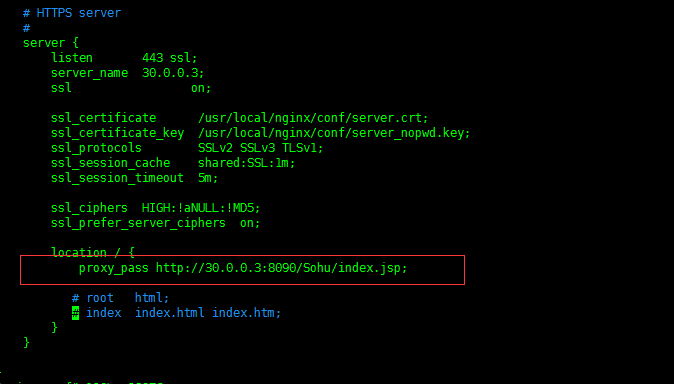
    server {
        listen       443 ssl;
        server_name  30.0.0.3;
        ssl           on;
      # ssl_certificate      /usr/local/nginx/conf/server.crt;
         ssl_certificate      /usr/local/keys/newKeys/192.196.1.131.crt;
      # ssl_certificate_key  /usr/local/nginx/conf/server_nopwd.key;
      # /usr/local/keys
        ssl_certificate_key  /usr/local/keys/newKeys/192.196.1.131.key;
        ssl_protocols        SSLv2 SSLv3 TLSv1;
        ssl_session_cache    shared:SSL:1m;
        ssl_session_timeout  5m;
        ssl_ciphers  HIGH:!aNULL:!MD5;
        ssl_prefer_server_ciphers  on;
 
        location / {
        proxy_pass http://30.0.0.3:8090/Sohu/index.jsp;
           # root   html;
           # index  index.html index.htm;
        }
    }
    server{
       listen    8080;
       server_name  30.0.0.3;
       rewrite ^(.*)$  https://$host$1 permanent;
    } 
}
方法二
执行脚本文件
#!/bin/sh
# create self-signed server certificate:
 
read -p "Enter your domain [www.example.com]: " DOMAIN
echo "Create server key..."
openssl genrsa -des3 -out $DOMAIN.key 1024
echo "Create server certificate signing request..."
SUBJECT="/C=US/ST=Mars/L=iTranswarp/O=iTranswarp/OU=iTranswarp/CN=$DOMAIN"
openssl req -new -subj $SUBJECT -key $DOMAIN.key -out $DOMAIN.csr
echo "Remove password..."
 
mv $DOMAIN.key $DOMAIN.origin.key
openssl rsa -in $DOMAIN.origin.key -out $DOMAIN.key
 
echo "Sign SSL certificate..."
openssl x509 -req -days 3650 -in $DOMAIN.csr -signkey $DOMAIN.key -out $DOMAIN.crt
 
echo "TODO:"
echo "Copy $DOMAIN.crt to /etc/nginx/ssl/$DOMAIN.crt"
echo "Copy $DOMAIN.key to /etc/nginx/ssl/$DOMAIN.key"
echo "Add configuration in nginx:"
echo "server {"
echo "    ..."
echo "    listen 443 ssl;"
echo "    ssl_certificate     /etc/nginx/ssl/$DOMAIN.crt;"
echo "    ssl_certificate_key /etc/nginx/ssl/$DOMAIN.key;"
echo "}"

浏览器设置:

重启浏览器重新访问,一切ok

nginx配置https服务器的更多相关文章

  1. Nginx 配置 HTTPS 服务器

    Nginx 配置 HTTPS 服务器 Chrome 浏览器地址栏标志着 HTTPS 的绿色小锁头从心理层面上可以给用户专业安全的心理暗示,本文简单总结一下如何在 Nginx 配置 HTTPS 服务器, ...

  2. windows下用nginx配置https服务器

    1.安装nginx 先到nginx官网下在nginx http://nginx.org/en/download.html 将下载好的文件解压出来修改文件名为 nginx ,然后拷贝到C盘下,目录如下: ...

  3. Nginx 配置 HTTPS(多域名)

    平常开发要求比较低, 依然在用 HTTP, 但到了微信小程序就不行了, 腾讯和苹果都对 API 提出了 HTTPS 的要求. 尤其是苹果, 不仅要求 HTTPS, 还要求 TLS 协议版本要在 1.2 ...

  4. Nginx配置Https

    1.申请证书: https://console.qcloud.com/ssl?utm_source=yingyongbao&utm_medium=ssl&utm_campaign=qc ...

  5. 【转】Linux下nginx配置https协议访问的方法

    一.配置nginx支持https协议访问,需要在编译安装nginx的时候添加相应的模块--with-http_ssl_module 查看nginx编译参数:/usr/local/nginx/sbin/ ...

  6. nginx配置https双向验证(ca机构证书+自签证书)

    nginx配置https双向验证 服务端验证(ca机构证书) 客户端验证(服务器自签证书) 本文用的阿里云签发的免费证书实验,下载nginx安装ssl,文件夹有两个文件 这两个文件用于做服务器http ...

  7. centos6.8下配置https服务器

    centos6.8下配置https服务器 1.1 环境 l  系统环境:内核环境为2.6.32版本  64位的CentOS release 6.8 (Final) [root@localhost ~] ...

  8. RedHat 6.6下安装nginx,配置HTTPS

    1.安装依赖包 yum -y install pcre-devel openssl-devel zlib-devel 2.下载nginx安装包到服务器上,当前使用版本nginx-1.15.5.tar. ...

  9. nginx 配置https并自签名证书

    2016-10-28 转载请注明出处:http://daodaoliang.com/ 作者: daodaoliang 版本: V1.0.1 邮箱: daodaoliang@yeah.net 参考链接: ...

随机推荐

  1. CSS3中的vh、vw及其应用场景

    需求:我们项目的需求是 一.vh   vw vw和vh是相对于视口(viewport)的宽度和高度.由于现在移动设备的屏幕尺寸之差别,如果仍然根据屏幕的物理分辨率来设计网页,效果很难统一,因此html ...

  2. 异步解决方案(三)Promise

    首先建议大家先看看这篇博文,这是我看过的最清晰给力的博文了: https://www.cnblogs.com/lvdabao/p/es6-promise-1.html 附赠一篇笑死我了的博客,加入有一 ...

  3. Js 向json对象中添加新元素

    即:var json={a:1,b:2} json.c=3  添加新元素直接使用赋值就行了

  4. Django工程创建

    方法一: 1.win+r进入cmd命令窗口: 2.找到Django的安装地址: 3.cmd窗口中利用cd 进入相应的文件夹,再输入命令如下: django-admin.exe startproject ...

  5. Newtonsoft.Json 自定义序列化格式转化器

    public static class JsonHelper { static JsonHelper() { Newtonsoft.Json.JsonSerializerSettings settin ...

  6. xlrd和xlwd模块

    xlrd模块 是python中一个第三方的用于读取excle表格的模块 exlce结构分析 一个excle表格包含多个sheet 一个sheet中包含多行多列 每个单元格具备唯一的行号和列号 常用函数 ...

  7. my21_myloader -o参数

    -o 参数 如果不使用-o参数,遇到第一个有主键或者唯一约束的数据,则退出当前线程:如果有-o参数,则删除原来的表,创建新表,再插入数据,主键不会发生变化. ** Message: Dropping ...

  8. 性能测试工具LoadRunner07-LR之Virtual User Generator 参数化设置

    1.Select next row[选择下一行]: 顺序(Sequential):按照参数化的数据顺序,一个一个的取 随机(Random):参数化中的数据,每次随机的从中抽取数据 唯一(Unique) ...

  9. python单元测试框架-unittest(三)之用例执行顺序

    执行顺序规则: 测试类或测试方法的数字与字母顺序0~9,A-Z 执行如下脚本,理解用例执行顺序 #coding=utf-8 import unittest class Test1(unittest.T ...

  10. Zend Optimizer安装、配置

    Zend Optimizer用优化代码的方法来提高php应用程序的执行速度.实现的原理是对那些在被最终执行之前由运行编译器(Run-Time Compiler)产生的代码进行优化.这里,我们下载最新版 ...