
java后台poi根据模板导出excel
public class ExcelUtils {

    private static final String INSPECTIONRECORD_SURFACE_TEMPLET_PATH = "download\\template\\materialList.xlsx";

    private static XSSFCellStyle cellstyle = null;

    public static void exportBom(HttpServletRequest request, HttpServletResponse response, Map map) throws IOException {

        //模板的路径,这个在自己的项目中很容易弄错,相对位置一定要写对啊

        String psth = request.getRealPath("/") + INSPECTIONRECORD_SURFACE_TEMPLET_PATH;

        Workbook webBook = readExcel(psth);

        Sheet sheet = webBook.getSheetAt(0);

        //调用样式方法

        cellstyle = createCellStyle(webBook);

        sheet.setColumnWidth(0, 3766);//列宽

        sheet.setColumnWidth(1, 4766);//列宽

        //开始操作模板,找到某行某列(某个cell),需要注意的是这里有个坑,行和列的计数都是从0开始的

        //一次数据插入的位置不对,别灰心,多试几次就好啦,你要是能看懂我下面的代码,数据插在了什么位置,你就明白了

        //打印时间

        int rows = 0;

        Row row = sheet.getRow(rows);

        //调用方法,赋值并给定样式(写样式的时候这个工具类只能用XSSF而不能用HSSF,不然样式会没响应)

        setCellStyleWithValue(row.createCell(0),(String) map.get("title"));

        rows = 2;

        row = sheet.getRow(rows);

        row.createCell(1).setCellValue((String) map.get("date"));

//        setCellStyleWithValue(row.createCell(1),(String) map.get("date"));

        //负责人

        rows = 3;

        row = sheet.getRow(rows);

        row.createCell(1).setCellValue((String) map.get("leader"));

//        setCellStyleWithValue(row.createCell(1),(String) map.get("leader"));

        //审核人

        rows = 4;

        row = sheet.getRow(rows);

        row.createCell(1).setCellValue((String) map.get("Auditleader"));

//        setCellStyleWithValue(row.createCell(1),(String) map.get("Auditleader"));

        //在调用模板的时候,数据的插入不能直接应用模板行,不然数据会覆盖掉哪行

        rows = 7;

        row = sheet.createRow(rows);

        row.createCell(0).setCellValue("编号");

        row.createCell(1).setCellValue("名称");

        row.createCell(2).setCellValue("规格");

        row.createCell(3).setCellValue("数量");

        row.createCell(4).setCellValue("益值");

        row.setRowStyle(cellstyle);

        List<Map<String, Object>> list = (List<Map<String, Object>>) map.get("resultList");

        for (int i = 0; i < list.size(); i++) {

            row = sheet.createRow(rows++);

/*            row.createCell(0).setCellValue(StringUtils.objToStr(list.get(i).get("物料编号")));

            row.createCell(1).setCellValue(StringUtils.objToStr(list.get(i).get("物料名称")));

            row.createCell(2).setCellValue(StringUtils.objToStr(list.get(i).get("物料规格")));

            row.createCell(3).setCellValue(Double.parseDouble(StringUtils.objToStr(list.get(i).get("物料消耗数量"))));

            row.createCell(4).setCellValue(Float.parseFloat(StringUtils.objToStr(list.get(i).get("物料消耗损益值"))));*/

            setCellStyleWithValue(row.createCell(0),StringUtils.objToStr(list.get(i).get("物料编号")));

            setCellStyleWithValue(row.createCell(1),StringUtils.objToStr(list.get(i).get("物料名称")));

            setCellStyleWithValue(row.createCell(2),StringUtils.objToStr(list.get(i).get("物料规格")));

            setCellStyleWithValue(row.createCell(3),Double.parseDouble(StringUtils.objToStr(list.get(i).get("物料消耗数量"))));

            setCellStyleWithValue(row.createCell(4),Float.parseFloat(StringUtils.objToStr(list.get(i).get("物料消耗损益值"))));

        }

        writeExcel(response, webBook, (String) map.get("title"));

    }

   private static XSSFWorkbook readExcel(String filePath) {

        InputStream in = null;

        XSSFWorkbook work = null;

        try {

            in = new FileInputStream(filePath);

            work = new XSSFWorkbook(in);

        } catch (FileNotFoundException e) {

            System.out.println("文件路径错误");

            e.printStackTrace();

        } catch (IOException e) {

            System.out.println("文件输入流错误");

            e.printStackTrace();

        }

        return work;

    }

    private static void writeExcel(HttpServletResponse response, Workbook work, String fileName) throws IOException {

        OutputStream out = null;

        try {

            out = response.getOutputStream();

            response.setContentType("application/ms-excel;charset=UTF-8");

            response.setHeader("Content-Disposition", "attachment;filename="

                    .concat(String.valueOf(URLEncoder.encode(fileName + ".xls", "UTF-8"))));

            work.write(out);

        } catch (IOException e) {

            System.out.println("输出流错误");

            e.printStackTrace();

        } finally {

            out.close();

        }

    }

    private static Cell setCellStyleWithStyleAndValue(CellStyle style, Cell cell, String value) {

        cell.setCellStyle(style);

        cell.setCellValue(value);

        return cell;

    }

    private static Cell setCellStyleWithStyleAndValue(CellStyle style, Cell cell, Double value) {

        cell.setCellStyle(style);

        cell.setCellValue(value);

        return cell;

    }

    private static Cell setCellStyleWithValue(Cell cell, String value) {

        cell.setCellStyle(cellstyle);

        cell.setCellValue(value);

        return cell;

    }

    private static Cell setCellStyleWithStyleAndValue(CellStyle style, Cell cell, RichTextString value) {

        cell.setCellStyle(style);

        cell.setCellValue(value);

        return cell;

    }

    private static Cell setCellStyleWithValue(Cell cell, int value) {

        cell.setCellStyle(cellstyle);

        cell.setCellValue(value);

        return cell;

    }

    private static Cell setCellStyleWithValue(Cell cell, double value) {

        cell.setCellStyle(cellstyle);

        cell.setCellValue(value);

        return cell;

    }

    private static XSSFCellStyle createCellStyle(Workbook wb) {

        cellstyle = (XSSFCellStyle) wb.createCellStyle();

        cellstyle.setAlignment(XSSFCellStyle.ALIGN_CENTER);

//        cellstyle.setBorderBottom(XSSFCellStyle.BORDER_THIN);

//        cellstyle.setBorderLeft(XSSFCellStyle.BORDER_THIN);

//        cellstyle.setBorderRight(XSSFCellStyle.BORDER_THIN);

//        cellstyle.setBorderTop(XSSFCellStyle.BORDER_THIN);

        cellstyle.setVerticalAlignment(XSSFCellStyle.VERTICAL_CENTER);

        return cellstyle;

    }

}

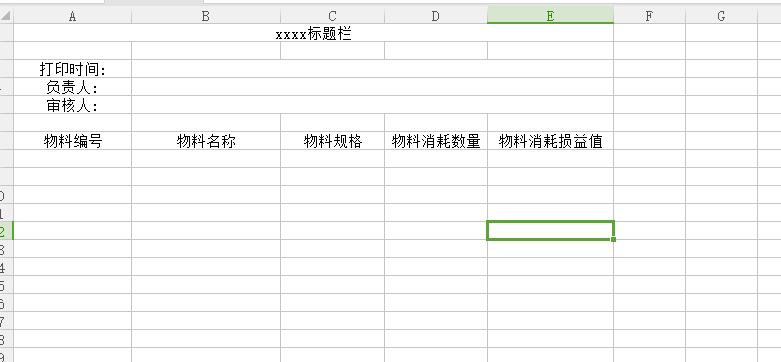
我自己的空模板,有数据的图就不贴出来了!
java后台poi根据模板导出excel的更多相关文章
- apache poi根据模板导出excel
需要预先新建编辑好一个excel文件,设置好样式. 编辑好输出的数据,根据excel坐标一一对应. 支持列表数据输出,列表中列合并. 代码如下: package com.icourt.util; im ...
- Java使用POI实现数据导出excel报表
Java使用POI实现数据导出excel报表 在上篇文章中,我们简单介绍了java读取word,excel和pdf文档内容 ,但在实际开发中,我们用到最多的是把数据库中数据导出excel报表形式.不仅 ...
- POI通过模板导出EXCEL文件
一般的EXCEL导出使用POI先创建一个HSSFWorkbook,然后通过不断创建HSSFRow,HSSFCell后设置单元格内容便可以完成导出. 这次在项目中需要用到模板,导出的内容包括(1.模板中 ...
- Java利用POI实现导入导出Excel表格示例代码
转自:https://www.jb51.net/article/95526.htm 介绍 Jakarta POI 是一套用于访问微软格式文档的Java API.Jakarta POI有很多组件组成,其 ...
- JAVA 通过POI 模版,导出excel
如有不足,欢迎指正,谢谢 ! 1.Maven引入 POI jar包.模版和结果文件.rar下载 <dependency> <groupId>org.apache.poi< ...
- java使用freemarker作为模板导出Excel表格
1:首先新建一个excel表格自己弄好格式如下图 2:把excel 表格另存为xml格式文件如下图 3:这个时候的文件就是xml 格式的文件了,在myeclipse里面项目工程里面新建一个文件后缀为. ...
- Java无模板导出Excel,Apache-POI插件实现
开发环境 jdk 1.8 Maven 3.6 Tomcat 8.5 SpringBoot 2.1.4.RELEASE Apache-POI 3.6 Idea 注意: 我是在现有的基于SpringBoo ...
- Java中使用poi导入、导出Excel
一.介绍 当前B/S模式已成为应用开发的主流,而在企业办公系统中,常常有客户这样子要求:你要把我们的报表直接用Excel打开(电信系统.银行系统).或者是:我们已经习惯用Excel打印.这样在我们实际 ...
- ASP.NET Core 2.2 : 十六.扒一扒新的Endpoint路由方案 try.dot.net 的正确使用姿势 .Net NPOI 根据excel模板导出excel、直接生成excel .Net NPOI 上传excel文件、提交后台获取excel里的数据
ASP.NET Core 2.2 : 十六.扒一扒新的Endpoint路由方案 ASP.NET Core 从2.2版本开始,采用了一个新的名为Endpoint的路由方案,与原来的方案在使用上差别不 ...
随机推荐
- pat1082. Read Number in Chinese (25)
1082. Read Number in Chinese (25) 时间限制 400 ms 内存限制 65536 kB 代码长度限制 16000 B 判题程序 Standard 作者 CHEN, Yu ...
- 使用mspaint查看图片像素
图片打码服务,要求对图像验证码进行切图,即具体知道像素的位置,网上搜了yhb-chi但下载不方便. 就想着看看mspaint可不可以,将图片拖到mspaint中: 显示了整张图片的像素大小(100X4 ...
- httpd.conf 配置
# # This is the main Apache server configuration file. It contains the # configuration directives th ...
- Qmake 配置自定义编译过程
Qmake 配置自定义编译过程 需求:动态更换资源文件 在 Windows10 下编写 Qt 项目时,有这样的需求: 程序用到的资源文件可以动态更换而不需要重新编译整个项目 解决方案 0.1 将所有的 ...
- jQuery Validate使用说明
jQuery Validate 导入 js 库 <script src="./jquery-validation/lib/jquery-1.8.3.js" type=&quo ...
- 自定义HandlerMethodArgumentResolver参数解析器和源码分析
在初学springmvc框架时,我就一直有一个疑问,为什么controller方法上竟然可以放这么多的参数,而且都能得到想要的对象,比如HttpServletRequest或HttpServletRe ...
- hibernate课程 初探一对多映射1-1 课程简介
hibernate 常见映射类型 one-to-many many-to-one one-to-one many-to-many
- Redis整理第三波(生存时间、事务管理)
expire 设置生存时间 Redis在实际使用过程中更多的用作缓存,然而缓存的数据一般都是需要设置生存时间的,即到期后数据销毁. TTL查看key的剩余时间,当返回值为-2时,表示键被删除. 当 ...
- php支付走过的坑(支付宝篇 注册 秘钥 环境等等配置)
支付这东西,说容易也容易,说难也难 代码这玩意还比较好说 但是 如果没有demo 直接去看官方文档 十有八九一脸懵逼 今天就整理一下 支付这块走过的坑 涉及 微信h5支付 支付宝h5支付 (api文档 ...
- TX Text Control X10新特性之图像占位符合并
文档处理控件TX Text Control即将发布的X10版本,将升级重点还是放到了其比较优势的流式布局报表设计和生成上.慧都获得了来自其开发商Text Control GmbH公司的一手资料,迫不及 ...