
JAVA 通过POI 模版,导出excel
如有不足,欢迎指正,谢谢 !
1、Maven引入 POI jar包、模版和结果文件.rar下载
<dependency>
<groupId>org.apache.poi</groupId>
<artifactId>poi</artifactId>
<version>4.0.1</version>
</dependency>
<dependency>
<groupId>net.sf.jxls</groupId>
<artifactId>jxls-core</artifactId>
<version>1.0.4</version>
</dependency>
2、工具方法如下:
package com.***.***.***;
import net.sf.jxls.transformer.XLSTransformer;
import javax.servlet.ServletOutputStream;
import javax.servlet.http.HttpServletRequest;
import javax.servlet.http.HttpServletResponse;
import java.io.*;
import java.net.URLEncoder;
import java.text.SimpleDateFormat;
import java.util.*;
CLASS 省略。。。

/**

     *

     * @param request

     * @param response

     * @param tempPath 模版的相对路径

     * @param resultMap 结果集

     * @throws Exception

     */

    public static void excelTempExport(HttpServletRequest request,HttpServletResponse response,String tempPath, Map resultMap) {

        String tempFileName = null;

        String newFileName = null;

        File newFile = null;

        XLSTransformer transformer = null;

        BufferedInputStream bis = null;

        BufferedOutputStream bos = null;

        try {

            //获得模版

            tempFileName = request.getSession().getServletContext().getRealPath(tempPath);

            //新的文件名称

            newFileName= new SimpleDateFormat("yyyyMMddHHmmss").format(new Date());

            //文件名称统一编码格式

            newFileName = URLEncoder.encode(newFileName, "utf-8");

            //生成的导出文件

            newFile = File.createTempFile(newFileName, ".xls");

            //transformer转到Excel

            transformer = new XLSTransformer();

            //将数据添加到模版中生成新的文件

            transformer.transformXLS(tempFileName, resultMap, newFile.getAbsolutePath());

            //将文件输入

            InputStream inputStream = new FileInputStream(newFile);

            // 设置response参数,可以打开下载页面

            response.reset();

            //设置响应文本格式

            response.setContentType("application/vnd.ms-excel;charset=utf-8");

            response.setHeader("Content-Disposition", "attachment;filename=" + String.valueOf((newFileName + ".xls").getBytes(), "iso-8859-1"));

            //将文件输出到页面

            ServletOutputStream out = response.getOutputStream();

            bis = new BufferedInputStream(inputStream);

            bos = new BufferedOutputStream(out);

            byte[] buff = new byte[2048];

            int bytesRead;

            // 根据读取并写入

            while (-1 != (bytesRead = bis.read(buff, 0, buff.length))) {

                bos.write(buff, 0, bytesRead);

            }

        } catch (Exception e) {

            e.printStackTrace();

        }finally {

            //使用完成后关闭流

            try {

                if (bis != null) {

                    bis.close();

                }

                if (bos != null) {

                    bos.close();

                }

            } catch (IOException e) {}

        }

    }

//测试类
@RequestMapping(value = "/exportExcelTest", method = RequestMethod.GET)
public void exportExcelTest(HttpServletRequest request, HttpServletResponse response) {
    Map map = new HashMap(4);
    Map itemMap = null;
    //商户
    List<Map> merchantList = new ArrayList<Map>();
    itemMap = new HashMap();
    itemMap.put("id", 3);
    itemMap.put("merchant_name", "张3");
    itemMap.put("market_id", 1);
    itemMap.put("market_name", "市场1");
    merchantList.add(itemMap);
    itemMap = new HashMap();
    itemMap.put("id", 4);
    itemMap.put("merchant_name", "张5");
    itemMap.put("market_id", 2);
    itemMap.put("market_name", "市场2");
    merchantList.add(itemMap);
    map.put("merchantList", merchantList);

    //品类
    List<Map> bccList = new ArrayList<Map>();
    itemMap = new HashMap();
    itemMap.put("id", 1);
    itemMap.put("category", "苹果");
    itemMap.put("sub_category", "红富士苹果");
    bccList.add(itemMap);
    itemMap = new HashMap();
    itemMap.put("id", 2);
    itemMap.put("category", "苹果");
    itemMap.put("sub_category", "国光苹果");
    bccList.add(itemMap);
    map.put("bccList", bccList);

    //供货商
    List<Map> merchantSupplierList = new ArrayList<Map>();
    itemMap = new HashMap();
    itemMap.put("id", 1);
    itemMap.put("supplierName", "李四");
    itemMap.put("supplierShopName", "李四水果店");
    merchantSupplierList.add(itemMap);
    itemMap = new HashMap();
    itemMap.put("id", 2);
    itemMap.put("supplierName", "王五");
    itemMap.put("supplierShopName", "王五蔬菜店");
    merchantSupplierList.add(itemMap);
    map.put("merchantSupplierList", merchantSupplierList);

    //省市区
    List<Map> areaList = new ArrayList<Map>();
    itemMap = new HashMap();
    itemMap.put("sheng_id", 610000);
    itemMap.put("sheng_name", "陕西省");
    itemMap.put("shi_id", 610100);
    itemMap.put("shi_name", "西安市");
    itemMap.put("qu_id", 610104);
    itemMap.put("qu_name", "莲湖区");
    areaList.add(itemMap);
    itemMap = new HashMap();
    itemMap.put("sheng_id", 610000);
    itemMap.put("sheng_name", "陕西省");
    itemMap.put("shi_id", 610100);
    itemMap.put("shi_name", "西安市");
    itemMap.put("qu_id", 610113);
    itemMap.put("qu_name", "雁塔区");
    areaList.add(itemMap);
    map.put("areaList", areaList);
    ExcelTemplate.exportExcelByTemplate(request, response, map, "excelTemplate/template.xls");
}
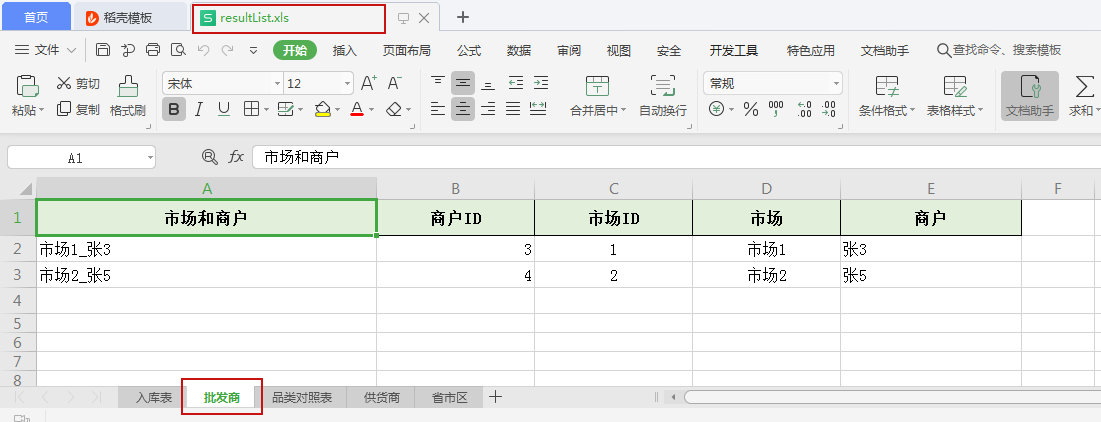
3、导出成功后结果如图:
JAVA 通过POI 模版,导出excel的更多相关文章
- Java利用POI导入导出Excel中的数据
首先谈一下今天发生的一件开心的事,本着一颗android的心我被分配到了PB组,身在曹营心在汉啊!好吧,今天要记录和分享的是Java利用POI导入导出Excel中的数据.下面POI包的下载地 ...
- java使用poi生成导出Excel(新)
导出样式: java代码: import java.io.FileOutputStream; import java.io.IOException; import java.io.OutputStre ...
- Java中导入、导出Excel
原文:Java中导入.导出Excel 一.介绍 当前B/S模式已成为应用开发的主流,而在企业办公系统中,常常有客户这样子要求:你要把我们的报表直接用Excel打开(电信系统.银行系统).或者是:我们已 ...
- 如何用poi生成导出excel
import org.apache.poi.ss.usermodel.CellStyle; import org.apache.poi.ss.usermodel.Sheet; import java. ...
- 我是陌生人 Java中导入、导出Excel
我是陌生人 Java中导入.导出Excel 一.介绍 当前B/S模式已成为应用开发的主流,而在企业办公系统中,常常有客户这样子要求:你要把我们的报表直接用Excel打开(电信系统.银行系统).或者是: ...
- jxls使用模版导出Excel
/** * 使用模版导出Excel */ @SuppressWarnings({ "unchecked", "deprecation" } ...
- POI导入导出excel(附工具类)
关于POI导出excel的功能我在前面的文章已经写过了,POI导出excel的三种方式 , 导出表格数据到excel并下载(HSSFWorkbook版) ,本篇文章主要是将导入导出功能进一步地封装,在 ...
- java的poi技术写Excel的Sheet
在这之前写过关于java读,写Excel的blog如下: Excel转Html java的poi技术读,写Excel[2003-2007,2010] java的poi技术读取Excel[2003-20 ...
- java的poi技术读取Excel[2003-2007,2010]
这篇blog主要是讲述java中poi读取excel,而excel的版本包括:2003-2007和2010两个版本, 即excel的后缀名为:xls和xlsx. 读取excel和MySQL相关: ja ...
- POI实现导出Excel和模板导出Excel
一.导出过程 1.用户请求导出 2.先访问数据库,查询需要导出的结果集 3.创建导出的Excel工作簿 4.遍历结果集,写入工作簿 5.将Excel已文件下载的形式回复给请求客户端 二.具体实现(截取 ...
随机推荐
- IDEA格式化代码快捷键失灵原因
网易云音乐快捷键与IDEA快捷键冲突了!!!!!!!坑爹
- 全网最全!小白搭建hexo+Github/Gitee/Coding
Hexo是一个快速.简洁且高效的博客框架.Hexo使用Markdown解析文章,在几秒内,即可利用靓丽的主题生成静态网页. 本站内容已全部转移到https://www.myyuns.ltd,具体请移步 ...
- 30分钟编写一个抓取 Unsplash 图片的 Python爬虫
我一直想用 Python and Selenium 创建一个网页爬虫,但从来没有实现它. 几天前, 我决定尝试一下,这听起来可能是挺复杂的, 然而编写代码从 Unsplash 抓取一些美丽的图片 ...
- 【代码审计】seacms 前台Getshell分析
一.漏洞分析 漏洞触发点search.php 211-213行 跟进parseIf 函数 ./include/main.class.php 这里要注意 3118行的位置,可以看到未做任何处理的eval ...
- 有源汇有上下界最小流 (ZQU 1592)
这道题跟求最大流的时候差不多. 都是先构造可行流,然后判断是否可行, 可行的话,就利用残余流量,构造从汇点t跑到源点s的最大流, 如何求出答案呢. 在第一次求可行流的dinic后,跟求最大流的时候一样 ...
- python基础 pyc
关于pyc的几点记录: python运行时会将python语句----->"字节码"------>转发到"虚拟机" 字节码:在大型的python程序 ...
- 【PAT甲级】1107 Social Clusters (30分)(非递归并查集)
题意: 输入一个正整数N(<=1000),表示人数,接着输入N行每行包括一个他的爱好数量:和爱好的序号.拥有相同爱好的人们可以默认他们在同一个俱乐部,输出俱乐部的数量并从大到小输出俱乐部的人数( ...
- mysql中的文件排序(filesort)
在MySQL中的ORDER BY有两种排序实现方式: 1. 利用有序索引获取有序数据 2. 文件排序 在explain中分析查询的时候,利用有序索引获取有序数据显示Using index ,文件排序显 ...
- JS中的字符串可以直接调用字符串对象的属性和方法
在JS中,会自动在字符串与字符串对象之间进行转换,因此,任何一个字符串常量都可以看作是一个String对象,其可以直接作为对象使用,只要在字符串变量的后面加 “.” 便可以直接调用String对象的属 ...
- async+队列queue.Queue()
import queue import time import random import threading import asyncio import logging logging.basicC ...