
React后台管理系统-后台接口封装
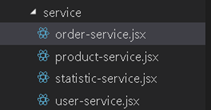
1新建文件夹 service ,里边建4个文件,分别是statistic-service.jsx 首页数据统计接口, user-service.jsx用户接口, product-service.jsx产品接口,order-service.jx订单接口
2.首页数据统计接口statistic-service
mm.jsx是封装的ajax请求,在上一边博客里边有讲到
- import MUtil from 'util/mm.jsx'
- const _mm = new MUtil();
- class Statistic{
- // 首页数据统计
- getHomeCount(){
- return _mm.request({
- url: '/manage/statistic/base_count.do'
- });
- }
- }
- export default Statistic;
3. 用户接口user-service
- import MUtil from 'util/mm.jsx'
- const _mm = new MUtil();
- class User{
- // 用户登录
- login(loginInfo){
- return _mm.request({
- type: 'post',
- url: '/manage/user/login.do',
- data: loginInfo
- });
- }
- // 检查登录接口的数据是不是合法
- checkLoginInfo(loginInfo){
- let username = $.trim(loginInfo.username),
- password = $.trim(loginInfo.password);
- // 判断用户名为空
- if(typeof username !== 'string' || username.length ===0){
- return {
- status: false,
- msg: '用户名不能为空!'
- }
- }
- // 判断密码为空
- if(typeof password !== 'string' || password.length ===0){
- return {
- status: false,
- msg: '密码不能为空!'
- }
- }
- return {
- status : true,
- msg : '验证通过'
- }
- }
- // 退出登录
- logout(){
- return _mm.request({
- type : 'post',
- url : '/user/logout.do'
- });
- }
- getUserList(pageNum){
- return _mm.request({
- type : 'post',
- url : '/manage/user/list.do',
- data : {
- pageNum : pageNum
- }
- });
- }
- }
- export default User;
4.产品接口product-service
- import MUtil from 'util/mm.jsx'
- const _mm = new MUtil();
- class Product{
- // 获取商品列表
- getProductList(listParam){
- let url = '',
- data = {};
- if(listParam.listType === 'list'){
- url = '/manage/product/list.do';
- data.pageNum = listParam.pageNum;
- }else if(listParam.listType === 'search'){
- url = '/manage/product/search.do';
- data.pageNum = listParam.pageNum;
- data[listParam.searchType] = listParam.keyword;
- }
- return _mm.request({
- type : 'post',
- url : url,
- data : data
- });
- }
- // 获取商品详情
- getProduct(productId){
- return _mm.request({
- type : 'post',
- url : '/manage/product/detail.do',
- data : {
- productId : productId || 0
- }
- });
- }
- // 检查保存商品的表单数据
- checkProduct(product){
- let result = {
- status: true,
- msg: '验证通过'
- };
- // 判断用户名为空
- if(typeof product.name !== 'string' || product.name.length ===0){
- return {
- status: false,
- msg: '商品名称不能为空!'
- }
- }
- // 判断描述不能为空
- if(typeof product.subtitle !== 'string' || product.subtitle.length ===0){
- return {
- status: false,
- msg: '商品描述不能为空!'
- }
- }
- // 验证品类ID
- if(typeof product.categoryId !== 'number' || !(product.categoryId > 0)){
- return {
- status: false,
- msg: '请选择商品品类!'
- }
- }
- // 判断商品价格为数字,且大于0
- if(typeof product.price !== 'number' || !(product.price >= 0)){
- return {
- status: false,
- msg: '请输入正确的商品价格!'
- }
- }
- // 判断库存为数字,且大于或等于0
- if(typeof product.stock !== 'number' || !(product.stock >= 0)){
- return {
- status: false,
- msg: '请输入正确的库存数量!'
- }
- }
- return result;
- }
- // 保存商品
- saveProduct(product){
- return _mm.request({
- type : 'post',
- url : '/manage/product/save.do',
- data : product
- });
- }
- // 变更商品销售状态
- setProductStatus(productInfo){
- return _mm.request({
- type : 'post',
- url : '/manage/product/set_sale_status.do',
- data : productInfo
- });
- }
- //查找一级品类列表
- getCategoryList(parentCategoryId){
- return _mm.request({
- type : 'post',
- url : '/manage/category/get_category.do',
- data : {
- //没有传的话默认值就是0
- categoryId : parentCategoryId || 0
- }
- });
- }
- // 新增品类
- saveCategory(category){
- return _mm.request({
- type : 'post',
- url : '/manage/category/add_category.do',
- data : category
- });
- }
- // 修改品类名称
- updateCategoryName(category){
- return _mm.request({
- type : 'post',
- url : '/manage/category/set_category_name.do',
- data : category
- });
- }
- }
- export default Product;
5.订单接口order-service.jx
- import MUtil from 'util/mm.jsx'
- const _mm = new MUtil();
- class Order{
- // 获取订单列表
- getOrderList(listParam){
- let url = '',
- data = {};
- if(listParam.listType === 'list'){
- url = '/manage/order/list.do';
- data.pageNum = listParam.pageNum;
- }else if(listParam.listType === 'search'){
- url = '/manage/order/search.do';
- data.pageNum = listParam.pageNum;
- data.orderNo = listParam.orderNo;
- }
- return _mm.request({
- type : 'post',
- url : url,
- data : data
- });
- }
- // 获取订单详情
- getOrderDetail(orderNumber){
- return _mm.request({
- type : 'post',
- url : '/manage/order/detail.do',
- data : {
- orderNo : orderNumber
- }
- });
- }
- sendGoods(orderNumber){
- return _mm.request({
- type : 'post',
- url : '/manage/order/send_goods.do',
- data : {
- orderNo : orderNumber
- }
- });
- }
- }
- export default Order;
6.解决跨域问题
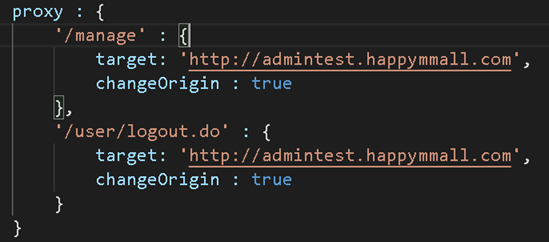
在webpack.config里边 devserverr 里边的proxy配置即可解决
7.页面引入和使用
- import Statistic from 'service/statistic-service.jsx'
- const _statistic = new Statistic();
- _statistic.getHomeCount().then(res => {
- this.setState(res);
- }, errMsg => {
- _mm.errorTips(errMsg);
- });
React后台管理系统-后台接口封装的更多相关文章
- React后台管理系统-ajax请求封装
1.新建文件夹 util , 在util里边新建 mm.jsx文件 2.使用jquery里边的ajax发送请求,回调用promise,返回一个promise对象 request(param){ ...
- 使用react全家桶制作博客后台管理系统
前面的话 笔者在做一个完整的博客上线项目,包括前台.后台.后端接口和服务器配置.本文将详细介绍使用react全家桶制作的博客后台管理系统 概述 该项目是基于react全家桶(React.React-r ...
- 使用React全家桶搭建一个后台管理系统
引子 学生时代为了掌握某个知识点会不断地做习题,做总结,步入岗位之后何尝不是一样呢?做业务就如同做习题,如果‘课后’适当地进行总结,必然更快地提升自己的水平. 由于公司采用的react+node的技术 ...
- 使用react全家桶制作博客后台管理系统 网站PWA升级 移动端常见问题处理 循序渐进学.Net Core Web Api开发系列【4】:前端访问WebApi [Abp 源码分析]四、模块配置 [Abp 源码分析]三、依赖注入
使用react全家桶制作博客后台管理系统 前面的话 笔者在做一个完整的博客上线项目,包括前台.后台.后端接口和服务器配置.本文将详细介绍使用react全家桶制作的博客后台管理系统 概述 该项目是基 ...
- 《React后台管理系统实战 :一》:目录结构、引入antd、引入路由、写login页面、使用antd的form登录组件、form前台验证、高阶函数/组件
实战 上接,笔记:https://blog.csdn.net/u010132177/article/details/104150177 https://gitee.com/pasaulis/react ...
- React版/Vue版都齐了,开源一套【特别】的后台管理系统...
本项目主要基于Elux+Antd构建,包含React版本和Vue版本,旨在提供给大家一个简单基础.开箱即用的后台管理系统通用模版,主要包含运行环境.脚手架.代码风格.基本Layout.状态管理.路由管 ...
- react后台管理系统路由方案及react-router原理解析
最近做了一个后台管理系统主体框架是基于React进行开发的,因此系统的路由管理,选用了react-router(4.3.1)插件进行路由页面的管理配置. 实现原理剖析 1.hash的方式 ...
- 【共享单车】—— React后台管理系统开发手记:主页面架构设计
前言:以下内容基于React全家桶+AntD实战课程的学习实践过程记录.最终成果github地址:https://github.com/66Web/react-antd-manager,欢迎star. ...
- Vue + Element-ui实现后台管理系统(4)---封装一个ECharts组件的一点思路
封装一个ECharts组件的一点思路 有关后台管理系统之前写过三遍博客,看这篇之前最好先看下这三篇博客.另外这里只展示关键部分代码,项目代码放在github上: mall-manage-system ...
随机推荐
- Hexo瞎折腾系列(9) - 网页标题崩溃特效
前言 本系列的所有修改均基于本系列第一篇中的新增文件(譬如custom.js),请先自行阅读Hexo瞎折腾系列(1) - 准备工作与简单美化:并按照文章所说自行修改代码或文件. 为网页添加标题崩溃特效 ...
- LeetCode 069 Sqrt(x) 求平方根
Implement int sqrt(int x).Compute and return the square root of x.x is guaranteed to be a non-negati ...
- C. Glass Carving 正着做或者倒着做都可以
http://codeforces.com/problemset/problem/527/C 这题总体思路就是,每画一条线,然后就找到x间距的最max值和y间距的最max值,相乘就是当前的ans 那么 ...
- Storm概念学习系列之storm核心组件
不多说,直接上干货! Storm核心组件 了解 Storm 的核心组件对于理解 Storm 原理非常重要,下面介绍 Storm 的整体,然后介绍 Storm 的核心. Storm 集群由一个主节点和多 ...
- springcloud中servcie层调用fegin异常以及异步方法的实现
近日在做业务上的短信推送和APP消息推送,通过调用别的模块的接口来实现,在springcloud中通过fegin进行调用.这里要说明的事情并不是如何开发推送功能,而是在调试过程中碰到的一些小问题.我把 ...
- JavaSE_3_面向对象
1.wait方法底层原理 wait是object中的方法,可以暂停线程,会释放对象锁,不像sleep方法,线程休眠期依然持有锁,通过调用notify或notifyAll方法唤醒线程. lock.wai ...
- git从安装到应用的学习
本文内容是对廖雪峰老师Git教程做的笔记,外加一些自己的学习心得,还抱着学以致用的心态来实践一番 Git学习笔记 分布式版本控制与集中式版本控制的最大区别 集中式的版本控制,本地没有历史记录,完整的仓 ...
- Java集合框架—List
Collection |--List:元素是有序的,元素可以重复.因为该集合体系有索引. |--ArrayList:底层的数据结构使用的是数组结构.特点:查询速度很快.但是增删稍慢.线程不同步. |- ...
- C# 发Domino邮件 报错误 Password or other security violation for database 的解决方案
错误提示: Password or other security violation for database ******* 问题产生的描述: 之前C#发邮件是好的 加上了附件部分代码之后,出现了这 ...
- keil 系列问题
1.为了让keil支持stm32f0系列,安装了keil4更高级的版本,但是发现编译时弹出异常提示框,经过一番折腾后找到解决办法,首先把电脑登陆账户名改为非中文的,然后卸载了keil重装就可以了. ...