
15、SpringBoot------整合swagger2
开发工具:STS
前言:
对外提供一个Api,无论是对开发、测试、维护,都有很大的帮助。
下面我们来实现swagger2。
参考实例:https://blog.csdn.net/weixin_39477597/article/details/79639239
实例:
1.添加依赖:
         <dependency>

             <groupId>io.springfox</groupId>

             <artifactId>springfox-swagger2</artifactId>

             <version>2.7.0</version>

         </dependency>

         <dependency>

             <groupId>io.springfox</groupId>

             <artifactId>springfox-swagger-ui</artifactId>

             <version>2.7.0</version>

         </dependency>
2.配置:
package com.xm.shiro.config;

import org.springframework.context.annotation.Bean;

import org.springframework.context.annotation.Configuration;

import springfox.documentation.builders.ApiInfoBuilder;

import springfox.documentation.builders.PathSelectors;

import springfox.documentation.builders.RequestHandlerSelectors;

import springfox.documentation.service.ApiInfo;

import springfox.documentation.service.Contact;

import springfox.documentation.spi.DocumentationType;

import springfox.documentation.spring.web.plugins.Docket;

import springfox.documentation.swagger2.annotations.EnableSwagger2;

@Configuration

@EnableSwagger2

public class SwaggerConfig {

    @Bean

    public Docket docket(){

        return new Docket(DocumentationType.SWAGGER_2).apiInfo(apiInfo()).select()

//                   当前包路径

                   .apis(RequestHandlerSelectors.basePackage("com.xm.shiro.controller"))

                    .paths(PathSelectors.any()).build();

    }

//构建api文档的详细信息函数

    private ApiInfo apiInfo(){

        return new ApiInfoBuilder()

                //页面标题

                    .title("springBoot测试使用Swagger2构建RESTful API")

                //创建人

                    .contact("郭小明")

                 //版本号

                    .version("1.0")

                //描述

                    .description("API 描述")

                    .build();

    }

}
3.在controller中引用api:
注解说明:
notes="方法的备注说明“
defaultValue:参数的默认值
package com.xm.shiro.controller;

import org.apache.shiro.SecurityUtils;

import org.apache.shiro.authc.AuthenticationException;

import org.apache.shiro.authc.IncorrectCredentialsException;

import org.apache.shiro.authc.UsernamePasswordToken;

import org.apache.shiro.authz.annotation.RequiresPermissions;

import org.apache.shiro.authz.annotation.RequiresRoles;

import org.apache.shiro.subject.Subject;

import org.springframework.web.bind.annotation.GetMapping;

import org.springframework.web.bind.annotation.PathVariable;

import org.springframework.web.bind.annotation.RequestMapping;

import org.springframework.web.bind.annotation.RestController;

import io.swagger.annotations.Api;

import io.swagger.annotations.ApiOperation;

@Api(value="UserController",tags="用户 登录、登出、注册")

@RestController

public class UserController {

    @RequiresPermissions("hello")

    @GetMapping("/hello")

    public String hello() {

        return "Hello Shiro!";

    }

    @GetMapping("/login")

    public String login() {

        return "权限管理";

    }

    @ApiOperation(value="根据用户名密码登录",notes="用户登录")

    @GetMapping("/doLogin/{username}/{password}")

    public String doLogin(@PathVariable("username") String username,@PathVariable("password") String password) {

        UsernamePasswordToken token = new UsernamePasswordToken(username, password);

        Subject currentUser = SecurityUtils.getSubject();

        try {

            currentUser.login(token);

            //此步将 调用realm的认证方法

        } catch(IncorrectCredentialsException e){

            //这最好把 所有的 异常类型都背会

            return "密码错误";

        } catch (AuthenticationException e) {

            return "登录失败";

        }

        currentUser.hasRole("sun");

        currentUser.hasRole("sun");

        currentUser.hasRole("sun");

        currentUser.hasRole("sun");

        return token.getPrincipal()+":登录成功";

    }

    @ApiOperation(value="用户退出",notes="注销用户")

    @GetMapping("/logout")

    public String logout() {

        Subject currentUser = SecurityUtils.getSubject();

        currentUser.logout();

        return "退出登录";

    }

    @GetMapping("/noUnauthorized")

    public String error() {

        return  "无权限";

    }

}
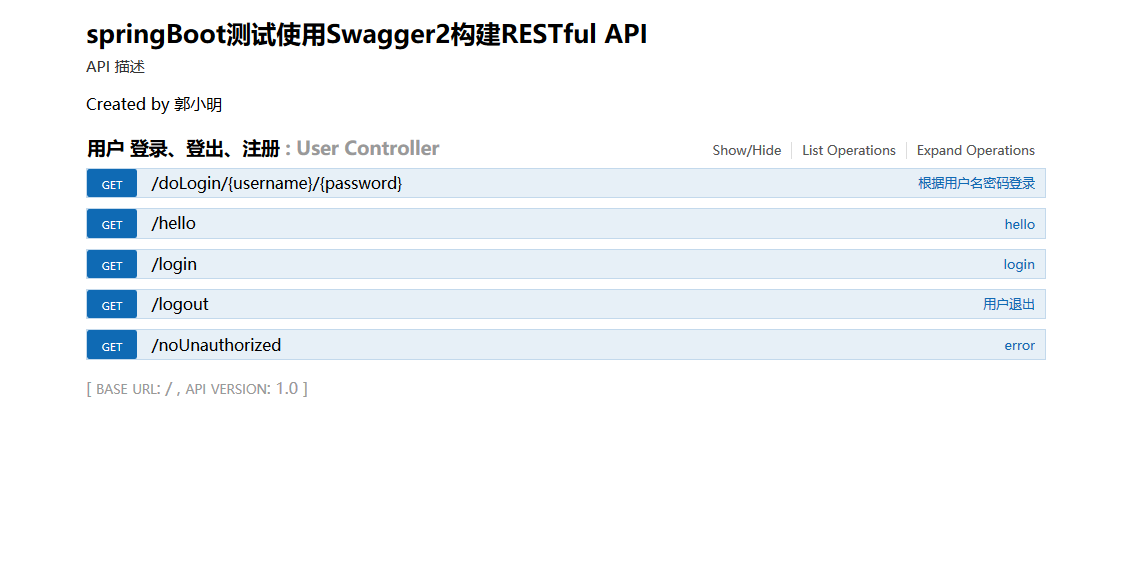
4.登录http://localhost:8080/swagger-ui.html,查看api
15、SpringBoot------整合swagger2的更多相关文章
- SpringBoot(七):SpringBoot整合Swagger2
原文地址:https://blog.csdn.net/saytime/article/details/74937664 手写Api文档的几个痛点: 文档需要更新的时候,需要再次发送一份给前端,也就是文 ...
- SpringBoot整合Swagger2
相信各位在公司写API文档数量应该不少,当然如果你还处在自己一个人开发前后台的年代,当我没说,如今为了前后台更好的对接,还是为了以后交接方便,都有要求写API文档. 手写Api文档的几个痛点: 文档需 ...
- SpringBoot整合Swagger2(Demo示例)
写在前面 由于公司项目采用前后端分离,维护接口文档基本上是必不可少的工作.一个理想的状态是设计好后,接口文档发给前端和后端,大伙按照既定的规则各自开发,开发好了对接上了就可以上线了.当然这是一种非常理 ...
- springboot 整合Swagger2的使用
Swagger2相较于传统Api文档的优点 手写Api文档的几个痛点: 文档需要更新的时候,需要再次发送一份给前端,也就是文档更新交流不及时. 接口返回结果不明确 不能直接在线测试接口,通常需要使用工 ...
- SpringBoot整合Swagger2案例,以及报错:java.lang.NumberFormatException: For input string: ""原因和解决办法
原文链接:https://blog.csdn.net/weixin_43724369/article/details/89341949 SpringBoot整合Swagger2案例 先说SpringB ...
- SpringBoot整合Swagger2详细教程
1. 简介 随着前后端分离开发模式越来越流行,编写接口文档变成了开发人员非常头疼的事.而Swagger是一个规范且完整的web框架,用于生成.描述.调用可视化的RESTful风格的在线接口文档,并 ...
- SpringBoot整合Swagger2及使用
简介 swagger是一个流行的API开发框架,这个框架以"开放API声明"(OpenAPI Specification,OAS)为基础, 对整个API的开发周期都提供了相应的解决 ...
- SpringBoot整合Swagger2,再也不用维护接口文档了!
前后端分离后,维护接口文档基本上是必不可少的工作.一个理想的状态是设计好后,接口文档发给前端和后端,大伙按照既定的规则各自开发,开发好了对接上了就可以上线了.当然这是一种非常理想的状态,实际开发中却很 ...
- SpringBoot学习笔记(16)----SpringBoot整合Swagger2
Swagger 是一个规范和完整的框架,用于生成,描述,调用和可视化RESTful风格的web服务 http://swagger.io Springfox的前身是swagger-springmvc,是 ...
- Spring Boot2 系列教程(十七)SpringBoot 整合 Swagger2
前后端分离后,维护接口文档基本上是必不可少的工作. 一个理想的状态是设计好后,接口文档发给前端和后端,大伙按照既定的规则各自开发,开发好了对接上了就可以上线了.当然这是一种非常理想的状态,实际开发中却 ...
随机推荐
- Mybatis学习笔记8 - resultMap自定义结果集映射规则
一.resultMap自定义结果集映射规则 示例如下: 接口定义: package com.mybatis.dao; import com.mybatis.bean.Employee; public ...
- win10 网络连接怎么删除不再使用的连接
# 打开网络共享中心->更改适配器设置->右击->选择属性->选择配置->选择驱动程序->卸载
- maya安装错误
AUTODESK系列软件着实令人头疼,安装失败之后不能完全卸载!!!(比如maya,cad,3dsmax等).有时手动删除注册表重装之后还是会出现各种问题,每个版本的C++Runtime和.NET f ...
- Java基础15-数组实例学生管理系统
import java.util.Scanner; public class Student{ public static void main(String[] args){ Scanner in=n ...
- Neutron命令测试5
jolin@jolin:/$ route -nKernel IP routing tableDestination Gateway Genmask Flags Metric Ref Use Iface ...
- spring boot基本认识
大家眼中的spring boot:https://www.zhihu.com/question/39483566-------------------------------------------- ...
- 虚拟机中Centos7搭建本地仓库
iso放入光驱(虚拟机光驱)后,设备目录是/dev/sr0 表示光驱,被挂载道 /run/media/c4t/CentOS\ 7\ x86_64目录下 [c4t@localhost ~]$ df文件系 ...
- Socket网络通信之NIO
Socket网络通信之NIO NIO:new io ,java1.4开始推出的可非阻塞IO. java.nio 包,可解决BIO阻塞的不足 但比BIO学习.使用复杂. 可以以阻塞.非阻塞两种方式工作. ...
- HTML三种样式引入方式
HTML三种样式引入方式 HTML有三种样式引入方式:行内样式(inline Styles).嵌入式样式表(Embedded Style Sheets).外部样式表(External Style ...
- struts 上传文件 Dynavalidatorform 实例
一.相关jar包 一个空struts工程的jar包: 另上传文件的两个jar包: 二.页面 1.上传页面upload.jsp <%@ page language="jav ...