
springboot 整合Swagger2的使用
Swagger2相较于传统Api文档的优点
手写Api文档的几个痛点:
文档需要更新的时候,需要再次发送一份给前端,也就是文档更新交流不及时。
接口返回结果不明确
不能直接在线测试接口,通常需要使用工具,比如postman
接口文档太多,不好管理
Swagger也就是为了解决这个问题,当然也不能说Swagger就一定是完美的,当然也有缺点,最明显的就是代码移入性比较强。
可以直接使用Swagger editor编写接口文档,我们这里讲解的是SpringBoot整合Swagger2,直接生成接口文档的方式。
依赖文件
<dependency>

	<groupId>io.springfox</groupId>

	<artifactId>springfox-swagger2</artifactId>

	<version>2.6.1</version>

</dependency>

<dependency>

	<groupId>io.springfox</groupId>

	<artifactId>springfox-swagger-ui</artifactId>

	<version>2.6.1</version>

</dependency>
配置类
package com.boss.hr.train.fishkkmybatis.config;

import org.springframework.context.annotation.Bean;

import org.springframework.context.annotation.Configuration;

import springfox.documentation.builders.ApiInfoBuilder;

import springfox.documentation.builders.PathSelectors;

import springfox.documentation.builders.RequestHandlerSelectors;

import springfox.documentation.service.ApiInfo;

import springfox.documentation.spi.DocumentationType;

import springfox.documentation.spring.web.plugins.Docket;

/**

 * @author fishkk

 * @version 1.0.0

 * @since

 */

@Configuration

public class Swagger2Configuration {

    @Bean

    public Docket createRestApi() {

        return new Docket(DocumentationType.SWAGGER_2)

                .apiInfo(apiInfo())

                .select()

                .apis(RequestHandlerSelectors.basePackage("com.boss.hr.train.fishkkmybatis.controller"))

                .paths(PathSelectors.any())

                .build();

    }

    private ApiInfo apiInfo() {

        return new ApiInfoBuilder()

                .title("springboot利用swagger构建api文档")

                .description("fishkk的Swagger")

                .version("1.0")

                .build();

    }

}
在启动函数出天价@EnableSwagger2,到这里就可以正常的使用Swagger2 了
Swagger2 的具体使用
package com.boss.hr.train.fishkkmybatis.controller;

import com.boss.hr.train.fishkkmybatis.annotation.Logg;

import com.boss.hr.train.fishkkmybatis.entity.Dictionary;

import com.boss.hr.train.fishkkmybatis.entity.Result;

import com.boss.hr.train.fishkkmybatis.enums.DictionaryEnum;

import com.boss.hr.train.fishkkmybatis.exception.BaseException;

import com.boss.hr.train.fishkkmybatis.service.impl.DictionaryServiceImpl;

import io.swagger.annotations.ApiImplicitParam;

import io.swagger.annotations.ApiOperation;

import org.springframework.data.redis.core.RedisTemplate;

import org.springframework.validation.BindingResult;

import org.springframework.web.bind.annotation.*;

import javax.annotation.Resource;

import javax.validation.Valid;

import java.util.List;

import java.util.Random;

import java.util.concurrent.TimeUnit;

/**

 * @author fishkk

 * @version 1.0.0

 * @since 2019/7/27

 */

@RestController

@RequestMapping(value = "/dic")

@CrossOrigin

public class DictionaryController {

    /**

     * Redis 缓存

     */

    @Resource

    private RedisTemplate redisTemplate;

    @Resource

    private DictionaryServiceImpl dictionaryService;

    private List<Dictionary> list;

    /**

     *  创建字典实体

     * @author fishkk

     * @since  2017/7/25

     * @param  dictionary 字典实体

     * @return  Dictionary 放回创建的字典实体

     */

    @ApiOperation(value="创建字典", notes="根据Dictionary对象创建字典")

    @ApiImplicitParam(name = "dictionary", value = "字典详细实体dictionary", required = true, dataType = "Dictionary")

    @PostMapping(value = "/insert")

    public Result insertDic(@Valid Dictionary dictionary, BindingResult bindingResult){

        if (bindingResult.hasErrors()){

            return Result.error(DictionaryEnum.ERROR_INPUT);

        }

        dictionaryService.insert(dictionary);

        return Result.success(dictionary);

    }

    /**

     *  根据主键查找字典

     * @author fishkk

     * @since  2019/7/25

     * @param  id 主键id

     * @return dictionary查找到的实体对象

     */

    @ApiOperation(value = "获取字典信息",notes = "根据id获取字典信息")

    @ApiImplicitParam(name = "id",value = "字典id",required = true, dataType = "Long", paramType = "path")

    @GetMapping(value = "/dic")

    public Result findById(@RequestParam(value = "id") Integer id){

        if (list == null){

            list = dictionaryService.selectAll();

            for (Dictionary x:list) {

                long time = new Random().nextInt(10);

                redisTemplate.opsForValue().set(x.getCategoryId(),x,12,TimeUnit.HOURS);

            }

        }

        if (redisTemplate.opsForValue().get(id) != null){

            return Result.success(redisTemplate.opsForValue().get(id));

        }

        redisTemplate.opsForValue().set(id,dictionaryService.selectByPrimaryKey(id),12,TimeUnit.HOURS);

        return Result.success(dictionaryService.selectByPrimaryKey(id));

    }

    /**

     * 根据主键删除字典

     * @author fishkk

     * @since  2019/7/25

     * @param  id 字典主键

     */

    @ApiOperation(value = "根据id删除单个字典表",notes = "根据id删除字典")

    @ApiImplicitParam(name = "id",value = "用户id",required = true, dataType = "Long", paramType = "path")

    @GetMapping(value = "/remove/{id}")

    public Result deleteById(@PathVariable("id") Integer id){

        dictionaryService.deleteByPrimaryKey(id);

        return Result.success(null);

    }

    /**

     *  更新字典对象

     * @author fishkk

     * @since  2019/7/26

     * @param  dictionary 修改过的字典对象

     */

    @ApiOperation(value="更新字典", notes="根据Dictionary更新对应的字典")

    @ApiImplicitParam(name = "dictionary", value = "字典详细实体dictionary", required = true, dataType = "Dictionary")

    @PostMapping(value = "/updata")

    public Result updata(@Valid Dictionary dictionary, BindingResult bindingResult){

        if (bindingResult.hasErrors()){

            return Result.error(DictionaryEnum.ERROR_INPUT);

        }

        dictionaryService.updateByPrimaryKey(dictionary);

        return Result.success(null);

    }

    /**

      *  根据字典名查询

      * @author fishkk

      * @since  2019/7/28

      * @param  name 字典名

      */

    @GetMapping(value = "/get/{name}")

    public Result findByName(@PathVariable("name") String name ){

        return Result.success(dictionaryService.findByName(name));

    }

    /**

     *  根据字典类型查询

     * @author fishkk

     * @since  2019/7/28

     * @param type 字典类型

     */

    @GetMapping(value = "/gettype/{type}")

    public Result findByType(@PathVariable("type") String type){

        return Result.success(dictionaryService.findByType(type));

    }

    /**

     *  获取全部对象

     * @author fishkk

     * @since  2019/7/28

     */

    @Logg

    @GetMapping(value = "/getall")

    public Result findByType(){

        //throw new BaseException(DictionaryEnum.NOT_FOUND);

      return Result.success(dictionaryService.selectAll());

//        Float a = null;

//        Float b = Float.intBitsToFloat(11);

//        System.out.println(a + b);

//        return null;

    }

}
启动SpringBoot项目,访问 http://localhost:8080/swagger-ui.html
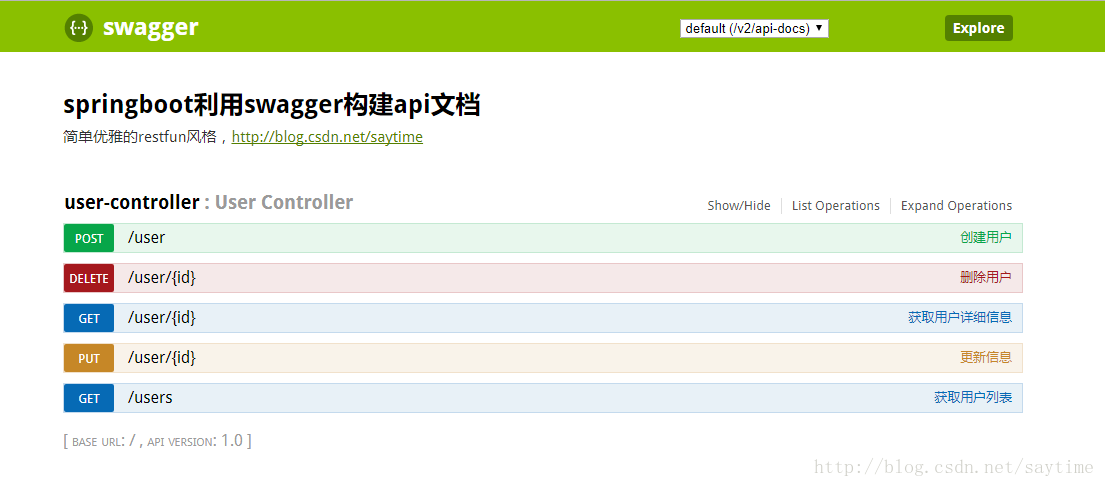
可以看到上诉类似的结果,我的项目启动太麻烦了含SpringCloud 就不展示了。
Swagger2的注解
swagger通过注解表明该接口会生成文档,包括接口名、请求方法、参数、返回信息的等等。
- @Api:修饰整个类,描述Controller的作用
- @ApiOperation:描述一个类的一个方法,或者说一个接口
- @ApiParam:单个参数描述
- @ApiModel:用对象来接收参数
- @ApiProperty:用对象接收参数时,描述对象的一个字段
- @ApiResponse:HTTP响应其中1个描述
- @ApiResponses:HTTP响应整体描述
- @ApiIgnore:使用该注解忽略这个API
- @ApiError :发生错误返回的信息
- @ApiImplicitParam:一个请求参数
- @ApiImplicitParams:多个请求参数
springboot 整合Swagger2的使用的更多相关文章
- SpringBoot(七):SpringBoot整合Swagger2
原文地址:https://blog.csdn.net/saytime/article/details/74937664 手写Api文档的几个痛点: 文档需要更新的时候,需要再次发送一份给前端,也就是文 ...
- SpringBoot整合Swagger2
相信各位在公司写API文档数量应该不少,当然如果你还处在自己一个人开发前后台的年代,当我没说,如今为了前后台更好的对接,还是为了以后交接方便,都有要求写API文档. 手写Api文档的几个痛点: 文档需 ...
- SpringBoot整合Swagger2(Demo示例)
写在前面 由于公司项目采用前后端分离,维护接口文档基本上是必不可少的工作.一个理想的状态是设计好后,接口文档发给前端和后端,大伙按照既定的规则各自开发,开发好了对接上了就可以上线了.当然这是一种非常理 ...
- SpringBoot整合Swagger2案例,以及报错:java.lang.NumberFormatException: For input string: ""原因和解决办法
原文链接:https://blog.csdn.net/weixin_43724369/article/details/89341949 SpringBoot整合Swagger2案例 先说SpringB ...
- SpringBoot整合Swagger2详细教程
1. 简介 随着前后端分离开发模式越来越流行,编写接口文档变成了开发人员非常头疼的事.而Swagger是一个规范且完整的web框架,用于生成.描述.调用可视化的RESTful风格的在线接口文档,并 ...
- SpringBoot整合Swagger2及使用
简介 swagger是一个流行的API开发框架,这个框架以"开放API声明"(OpenAPI Specification,OAS)为基础, 对整个API的开发周期都提供了相应的解决 ...
- SpringBoot整合Swagger2,再也不用维护接口文档了!
前后端分离后,维护接口文档基本上是必不可少的工作.一个理想的状态是设计好后,接口文档发给前端和后端,大伙按照既定的规则各自开发,开发好了对接上了就可以上线了.当然这是一种非常理想的状态,实际开发中却很 ...
- SpringBoot学习笔记(16)----SpringBoot整合Swagger2
Swagger 是一个规范和完整的框架,用于生成,描述,调用和可视化RESTful风格的web服务 http://swagger.io Springfox的前身是swagger-springmvc,是 ...
- Spring Boot2 系列教程(十七)SpringBoot 整合 Swagger2
前后端分离后,维护接口文档基本上是必不可少的工作. 一个理想的状态是设计好后,接口文档发给前端和后端,大伙按照既定的规则各自开发,开发好了对接上了就可以上线了.当然这是一种非常理想的状态,实际开发中却 ...
随机推荐
- 读Secrets of the JavaScript Ninja(二)对象
面向对象和原型 理解原型 在JavaScript中,可通过原型实现继承.原型的概念很简单.每个对象都含有原型的引用,当查找属性时,若对象本身不具有该属性,则会查找原型上是否有该属性. 每个对象都可以有 ...
- Git 查看更改
当向仓库中添加文件或删除文件后,可能需要查看更改. 查看更改有多种方式. 1.查看状态 # git status 结果 1 2 # 位于分支 master 无文件要提交,干净的工作区 2.查看日志 # ...
- 使用tomcat7-maven-plugin
2019-01-0714:16:44 功能: (使用maven中的tomcat插件,就可以将tomcat集成到项目中,效果就是:在不同平台中无需配置tomcat就可以直接运行web) 地址: tomc ...
- c#内存泄漏分析
背景 给客户开发了一个WPF应用,每隔一段时间就会很卡,推测是内存泄漏引起.需要监测内存使用情况. 使用的工具 Ants Memory Profiler 百度网盘下载地址 使用教程 入门使用 参考文档 ...
- 服务器端debug操作
写好的代码打个包放在服务器上,发现与理想的情况下不一致.查看log日志又觉得很烦,毕竟debug调试才是王道. 下面来说说怎么debug调试服务器上的.最好服务器上的代码和本地的保存一致,这样误差会小 ...
- 关于ElasticSearch的堆内存设置与优化
1.什么是堆内存?Java 中的堆是 JVM 所管理的最大的一块内存空间,主要用于存放各种类的实例对象.在 Java 中,堆被划分成两个不同的区域:- 新生代 ( Young ).- 老年代 ( Ol ...
- C#实现AES加密解密
AES AES 高级加密标准(英语:Advanced Encryption Standard,缩写:AES),在密码学中又称Rijndael加密法 Rijndael(读作rain-dahl)是由美 ...
- sqlserver安装教程
1 安装步骤:http://jingyan.baidu.com/article/359911f573f71657fe030603.html 2 当提示装载第二张光盘时,在DAEMON Tools中把第 ...
- python Mock 示例
在Python3.x中,mock已经被集成到了unittest单元测试框架中,所以,可以直接使用. 可能你和我初次接触这个概念的时候会有这样的疑问:把要测的东西都模拟掉了还测试什么呢? 但在,实际生产 ...
- Spring源码——IOC控制反转
1.基础知识 Spring有两个核心功能,分别是ioc和aop,其中ioc是控制反转,aop是切面编程. 在ioc中,还有一个名次叫DI,也就是依赖注入.嗯,好像IOC和DI是指同一个,好像又感觉他俩 ...