
15、SpringBoot------整合swagger2
开发工具:STS
前言:
对外提供一个Api,无论是对开发、测试、维护,都有很大的帮助。
下面我们来实现swagger2。
参考实例:https://blog.csdn.net/weixin_39477597/article/details/79639239
实例:
1.添加依赖:
         <dependency>

             <groupId>io.springfox</groupId>

             <artifactId>springfox-swagger2</artifactId>

             <version>2.7.0</version>

         </dependency>

         <dependency>

             <groupId>io.springfox</groupId>

             <artifactId>springfox-swagger-ui</artifactId>

             <version>2.7.0</version>

         </dependency>
2.配置:
package com.xm.shiro.config;

import org.springframework.context.annotation.Bean;

import org.springframework.context.annotation.Configuration;

import springfox.documentation.builders.ApiInfoBuilder;

import springfox.documentation.builders.PathSelectors;

import springfox.documentation.builders.RequestHandlerSelectors;

import springfox.documentation.service.ApiInfo;

import springfox.documentation.service.Contact;

import springfox.documentation.spi.DocumentationType;

import springfox.documentation.spring.web.plugins.Docket;

import springfox.documentation.swagger2.annotations.EnableSwagger2;

@Configuration

@EnableSwagger2

public class SwaggerConfig {

    @Bean

    public Docket docket(){

        return new Docket(DocumentationType.SWAGGER_2).apiInfo(apiInfo()).select()

//                   当前包路径

                   .apis(RequestHandlerSelectors.basePackage("com.xm.shiro.controller"))

                    .paths(PathSelectors.any()).build();

    }

//构建api文档的详细信息函数

    private ApiInfo apiInfo(){

        return new ApiInfoBuilder()

                //页面标题

                    .title("springBoot测试使用Swagger2构建RESTful API")

                //创建人

                    .contact("郭小明")

                 //版本号

                    .version("1.0")

                //描述

                    .description("API 描述")

                    .build();

    }

}
3.在controller中引用api:
注解说明:
notes="方法的备注说明“
defaultValue:参数的默认值
package com.xm.shiro.controller;

import org.apache.shiro.SecurityUtils;

import org.apache.shiro.authc.AuthenticationException;

import org.apache.shiro.authc.IncorrectCredentialsException;

import org.apache.shiro.authc.UsernamePasswordToken;

import org.apache.shiro.authz.annotation.RequiresPermissions;

import org.apache.shiro.authz.annotation.RequiresRoles;

import org.apache.shiro.subject.Subject;

import org.springframework.web.bind.annotation.GetMapping;

import org.springframework.web.bind.annotation.PathVariable;

import org.springframework.web.bind.annotation.RequestMapping;

import org.springframework.web.bind.annotation.RestController;

import io.swagger.annotations.Api;

import io.swagger.annotations.ApiOperation;

@Api(value="UserController",tags="用户 登录、登出、注册")

@RestController

public class UserController {

    @RequiresPermissions("hello")

    @GetMapping("/hello")

    public String hello() {

        return "Hello Shiro!";

    }

    @GetMapping("/login")

    public String login() {

        return "权限管理";

    }

    @ApiOperation(value="根据用户名密码登录",notes="用户登录")

    @GetMapping("/doLogin/{username}/{password}")

    public String doLogin(@PathVariable("username") String username,@PathVariable("password") String password) {

        UsernamePasswordToken token = new UsernamePasswordToken(username, password);

        Subject currentUser = SecurityUtils.getSubject();

        try {

            currentUser.login(token);

            //此步将 调用realm的认证方法

        } catch(IncorrectCredentialsException e){

            //这最好把 所有的 异常类型都背会

            return "密码错误";

        } catch (AuthenticationException e) {

            return "登录失败";

        }

        currentUser.hasRole("sun");

        currentUser.hasRole("sun");

        currentUser.hasRole("sun");

        currentUser.hasRole("sun");

        return token.getPrincipal()+":登录成功";

    }

    @ApiOperation(value="用户退出",notes="注销用户")

    @GetMapping("/logout")

    public String logout() {

        Subject currentUser = SecurityUtils.getSubject();

        currentUser.logout();

        return "退出登录";

    }

    @GetMapping("/noUnauthorized")

    public String error() {

        return  "无权限";

    }

}
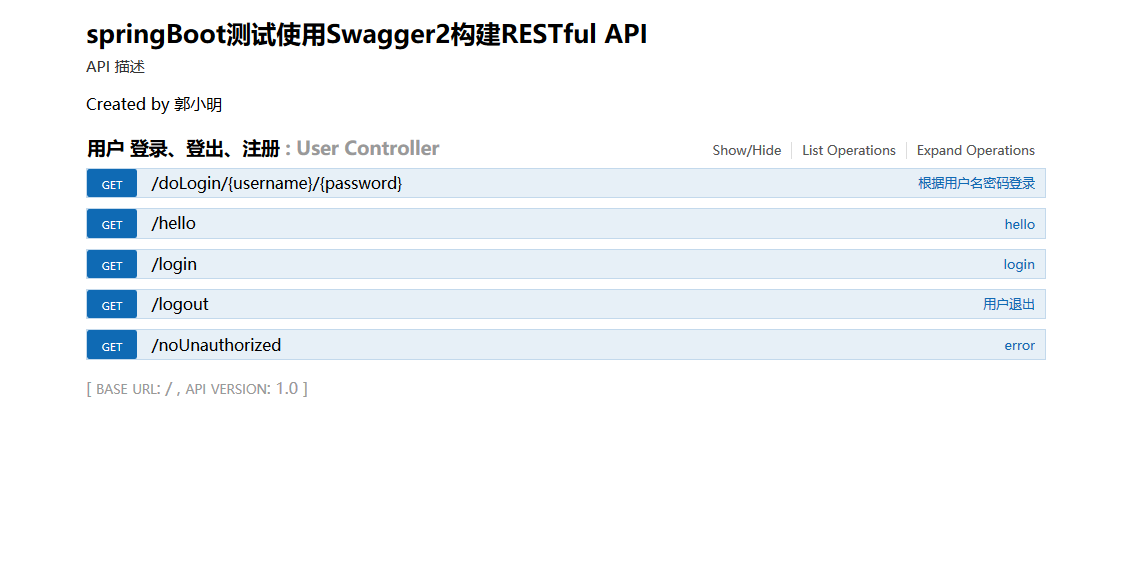
4.登录http://localhost:8080/swagger-ui.html,查看api
15、SpringBoot------整合swagger2的更多相关文章
- SpringBoot(七):SpringBoot整合Swagger2
原文地址:https://blog.csdn.net/saytime/article/details/74937664 手写Api文档的几个痛点: 文档需要更新的时候,需要再次发送一份给前端,也就是文 ...
- SpringBoot整合Swagger2
相信各位在公司写API文档数量应该不少,当然如果你还处在自己一个人开发前后台的年代,当我没说,如今为了前后台更好的对接,还是为了以后交接方便,都有要求写API文档. 手写Api文档的几个痛点: 文档需 ...
- SpringBoot整合Swagger2(Demo示例)
写在前面 由于公司项目采用前后端分离,维护接口文档基本上是必不可少的工作.一个理想的状态是设计好后,接口文档发给前端和后端,大伙按照既定的规则各自开发,开发好了对接上了就可以上线了.当然这是一种非常理 ...
- springboot 整合Swagger2的使用
Swagger2相较于传统Api文档的优点 手写Api文档的几个痛点: 文档需要更新的时候,需要再次发送一份给前端,也就是文档更新交流不及时. 接口返回结果不明确 不能直接在线测试接口,通常需要使用工 ...
- SpringBoot整合Swagger2案例,以及报错:java.lang.NumberFormatException: For input string: ""原因和解决办法
原文链接:https://blog.csdn.net/weixin_43724369/article/details/89341949 SpringBoot整合Swagger2案例 先说SpringB ...
- SpringBoot整合Swagger2详细教程
1. 简介 随着前后端分离开发模式越来越流行,编写接口文档变成了开发人员非常头疼的事.而Swagger是一个规范且完整的web框架,用于生成.描述.调用可视化的RESTful风格的在线接口文档,并 ...
- SpringBoot整合Swagger2及使用
简介 swagger是一个流行的API开发框架,这个框架以"开放API声明"(OpenAPI Specification,OAS)为基础, 对整个API的开发周期都提供了相应的解决 ...
- SpringBoot整合Swagger2,再也不用维护接口文档了!
前后端分离后,维护接口文档基本上是必不可少的工作.一个理想的状态是设计好后,接口文档发给前端和后端,大伙按照既定的规则各自开发,开发好了对接上了就可以上线了.当然这是一种非常理想的状态,实际开发中却很 ...
- SpringBoot学习笔记(16)----SpringBoot整合Swagger2
Swagger 是一个规范和完整的框架,用于生成,描述,调用和可视化RESTful风格的web服务 http://swagger.io Springfox的前身是swagger-springmvc,是 ...
- Spring Boot2 系列教程(十七)SpringBoot 整合 Swagger2
前后端分离后,维护接口文档基本上是必不可少的工作. 一个理想的状态是设计好后,接口文档发给前端和后端,大伙按照既定的规则各自开发,开发好了对接上了就可以上线了.当然这是一种非常理想的状态,实际开发中却 ...
随机推荐
- Ubuntu 16.04系统上NFS的安装与使用
摘要:本文介绍了NFS服务器的安装过程.配置文件和常用命令行工具,以及NFS客户端上如何安装常用工具,介绍如何挂载共享目录,并通过实验进行验证. 一.服务器端: 1.1安装NFS服务: #执行以下命令 ...
- python函数(四)
一.函数是什么? 函数一词来源于数学,但编程中的「函数」概念,与数学中的函数是有很大不同的,编程中的函数在英文中也有很多不同的叫法.在BASIC中叫做subroutine(子过程或子程序),在Pasc ...
- Mysql数据库常用操作整理
0.说明 MySQL数据库是一个十分轻便的数据库管理系统,相比大型的数据库管理系统如Oracle,MySQL更拥有轻便.灵活.开发速度快的特色,更适用于中小型数据的存储与架构,被数以万计的网站采用.从 ...
- Intellij IDEA +genymotion安装配置
Intellij IDEA是一款非常好用的java编辑器,比Eclipse的代码提示要友善的多,优缺点不多讲了. 下面讲如何安装配置. 1)如官网下载最新版本 http://www.jetbrains ...
- wpf 查找父元素、子元素方法
1 /// <summary> 2 /// 根据类型查找子元素 3 /// </summary> 4 /// <typeparam name="T"& ...
- poj 3107 删点最大分支最小
http://poj.org/problem?id=3107 这实际上就是找重心,在之前有做过:http://www.cnblogs.com/qlky/p/5780933.html #include ...
- intellijidea课程 intellijidea神器使用技巧 3-4 alter+enter
alter enter ==> 创建函数 fi() ==> alter enter
- 测试驱动开发(TDD)及测试框架Mocha.js入门学习
组里马上要转变开发模式,由传统的开发模式(Developer开发,QA测试),转变为尝试TDD(Test-driven development,测试驱动开发)的开发模型.由此将不存在QA的角色,或者仅 ...
- GitHub教程(三) 本地仓库托管到GitHub
本文开头先特别声明一下:由于GitHub教程属于Git系列教程的GitHub子篇章,因此GitHub教程中将不再详细介绍Git操作命令及其用法,我会根据实际需要穿插着回顾Git操作命令.如果读者需要学 ...
- Quartz .Net(定时框架):
Quartz .Net(定时框架): 基本说明: 说明:Quartz .Net 是一个从 Java 版的 Quartz 移植过来定时任务框架,可以实现异常灵活的定 时任务 用法: 安装 Quartz ...