
bootstrap table 学习记录
效果:
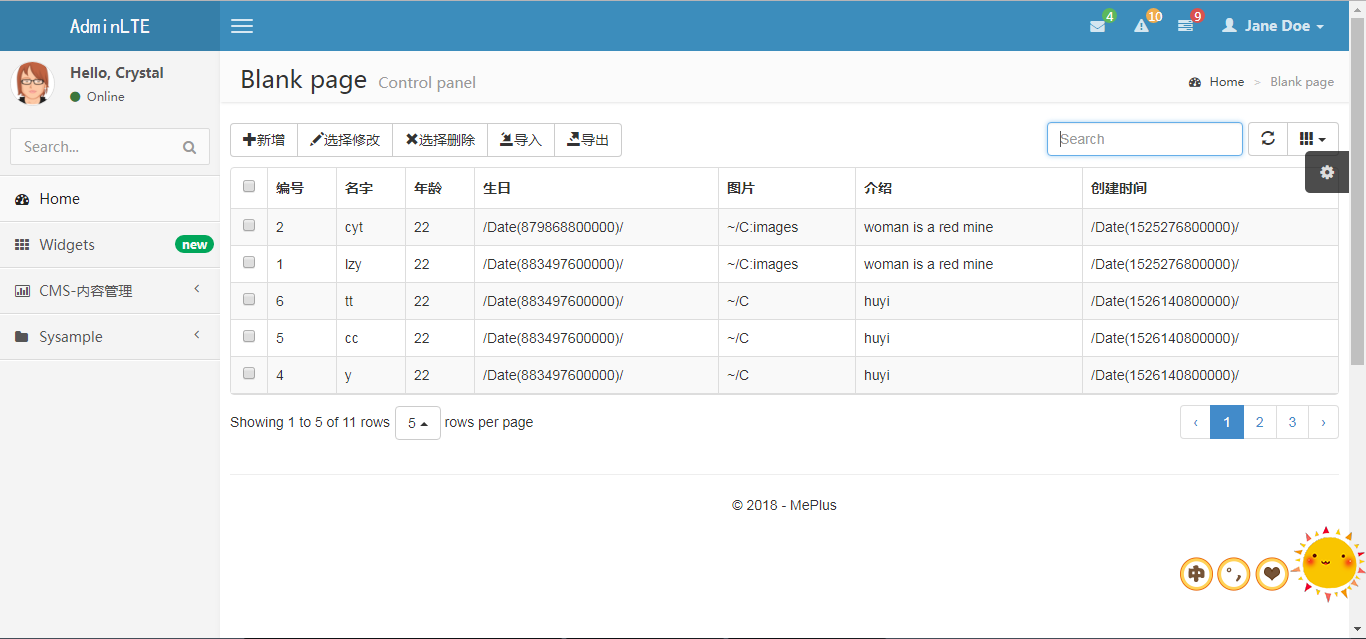
html代码:
<!-- 工具容器 -->
<div id="toolbar" class="btn-group">
<button id="btn_add" type="button" class="btn btn-default">
<span class="glyphicon glyphicon-plus" aria-hidden="true"></span>新增
</button>
<button id="btn_edit" type="button" class="btn btn-default">
<span class="glyphicon glyphicon-pencil" aria-hidden="true"></span>选择修改
</button>
<button id="btn_delete" type="button" class="btn btn-default">
<span class="glyphicon glyphicon-remove" aria-hidden="true"></span>选择删除
</button>
<button id="btn_Import" type="button" class="btn btn-default">
<span class="glyphicon glyphicon-import" aria-hidden="true"></span>导入
</button>
<button id="btn_export" type="button" class="btn btn-default">
<span class="glyphicon glyphicon-export" aria-hidden="true"></span>导出
</button>
</div>
<!-- 表格容器 -->-->
<table id="tb_roles" data-filter-control="true" data-locale="zh-CN">
<thead>
<tr>
<th data-field="Name" data-filter-control="select">名称</th>
<th data-field="Age" data-filter-control="input">年龄</th>
<th data-field="Bir" data-filter-control="input">生日</th>
<th data-field="Photo" data-filter-control="input">图片地址</th>
<th data-field="Note" data-filter-control="input">简介</th>
<th data-field="CreateTime" data-filter-control="input">时间</th>
</tr>
</thead>
</table>
script代码:
<script type="text/javascript">
function InitTable() {
//销毁表格
$('#tb_roles').bootstrapTable('destroy');
$('#tb_roles').bootstrapTable({
url: '/SysSample/GetJsonList',//后台控制器
method: 'post',
toolbar: '#toolbar',//自定义工具栏
sidePagination: "server",//表示服务端请求
striped: true,
cache: false,//缓存
pagination: true,//分页栏
sortable: true,//排序
search: true,//启用查询
showColumns: true,
showRefresh: true,
minimumCountColumns: 2,
clickToSelect: true,
detailView: false,//父子表
queryParamsType: "undefined",
queryParams: function (params) {//设置查询数
return params;
},
onLoadSuccess: function () { //加载成功时执行
console.log("加载成功");
},
onLoadError: function () { //加载失败时执行
console.log("加载数据失败");
},
onClickRow: function (row, $element, idFeild) {
// idFeild指字段但是找不到
console.log(row);
},
responseHandler: function (res) {
//在ajax获取到数据,渲染表格之前,修改数据源
return res;
},
columns: [
{
field: 'state',
checkbox: true,
align: 'center',
valign: 'middle'
},{
title: '编号',
field: 'id'
}, {
title: '名字',
field: 'Name'
}, {
title: '年龄',
field: 'Age'
}, {
title: '生日',
field: 'Bir'
}, {
title: '图片',
field: 'Photo'
}, {
title: '介绍',
field: 'Note'
}, {
title: '创建时间',
field: 'CreateTime'
}],
toolbar: "#toolbar",
sortName: "CreateTime",//排序
sortOrder: "Asc",//排序方式
searchText: "Name",//查询字段
showColumns: true,
pagination: true, //启动分页
pageSize: 1, //每页显示的记录数
pageNumber: 1, //当前第几页
pageSize: 5,//页数量
pageList: [5, 10, 20, 30]
});
}
$(function () {
InitTable();
})
</script>
注:
有些问题还有待解决。。。例如:pageList没有起作用等等
推荐中文api:https://blog.csdn.net/Hu_Yanke/article/details/70670314
bootstrap table 学习记录的更多相关文章
- .Net MVC+bootstrap Table学习
一.效果展示 二.使用方法 1).相关css和js的引用 <link href="~/Themes/Bootstrap/css/bootstrap.css" rel=&quo ...
- Bootstrap Metronic 学习记录(二)菜单栏
1.简介 1) .环境配置 2) .提取页面 2).动态生成菜单(无限级别树) 2.系统环境配置 项目需要程序数据支撑,这里选择MVC5.0+EF6.0[SQLSERVER](不对MVC架构和SQ ...
- Bootstrap Metronic 学习记录(一)简介
1.简介 是一个基于Bootstrap 3.x的高级管理控制面板主题.Bootstrap Metronic - 是一个完全响应式管理模板.基于Bootstrap3框架.高度可定制的,易于使用.适合从小 ...
- Bootstrap Table使用方法详解
http://www.jb51.net/article/89573.htm bootstrap-table使用总结 bootstrap-table是在bootstrap-table的基础上写出来的,专 ...
- Lua和C++交互 学习记录之四:全局table交互
主要内容转载自:子龙山人博客(强烈建议去子龙山人博客完全学习一遍) 部分内容查阅自:<Lua 5.3 参考手册>中文版 译者 云风 制作 Kavcc vs2013+lua-5.3.3 1 ...
- 后台系统组件:一丶bootstrap table
http://www.cnblogs.com/landeanfen/p/4976838.html (bootstrap table) http://www.cnblogs.com/landeanfen ...
- Spring Boot学习记录(二)--thymeleaf模板 - CSDN博客
==他的博客应该不错,没有细看 Spring Boot学习记录(二)--thymeleaf模板 - CSDN博客 http://blog.csdn.net/u012706811/article/det ...
- Bootstrap table的基本使用总结
最近在学习BootStrap构建页面,现记录BootStrap table 的一些基本使用如下: HTML文件: <!DOCTYPE html> <html> <meta ...
- [转]手把手教你--Bootstrap Table表格插件及数据导出(可导出Excel2003及Exce2007)
原文地址:https://blog.csdn.net/javayoucome/article/details/80081771 1.介绍 Bootstrap Table介绍见官网:http://boo ...
随机推荐
- linux命令学习笔记(6):rmdir 命令
今天学习一下linux中命令: rmdir命令.rmdir是常用的命令,该命令的功能是删除空目录,一个目录 被删除之前必须是空的.(注意,rm - r dir命令可代替rmdir,但是有很大危险性.) ...
- 使用 Anthem.NET 框架的一个调试经历
简介:Anthem 是一个很好用的 Ajax 框架,支持 ASP.NET 1.1, 2.0.由于该框架的所有控件都继承自 ASP.NET 自身的服务器控件,保留了几乎所有这些控件的属性和行为(除了把它 ...
- Linux 下网卡参数配置
目录 Linux 下网卡参数配置 第一种:修改 interfaces 文件 网卡配置实例 回环参数配置 DHCP方式配置 静态 IP 地址分配 无线网卡配置 March 17, 2015 7:48 P ...
- 如何得到DataTable的列名
foreach (DataColumn dc in dtfood.Columns) { string lm = dc.ColumnName; }
- 使用 EntityFramework后把一个对象序列化成json字符串引起循环引用的问题
先看一个T4模板生成的model实体类 著作权归作者所有. 商业转载请联系作者获得授权,非商业转载请注明出处. 作者:卷猫 链接:http://anneke.cn/ArticleInfo/Detial ...
- 使用union来遍历结构体中的成员
前几天和实验室的同学讨论问题的时候发现他使用的一段数据校验的代码自己以前没有接触过,今天有空就把它整理了一下. #include <stdio.h> #include <stdlib ...
- Loadrunner 监控 Linux (centos6.5)服务器系统资源
Loadrunner 监控 Linux 服务器系统资源,需要在被监控的服务器上启用 rstatd 进程但尝试启动时,爆炸了: [root@test1 rpc.rstatd-4.0.1]# rpc.rs ...
- Maven的pom实例
该pom中包含了一些我认为会需要的东西,并且加了注释.可以根据需求适当删减. 包含了spring-mvc , junit,hibernate验证,json,apache-commons组件 还有 co ...
- std::min error C2059: 语法错误:“::” 的解决方法
std::min error C2059: 语法错误:"::" 的解决方法 下面这段代码: size_t n = std::min(count_, num_elements); 编 ...
- wpf label下划线不显示的问题
突然发现label设置content的值为字符串时,如果字符串中包含_的话,在展示出来时下划线就不见了,百度了一下,发现了问题根源,说的label的ContentPresenter默认将下划线处理成快 ...