
吴裕雄 python 神经网络——TensorFlow 数据集基本使用方法
import tempfile

import tensorflow as tf

input_data = [1, 2, 3, 5, 8]

dataset = tf.data.Dataset.from_tensor_slices(input_data)

# 定义迭代器。

iterator = dataset.make_one_shot_iterator()

# get_next() 返回代表一个输入数据的张量。

x = iterator.get_next()

y = x * x

with tf.Session() as sess:

    for i in range(len(input_data)):

        print(sess.run(y))

# 创建文本文件作为本例的输入。

with open("E:\\temp\\test1.txt", "w") as file:

    file.write("File1, line1.\n")

    file.write("File1, line2.\n")

with open("E:\\temp\\test2.txt", "w") as file:

    file.write("File2, line1.\n")

    file.write("File2, line2.\n")

# 从文本文件创建数据集。这里可以提供多个文件。

input_files = ["E:\\temp\\test1.txt", "E:\\temp\\test2.txt"]

dataset = tf.data.TextLineDataset(input_files)

# 定义迭代器。

iterator = dataset.make_one_shot_iterator()

# 这里get_next()返回一个字符串类型的张量,代表文件中的一行。

x = iterator.get_next()

with tf.Session() as sess:

    for i in range(4):

        print(sess.run(x))

# 解析一个TFRecord的方法。

def parser(record):

    features = tf.parse_single_example(

        record,

        features={

            'image_raw':tf.FixedLenFeature([],tf.string),

            'pixels':tf.FixedLenFeature([],tf.int64),

            'label':tf.FixedLenFeature([],tf.int64)

        })

    decoded_images = tf.decode_raw(features['image_raw'],tf.uint8)

    retyped_images = tf.cast(decoded_images, tf.float32)

    images = tf.reshape(retyped_images, [784])

    labels = tf.cast(features['label'],tf.int32)

    #pixels = tf.cast(features['pixels'],tf.int32)

    return images, labels

# 从TFRecord文件创建数据集。这里可以提供多个文件。

input_files = ["E:\\MNIST_data\\output.tfrecords"]

dataset = tf.data.TFRecordDataset(input_files)

# map()函数表示对数据集中的每一条数据进行调用解析方法。

dataset = dataset.map(parser)

# 定义遍历数据集的迭代器。

iterator = dataset.make_one_shot_iterator()

# 读取数据,可用于进一步计算

image, label = iterator.get_next()

with tf.Session() as sess:

    for i in range(10):

        x, y = sess.run([image, label])

        print(y)
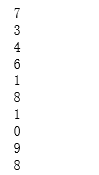
# 从TFRecord文件创建数据集,具体文件路径是一个placeholder,稍后再提供具体路径。

input_files = tf.placeholder(tf.string)

dataset = tf.data.TFRecordDataset(input_files)

dataset = dataset.map(parser)

# 定义遍历dataset的initializable_iterator。

iterator = dataset.make_initializable_iterator()

image, label = iterator.get_next()

with tf.Session() as sess:

    # 首先初始化iterator,并给出input_files的值。

    sess.run(iterator.initializer,feed_dict={input_files: ["E:\\MNIST_data\\output.tfrecords"]})

    # 遍历所有数据一个epoch。当遍历结束时,程序会抛出OutOfRangeError。

    while True:

        try:

            x, y = sess.run([image, label])

        except tf.errors.OutOfRangeError:

            break
吴裕雄 python 神经网络——TensorFlow 数据集基本使用方法的更多相关文章
- 吴裕雄 python 神经网络——TensorFlow 数据集高层操作
import tempfile import tensorflow as tf train_files = tf.train.match_filenames_once("E:\\output ...
- 吴裕雄 python 神经网络——TensorFlow pb文件保存方法
import tensorflow as tf from tensorflow.python.framework import graph_util v1 = tf.Variable(tf.const ...
- 吴裕雄 python 神经网络——TensorFlow ckpt文件保存方法
import tensorflow as tf v1 = tf.Variable(tf.random_normal([1], stddev=1, seed=1)) v2 = tf.Variable(t ...
- 吴裕雄 python 神经网络——TensorFlow 循环神经网络处理MNIST手写数字数据集
#加载TF并导入数据集 import tensorflow as tf from tensorflow.contrib import rnn from tensorflow.examples.tuto ...
- 吴裕雄 python 神经网络TensorFlow实现LeNet模型处理手写数字识别MNIST数据集
import tensorflow as tf tf.reset_default_graph() # 配置神经网络的参数 INPUT_NODE = 784 OUTPUT_NODE = 10 IMAGE ...
- 吴裕雄 python 神经网络——TensorFlow 使用卷积神经网络训练和预测MNIST手写数据集
import tensorflow as tf import numpy as np from tensorflow.examples.tutorials.mnist import input_dat ...
- 吴裕雄 PYTHON 神经网络——TENSORFLOW 无监督学习处理MNIST手写数字数据集
# 导入模块 import numpy as np import tensorflow as tf import matplotlib.pyplot as plt # 加载数据 from tensor ...
- 吴裕雄 python 神经网络——TensorFlow实现回归模型训练预测MNIST手写数据集
import tensorflow as tf from tensorflow.examples.tutorials.mnist import input_data mnist = input_dat ...
- 吴裕雄 python 神经网络——TensorFlow实现AlexNet模型处理手写数字识别MNIST数据集
import tensorflow as tf # 输入数据 from tensorflow.examples.tutorials.mnist import input_data mnist = in ...
随机推荐
- 通过FormData对象可以组装一组用 [XMLHttpRequest]发送请求的键/值对,它可以更灵活方便的发送表单数据。
工作记录用 1 大概页面,点击选择按钮,选择文件,填写备注并可以上传前预览,然后点击上传按钮开始上传 2 html+js代码 <h2>Test</h2> <div id= ...
- STA之RC Corner
RC corner,这里的RC指gate跟network的寄生参数,寄生参数抽取工具根据电路的物理信息,抽取出电路的电阻电容值,再以寄生参数文件输入给STA工具,常见的寄生参数文件格式为SPEF. I ...
- C++算法导论第九章O(n)期望选择序列第i小的数字
#include<iostream> #include<vector> #include<algorithm> #include<time.h> usi ...
- ASP.NET Core Web API 控制器与方法返回输出
DATA ACCESS LAYER 在一些不同的示例教程中,我们可能看到 DAL 的实现在主项目中,并且每个控制器中都有实例.我们不建议这么做. 当我们编写 DAL 时,我们应该将其作为一个独立的服务 ...
- 安装ipython[win/linux]
首先以win7 64位系统, python2.7.9为例,linux见底部 1.下载材料http://files.cnblogs.com/files/smileyes/ipython-win64.z ...
- JQuery中的DOM操作(转载)
原文链接:http://www.cnblogs.com/ILYljhl/archive/2013/07/10/3182414.html jQuery封装了大量DOM操作的API,极大提高了操作DOM节 ...
- 【C语言】找出1000以内可以被3整除的数
分别用while,do-while,for语句实现 方法一:while #include<stdio.h> int main() { int m; m = ; ) { == ) print ...
- NMAP输出结果中CPE的含义【转】
CPE全称是Common Platform Enumeration,意思是通用平台枚举项:它是NMAP对识别出来的软件.操作系统和硬件的一种命名方式:格式如下: cpe:/<part>:& ...
- Codeforces Gym 102392F Game on a Tree (SEERC2019 F题) 题解
题目链接:https://codeforces.com/gym/102392/problem/F 题意:被这题题意坑了很久,大意是说有一棵根为 \(1\) 的树,每个节点初始都是白色, \(Alice ...
- Ubuntu16 nginx 配置 Let's Encrypt 免费ssl
每篇一句 Some of us get dipped in flat, some in satin, some in gloss. But every once in a while you find ...