
吴裕雄 python 神经网络——TensorFlow实现AlexNet模型处理手写数字识别MNIST数据集
import tensorflow as tf

# 输入数据

from tensorflow.examples.tutorials.mnist import input_data

mnist = input_data.read_data_sets("E:\\MNIST_data", one_hot=True)

# 定义网络的超参数

learning_rate = 0.001

training_iters = 200000

batch_size = 128

display_step = 5

# 定义网络的参数

# 输入的维度 (img shape: 28*28)

n_input = 784

# 标记的维度 (0-9 digits)

n_classes = 10

# Dropout的概率,输出的可能性

dropout = 0.75

# 输入占位符

x = tf.placeholder(tf.float32, [None, n_input])

y = tf.placeholder(tf.float32, [None, n_classes])

#dropout (keep probability)

keep_prob = tf.placeholder(tf.float32)

# 定义卷积操作

def conv2d(name,x, W, b, strides=1):

    # Conv2D wrapper, with bias and relu activation

    x = tf.nn.conv2d(x, W, strides=[1, strides, strides, 1], padding='SAME')

    x = tf.nn.bias_add(x, b)

    # 使用relu激活函数

    return tf.nn.relu(x,name=name)

# 定义池化层操作

def maxpool2d(name,x, k=2):

    # MaxPool2D wrapper

    return tf.nn.max_pool(x, ksize=[1, k, k, 1], strides=[1, k, k, 1],padding='SAME',name=name)

# 规范化操作

def norm(name, l_input, lsize=4):

    return tf.nn.lrn(l_input, lsize, bias=1.0, alpha=0.001 / 9.0,beta=0.75, name=name)

# 定义所有的网络参数

weights = {

    'wc1': tf.Variable(tf.random_normal([11, 11, 1, 96])),

    'wc2': tf.Variable(tf.random_normal([5, 5, 96, 256])),

    'wc3': tf.Variable(tf.random_normal([3, 3, 256, 384])),

    'wc4': tf.Variable(tf.random_normal([3, 3, 384, 384])),

    'wc5': tf.Variable(tf.random_normal([3, 3, 384, 256])),

    'wd1': tf.Variable(tf.random_normal([4*4*256, 4096])),

    'wd2': tf.Variable(tf.random_normal([4096, 1024])),

    'out': tf.Variable(tf.random_normal([1024, n_classes]))

}

biases = {

    'bc1': tf.Variable(tf.random_normal([96])),

    'bc2': tf.Variable(tf.random_normal([256])),

    'bc3': tf.Variable(tf.random_normal([384])),

    'bc4': tf.Variable(tf.random_normal([384])),

    'bc5': tf.Variable(tf.random_normal([256])),

    'bd1': tf.Variable(tf.random_normal([4096])),

    'bd2': tf.Variable(tf.random_normal([1024])),

    'out': tf.Variable(tf.random_normal([n_classes]))

}

# 定义整个网络

def alex_net(x, weights, biases, dropout):

    # 向量转为矩阵 Reshape input picture

    x = tf.reshape(x, shape=[-1, 28, 28, 1])

    # 第一层卷积

    # 卷积

    conv1 = conv2d('conv1', x, weights['wc1'], biases['bc1'])

    # 下采样

    pool1 = maxpool2d('pool1', conv1, k=2)

    # 规范化

    norm1 = norm('norm1', pool1, lsize=4)

    # 第二层卷积

    # 卷积

    conv2 = conv2d('conv2', norm1, weights['wc2'], biases['bc2'])

    # 最大池化(向下采样)

    pool2 = maxpool2d('pool2', conv2, k=2)

    # 规范化

    norm2 = norm('norm2', pool2, lsize=4)

    # 第三层卷积

    # 卷积

    conv3 = conv2d('conv3', norm2, weights['wc3'], biases['bc3'])

    # 规范化

    norm3 = norm('norm3', conv3, lsize=4)

    # 第四层卷积

    conv4 = conv2d('conv4', norm3, weights['wc4'], biases['bc4'])

    # 第五层卷积

    conv5 = conv2d('conv5', conv4, weights['wc5'], biases['bc5'])

    # 最大池化(向下采样)

    pool5 = maxpool2d('pool5', conv5, k=2)

    # 规范化

    norm5 = norm('norm5', pool5, lsize=4)

    # 全连接层1

    fc1 = tf.reshape(norm5, [-1, weights['wd1'].get_shape().as_list()[0]])

    fc1 =tf.add(tf.matmul(fc1, weights['wd1']),biases['bd1'])

    fc1 = tf.nn.relu(fc1)

    # dropout

    fc1=tf.nn.dropout(fc1,dropout)

    # 全连接层2

    fc2 = tf.reshape(fc1, [-1, weights['wd2'].get_shape().as_list()[0]])

    fc2 =tf.add(tf.matmul(fc2, weights['wd2']),biases['bd2'])

    fc2 = tf.nn.relu(fc2)

    # dropout

    fc2=tf.nn.dropout(fc2,dropout)

    # 输出层

    out = tf.add(tf.matmul(fc2, weights['out']) ,biases['out'])

    return out

# 构建模型

pred = alex_net(x, weights, biases, keep_prob)

# 定义损失函数和优化器

cost = tf.reduce_mean(tf.nn.softmax_cross_entropy_with_logits(logits=pred, labels=y))

optimizer = tf.train.AdamOptimizer(learning_rate=learning_rate).minimize(cost)

# 评估函数

correct_pred = tf.equal(tf.argmax(pred,1), tf.argmax(y,1))

accuracy = tf.reduce_mean(tf.cast(correct_pred, tf.float32))

# 初始化变量

init = tf.global_variables_initializer()

# 开启一个训练

with tf.Session() as sess:

    sess.run(init)

    step = 1

    # 开始训练,直到达到training_iters,即200000

    while step * batch_size < training_iters:

        #获取批量数据

        batch_x, batch_y = mnist.train.next_batch(batch_size)

        sess.run(optimizer, feed_dict={x: batch_x, y: batch_y, keep_prob: dropout})

        if step % display_step == 0:

            # 计算损失值和准确度,输出

            loss,acc = sess.run([cost,accuracy], feed_dict={x: batch_x, y: batch_y, keep_prob: 1.})

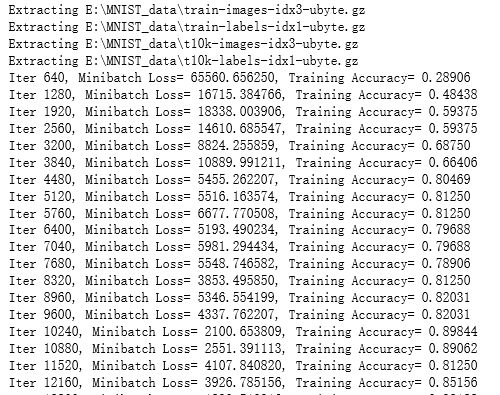
            print ("Iter " + str(step*batch_size) + ", Minibatch Loss= " + "{:.6f}".format(loss) + ", Training Accuracy= " + "{:.5f}".format(acc))

        step += 1

    print ("Optimization Finished!")

    # 计算测试集的精确度

    print ("Testing Accuracy:",sess.run(accuracy, feed_dict={x: mnist.test.images[:256],y: mnist.test.labels[:256],keep_prob: 1.}))
吴裕雄 python 神经网络——TensorFlow实现AlexNet模型处理手写数字识别MNIST数据集的更多相关文章
- 吴裕雄 python 神经网络TensorFlow实现LeNet模型处理手写数字识别MNIST数据集
import tensorflow as tf tf.reset_default_graph() # 配置神经网络的参数 INPUT_NODE = 784 OUTPUT_NODE = 10 IMAGE ...
- 吴裕雄 python 神经网络——TensorFlow实现回归模型训练预测MNIST手写数据集
import tensorflow as tf from tensorflow.examples.tutorials.mnist import input_data mnist = input_dat ...
- 吴裕雄 PYTHON 神经网络——TENSORFLOW 滑动平均模型
import tensorflow as tf v1 = tf.Variable(0, dtype=tf.float32) step = tf.Variable(0, trainable=False) ...
- 吴裕雄 python 神经网络——TensorFlow 实现LeNet-5模型处理MNIST手写数据集
import os import numpy as np import tensorflow as tf from tensorflow.examples.tutorials.mnist import ...
- TensorFlow 之 手写数字识别MNIST
官方文档: MNIST For ML Beginners - https://www.tensorflow.org/get_started/mnist/beginners Deep MNIST for ...
- 吴裕雄 python 神经网络——TensorFlow训练神经网络:全模型
import tensorflow as tf from tensorflow.examples.tutorials.mnist import input_data INPUT_NODE = 784 ...
- 吴裕雄 python 神经网络——TensorFlow 循环神经网络处理MNIST手写数字数据集
#加载TF并导入数据集 import tensorflow as tf from tensorflow.contrib import rnn from tensorflow.examples.tuto ...
- 吴裕雄 python 神经网络——TensorFlow 使用卷积神经网络训练和预测MNIST手写数据集
import tensorflow as tf import numpy as np from tensorflow.examples.tutorials.mnist import input_dat ...
- 吴裕雄 python 神经网络——TensorFlow 训练过程的可视化 TensorBoard的应用
#训练过程的可视化 ,TensorBoard的应用 #导入模块并下载数据集 import tensorflow as tf from tensorflow.examples.tutorials.mni ...
随机推荐
- NG-ALAIN 边学边记2
1. 下载Git上的源码 : https://github.com/ng-alain/ng-alain.git 2.解压文件: 3.进入到目录下: 4.打开CMD 切换到 E:\NgAlain\ng ...
- 题解【AcWing274】移动服务
题面 非常好的优化 \(\text{DP}\) 状态表示的题目. 首先可以设 \(dp_{i,x,y,z}\) 表示已经做完了前 \(i\) 个请求,现在的 \(3\) 名服务员分别在 \(x\) . ...
- 安装python3并新建python3的虚拟环境
安装依赖 yum install openssl-devel bzip2-devel expat-devel gdbm-devel readline-devel sqlite-devel -y 下载P ...
- Python七夕记
- flask 路由规划(blueprint)
# 统一路由蓝牙规划 # file:blueprint_route.py from flask import Blueprint route_test = Blueprint("home&q ...
- mac环境下,pycharm2018 配置 anaconda。
2018版的pycharm与之前的版本在配置anaconda上流程略有不同.直接上图 1.新建工程,展开会看到系统默认的编译环境名叫virtualenv,是基于python3.5的环境(如果没有安装过 ...
- [转]Jarvis OJ- [XMAN]level2/3_x64-Writeup
学弟写的挺好的,我就直接转过来了 原文链接:http://www.cnblogs.com/ZHijack/p/7940686.html 两道64位栈溢出,思路和之前的32位溢出基本一致,所以放在一起 ...
- C short类型的内存分析
#include<stdio.h> #include<limits.h> void main(){ //printf("short%d, int%d, long%d ...
- jsonp实现js跨域请求
sonp是跨域通信的一个协议 具体来说jsonp实现跨域请求其实是使用js文件引用(js文件不一定是.js结尾)可跨域的性质,将请求的结果包裹在客户端需要调用的js方法内部.需要前后端配合使用. 前段 ...
- ASP.NET + MVC5 入门完整教程三 (上) ---第一个MVC项目
https://blog.csdn.net/qq_21419015/article/details/80420815 第一个MVC应用程序 1创建MVC项目 打开VS ,File--新建--项目,选择 ...