
Spring MVC-视图解析器(View Resolverr)-XML视图解析器(Xml View Resolver)示例(转载实践)
以下内容翻译自:https://www.tutorialspoint.com/springmvc/springmvc_xmlviewresolver.htm
说明:示例基于Spring MVC 4.1.6。
XmlViewResolver用于使用在xml文件中定义的视图bean来解析视图名称。以下示例显示如何使用Spring Web MVC框架使用XmlViewResolver。
TestWeb-servlet.xml
<bean class="org.springframework.web.servlet.view.XmlViewResolver">

   <property name="location">

      <value>/WEB-INF/views.xml</value>

   </property>

</bean>
views.xml
<bean id="hello" class="org.springframework.web.servlet.view.JstlView">

   <property name="url" value="/WEB-INF/jsp/hello.jsp" />

</bean>
例如,使用上面的配置,如果是URI
/hello被请求,DispatcherServlet将请求转发到在view.xml中由bean hello定义的hello.jsp。
首先,让我们使用Eclipse IDE,并按照以下步骤使用Spring Web Framework开发基于动态窗体的Web应用程序:
| 步骤 | 描述 |
|---|---|
| 1 | 创建一个名为TestWeb的项目,在一个包com.tutorialspoint下,如Spring MVC - Hello World Example章节所述。 |
| 2 | 在com.tutorialspoint包下创建一个Java类HelloController。 |
| 3 | 在jsp子文件夹下创建一个视图文件hello.jsp。 |
| 4 | 下载JSTL库jstl.jar。把它放在你的CLASSPATH中。 |
| 5 | 最后一步是创建所有源和配置文件的内容并导出应用程序,如下所述。 |
HelloController.java
package com.tutorialspoint;

import org.springframework.stereotype.Controller;

import org.springframework.web.bind.annotation.RequestMapping;

import org.springframework.web.bind.annotation.RequestMethod;

import org.springframework.ui.ModelMap;

@Controller

@RequestMapping("/hello")

public class HelloController{

   @RequestMapping(method = RequestMethod.GET)

   public String printHello(ModelMap model) {

      model.addAttribute("message", "Hello Spring MVC Framework!");

      return "hello";

   }

}
TestWeb-servlet.xml
<beans xmlns="http://www.springframework.org/schema/beans"

   xmlns:context="http://www.springframework.org/schema/context"

   xmlns:xsi="http://www.w3.org/2001/XMLSchema-instance"

   xsi:schemaLocation="

   http://www.springframework.org/schema/beans

   http://www.springframework.org/schema/beans/spring-beans-3.0.xsd

   http://www.springframework.org/schema/context

   http://www.springframework.org/schema/context/spring-context-3.0.xsd">

   <context:component-scan base-package="com.tutorialspoint" />

   <bean class="org.springframework.web.servlet.view.XmlViewResolver">

      <property name="location">

         <value>/WEB-INF/views.xml</value>

      </property>

   </bean>

</beans>
views.xml
<beans xmlns="http://www.springframework.org/schema/beans"

   xmlns:context="http://www.springframework.org/schema/context"

   xmlns:xsi="http://www.w3.org/2001/XMLSchema-instance"

   xsi:schemaLocation="

   http://www.springframework.org/schema/beans

   http://www.springframework.org/schema/beans/spring-beans-3.0.xsd

   http://www.springframework.org/schema/context

   http://www.springframework.org/schema/context/spring-context-3.0.xsd">

   <bean id="hello"

      class="org.springframework.web.servlet.view.JstlView">

      <property name="url" value="/WEB-INF/jsp/hello.jsp" />

   </bean>

</beans>
hello.jsp
<%@ page contentType="text/html; charset=UTF-8" %>

<html>

<head>

<title>Hello World</title>

</head>

<body>

   <h2>${message}</h2>

</body>

</html>
完成创建源文件和配置文件后,导出应用程序。右键单击应用程序,然后使用Export > WAR File选项,并将您的HelloWeb.war文件保存在Tomcat的webapps文件夹中。
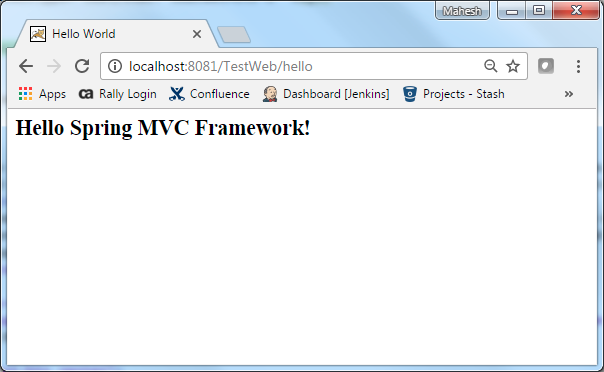
现在启动您的Tomcat服务器,并确保您可以使用标准浏览器从webapps文件夹访问其他网页。现在尝试访问URL http://localhost:8080/HelloWeb/hello,如果您的Spring Web应用程序一切正常,您应该看到以下结果:
Maven示例:
https://github.com/easonjim/5_java_example/tree/master/springmvc/tutorialspoint/test23
Spring MVC-视图解析器(View Resolverr)-XML视图解析器(Xml View Resolver)示例(转载实践)的更多相关文章
- Spring MVC-视图解析器(View Resolverr)-多重解析器(Multiple Resolver)示例(转载实践)
以下内容翻译自:https://www.tutorialspoint.com/springmvc/springmvc_multiple_resolver_mapping.htm 说明:示例基于Spri ...
- Spring MVC的WebMvcConfigurerAdapter用法收集(零配置,无XML配置)
原理先不了解,只记录常用方法 用法: @EnableWebMvc 开启MVC配置,相当于 <?xml version="1.0" encoding="UTF-8&q ...
- Spring MVC-学习笔记(5)spring MVC的文件上传、下载、拦截器
1.文件上传. spring MVC为文件上传提供了直接的支持,这种支持是即插即用的MultipartResolver(多部分解析器)实现的.spring MVC使用Apache Commo ...
- (转载)spring mvc DispatcherServlet详解之一---处理请求深入解析
要深入理解spring mvc的工作流程,就需要先了解spring mvc的架构: 从上图可以看到 前端控制器DispatcherServlet在其中起着主导作用,理解了DispatcherServl ...
- spring mvc DispatcherServlet详解之一---处理请求深入解析
要深入理解spring mvc的工作流程,就需要先了解spring mvc的架构: 从上图可以看到 前端控制器DispatcherServlet在其中起着主导作用,理解了DispatcherServl ...
- Spring MVC源码(三) ----- @RequestBody和@ResponseBody原理解析
概述 在SpringMVC的使用时,往往会用到@RequestBody和@ResponseBody两个注解,尤其是处理ajax请求必然要使用@ResponseBody注解.这两个注解对应着Contro ...
- Spring Mvc如何通过注解的方式设置视图解析器的优先级
<bean id="jspViewResolver" class="org.springframework.web.servlet.view.InternalRes ...
- spring mvc DispatcherServlet详解之一---处理请求深入解析(续)
上文中,我们知道分发过程有以下步骤: 分发过程如下: 1. 判断是否设置了multipart resolver,设置的话转换为multipart request,没有的话则继续下面的步骤. 2. 根据 ...
- Spring MVC多解析器映射
如果想在spring mvc应用程序中使用多个视图解析器,那么可以使用order属性设置优先级顺序. 以下示例显示如何在Spring Web MVC框架中使用ResourceBundleViewRes ...
- 内容协商在视图View上的应用【享学Spring MVC】
每篇一句 人生很有意思:首先就得活得长.活得长才能够见自己,再长就可以见众生 前言 在经过 前两篇 文章了解了Spring MVC的内容协商机制之后,相信你已经能够熟练的运用Spring MVC提供的 ...
随机推荐
- Unity项目 - 吃豆人Pacman
项目展示 Github项目地址:Pacman 涉及知识 切片制作 Animations 状态机设置,any state切换,重写状态机 按键读取进行整数距离的刚体移动 用射线检测碰撞性 渲染顺序问题 ...
- 解决macOS升级之后每次使用ssh都要输入密码的问题
最近想趁着假期把跟了我2年mac的系统重做下.于是就开始行动了,经过大半天的数据备份.然后进行了全盘格式化,使用了在线更新的方式从新安装升级到了10.12.6.这里提醒下有类似的想法的同学可以采用 ...
- Django 内容回顾
模板 变量 {{ }} 标签 {% %} if elif else for empty forloop() with...as csrf_token 过滤器 default length add da ...
- UNIX环境高级编程--5
标准I/O库流和FILE对象: 所有I/O函数都是围绕文件描述符的.当打开一个文件时,即返回一个文件描述符,然后该文件描述符就用于后续的I/O操作.当用标准I/O库打开或者创建一个文件时,我们已 ...
- [转]Linux下paste命令详解
转自:http://blog.csdn.net/andy572633/article/details/7214126 paste单词意思是粘贴.该命令主要用来将多个文件的内容合并,与cut命令完成的功 ...
- 6.11---multipartfile在哪个jar包下---6.11---uuid---swagger上传图片包错去掉注解响应体
<dependency><groupId>commons-fileupload</groupId><artifactId>commons-fileupl ...
- MySQL索引----数据结构及算法原理
摘要 本文以MySQL数据库为研究对象,讨论与数据库索引相关的一些话题.特别需要说明的是,MySQL支持诸多存储引擎,而各种存储引擎对索引的支持也各不相同,因此MySQL数据库支持多种索引类型,如BT ...
- 右边根据左边的高度自动居中只需要两行CSS就可以完成
右边根据左边的高度自动居中只需要两行CSS就可以完成 <style type="text/css" > div{ display: inline-block; vert ...
- activiti 表——介绍
Activiti 用到的表都是act_开头 下面分别来介绍下 activiti 所用到的表: Act_RE_* 表示 RepositoryService接口所操作的表:包含了流程定义信息 .流程静态资 ...
- Python3之切片的道理
list的切片有三个参数:起点,终点,步长 list[::-1] 相当于起点为最后的一个,终点为第一个,然后一次减少一个 更多的看下面的测试 >>> a = [0,1,2,3,4,5 ...