
c#基于Tablet pc实现的手写输入
需要安装Tablet pc,win7的话 直接在控制面板》程序和应用》添加组建里面勾选上添加
然后就是下面的程序了,看代码
设计文件
namespace 手写识别

{

    partial class Form1

    {

        /// <summary>

        /// 必需的设计器变量。

        /// </summary>

        private System.ComponentModel.IContainer components = null;

        /// <summary>

        /// 清理所有正在使用的资源。

        /// </summary>

        /// <param name="disposing">如果应释放托管资源,为 true;否则为 false。</param>

        protected override void Dispose(bool disposing)

        {

            if (disposing && (components != null))

            {

                components.Dispose();

            }

            base.Dispose(disposing);

        }

        #region Windows 窗体设计器生成的代码

        /// <summary>

        /// 设计器支持所需的方法 - 不要

        /// 使用代码编辑器修改此方法的内容。

        /// </summary>

        private void InitializeComponent()

        {

            this.components = new System.ComponentModel.Container();

            System.ComponentModel.ComponentResourceManager resources = new System.ComponentModel.ComponentResourceManager(typeof(Form1));

            this.ink_here = new System.Windows.Forms.PictureBox();

            this.textBox1 = new System.Windows.Forms.TextBox();

            this.button1 = new System.Windows.Forms.Button();

            this.button2 = new System.Windows.Forms.Button();

            this.colorDialog1 = new System.Windows.Forms.ColorDialog();

            this.button3 = new System.Windows.Forms.Button();

            this.timSb = new System.Windows.Forms.Timer(this.components);

            this.btnDelet = new System.Windows.Forms.Button();

            this.panel1 = new System.Windows.Forms.Panel();

            this.panel2 = new System.Windows.Forms.Panel();

            this.shibie_9 = new System.Windows.Forms.Button();

            this.shibie_8 = new System.Windows.Forms.Button();

            this.shibie_7 = new System.Windows.Forms.Button();

            this.shibie_6 = new System.Windows.Forms.Button();

            this.shibie_5 = new System.Windows.Forms.Button();

            this.shibie_4 = new System.Windows.Forms.Button();

            this.shibie_3 = new System.Windows.Forms.Button();

            this.shibie_2 = new System.Windows.Forms.Button();

            this.shibie_1 = new System.Windows.Forms.Button();

            this.shibie_0 = new System.Windows.Forms.Button();

            ((System.ComponentModel.ISupportInitialize)(this.ink_here)).BeginInit();

            this.panel1.SuspendLayout();

            this.panel2.SuspendLayout();

            this.SuspendLayout();

            //

            // ink_here

            //

            this.ink_here.BackgroundImage = ((System.Drawing.Image)(resources.GetObject("ink_here.BackgroundImage")));

            this.ink_here.BackgroundImageLayout = System.Windows.Forms.ImageLayout.Stretch;

            this.ink_here.BorderStyle = System.Windows.Forms.BorderStyle.Fixed3D;

            this.ink_here.Dock = System.Windows.Forms.DockStyle.Fill;

            this.ink_here.Location = new System.Drawing.Point(, );

            this.ink_here.Name = "ink_here";

            this.ink_here.Size = new System.Drawing.Size(, );

            this.ink_here.TabIndex = ;

            this.ink_here.TabStop = false;

            this.ink_here.MouseDown += new System.Windows.Forms.MouseEventHandler(this.ink_here_MouseDown);

            this.ink_here.MouseUp += new System.Windows.Forms.MouseEventHandler(this.ink_here_MouseUp);

            //

            // textBox1

            //

            this.textBox1.Dock = System.Windows.Forms.DockStyle.Top;

            this.textBox1.Location = new System.Drawing.Point(, );

            this.textBox1.Multiline = true;

            this.textBox1.Name = "textBox1";

            this.textBox1.Size = new System.Drawing.Size(, );

            this.textBox1.TabIndex = ;

            //

            // button1

            //

            this.button1.Anchor = ((System.Windows.Forms.AnchorStyles)((System.Windows.Forms.AnchorStyles.Top | System.Windows.Forms.AnchorStyles.Right)));

            this.button1.Location = new System.Drawing.Point(, );

            this.button1.Name = "button1";

            this.button1.Size = new System.Drawing.Size(, );

            this.button1.TabIndex = ;

            this.button1.Text = "识别";

            this.button1.UseVisualStyleBackColor = true;

            this.button1.Click += new System.EventHandler(this.button1_Click);

            //

            // button2

            //

            this.button2.Anchor = ((System.Windows.Forms.AnchorStyles)((System.Windows.Forms.AnchorStyles.Top | System.Windows.Forms.AnchorStyles.Right)));

            this.button2.Location = new System.Drawing.Point(, );

            this.button2.Name = "button2";

            this.button2.Size = new System.Drawing.Size(, );

            this.button2.TabIndex = ;

            this.button2.Text = "清除";

            this.button2.UseVisualStyleBackColor = true;

            this.button2.Click += new System.EventHandler(this.button2_Click);

            //

            // button3

            //

            this.button3.Anchor = ((System.Windows.Forms.AnchorStyles)((System.Windows.Forms.AnchorStyles.Top | System.Windows.Forms.AnchorStyles.Right)));

            this.button3.Location = new System.Drawing.Point(, );

            this.button3.Name = "button3";

            this.button3.Size = new System.Drawing.Size(, );

            this.button3.TabIndex = ;

            this.button3.Text = "墨水颜色";

            this.button3.UseVisualStyleBackColor = true;

            this.button3.Click += new System.EventHandler(this.button3_Click);

            //

            // timSb

            //

            this.timSb.Interval = ;

            this.timSb.Tick += new System.EventHandler(this.timSb_Tick);

            //

            // btnDelet

            //

            this.btnDelet.Anchor = ((System.Windows.Forms.AnchorStyles)((System.Windows.Forms.AnchorStyles.Top | System.Windows.Forms.AnchorStyles.Right)));

            this.btnDelet.Location = new System.Drawing.Point(, );

            this.btnDelet.Name = "btnDelet";

            this.btnDelet.Size = new System.Drawing.Size(, );

            this.btnDelet.TabIndex = ;

            this.btnDelet.Text = "←Dele";

            this.btnDelet.UseVisualStyleBackColor = true;

            this.btnDelet.Click += new System.EventHandler(this.btnDelet_Click);

            //

            // panel1

            //

            this.panel1.Controls.Add(this.button3);

            this.panel1.Controls.Add(this.btnDelet);

            this.panel1.Controls.Add(this.button1);

            this.panel1.Controls.Add(this.button2);

            this.panel1.Dock = System.Windows.Forms.DockStyle.Bottom;

            this.panel1.Location = new System.Drawing.Point(, );

            this.panel1.Name = "panel1";

            this.panel1.Size = new System.Drawing.Size(, );

            this.panel1.TabIndex = ;

            //

            // panel2

            //

            this.panel2.Controls.Add(this.shibie_9);

            this.panel2.Controls.Add(this.shibie_8);

            this.panel2.Controls.Add(this.shibie_7);

            this.panel2.Controls.Add(this.shibie_6);

            this.panel2.Controls.Add(this.shibie_5);

            this.panel2.Controls.Add(this.shibie_4);

            this.panel2.Controls.Add(this.shibie_3);

            this.panel2.Controls.Add(this.shibie_2);

            this.panel2.Controls.Add(this.shibie_1);

            this.panel2.Controls.Add(this.shibie_0);

            this.panel2.Dock = System.Windows.Forms.DockStyle.Right;

            this.panel2.Location = new System.Drawing.Point(, );

            this.panel2.Name = "panel2";

            this.panel2.Size = new System.Drawing.Size(, );

            this.panel2.TabIndex = ;

            //

            // shibie_9

            //

            this.shibie_9.Location = new System.Drawing.Point(, );

            this.shibie_9.Name = "shibie_9";

            this.shibie_9.Size = new System.Drawing.Size(, );

            this.shibie_9.TabIndex = ;

            this.shibie_9.UseVisualStyleBackColor = true;

            this.shibie_9.Click += new System.EventHandler(this.shibie_Click);

            //

            // shibie_8

            //

            this.shibie_8.Location = new System.Drawing.Point(, );

            this.shibie_8.Name = "shibie_8";

            this.shibie_8.Size = new System.Drawing.Size(, );

            this.shibie_8.TabIndex = ;

            this.shibie_8.UseVisualStyleBackColor = true;

            this.shibie_8.Click += new System.EventHandler(this.shibie_Click);

            //

            // shibie_7

            //

            this.shibie_7.Location = new System.Drawing.Point(, );

            this.shibie_7.Name = "shibie_7";

            this.shibie_7.Size = new System.Drawing.Size(, );

            this.shibie_7.TabIndex = ;

            this.shibie_7.UseVisualStyleBackColor = true;

            this.shibie_7.Click += new System.EventHandler(this.shibie_Click);

            //

            // shibie_6

            //

            this.shibie_6.Location = new System.Drawing.Point(, );

            this.shibie_6.Name = "shibie_6";

            this.shibie_6.Size = new System.Drawing.Size(, );

            this.shibie_6.TabIndex = ;

            this.shibie_6.UseVisualStyleBackColor = true;

            this.shibie_6.Click += new System.EventHandler(this.shibie_Click);

            //

            // shibie_5

            //

            this.shibie_5.Location = new System.Drawing.Point(, );

            this.shibie_5.Name = "shibie_5";

            this.shibie_5.Size = new System.Drawing.Size(, );

            this.shibie_5.TabIndex = ;

            this.shibie_5.UseVisualStyleBackColor = true;

            this.shibie_5.Click += new System.EventHandler(this.shibie_Click);

            //

            // shibie_4

            //

            this.shibie_4.Location = new System.Drawing.Point(, );

            this.shibie_4.Name = "shibie_4";

            this.shibie_4.Size = new System.Drawing.Size(, );

            this.shibie_4.TabIndex = ;

            this.shibie_4.UseVisualStyleBackColor = true;

            this.shibie_4.Click += new System.EventHandler(this.shibie_Click);

            //

            // shibie_3

            //

            this.shibie_3.Location = new System.Drawing.Point(, );

            this.shibie_3.Name = "shibie_3";

            this.shibie_3.Size = new System.Drawing.Size(, );

            this.shibie_3.TabIndex = ;

            this.shibie_3.UseVisualStyleBackColor = true;

            this.shibie_3.Click += new System.EventHandler(this.shibie_Click);

            //

            // shibie_2

            //

            this.shibie_2.Location = new System.Drawing.Point(, );

            this.shibie_2.Name = "shibie_2";

            this.shibie_2.Size = new System.Drawing.Size(, );

            this.shibie_2.TabIndex = ;

            this.shibie_2.UseVisualStyleBackColor = true;

            this.shibie_2.Click += new System.EventHandler(this.shibie_Click);

            //

            // shibie_1

            //

            this.shibie_1.Location = new System.Drawing.Point(, );

            this.shibie_1.Name = "shibie_1";

            this.shibie_1.Size = new System.Drawing.Size(, );

            this.shibie_1.TabIndex = ;

            this.shibie_1.UseVisualStyleBackColor = true;

            this.shibie_1.Click += new System.EventHandler(this.shibie_Click);

            //

            // shibie_0

            //

            this.shibie_0.Location = new System.Drawing.Point(, );

            this.shibie_0.Name = "shibie_0";

            this.shibie_0.Size = new System.Drawing.Size(, );

            this.shibie_0.TabIndex = ;

            this.shibie_0.UseVisualStyleBackColor = true;

            this.shibie_0.Click += new System.EventHandler(this.shibie_Click);

            //

            // Form1

            //

            this.AutoScaleDimensions = new System.Drawing.SizeF(6F, 12F);

            this.AutoScaleMode = System.Windows.Forms.AutoScaleMode.Font;

            this.ClientSize = new System.Drawing.Size(, );

            this.Controls.Add(this.ink_here);

            this.Controls.Add(this.textBox1);

            this.Controls.Add(this.panel2);

            this.Controls.Add(this.panel1);

            this.MaximizeBox = false;

            this.MinimumSize = new System.Drawing.Size(, );

            this.Name = "Form1";

            this.StartPosition = System.Windows.Forms.FormStartPosition.CenterScreen;

            this.Text = "手写识别";

            this.Load += new System.EventHandler(this.Form1_Load);

            ((System.ComponentModel.ISupportInitialize)(this.ink_here)).EndInit();

            this.panel1.ResumeLayout(false);

            this.panel2.ResumeLayout(false);

            this.ResumeLayout(false);

            this.PerformLayout();

        }

        #endregion

        private System.Windows.Forms.PictureBox ink_here;

        private System.Windows.Forms.TextBox textBox1;

        private System.Windows.Forms.Button button1;

        private System.Windows.Forms.Button button2;

        private System.Windows.Forms.ColorDialog colorDialog1;

        private System.Windows.Forms.Button button3;

        private System.Windows.Forms.Timer timSb;

        private System.Windows.Forms.Button btnDelet;

        private System.Windows.Forms.Panel panel1;

        private System.Windows.Forms.Panel panel2;

        private System.Windows.Forms.Button shibie_0;

        private System.Windows.Forms.Button shibie_9;

        private System.Windows.Forms.Button shibie_8;

        private System.Windows.Forms.Button shibie_7;

        private System.Windows.Forms.Button shibie_6;

        private System.Windows.Forms.Button shibie_5;

        private System.Windows.Forms.Button shibie_4;

        private System.Windows.Forms.Button shibie_3;

        private System.Windows.Forms.Button shibie_2;

        private System.Windows.Forms.Button shibie_1;

    }

}
代码文件
using System;

using System.Collections.Generic;

using System.ComponentModel;

using System.Data;

using System.Drawing;

using System.Text;

using System.Windows.Forms;

using Microsoft.Ink;

namespace 手写识别

{

    public partial class Form1 : Form

    {

        InkCollector ic;

        RecognizerContext rct;

        // Recognizer rc;

        string FullCACText;

        public Form1()

        {

            InitializeComponent();

        }

        private void Form1_Load(object sender, EventArgs e)

        {

            ic = new InkCollector(ink_here.Handle);

            this.ic.Stroke += new InkCollectorStrokeEventHandler(ic_Stroke);

            ic.Enabled = true;

            ink_();

            this.rct.RecognitionWithAlternates += new RecognizerContextRecognitionWithAlternatesEventHandler(rct_RecognitionWithAlternates);

            //单字识别

            rct.RecognitionFlags = RecognitionModes.WordMode;

            rct.Strokes = ic.Ink.Strokes;

        }

        void rct_RecognitionWithAlternates(object sender, RecognizerContextRecognitionWithAlternatesEventArgs e)

        {

            string ResultString = "";

            RecognitionAlternates alts;

            if (e.RecognitionStatus == RecognitionStatus.NoError)

            {

                alts = e.Result.GetAlternatesFromSelection();

                Console.WriteLine(alts.Count);

                foreach (RecognitionAlternate alt in alts)

                {

                    ResultString = ResultString + alt.ToString() + " ";

                }

            }

            FullCACText = ResultString.Trim();

            Console.WriteLine(FullCACText);

            Control.CheckForIllegalCrossThreadCalls = false;

            GetString(FullCACText);

            Control.CheckForIllegalCrossThreadCalls = true;

        }

        private void GetString(string txt)

        {

            string[] str_temp = txt.Split(' ');

            string str_temp1 = "shibie_";

            string str_temp2 = "";

            if (str_temp.Length > )

            {

                for (int i = ; i < str_temp.Length; i++)

                {

                    str_temp2 = str_temp1 + i.ToString();

                    Control[] con_temp = panel2.Controls.Find(str_temp2, true);

                    if (con_temp.Length > )

                    {

                        Button btn = (Button)(con_temp[]);

                        btn.Text = str_temp[i];

                    }

                }

            }

        }

        void ic_Stroke(object sender, InkCollectorStrokeEventArgs e)

        {

            rct.StopBackgroundRecognition();

            rct.Strokes.Add(e.Stroke);

            rct.BackgroundRecognizeWithAlternates();

        }

        private void ink_()

        {

            Recognizers recos = new Recognizers();

            Recognizer chineseReco = recos.GetDefaultRecognizer();

            rct = chineseReco.CreateRecognizerContext();

        }

        private void ic_Stroke()

        {

        }

        private void button3_Click(object sender, EventArgs e)

        {

            colorDialog1.FullOpen = true;

            colorDialog1.ShowDialog();

            ic.DefaultDrawingAttributes.Color = colorDialog1.Color;

        }

        private void button2_Click(object sender, EventArgs e)

        {

            if (!ic.CollectingInk)

            {

                Strokes strokesToDelete = ic.Ink.Strokes;

                rct.StopBackgroundRecognition();

                ic.Ink.DeleteStrokes(strokesToDelete);

                rct.Strokes = ic.Ink.Strokes;

                ic.Ink.DeleteStrokes();//清除手写区域笔画;

                ink_here.Refresh();//刷新手写区域

                textBox1.Clear();

            }

        }

        private void button1_Click(object sender, EventArgs e)

        {

            #region 单字识别处理

            List<Point> lstPoints = new List<Point>();

            foreach (var stroke in ic.Ink.Strokes)

            {

                lstPoints.AddRange(stroke.GetPoints());

            }

            ic.Ink.DeleteStrokes();//清除手写区域笔画;

            Stroke sk = ic.Ink.CreateStroke(lstPoints.ToArray());

            rct.Strokes.Add(sk);

            #endregion

            textBox1.SelectedText = ic.Ink.Strokes.ToString();

        }

        private void timSb_Tick(object sender, EventArgs e)

        {

            button1.PerformClick();

            if (!ic.CollectingInk)

            {

                Strokes strokesToDelete = ic.Ink.Strokes;

                rct.StopBackgroundRecognition();

                ic.Ink.DeleteStrokes(strokesToDelete);

                rct.Strokes = ic.Ink.Strokes;

                ic.Ink.DeleteStrokes();//清除手写区域笔画;

                ink_here.Refresh();//刷新手写区域

            }

            timSb.Stop();

        }

        private void ink_here_MouseUp(object sender, MouseEventArgs e)

        {

            timSb.Enabled = true;

        }

        private void ink_here_MouseDown(object sender, MouseEventArgs e)

        {

            timSb.Enabled = false;

        }

        private void btnDelet_Click(object sender, EventArgs e)

        {

            if (!string.IsNullOrEmpty(textBox1.Text))

                textBox1.Text = textBox1.Text.Substring(, textBox1.Text.Length - );

        }

        private void shibie_Click(object sender, EventArgs e)

        {

            int intStart = textBox1.SelectionStart;

            textBox1.Text = textBox1.Text.Remove(intStart - , );

            textBox1.Text = textBox1.Text.Insert(intStart - , (sender as Button).Text);

            textBox1.SelectionStart = intStart;

        }

    }

}
需要引用Microsoft.Ink.dll,自己百度下载
然后看效果
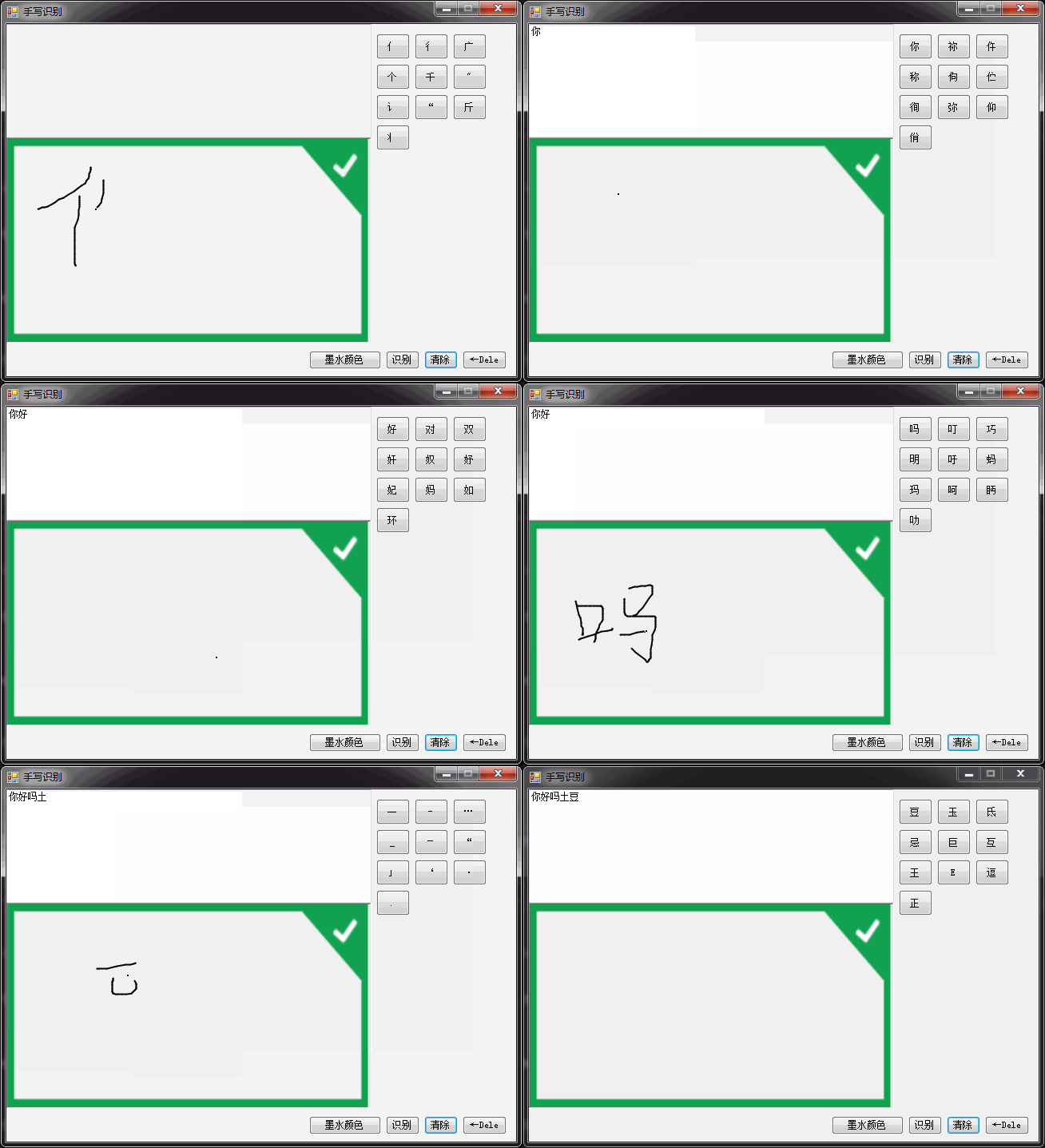
c#基于Tablet pc实现的手写输入的更多相关文章
- 通通WPF随笔(4)——通通手写输入法(基于Tablet pc实现)
原文:通通WPF随笔(4)--通通手写输入法(基于Tablet pc实现) 从我在博客园写第一篇博客到现在已经有1年半了,我的第一篇博客写的就是手写识别,当时,客户需求在应用中加入手写输入功能,由于第 ...
- 018.07 New BMW ICOM A3+B+C+D Plus EVG7 Controller Tablet PC with WIFI Function
2018.07 New BMW ICOM A3+B+C+D Plus EVG7 Controller Tablet PC with WIFI Function Software Version : ...
- Building Tablet PC Applications ROB JARRETT
Building Tablet PC Applications ROB JARRETT Tablet PC 开发,有需要PDF的留下邮箱 目录This text was added by using ...
- WPF4.0用tablet实现手写输入(更新XP SP3下也能手写输入方法)
原文:WPF4.0用tablet实现手写输入(更新XP SP3下也能手写输入方法) 由于项目需求一个手写输入的控件,纠结了2天,终于搞定了. 主要是由于本人的英语不过关,一直和ocr混淆在一起,研究了 ...
- 使用java做一个能赚钱的微信群聊机器人(2020年基于PC端协议最新可用版)
前言 微信群机器人,主要用来管理群聊,提供类似天气查询.点歌.机器人聊天等用途. 由于微信将web端的协议封杀后,很多基于http协议的群聊机器人都失效了,所以这里使用基于PC端协议的插件来实现. 声 ...
- Windows Thin PC体验 & 语言包更改(win 7 included)
本作品由Man_华创作,采用知识共享署名-非商业性使用-相同方式共享 4.0 国际许可协议进行许可.基于http://www.cnblogs.com/manhua/上的作品创作. 简介: Window ...
- C#判断PC是否支持触摸屏
C#判断PC是否支持触摸屏 添加引用PresentationFrameworkSystem.Windows.SystemParameters.IsTabletPC 使用win32api [csharp ...
- <自动化测试方案_7>第七章、PC端UI自动化测试
第七章.PC端UI自动化测试 UI自动化测试又分为:Web自动化测试,App自动化测试.微信小程序.微信公众号UI层的自动化测试工具非常多,比较主流的是UFT(QTP),Robot Framework ...
- 基于Vue的Ui框架
基于Vue的Ui框架 饿了么公司基于vue开的的vue的Ui组件库 Element Ui 基于vue pc端的UI框架 http://element.eleme.io/ MintUi 基于vue 移动 ...
随机推荐
- RGB 的调色
通过 RGB 三通道所占比的组合(通过三元素长的元组存储),可呈现丰富的色彩样式: [0, 0, 0] ⇒ 黑色,[1, 1, 1] ⇒ 白色 [1, 0, 0] ⇒ 红色,[0, 1, 0] ⇒ 绿 ...
- noip刷题记录 20170818
天天爱跑步 lca + 树上差分 #include<iostream> #include<cstdio> #include<cstdlib> #include< ...
- cordova 生成发行版apk,并添加证书 – 畅玩Coding
原文:cordova 生成发行版apk,并添加证书 – 畅玩Coding 首先jdk生成证书. 1.进入jdk安装目录 D:\Java\jdk1.7.0\bin 2.执行命令 keytool -gen ...
- 【足迹C++primer】49、超载,更改,运营商
超载,更改.运营商 Conversion Operators 转换操作符 operator type() const Conversions to an array or a function typ ...
- maven webcollector java.lang.ClassNotFoundException: org.openqa.selenium.remote.SessionNotFoundException
使用webcollector时出现了如下异常 分析是依赖的问题,不仅要添加selenium-java,还要添加htmlunit-driver的依赖,注意不要添加成selenium-htmlunit-d ...
- Android之assets资源目录的各种操作
第一种方法: String path = file:///android_asset/文件名; 第二种方法: InputStream abpath = getClass() ...
- C#中的并发编程知识
= 导航 顶部 线程 Task async/await IAsyncResult Parallel 异步的回调 顶部 线程 Task async/await IAsyncResult Pa ...
- Spring 4 MVC+Apache Tiles 3 Example
In this post we will integrate Apache Tiles 3 with Spring MVC 4, using annotation-based configuratio ...
- Bean行为破坏之前,
而在自定义初始化阶段的行为之一似.Spring此外,它提供了两种方法来定制Bean具体的行为破坏之前. 例如下列: 1.采用destroy-method属性. 2.达到DisposableBean介面 ...
- IE8支持function.bind()方法
这个 bind 方法仅仅有在 ie10 版本号的浏览器才得到原生支持,低于该版本号的浏览器下运行时会得到一个 undefined 的错误提示.于是仅仅好再次上网 google 解决方式,功夫不负有心人 ...