
ArcGIS三大文件格式解析
|
Shape数据 Shapefile是ArcView GIS 3.x的原生数据格式,属于简单要素类,用点、线、多边形存储要素的形状,却不能存储拓扑关系,具有简单、快速显示的优点。一个shapefile是由若干个文件组成的,空间信息和属性信息分离存储,所以称之为“基于文件”。 每个shapefile,都至少有这三个文件组成,其中: *.shp 存储的是几何要素的的空间信息,也就是XY坐标 *.shx 存储的是有关*.shp存储的索引信息。它记录了在*.shp中,空间数据是如何存储的,XY坐标的输入点在哪里,有多少XY坐标对等信息 *.dbf 存储地理数据的属性信息的dBase表 这三个文件是一个shapefile的基本文件,shapefile还可以有其他一些文件,但所有这些文件都与该shapefile同名,并且存储在同一路径下。 其它较为常见的文件: *.prj 如果shapefile定义了坐标系统,那么它的空间参考信息将会存储在*.prj文件中 *.shp.xml 这是对shapefile进行元数据浏览后生成的xml元数据文件 *.sbn和*.sbx 这两个存储的是shapefile的空间索引,它能加速空间数据的读取。这两个文件是在对数据进行操作、浏览或连接后才产生的,也可以通过ArcToolbox >Data Management Tools >Indexes >Add spatial Index工具生成。 当使用ArcCatalog对shapefile进行创建、移动、删除或重命名等操作,或使用ArcMap对shapefile进行编辑时,ArcCatalog将自动维护数据的完整性,将所有文件同步改变。所以需要使用ArcCatalog管理shapefile。 虽然Shapefile无法存储拓扑关系,但它并不是普通用于显示的图形文件,作为地理数据,它自身有拓扑的。比如一个多边形要素类,shapefile会按顺时针方向为它的所有顶点排序,然后按顶点顺序两两连接成的边线向量,在向量右侧的为多边形的内部,在向量左侧的是多边形的外部。 由于1990年代地理信息的迅速发展以及ArcView GIS 3.x软件在世界范围内的推广,shapefile格式的数据使用非常广泛,数据来源也较多。很多软件都提供了向shapefile转换的接口(eg:MapInfo、MapGIS等)。ArcGIS支持对shapefile的编辑操作,也支持shapefile向第三代数据模型geodatabase的转换。 |
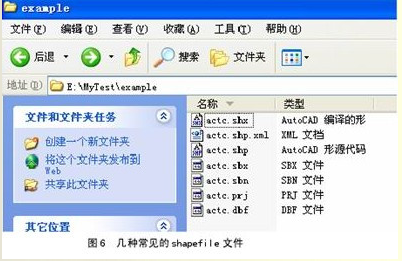
1. shp存储几何要素的空间信息,即XY坐标
shx存储了有关.shp存储的索引信息,即shp中空间数据的存储方式,XY坐标的输入点在哪里,有多少XY坐标对等信息
dbf存储地理数据的属性信息的dBase表
prj存储了文件的空间参考信息,如坐标系统等
shp.xml对元数据浏览后生成的xml元数据文件
sbn和sbx存储对shapefile的空间索引,加速空间数据的读取
Coverage数据
Coverage是ArcInfo workstation的原生数据格式。之所以称之为“基于文件夹的存储”,是因为在windows资源管理器下,它的空间信息和属性信息是分别存放在两个文件夹里。例如,在我的电脑E:\MyTest\example文件夹中,有3个coverage,它们在windows资源管理器下的状态如图1所示,所有信息都以文件夹的形式来存储。空间信息以二进制文件的形式存储在独立的文件夹中,文件夹名称即为该coverage名称,属性信息和拓扑数据则以INFO表的形式存储。Coverage将空间信息与属性信息结合起来,并存储要素间的拓扑关系。
coverage是一个非常成功的早期地理数据模型,二十多年来深受用户欢迎,很多早期的数据都是coverage格式的。ESRI不公开coverage的数据格式,但是提供了coverage格式转换的一个交换文件(interchange file,即E00),并公开数据格式,这样就方便了coverage数据与其他格式的数据之间的转换。
但是ESRI为推广其第三代数据模型geodatabase,从ArcGIS 8.3版本开始,屏蔽了对coverage的编辑功能。如果需要使用coverage格式的数据,可以安装ArcInfo workstation,或者将coverage数据转换为其他可编辑的数据格式。
Coverage是一个集合,它可以包含一个或多个要素类
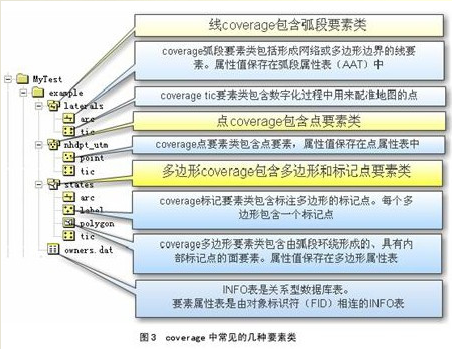
adf为coverage格式,包括lab.adf、arc.adf、sec.adf、pal.adf、cnt.adf、tic.adf、lnk.adf、bnd.adf都记录了坐标信息,arx.adf、pax.adf为索引文件和pat.adf、aat.adf为属性文件
pat点属性表,记录lable点的坐标信息
tic控制点,用于配准地图的点
aux保存栅格文件自身不能保存的辅助信息,包括彩色地图信息,直方图或表格,坐标系统,变换信息,投影信息
rrd保存影像金字塔信息索引,加速显示和漫游
dat属性信息
nit属性表定义文件
dir属性表路径管理文件,用于关联dat和nit
Geodatabase数据
Geodatabase作为ArcGIS的原生数据格式,体现了很多第三代地理数据模型的优势。随着IT技术的发展,普通的事务型数据的管理模式,早已从传统的基于文件的管理转向利用基于工业标准建立的关系型数据库进行管理,这种基于数据库的管理方式的优点是不言而喻的。那么带有空间信息的地理数据是否也可以利用这种非常成熟的数据库技术进行管理呢?于是ESRI推出了geodatabase数据模型,利用数据库技术高效安全地管理我们的地理数据。
Geodatabase可以分为两种,一种是基于Microsoft Access的personal geodatabase,另一种是基于oracle、SQL Server、Informix或者DB2的enterprise geodatabase,由于它需要中间件ArcSDE进行连接,所以enterprise geodatabase又称为ArcSDE geodatabase。由于Microsoft Access自身容量的限制,personal geodatabase的容量上限为2GB,这显然不能满足企业级的海量地理数据的存储需求。于是可以将geodatabase扩展为ArcSDE geodatabase,底层数据库可以使用oracle这样的大型关系数据库,能够存储近乎“无限”的海量数据(仅受硬盘大小的限制)。虽然底层使用的数据库各不相同,但是geodatabase给用户提供的是一个一致的操作环境。
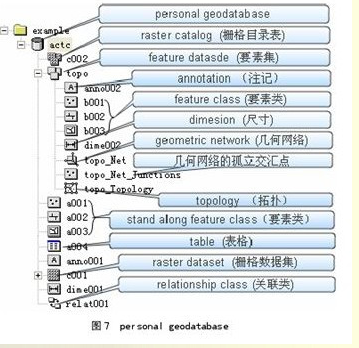
在geodatabase中,不仅可以存储类似shapefile的简单要素类,还可以存储类似coverage的要素集,并且支持一系列的行为规则对其空间信息和属性信息进行验证。表格、关联类、栅格、注记和尺寸都可以作为geodatabase对象存储。这些在perasonal geodatabase和ArcSDE geodatabase中都是一样的(栅格的存储有点小差异,但对用户来说都是一样的)。如图所示,是一个personal geodatabase。
对Personal geodatabase进行编辑,使用ArcView的license即可。不需要额外的软件就能直接连接。但是Personal geodatabase不支持多用户编辑,仅能满足小项目的要求。
而通过ArcSDE连接的ArcSDE geodatabase,则需要至少ArcEditor的license才能对其进行编辑。ArcSDE geodatabase通过版本的机制,可支持多用户、长事务编辑。
在ArcToolbox >Conversion Tools > To Geodatabase中,有多种转换工具支持coverage、shapefile、CAD等矢量数据向geodatabase的转换。在personal geodatabase和ArcSDE geodatabase间只要复制、粘贴即可,无须转换。
adf - ARC/INFO coverage data file
agf - Atlas GIS native binary geodataset file
ain - attribute index file
aih - attribute index file
alg - ER Mapper algorithm
apr - ArcView Project File (ODB format)
avl - legend template file (ODB format)
avp - palette file (ODB format)
ave - Avenue script
avx - ArcView extension file (ODB format)
ai - Adobe Illlustrator picture file
bat - DOS batch file
bil - image file (band interleaved by line)
bip - image file (band interleaved by pixel)
blw - world file for bil image
bmp - Windows bitmap image file
bpw - world file for bip or bmp images
bsq - image file (band sequential)
bqw - world file for bsq image
c - C programming language source code filename
cat - UNIX hyperhelp supporting file
cgm - Computer Graphics Metafile
cls - geocoding classification file
cnt - help file contents
dat - generic data file extension dat - INFO attribute file
db - Object Database File (also ODB)
dbf - dBASE tabular data file
dbf - Shapefile attribute table file
dbg - problem debug log file
dcp - default codepage file
dct - geocoding dictionary file
dec - UNIX hyperhelp supporting file
def - defaults file (North Arrows, Layout Templates, etc) (ODB format)
dem - Digital Elevation Model file
dgn - Design drawing file (Intergraph)
dir - INFO directory manager file
dlg - Digital Line Graph file
dll - Windows Dynamic Link Library file
doc - MS-Word, MS-Wordpad document file
dtd - UNIX hyperhelp supporting file
dwg - Drawing file (AutoCAD)
dxf - Drawing exchange file
e00 - ARC/INFO export file
ecw - ER Mapper Enhanced Compressed Wavelet
eps - Encapsulated PostScript
ers - ER Mapper raster file format
exe - DOS/Windows executable file
fbn - spatial index file for read-only datasets
fbx - spatial index file for read-only datasets
fls - Windows help supporting file
ftg - UNIX help supporting file
fts - UNIX help supporting file
gen - ARC/INFO UnGenerate format
gfw - world file for gif image
gif - image file (CompuServe)
hdr - header file (for ArcView extensions or TIF images)
hlp - Windows help file
htm - WWW file (hypertext markup, 3-character DOS version)
html- WWW file (hypertext markup language, UNIX version)
ico - Icon file
idx - geocoding index for read-only datasets
img - ERDAS Imagine image file
ini - initialization file
ixc - geocoding index for read-write coverages
ixs - geocoding index for read-write shapefiles
jpg - image file (Joint Photographic Experts Group)
key - geocoding matching keys (ODB format)
lin - ARC/INFO lineset symbol file
lnk - Windows shortcut icon link file
mat - geocoding matching parameters file
mcp - image file (MacPaint)
mid - MapInfo interchange format (always paired with "mif")
mif - MapInfo interchange format (always paired with "mid")
mrk - ARC/INFO markerset symbol file (not compatible w/ArcView)
mxc - geocoding index for read-write coverages (ODB format)
mxs - geocoding index for read-write shapefiles (ODB format)
nit - INFO table definitions file
ndx - fonts index file (UNIX only)
nls - Codepage language files
odb - Object Database ASCII file (ODB format)
pat - geocoding pattern recognition file
pdf - preferences definition file
pif - Windows program information file (for DOS programs)
pps - processing set codes
prj - projections definition file
ps - PostScript. file
rlc - image file (run-length coding)
rs - image file (raster snapshot | Sun rasterfile)
sbn - spatial index for read-write shapefiles
sbx - spatial index for read-write shapefiles
shd - ARC/INFO shadeset symbol file
shp - Shapefile (stores feature geometry)
shx - Shapefile (stores file lookup index)
stn - geocoding standardization file
tab - lookup file
tbl - geocoding support table
tif - image file (Tag Image Format file)
tfw - world file for tif image
tmp - temporary file
ttf - TrueType font file
txt - text file (usually ASCII)
xbm - image file (X Bitmap)
wmf - image file (Windows Metafile)
wld - world file for CAD datasets
wri - Windows Write.exe file
ArcGIS三大文件格式解析的更多相关文章
- Android init.rc文件格式解析
/***************************************************************************** * Android init.rc文件格式 ...
- mp4文件格式解析(转载)
mp4文件格式解析 原作:http://blog.sina.com.cn/s/blog_48f93b530100jz4b.html 目前MP4的概念被炒得很火,也很乱.最开始MP4指的是音频(MP3的 ...
- C++PE文件格式解析类(轻松制作自己的PE文件解析器)
PE是Portable Executable File Format(可移植的运行体)简写,它是眼下Windows平台上的主流可运行文件格式. PE文件里包括的内容非常多,详细我就不在这解释了,有兴趣 ...
- ORM进阶之Hibernate中对象的三大状态解析
ORM进阶之 ORM简单介绍 ORM进阶之Hibernate简单介绍及框架搭 ORM进阶之Hibernate的三大对象 ORM进阶之Hibernate中对象的三大状态解析 在Hibernatea中每一 ...
- 解析prototxt文件的python库 prototxt-parser(使用parsy自定义文件格式解析)
解析prototxt文件的python库 prototxt-parser https://github.com/yogin16/prototxt_parser https://test.pypi.or ...
- mp4文件格式解析(转)
mp4文件格式解析 MP4文件格式带数据详解 MP4文件格式的解析,以及MP4文件的分割算法
- Qt的.pro文件格式解析
Qt的.pro文件格式解析 在Qt中用qmake生成makefile文件,它是由.pro文件生成而来的,.pro文件的具体格式语法如下: 1.注释 .pro文件中注释采用#号,从"#&quo ...
- Dotnet文件格式解析
0x0.序 解析过程并没有介绍对pe结构的相关解析过程,网上此类相关资料很多可自行查阅,本文只介绍了网上资料较少的从pe结构的可选头中的数据目录表中获取dotnet目录的rva和size,到完全解析d ...
- flv文件格式解析!!!
flv头 FLV header 总体上看,FLV包括文件头(File Header)和文件体(File Body)两部分,其中文件体由一系列的Tag组成. Signature: FLV 文件的前3个字 ...
随机推荐
- MD5加密(16/32)
public string MD5(string str, int code) { if (code == 16) //16位MD5加密(取32位加密的9~25字符) { return System. ...
- BZOJ3919 : [Baltic2014]portals
预处理出每个点上下左右能延伸到的最远点以及到它们的距离的最小值md. 然后spfa,一个点除了可以以1的代价到达四周的点之外,还可以以md+1的代价到达四个方向能到达的最远点. #include< ...
- BZOJ4120 : [Baltic2015]Editor
活跃区的操作序列的优先级单调不上升,所以每次undo的一定是一段区间. 以优先级为权值建立可持久化权值线段树,维护优先级在某区间内的最靠后的位置. #include<cstdio> con ...
- CentOS6.4 配置HAProxy+Keepalived
安装HAProxy请参考 http://www.cnblogs.com/kgdxpr/p/3272861.html 安装Keepalived 1.下载安装依赖包 yum install -y wget ...
- 对偶图 && 【BZOJ】1001: [BeiJing2006]狼抓兔子(对偶图+最短路)
http://www.lydsy.com/JudgeOnline/problem.php?id=1001 可谓惨不忍睹,一下午就在调这题了. 很久以前看到这题是一眼最大流,看到n<=1000,我 ...
- USACO 5.4 Betsy's Tour(暴力)
水过,水过,这个程序跑7,跑5分钟左右把... /* ID: cuizhe LANG: C++ TASK: betsy */ #include <iostream> #include &l ...
- HttpClient工具类v1.7
package com.cucpay.fundswap.util; import java.io.IOException; import java.net.SocketTimeoutException ...
- shell 之for [转]
本文也即<Learning the bash Shell>3rd Edition的第五章Flow Control之读书笔记之二,但我们将不限于此.flow control是任何编程语言中很 ...
- PS如何查找自己想要的字体
曾经很多人问我,这是什么字体,答曰:“不知道”,自己平时在作图时也经常会遇到这样的问题,于是我就把文字打出来,然后比照PS里边已经导入的字体挨个试验,这样不仅浪费了大量的时间和精力,而且比对完后,各种 ...
- 怎样使用Photoshop CS5的操控变形功能
| 浏览:23114 | 更新:2011-08-08 10:10 | 标签: photoshop 1 2 3 4 5 6 7 分步阅读 Photoshop CS5已经发布很长时间了,和以前的版本相比, ...