
iOS - (两个APP之间的跳转)
一个程序若要跳到另一个程序。需要在目标程序的plist文件里面修改:
打开info.plist,添加一项URL types
展开URL types,再展开Item0,将Item0下的URL identifier修改为URL Scheme
展开URL Scheme,将Item0的内容修改为 SecondApp(此为跳转的key)
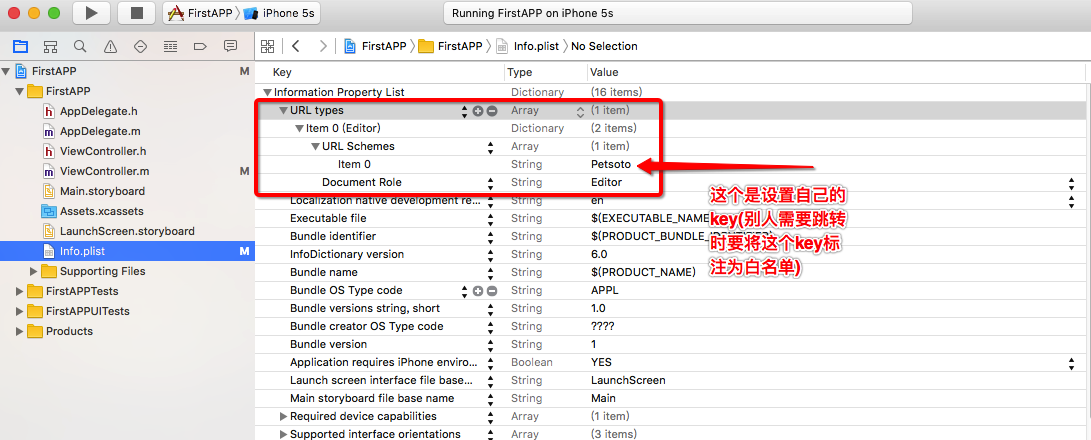
话不多说,下面开始讲解步骤:
首先创建两个工程,第一个 FirstAPP , 第二个 SecondAPP
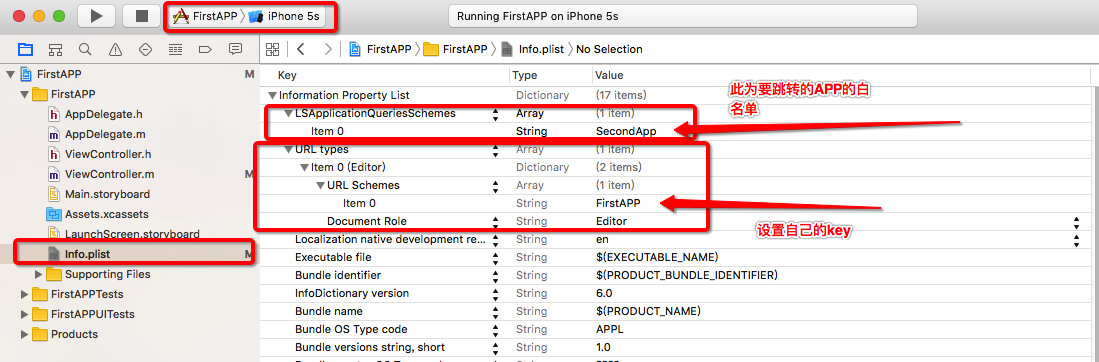
第一个 First APP 的 info.plist 需要设置 key(url) 与 白名单
接下来我们再对第二个 SecondAPP 工程来做相应的处理
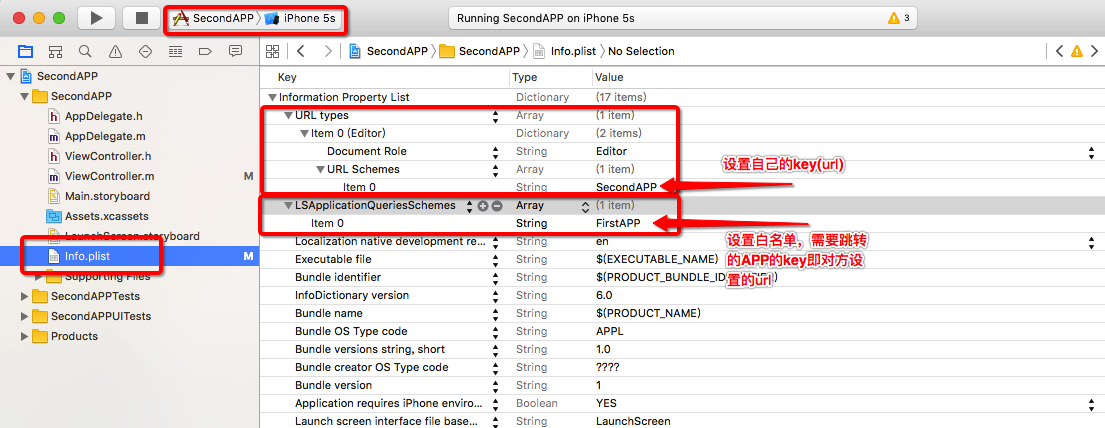
将这两个工程设置好了之后,接下来上代码
第一个 FirstApp工程
//
// ViewController.m
// FirstAPP
//
// Created by luorende on 16/8/25.
// Copyright © 2016年 luorende. All rights reserved.
//
#import "ViewController.h"
@interface ViewController ()
@end
@implementation ViewController
- (void)viewDidLoad {
[super viewDidLoad];
UIButton * button = [UIButton buttonWithType:UIButtonTypeCustom];
button.frame = CGRectMake(100, 100, 200, 50);
button.backgroundColor = [UIColor darkGrayColor];
[button setTitle:@"跳转到SecondApp" forState:UIControlStateNormal];
button.titleLabel.font = [UIFont systemFontOfSize:20];
[button addTarget:self action:@selector(clickButton:) forControlEvents:UIControlEventTouchUpInside];
[self.view addSubview:button];
}
//跳转到SecondApp
-(void)clickButton:(UIButton *)button{
NSLog(@"执行了点击事件");
//之前配置的白名单,就是需要跳转对方App的key,即对方设置的url
NSString * UrlStr = @"SecondApp://xxxxx";
NSURL * url = [NSURL URLWithString:UrlStr];
// 在这里可以先做个判断
if ([[UIApplication sharedApplication]canOpenURL:url]) {
[[UIApplication sharedApplication] openURL:url];
}else{
NSLog(@"应用程序未安装");
}
}
//跳转到AppStore
-(void)abc{
[[UIApplication sharedApplication]openURL:[NSURL URLWithString:@""]];
[[UIApplication sharedApplication]openURL:[NSURL URLWithString:@""]];
}
第二个工程 SecondAPP 里的代码
//
// ViewController.m
// SecondAPP
//
// Created by luorende on 16/8/26.
// Copyright © 2016年 luorende. All rights reserved.
//
#import "ViewController.h"
@interface ViewController ()
@end
@implementation ViewController
- (void)viewDidLoad {
[super viewDidLoad];
// Do any additional setup after loading the view, typically from a nib.
UIButton * button = [UIButton buttonWithType:UIButtonTypeCustom];
button.frame = CGRectMake(100, 100, 200, 100);
button.backgroundColor = [UIColor darkGrayColor];
[button setTitle:@"SecondApp,跳转到另一个APP" forState:UIControlStateNormal];
button.titleLabel.font = [UIFont systemFontOfSize:20];
[button addTarget:self action:@selector(clickButton:) forControlEvents:UIControlEventTouchUpInside];
[self.view addSubview:button];
}
-(void)clickButton:(UIButton *)button{
NSLog(@"执行了点击事件");
NSString * UrlStr = @"FirstAPP://xxxxx";
NSURL * url = [NSURL URLWithString:UrlStr];
if ([[UIApplication sharedApplication]canOpenURL:url]) {
[[UIApplication sharedApplication] openURL:url];
}else{
NSLog(@"应用程序未安装");
// 程序未成功跳转,我们还可以做一个提示
UIAlertView *alertView = [[UIAlertView alloc]initWithTitle:@"应用程序未安装"message:@"确定下载<xxxx>应用吗?" delegate:self cancelButtonTitle:@"取消" otherButtonTitles:@"确定",nil];
alertView.alertViewStyle = UIAlertViewStyleDefault;
[alertView show];
}
注: 另外说明一下
例如:相互跳转的时候双方都要设置URL与白名单 ,若是 FirstAPP 不设置URL types 项(自己注册自己URL)
则实现的功能是:FirstAPP 可以跳转到 SecondAPP ,但SecondAPP无法跳转过来

当然双方只设置 LSApplicationQueriesSchemes 项也是不行的,会提示应用程序未安装 (白名单)

简单说来 就是需要有一个要设置 URL

自己设置了的话,就是说已经有了URL,别人不注册, 使用设置白名单后也能跳转
总结:谁要跳,谁就要设置谁为白名单。 白名单要与跳到App设置的域名URL 要保持一致 另外代码部分的URL也要以域名URL打头即可
iOS - (两个APP之间的跳转)的更多相关文章
- ios两个app之间跳转,传值的实现
两个APP之间的跳转是通过[[UIApplication sharedApplication] openURL:url]这种方式来实现的. 1.首先设置第一个APP的url地址 2.接着设置第二个AP ...
- iOS中两个APP之间的跳转和通信
app间的跳转 一:在第一个app首先要做下面这些操作: 1.在info.plist文件中的Information Property List下添加一项:URL types. 2.点开URL type ...
- 两个App之间的跳转 并传值
两个App之间的传值最主要的是方法是 Intent intent = getPackageManager().getLaunchIntentForPackage("com.example.a ...
- iOS 两个App之间调起通信
前言 假设需求是这样的:由一个app1跳转到app2之后,app2完成某项任务之后,怎么把app2的完成信息传到app1(自己的程序是app1),传的是什么类型的数据,怎么进行解析? 逻辑 本文章使用 ...
- iOS 两个页面之间的跳转
-------->-------->-------->-------->-------->-------->--------> 以上完成页面one跳到页面 ...
- iOS APP之间到跳转,以及热门应用,手机自带到应用跳转
应用之间的跳转 在第一个APP中,做如下操作:1.在info.plist文件中的"信息属性列表"下添加一项:"URL类型"; 2.点开"URL类型&q ...
- 两个APP之间怎么调用《IT蓝豹》
两个app之间怎么调用? (1):通过显示Intent 启动 首先:配置好B app 的action,即AndroidManifest.xml中声明 <intent-filter> ...
- 通过AIDL在两个APP之间Service通信
一.项目介绍 [知识准备] ①Android Interface definition language(aidl,android接口定义语言),其目的实现跨进程的调用.进程是程序在os中执行的载体, ...
- iOS开发-应用之间的跳转及通信
Update 2016-08-12: 在Github的Demo上增加Mac自定义Url Scheme,可以在Safari上输入特定协议头打开应用,并传递参数) 简介 我们接下来将要实现应用程序之间的跳 ...
随机推荐
- Go项目的目录结构说明
一.项目目录结构 GoPath /bin /pkg /src project_1 project_2 ...... project_n GoPath : 相当于donet下 ...
- Web 在线文件管理器学习笔记与总结(11)获取文件夹信息 (12)返回上一级操作
(11)获取文件夹信息 文件夹没有修改操作. index.php: <?php require 'dir.func.php'; require 'file.func.php'; require ...
- CSS 实现背景图尺寸不随浏览器缩放而变化
<!-- Author:博客园小dee --> 一些网站的首页背景图尺寸不随浏览器缩放而变化,例如百度个人版的首页,缩放后背景图的尺寸并不改变: 再比如花瓣网( http://www.hu ...
- 做bbs论坛项目的收获(1)
1. 当两张表出现关联的时候,关联的外键,千万不能是汉字,千万不能使汉字,因为这个问题,直接导致项目进行不下去..... 顺便记录一下知识点(一) 当用frameset设置网页的结构的时候 eg: & ...
- debug和release转载
Debug和Release区别 转自草原和大树 VC下Debug和Release区别 最近写代码过程中,发现 Debug 下运行正常,Release 下就会出现问题,百思不得其解,而Release 下 ...
- phpcms v9 模板调用代码大全
另:每个栏目会对应当前所选模型的三个模板文件: 这些模板文件所在位置:phpcms/templates/default/content/ 目录下,如果想修改模板文件,只需要到此目录下找到对应的模板文 ...
- nrf51822-提高nordic ble数据发送速率
讲解2点: 为什么 nordic的4.0协议栈中ble只能发送20字节的应用负载数据. 大量数据发送时如何提高发送速率 1:为何上层应用负载每次最多20字节 首先了解 4.0中链路层的包格式如下: P ...
- 一个高度压缩的bit位图字典的实现
微软实现的字典功能简单方便,出于全局性考虑,其内部实现比较复杂,在对海量数据处理时,仅仅存放一个对象地址就将占据32个bit(64位机器中占据64个bit),而且其内部通过int[]来处理hash桶, ...
- java简单优化和编写规范,自己总结的。
1.永远不要比较两个浮点数是否相等.它是不安全的.详情google. 2.尽量使用StringBuffer代替String. 3.final类会提高很多效率. 4.try-catch 不应该用来控制程 ...
- oracle截取某个字符前面的字符串
已验证. 要求:A.数据库表中的一个字符串 可能含有"+" 例:ORC+001 也可能不含“+” B.要求如果该字符串含有“+”,则取“+”之前的字符 例:ORC+001 取ORC ...