
学生成绩管理系统(SSM+MySQL+JSP)
开发工具:Eclipse
前端技术:
基础:html+css+JavaScript
框架:JQuery+H-ui
后端技术:Spring+SpringMVC+mybatis
模板引擎:JSP
数据库:mysql 5.7.27
jdk版本:1.8.0_251
tomcat版本:Tomcat 9.0
数据库连接池:druid
一、功能概述
学生管理系统的用户包括学生、教师及管理员。
(1)学生可以对个人的各科成绩进行查询、个人信息修改、选课、修改登录密码等操作。
(2)教师可以对学生信息、教师个人信息、课程信息、成绩等进行管理,实现对这些信息的查询、录入、添加、修改、删除等操作。
(3)管理员可以对学生、教师、课程、成绩信息进行管理,实现对这些信息的查询、录入、添加、修改、删除以及权限管理等操作。
功能结构图:
二、数据库表结构
成绩表(Score):
学生表(student):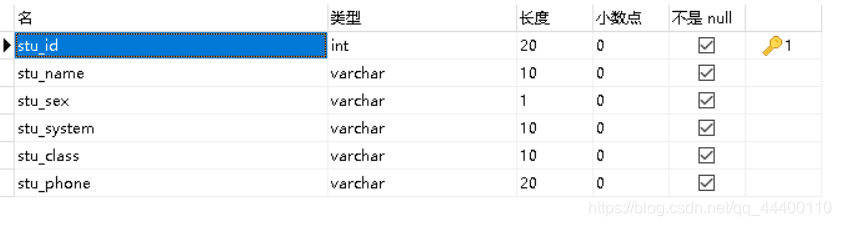
课程表(subject):
教师表(teacher):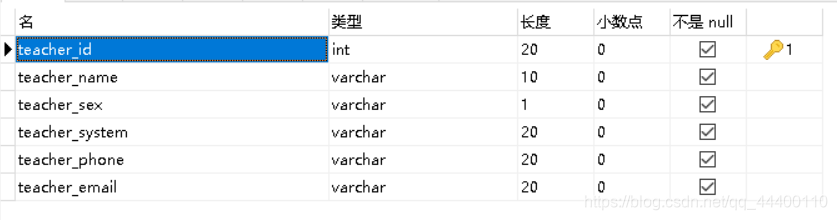
用户表(user):
三、项目结构

四、配置SSM文件
Spring-context.xml
<?xml version="1.0" encoding="UTF-8"?>

<beans xmlns="http://www.springframework.org/schema/beans" xmlns:xsi="http://www.w3.org/2001/XMLSchema-instance"

    xmlns:context="http://www.springframework.org/schema/context" xmlns:jdbc="http://www.springframework.org/schema/jdbc"

    xmlns:jee="http://www.springframework.org/schema/jee" xmlns:tx="http://www.springframework.org/schema/tx"

    xmlns:util="http://www.springframework.org/schema/util" xmlns:task="http://www.springframework.org/schema/task" xsi:schemaLocation="

        http://www.springframework.org/schema/beans http://www.springframework.org/schema/beans/spring-beans-4.0.xsd

        http://www.springframework.org/schema/context http://www.springframework.org/schema/context/spring-context-4.0.xsd

        http://www.springframework.org/schema/jdbc http://www.springframework.org/schema/jdbc/spring-jdbc-4.0.xsd

        http://www.springframework.org/schema/jee http://www.springframework.org/schema/jee/spring-jee-4.0.xsd

        http://www.springframework.org/schema/tx http://www.springframework.org/schema/tx/spring-tx-4.0.xsd

        http://www.springframework.org/schema/util http://www.springframework.org/schema/util/spring-util-4.0.xsd

        http://www.springframework.org/schema/task http://www.springframework.org/schema/task/spring-task-4.0.xsd"

    default-lazy-init="true">

    <description>Spring Configuration</description>

    <!-- 加载配置属性文件 -->

    <context:property-placeholder ignore-unresolvable="true" location="classpath:demo.properties" />

    <!-- 使用Annotation自动注册Bean,解决事物失效问题:在主容器中不扫描@Controller注解,在SpringMvc中只扫描@Controller注解。  -->

    <context:component-scan base-package="com.stusystem.controller"><!-- base-package 如果多个,用“,”分隔 -->

        <context:exclude-filter type="annotation" expression="org.springframework.stereotype.Controller"/>

    </context:component-scan>

     <!-- MyBatis begin -->

    <bean id="sqlSessionFactory" class="org.mybatis.spring.SqlSessionFactoryBean">

        <property name="dataSource" ref="dataSource"/>

        <property name="typeAliasesPackage" value="com.stusystem.entity"/>

        <property name="mapperLocations" value="classpath:/com/stusystem/mappings/**/*.xml"/>

        <property name="configLocation" value="classpath:/mybatis-config.xml"></property>

    </bean>

    <!-- 扫描basePackage下所有以@MyBatisDao注解的接口 -->

    <bean id="mapperScannerConfigurer" class="org.mybatis.spring.mapper.MapperScannerConfigurer">

        <property name="sqlSessionFactoryBeanName" value="sqlSessionFactory" />

        <property name="basePackage" value="com.stusystem.dao"/>

    </bean>

    <!-- 定义事务,用@Transactiona注解表示事物 -->

    <bean id="transactionManager" class="org.springframework.jdbc.datasource.DataSourceTransactionManager">

        <property name="dataSource" ref="dataSource" />

    </bean>

    <!-- 配置 Annotation 驱动,扫描@Transactional注解的类定义事务  -->

    <tx:annotation-driven transaction-manager="transactionManager" proxy-target-class="true"/>

    <!-- MyBatis end -->

    <!-- 配置 JSR303 Bean Validator 定义 -->

    <bean id="validator" class="org.springframework.validation.beanvalidation.LocalValidatorFactoryBean" />

    <!-- 数据源配置, 使用 BoneCP 数据库连接池 -->

    <bean id="dataSource" class="com.alibaba.druid.pool.DruidDataSource" init-method="init" destroy-method="close">

        <!-- 数据源驱动类可不写,Druid默认会自动根据URL识别DriverClass -->

        <property name="driverClassName" value="${jdbc.driver}" />

        <!-- 基本属性 url、user、password -->

        <property name="url" value="${jdbc.url}" />

        <property name="username" value="${jdbc.username}" />

        <property name="password" value="${jdbc.password}" />

        <!-- 配置初始化大小、最小、最大 -->

        <property name="initialSize" value="${jdbc.pool.init}" />

        <property name="minIdle" value="${jdbc.pool.minIdle}" />

        <property name="maxActive" value="${jdbc.pool.maxActive}" />

        <!-- 配置获取连接等待超时的时间 -->

        <property name="maxWait" value="60000" />

        <!-- 配置间隔多久才进行一次检测,检测需要关闭的空闲连接,单位是毫秒 -->

        <property name="timeBetweenEvictionRunsMillis" value="60000" />

        <!-- 配置一个连接在池中最小生存的时间,单位是毫秒 -->

        <property name="minEvictableIdleTimeMillis" value="300000" />

        <property name="validationQuery" value="${jdbc.testSql}" />

        <property name="testWhileIdle" value="true" />

        <property name="testOnBorrow" value="false" />

        <property name="testOnReturn" value="false" />

        <!-- 配置监控统计拦截的filters -->

        <property name="filters" value="stat" />

    </bean>

</beans>
Mybatis-config.xml:
<?xml version="1.0" encoding="UTF-8"?>

<!DOCTYPE configuration PUBLIC "-//mybatis.org//DTD Config 3.0//EN" "http://mybatis.org/dtd/mybatis-3-config.dtd">

<configuration>

    <!-- 全局参数 -->

    <settings>

        <!-- 使全局的映射器启用或禁用缓存。 -->

        <setting name="cacheEnabled" value="true"/>

        <!-- 全局启用或禁用延迟加载。当禁用时,所有关联对象都会即时加载。 -->

        <setting name="lazyLoadingEnabled" value="true"/>

        <!-- 当启用时,有延迟加载属性的对象在被调用时将会完全加载任意属性。否则,每种属性将会按需要加载。 -->

        <setting name="aggressiveLazyLoading" value="true"/>

        <!-- 是否允许单条sql 返回多个数据集  (取决于驱动的兼容性) default:true -->

        <setting name="multipleResultSetsEnabled" value="true"/>

        <!-- 是否可以使用列的别名 (取决于驱动的兼容性) default:true -->

        <setting name="useColumnLabel" value="true"/>

        <!-- 允许JDBC 生成主键。需要驱动器支持。如果设为了true,这个设置将强制使用被生成的主键,有一些驱动器不兼容不过仍然可以执行。  default:false  -->

        <setting name="useGeneratedKeys" value="false"/>

        <!-- 指定 MyBatis 如何自动映射 数据基表的列 NONE:不隐射 PARTIAL:部分  FULL:全部  -->

        <setting name="autoMappingBehavior" value="PARTIAL"/>

        <!-- 这是默认的执行类型  (SIMPLE: 简单; REUSE: 执行器可能重复使用prepared statements语句;BATCH: 执行器可以重复执行语句和批量更新)  -->

        <setting name="defaultExecutorType" value="SIMPLE"/>

        <!-- 使用驼峰命名法转换字段。 -->

        <setting name="mapUnderscoreToCamelCase" value="true"/>

        <!-- 设置本地缓存范围 session:就会有数据的共享  statement:语句范围 (这样就不会有数据的共享 ) defalut:session -->

        <setting name="localCacheScope" value="SESSION"/>

        <!-- 设置但JDBC类型为空时,某些驱动程序 要指定值,default:OTHER,插入空值时不需要指定类型 -->

        <setting name="jdbcTypeForNull" value="NULL"/>

    </settings>

</configuration>
spring-mvc.xml:

<?xml version="1.0" encoding="UTF-8"?>

<beans xmlns="http://www.springframework.org/schema/beans" xmlns:xsi="http://www.w3.org/2001/XMLSchema-instance"

    xmlns:context="http://www.springframework.org/schema/context" xmlns:mvc="http://www.springframework.org/schema/mvc"

    xsi:schemaLocation="http://www.springframework.org/schema/beans http://www.springframework.org/schema/beans/spring-beans-4.0.xsd

        http://www.springframework.org/schema/context http://www.springframework.org/schema/context/spring-context-4.0.xsd

        http://www.springframework.org/schema/mvc http://www.springframework.org/schema/mvc/spring-mvc-4.0.xsd">

    <description>Spring MVC Configuration</description>

    <!-- 加载配置属性文件 -->

    <context:property-placeholder ignore-unresolvable="true" location="classpath:demo.properties" />

    <!-- 使用Annotation自动注册Bean,只扫描@Controller -->

    <context:component-scan base-package="com.stusystem" use-default-filters="false"><!-- base-package 如果多个,用“,”分隔 -->

        <context:include-filter type="annotation" expression="org.springframework.stereotype.Controller"/>

    </context:component-scan>

    <!-- 默认的注解映射的支持,org.springframework.web.servlet.mvc.method.annotation.RequestMappingHandlerMapping -->

    <mvc:annotation-driven content-negotiation-manager="contentNegotiationManager">

        <mvc:message-converters register-defaults="true">

            <!-- 将StringHttpMessageConverter的默认编码设为UTF-8 -->

            <bean class="org.springframework.http.converter.StringHttpMessageConverter">

                <constructor-arg value="UTF-8" />

            </bean>

        </mvc:message-converters>

    </mvc:annotation-driven>

    <!-- REST中根据URL后缀自动判定Content-Type及相应的View -->

    <bean id="contentNegotiationManager" class="org.springframework.web.accept.ContentNegotiationManagerFactoryBean">

        <property name="mediaTypes" >

            <map>

                <entry key="xml" value="application/xml"/>

                <entry key="json" value="application/json"/>

            </map>

        </property>

        <property name="ignoreAcceptHeader" value="true"/>

        <property name="favorPathExtension" value="true"/>

    </bean>

    <!-- 定义视图文件解析 -->

    <bean class="org.springframework.web.servlet.view.InternalResourceViewResolver">

        <property name="prefix" value="/"/>

        <!--  <property name="suffix" value="${web.view.suffix}"/> -->

        <property name="suffix" value=".jsp"/>

    </bean>

    <!-- 对静态资源文件的访问, 将无法mapping到Controller的path交给default servlet handler处理 -->

    <mvc:default-servlet-handler />

    <!-- 静态资源映射 -->

    <mvc:resources mapping="/static/**" location="/static/" cache-period="31536000"/>

    <!-- 定义无Controller的path<->view直接映射 -->

    <mvc:view-controller path="/" view-name="redirect:${web.view.index}"/>

        <mvc:interceptors>

            <!--多个拦截器,顺序执行 -->

            <!-- 登陆认证拦截器 -->

            <mvc:interceptor>

                <mvc:mapping path="/**"/>

                <bean class="com.stusystem.interceptor.LoginInterceptor"></bean>

            </mvc:interceptor>

        </mvc:interceptors>

</beans>
五、配置web.xml和demo.properties
<?xml version="1.0" encoding="UTF-8"?>

<web-app xmlns:xsi="http://www.w3.org/2001/XMLSchema-instance"

    xmlns="http://java.sun.com/xml/ns/javaee"

    xsi:schemaLocation="http://java.sun.com/xml/ns/javaee http://java.sun.com/xml/ns/javaee/web-app_3_0.xsd"

    id="WebApp_ID" version="3.0">

    <display-name>stusystem_3</display-name>

    <context-param>

        <param-name>contextConfigLocation</param-name>

        <param-value>classpath*:/spring-context*.xml</param-value>

    </context-param>

    <listener>

        <listener-class>org.springframework.web.context.ContextLoaderListener</listener-class>

    </listener>

    <listener>

        <listener-class>org.springframework.web.context.request.RequestContextListener</listener-class>

    </listener>

    <filter>

        <filter-name>encodingFilter</filter-name>

        <filter-class>org.springframework.web.filter.CharacterEncodingFilter</filter-class>

        <init-param>

            <param-name>encoding</param-name>

            <param-value>UTF-8</param-value>

        </init-param>

        <init-param>

            <param-name>forceEncoding</param-name>

            <param-value>true</param-value>

        </init-param>

    </filter>

    <filter-mapping>

        <filter-name>encodingFilter</filter-name>

        <url-pattern>/*</url-pattern>

    </filter-mapping>

    <servlet>

        <servlet-name>springServlet</servlet-name>

        <servlet-class>org.springframework.web.servlet.DispatcherServlet</servlet-class>

        <init-param>

            <param-name>contextConfigLocation</param-name>

            <param-value>classpath*:/spring-mvc*.xml</param-value>

        </init-param>

        <load-on-startup>1</load-on-startup>

    </servlet>

    <servlet-mapping>

        <servlet-name>springServlet</servlet-name>

        <url-pattern>/</url-pattern>

    </servlet-mapping>

    <servlet>

        <servlet-name>DruidStatView</servlet-name>

        <servlet-class>com.alibaba.druid.support.http.StatViewServlet</servlet-class>

        <init-param>

            <param-name>allow</param-name>

            <param-value>127.0.0.1</param-value>

        </init-param>

    </servlet>

    <servlet-mapping>

        <servlet-name>DruidStatView</servlet-name>

        <url-pattern>/druid/*</url-pattern>

    </servlet-mapping>

    <session-config>

        <session-timeout>600</session-timeout>

    </session-config>

    <servlet-mapping>

        <servlet-name>default</servlet-name>

            <url-pattern>/js/*</url-pattern>

            <url-pattern>/css/*</url-pattern>

            <url-pattern>/images/*</url-pattern>

            <url-pattern>/font/*</url-pattern>

            <url-pattern>/assets/*</url-pattern>

            <url-pattern>/lib/*</url-pattern>

    </servlet-mapping>

</web-app>
demo.properties
#============================#

#===== Database settings ====#

#============================#

#mysql database setting

jdbc.type=mysql

jdbc.driver=com.mysql.jdbc.Driver

jdbc.url=jdbc:mysql://localhost:3306/stusystem?useUnicode=true&characterEncoding=utf-8

jdbc.username=root

jdbc.password=123456

#pool settings

jdbc.pool.init=1

jdbc.pool.minIdle=3

jdbc.pool.maxActive=20

#jdbc.testSql=SELECT 'x'

jdbc.testSql=SELECT 'x' FROM DUAL

web.view.prefix=/

web.view.suffix=.jsp

web.view.index=/StuSystem/user/login
六、各个模块代码
UserBean.java:

package com.stusystem.entity;

import org.apache.ibatis.type.Alias;

import org.springframework.stereotype.Component;

@Alias("userbean")

@Component

public class Userbean {

    private String userName;

    private int userId;

    private String admin;

    private String password;

    private String xmm;

    public String getXmm() {

        return xmm;

    }

    public void setXmm(String xmm) {

        this.xmm = xmm;

    }

    public String getUserName() {

        return userName;

    }

    public void setUserName(String userName) {

        this.userName = userName;

    }

    public int getUserId() {

        return userId;

    }

    public void setUserId(int userId) {

        this.userId = userId;

    }

    public String getAdmin() {

        return admin;

    }

    public void setAdmin(String admin) {

        this.admin = admin;

    }

    public String getPassword() {

        return password;

    }

    public void setPassword(String password) {

        this.password = password;

    }

}
UserDao.java:

package com.stusystem.dao;

import com.stusystem.entity.Userbean;

public interface  UserDao {

    //验证登录信息

    public Userbean getUsrInfoByNameAndPsw(Userbean userbean);

    //修改密码

    public void mmxg(Userbean userbean);

}
UserDao.xml

<?xml version="1.0" encoding="UTF-8" ?>

<!DOCTYPE mapper PUBLIC "-//mybatis.org//DTD Mapper 3.0//EN" "http://mybatis.org/dtd/mybatis-3-mapper.dtd">

<!-- namesapce ,DAO的package路径  -->

<mapper namespace="com.stusystem.dao.UserDao">

    <!-- 根据用户输入的用户名和密码查询是否存在此用户  -->

    <select id="getUsrInfoByNameAndPsw" parameterType="userbean" resultType="userbean">

        select * from user where user_id=#{userId} and password=#{password} and admin=#{admin}

    </select>

    <!-- 修改登录用户的密码  -->

    <update id="mmxg" parameterType="userbean">

        UPDATE user SET password = #{xmm} WHERE (user_id=#{userId})

    </update>

</mapper>
UserController.java:

package com.stusystem.controller;

import java.io.IOException;

import javax.servlet.http.HttpServletRequest;

import javax.servlet.http.HttpServletResponse;

import javax.servlet.http.HttpSession;

import org.springframework.beans.factory.annotation.Autowired;

import org.springframework.stereotype.Controller;

import org.springframework.web.bind.annotation.RequestMapping;

import com.stusystem.dao.UserDao;

import com.stusystem.entity.Userbean;

@Controller

@RequestMapping(value = "user")

public class UserController {

    @Autowired

    private UserDao userDao;

//    ApplicationContext applicationContext = new ClassPathXmlApplicationContext("classpath:spring-context.xml");

//    UserDao userDao = (UserDao) applicationContext.getBean("userDao");

    //返回登陆界面

    //验证用户的用户名和密码是有和数据库中的匹配

    @RequestMapping(value = {"/login"})

    public String userlogin() {

        return "login";

    }

    //登陆验证

    @RequestMapping(value = {"/loginyanzheng"})

    public void loginyanzheng(Userbean userbean,HttpServletResponse response,HttpServletRequest request) throws IOException {

        Userbean user = userDao.getUsrInfoByNameAndPsw(userbean);

        if(user==null){

            response.getWriter().println("{\"status\":0,\"msg\":\"用户名或密码有误!\"}");

        }else{

            // 用户的信息存放到session中。

            HttpSession session = request.getSession();

            session.setAttribute("userbean", user);

            response.getWriter().println("{\"status\":1,\"url\":\"index\"}");

        }

    }

    //返回系统主界面

    @RequestMapping(value = {"/index"})

    public String index() {

        return "index";

    }

    //返回关于页面

    @RequestMapping(value = {"/gy"})

    public String guanyu() {

        return "gy";

    }

    //返回密码修改页面

    @RequestMapping(value = {"/dlmmxg"})

    public String dlmmxg() {

        return "dlmmxg";

    }

    //修改登录密码

    @RequestMapping(value = {"/mmxg"})

    public String mmxg(Userbean userbean,HttpServletResponse response,HttpServletRequest request){

        Userbean user = userDao.getUsrInfoByNameAndPsw(userbean);

        if(user==null){

            request.setAttribute("status", '0');

        }else{

            userDao.mmxg(userbean);

            request.setAttribute("status", '1');

        }

        return "dlmmxg";

    }

    //退出系统

    @RequestMapping(value = {"/loginout"})

    public String loginout(HttpServletRequest request){

        HttpSession session = request.getSession();

        session.invalidate();

        return "login";

    }

}
login.jsp <!DOCTYPE html>
<%@ page language="java" contentType="text/html; charset=utf-8" pageEncoding="utf-8"%>
<html>
<head>
<meta http-equiv="content-type" content="text/html">
<meta charset="UTF-8">
<title>学生成绩管理系统|登录</title>
<link rel="stylesheet" href="<%=request.getContextPath()%>/css/host.css">
<link rel="stylesheet" href="<%=request.getContextPath()%>/css/animate.min.css">
<link rel="stylesheet" href="<%=request.getContextPath()%>/css/bootstrap.min.css">
<link rel="stylesheet" href="<%=request.getContextPath()%>/css/font-awesome.min.css">
<link rel="stylesheet" href="<%=request.getContextPath()%>/css/style.min.css">
<link rel="stylesheet" href="<%=request.getContextPath()%>/css/iconfont.css">
<link rel="stylesheet" href="<%=request.getContextPath()%>/js/validator-0.7.3/jquery.validator.css">
<link rel="stylesheet" href="<%=request.getContextPath()%>/css/sweetalert/sweetalert.css">
<script src="<%=request.getContextPath()%>/js/jquery-1.8.3.js"></script>
<script type="text/javascript" src="<%=request.getContextPath()%>/js/validator-0.7.3/jquery.validator.js"></script>
<script type="text/javascript" src="<%=request.getContextPath()%>/js/validator-0.7.3/local/zh_CN.js"></script>
<script type="text/javascript" src="<%=request.getContextPath()%>/js/host.js"></script>
<script type="text/javascript" src="<%=request.getContextPath()%>/js/sweetalert/sweetalert.min.js"></script>
<script type="text/javascript">
function login() {
var userid = document.getElementById("userid").value;
var password = document.getElementById("password").value;
var list = document.getElementsByName("inlineRadioOptions");
var admin = null;
if(!list[0].checked&&!list[1].checked&&!list[2].checked){
return;
}
for(var i = 0 ; i < list.length ; i++){
if(list[i].checked){
admin = list[i].value;
}
} $.ajax({
type : "POST",
data : "userId=" + userid + "&password=" + password +"&admin=" + admin,
dataType : "json",
url : "<%=request.getContextPath()%>/user/loginyanzheng",
success : function(result) { if (result.status == 0) {
swal("哦豁","用户名或密码有误,请重新输入!","error");
} else {
swal({title:"太帅了",text:"登录成功,进入系统!",type:"success"},
function () {
location.href = "/StuSystem_3/user/index";
});
}
}
});
}
</script>
</head>
<body bgcolor="#FFFFFF">
<div class="middle-box text-center loginscreen ">
<div >
<div class="animated animated lightSpeedIn ">
<i class="icon iconfont"></i>
</div>
<h3>欢迎使用 学生成绩管理系统</h3>
<form class=" animated rollIn" data-validator-option="{theme:'yellow_right_effect',stopOnError:true}">
<div class="form-group">
<input type="text" class="form-control" placeholder="用户名" data-rule="用户名:required;digits" id = "userid">
</div>
<div class="form-group">
<input type="password" class="form-control" placeholder="密码" data-rule="密码:required;password" id = "password">
</div>
<fieldset>
<label class="radio-inline" >
<input type="radio" name="inlineRadioOptions" id="inlineRadio1" value="1" data-rule="checked"> 管理员
</label>
<label class="radio-inline">
<input type="radio" name="inlineRadioOptions" id="inlineRadio2" value="2" > 教师
</label>
<label class="radio-inline">
<input type="radio" name="inlineRadioOptions" id="inlineRadio3" value="3" > 学生
</label>
</fieldset>
<br/>
<br/>
<button type="submit" class="btn btn-primary block full-width " onclick="login();">登 录</button>
</form>
<br/>
<br/>
<div class = "animated bounceInLeft"> </div>
</div>
</div>
<div class="part"></div>
</body>
</html>
index.jsp

<!DOCTYPE HTML>

<%@ page language="java" contentType="text/html; charset=utf-8" pageEncoding="utf-8"%>

<%@ taglib prefix="c" uri="http://java.sun.com/jsp/jstl/core" %>

<html>

 <head>

  <title>学生成绩管理系统|首页</title>

   <meta http-equiv="Content-Type" content="text/html; charset=utf-8" />

   <link href="<%=request.getContextPath()%>/assets/css/dpl-min.css" rel="stylesheet" type="text/css" />

   <link href="<%=request.getContextPath()%>/assets/css/bui-min.css" rel="stylesheet" type="text/css" />

   <link href="<%=request.getContextPath()%>/assets/css/main.css" rel="stylesheet" type="text/css" />

   <script type="text/javascript">

       var index = layer.load(0, {shade: false}); //0代表加载的风格,支持0-2

   </script>

 </head>

 <body>

   <div class="header">

    <div class="dl-title"><span class="">学生成绩管理系统</span></div>

    <div class="dl-log">欢迎您,<span class="dl-log-user">${userbean.userName}</span>

    <c:choose>

        <c:when test="${userbean.admin == 1}">

            <span class="admin">(管理员)</span>

        </c:when>

    </c:choose>

    <c:choose>

        <c:when test="${userbean.admin == 2}">

            <span class="admin">(教师)</span>

        </c:when>

    </c:choose>

    <c:choose>

        <c:when test="${userbean.admin == 3}">

            <span class="admin">(学生)</span>

        </c:when>

    </c:choose>

        <a href="loginout" title="退出系统" class="dl-log-quit">[退出]</a>

    </div>

   </div>

   <div class="content">

    <div class="dl-main-nav">

      <ul id="J_Nav"  class="nav-list ks-clear">

        <li class="nav-item dl-selected"><div class="nav-item-inner nav-storage">首页</div></li>

      </ul>

    </div>

    <ul id="J_NavContent" class="dl-tab-conten">

    </ul>

   </div>

  <script type="text/javascript" src="<%=request.getContextPath()%>/assets/js/jquery-1.8.1.min.js"></script>

  <script type="text/javascript" src="<%=request.getContextPath()%>/assets/js/bui-min.js"></script>

  <script type="text/javascript" src="<%=request.getContextPath()%>/assets/js/config-min.js"></script>

  <script type="text/javascript" src="<%=request.getContextPath()%>/lib/layer/1.9.3/layer.js"></script>

  <script>

    //学生登录

    if('${userbean.admin}'=='3'){

    BUI.use('common/main',function(){

      var config = [{

          id:'menu',

          homePage:'gy',

          menu:[{

              text:'学生操作',

              items:[

                {id:'cjcx',text:'成绩查询',href:'/StuSystem_3/score/xsgrcjcx?studentId=' + '${userbean.userId}'},

                {id:'xsgrkcgl',text:'学生个人课程管理',href:'/StuSystem_3/score/scoreone?page=1&studentId=' + '${userbean.userId}' },

                {id:'xsgrxxgl',text:'学生个人信息管理',href:'/StuSystem_3/student/studentone?stuId=' + '${userbean.userId}' },

                {id:'dlmmxg',text:'登录密码修改',href:'/StuSystem_3/user/dlmmxg'},

                {id:'gy',text:'关于',href:'gy'}

              ]

            }]

          }];

      new PageUtil.MainPage({

        modulesConfig : config

      });

    });

}

    //教师登录

if('${userbean.admin}'=='2'){

    BUI.use('common/main',function(){

      var config = [{

          id:'menu',

          homePage:'gy',

          menu:[{

              text:'教师操作',

              items:[

                {id:'xsxxgl',text:'学生信息管理',href:'/StuSystem_3/teacher/teacherlist?page=1'},

                {id:'kcxxgl',text:'课程信息管理',href:'/StuSystem_3/student/studentlist?page=1'},

                {id:'jsgrxxgl',text:'教师个人信息管理',href:'/StuSystem_3/teacher/teacherone?teacherId='+'${userbean.userId}'},

                {id:'xscjgl',text:'学生成绩管理',href:'/StuSystem_3/score/scorelist?page=1'},

                {id:'dlmmxg',text:'登录密码修改',href:'/StuSystem_3/user/dlmmxg'},

                {id:'gy',text:'关于',href:'gy'}

              ]

            }]

          }];

      new PageUtil.MainPage({

        modulesConfig : config

      });

    });

}

    //管理员登录

    if('${userbean.admin}'=='1'){

        BUI.use('common/main',function(){

          var config = [{

              id:'menu',

              homePage:'gy',

              menu:[{

                  text:'管理员操作',

                  items:[

                    {id:'jsxxgl',text:'教师信息管理',href:'/StuSystem_3/teacher/teacherlist?page=1'},

                    {id:'xsxxgl',text:'学生信息管理',href:'/StuSystem_3/student/studentlist?page=1'},

                    {id:'kcxxgl',text:'课程信息管理',href:'/StuSystem_3/subject/subjectlist?page=1'},

                    {id:'xscjgl',text:'学生成绩管理',href:'/StuSystem_3/score/scorelist?page=1'},

                    {id:'dlmmxg',text:'登录密码修改',href:'/StuSystem_3/user/dlmmxg'},

                    {id:'gy',text:'关于',href:'gy'}

                  ]

                }]

              }];

          new PageUtil.MainPage({

            modulesConfig : config

          });

        });

    }

  </script>

 </body>

</html>
dlmmxg.jsp <!DOCTYPE HTML>
<%@ page language="java" contentType="text/html; charset=utf-8" pageEncoding="utf-8"%>
<html>
<head>
<meta http-equiv="Content-Type" content="text/html; charset=utf-8">
<link href="<%=request.getContextPath()%>/css/H-ui.css" rel="stylesheet" type="text/css" />
<link href="<%=request.getContextPath()%>/css/H-ui.1.x.patch.css" rel="stylesheet" type="text/css" />
<link rel="stylesheet" href="<%=request.getContextPath()%>/css/sweetalert/sweetalert.css">
<script src="<%=request.getContextPath()%>/js/jquery-1.8.3.js"></script>
<script type="text/javascript" src="<%=request.getContextPath()%>/lib/Validform/5.3.2/Validform.js"></script>
<script type="text/javascript" src="<%=request.getContextPath()%>/lib/Validform/5.3.2/passwordStrength-min.js"></script>
<script src="<%=request.getContextPath()%>/js/sweetalert/sweetalert.min.js"></script>
<script type="text/javascript">
$(function(){
$("#demoform-2").Validform({
tiptype:2,
usePlugin:{
datepicker:{},//日期控件校验;
passwordstrength:{
minLen:6,//设置密码长度最小值,默认为0;
maxLen:18,//设置密码长度最大值,默认为30;
trigger:function(obj,error){
//该表单元素的keyup和blur事件会触发该函数的执行;
//obj:当前表单元素jquery对象;
//error:所设密码是否符合验证要求,验证不能通过error为true,验证通过则为false;
//console.log(error);
if(error){
obj.parent().find(".Validform_checktip").show();
obj.parent().find(".passwordStrength").hide();
}else{
obj.parent().find(".passwordStrength").show();
}
}
}
}
});
});
</script>
<title>教师信息编辑页面</title>
</head>
<body>
<form action="mmxg" method="post" class="form form-horizontal responsive" id="demoform-2">
<div class="row cl">
<label class="form-label col-2">旧密码:</label>
<div class="formControls col-5">
<input type="text" name="userId" id = "userId" value="${userbean.userId}" style="display:none;"/>
<input type="text" name="admin" id = "admin" value="${userbean.admin}" style="display:none;"/>
<input type="password" class="input-text" placeholder="请输入旧密码" name="password" id="password" datatype="*6-16" nullmsg="旧密码不能为空" value = "">
</div>
<div class="col-5">
</div>
</div>
<div class="row cl">
<label class="form-label col-2">新密码:</label>
<div class="formControls col-5">
<input type="password" class="input-text" autocomplete="off" placeholder="密码" name="xmm" id="password1" datatype="*6-18" nullmsg="请输入密码!" >
</div>
<div class="col-5">
</div>
</div>
<div class="row cl">
<label class="form-label col-2">密码验证:</label>
<div class="formControls col-5">
<input type="password" class="input-text" autocomplete="off" placeholder="密码" name="password2" id="password2" recheck="xmm" datatype="*6-18" nullmsg="请再输入一次密码!" errormsg="您两次输入的密码不一致!" >
</div>
<div class="col-5">
</div>
</div>
<div class="row cl">
<div class="col-10 col-offset-2">
<input class="btn btn-primary" type="submit" onclick="tijiao();" value=" 提交 ">
</div>
</div>
</form>
</body>
<script type="text/javascript"> if("${status}" == '1'){
swal({title:"密码修改成功!",text:"您已经向服务器了这条信息!",type:"success"},
function () {
location.href = "dlmmxg";
}); }else if("${status}" == '0'){
swal("哦豁","修改失败失败,请确保密码输入正确!","error");
}else{} </script>
</html>
(2)学生模块
StudentBean.java:

package com.stusystem.entity;

public class StudentBean {

    private int stuId;

    private String stuName;

    private String stuSex;

    private String stuSystem;

    private String stuClass;

    private String stuPhone;

    private int page;

    public int getPage() {

        return (page-1)*6;

    }

    public void setPage(int page) {

        this.page = page;

    }

    public int getStuId() {

        return stuId;

    }

    public void setStuId(int stuId) {

        this.stuId = stuId;

    }

    public String getStuName() {

        return stuName;

    }

    public void setStuName(String stuName) {

        this.stuName = stuName;

    }

    public String getStuSex() {

        return stuSex;

    }

    public void setStuSex(String stuSex) {

        this.stuSex = stuSex;

    }

    public String getStuSystem() {

        return stuSystem;

    }

    public void setStuSystem(String stuSystem) {

        this.stuSystem = stuSystem;

    }

    public String getStuClass() {

        return stuClass;

    }

    public void setStuClass(String stuClass) {

        this.stuClass = stuClass;

    }

    public String getStuPhone() {

        return stuPhone;

    }

    public void setStuPhone(String stuPhone) {

        this.stuPhone = stuPhone;

    }

}
StudentDao.java:

package com.stusystem.dao;

import java.util.List;

import com.stusystem.entity.StudentBean;

public interface StudentDao {

public List<StudentBean> getStudent(StudentBean studentbean) throws Exception;//返回学生信息的list

public int getstupage(StudentBean studentbean) throws Exception;//分页处理

public StudentBean getStudentone (StudentBean studentbean) throws Exception;//返回一条学生信息

public void studentdel(StudentBean studentbean) throws Exception;//删除一条学生信息

public void studentadd(StudentBean studentbean) throws Exception;//增加一条学生信息

public void studentxiugai(StudentBean studentbean) throws Exception;//修改一条学生信息

}
StudentDao.xml:

```java

<?xml version="1.0" encoding="UTF-8" ?>

<!DOCTYPE mapper PUBLIC "-//mybatis.org//DTD Mapper 3.0//EN" "http://mybatis.org/dtd/mybatis-3-mapper.dtd">

<!-- namespace ,DAO的package路径  -->

<mapper namespace="com.stusystem.dao.StudentDao">

    <!-- 查询出多条学生信息 -->

    <select id="getStudent" parameterType="com.stusystem.entity.StudentBean" resultType="com.stusystem.entity.StudentBean">

        <if test=" stuName != null and stuName != '' "> SELECT * FROM student where stu_name = #{stuName} limit #{page} , 6 </if>

        <if test=" stuName == null or stuName == '' "> SELECT * FROM student limit #{page} , 6 </if>

    </select>

    <!--分页处理  -->

    <select id="getstupage" parameterType="com.stusystem.entity.StudentBean" resultType="int">

        <if test=" stuName != null and stuName != '' "> select count(*) from student where stu_name = #{stuName} </if>

        <if test=" stuName == null or stuName == '' "> select count(*) from student </if>

    </select>

    <!--根据id查询出一条学生信息-->

    <select id="getStudentone" parameterType="com.stusystem.entity.StudentBean" resultType="com.stusystem.entity.StudentBean" >

        SELECT * FROM student WHERE stu_id=#{stuId}

    </select>

    <!-- 删除一条学生信息  -->

    <delete id="studentdel" parameterType="com.stusystem.entity.StudentBean" >

        DELETE FROM student WHERE (stu_id=#{stuId})

    </delete>

    <!-- 修改一条学生信息 -->

    <update id="studentxiugai" parameterType="com.stusystem.entity.StudentBean">

        UPDATE student SET stu_name=#{stuName}, stu_sex=#{stuSex}, stu_system=#{stuSystem}, stu_phone=#{stuPhone}, stu_class=#{stuClass} WHERE (stu_id=#{stuId})

    </update>

    <!-- 添加一条学生信息 -->

    <insert id="studentadd" parameterType="com.stusystem.entity.StudentBean">

        INSERT INTO student (stu_name, stu_sex, stu_system, stu_phone, stu_class) VALUES (#{stuName},#{stuSex},#{stuSystem},#{stuPhone},#{stuClass})

    </insert>

</mapper>
StudentController.java

package com.stusystem.controller;

import java.io.IOException;

import java.net.URLDecoder;

import java.util.List;

import javax.servlet.http.HttpServletResponse;

import org.springframework.beans.factory.annotation.Autowired;

import org.springframework.stereotype.Controller;

import org.springframework.ui.Model;

import org.springframework.web.bind.annotation.RequestMapping;

import com.stusystem.dao.StudentDao;

import com.stusystem.entity.StudentBean;

@Controller

@RequestMapping(value = "student")

public class StudentController {

    @Autowired

    private StudentDao studentDao;

//    ApplicationContext applicationContext = new ClassPathXmlApplicationContext("classpath:spring-context.xml");

//    StudentDao studentDao = (StudentDao) applicationContext.getBean("studentDao");

    //得到学生列表和页数.返回到学生信息页面

    @RequestMapping(value = {"/studentlist"})

    public String getStudent(StudentBean stu,Model model) throws Exception{

        if(stu.getStuName()!=null&&stu.getStuName()!=""){

            stu.setStuName(URLDecoder.decode(stu.getStuName(), "UTF-8"));

        }

        List<StudentBean> stulist = studentDao.getStudent(stu);

        int stupage = studentDao.getstupage(stu);

        model.addAttribute("studentlist", stulist);

        model.addAttribute("stupage", stupage);

        model.addAttribute("studentname", stu.getStuName());

        return "studentlist";

    }

    //得到一个学生信息。返回到一个学生信息页面

    @RequestMapping(value = {"/studentone"})

    public String getStudentone(StudentBean stu,Model model) throws Exception {

        StudentBean studentone = studentDao.getStudentone(stu);

        model.addAttribute("stuone", studentone);

        return "studentone";

    }

    //得到一个学生信息。返回到学生编辑页面

    @RequestMapping(value = {"/studenteditor"})

    public String studenteditor(StudentBean stu,Model model) throws Exception {

        if(stu.getStuId()==0){

            return "studenteditor";

        }else{

            StudentBean studentone = studentDao.getStudentone(stu);

            model.addAttribute("studentone", studentone);

            return "studenteditor";

        }

    }

    //删除学生信息

    @RequestMapping(value = {"/studentdel"})

    public void studentdel(StudentBean stu,HttpServletResponse response) throws IOException {

        int a = 0;

        try {

            studentDao.studentdel(stu);

        } catch (Exception e) {

            a=a+1;

            response.getWriter().println("{'status':'0'}");

            e.printStackTrace();

        }

        if(a==0){

            response.getWriter().println("{'status':'1'}");

        }else{

        }

    }

    //添加/修改   ( 以是否有stuId来判断)     学生信息

    @RequestMapping(value = {"/studentadd"})

    public void studentadd(StudentBean stu,HttpServletResponse response) throws IOException{

        int a = 0;

        try {

            if(stu.getStuId()==0){

                stu.setStuName(URLDecoder.decode(stu.getStuName(), "UTF-8"));

                stu.setStuSystem(URLDecoder.decode(stu.getStuSystem(), "UTF-8"));

                stu.setStuSex(URLDecoder.decode(stu.getStuSex(), "UTF-8"));

                stu.setStuClass(URLDecoder.decode(stu.getStuClass(), "UTF-8"));

                studentDao.studentadd(stu);

            }else{

                stu.setStuName(URLDecoder.decode(stu.getStuName(), "UTF-8"));

                stu.setStuSystem(URLDecoder.decode(stu.getStuSystem(), "UTF-8"));

                stu.setStuSex(URLDecoder.decode(stu.getStuSex(), "UTF-8"));

                stu.setStuClass(URLDecoder.decode(stu.getStuClass(), "UTF-8"));

                studentDao.studentxiugai(stu);

            }

        } catch (Exception e) {

            a=a+1;

            response.getWriter().println("{'status':'0'}");

            e.printStackTrace();

        }

        if(a==0){

            response.getWriter().println("{'status':'1'}");

        }else{

        }

    }

}
studentlist.jsp <!DOCTYPE HTML>
<%@ page language="java" contentType="text/html; charset=utf-8" pageEncoding="utf-8"%>
<%@ taglib prefix="c" uri="http://java.sun.com/jsp/jstl/core" %>
<html >
<head>
<meta http-equiv="Content-Type" content="text/html; charset=utf-8">
<link rel="stylesheet" href="<%=request.getContextPath()%>/css/bootstrap.min.css">
<link rel="stylesheet" href="<%=request.getContextPath()%>/font/iconfont.css">
<link rel="stylesheet" href="<%=request.getContextPath()%>/css/sweetalert/sweetalert.css">
<script src="<%=request.getContextPath()%>/js/jquery.js"></script>
<script src="<%=request.getContextPath()%>/lib/layer/1.9.3/layer.js"></script>
<script src="<%=request.getContextPath()%>/lib/laypage/1.2/laypage.js"></script>
<script src="<%=request.getContextPath()%>/js/sweetalert/sweetalert.min.js"></script>
<script type="text/javascript">
function del(studentid) {
swal({
title: "您确定要删除这条信息吗",
text: "删除后将无法恢复,请谨慎操作!",
type: "warning",
showCancelButton: true,
confirmButtonColor: "#DD6B55",
confirmButtonText: "删除",
closeOnConfirm: false
}, function () {
if (window.XMLHttpRequest){
// code for IE7+, Firefox, Chrome, Opera, Safari
xmlhttp=new XMLHttpRequest();
}
else{// code for IE6, IE5
xmlhttp=new ActiveXObject("Microsoft.XMLHTTP");
} //创建XMLHttpRequest对象
xmlhttp.onreadystatechange=function(){
if (xmlhttp.readyState==4 && xmlhttp.status==200){
var a = eval("("+xmlhttp.responseText+")");
if(a.status== 1){
swal({title:"删除成功!",text:"您已经永久删除了这条信息!",type:"success"},
function () {
var b = '${stupage}' ;
b = Math.ceil(b/6) ;
location.href = "studentlist?page=" + b;
});
}else{
swal("哦豁","删除失败,请重试!","error");
}
}
} ; //服务器响应时完成相应操作
xmlhttp.open("post","studentdel?stuId="+studentid,true);
xmlhttp.send();
});
}
</script>
<title>学生列表</title>
</head>
<body background="<%=request.getContextPath()%>/images/010.gif">
<div class="container-fluid">
<div class="row">
<div class="col-md-4"></div>
<div class="col-md-4"><h2 class="text-center">学生信息管理表</h2></div>
<div class="col-md-4"></div>
</div>
</div>
<div class="row">
<div class="col-md-3">
<div class="input-group">
<input type="text" class="form-control" placeholder="输入学生姓名搜索" id = "sousuo" value = "${studentname}">
<span class="input-group-btn">
<button class="btn btn-default" type="button" onclick="sousuo();">Go!</button>
</span>
</div>
</div>
<div class="col-md-3"><button type="button" class="btn btn-default" onclick="tianjia();">添加+</button></div>
<div class="col-md-6"></div>
</div> <br/>
<table class="table table-hover">
<tr class="info">
<th>学号</th>
<th>学生姓名</th>
<th>学生性别</th>
<th>所在系</th>
<th>班级</th>
<th>电话号码</th>
<th>操作</th>
</tr>
<c:forEach items="${studentlist}" var="stu">
<tr>
<td>${stu.stuId}</td>
<td>${stu.stuName}</td>
<td>${stu.stuSex}</td>
<td>${stu.stuSystem}</td>
<td>${stu.stuClass}</td>
<td>${stu.stuPhone}</td>
<td><button type="button" class="btn btn-info btn-xs" onclick="bianji(${stu.stuId});" ><i class="iconfont"></i> 编辑</button> <button type="button" onclick="del(${stu.stuId});" class="btn btn-danger btn-xs"><i class="iconfont"></i> 删除</button></td>
</tr>
</c:forEach>
</table>
<div id="page11" style="margin-top:5px; text-align:center;"></div>
</body>
<script src="<%=request.getContextPath()%>/lib/laypage/1.2/laypage.js"></script>
<script type="text/javascript">
laypage({
cont: 'page11',
pages: Math.ceil("${stupage}"/6), //可以叫服务端把总页数放在某一个隐藏域,再获取。假设我们获取到的是18 length
skip: true, //是否开启跳页
skin: '#6699FF',
curr: function(){ //通过url获取当前页,也可以同上(pages)方式获取
var page = location.search.match(/page=(\d+)/);
return page ? page[1] : 1;
}(),
jump: function(e, first){ //触发分页后的回调
if(!first){ //一定要加此判断,否则初始时会无限刷新
var studengtname = document.getElementById("sousuo").value;
location.href = '?page='+e.curr + '&stuName=' + encodeURI(encodeURI(studengtname));
}
}
});
</script>
<script type="text/javascript">
function bianji(studentId) {
layer.open({
type: 2,
title: '学生信息编辑页面',
shadeClose: true,
shade: 0.8,
shift: 1, //0-6的动画形式,-1不开启
area: ['800px', '80%'],
content: 'studenteditor?stuId='+ studentId
});
}
function tianjia() {
layer.open({
type: 2,
title: '学生信息添加页面',
shadeClose: true,
shade: 0.8,
shift: 1, //0-6的动画形式,-1不开启
area: ['800px', '80%'],
content: 'studenteditor?stuId=0'
});
}
</script>
<script type="text/javascript">
function sousuo() {
var studentname = document.getElementById("sousuo").value;
location.href = 'studentlist?stuName='+ encodeURI(encodeURI(studentname)) + '&page=1' ;
}
</script>
</html>
studentone.jsp <!DOCTYPE HTML>
<%@ page language="java" contentType="text/html; charset=utf-8" pageEncoding="utf-8"%>
<html >
<head>
<meta http-equiv="Content-Type" content="text/html; charset=utf-8">
<link rel="stylesheet" href="<%=request.getContextPath()%>/css/bootstrap.min.css">
<link rel="stylesheet" href="<%=request.getContextPath()%>/font/iconfont.css">
<link rel="stylesheet" href="<%=request.getContextPath()%>/css/sweetalert/sweetalert.css">
<script src="<%=request.getContextPath()%>/js/jquery.js"></script>
<script src="<%=request.getContextPath()%>/lib/layer/1.9.3/layer.js"></script>
<script src="<%=request.getContextPath()%>/lib/laypage/1.2/laypage.js"></script>
<script src="<%=request.getContextPath()%>/js/sweetalert/sweetalert.min.js"></script>
<title>学生信息列表</title>
</head>
<body background="<%=request.getContextPath()%>/images/010.gif">
<div class="container-fluid">
<div class="row">
<div class="col-md-4"></div>
<div class="col-md-4"><h2 class="text-center">学生个人信息管理表</h2></div>
<div class="col-md-4"></div>
</div>
</div>
<br/>
<table class="table table-hover">
<tr class="info">
<th>学号</th>
<th>学生姓名</th>
<th>学生性别</th>
<th>所在系</th>
<th>班级</th>
<th>电话号码</th>
<th>操作</th>
</tr>
<tr>
<td>${stuone.stuId}</td>
<td>${stuone.stuName}</td>
<td>${stuone.stuSex}</td>
<td>${stuone.stuSystem}</td>
<td>${stuone.stuClass}</td>
<td>${stuone.stuPhone}</td>
<td>
<button id = "xiugai" type="button" class="btn btn-info btn-xs" οnclick="xiugai();" >
<i class="iconfont"></i>
编辑
</button>
</td>
</tr>
</table>
</body>
<script type="text/javascript">
function xiugai() {
layer.open({
type: 2,
title: '学生个人信息修改页面',
shadeClose: true,
shade: 0.8,
shift: 1, //0-6的动画形式,-1不开启
area: ['800px', '80%'],
content: 'studenteditor?stuId='+"${stuone.stuId}"
});
}
</script>
</html>
studenteditor.jsp <!DOCTYPE HTML>
<%@ page language="java" contentType="text/html; charset=utf-8" pageEncoding="utf-8"%>
<html>
<head>
<meta http-equiv="Content-Type" content="text/html; charset=utf-8">
<link href="<%=request.getContextPath()%>/css/H-ui.css" rel="stylesheet" type="text/css" />
<link href="<%=request.getContextPath()%>/css/H-ui.1.x.patch.css" rel="stylesheet" type="text/css" />
<link rel="stylesheet" href="<%=request.getContextPath()%>/css/sweetalert/sweetalert.css">
<script src="<%=request.getContextPath()%>/js/jquery-1.8.3.js"></script>
<script type="text/javascript" src="<%=request.getContextPath()%>/lib/Validform/5.3.2/Validform.js"></script>
<script type="text/javascript" src="<%=request.getContextPath()%>/lib/Validform/5.3.2/passwordStrength-min.js"></script>
<script src="<%=request.getContextPath()%>/js/sweetalert/sweetalert.min.js"></script>
<script type="text/javascript">
$(function(){
$("#demoform-2").Validform({
tiptype:2,
usePlugin:{
datepicker:{},//日期控件校验;
passwordstrength:{
minLen:6,//设置密码长度最小值,默认为0;
maxLen:18,//设置密码长度最大值,默认为30;
trigger:function(obj,error){
//该表单元素的keyup和blur事件会触发该函数的执行;
//obj:当前表单元素jquery对象;
//error:所设密码是否符合验证要求,验证不能通过error为true,验证通过则为false;
//console.log(error);
if(error){
obj.parent().find(".Validform_checktip").show();
obj.parent().find(".passwordStrength").hide();
}else{
obj.parent().find(".passwordStrength").show();
}
}
}
}
});
});
</script>
<title>教师信息编辑页面</title>
</head>
<body>
<form action="" method="post" class="form form-horizontal responsive" id="demoform-2">
<div class="row cl">
<label class="form-label col-2">姓名:</label>
<div class="formControls col-5">
<input type="text" name="studentid" id = "studentid" value="${studentone.stuId}" style="display:none;"/>
<input type="text" class="input-text" placeholder="请输入学生姓名" name="studentname" id="studentname" datatype="s2-5" nullmsg="学生姓名不能为空" value = "${studentone.stuName}">
</div>
<div class="col-5">
</div>
</div>
<div class="row cl">
<label class="form-label col-2">所在系:</label>
<div class="formControls col-5">
<input type="text" class="input-text" placeholder="请输入学生所在系" name="studentsystem" id="studentsystem" datatype="s2-10" nullmsg="所在系不能为空" value = "${studentone.stuSystem}">
</div>
<div class="col-5">
</div>
</div>
<div class="row cl">
<label class="form-label col-2">电话号码:</label>
<div class="formControls col-5">
<input type="text" class="input-text" autocomplete="off" placeholder="手机号码" name="studentphone" id="studentphone" datatype="m" nullmsg="电话号码不能为空" value = "${studentone.stuPhone}">
</div>
<div class="col-5">
</div>
</div>
<div class="row cl">
<label class="form-label col-2">班级:</label>
<div class="formControls col-5">
<input type="text" class="input-text" placeholder="请输入学生班级" name="studentclass" id="studentclass" datatype="s2-10" nullmsg="班级不能为空" value = "${studentone.stuClass}">
</div>
<div class="col-5">
</div>
</div>
<div class="row cl">
<label class="form-label col-2">学生性别:</label>
<div class="formControls skin-minimal col-5">
<div class="radio-box">
<input type="radio" id="sex-1" name="studentsex" value = "男" datatype="*" nullmsg="请选择性别!">
<label for="sex-1">男</label>
</div>
<div class="radio-box">
<input type="radio" id="sex-2" name="studentsex" value = "女">
<label for="sex-2">女</label>
</div>
</div>
<div class="col-5">
</div>
</div>
<div class="row cl">
<div class="col-10 col-offset-2">
<input class="btn btn-primary" type="button" οnclick="hehe();" id = "tijiao" value=" 提交 ">
</div>
</div>
</form>
</body>
<script type="text/javascript">
if('${studentone.stuSex}' =="女"){
document.getElementById('sex-2').checked="checked";
}else if('${studentone.stuSex}' =="男") {
document.getElementById('sex-1').checked="checked";
}else{ }
</script>
<script type="text/javascript">
function hehe() {
var studentname = document.getElementById("studentname").value;
var studentsystem = document.getElementById("studentsystem").value;
var studentid = document.getElementById("studentid").value;
if(studentid==""){
studentid = 0;
}
var studentphone = document.getElementById("studentphone").value;
var studentclass = document.getElementById("studentclass").value;
var list = document.getElementsByName("studentsex");
var studentsex = null;
for(var i = 0 ; i < list.length ; i++){
if(list[i].checked){
studentsex = list[i].value;
}
}
if(studentname==""||studentsystem==""||studentphone==""||studentclass==""||studentsex==""){
swal("哦豁","提交失败,请重试!","error");
return;
}
if (window.XMLHttpRequest){
// code for IE7+, Firefox, Chrome, Opera, Safari
xmlhttp=new XMLHttpRequest();
}
else{// code for IE6, IE5
xmlhttp=new ActiveXObject("Microsoft.XMLHTTP");
} //创建XMLHttpRequest对象
xmlhttp.onreadystatechange=function(){
if (xmlhttp.readyState==4 && xmlhttp.status==200){
var a = eval("("+xmlhttp.responseText+")");
if(a.status == 1){
swal({title:"提交成功!",text:"您已经向服务器了这条信息!",type:"success"},
function () {
parent.top.topManager.reloadPage();
parent.layer.closeAll();
});
}else{
swal("哦豁","提交失败,请重试!","error");
}
}
} ; //服务器响应时完成相应操作
xmlhttp.open("post","studentadd?stuName="+encodeURI(encodeURI(studentname)) + "&stuSystem=" + encodeURI(encodeURI(studentsystem))+ "&stuId=" + studentid + "&stuPhone=" + encodeURI(encodeURI(studentphone))+ "&stuClass=" + encodeURI(encodeURI(studentclass))+ "&stuSex=" + encodeURI(encodeURI(studentsex)) ,true);
xmlhttp.send();
}
</script>
</html>
(3)教师模块
TeacherBean.java

package com.stusystem.entity;

import org.apache.ibatis.type.Alias;

import org.springframework.stereotype.Component;

@Alias("teacherBean")

@Component

public class TeacherBean {

    private int teacherId;

    private String teacherName;

    private String teacherSex;

    private String teacherSystem;

    private String teacherPhone;

    private String teacherEmail;

    public String getTeacherEmail() {

        return teacherEmail;

    }

    public void setTeacherEmail(String teacherEmail) {

        this.teacherEmail = teacherEmail;

    }

    private int page;

    public int getPage() {

        return (page-1)*6;

    }

    public void setPage(int page) {

        this.page = page;

    }

    public int getTeacherId() {

        return teacherId;

    }

    public void setTeacherId(int teacherId) {

        this.teacherId = teacherId;

    }

    public String getTeacherName() {

        return teacherName;

    }

    public void setTeacherName(String teacherName) {

        this.teacherName = teacherName;

    }

    public String getTeacherSystem() {

        return teacherSystem;

    }

    public String getTeacherSex() {

        return teacherSex;

    }

    public void setTeacherSex(String teacherSex) {

        this.teacherSex = teacherSex;

    }

    public void setTeacherSystem(String teacherSystem) {

        this.teacherSystem = teacherSystem;

    }

    public String getTeacherPhone() {

        return teacherPhone;

    }

    public void setTeacherPhone(String teacherPhone) {

        this.teacherPhone = teacherPhone;

    }

}
TeacherDao.java

package com.stusystem.dao;

import com.stusystem.entity.*;

import java.util.*;

public interface TeacherDao {

public List<TeacherBean> getTeacher(TeacherBean teacherbean) throws Exception;

public int getteapage(TeacherBean teacherbean) throws Exception;//返回教师信息有多少页

public TeacherBean getTeacherone(TeacherBean teacherbean) throws Exception;//根据Id返回一条教师记录

public void teacherdel(TeacherBean teacherbean) throws Exception;

public void teacheradd(TeacherBean teacherbean) throws Exception;

public void teacherxiugai(TeacherBean teacherbean) throws Exception;

}
TeacherDao.xml

<?xml version="1.0" encoding="UTF-8"?>

<!DOCTYPE mapper PUBLIC "-//mybatis.org//DTD Mapper 3.0//EN" "http://mybatis.org/dtd/mybatis-3-mapper.dtd">

<!-- namespace ,DAO的package路径  -->

<mapper namespace="com.stusystem.dao.TeacherDao">

<select id="getTeacher" parameterType="teacherBean" resultType="teacherBean">

<if test=" teacherName != null and teacherName != '' "> SELECT * FROM teacher where teacher_name = #{teacherName} limit #{page} , 6 </if>

        <if test=" teacherName == null or teacherName == '' "> SELECT * FROM teacher limit #{page} , 6 </if>

</select>

<!-- 查询出所有教师信息可以分为多少页,在前端做分页处理  -->

    <select id="getteapage" parameterType="teacherBean" resultType="int">

        <if test=" teacherName != null and teacherName != '' "> select count(*) from `teacher` where teacher_name = #{teacherName} </if>

        <if test=" teacherName == null or teacherName == '' "> select count(*) from `teacher` </if>

    </select>

    <!-- 根据id查询出一条教师信息  -->

    <select id="getTeacherone" parameterType="teacherBean" resultType="teacherBean" >

        SELECT * FROM teacher WHERE teacher_id=#{teacherId}

    </select>

    <!-- 删除一条教师记录  -->

    <delete id="teacherdel" parameterType="teacherBean" >

        DELETE FROM `teacher` WHERE (`teacher_id`=#{teacherId})

    </delete>

    <!--修改一条教师记录  -->

    <update id="teacherxiugai" parameterType="teacherBean">

        UPDATE teacher SET teacher_name=#{teacherName}, teacher_sex=#{teacherSex}, teacher_system=#{teacherSystem}, teacher_phone=#{teacherPhone}, teacher_email=#{teacherEmail} WHERE (teacher_id=#{teacherId})

    </update>

    <!-- 添加一条教师记录  -->

    <insert id="teacheradd" parameterType="teacherBean">

        INSERT INTO `teacher` (`teacher_name`, `teacher_sex`, `teacher_system`, `teacher_phone`, `teacher_email`) VALUES (#{teacherName},#{teacherSex},#{teacherSystem},#{teacherPhone},#{teacherEmail})

    </insert>

</mapper>
TeacherController,java

package com.stusystem.controller;

import java.io.IOException;

import java.net.URLDecoder;

import java.util.List;

import javax.servlet.http.HttpServletRequest;

import javax.servlet.http.HttpServletResponse;

import org.springframework.beans.factory.annotation.Autowired;

import org.springframework.stereotype.Controller;

import org.springframework.ui.Model;

import org.springframework.web.bind.annotation.RequestMapping;

import com.stusystem.dao.TeacherDao;

import com.stusystem.entity.TeacherBean;

@Controller

@RequestMapping("teacher")

public class TeacherController {

     @Autowired

     TeacherDao teacherDao;

     @RequestMapping("/teacherlist")

     public String getTeacher(TeacherBean tea,Model model,HttpServletRequest request) throws Exception{

         if(tea.getTeacherName()!=null&&tea.getTeacherName()!=""){

             tea.setTeacherName(URLDecoder.decode(tea.getTeacherName(), "UTF-8"));

         }

         List<TeacherBean> teacherlist=teacherDao.getTeacher(tea);

         int teapage=teacherDao.getteapage(tea);

         model.addAttribute("teacherlist",teacherlist);

         model.addAttribute("teapage",teapage);

         model.addAttribute("teachername",tea.getTeacherName());

         return "teacherlist";

     }

     @RequestMapping("/teacherone")

     public String getTeacherone(TeacherBean tea,Model model) throws Exception{

         TeacherBean teacherone=teacherDao.getTeacherone(tea);

         model.addAttribute("teaone",teacherone);

         return "teacherone";

     }

     @RequestMapping("/teachereditor")

     public String teachereditor(TeacherBean tea,Model model) throws Exception{

         if(tea.getTeacherId()==0) {

             return "teachereditor";

         }else {

             TeacherBean teacherone=teacherDao.getTeacherone(tea);

             model.addAttribute("teacherone",teacherone);

             return "teachereditor";

         }

     }

     @RequestMapping("/teacherdel")

     public void teacherdel(TeacherBean tea,HttpServletResponse response) throws IOException{

            int a = 0;

            try {

                teacherDao.teacherdel(tea);

            } catch (Exception e) {

                a=a+1;

                response.getWriter().println("{'status':'0'}");

                e.printStackTrace();

            }

            if(a==0){

                response.getWriter().println("{'status':'1'}");

            }else{

            }

     }

   //添加一条教师用户信息

     @RequestMapping(value = {"/teacheradd"})

     public void teacheradd(TeacherBean tea,HttpServletResponse response) throws IOException{

         int a = 0;

         try {

             if(tea.getTeacherId()==0){

                 tea.setTeacherName(URLDecoder.decode(tea.getTeacherName(), "UTF-8"));

                 tea.setTeacherSystem(URLDecoder.decode(tea.getTeacherSystem(), "UTF-8"));

                 tea.setTeacherSex(URLDecoder.decode(tea.getTeacherSex(), "UTF-8"));

                 tea.setTeacherEmail(URLDecoder.decode(tea.getTeacherEmail(), "UTF-8"));

                 teacherDao.teacheradd(tea);

             }else{

                 tea.setTeacherName(URLDecoder.decode(tea.getTeacherName(), "UTF-8"));

                 tea.setTeacherSystem(URLDecoder.decode(tea.getTeacherSystem(), "UTF-8"));

                 tea.setTeacherSex(URLDecoder.decode(tea.getTeacherSex(), "UTF-8"));

                 tea.setTeacherEmail(URLDecoder.decode(tea.getTeacherEmail(), "UTF-8"));

                 teacherDao.teacherxiugai(tea);

             }

         } catch (Exception e) {

             a=a+1;

             response.getWriter().println("{'status':'0'}");

             e.printStackTrace();

         }

         if(a==0){

             response.getWriter().println("{'status':'1'}");

         }else{

         }

     }

}
teacherlist.jsp <!DOCTYPE HTML>
<%@ page language="java" contentType="text/html; charset=utf-8" pageEncoding="utf-8"%>
<%@ taglib prefix="c" uri="http://java.sun.com/jsp/jstl/core" %>
<html >
<head>
<meta http-equiv="Content-Type" content="text/html; charset=utf-8">
<link rel="stylesheet" href="<%=request.getContextPath()%>/css/bootstrap.min.css">
<link rel="stylesheet" href="<%=request.getContextPath()%>/font/iconfont.css">
<link rel="stylesheet" href="<%=request.getContextPath()%>/css/sweetalert/sweetalert.css">
<script src="<%=request.getContextPath()%>/js/jquery.js"></script>
<script src="<%=request.getContextPath()%>/lib/layer/1.9.3/layer.js"></script>
<script src="<%=request.getContextPath()%>/lib/laypage/1.2/laypage.js"></script>
<script src="<%=request.getContextPath()%>/js/sweetalert/sweetalert.min.js"></script>
<script type="text/javascript">
function del(teacherid) {
swal({
title: "您确定要删除这条信息吗",
text: "删除后将无法恢复,请谨慎操作!",
type: "warning",
showCancelButton: true,
confirmButtonColor: "#DD6B55",
confirmButtonText: "删除",
closeOnConfirm: false
}, function () {
if (window.XMLHttpRequest){
// code for IE7+, Firefox, Chrome, Opera, Safari
xmlhttp=new XMLHttpRequest();
}
else{// code for IE6, IE5
xmlhttp=new ActiveXObject("Microsoft.XMLHTTP");
} //创建XMLHttpRequest对象
xmlhttp.onreadystatechange=function(){
if (xmlhttp.readyState==4 && xmlhttp.status==200){
var a = eval("("+xmlhttp.responseText+")");
if(a.status== 1){
swal({title:"删除成功!",text:"您已经永久删除了这条信息!",type:"success"},
function () {
var b = '${teapage}' ;
b = Math.ceil(b/6) ;
location.href = "teacherlist?page="+b;
});
}else{
swal("哦豁","删除失败,请重试!","error");
}
}
} ; //服务器响应时完成相应操作
xmlhttp.open("post","teacherdel?teacherId="+teacherid,true);
xmlhttp.send();
});
}
</script>
<title>教师列表</title>
</head>
<body background="<%=request.getContextPath()%>/images/010.gif">
<div class="container-fluid">
<div class="row">
<div class="col-md-4"></div>
<div class="col-md-4"><h2 class="text-center">教师信息管理表</h2></div>
<div class="col-md-4"></div>
</div>
</div>
<div class="row">
<div class="col-md-3">
<div class="input-group">
<input type="text" class="form-control" id ="sousuo" placeholder="输入教师姓名搜索" value = "${teachername}" >
<span class="input-group-btn">
<button class="btn btn-default" type="button" onclick="sousuo();">Go!</button>
</span>
</div>
</div>
<div class="col-md-3"><button type="button" class="btn btn-default" onclick="tianjia();">添加+</button></div>
<div class="col-md-6"></div>
</div>
<br/>
<table class="table table-hover">
<tr class="info">
<th>教师编号</th>
<th>教师姓名</th>
<th>教师性别</th>
<th>所在系</th>
<th>电话号码</th>
<th>邮箱</th>
<th>操作</th>
</tr>
<c:forEach items="${teacherlist}" var="tea">
<tr>
<td>${tea.teacherId}</td>
<td>${tea.teacherName}</td>
<td>${tea.teacherSex}</td>
<td>${tea.teacherSystem}</td>
<td>${tea.teacherPhone}</td>
<td>${tea.teacherEmail}</td>
<td><button type="button" class="btn btn-info btn-xs" onclick="bianji(${tea.teacherId});" ><i class="iconfont"></i> 编辑</button> <button type="button" onclick="del(${tea.teacherId});" class="btn btn-danger btn-xs"><i class="iconfont"></i> 删除</button></td>
</tr>
</c:forEach>
</table>
<div id="page11" style="margin-top:5px; text-align:center;"></div>
</body>
<script src="<%=request.getContextPath()%>/lib/laypage/1.2/laypage.js"></script>
<script type="text/javascript">
laypage({
cont: 'page11',
pages: Math.ceil("${teapage}"/6), //可以叫服务端把总页数放在某一个隐藏域,再获取。假设我们获取到的是18
skip: true, //是否开启跳页
skin: '#6699FF',
curr: function(){ //通过url获取当前页,也可以同上(pages)方式获取
var page = location.search.match(/page=(\d+)/);
return page ? page[1] : 1;
}(),
jump: function(e, first){ //触发分页后的回调
if(!first){ //一定要加此判断,否则初始时会无限刷新
var teachername = document.getElementById("sousuo").value;
location.href = '?page='+e.curr + '&teacherName=' + encodeURI(encodeURI(teachername));
}
}
});
</script>
<script type="text/javascript">
function bianji(teacherId) {
layer.open({
type: 2,
title: '教师信息编辑页面',
shadeClose: true,
shade: 0.8,
shift: 1, //0-6的动画形式,-1不开启
area: ['800px', '80%'],
content: 'teachereditor?teacherId='+ teacherId
});
}
function tianjia() {
layer.open({
type: 2,
title: '教师信息编辑页面',
shadeClose: true,
shade: 0.8,
shift: 1, //0-6的动画形式,-1不开启
area: ['800px', '80%'],
content: 'teachereditor?teacherId=0'
});
}
</script>
<script type="text/javascript">
function sousuo() {
var teachername = document.getElementById("sousuo").value;
location.href = 'teacherlist?teacherName='+ encodeURI(encodeURI(teachername)) + '&page=1' ;
}
</script>
</html>
teacherone.jsp <!DOCTYPE HTML>
<%@ page language="java" contentType="text/html; charset=utf-8" pageEncoding="utf-8"%>
<html >
<head>
<meta http-equiv="Content-Type" content="text/html; charset=utf-8">
<link rel="stylesheet" href="<%=request.getContextPath()%>/css/bootstrap.min.css">
<link rel="stylesheet" href="<%=request.getContextPath()%>/font/iconfont.css">
<link rel="stylesheet" href="<%=request.getContextPath()%>/css/sweetalert/sweetalert.css">
<script src="<%=request.getContextPath()%>/js/jquery.js"></script>
<script src="<%=request.getContextPath()%>/lib/layer/1.9.3/layer.js"></script>
<script src="<%=request.getContextPath()%>/lib/laypage/1.2/laypage.js"></script>
<script src="<%=request.getContextPath()%>/js/sweetalert/sweetalert.min.js"></script>
<title>教师信息列表</title>
</head>
<body background="<%=request.getContextPath()%>/images/010.gif">
<div class="container-fluid">
<div class="row">
<div class="col-md-4"></div>
<div class="col-md-4"><h2 class="text-center">教师个人信息管理表</h2></div>
<div class="col-md-4"></div>
</div>
</div>
<br/>
<table class="table table-hover">
<tr class="info">
<th>教师编号</th>
<th>教师姓名</th>
<th>教师性别</th>
<th>系别</th>
<th>电话号码</th>
<th>邮箱</th>
<th>操作</th>
</tr>
<tr>
<td>${teaone.teacherId}</td>
<td>${teaone.teacherName}</td>
<td>${teaone.teacherSex}</td>
<td>${teaone.teacherSystem}</td>
<td>${teaone.teacherPhone}</td>
<td>${teaone.teacherEmail}</td>
<td>
<button id = "xiugai" type="button" class="btn btn-info btn-xs" οnclick="xiugai();" >
<i class="iconfont"></i>
编辑
</button>
</td>
</tr>
</table>
</body>
<script type="text/javascript">
function xiugai() {
layer.open({
type: 2,
title: '学生个人信息修改页面',
shadeClose: true,
shade: 0.8,
shift: 1, //0-6的动画形式,-1不开启
area: ['800px', '80%'],
content: 'teachereditor?teacherId='+"${teaone.teacherId}"
});
}
</script>
</html>
teachereditor.jsp <!DOCTYPE HTML>
<%@ page language="java" contentType="text/html; charset=utf-8" pageEncoding="utf-8"%>
<html>
<head>
<meta http-equiv="Content-Type" content="text/html; charset=utf-8">
<link href="<%=request.getContextPath()%>/css/H-ui.css" rel="stylesheet" type="text/css" />
<link href="<%=request.getContextPath()%>/css/H-ui.1.x.patch.css" rel="stylesheet" type="text/css" />
<link rel="stylesheet" href="<%=request.getContextPath()%>/css/sweetalert/sweetalert.css">
<script src="<%=request.getContextPath()%>/js/jquery-1.8.3.js"></script>
<script type="text/javascript" src="<%=request.getContextPath()%>/lib/Validform/5.3.2/Validform.js"></script>
<script type="text/javascript" src="<%=request.getContextPath()%>/lib/Validform/5.3.2/passwordStrength-min.js"></script>
<script src="<%=request.getContextPath()%>/js/sweetalert/sweetalert.min.js"></script>
<script type="text/javascript">
$(function(){
$("#demoform-2").Validform({
tiptype:2,
usePlugin:{
datepicker:{},//日期控件校验;
passwordstrength:{
minLen:6,//设置密码长度最小值,默认为0;
maxLen:18,//设置密码长度最大值,默认为30;
trigger:function(obj,error){
//该表单元素的keyup和blur事件会触发该函数的执行;
//obj:当前表单元素jquery对象;
//error:所设密码是否符合验证要求,验证不能通过error为true,验证通过则为false;
//console.log(error);
if(error){
obj.parent().find(".Validform_checktip").show();
obj.parent().find(".passwordStrength").hide();
}else{
obj.parent().find(".passwordStrength").show();
}
}
}
}
});
});
</script>
<title>教师信息编辑页面</title>
</head>
<body>
<form action="" class="form form-horizontal responsive" id="demoform-2">
<div class="row cl">
<label class="form-label col-2">姓名:</label>
<div class="formControls col-5">
<input type="text" name="teacherid" id = "teacherid" value="${teacherone.teacherId}" style="display:none;"/>
<input type="text" value = "${teacherone.teacherName}" class="input-text" placeholder="请输入教师姓名" name="teachername" id="teachername" datatype="s2-5" nullmsg="教师姓名不能为空" >
</div>
<div class="col-5">
</div>
</div>
<div class="row cl">
<label class="form-label col-2">所在系:</label>
<div class="formControls col-5">
<input type="text" class="input-text" placeholder="请输入教师所在系" name="teachersystem" id="teachersystem" datatype="s2-10" nullmsg="请输入所在系" value = '${teacherone.teacherSystem}' >
</div>
<div class="col-5">
</div>
</div>
<div class="row cl">
<label class="form-label col-2">电话号码:</label>
<div class="formControls col-5">
<input type="text" class="input-text" autocomplete="off" placeholder="手机号码" name="teacherphone" id="teacherphone" datatype="m" nullmsg="电话号码不能为空" value = '${teacherone.teacherPhone}'>
</div>
<div class="col-5">
</div>
</div>
<div class="row cl">
<label class="form-label col-2">邮箱:</label>
<div class="formControls col-5">
<input type="text" class="input-text" placeholder="@" name="teacheremail" id="teacheremail" datatype="e" nullmsg="请输入邮箱!" value = '${teacherone.teacherEmail}'>
</div>
<div class="col-5">
</div>
</div>
<div class="row cl">
<label class="form-label col-2">教师性别:</label>
<div class="formControls skin-minimal col-5">
<div class="radio-box">
<input type="radio" id="sex-1" value = "男" name="teachersex" datatype="*" nullmsg="请选择性别!" >
<label for="sex-1">男</label>
</div>
<div class="radio-box">
<input type="radio" id="sex-2" name="teachersex" value = "女">
<label for="sex-2">女</label>
</div>
</div>
<div class="col-5">
</div>
</div>
<div class="row cl">
<div class="col-10 col-offset-2">
<input class="btn btn-primary" type="button" οnclick="hehe();" id = "tijiao" value=" 提交 ">
</div>
</div>
</form>
</body>
<script type="text/javascript">
if('${teacherone.teacherSex}' =="女"){
document.getElementById('sex-2').checked="checked";
}else if('${teacherone.teacherSex}' =="男") {
document.getElementById('sex-1').checked="checked";
}else{ }
</script>
<script type="text/javascript">
function hehe() {
var teachername = document.getElementById("teachername").value;
var teachersystem = document.getElementById("teachersystem").value;
var teacherid = document.getElementById("teacherid").value;
if(teacherid==""){
teacherid = 0;
}
var teacherphone = document.getElementById("teacherphone").value;
var teacheremail = document.getElementById("teacheremail").value;
var list = document.getElementsByName("teachersex");
var teachersex = null;
for(var i = 0 ; i < list.length ; i++){
if(list[i].checked){
teachersex = list[i].value;
}
}
if(teachername==""||teachersystem==""||teacherphone==""||teacheremail==""||teachersex==""){
swal("哦豁","提交失败,请重试!","error");
return;
}
if (window.XMLHttpRequest){
// code for IE7+, Firefox, Chrome, Opera, Safari
xmlhttp=new XMLHttpRequest();
}
else{// code for IE6, IE5
xmlhttp=new ActiveXObject("Microsoft.XMLHTTP");
} //创建XMLHttpRequest对象
xmlhttp.onreadystatechange=function(){
if (xmlhttp.readyState==4 && xmlhttp.status==200){
var a = eval("("+xmlhttp.responseText+")");
if(a.status == 1){
swal({title:"提交成功!",text:"您已经向服务器了这条信息!",type:"success"},
function () {
parent.top.topManager.reloadPage();//刷新父页
parent.layer.closeAll();
});
}else{
swal("哦豁","提交失败,请重试!","error");
}
}
} ; //服务器响应时完成相应操作
xmlhttp.open("post","teacheradd?teacherName="+encodeURI(encodeURI(teachername)) + "&teacherSystem=" + encodeURI(encodeURI(teachersystem))+ "&teacherId=" + encodeURI(encodeURI(teacherid))+ "&teacherPhone=" + encodeURI(encodeURI(teacherphone))+ "&teacherEmail=" + encodeURI(encodeURI(teacheremail))+ "&teacherSex=" + encodeURI(encodeURI(teachersex)) ,true);
xmlhttp.send();
}
</script>
</html>
(4)课程模块
SubjectBean.java

package com.stusystem.entity;

public class SubjectBean {

private int subjectId;

private String subjectName;

private String teacherName;

private String subjectCredit;

private int page;

public int getPage() {

    return (page-1)*6;

}

public void setPage(int page) {

    this.page = page;

}

public int getSubjectId() {

    return subjectId;

}

public void setSubjectId(int subjectId) {

    this.subjectId = subjectId;

}

public String getSubjectName() {

    return subjectName;

}

public void setSubjectName(String subjectName) {

    this.subjectName = subjectName;

}

public String getTeacherName() {

    return teacherName;

}

public void setTeacherName(String teacherName) {

    this.teacherName = teacherName;

}

public String getSubjectCredit() {

    return subjectCredit;

}

public void setSubjectCredit(String subjectCredit) {

    this.subjectCredit = subjectCredit;

}

}
SubjectDao.java

package com.stusystem.dao;

import java.util.List;

import com.stusystem.entity.SubjectBean;

public interface SubjectDao {

public List<SubjectBean> getSubject(SubjectBean subjectBean) throws Exception;

public int getsbjpage(SubjectBean subjectBean) throws Exception;

public SubjectBean getSubjectone(SubjectBean subjectBean) throws Exception;

public void subjectdel(SubjectBean subjectBean) throws Exception;

public void subjectadd(SubjectBean subjectBean) throws Exception;

public void subjectxiugai(SubjectBean subjectBean) throws Exception;

}
SubjectDao.xml

`<?xml version="1.0" encoding="UTF-8" ?>

<!DOCTYPE mapper PUBLIC "-//mybatis.org//DTD Mapper 3.0//EN" "http://mybatis.org/dtd/mybatis-3-mapper.dtd">

<!-- namesapce ,DAO的package路径  -->

<mapper namespace="com.stusystem.dao.SubjectDao">

    <!-- 查询所有课程信息的list -->

    <select id="getSubject" parameterType="com.stusystem.entity.SubjectBean" resultType="com.stusystem.entity.SubjectBean">

        <if test=" subjectName != null and subjectName != '' "> SELECT * FROM subject where subject_name = #{subjectName} limit #{page} , 6 </if>

        <if test=" subjectName == null or subjectName == '' "> SELECT * FROM subject limit #{page} , 6 </if>

    </select>

    <!-- 查询课程信息共有多少页,分页处理 -->

    <select id="getsbjpage" parameterType="com.stusystem.entity.SubjectBean" resultType="int">

        <if test=" subjectName != null and subjectName != '' "> select count(*) from `subject` where subject_name = #{subjectName} </if>

        <if test=" subjectName == null or subjectName == '' "> select count(*) from `subject` </if>

    </select>

    <!-- 查询一条课程信息  -->

    <select id="getSubjectone" parameterType="com.stusystem.entity.SubjectBean" resultType="com.stusystem.entity.SubjectBean" >

        SELECT * FROM subject WHERE subject_id=#{subjectId}

    </select>

    <!-- 删除一条课程信息 -->

    <delete id="subjectdel" parameterType="com.stusystem.entity.SubjectBean" >

        DELETE FROM `subject` WHERE (`subject_id`=#{subjectId})

    </delete>

    <!-- 修改一条课程信息  -->

    <update id="subjectxiugai" parameterType="com.stusystem.entity.SubjectBean">

        UPDATE subject SET subject_name=#{subjectName}, teacher_name=#{teacherName}, subject_credit=#{subjectCredit} WHERE (subject_id=#{subjectId})

    </update>

    <!-- 添加一条课程信息  -->

    <insert id="subjectadd" parameterType="com.stusystem.entity.SubjectBean">

        INSERT INTO `subject` (`subject_name`, `teacher_name`, `subject_credit`) VALUES (#{subjectName},#{teacherName},#{subjectCredit})

    </insert>

</mapper>
ScoreController.java

package com.stusystem.controller;

import java.io.IOException;

import java.net.URLDecoder;

import java.util.List;

import javax.servlet.http.HttpServletResponse;

import org.springframework.beans.factory.annotation.Autowired;

import org.springframework.stereotype.Controller;

import org.springframework.ui.Model;

import org.springframework.web.bind.annotation.RequestMapping;

import com.stusystem.dao.SubjectDao;

import com.stusystem.entity.SubjectBean;

@Controller

@RequestMapping("subject")

public class SubjectController {

    @Autowired

    SubjectDao subjectDao;

    @RequestMapping("/subjectlist")

    public String getSubject(SubjectBean sbj,Model model) throws Exception{

        if(sbj.getSubjectName()!=null&&sbj.getSubjectName()!=""){

            sbj.setSubjectName(URLDecoder.decode(sbj.getSubjectName(), "UTF-8"));

        }

        List<SubjectBean> subjectlist=subjectDao.getSubject(sbj);

        int sbjpage=subjectDao.getsbjpage(sbj);

        model.addAttribute("subjectlist",subjectlist);

        model.addAttribute("sbjpage",sbjpage);

        model.addAttribute("subjectName", sbj.getSubjectName());

        return "subjectlist";

    }

    @RequestMapping("/subjecteditor")

    public String studenteditor(SubjectBean sbj,Model model) throws Exception {

        if(sbj.getSubjectId()==0){

            return "subjecteditor";

        }else{

            SubjectBean subjectone = subjectDao.getSubjectone(sbj);

            model.addAttribute("subjectone", subjectone);//如subjecteditor.jsp中可用subjectone.sybjectId来获取课程号

            return "subjecteditor";

        }

    }

    //删除一条课程信息

    @RequestMapping(value = {"/subjectdel"})

    public void subjectdel(SubjectBean sbj,HttpServletResponse response) throws IOException {

        int a = 0;

        try {

            subjectDao.subjectdel(sbj);

        } catch (Exception e) {

            a=a+1;

            response.getWriter().println("{'status':'0'}");

            e.printStackTrace();

        }

        if(a==0){

            response.getWriter().println("{'status':'1'}");

        }else{

        }

    }

    //添加一条课程信息

    @RequestMapping(value = {"/subjectadd"})

    public void subjectadd(SubjectBean sbj,HttpServletResponse response) throws IOException{

        int a = 0;

        try {

            if(sbj.getSubjectId()==0){

                sbj.setSubjectName(URLDecoder.decode(sbj.getSubjectName(), "UTF-8"));

                sbj.setTeacherName(URLDecoder.decode(sbj.getTeacherName(), "UTF-8"));

                subjectDao.subjectadd(sbj);

            }else{

                sbj.setSubjectName(URLDecoder.decode(sbj.getSubjectName(), "UTF-8"));

                sbj.setTeacherName(URLDecoder.decode(sbj.getTeacherName(), "UTF-8"));

                subjectDao.subjectxiugai(sbj);

            }

        } catch (Exception e) {

            a=a+1;

            response.getWriter().println("{'status':'0'}");

            e.printStackTrace();

        }

        if(a==0){

            response.getWriter().println("{'status':'1'}");

        }else{

        }

    }

}
subjectlist.jsp <!DOCTYPE HTML>
<%@ page language="java" contentType="text/html; charset=utf-8" pageEncoding="utf-8"%>
<%@ taglib prefix="c" uri="http://java.sun.com/jsp/jstl/core" %>
<html >
<head>
<meta http-equiv="Content-Type" content="text/html; charset=utf-8">
<link rel="stylesheet" href="<%=request.getContextPath()%>/css/bootstrap.min.css">
<link rel="stylesheet" href="<%=request.getContextPath()%>/font/iconfont.css">
<link rel="stylesheet" href="<%=request.getContextPath()%>/css/sweetalert/sweetalert.css">
<script src="<%=request.getContextPath()%>/js/jquery.js"></script>
<script src="<%=request.getContextPath()%>/lib/layer/1.9.3/layer.js"></script>
<script src="<%=request.getContextPath()%>/lib/laypage/1.2/laypage.js"></script>
<script src="<%=request.getContextPath()%>/js/sweetalert/sweetalert.min.js"></script>
<script type="text/javascript">
function del(studentid) {
swal({
title: "您确定要删除这条信息吗",
text: "删除后将无法恢复,请谨慎操作!",
type: "warning",
showCancelButton: true,
confirmButtonColor: "#DD6B55",
confirmButtonText: "删除",
closeOnConfirm: false
}, function () {
if (window.XMLHttpRequest){
// code for IE7+, Firefox, Chrome, Opera, Safari
xmlhttp=new XMLHttpRequest();
}
else{// code for IE6, IE5
xmlhttp=new ActiveXObject("Microsoft.XMLHTTP");
} //创建XMLHttpRequest对象
xmlhttp.onreadystatechange=function(){
if (xmlhttp.readyState==4 && xmlhttp.status==200){
var a = eval("("+xmlhttp.responseText+")");
if(a.status== 1){
swal({title:"删除成功!",text:"您已经永久删除了这条信息!",type:"success"},
function () {
var b = '${stupage}' ;
b = Math.ceil(b/6) ;
location.href = "studentlist?page=" + b;
});
}else{
swal("哦豁","删除失败,请重试!","error");
}
}
} ; //服务器响应时完成相应操作
xmlhttp.open("post","studentdel?stuId="+studentid,true);
xmlhttp.send();
});
}
</script>
<title>学生列表</title>
</head>
<body background="<%=request.getContextPath()%>/images/010.gif">
<div class="container-fluid">
<div class="row">
<div class="col-md-4"></div>
<div class="col-md-4"><h2 class="text-center">学生信息管理表</h2></div>
<div class="col-md-4"></div>
</div>
</div>
<div class="row">
<div class="col-md-3">
<div class="input-group">
<input type="text" class="form-control" placeholder="输入学生姓名搜索" id = "sousuo" value = "${studentname}">
<span class="input-group-btn">
<button class="btn btn-default" type="button" onclick="sousuo();">Go!</button>
</span>
</div>
</div>
<div class="col-md-3"><button type="button" class="btn btn-default" onclick="tianjia();">添加+</button></div>
<div class="col-md-6"></div>
</div> <br/>
<table class="table table-hover">
<tr class="info">
<th>学号</th>
<th>学生姓名</th>
<th>学生性别</th>
<th>所在系</th>
<th>班级</th>
<th>电话号码</th>
<th>操作</th>
</tr>
<c:forEach items="${studentlist}" var="stu">
<tr>
<td>${stu.stuId}</td>
<td>${stu.stuName}</td>
<td>${stu.stuSex}</td>
<td>${stu.stuSystem}</td>
<td>${stu.stuClass}</td>
<td>${stu.stuPhone}</td>
<td><button type="button" class="btn btn-info btn-xs" onclick="bianji(${stu.stuId});" ><i class="iconfont"></i> 编辑</button> <button type="button" onclick="del(${stu.stuId});" class="btn btn-danger btn-xs"><i class="iconfont"></i> 删除</button></td>
</tr>
</c:forEach>
</table>
<div id="page11" style="margin-top:5px; text-align:center;"></div>
</body>
<script src="<%=request.getContextPath()%>/lib/laypage/1.2/laypage.js"></script>
<script type="text/javascript">
laypage({
cont: 'page11',
pages: Math.ceil("${stupage}"/6), //可以叫服务端把总页数放在某一个隐藏域,再获取。假设我们获取到的是18 length
skip: true, //是否开启跳页
skin: '#6699FF',
curr: function(){ //通过url获取当前页,也可以同上(pages)方式获取
var page = location.search.match(/page=(\d+)/);
return page ? page[1] : 1;
}(),
jump: function(e, first){ //触发分页后的回调
if(!first){ //一定要加此判断,否则初始时会无限刷新
var studengtname = document.getElementById("sousuo").value;
location.href = '?page='+e.curr + '&stuName=' + encodeURI(encodeURI(studengtname));
}
}
});
</script>
<script type="text/javascript">
function bianji(studentId) {
layer.open({
type: 2,
title: '学生信息编辑页面',
shadeClose: true,
shade: 0.8,
shift: 1, //0-6的动画形式,-1不开启
area: ['800px', '80%'],
content: 'studenteditor?stuId='+ studentId
});
}
function tianjia() {
layer.open({
type: 2,
title: '学生信息添加页面',
shadeClose: true,
shade: 0.8,
shift: 1, //0-6的动画形式,-1不开启
area: ['800px', '80%'],
content: 'studenteditor?stuId=0'
});
}
</script>
<script type="text/javascript">
function sousuo() {
var studentname = document.getElementById("sousuo").value;
location.href = 'studentlist?stuName='+ encodeURI(encodeURI(studentname)) + '&page=1' ;
}
</script>
</html>
subjectone.jsp <!DOCTYPE HTML>
<%@ page language="java" contentType="text/html; charset=utf-8" pageEncoding="utf-8"%>
<html >
<head>
<meta http-equiv="Content-Type" content="text/html; charset=utf-8">
<link rel="stylesheet" href="<%=request.getContextPath()%>/css/bootstrap.min.css">
<link rel="stylesheet" href="<%=request.getContextPath()%>/font/iconfont.css">
<link rel="stylesheet" href="<%=request.getContextPath()%>/css/sweetalert/sweetalert.css">
<script src="<%=request.getContextPath()%>/js/jquery.js"></script>
<script src="<%=request.getContextPath()%>/lib/layer/1.9.3/layer.js"></script>
<script src="<%=request.getContextPath()%>/lib/laypage/1.2/laypage.js"></script>
<script src="<%=request.getContextPath()%>/js/sweetalert/sweetalert.min.js"></script>
<title>学生信息列表</title>
</head>
<body background="<%=request.getContextPath()%>/images/010.gif">
<div class="container-fluid">
<div class="row">
<div class="col-md-4"></div>
<div class="col-md-4"><h2 class="text-center">学生个人信息管理表</h2></div>
<div class="col-md-4"></div>
</div>
</div>
<br/>
<table class="table table-hover">
<tr class="info">
<th>学号</th>
<th>学生姓名</th>
<th>学生性别</th>
<th>所在系</th>
<th>班级</th>
<th>电话号码</th>
<th>操作</th>
</tr>
<tr>
<td>${stuone.stuId}</td>
<td>${stuone.stuName}</td>
<td>${stuone.stuSex}</td>
<td>${stuone.stuSystem}</td>
<td>${stuone.stuClass}</td>
<td>${stuone.stuPhone}</td>
<td>
<button id = "xiugai" type="button" class="btn btn-info btn-xs" οnclick="xiugai();" >
<i class="iconfont"></i>
编辑
</button>
</td>
</tr>
</table>
</body>
<script type="text/javascript">
function xiugai() {
layer.open({
type: 2,
title: '学生个人信息修改页面',
shadeClose: true,
shade: 0.8,
shift: 1, //0-6的动画形式,-1不开启
area: ['800px', '80%'],
content: 'studenteditor?stuId='+"${stuone.stuId}"
});
}
</script>
</html>
subjecteditoe.jsp <!DOCTYPE HTML>
<%@ page language="java" contentType="text/html; charset=utf-8" pageEncoding="utf-8"%>
<html>
<head>
<meta http-equiv="Content-Type" content="text/html; charset=utf-8">
<link href="<%=request.getContextPath()%>/css/H-ui.css" rel="stylesheet" type="text/css" />
<link href="<%=request.getContextPath()%>/css/H-ui.1.x.patch.css" rel="stylesheet" type="text/css" />
<link rel="stylesheet" href="<%=request.getContextPath()%>/css/sweetalert/sweetalert.css">
<script src="<%=request.getContextPath()%>/js/jquery-1.8.3.js"></script>
<script type="text/javascript" src="<%=request.getContextPath()%>/lib/Validform/5.3.2/Validform.js"></script>
<script type="text/javascript" src="<%=request.getContextPath()%>/lib/Validform/5.3.2/passwordStrength-min.js"></script>
<script src="<%=request.getContextPath()%>/js/sweetalert/sweetalert.min.js"></script>
<script type="text/javascript">
$(function(){
$("#demoform-2").Validform({
tiptype:2,
usePlugin:{
datepicker:{},//日期控件校验;
passwordstrength:{
minLen:6,//设置密码长度最小值,默认为0;
maxLen:18,//设置密码长度最大值,默认为30;
trigger:function(obj,error){
//该表单元素的keyup和blur事件会触发该函数的执行;
//obj:当前表单元素jquery对象;
//error:所设密码是否符合验证要求,验证不能通过error为true,验证通过则为false;
//console.log(error);
if(error){
obj.parent().find(".Validform_checktip").show();
obj.parent().find(".passwordStrength").hide();
}else{
obj.parent().find(".passwordStrength").show();
}
}
}
}
});
});
</script>
<title>教师信息编辑页面</title>
</head>
<body>
<form action="" class="form form-horizontal responsive" id="demoform-2">
<div class="row cl">
<label class="form-label col-2">课程名字:</label>
<div class="formControls col-5">
<input type="text" name="subjectid" id = "subjectid" value="${subjectone.subjectId}" style="display:none;"/>
<input type="text" class="input-text" placeholder="请输入课程名字" name="subjectname" id="subjectname" value="${subjectone.subjectName}" datatype="s2-10" nullmsg="课程名字不能为空">
</div>
<div class="col-5">
</div>
</div>
<div class="row cl">
<label class="form-label col-2">授课老师:</label>
<div class="formControls col-5">
<input type="text" class="input-text" placeholder="请输入授课老师" name="teachername" id="teachername" value="${subjectone.teacherName}" datatype="s2-5" nullmsg="授课老师不能为空">
</div>
<div class="col-5">
</div>
</div>
<div class="row cl">
<label class="form-label col-2">学分:</label>
<div class="formControls col-5">
<input type="text" class="input-text" autocomplete="off" placeholder="请输入学分" name="subjectcredit" id="subjectcredit" value="${subjectone.subjectCredit}" datatype="n" nullmsg="学分不能为空">
</div>
<div class="col-5">
</div>
</div>
<div class="row cl">
<div class="col-10 col-offset-2">
<input class="btn btn-primary" type="button" onclick="hehe();" value=" 提交 ">
</div>
</div>
</form>
</body>
<script type="text/javascript">
function hehe() {
var subjectid = document.getElementById("subjectid").value;
if(subjectid==""){
subjectid = 0;
}
var subjectname = document.getElementById("subjectname").value;
var teachername = document.getElementById("teachername").value;
var subjectcredit = document.getElementById("subjectcredit").value;
if(subjectname==""||teachername==""||subjectcredit==""){
swal("哦豁","提交失败,请重试!","error");
return;
}
if (window.XMLHttpRequest){
// code for IE7+, Firefox, Chrome, Opera, Safari
xmlhttp=new XMLHttpRequest();
}
else{// code for IE6, IE5
xmlhttp=new ActiveXObject("Microsoft.XMLHTTP");
} //创建XMLHttpRequest对象
xmlhttp.onreadystatechange=function(){
if (xmlhttp.readyState==4 && xmlhttp.status==200){
var a = eval("("+xmlhttp.responseText+")");
if(a.status == 1){
swal({title:"提交成功!",text:"您已经向服务器了这条信息!",type:"success"},
function () {
parent.top.topManager.reloadPage();
parent.layer.closeAll();
});
}else{
swal("哦豁","提交失败,请重试!","error");
}
}
} ; //服务器响应时完成相应操作
xmlhttp.open("post","subjectadd?subjectId="+encodeURI(encodeURI(subjectid)) + "&subjectName=" + encodeURI(encodeURI(subjectname))+ "&teacherName=" + encodeURI(encodeURI(teachername))+ "&subjectCredit=" + encodeURI(encodeURI(subjectcredit)),true);
xmlhttp.send();
}
</script>
</html>
(5)分数和选课模块
ScoreBean.java

package com.stusystem.entity;

import org.apache.ibatis.type.Alias;

import org.springframework.stereotype.Component;

@Alias("scoreBean")

@Component

public class ScoreBean {

private int scoreId;

private int studentId;

private String subjectName;

private String studentName;

private String score;

private int subjectId;

private String teacherName;

private String subjectCredit;

private int page;

public int getPage() {

    return (page-1)*6;

}

public void setPage(int page) {

    this.page = page;

}

public String getSubjectCredit() {

    return subjectCredit;

}

public void setSubjectCredit(String subjectCredit) {

    this.subjectCredit = subjectCredit;

}

public String getTeacherName() {

    return teacherName;

}

public void setTeacherName(String teacherName) {

    this.teacherName = teacherName;

}

public int getScoreId() {

    return scoreId;

}

public void setScoreId(int scoreId) {

    this.scoreId = scoreId;

}

public int getStudentId() {

    return studentId;

}

public void setStudentId(int studentId) {

    this.studentId = studentId;

}

public String getSubjectName() {

    return subjectName;

}

public void setSubjectName(String subjectName) {

    this.subjectName = subjectName;

}

public String getStudentName() {

    return studentName;

}

public void setStudentName(String studentName) {

    this.studentName = studentName;

}

public String getScore() {

    return score;

}

public void setScore(String score) {

    this.score = score;

}

public int getSubjectId() {

    return subjectId;

}

public void setSubjectId(int subjectId) {

    this.subjectId = subjectId;

}

}
ScoreDao.java

package com.stusystem.dao;

import java.util.List;

import com.stusystem.entity.ScoreBean;

import com.stusystem.entity.StudentBean;

import com.stusystem.entity.SubjectBean;

public interface ScoreDao {

public List<ScoreBean> getscorelist(StudentBean studentBean) throws Exception;

public void scoreadd(ScoreBean score) throws Exception;

public List<SubjectBean> getSubject(ScoreBean score) throws Exception;

//已选课程信息的分页处理

public int getsbjpage(ScoreBean score)throws Exception;

//添加一个学生的选课信息

public void setsubject(ScoreBean score)throws Exception;

//查询一个学生已选课程信息的list

public List<SubjectBean> yxsubjectlist(ScoreBean score) throws Exception;

//删除一条已选课程

public void delyxkc(ScoreBean score) throws Exception;

//查询一个学生的已选课程成绩和课程信息的list

public List<ScoreBean> getscoreonelist(ScoreBean score)throws Exception;

}
ScoreDao.xml

<?xml version="1.0" encoding="UTF-8" ?>

<!DOCTYPE mapper PUBLIC "-//mybatis.org//DTD Mapper 3.0//EN" "http://mybatis.org/dtd/mybatis-3-mapper.dtd">

<!-- namesapce ,DAO的package路径  -->

<mapper namespace="com.stusystem.dao.ScoreDao">

    <!-- 多表查询查询出一个学生的成绩和其他信息保存到一个score对象中  -->

    <select id="getscorelist" parameterType="com.stusystem.entity.StudentBean" resultType="scoreBean">

        SELECT score.score, `subject`.subject_name, score.score_id FROM score , `subject` WHERE score.subject_id = `subject`.subject_id AND score.student_id = #{stuId}

    </select>

    <!-- 添加一个学生的成绩  -->

    <update id="scoreadd" parameterType="scoreBean">

        UPDATE score SET score=#{score} WHERE score_id=#{scoreId}

    </update>

    <!--查询一个学生的未选选课程信息list -->

    <select id="getSubject" parameterType="scoreBean" resultType="com.stusystem.entity.SubjectBean">

        <if test=" subjectName != null and subjectName != '' ">select * from `subject` where subject_name = #{subjectName} and subject_id not in (select subject_id from score where student_id = #{studentId} ) limit #{page} ,6 </if>

        <if test=" subjectName == null or subjectName == '' "> SELECT * FROM subject where subject_id not in (select subject_id from score where student_id = #{studentId} ) limit #{page} ,6 </if>

    </select>

    <!-- 已选课程信息的分页处理  -->

    <select id="getsbjpage" parameterType="scoreBean" resultType="int">

        <if test=" subjectName != null and subjectName != '' ">select count(*) from `subject` where subject_name = #{subjectName} and subject_id not in (select subject_id from score where student_id = #{studentId} )</if>

        <if test=" subjectName == null or subjectName == '' "> select count(*) from subject where subject_id not in (select subject_id from score where student_id = #{studentId} ) </if>

    </select>

    <!--添加一个学生的选课信息  -->

    <insert id="setsubject" parameterType="scoreBean">

        INSERT INTO `score` (`student_id`, `subject_id`) VALUES (#{studentId},#{subjectId})

    </insert>

    <!-- 查询一个学生已选课程信息的list-->

    <select id="yxsubjectlist" parameterType="scoreBean" resultType="com.stusystem.entity.SubjectBean">

        SELECT * FROM subject where subject_id in (select subject_id from score where student_id = #{studentId} )

    </select>

    <!-- 删除一条已选课程 -->

    <delete id="delyxkc" parameterType="scoreBean">

        DELETE FROM `score` WHERE `student_id`=#{studentId} and subject_id = #{subjectId}

    </delete>

    <!-- 查询一个学生的已选课程成绩和课程信息的list-->

    <select id="getscoreonelist" parameterType="scoreBean" resultType="scoreBean">

        SELECT * FROM score , `subject` WHERE score.subject_id = `subject`.subject_id AND score.student_id = #{studentId}

    </select>

</mapper>
ScoreController.java package com.stusystem.controller; import java.io.IOException;
import java.net.URLDecoder;
import java.util.List; import javax.servlet.http.HttpServletResponse; import org.springframework.beans.factory.annotation.Autowired;
import org.springframework.stereotype.Controller;
import org.springframework.ui.Model;
import org.springframework.web.bind.annotation.RequestMapping; import com.stusystem.dao.ScoreDao;
import com.stusystem.dao.StudentDao;
import com.stusystem.entity.ScoreBean;
import com.stusystem.entity.StudentBean;
import com.stusystem.entity.SubjectBean;
@Controller
@RequestMapping(value = "score")
public class ScoreController {
@Autowired
private StudentDao studentDao;
//要注入必须要将这个类在spring容器中注册
@Autowired
private ScoreDao scoreDao;
// ApplicationContext applicationContext = new ClassPathXmlApplicationContext("classpath:spring-context.xml");
// StudentDao studentDao = (StudentDao) applicationContext.getBean("studentDao");
// ScoreDao scoreDao = (ScoreDao) applicationContext.getBean("scoreDao");
//查询出所有学生信息到学生成绩管理页面
@RequestMapping(value = {"/scorelist"})
public String getStudent(StudentBean stu,Model model) throws Exception{
if(stu.getStuName()!=null&&stu.getStuName()!=""){
stu.setStuName(URLDecoder.decode(stu.getStuName(), "UTF-8"));
}
List<StudentBean> stulist = studentDao.getStudent(stu);
int stupage = studentDao.getstupage(stu);
model.addAttribute("studentlist", stulist);
model.addAttribute("stupage", stupage);
model.addAttribute("studentname", stu.getStuName());
return "scorelist";
}
//查询出一个学生已选课程信息list到该学生成绩编辑页面
@RequestMapping(value = {"/scoreeditor"})
public String scoreeditor(StudentBean stu,Model model) throws Exception{
List<ScoreBean> scorelist = scoreDao.getscorelist(stu);
model.addAttribute("scorelist", scorelist);
if(scorelist.size()==0){
model.addAttribute("h1", " 这位同学还没有选课!!!");
}
return "scoreeditor";
}
//得到在编辑页面编辑好一个学生的各科成绩的list,循环存入数据库中后,在返回存入结果
@RequestMapping(value = {"/scoreadd"})
public void scoreadd(String scorelist,HttpServletResponse response) throws IOException {
int a = 0;
String[] scoreStrArray = scorelist.split(",");
ScoreBean score = new ScoreBean();
try{
for(int i = 0 ; i < scoreStrArray.length ; i+=2 ){
score.setScore(scoreStrArray[i]);
score.setScoreId(Integer.parseInt(scoreStrArray[i+1]));
scoreDao.scoreadd(score);
}
}catch (Exception e){
a=a+1;
response.getWriter().println("{'status':'0'}");
e.printStackTrace();
}
if(a==0){
response.getWriter().println("{'status':'1'}");
}
}
//查询出一个学生的未选课程的信息list
@RequestMapping(value = {"/scoreone"})
public String scoreone(ScoreBean scorebean,Model model)throws Exception{
String subjectname =scorebean.getSubjectName();
if (subjectname != null && !"".equals(subjectname)) {
subjectname= URLDecoder.decode(subjectname, "UTF-8");
scorebean.setSubjectName(URLDecoder.decode(subjectname, "UTF-8")) ;
}
List<SubjectBean> subjectlist = scoreDao.getSubject(scorebean);
int sbjpage = scoreDao.getsbjpage(scorebean);
model.addAttribute("sbjpage", sbjpage);
model.addAttribute("subjectlist", subjectlist);
model.addAttribute("subjectname", subjectname);
return "scoreone";
}
//添加一个学生的选课记录
@RequestMapping(value = {"/xuanke"})
public void xuanke(HttpServletResponse response,ScoreBean scorebean) throws IOException{
int a = 0;
try {
scoreDao.setsubject(scorebean);
} catch (Exception e) {
a=a+1;
response.getWriter().println("{'status':'0'}");
e.printStackTrace();
}
if(a==0){
response.getWriter().println("{'status':'1'}");
}
}
//返回一个学生的已选课程的list到已选课程编辑页面
@RequestMapping(value = {"/xsyxkc"})
public String xsyxkc(ScoreBean scorebean,Model model) throws Exception{
List<SubjectBean> yxsubjectlist = scoreDao.yxsubjectlist(scorebean);
model.addAttribute("yxsubjectlist", yxsubjectlist);
return "xsyxkc";
}
//删除一个学生的已选课程
@RequestMapping(value = {"/yxkcdel"})
public void yxkcdel(ScoreBean scorebean,HttpServletResponse response) throws IOException{
int a = 0;
try {
scoreDao.delyxkc(scorebean);
} catch (Exception e) {
a=a+1;
response.getWriter().println("{'status':'0'}");
e.printStackTrace();
}
if(a==0){
response.getWriter().println("{'status':'1'}");
}
}
//查询出一个学生的已选课程成绩信息和相应成绩
@RequestMapping(value = {"/xsgrcjcx"})
public String xsgrcjcx(ScoreBean scorebean,Model model)throws Exception{
List<ScoreBean> scoreonelist = scoreDao.getscoreonelist(scorebean);
model.addAttribute("scoreonelist", scoreonelist);
if(scoreonelist.size()==0){
model.addAttribute("h1", "你还没有选课!!");
}
return "xsgrcjcx";
}
}
scorelist.jsp <!DOCTYPE HTML>
<%@ page language="java" contentType="text/html; charset=utf-8" pageEncoding="utf-8"%>
<%@ taglib prefix="c" uri="http://java.sun.com/jsp/jstl/core" %>
<html >
<head>
<meta http-equiv="Content-Type" content="text/html; charset=utf-8">
<link rel="stylesheet" href="<%=request.getContextPath()%>/css/bootstrap.min.css">
<link rel="stylesheet" href="<%=request.getContextPath()%>/font/iconfont.css">
<link rel="stylesheet" href="<%=request.getContextPath()%>/css/sweetalert/sweetalert.css">
<script src="<%=request.getContextPath()%>/js/jquery.js"></script>
<script src="<%=request.getContextPath()%>/lib/layer/1.9.3/layer.js"></script>
<script src="<%=request.getContextPath()%>/lib/laypage/1.2/laypage.js"></script>
<script src="<%=request.getContextPath()%>/js/sweetalert/sweetalert.min.js"></script>
<title>学生列表</title>
</head>
<body background="<%=request.getContextPath()%>/images/010.gif">
<div class="container-fluid">
<div class="row">
<div class="col-md-4"></div>
<div class="col-md-4"><h2 class="text-center">学生成绩管理表</h2></div>
<div class="col-md-4"></div>
</div>
</div>
<div class="row">
<div class="col-md-3">
<div class="input-group">
<input type="text" class="form-control" placeholder="输入学生姓名搜索" id = "sousuo" value = "${studentname}">
<span class="input-group-btn">
<button class="btn btn-default" type="button" onclick="sousuo();">Go!</button>
</span>
</div>
</div>
<div class="col-md-3"></div>
<div class="col-md-6"></div>
</div> <br/>
<table class="table table-hover">
<tr class="info">
<th>学号</th>
<th>学生姓名</th>
<th>学生性别</th>
<th>所在系</th>
<th>班级</th>
<th>电话号码</th>
<th>操作</th>
</tr>
<c:forEach items="${studentlist}" var="stu">
<tr>
<td>${stu.stuId}</td>
<td>${stu.stuName}</td>
<td>${stu.stuSex}</td>
<td>${stu.stuSystem}</td>
<td>${stu.stuClass}</td>
<td>${stu.stuPhone}</td>
<td><button type="button" onclick="bianji(${stu.stuId});" class="btn btn-info btn-xs"><i class="iconfont"></i> 编辑该学生成绩</button></td>
</tr>
</c:forEach>
</table>
<div id="page11" style="margin-top:5px; text-align:center;"></div>
</body>
<script src="<%=request.getContextPath()%>/lib/laypage/1.2/laypage.js"></script>
<script type="text/javascript">
laypage({
cont: 'page11',
pages: Math.ceil("${stupage}"/6), //可以叫服务端把总页数放在某一个隐藏域,再获取。假设我们获取到的是18 length
skip: true, //是否开启跳页
skin: '#6699FF',
curr: function(){ //通过url获取当前页,也可以同上(pages)方式获取
var page = location.search.match(/page=(\d+)/);
return page ? page[1] : 1;
}(),
jump: function(e, first){ //触发分页后的回调
if(!first){ //一定要加此判断,否则初始时会无限刷新
var studengtname = document.getElementById("sousuo").value;
location.href = '?page='+e.curr + '&stuName=' + encodeURI(encodeURI(studengtname));
}
}
});
</script>
<script type="text/javascript">
function bianji(studentid) {
layer.open({
type: 2,
title: '学生成绩编辑页面',
shadeClose: true,
shade: 0.8,
shift: 1, //0-6的动画形式,-1不开启
area: ['800px', '80%'],
content: 'scoreeditor?stuId='+studentid
});
}
</script>
<script type="text/javascript">
function sousuo() {
var studentname = document.getElementById("sousuo").value;
location.href = 'scorelist?stuName='+ encodeURI(encodeURI(studentname)) + '&page=1';
}
</script>
</html>
scoreone.jsp <!DOCTYPE HTML>
<%@ page language="java" contentType="text/html; charset=utf-8" pageEncoding="utf-8"%>
<%@ taglib prefix="c" uri="http://java.sun.com/jsp/jstl/core" %>
<html >
<head>
<meta http-equiv="Content-Type" content="text/html; charset=utf-8">
<link rel="stylesheet" href="<%=request.getContextPath()%>/css/bootstrap.min.css">
<link rel="stylesheet" href="<%=request.getContextPath()%>/font/iconfont.css">
<link rel="stylesheet" href="<%=request.getContextPath()%>/css/sweetalert/sweetalert.css">
<script src="<%=request.getContextPath()%>/js/jquery.js"></script>
<script src="<%=request.getContextPath()%>/lib/layer/1.9.3/layer.js"></script>
<script src="<%=request.getContextPath()%>/lib/laypage/1.2/laypage.js"></script>
<script src="<%=request.getContextPath()%>/js/sweetalert/sweetalert.min.js"></script>
<script type="text/javascript">
function xuanze(subjectid,studentid) {
swal({
title: "您确定要选择本课程吗?",
text: "请选择与本人专业相关的课程!!",
type: "warning",
showCancelButton: true,
confirmButtonColor: "#DD6B55",
confirmButtonText: "选择",
closeOnConfirm: false
}, function () {
if (window.XMLHttpRequest){
// code for IE7+, Firefox, Chrome, Opera, Safari
xmlhttp=new XMLHttpRequest();
}
else{// code for IE6, IE5
xmlhttp=new ActiveXObject("Microsoft.XMLHTTP");
} //创建XMLHttpRequest对象
xmlhttp.onreadystatechange=function(){
if (xmlhttp.readyState==4 && xmlhttp.status==200){
var a = eval("("+xmlhttp.responseText+")");
if(a.status== 1){
swal({title:"选择成功!",text:"您已经成功选择了本课程!",type:"success"},
function () {
location.href = "scoreone?page=1"+"&studentId="+'${userbean.userId}';
});
}else{
swal("哦豁","选择失败,请重试!","error");
}
}
} ; //服务器响应时完成相应操作
xmlhttp.open("post","xuanke?subjectId="+ subjectid + "&studentId=" + studentid ,true);
xmlhttp.send();
});
}
</script>
<title>课程列表</title>
</head>
<body background="<%=request.getContextPath()%>/images/010.gif">
<div class="container-fluid">
<div class="row">
<div class="col-md-4"></div>
<div class="col-md-4"><h2 class="text-center">学生个人课程信息管理表</h2></div>
<div class="col-md-4"></div>
</div>
</div>
<div class="row">
<div class="col-md-3">
<div class="input-group">
<input type="text" class="form-control" placeholder="输入课程名搜索" id = "sousuo" value = "${subjectname}">
<span class="input-group-btn">
<button class="btn btn-default" type="button" onclick="sousuo();">Go!</button>
</span>
</div>
</div>
<div class="col-md-3"><button type="button" class="btn btn-default" onclick="yxkc();">查看已选择课程</button></div>
<div class="col-md-6"></div>
</div> <br/>
<table class="table table-hover">
<tr class="info">
<th>课程编号</th>
<th>课程名字</th>
<th>授课老师</th>
<th>课程学分</th>
<th>操作</th>
</tr>
<c:forEach items="${subjectlist}" var="sbj">
<tr>
<td>${sbj.subjectId}</td>
<td>${sbj.subjectName}</td>
<td>${sbj.teacherName}</td>
<td>${sbj.subjectCredit}</td>
<td>
<button id = "${sbj.subjectId}" type="button" class="btn btn-info btn-xs" οnclick="xuanze(${sbj.subjectId},${userbean.userId});" >
<i class="iconfont"></i>
添加本课程
</button>
</td>
</tr>
</c:forEach>
</table>
<div id="page11" style="margin-top:5px; text-align:center;"></div>
</body>
<script src="<%=request.getContextPath()%>/lib/laypage/1.2/laypage.js"></script>
<script type="text/javascript">
var aa = Math.ceil("${sbjpage}"/6);
laypage({
cont: 'page11',
pages: aa, //可以叫服务端把总页数放在某一个隐藏域,再获取。假设我们获取到的是18 length
skip: true, //是否开启跳页
skin: '#6699FF',
curr: function(){ //通过url获取当前页,也可以同上(pages)方式获取
var page = location.search.match(/page=(\d+)/);
return page ? page[1] : 1;
}(),
jump: function(e, first){ //触发分页后的回调
if(!first){ //一定要加此判断,否则初始时会无限刷新
var subjectname = document.getElementById("sousuo").value;
location.href = '?page='+e.curr + '&subjectName=' + encodeURI(encodeURI(subjectname)+'&studentId=' + '${userbean.userId}');
}
}
});
</script>
<script type="text/javascript">
function sousuo() {
var subjectname = document.getElementById("sousuo").value;
location.href = 'scoreone?subjectName='+ encodeURI(encodeURI(subjectname)) + '&page=1' + '&studentId=' + '${userbean.userId}' ;
}
function yxkc() {
layer.open({
type: 2,
title: '学生已选课程信息页面',
shadeClose: true,
shade: 0.8,
shift: 1, //0-6的动画形式,-1不开启
area: ['800px', '80%'],
content: 'xsyxkc?studentId='+"${userbean.userId}"
});
}
</script>
</html>
scoreeditor,jsp <!DOCTYPE HTML>
<%@ page language="java" contentType="text/html; charset=utf-8" pageEncoding="utf-8"%>
<%@ taglib prefix="c" uri="http://java.sun.com/jsp/jstl/core" %>
<html>
<head>
<meta http-equiv="Content-Type" content="text/html; charset=utf-8">
<link href="<%=request.getContextPath()%>/css/H-ui.css" rel="stylesheet" type="text/css" />
<link href="<%=request.getContextPath()%>/css/H-ui.1.x.patch.css" rel="stylesheet" type="text/css" />
<link rel="stylesheet" href="<%=request.getContextPath()%>/css/sweetalert/sweetalert.css">
<script src="<%=request.getContextPath()%>/js/jquery-1.8.3.js"></script>
<script type="text/javascript" src="<%=request.getContextPath()%>/lib/Validform/5.3.2/Validform.js"></script>
<script type="text/javascript" src="<%=request.getContextPath()%>/lib/Validform/5.3.2/passwordStrength-min.js"></script>
<script src="<%=request.getContextPath()%>/js/sweetalert/sweetalert.min.js"></script>
<script type="text/javascript">
$(function(){
$("#demoform-2").Validform({
tiptype:2,
usePlugin:{
datepicker:{},//日期控件校验;
passwordstrength:{
minLen:6,//设置密码长度最小值,默认为0;
maxLen:18,//设置密码长度最大值,默认为30;
trigger:function(obj,error){
//该表单元素的keyup和blur事件会触发该函数的执行;
//obj:当前表单元素jquery对象;
//error:所设密码是否符合验证要求,验证不能通过error为true,验证通过则为false;
//console.log(error);
if(error){
obj.parent().find(".Validform_checktip").show();
obj.parent().find(".passwordStrength").hide();
}else{
obj.parent().find(".passwordStrength").show();
}
}
}
}
});
});
</script>
<title>学生成绩编辑页面</title>
</head>
<body>
<div class="row" id = "demo">
<div class="col-md-4"><h1>${h1}</h1></div>
<div class="col-md-4"></div>
<div class="col-md-4"></div>
</div>
<form action="" class="form form-horizontal responsive" id="demoform-2">
<c:forEach items="${scorelist}" var="sco">
<div class="row cl">
<label class="form-label col-3">${sco.subjectName}:</label>
<div class="formControls col-5">
<input type="text" name="scoreid" id = "scoreid" value="${sco.scoreId}" style="display:none;"/>
<input type="text" value = "${sco.score}" class="input-text" placeholder="请输入${sco.subjectName}成绩" name="scorelist" datatype="n1-3" nullmsg="成绩不能为空,可以为零" >
</div>
<div class="col-4">
</div>
</div>
</c:forEach>
<div class="row cl">
<div class="col-10 col-offset-2">
<input class="btn btn-primary" type="button" οnclick="hehe();" id = "tijiao" value=" 提交 ">
</div>
</div>
</form>
</body>
<script type="text/javascript">
var list = document.getElementsByName("scorelist");
if(list.length==0){
$("input").hide();
}
function hehe() {
var list1 = document.getElementsByName("scorelist");
var list2 = document.getElementsByName("scoreid");
var scorelist = [list1.length];
for(var i = 0 ;i < list1.length ; i++){
scorelist[i] = [list1[i].value,list2[i].value];
}
if (window.XMLHttpRequest){
// code for IE7+, Firefox, Chrome, Opera, Safari
xmlhttp=new XMLHttpRequest();
}
else{// code for IE6, IE5
xmlhttp=new ActiveXObject("Microsoft.XMLHTTP");
} //创建XMLHttpRequest对象
xmlhttp.onreadystatechange=function(){
if (xmlhttp.readyState==4 && xmlhttp.status==200){
var a = eval("("+xmlhttp.responseText+")");
if(a.status == 1){
swal({title:"提交成功!",text:"您已经向服务器了这条信息!",type:"success"},
function () {
parent.top.topManager.reloadPage();
parent.layer.closeAll();
});
}else{
swal("哦豁","提交失败,请重试!","error");
}
}
} ; //服务器响应时完成相应操作
xmlhttp.open("post","scoreadd?scorelist="+scorelist ,true);
xmlhttp.send();
}
</script>
</html>
xsgrcjcx.jsp

<!DOCTYPE HTML>

<%@ page language="java" contentType="text/html; charset=utf-8" pageEncoding="utf-8"%>

<%@ taglib prefix="c" uri="http://java.sun.com/jsp/jstl/core" %>

<html >

<head>

<meta http-equiv="Content-Type" content="text/html; charset=utf-8">

<link rel="stylesheet" href="<%=request.getContextPath()%>/css/bootstrap.min.css">

<script src="<%=request.getContextPath()%>/js/jquery.js"></script>

<title>课程列表</title>

</head>

<body background="<%=request.getContextPath()%>/images/010.gif">

<div class="container-fluid">

    <div class="row">

      <div class="col-md-4"></div>

      <div class="col-md-4"><h2 class="text-center">学生个人课程信息管理表</h2></div>

      <div class="col-md-4"></div>

    </div>

</div>

    <br/>

    <table class="table table-hover" id = 'table'>

        <tr class="info">

            <th>课程编号</th>

            <th>课程名字</th>

            <th>授课老师</th>

            <th>课程学分</th>

            <th>分数</th>

        </tr>

        <c:forEach items="${scoreonelist}" var="sco">

        <tr>

            <td>${sco.subjectId}</td>

            <td>${sco.subjectName}</td>

            <td>${sco.teacherName}</td>

            <td>${sco.subjectCredit}</td>

            <td>${sco.score}</td>

        </tr>

        </c:forEach>

    </table>

    <div class="row">

      <div class="col-md-4"></div>

      <div class="col-md-4"><h1>${h1}</h1></div>

      <div class="col-md-4"></div>

    </div>

    <div id="page11" style="margin-top:5px; text-align:center;"></div>

</body>

</html>
xsyxkc.jsp <!DOCTYPE HTML>
<%@ page language="java" contentType="text/html; charset=utf-8" pageEncoding="utf-8"%>
<%@ taglib prefix="c" uri="http://java.sun.com/jsp/jstl/core" %>
<html >
<head>
<meta http-equiv="Content-Type" content="text/html; charset=utf-8">
<link rel="stylesheet" href="<%=request.getContextPath()%>/css/bootstrap.min.css">
<link rel="stylesheet" href="<%=request.getContextPath()%>/font/iconfont.css">
<link rel="stylesheet" href="<%=request.getContextPath()%>/css/sweetalert/sweetalert.css">
<script src="<%=request.getContextPath()%>/js/jquery.js"></script>
<script src="<%=request.getContextPath()%>/lib/layer/1.9.3/layer.js"></script>
<script src="<%=request.getContextPath()%>/lib/laypage/1.2/laypage.js"></script>
<script src="<%=request.getContextPath()%>/js/sweetalert/sweetalert.min.js"></script>
<title>已选课程列表</title>
</head>
<body background="<%=request.getContextPath()%>/images/010.gif">
<div class="container-fluid">
<div class="row">
<div class="col-md-4"></div>
<div class="col-md-4"><h2 class="text-center">学生已选课程表</h2></div>
<div class="col-md-4"></div>
</div>
</div>
<br/>
<table class="table table-hover">
<tr class="info">
<th>课程编号</th>
<th>课程名字</th>
<th>授课老师</th>
<th>课程学分</th>
<th>操作</th>
</tr>
<c:forEach items="${yxsubjectlist}" var="sbj">
<tr>
<td>${sbj.subjectId}</td>
<td>${sbj.subjectName}</td>
<td>${sbj.teacherName}</td>
<td>${sbj.subjectCredit}</td>
<td>
<button type="button" class="btn btn-danger btn-xs" onclick="del(${sbj.subjectId},${userbean.userId});" >
<i class="iconfont"></i>
删除本课程
</button>
</td>
</tr>
</c:forEach>
</table>
</body>
<script src="<%=request.getContextPath()%>/lib/laypage/1.2/laypage.js"></script>
<script type="text/javascript">
function del(subjectid,studentid) {
swal({
title: "您确定要删除这条信息吗",
text: "删除后将无法恢复,请谨慎操作!",
type: "warning",
showCancelButton: true,
confirmButtonColor: "#DD6B55",
confirmButtonText: "删除",
closeOnConfirm: false
}, function () {
if (window.XMLHttpRequest){
// code for IE7+, Firefox, Chrome, Opera, Safari
xmlhttp=new XMLHttpRequest();
}
else{// code for IE6, IE5
xmlhttp=new ActiveXObject("Microsoft.XMLHTTP");
} //创建XMLHttpRequest对象
xmlhttp.onreadystatechange=function(){
if (xmlhttp.readyState==4 && xmlhttp.status==200){
var a = eval("("+xmlhttp.responseText+")");
if(a.status== 1){
swal({title:"删除成功!",text:"您已经永久删除了这条信息!",type:"success"},
function () {
location.href = 'xsyxkc?studentId=' + '${userbean.userId}' ;
});
}else{
swal("哦豁","删除失败,请重试!","error");
}
}
} ; //服务器响应时完成相应操作
xmlhttp.open("post","yxkcdel?subjectId=" + subjectid + "&studentId=" + studentid,true);
xmlhttp.send();
});
}
</script>
</html>
关于界面gy.jsp:
<!DOCTYPE HTML>
<%@ page language="java" contentType="text/html; charset=utf-8" pageEncoding="utf-8"%>
<html >
<head>
<meta http-equiv="Content-Type" content="text/html; charset=utf-8">
<script src="<%=request.getContextPath()%>/js/jquery-1.8.3.js"></script>
<link rel="stylesheet" href="<%=request.getContextPath()%>/font/font1/LiDeBiao-Xing3.css">
<link rel="stylesheet" href="<%=request.getContextPath()%>/css/bootstrap.min.css">
<title>学生列表</title>
</head>
<body background="<%=request.getContextPath()%>/images/010.gif">
<div class="row">
<div class="col-md-2"></div>
<div class="col-md-8">
<div style='font-size: 60px;font-family:LiDeBiao-Xing3555757;margin-top:100px;' >
系统开发中。。。。。。。
</div>
</div>
<div class="col-md-2"></div>
</div>
</body>
<!-- 站在巨人的肩膀上,在互联网的胯下疯狂输出!<br/> ——邹海清 -->
</html>
项目截图: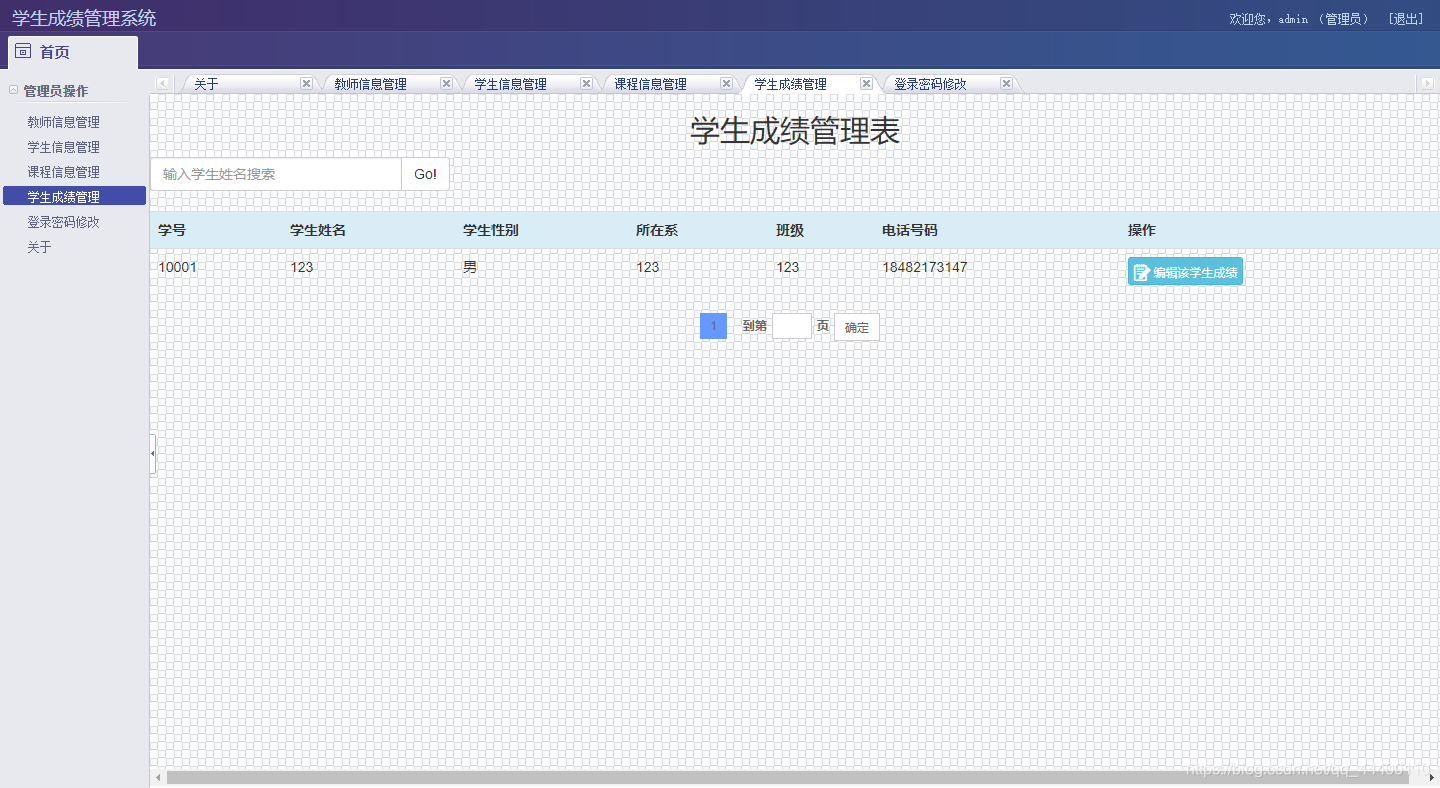
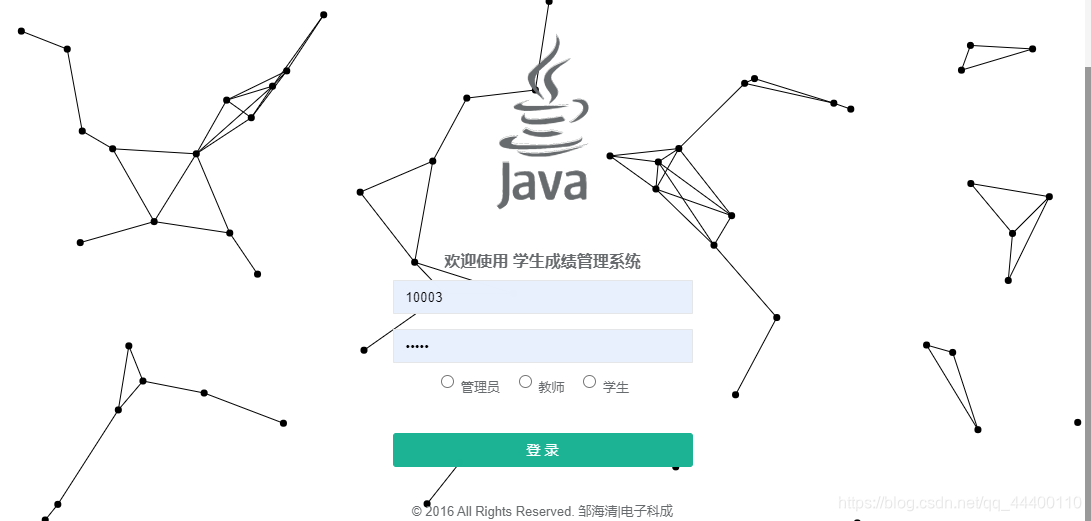

。。。。。
具体项目源码地址:
源码地址 : https://gitee.com/z77z/StuSystem
学生成绩管理系统(SSM+MySQL+JSP)的更多相关文章
- 学生成绩管理系统3.0(JSP+Servlet+MySQL)
源代码:戳这里! (2019-01-08 更新 惊讶于这么久了还有人看这个项目 于是把代码传到 github 了(辣鸡CSDN) https://github.com/G-lory/StudentAc ...
- JSP+SSM+Mysql实现的学生成绩管理系统
项目简介 项目来源于:https://gitee.com/z77z/StuSystem 本系统是基于JSP+SSM+Mysql实现的学生成绩管理系统.主要实现的功能有教师管理.学生管理.课程管理.学生 ...
- JSP+Servlet+JDBC+mysql实现的学生成绩管理系统
项目简介 项目来源于:https://gitee.com/zzdoreen/SSMS 本系统基于JSP+Servlet+Mysql 一个基于JSP+Servlet+Jdbc的学生成绩管理系统.涉及技术 ...
- 学生成绩管理系统 1.0(Java+MySql)
真难…… 数据库建立不会,中文编码不会,插入数据不会,删除不会…… Java读入数据不会……数据库连接不会…… 你也好意思说自己是学计算机的啊魂淡…… 我会慢慢写2.0,3.0版的……噗…… src/ ...
- Java课程设计—学生成绩管理系统(201521123005 杨雪莹)
一.团队课程设计博客链接 学生成绩管理系统 二.个人负责模块或任务说明 学生成绩录入 显示所有学生信息 显示各科平均成绩 显示学生成绩(按降序排序) 三.自己的代码提交记录截图 四.自己负责模块或任务 ...
- Java课程设计——学生成绩管理系统(201521123003 董美凤)
Java课程设计--学生成绩管理系统(201521123003 董美凤) 1.团队课程设计博客链接 学生成绩管理系统博客链接 2.个人负责模块或任务说明 信息修改 密码修改 部分界面设计 3.自己的代 ...
- Java项目:学生成绩管理系统(二)
学生成绩管理系统(二):项目介绍 一.设计要求: 1.1 简单的图形界面登录功能. 1.2 对数据库的的信息的查询功能. 1.3 对数据库的的信息的修改功能. 1.4 对数据库的的信息的删除功能. 1 ...
- Java项目:学生成绩管理系统(一)
学生成绩管理系统(一) 项目名称:学生成绩管理系统 项目需求分析(Need 需求): (1)该系统的用户分为教师和学生.教师的功能有:管理某一学生或课程的信息以及成绩,包括增.删.查.报表打印等:学生 ...
- 学生成绩管理系统[C]
#include<stdio.h> #include<stdlib.h> #include<string.h> #include<conio.h> #d ...
随机推荐
- Python Tuple(元组) max()方法
描述 Python 元组 max() 函数返回元组中元素最大值.高佣联盟 www.cgewang.com 语法 max()方法语法: max(tuple) 参数 tuple -- 指定的元组. 返回值 ...
- Pintech品致-高压放大器
pintech品致推出的HA-520(200KHz,500Vp-p)高压放大器真的是实用的高电压信号放大器, 体积小,轻便及简易的操作, 高电压输出(800Vp-p)等优点.连续输出电流量最大值达 ...
- Android SQLite轻量级数据库的删除和查找操作
今天主要是补充昨天的内容,本打算合成一章的,但是毕竟一天一天的内容写习惯了. 就这样继续昨天的,昨天只讲了创建以及增加和查询, 其实用法都差不多,今天学长也是在原有的基础上写的,还顺便融合了Share ...
- Android Studio--Activity实现跳转功能
首先,完成一个布局文件,名字就叫做activity_text_view.xml <?xml version="1.0" encoding="utf-8"? ...
- 16、Java中级进阶 面向对象 封装
1.封装概述 封装可以被认为是一个保护屏障,将类的某些信息隐藏在类内部,不允许外部程序直接访问,而是通过类提供的方法来实现对隐藏信息的操作访问,可以有效的防止该类的代码和数据被其他类随意访问. 要访问 ...
- 微信公众号怎么发PDF文件?
微信公众号怎么发PDF文件? 我们都知道创建一个微信公众号,在公众号中发布一些文章是非常简单的,但公众号添加附件下载的功能却被限制,如今可以使用小程序“微附件”进行在公众号中添加附件. 以下是公众 ...
- IndexFlatL2、IndexIVFFlat、IndexIVFPQ三种索引方式示例
上文针对Faiss安装和一些原理做了简单说明,本文针对标题所列三种索引方式进行编码验证. 首先生成数据集,这里采用100万条数据,每条50维,生成数据做本地化保存,代码如下: import numpy ...
- 最新版CentOS8系统安装和基本配置
一.Centos8新版简介 Redhat公司在2019年5月推出了rhel8,年底推出了centos8,紧接着也会把相关的技术认证完全转换为新平台. 阿里云.华为云目前也已推出centos8的公共镜像 ...
- 9个常用ES6特性归纳(一般用这些就够了)
ECMAScript 6.0(以下简称 ES6)是 JavaScript 语言的下一代标准,已经在 2015 年 6 月正式发布了.它的目标,是使得 JavaScript 语言可以用来编写复杂的大型应 ...
- Kubernetes用Helm安装Ingress并踩一下使用的坑
1 前言 欢迎访问南瓜慢说 www.pkslow.com获取更多精彩文章! Ingress是Kubernetes一个非常重要的Controller,它类似一个路由转发的组件,可以让外界访问Kubern ...