
SpringCloud系列之Nacos+Dubbo+Seata应用篇
前言
本文接上篇文章《SpringCloud系列之Nacos+Dubbo应用篇》继续展开,本次在原先集成Nacos和Dubbo基础上增加分布式事务Seata组件,之前在《SpringCloud系列之集成分布式事务Seata应用篇》中也提及到Seata的集成,只不过原先Seata使用都是基于“file”展开,在本篇中将介绍如何基于nacos进行配置以及Dubbo和Seata的集成验证。
项目版本
spring-boot.version:2.2.5.RELEASE
spring-cloud.version:Hoxton.SR3
nacos.version:1.3.2
dubbo.version:2.6.9/2.7.6
seata.version:1.3.0
关注本文末尾微信公众号,回复“666”获取常用开发工具包,内含常用开发组件(Nacos,Seata等),节省翻墙下载时间。
项目说明
项目模块说明如下:
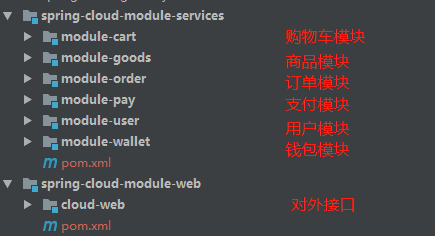
前端请求接口请求cloud-web模块保留接口,从而调用相应业务微服务模块,执行业务逻辑后响应前端请求。
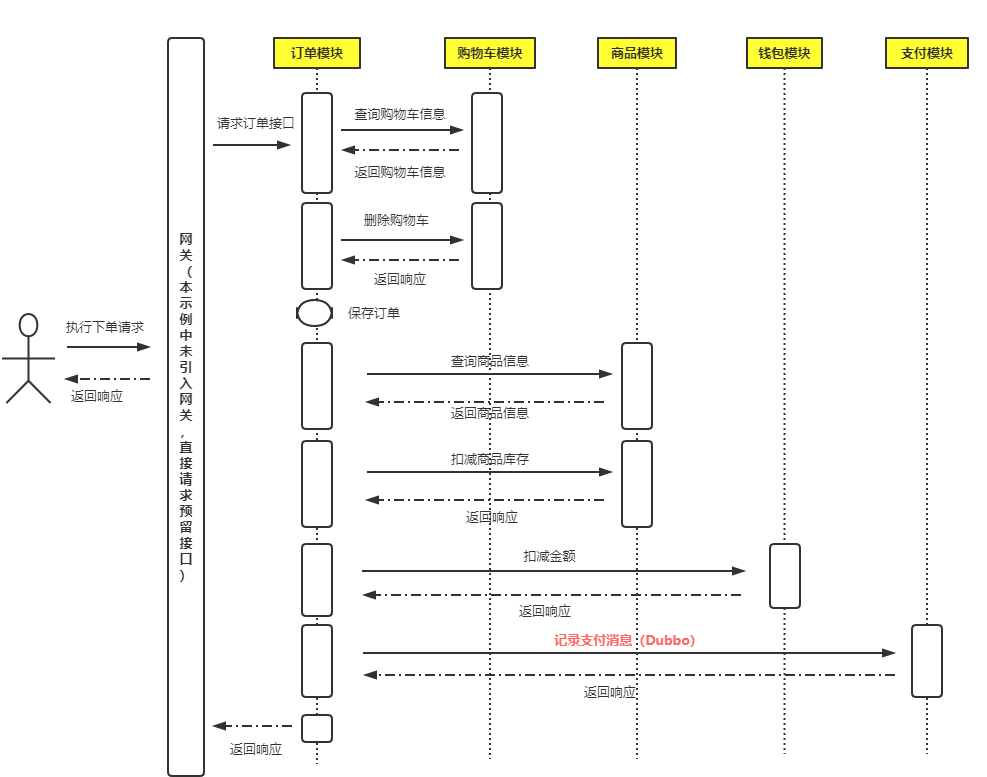
支付模块对外提供Dubbo服务,其余服务采用Feign进行通讯,用户模块示例中未涉及相关业务调用。
Dubbo 2.6.x 和 Dubbo 2.7.x 除了依赖不一样,其余配置项基本一样,这边就不再单独进行区分说明,详情请查阅本文文末项目源码,有进行区分说明。
Nacos服务
Nacos服务端部署请查阅《SpringCloud系列之Nacos应用篇》
Seata服务
进入Seata配置目录下,编辑registry.conf配置文件,将registry配置项中type配置项配置成"nacos",并配置nacos相关配置,具体如下
registry {

  # file 、nacos 、eureka、redis、zk、consul、etcd3、sofa

  type = "nacos"

  nacos {

    application = "seata-server"

    serverAddr = "127.0.0.1:8848"

    group = "SEATA_GROUP"

    namespace = "public"

    cluster = "default"

    username = ""

    password = ""

  }

}
配置完registry配置项后将config配置项也配置成“nacos”,具体如下
config {

  # file、nacos 、apollo、zk、consul、etcd3

  type = "nacos"

  nacos {

    serverAddr = "127.0.0.1:8848"

    namespace = "public"

    group = "SEATA_GROUP"

    username = ""

    password = ""

  }

}
调整完后启动Seata服务即可在Nacos后台看到已注册的服务,如下图

订单模块
其余模块本次未进行任何调整,只在订单模块中增加Dubbo相关配置
部分pom.xml如下,完整信息请查阅本文文末项目源码
pom.xml
        <!--nacos discovery-->

        <dependency>

            <groupId>com.alibaba.cloud</groupId>

            <artifactId>spring-cloud-starter-alibaba-nacos-discovery</artifactId>

            <exclusions>

                <exclusion>

                    <groupId>com.alibaba.nacos</groupId>

                    <artifactId>nacos-client</artifactId>

                </exclusion>

            </exclusions>

        </dependency>

        <!--nacos config-->

        <dependency>

            <groupId>com.alibaba.cloud</groupId>

            <artifactId>spring-cloud-starter-alibaba-nacos-config</artifactId>

            <exclusions>

                <exclusion>

                    <groupId>com.alibaba.nacos</groupId>

                    <artifactId>nacos-client</artifactId>

                </exclusion>

            </exclusions>

        </dependency>

        <!--dubbo-->

        <dependency>

            <groupId>com.alibaba.boot</groupId>

            <artifactId>dubbo-spring-boot-starter</artifactId>

            <version>0.2.1.RELEASE</version>

        </dependency>

        <dependency>

            <groupId>com.alibaba</groupId>

            <artifactId>dubbo</artifactId>

            <version>2.6.9</version>

        </dependency>

        <!--dubbo nacos-->

        <dependency>

            <groupId>com.alibaba</groupId>

            <artifactId>dubbo-registry-nacos</artifactId>

            <version>2.6.7</version>

            <exclusions>

                <exclusion>

                    <groupId>com.alibaba.nacos</groupId>

                    <artifactId>nacos-client</artifactId>

                </exclusion>

            </exclusions>

        </dependency>

        <!--nacos-->

        <dependency>

            <groupId>com.alibaba.nacos</groupId>

            <artifactId>nacos-client</artifactId>

            <version>1.3.2</version>

        </dependency>

        <dependency>

            <groupId>io.netty</groupId>

            <artifactId>netty-all</artifactId>

            <version>4.1.31.Final</version>

        </dependency>

        <!-- seata-->

        <dependency>

            <groupId>com.alibaba.cloud</groupId>

            <artifactId>spring-cloud-alibaba-seata</artifactId>

            <version>2.2.0.RELEASE</version>

            <exclusions>

                <exclusion>

                    <groupId>io.seata</groupId>

                    <artifactId>seata-spring-boot-starter</artifactId>

                </exclusion>

            </exclusions>

        </dependency>

        <dependency>

            <groupId>io.seata</groupId>

            <artifactId>seata-spring-boot-starter</artifactId>

            <version>1.3.0</version>

        </dependency>
application.properties
dubbo.application.name=order-service

# dubbo扫描包路径

dubbo.scan.base-packages=com.chinawu.cloud.order.service

# dubbo协议

dubbo.protocol.name=dubbo

# 随机端口

dubbo.protocol.port=-1

# zookeeper地址

dubbo.registry.address=nacos://127.0.0.1:8848

spring.main.allow-bean-definition-overriding=true
OrderService.java
@RestController

public class OrderService implements OrderFacade {

    @Autowired

    private TbOrderMapper tbOrderMapper;

    @Autowired

    private CartFacade cartFacade;

    @Autowired

    private GoodsFacade goodsFacade;

    @Autowired

    private WalletFacade walletFacade;

    // Dubbo服务消费

    @Reference(check = false)

    DPayFacade dPayFacade;

    /**

     * <p >

     * 功能:新增订单

     * </p>

     * @param cartId 购物车ID

     * @author wuyubin

     * @date  2020年05月22日

     * @return

     */

    @Override

    public void addOrder(Long cartId) {

        CartDTO cart = cartFacade.getCartById(cartId);

        TbOrder order = new TbOrder();

        order.setUserId(cart.getUserId());

        order.setGoodsId(cart.getGoodsId());

        order.setOrderNo(String.valueOf(System.currentTimeMillis()));

        order.setCreateTime(System.currentTimeMillis());

        order.setUpdateTime(order.getCreateTime());

        order.setIsDeleted(Byte.valueOf("0"));

        // 新增订单

        tbOrderMapper.insert(order);

        // 删除购物车(Feign)

        cartFacade.deleteCartById(cartId);

        GoodsDTO goods = goodsFacade.getByGoodsId(cart.getGoodsId());

        // 扣减库存(Feign)

        goodsFacade.substractStock(goods.getId());

        // 扣减金额(Feign)

        walletFacade.substractMoney(cart.getUserId(),goods.getMoney());

        // 记录支付消息(Dubbo调用)

        dPayFacade.goToPay("wuyubin");

        throw new RuntimeException();

    }

}
新增引用支付模块Dubbo服务,dPayFacade.goToPay("wuyubin");
支付模块
支付模块在原先基础上增加Seata依赖,部分pom信息如下
pom.xml
        <dependency>

            <groupId>com.alibaba.cloud</groupId>

            <artifactId>spring-cloud-alibaba-seata</artifactId>

            <version>2.2.0.RELEASE</version>

            <exclusions>

                <exclusion>

                    <groupId>io.seata</groupId>

                    <artifactId>seata-spring-boot-starter</artifactId>

                </exclusion>

            </exclusions>

        </dependency>

        <dependency>

            <groupId>io.seata</groupId>

            <artifactId>seata-spring-boot-starter</artifactId>

            <version>1.3.0</version>

        </dependency>
application.properties
# seata配置

seata.enabled=true

#seata.excludes-for-auto-proxying=firstClassNameForExclude,secondClassNameForExclude

seata.application-id=pay-service

# 事务分组名

seata.tx-service-group=pay-service_tx_group

# 默认开启数据源自动代理

seata.enable-auto-data-source-proxy=true

seata.use-jdk-proxy=false

seata.config.type=nacos

seata.registry.type=nacos

seata.registry.nacos.server-addr=127.0.0.1:8848
DPayService.java
@Service

public class DPayService implements DPayFacade {

    @Autowired

    TbPayMapper tbPayMapper;

    @Override

    public String goToPay(String userName) {

        String xid = RootContext.getXID();

        System.out.println("pay.seata.xid:"+xid);

        System.out.println("dubbo.method:goToPay request "+userName);

        TbPay pay = new TbPay();

        pay.setMoney(new BigDecimal("5"));

        pay.setStatus(Byte.valueOf("1"));

        tbPayMapper.insert(pay);

        return "dubbo.method:goToPay result:" + userName + " pay success";

    }

}
调整完启动支付模块后,启动过程中发现一行报错日志,信息如下
no available service 'null' found, please make sure registry config correct
其余正常,但心里还是有点担忧,其他服务模块启动后试一下再说
http://localhost:9100/order/add?cartId=1
请求后果然在支付模块报如下错误
Caused by: io.seata.core.exception.RmTransactionException: Runtime
Caused by: io.seata.common.exception.FrameworkException: No available service
看信息应该是缺少服务,后来经过一点点排查后,最终确认是这一行配置项导致,将
seata.config.type=nacos调整至file时并把这行配置项打开即可(用nacos时其余seata配置项都注释掉了)
seata.service.vgroup-mapping.pay-service_tx_group=default
先了解下该行配置项主要作用,原来是靠此配置项用于查询TC服务的。

那是不是只要添加这行配置就可以了呢,重新将seata配置信息调整至“nacos”,根据命名规则尝试创建以下配置项
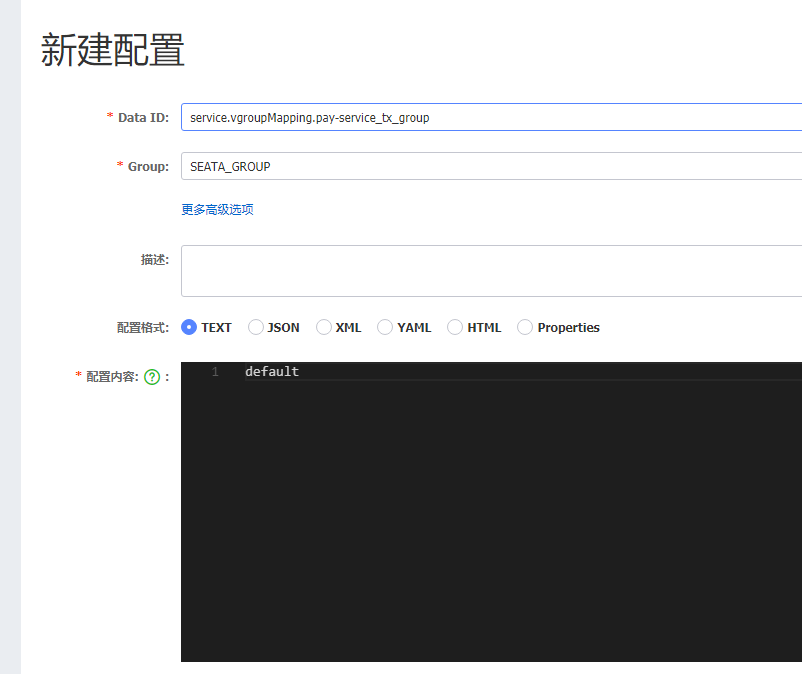
配置创建成功后,在支付模块后台立马看到有日志输出
2020-09-14 15:58:43.284 ERROR 28292 --- [eoutChecker_2_1] i.s.c.r.netty.NettyClientChannelManager  : no available service 'null' found, please make sure registry config correct

2020-09-14 15:58:53.252 ERROR 28292 --- [eoutChecker_1_1] i.s.c.r.netty.NettyClientChannelManager  : no available service 'null' found, please make sure registry config correct

2020-09-14 15:58:53.285 ERROR 28292 --- [eoutChecker_2_1] i.s.c.r.netty.NettyClientChannelManager  : no available service 'null' found, please make sure registry config correct

2020-09-14 15:59:02.853  INFO 28292 --- [-localhost_8848] c.a.n.client.config.impl.ClientWorker    : [fixed-localhost_8848] [polling-resp] config changed. dataId=service.vgroupMapping.pay-service_tx_group, group=SEATA_GROUP

2020-09-14 15:59:02.853  INFO 28292 --- [-localhost_8848] c.a.n.client.config.impl.ClientWorker    : get changedGroupKeys:[service.vgroupMapping.pay-service_tx_group+SEATA_GROUP]

2020-09-14 15:59:02.857  INFO 28292 --- [-localhost_8848] c.a.n.client.config.impl.ClientWorker    : [fixed-localhost_8848] [data-received] dataId=service.vgroupMapping.pay-service_tx_group, group=SEATA_GROUP, tenant=null, md5=c21f969b5f03d33d43e04f8f136e7682, content=default, type=text

2020-09-14 15:59:02.857  INFO 28292 --- [-localhost_8848] c.a.nacos.client.config.impl.CacheData   : [fixed-localhost_8848] [notify-context] dataId=service.vgroupMapping.pay-service_tx_group, group=SEATA_GROUP, md5=c21f969b5f03d33d43e04f8f136e7682

2020-09-14 15:59:02.858  INFO 28292 --- [-localhost_8848] c.a.nacos.client.config.impl.CacheData   : [fixed-localhost_8848] [notify-ok] dataId=service.vgroupMapping.pay-service_tx_group, group=SEATA_GROUP, md5=c21f969b5f03d33d43e04f8f136e7682, listener=io.seata.config.nacos.NacosConfiguration$NacosListener@37dd83b6

2020-09-14 15:59:02.858  INFO 28292 --- [-localhost_8848] c.a.nacos.client.config.impl.CacheData   : [fixed-localhost_8848] [notify-listener] time cost=1ms in ClientWorker, dataId=service.vgroupMapping.pay-service_tx_group, group=SEATA_GROUP, md5=c21f969b5f03d33d43e04f8f136e7682, listener=io.seata.config.nacos.NacosConfiguration$NacosListener@37dd83b6

2020-09-14 15:59:03.253  INFO 28292 --- [eoutChecker_1_1] com.alibaba.nacos.client.naming          : new ips(1) service: SEATA_GROUP@@seata-server@@default -> [{"instanceId":"192.168.2.241#8091#default#SEATA_GROUP@@seata-server","ip":"192.168.2.241","port":8091,"weight":1.0,"healthy":true,"enabled":true,"ephemeral":true,"clusterName":"default","serviceName":"SEATA_GROUP@@seata-server","metadata":{},"ipDeleteTimeout":30000,"instanceHeartBeatInterval":5000,"instanceIdGenerator":"simple","instanceHeartBeatTimeOut":15000}]

2020-09-14 15:59:03.254  INFO 28292 --- [eoutChecker_1_1] com.alibaba.nacos.client.naming          : current ips:(1) service: SEATA_GROUP@@seata-server@@default -> [{"instanceId":"192.168.2.241#8091#default#SEATA_GROUP@@seata-server","ip":"192.168.2.241","port":8091,"weight":1.0,"healthy":true,"enabled":true,"ephemeral":true,"clusterName":"default","serviceName":"SEATA_GROUP@@seata-server","metadata":{},"ipDeleteTimeout":30000,"instanceHeartBeatInterval":5000,"instanceIdGenerator":"simple","instanceHeartBeatTimeOut":15000}]

2020-09-14 15:59:03.254  INFO 28292 --- [eoutChecker_1_1] com.alibaba.nacos.client.naming          : [LISTENER] adding SEATA_GROUP@@seata-server with default to listener map

2020-09-14 15:59:03.256  INFO 28292 --- [eoutChecker_1_1] i.s.c.r.netty.NettyClientChannelManager  : will connect to 192.168.2.241:8091

2020-09-14 15:59:03.258  INFO 28292 --- [eoutChecker_1_1] i.s.core.rpc.netty.NettyPoolableFactory  : NettyPool create channel to transactionRole:TMROLE,address:192.168.2.241:8091,msg:< RegisterTMRequest{applicationId='pay-service', transactionServiceGroup='pay-service_tx_group'} >

2020-09-14 15:59:03.281  INFO 28292 --- [eoutChecker_2_1] i.s.c.r.netty.NettyClientChannelManager  : will connect to 192.168.2.241:8091

2020-09-14 15:59:03.281  INFO 28292 --- [eoutChecker_2_1] i.s.c.rpc.netty.RmNettyRemotingClient    : RM will register :jdbc:mysql://127.0.0.1:3306/spring-cloud

2020-09-14 15:59:03.283  INFO 28292 --- [eoutChecker_2_1] i.s.core.rpc.netty.NettyPoolableFactory  : NettyPool create channel to transactionRole:RMROLE,address:192.168.2.241:8091,msg:< RegisterRMRequest{resourceIds='jdbc:mysql://127.0.0.1:3306/spring-cloud', applicationId='pay-service', transactionServiceGroup='pay-service_tx_group'} >

2020-09-14 15:59:03.305  INFO 28292 --- [eoutChecker_2_1] i.s.c.rpc.netty.RmNettyRemotingClient    : register RM success. client version:1.3.0, server version:1.3.0,channel:[id: 0x15ef339d, L:/192.168.2.241:64550 - R:/192.168.2.241:8091]

2020-09-14 15:59:03.305  INFO 28292 --- [eoutChecker_1_1] i.s.c.rpc.netty.TmNettyRemotingClient    : register TM success. client version:1.3.0, server version:1.3.0,channel:[id: 0xd4e407be, L:/192.168.2.241:64548 - R:/192.168.2.241:8091]

2020-09-14 15:59:03.313  INFO 28292 --- [eoutChecker_1_1] i.s.core.rpc.netty.NettyPoolableFactory  : register success, cost 39 ms, version:1.3.0,role:TMROLE,channel:[id: 0xd4e407be, L:/192.168.2.241:64548 - R:/192.168.2.241:8091]

2020-09-14 15:59:03.313  INFO 28292 --- [eoutChecker_2_1] i.s.core.rpc.netty.NettyPoolableFactory  : register success, cost 26 ms, version:1.3.0,role:RMROLE,channel:[id: 0x15ef339d, L:/192.168.2.241:64550 - R:/192.168.2.241:8091]
感觉有戏,再次请求接口,果然不再报错,提示事务回滚成功,其余模块也提示回滚成功,另外数据也正常,至此就可以使用啦。
pay.seata.xid:192.168.2.241:8091:48803259719028736

dubbo.method:goToPay request wuyubin

2020-09-14 16:06:44.006  INFO 28292 --- [ch_RMROLE_1_1_8] i.s.c.r.p.c.RmBranchRollbackProcessor    : rm handle branch rollback process:xid=192.168.2.241:8091:48803259719028736,branchId=48803260146847744,branchType=AT,resourceId=jdbc:mysql://127.0.0.1:3306/spring-cloud,applicationData=null

2020-09-14 16:06:44.010  INFO 28292 --- [ch_RMROLE_1_1_8] io.seata.rm.AbstractRMHandler            : Branch Rollbacking: 192.168.2.241:8091:48803259719028736 48803260146847744 jdbc:mysql://127.0.0.1:3306/spring-cloud

2020-09-14 16:06:44.061  INFO 28292 --- [ch_RMROLE_1_1_8] i.s.r.d.undo.AbstractUndoLogManager      : xid 192.168.2.241:8091:48803259719028736 branch 48803260146847744, undo_log deleted with GlobalFinished

2020-09-14 16:06:44.063  INFO 28292 --- [ch_RMROLE_1_1_8] io.seata.rm.AbstractRMHandler            : Branch Rollbacked result: PhaseTwo_Rollbacked
参考资料
Seata事务分组专题
源码分析Seata-XID传递 Dubbo篇
系列文章
SpringCloud系列之配置中心(Config)使用说明
SpringCloud系列之服务注册发现(Eureka)应用篇

SpringCloud系列之Nacos+Dubbo+Seata应用篇的更多相关文章
- SpringCloud系列之Nacos+Dubbo应用篇
目录 前言 项目版本 项目说明 项目结构 集成Dubbo2.6.x 支付模块 用户模块 集成Dubbo2.7.x 支付模块 用户模块 测试验证 参考资料 系列文章 前言 本文在前篇文章<Spri ...
- SpringCloud系列之Nacos应用篇
前言 原先项目是以SpringConfig作为项目配置中心组件,Eureka作为服务注册发现组件,基本上就是SpringCloud全家桶,Eureka已经停更,所以前期调研可替换方案,主流替换方案有C ...
- SpringCloud系列之集成Dubbo应用篇
目录 前言 项目版本 项目说明 集成Dubbo 2.6.x 新项目模块 老项目模块 集成Dubbo 2.7.x 新项目模块 老项目模块 参考资料 系列文章 前言 SpringCloud系列开篇文章就说 ...
- SpringCloud系列之集成分布式事务Seata应用篇
目录 前言 项目版本 项目说明 Seata服务端部署 Seata客户端集成 cloud-web module-order module-cart module-goods module-wallet ...
- SpringCloud系列之网关(Gateway)应用篇
@ 目录 前言 项目版本 网关访问 鉴权配置 限流配置 前言 由于项目采用了微服务架构,业务功能都在相应各自的模块中,每个业务模块都是以独立的项目运行着,对外提供各自的服务接口,如没有类似网关之类组件 ...
- SpringCloud系列——Bus 消息总线
前言 SpringCloud Bus使用轻量级消息代理将分布式系统的节点连接起来.然后可以使用此代理广播状态更改(例如配置更改)或其他管理指令.本文结合RabbitMQ+GitHub的Webhook实 ...
- Nacos系列:Nacos的三种部署模式
三种部署模式 Nacos支持三种部署模式 1.单机模式:可用于测试和单机使用,生产环境切忌使用单机模式(满足不了高可用) 2.集群模式:可用于生产环境,确保高可用 3.多集群模式:可用于多数据中心场景 ...
- SpringCloud系列-整合Hystrix的两种方式
Hystrix [hɪst'rɪks],中文含义是豪猪,因其背上长满棘刺,从而拥有了自我保护的能力.本文所说的Hystrix是Netflix开源的一款容错框架,同样具有自我保护能力. 本文目录 一.H ...
- SpringBoot系列之集成Dubbo的方式
SpringBoot系列之集成Dubbo的方式 本博客介绍Springboot框架集成Dubbo实现微服务的3种常用方式,对于Dubbo知识不是很熟悉的,请先学习我上一篇博客:SpringBoot系列 ...
随机推荐
- 一步一步讲解如何安装Ubuntu18.04,零基础
在一块空的硬盘上安装Ubuntu是最为简单的,我接下将介绍如何进行安装 1.准备 Ubuntu镜像,b( ̄▽ ̄)d 这个是肯定yaod Rufus,一个写入镜像的工具' U盘一个 2.开始 2.1.写 ...
- mongodb在win10下的安装和配置
一.准备 下载mongodb https://www.mongodb.com/download-center/community 该实例中使用的是:mongodb-win32-x86_64-2008p ...
- 牛客网PAT练兵场-科学计数法
题目地址:https://www.nowcoder.com/pat/6/problem/4050 题解:模拟题 /** * Copyright(c) * All rights reserved. * ...
- MS建模mmt
一.流程:1.定义好每个原子力场类型:Edit Sets(分组) 2.加H(一般是仅与Al-O八面体中的Al相连的O原子).给H分组 3.“make P1”.校核化学式(正确与否) 4.扩成超晶胞(N ...
- Java并发必知必会第三弹:用积木讲解ABA原理
Java并发必知必会第三弹:用积木讲解ABA原理 可落地的 Spring Cloud项目:PassJava 本篇主要内容如下 一.背景 上一节我们讲了程序员深夜惨遭老婆鄙视,原因竟是CAS原理太简单? ...
- 作为一个Java程序员连简单的分页功能都会写,你好意思嘛!
今天想说的就是能够在我们操作数据库的时候更简单的更高效的实现,现成的CRUD接口直接调用,方便快捷,不用再写复杂的sql,带吗简单易懂,话不多说上方法 1.Utils.java工具类中的方法 1 /* ...
- Orleans 知多少 | Orleans 中文文档上线
Orleans 简介 Orleans是一个跨平台框架,用于构建健壮,可扩展的分布式应用程序 Orleans建立在.NET开发人员生产力的基础上,并将其带入了分布式应用程序的世界,例如云服务. Orle ...
- url_for函数——快速寻找url
我们已经知道,知道了url就可以找到对应的视图函数,那么现在问题来了,如果我们知道了视图函数,要怎么找到url呢?这时候我们就需要url_for函数了. # coding: utf-8from fla ...
- 3点带你快速学会Selenium工具的使用
(一)Selenium IDE Firefox的一个插件,有助于我们理解测试框架.在附加组件里搜索下载,一般搜的结果里前几个都不是,得点那个查看更多才行,找到这个: 安装以后浏览器工具栏会有: 安装好 ...
- Cookie:SameSite,防止CSRF攻击
前言 最近在本地调试时,发现请求接口提示“未登录”,通过分析HTTP请求报文发现未携带登录状态的Cookie: PS:登录状态Cookie名是TEST 再进一步分析,发现Cookie的属性SameSi ...