
SpringCloud系列之网关(Gateway)应用篇
@
前言
由于项目采用了微服务架构,业务功能都在相应各自的模块中,每个业务模块都是以独立的项目运行着,对外提供各自的服务接口,如没有类似网关之类组件的话,相应的鉴权,限流等功能实现起来不能够进行统一的配置和管理,有了网关后一切都是如此的优雅。刚好新项目中采用了SpringCloud Gateway组件作为网关,就记录下项目中常用的配置吧。
项目版本
spring-boot-version:2.2.5.RELEASE
spring-cloud.version:Hoxton.SR3
网关访问
示例项目还是延续SpringCloud系列原先的示例代码,引入网关仅仅只需新增spring-cloud-gateway项目即可。
核心pom.xml(详细信息查看示例源码,在文章末尾)
<dependency>

   <groupId>org.springframework.cloud</groupId>

    <artifactId>spring-cloud-starter-gateway</artifactId>

</dependency>
bootstrap.yml
server:

  port: 9005

spring:

  application:

    name: springcloud-gateway-service

  cloud:

    config:

      discovery:

        enabled: true

        service-id: config-server

      profile: dev

      label: master

    gateway:

      enabled: true  #开启网关

      discovery:

        locator:

          enabled: true #开启自动路由,以服务id建立路由,服务id默认大写

          lower-case-service-id: true #服务id设置为小写

eureka:

  client:

    service-url:

      defaultZone: http://localhost:9003/eureka/
ApiGatewayApplication.java
@EnableDiscoveryClient

@SpringBootApplication

public class ApiGatewayApplication {

    public static void main(String[] args) {

        SpringApplication.run(ApiGatewayApplication.class, args);

    }

}
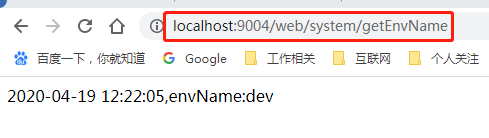
访问原先spring-cloud-system-server模块对外提供的接口
http://localhost:9004/web/system/getEnvName
通过网关进行访问
http://localhost:9005/system-server/web/system/getEnvName
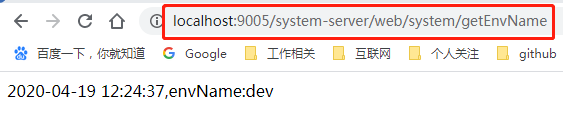
请求能正常返回,那就说明网关组件已集成进来了,是不是很简单呢,一行配置项就搞定了,便于展现这边采用properties配置方式说明
spring.cloud.gateway.discovery.locator.enabled=true
到此网关的基础配置应用已完成,通过网关访问的请求路径格式如下
http://网关地址:网关端口/各自服务id/各自服务对外提供的URL访问
鉴权配置
这边将spring-cloud-system-server模块引入spring security安全认证组件,上代码。
pom.xml
<dependency>

    <groupId>org.springframework.boot</groupId>

    <artifactId>spring-boot-starter-security</artifactId>

</dependency>
application.properties
spring.security.user.name=test

spring.security.user.password=123456
服务模块调整完后,重新启动该模块,访问对外请求接口,出现认证登录界面说明配置成功。
http://localhost:9004/web/system/getEnvName
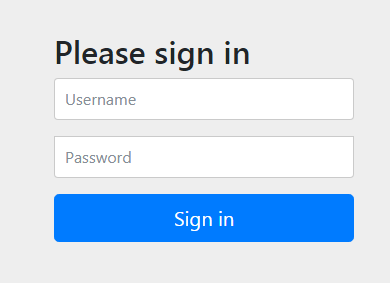
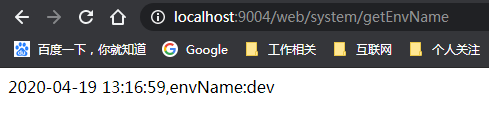
输入上述配置项中配置的用户名和密码后,接口请求返回正常。
请求网关地址,访问服务接口按下回车键时会跳转至服务项目认证页面,如下
http://localhost:9005/system-server/web/system/getEnvName
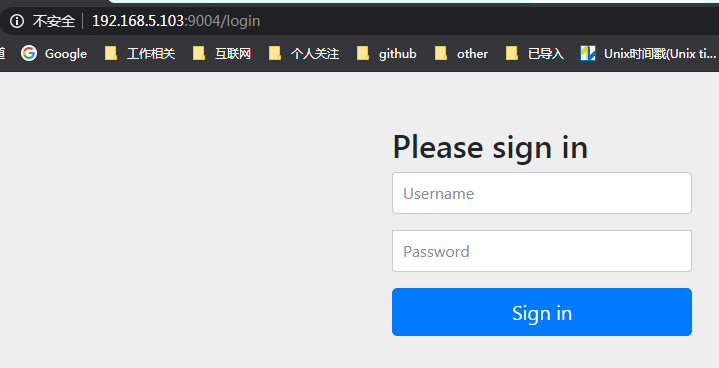
接下来对网关模块进行相应调整
bootstrap.yml
spring:

  application:

    name: springcloud-gateway-service

  security:

    user:

      name: test

      password: 123456
新增安全认证过滤类
SecurityBasicAuthorizationFilter.java
@Component

public class SecurityBasicAuthorizationFilter implements GlobalFilter, Ordered {

    @Value("${spring.security.user.name}")

    private String username;

    @Value("${spring.security.user.password}")

    private String password;

    public Mono<Void> filter(ServerWebExchange exchange, GatewayFilterChain chain) {

        String auth = username.concat(":").concat(password);

        String encodedAuth = new sun.misc.BASE64Encoder().encode(auth.getBytes(Charset.forName("US-ASCII")));

        String authHeader = "Basic " +encodedAuth;

        //headers中增加授权信息

        ServerHttpRequest serverHttpRequest = exchange.getRequest().mutate().header("Authorization", authHeader).build();

        ServerWebExchange build = exchange.mutate().request(serverHttpRequest).build();

        return chain.filter(build);

    }

    /**

     * 优先级

     * 数字越大优先级越低

     * @return

     */

    public int getOrder() {

        return -1;

    }

}
重启网关项目,重新访问服务地址,返回正常数据。这边说明下在测试时最好新开一个无痕窗口或者清理浏览器缓存后再进行测试,不然因会话缓存会导致安全认证没有生效的假象。
http://localhost:9005/system-server/web/system/getEnvName
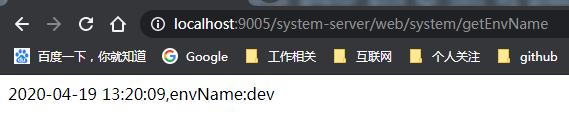
限流配置
SpringCloud Gateway自带限流功能,但是基于redis,这边简单演示下,项目中没有使用而是使用了阿里开源的sentinel,后续将介绍下集成sentinel组件。
pom.xml
<dependency>

    <groupId>org.springframework.boot</groupId>

    <artifactId>spring-boot-starter-data-redis-reactive</artifactId>

</dependency>
bootstrap.yml
spring:

  cloud:

    gateway:

      enabled: true  #开启网关

      discovery:

        locator:

          enabled: true #开启自动路由,以服务id建立路由,服务id默认大写

          lower-case-service-id: true #服务id设置为小写

      routes:

        - id: baidu_route

          uri: https://www.baidu.com/

          predicates:

          - Path=/baidu/**

          filters:

            - name: RequestRateLimiter

              args:

                key-resolver: "#{@apiKeyResolver}"

                redis-rate-limiter.replenishRate: 1 #允许每秒处理多少个请求

                redis-rate-limiter.burstCapacity: 5 #允许在一秒钟内完成的最大请求数

   redis:

    host: 192.168.28.142

    pool: 6379

    password: password

    database: 1
RequestRateLimiterConfig.java
@Configuration

public class RequestRateLimiterConfig {

    @Bean

    @Primary

    public KeyResolver apiKeyResolver() {

        //URL限流,超出限流返回429状态

        return exchange -> Mono.just(exchange.getRequest().getPath().toString());

    }

}
重新启动网关项目,访问如下请求地址,会请求跳转至百度首页,目前配置项配置为1s内请求数5次,超过5次就会触发限流,返回429状态码,多次刷新就会出现如下页面
http://localhost:9005/baidu/test
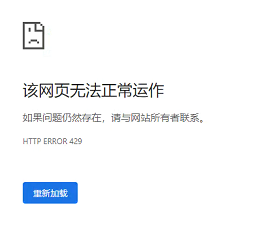
通过monitor命令实时查看redis信息

本次网关项目目录结构
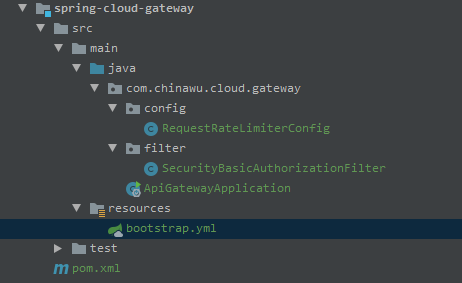
同系列文章
1-SpringCloud系列之配置中心(Config)使用说明
2-SpringCloud系列之服务注册发现(Eureka)应用篇
示例源码
SpringCloud系列之网关(Gateway)应用篇的更多相关文章
- SpringCloud系列之集成Dubbo应用篇
目录 前言 项目版本 项目说明 集成Dubbo 2.6.x 新项目模块 老项目模块 集成Dubbo 2.7.x 新项目模块 老项目模块 参考资料 系列文章 前言 SpringCloud系列开篇文章就说 ...
- SpringCloud系列之Nacos+Dubbo应用篇
目录 前言 项目版本 项目说明 项目结构 集成Dubbo2.6.x 支付模块 用户模块 集成Dubbo2.7.x 支付模块 用户模块 测试验证 参考资料 系列文章 前言 本文在前篇文章<Spri ...
- SpringCloud之服务网关Gateway,入门+实操
SpringCloudAlibaba微服务实战教程系列 Spring Cloud 微服务架构学习记录与示例 一. GateWay简介 Spring Cloud GateWay是Spring Cloud ...
- SpringCloud系列之集成分布式事务Seata应用篇
目录 前言 项目版本 项目说明 Seata服务端部署 Seata客户端集成 cloud-web module-order module-cart module-goods module-wallet ...
- SpringCloud系列之Nacos应用篇
前言 原先项目是以SpringConfig作为项目配置中心组件,Eureka作为服务注册发现组件,基本上就是SpringCloud全家桶,Eureka已经停更,所以前期调研可替换方案,主流替换方案有C ...
- SpringCloud系列之Nacos+Dubbo+Seata应用篇
目录 前言 项目版本 项目说明 Nacos服务 Seata服务 订单模块 支付模块 参考资料 系列文章 前言 本文接上篇文章<SpringCloud系列之Nacos+Dubbo应用篇>继续 ...
- SpringCloud系列之API网关(Gateway)服务Zuul
1.什么是API网关 API网关是所有请求的入口,承载了所有的流量,API Gateway是一个门户一样,也可以说是进入系统的唯一节点.这跟面向对象设计模式中的Facet模式很像.API Gatewa ...
- 跟我学SpringCloud | 第十篇:服务网关Zuul高级篇
SpringCloud系列教程 | 第十篇:服务网关Zuul高级篇 Springboot: 2.1.6.RELEASE SpringCloud: Greenwich.SR1 如无特殊说明,本系列教程全 ...
- 学习一下 SpringCloud (六)-- 注册中心与配置中心 Nacos、网关 Gateway
(1) 相关博文地址: 学习一下 SpringCloud (一)-- 从单体架构到微服务架构.代码拆分(maven 聚合): https://www.cnblogs.com/l-y-h/p/14105 ...
随机推荐
- M-Renamer方法名修改器,iOS项目方法名重构,Objective-C/Swift,代码模型预判,减少误改的机率,替换速度更快,可视化操作,傻瓜式操作,一键操作,引用处自动修改,马甲包的福音
M-Renamer M-Renamer(Method-Name-Renamer)类方法名修改器,采用链式解析头文件,代码模型预判,减少误改的机率,替换速度更快:可以解析整个项目大多数类的方法,可视化操 ...
- 曹工说Spring Boot源码(27)-- Spring的component-scan,光是include-filter属性的各种配置方式,就够玩半天了.md
写在前面的话 相关背景及资源: 曹工说Spring Boot源码(1)-- Bean Definition到底是什么,附spring思维导图分享 曹工说Spring Boot源码(2)-- Bean ...
- Building Applications with Force.com and VisualForce Dev 401-001(一):Introduction
Dev 401-001:Introduction Module Objectives1.Orient yourselves to the training location.2.Understan ...
- c++第一个程序测试-----c++每日笔记!
#include <iostream>int main(){ //std::cout << "Enter two number:" <<std: ...
- shell脚本中的case条件语句介绍和使用案例
#前言:这篇我们接着写shell的另外一个条件语句case,上篇讲解了if条件语句.case条件语句我们常用于实现系统服务启动脚本等场景,case条件语句也相当于if条件语句多分支结构,多个选择,ca ...
- SpringCloud服务的注册发现--------zookeeper实现服务与发现 + Ribbon实现客户端负载均衡
1,Eureka 闭源了,但是我们可以通过zookeeper实现注册中心的功能. zookeeper 是一个分布式协调工具,可以实现服务的注册和发现,配置中心,注册中心,消息中间件的功能 2,工具准备 ...
- Python python 函数参数:可变参数
# 可变参数 '''传入的参数数量是不确定的 ''' '''若是要计算几个数(未知)的平方和 ''' def cal(nums): sum = 0 for num in nums: sum = sum ...
- [vijos1162]波浪数
题目链接:https://www.vijos.org/p/1162 这题的解法我觉得可能是模拟吧,但是题的分类又是构造QAQ..... 不是很懂,所以我们把这个方法叫做奇技淫巧吧 这题的暴力思路就是针 ...
- Pytest系列(2) - assert断言详细使用
如果你还想从头学起Pytest,可以看看这个系列的文章哦! https://www.cnblogs.com/poloyy/category/1690628.html 前言 与unittest不同,py ...
- 面向对象编程基础(java)
面向对象编程基础 1.1 面向对象概述 在程序开发初期,大家使用的是结构化开发语言,也就是面向过程(opp),但随着市场需求剧增,软件的规模也越来越大,结构化语言的弊端也暴露出来. 开发周期无休止的拖 ...