
【Azure 存储服务】Python模块(azure.cosmosdb.table)直接对表存储(Storage Account Table)做操作示例
什么是表存储
Azure 表存储是一项用于在云中存储结构化 NoSQL 数据的服务,通过无结构化的设计提供键/属性存储。 因为表存储无固定的数据结构要求,因此可以很容易地随着应用程序需求的发展使数据适应存储。Azure 表存储可存储大量结构化数据。 该服务是一个 NoSQL 数据存储,接受来自 Azure 云内部和外部的通过验证的呼叫。 Azure 表最适合存储结构化非关系型数据。 表存储的常见用途包括:
- 存储 TB 量级的结构化数据,能够为 Web 规模应用程序提供服务
- 存储无需复杂联接、外键或存储过程,并且可以对其进行非规范化以实现快速访问的数据集
- 使用聚集索引快速查询数据
- 使用 OData 协议和 LINQ 查询以及 WCF 数据服务 .NET 库访问数据
可以使用表存储来存储和查询大型结构化非关系型数据集,并且表会随着需求的增加而扩展。表存储包含以下组件:
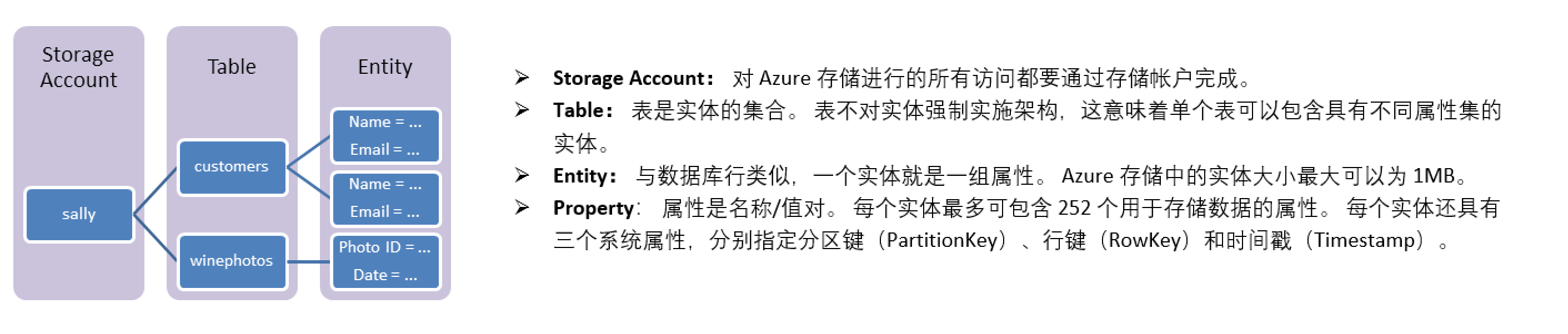
(内容来源于 Azure: https://docs.azure.cn/zh-cn/cosmos-db/table-storage-overview)
问题描述
是否有Python module可以直接对Storage Account Table(表存储)进行操作呢? 有的。在查询表存储的Python文档后,它使用的Python module于cosmosDB一样。在代码中引入azure.cosmosdb.table即可。
from azure.cosmosdb.table.tableservice import TableService

from azure.cosmosdb.table.models import Entity
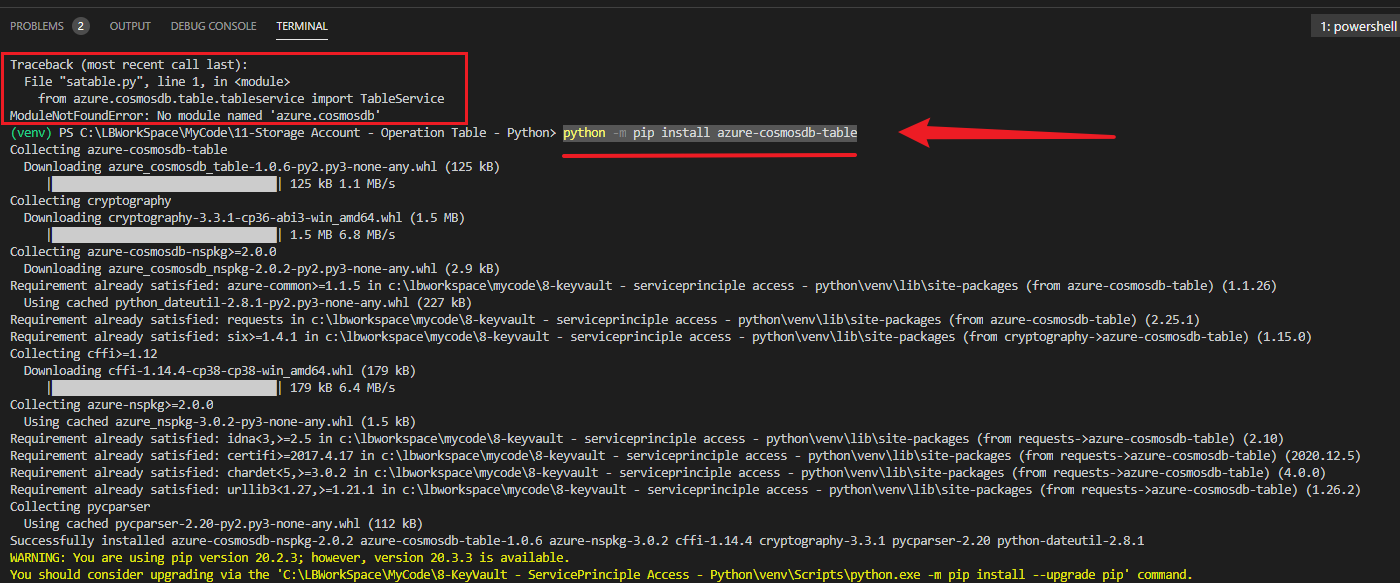
使用PIP安装azure-cosmosdb-table模块。在VS Code中执行: python -m pip install azure-cosmosdb-table
操作代码
通过 Python 开始使用 Azure 表存储和 Azure Cosmos DB 表 API
此示例介绍如何在常见的 Azure 表存储方案中使用用于 Python 的 Azure Cosmos DB 表 SDK。 该 SDK 的名称表示它适合与 Azure Cosmos DB 配合使用,但其实该 SDK 既适合与 Azure Cosmos DB 配合使用,也适合与 Azure 表存储配合使用,只不过每个服务具有唯一的终结点。 本文使用 Python 示例探索这些方案,以演示如何:
- 创建和删除表
- 插入和查询实体
- 修改实体
Python cosmosdb table模块中包含了对表的所有原子操作。以下代码示例中包含了:
- 创建表:create_table
- 将实体添加到表:insert_entity
- 更新实体:update_entity / insert_or_replace_entity
- 修改多个实体: with table_service.batch(tablename) as batch
- 查询实体: get_entity
- 查询一组实体: table_service.query_entities(tablename, filter="PartitionKey eq 'tasksSeattle'")
- 查询一部分实体属性:table_service.query_entities(tablename, filter="PartitionKey eq 'tasksSeattle'", select='description')
- 删除实体:delete_entity
- 删除表:delete_table
全部代码:
from azure.cosmosdb.table.tableservice import TableService

from azure.cosmosdb.table.models import Entity

##连接到 Azure 表服务, account_key的内容在Azure Storage Account的门户中获取(Storage Account --> Access Keys)

table_service = TableService(account_name='you storage account name', account_key='your storage account key', endpoint_suffix='core.chinacloudapi.cn')

##创建表

tablename='tasktable2'

table_service.create_table(tablename)

##将实体添加到表

task = {'PartitionKey': 'tasksSeattle', 'RowKey': '001',

        'description': 'Take out the trash', 'priority': 200}

table_service.insert_entity(tablename, task)

## Same way:

# task = Entity()

# task.PartitionKey = 'tasksSeattle'

# task.RowKey = '002'

# task.description = 'Wash the car'

# task.priority = 100

# table_service.insert_entity(tablename, task)

##更新实体

print('##更新实体')

task = {'PartitionKey': 'tasksSeattle', 'RowKey': '001',

        'description': 'Take out the garbage', 'priority': 250}

table_service.update_entity(tablename, task)

##如果要更新的实体不存在,更新操作将失败。 如果要存储实体(无论其存在与否)

print('##如果要更新的实体不存在,更新操作将失败。 如果要存储实体(无论其存在与否)')

# Replace the entity created earlier

task = {'PartitionKey': 'tasksSeattle', 'RowKey': '001',

        'description': 'Take out the garbage again', 'priority': 250}

table_service.insert_or_replace_entity(tablename, task)

# Insert a new entity

task = {'PartitionKey': 'tasksSeattle', 'RowKey': '003',

        'description': 'Buy detergent', 'priority': 300}

table_service.insert_or_replace_entity(tablename, task)

##修改多个实体

print('##修改多个实体')

task006 = {'PartitionKey': 'tasksSeattle', 'RowKey': '006',

           'description': 'Go grocery shopping', 'priority': 400}

task007 = {'PartitionKey': 'tasksSeattle', 'RowKey': '007',"MyAddColumn":"you know, thing changed, life goes on.",

           'description': 'Clean the bathroom', 'priority': 100}

with table_service.batch(tablename) as batch:

    batch.insert_entity(task006)

    batch.insert_entity(task007)

##查询条目/实体

print('##查询条目/实体')

task = table_service.get_entity(tablename, 'tasksSeattle', '001')

print(task.description)

print(task.priority)

##查询一组条目

print('##查询一组条目')

tasks = table_service.query_entities(

    tablename, filter="PartitionKey eq 'tasksSeattle'")

for task in tasks:

    print(task.description)

    print(task.priority)

##查询一部分实体属性

print('##查询一部分实体属性')

tasks = table_service.query_entities(

    tablename, filter="PartitionKey eq 'tasksSeattle'", select='description')

for task in tasks:

    print(task.description)

# ##删除条目/实体

# print('##删除条目/实体')

# table_service.delete_entity(tablename, 'tasksSeattle', '001')

# ##删除表

# print('##删除表')

# table_service.delete_table(tablename)
执行结果:

参考文档
什么是 Azure 表存储?:https://docs.azure.cn/zh-cn/storage/tables/table-storage-overview
通过 Python 开始使用 Azure 表存储和 Azure Cosmos DB 表 API: https://docs.azure.cn/zh-cn/cosmos-db/table-storage-how-to-use-python?toc=https%3A%2F%2Fdocs.azure.cn%2Fzh-cn%2Fstorage%2Ftables%2Ftoc.json&bc=https%3A%2F%2Fdocs.azure.cn%2Fzh-cn%2Fbread%2Ftoc.json
【Azure 存储服务】Python模块(azure.cosmosdb.table)直接对表存储(Storage Account Table)做操作示例的更多相关文章
- Azure Backup (3) 使用Azure备份服务,备份Azure虚拟机
<Windows Azure Platform 系列文章目录> 本将介绍,如何使用Azure备份服务,备份Azure虚拟机. 我们先预先创建2台Windows VM (命名为LeiVM00 ...
- 【Azure 存储服务】Java Azure Storage SDK V12使用Endpoint连接Blob Service遇见 The Azure Storage endpoint url is malformed
问题描述 使用Azure Storage Account的共享访问签名(Share Access Signature) 生成的终结点,连接时遇见 The Azure Storage endpoint ...
- wp8.1 Study16:网络之 使用Azure移动服务及利用Azure推送通知服务
一.WP8.1有关网络的API WP8.1与其它平台的对比如下图: 二.Azure移动服务 前提: Azure移动服务可以让使用者的数据存放在云空间,从而方便使用者的App在不同平台上的数据共享. 1 ...
- 深入Android媒体存储服务(一):APP与媒体存储服务的交互
简介: 本文介绍如何在 Android 中,开发者的 APP 如何使用媒体存储服务(包含MediaScanner.MediaProvider以及媒体信息解析等部分),包括如何把 APP 新增或修改的文 ...
- Microsoft Azure 云存储服务概念
本文包括了以下几点内容: 什么是Azure云存储服务? 云存储服务分类 云存储服务的优势 什么是Azure云存储服务? Azure 云存储服务可以说是Azure 上最重要的SAAS服务了. 在Azur ...
- 宣布正式发布 Windows Azure 移动服务、网站及持续的服务创新
我们努力创新,向开发人员提供多样化平台以构建最好的云应用程序并在第一时间提供给世界各地的客户.许多新应用程序都属于"现代化应用程序",即始终基于 Web,且可以通过各种移动设备进行 ...
- Windows Azure Storage (18) 使用HTML5 Portal的Azure CDN服务
<Windows Azure Platform 系列文章目录> Update:2015-04-15 如果读者使用的是国内由世纪互联运维的Azure China服务,请参考笔者的文档:Azu ...
- Azure Backup (2) Azure备份服务
<Windows Azure Platform 系列文章目录> 本文介绍的是国内由世纪互联运维的Azure China. 本文介绍的Azure管理界面是Classic Model,网址:h ...
- Azure 媒体服务换新锁,更安全更方便,新钥匙请收好!
不知道有多少人已经把家里的门锁换成了数字化的指纹锁?沿用了几百上千年的传统门锁,在技术的帮助下无疑变得更方便,不用带钥匙,还能远程控制和操作,最重要的是,终于不用担心「衣果(luǒ)着」出门扔垃圾,风 ...
随机推荐
- Elasticsearch 新机型发布,性能提升30%
跨年迎双节,2020 年最后一次囤货的机会来啦! Elasticsearch Service 星星海新机型发布,更高性能,更低价格. 爆款机型限时特惠,帮助您顺畅体验 Elasticsearch 云上 ...
- react第十五单元(react路由的封装,以及路由数据的提取)
第十五单元(react路由的封装,以及路由数据的提取) #课程目标 熟悉react路由组件及路由传参,封装路由组件能够处理路由表 对多级路由能够实现封装通用路由传递逻辑,实现多级路由的递归传参 对复杂 ...
- [水题日常]UVA Partitioning by Palindromes
一句话题意:每次给你一个字符串问最少划分成多少段才能使得每一段都是回文串. (下面用\(s[1..n]\)来表示这个字符串) 记\(dp[i]\)为\(s[1..i]\)的答案,如果对于某个\(j&l ...
- 属于同一网段的ip是不是就在同一个局域网?
参考文章链接: https://zhidao.baidu.com/question/350887200.html?qbl=relate_question_0&word=%D4%DA%D2%BB ...
- Web常用编码以及攻击绕过笔记
一.URL编码形式:"%"加上ASCII码(先将字符转换为两位ASCII码,再转为16进制),其中加号"+"在URL编码中和"%20"表示一 ...
- GitHub 上的大佬们打完招呼,会聊些什么?
你好 GitHub!每一位开源爱好者的好朋友「HelloGitHub」 大家好,今儿 HG 有幸邀请到:Lanking 一位亚马逊 AI 软件工程师.开源爱好者和贡献者.他是亚马逊开源的 Java 深 ...
- Maven大全
Maven 命令 mvn clean compile -Dmaven.test.skip=true 编译代码,检查代码安全性 Maven 注解 用maven管理库依赖,有个好处就是连同库的依赖的全部j ...
- CentOS7下常用安装服务软件yum方式的介绍
简介:介绍yum软件包的管理并配置本地yum源 yum安装:基于 C/S 架构,yum安装称之为傻瓜式安装 yum安装优点:方便快捷,不用考虑包依赖,自动下载软件包. yum安装缺点:人为无法干预,无 ...
- Java Hash表 数据结构
思考: 数组由于内存地址连续,是一种查询快增删慢的数据结构: 链表由于内存地址不连续,是一种查询慢增删快的数据结构: 那么怎么实现查询又快,增删也快的数据结构呢? 要是把数组和链表结合起来会怎么样? ...
- JSP 的 4 种作用域?
page:代表与一个页面相关的对象和属性. request:代表与客户端发出的一个请求相关的对象和属性.一个请求可能跨越多个页面,涉及多个 Web 组件:需要在页面显示的临时数据可以置于此作用域. s ...