
【Azure 存储服务】Java Azure Storage SDK V12使用Endpoint连接Blob Service遇见 The Azure Storage endpoint url is malformed
问题描述
使用Azure Storage Account的共享访问签名(Share Access Signature) 生成的终结点,连接时遇见 The Azure Storage endpoint url is malformed (Azure 存储终结点 URL 格式不正确)
Storage Account SDK in pom.xml:
    <dependency>

      <groupId>com.azure</groupId>

      <artifactId>azure-storage-blob</artifactId>

      <version>12.6.0</version>

    </dependency>
App.Java 文件中,创建 BlobServiceClient 对象代码:
String endpoint ="BlobEndpoint=https://://************...";

BlobServiceClient blobServiceClientbyendpoint = new BlobServiceClientBuilder().endpoint(endpoint).buildClient();
获取Endpoint的方法为(Azure Portal --> Storage Account --> Share access signature)
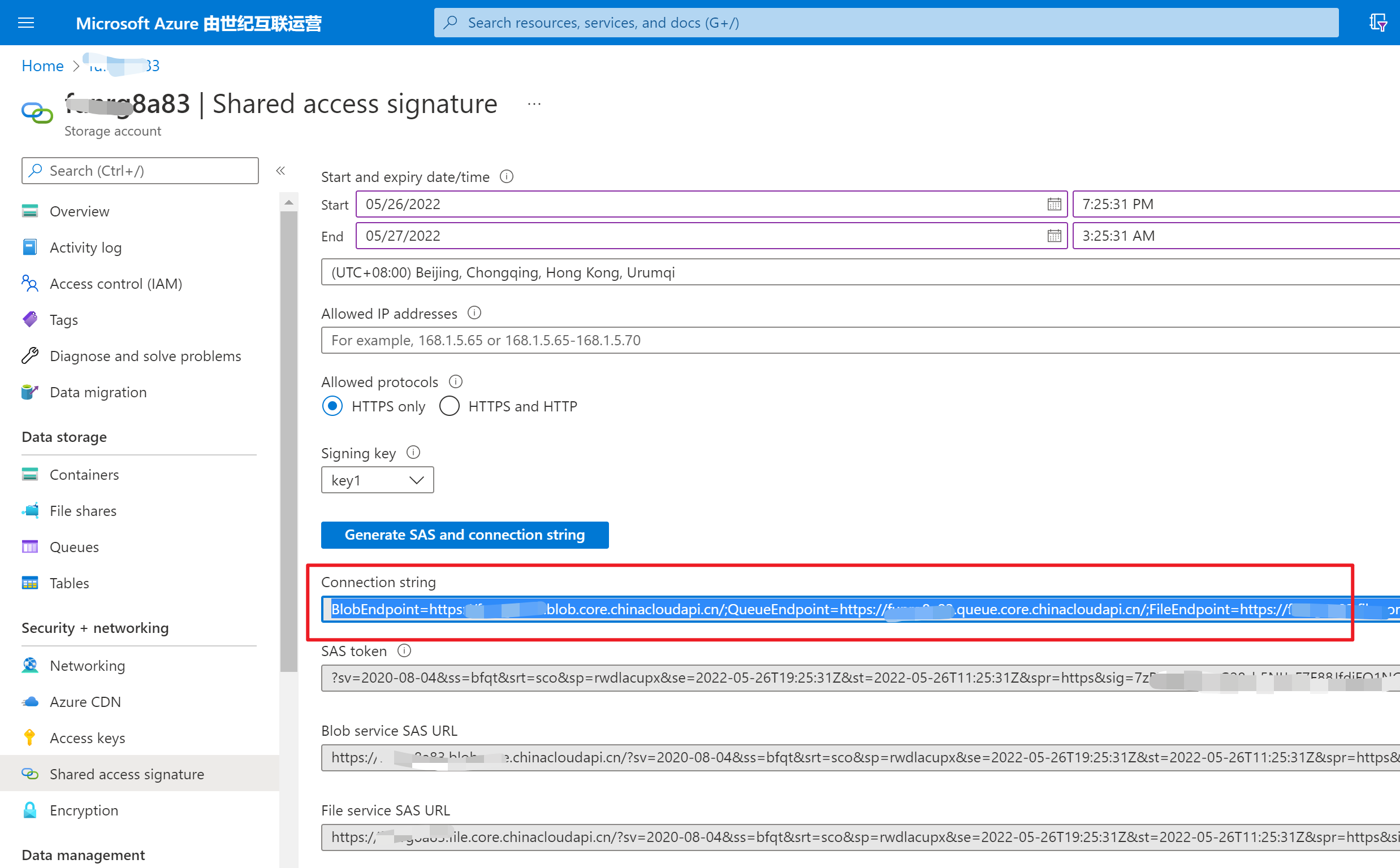
当执行Java 代码时,main函数抛出异常:java.lang.IllegalArgumentException: The Azure Storage endpoint url is malformed
PS C:\LBWorkSpace\MyCode\1-Storage Account - Operation Blob by Connection String - Java>
 & 'C:\Program Files\Microsoft\jdk-11.0.12.7-hotspot\bin\java.exe'
 '-agentlib:jdwp=transport=dt_socket,server=n,suspend=y,address=localhost:59757'
'@C:\Users\AppData\Local\Temp\cp_6ux3xmehddi1mc4fanfjupd3x.argfile'
 'com.blobs.quickstart.App'


Azure Blob storage v12 - Java quickstart sample

2022-05-26 10:24:29 ERROR BlobServiceClientBuilder - The Azure Storage endpoint url is malformed.

Exception in thread "main" java.lang.IllegalArgumentException: The Azure Storage endpoint url is malformed.

        at com.azure.storage.blob.BlobServiceClientBuilder.endpoint(BlobServiceClientBuilder.java:132)

        at com.blobs.quickstart.App.main(App.java:30)
问题分析
消息 [The Azure Storage endpoint url is malformed (Azure 存储终结点 URL 格式不正确)] 说明代码中使用的格式不对,回到生成endopoint的页面查看,原来使用的是连接字符串 Connection String. 与直接使用Access Key中的Connection String是相同的代码方式,而 Endpoint 是指当个连接到Blob Service的URL。
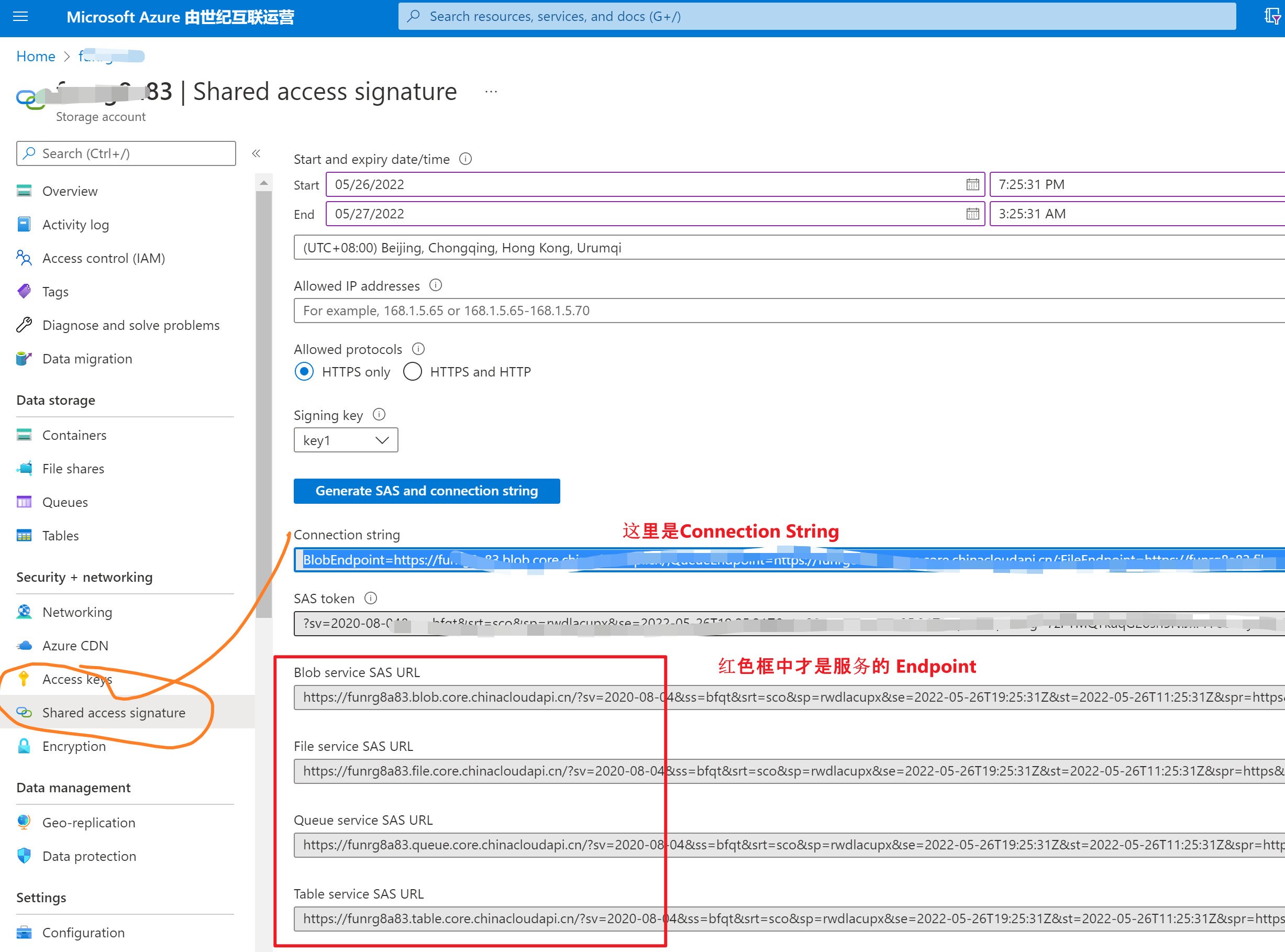
回到代码中,发现新版本把连接方式进行了区分:
- 使用Connection String时,用 new BlobServiceClientBuilder().connectionString(connectStr).buildClient();
- 使用Endpoint时,用 new BlobServiceClientBuilder().endpoint(endpoint).buildClient();
所以,解决 endpoint url malformed 关键就是使用正确的 SAS URL 或者是 Connection String
//使用连接字符串时
String connectStr ="BlobEndpoint=https://:************.blob.core.chinacloudapi.cn/;...SharedAccessSignature=sv=2020-08-0...&sig=**************";

BlobServiceClient blobServiceClient = new BlobServiceClientBuilder().connectionString(connectStr).buildClient();


//使用SAS终结点

String endpoint ="https://************.blob.core.chinacloudapi.cn/?sv=2020-08-04...&sig=*********************";

BlobServiceClient blobServiceClientbyendpoint = new BlobServiceClientBuilder().endpoint(endpoint).buildClient();
完整的示例代码:
package com.blobs.quickstart;

/**

 * Azure blob storage v12 SDK quickstart

 */

import com.azure.storage.blob.*;

import com.azure.storage.blob.models.*;

import java.io.*;

public class App

{

    public static void main( String[] args ) throws IOException

    {

        System.out.println("Azure Blob storage v12 - Java quickstart sample\n");

        // Retrieve the connection string for use with the application. The storage

        // connection string is stored in an environment variable on the machine

        // running the application called AZURE_STORAGE_CONNECTION_STRING. If the environment variable

        // is created after the application is launched in a console or with

        // Visual Studio, the shell or application needs to be closed and reloaded

        // to take the environment variable into account.

        //String connectStr ="DefaultEndpointsProtocol=https;AccountName=******;AccountKey=***********************;EndpointSuffix=core.chinacloudapi.cn";// System.getenv("AZURE_STORAGE_CONNECTION_STRING");

        String connectStr ="BlobEndpoint=https://******* */.blob.core.chinacloudapi.cn/;QueueEndpoint=https://*******.queue.core.chinacloudapi.cn/;FileEndpoint=https://*******.file.core.chinacloudapi.cn/;TableEndpoint=https://*******.table.core.chinacloudapi.cn/;SharedAccessSignature=sv=2020...&sig=*************************";

        BlobServiceClient blobServiceClient = new BlobServiceClientBuilder().connectionString(connectStr).buildClient();

        //Create a unique name for the container

        String containerName = "lina-" + java.util.UUID.randomUUID();

        // Create the container and return a container client object

        BlobContainerClient containerClient = blobServiceClient.createBlobContainer(containerName);

        BlobContainerClient containerClient1 = blobServiceClient.getBlobContainerClient("container-name");

        if(!containerClient1.exists())

        {

            System.out.println("create containerName");

            blobServiceClient.createBlobContainer("container-name");

        }

        System.out.println("create containerName .....");

        // // Create a local file in the ./data/ directory for uploading and downloading

        // String localPath = "./data/";

        // String fileName = "quickstart" + java.util.UUID.randomUUID() + ".txt";

        // File localFile = new File(localPath + fileName);

        // // Write text to the file

        // FileWriter writer = new FileWriter(localPath + fileName, true);

        // writer.write("Hello, World!");

        // writer.close();

        // // Get a reference to a blob

        // BlobClient blobClient = containerClient.getBlobClient(fileName);

        // System.out.println("\nUploading to Blob storage as blob:\n\t" + blobClient.getBlobUrl());

        // // Upload the blob

        // blobClient.uploadFromFile(localPath + fileName);

        // System.out.println("\nListing blobs...");

        // // List the blob(s) in the container.

        // for (BlobItem blobItem : containerClient.listBlobs()) {

        //     System.out.println("\t" + blobItem.getName());

        // }

        // // Download the blob to a local file

        // // Append the string "DOWNLOAD" before the .txt extension so that you can see both files.

        // String downloadFileName = fileName.replace(".txt", "DOWNLOAD.txt");

        // File downloadedFile = new File(localPath + downloadFileName);

        // System.out.println("\nDownloading blob to\n\t " + localPath + downloadFileName);

        // blobClient.downloadToFile(localPath + downloadFileName);

        // // Clean up

        // System.out.println("\nPress the Enter key to begin clean up");

        // System.console().readLine();

        // System.out.println("Deleting blob container...");

        // containerClient.delete();

        // System.out.println("Deleting the local source and downloaded files...");

        // localFile.delete();

        // downloadedFile.delete();

        System.out.println("Done");

    }

}
参考资料
快速入门:使用 Java v12 SDK 管理 blob: https://docs.azure.cn/zh-cn/storage/blobs/storage-quickstart-blobs-java?tabs=powershell%2Cenvironment-variable-windows
【Azure 存储服务】Java Azure Storage SDK V12使用Endpoint连接Blob Service遇见 The Azure Storage endpoint url is malformed的更多相关文章
- 玩转Windows Azure存储服务——网盘
存储服务是除了计算服务之外最重要的云服务之一.说到云存储,大家可以想到很多产品,例如:AWS S3,Google Drive,百度云盘...而在Windows Azure中,存储服务却是在默默无闻的工 ...
- 【Azure 存储服务】代码版 Azure Storage Blob 生成 SAS (Shared Access Signature: 共享访问签名)
问题描述 在使用Azure存储服务,为了有效的保护Storage的Access Keys.可以使用另一种授权方式访问资源(Shared Access Signature: 共享访问签名), 它的好处可 ...
- 解读 Windows Azure 存储服务的账单 – 带宽、事务数量,以及容量
经常有人询问我们,如何估算 Windows Azure 存储服务的成本,以便了解如何更好地构建一个经济有效的应用程序.本文我们将从带宽.事务数量,以及容量这三种存储成本的角度探讨这一问题. 在使用 W ...
- 【Azure 存储服务】Python模块(azure.cosmosdb.table)直接对表存储(Storage Account Table)做操作示例
什么是表存储 Azure 表存储是一项用于在云中存储结构化 NoSQL 数据的服务,通过无结构化的设计提供键/属性存储. 因为表存储无固定的数据结构要求,因此可以很容易地随着应用程序需求的发展使数据适 ...
- 微软开放技术开发了适用于 Windows Azure 移动服务的开源 Android SDK
发布于 2014-02-10 作者 陈 忠岳 为进一步实现连接微软与非微软技术的目标,微软开放技术有限公司开发了适用于 Windows Azure 移动服务的 Android SDK,由Scot ...
- 玩转Windows Azure存储服务——高级存储
在上一篇我们把Windows Azure的存储服务用作网盘,本篇我们继续挖掘Windows Azure的存储服务——高级存储.高级存储自然要比普通存储高大上的,因为高级存储是SSD存储!其吞吐量和IO ...
- 跟我学Windows Azure 五 使用Cloub Service连接Blob Service完成图片的上传
首先,我们创建一个云服务项目,用来演示我们的blob存储 下来我们修改我们我们云服务的名字 我们需要添加一个空的WebForm的项目 点击完成,我们可以看到我们的解决方案已经添加完成 下来我们需要添加 ...
- 【Azure 存储服务】Hadoop集群中使用ADLS(Azure Data Lake Storage)过程中遇见执行PUT操作报错
问题描述 在Hadoop集中中,使用ADLS 作为数据源,在执行PUT操作(上传文件到ADLS中),遇见 400错误[put: Operation failed: "An HTTP head ...
- 【Azure 存储服务】如何把开启NFS 3.0协议的Azure Blob挂载在Linux VM中呢?(NFS: Network File System 网络文件系统)
问题描述 如何把开启NFS协议的Azure Blob挂载到Linux虚拟机中呢? [答案]:可以使用 NFS 3.0 协议从基于 Linux 的 Azure 虚拟机 (VM) 或在本地运行的 Linu ...
随机推荐
- 【Android开发】简单好用的阴影库 ShadowLayout
先来看一张使用 ShadowLayout 库实现的各种阴影的效果图,如下图所示: 如上图所示,通过使用 ShadowLayout 可以控制阴影的颜色.范围.显示边界(上下左右四个边界).x 轴和 y ...
- mysql基本操作2
##DDL控制表结构,不支持事务##DML控制表数据,支持事务 DQL专门做查询 ##TCL 管理事务##DCL 管理数据库权限 ##ORDER BY 子句-根据指定列对结果集 ...
- pod和容器(容易混淆的地方)
在Kubenetes中,所有的容器均在 pod 中运行,一个pod可以承载一个或者多个相关的docker容器(或rkt,以及用户自定义容器),同一个Pod中的容器可以部署在同一个物理机器(可以叫宿主机 ...
- Java设计模式——抽象工厂模式
抽象工厂模式也是创建模式,可以把它理解成创建工厂的工厂,这种模式也是我们经常使用的.在抽象工厂中的接口是用来创建工厂的,每个生成的工厂又都可以按照工厂模式创建其他对象. 举例说明: 创建Shape接口 ...
- STL空间分配器源码分析(一)
一.摘要 STL的空间分配器(allocator)定义于命名空间std内,主要为STL容器提供内存的分配和释放.对象的构造和析构的统一管理.空间分配器的实现细节,对于容器来说完全透明,容器不需关注内存 ...
- Go xmas2020 学习笔记 04、Strings
04-Strings.unicode.utf-8.类型描述符.go 字符串在内存中的存储. Strings. String structure. String functions. Practice
- 5.Java程序运行机制
一.编译型和解释型语言区别 计算机是不能理解高级语言的,更不能直接执行高级语言,它只能直接理解机器语言,所以任何的高级语言编写的程序都必须转换成计算机语言,也就是机器码.而这种转换的方式有两种: 编译 ...
- 【面试普通人VS高手系列】lock和synchronized区别
今天来分享一道阿里一面的面试题,"lock和synchronized的区别". 对于这个问题,看看普通人和高手的回答! 普通人: 嗯,lock是J.U.C包里面提供的锁,synch ...
- 2021.08.09 P5658 括号树(树形结构)
2021.08.09 P5658 括号树(树形结构) [P5658 CSP-S2019] 括号树 - 洛谷 | 计算机科学教育新生态 (luogu.com.cn) 题意: 太长,在链接中. 分析及代码 ...
- react实战系列 —— 起步(mockjs、第一个模块、docusaurus)
其他章节请看: react实战 系列 起步 本篇我们首先引入 mockjs ,然后进入 spug 系统,接着模仿"任务计划"模块实现一个类似的一级导航页面("My任务计划 ...