
confluent kafka connect remote debugging
1. Deep inside of kafka-connect start up
To begin with, let's take a look at how kafka connect start.
1.1 start command
# background running mode

cd /home/lenmom/workspace/software/confluent-community-5.1.-2.11/ &&./bin/connect-distributed -daemon ./etc/schema-registry/connect-avro-distributed.properties

# or console running mode

cd /home/lenmom/workspace/software/confluent-community-5.1.-2.11/ &&./bin/connect-distributed ./etc/schema-registry/connect-avro-distributed.properties
we saw the start command is connect-distributed, then take a look at content of this file
#!/bin/sh

# Licensed to the Apache Software Foundation (ASF) under one or more

# contributor license agreements.  See the NOTICE file distributed with

# this work for additional information regarding copyright ownership.

# The ASF licenses this file to You under the Apache License, Version 2.0

# (the "License"); you may not use this file except in compliance with

# the License.  You may obtain a copy of the License at

#

#    http://www.apache.org/licenses/LICENSE-2.0

#

# Unless required by applicable law or agreed to in writing, software

# distributed under the License is distributed on an "AS IS" BASIS,

# WITHOUT WARRANTIES OR CONDITIONS OF ANY KIND, either express or implied.

# See the License for the specific language governing permissions and

# limitations under the License.

if [ $# -lt  ];

then

        echo "USAGE: $0 [-daemon] connect-distributed.properties"

        exit

fi

base_dir=$(dirname $)

###

### Classpath additions for Confluent Platform releases (LSB-style layout)

###

#cd -P deals with symlink from /bin to /usr/bin

java_base_dir=$( cd -P "$base_dir/../share/java" && pwd )

# confluent-common: required by kafka-serde-tools

# kafka-serde-tools (e.g. Avro serializer): bundled with confluent-schema-registry package

for library in "kafka" "confluent-common" "kafka-serde-tools" "monitoring-interceptors"; do

  dir="$java_base_dir/$library"

  if [ -d "$dir" ]; then

    classpath_prefix="$CLASSPATH:"

    if [ "x$CLASSPATH" = "x" ]; then

      classpath_prefix=""

    fi

    CLASSPATH="$classpath_prefix$dir/*"

  fi

done

if [ "x$KAFKA_LOG4J_OPTS" = "x" ]; then

  LOG4J_CONFIG_NORMAL_INSTALL="/etc/kafka/connect-log4j.properties"

  LOG4J_CONFIG_ZIP_INSTALL="$base_dir/../etc/kafka/connect-log4j.properties"

  if [ -e "$LOG4J_CONFIG_NORMAL_INSTALL" ]; then # Normal install layout

    KAFKA_LOG4J_OPTS="-Dlog4j.configuration=file:${LOG4J_CONFIG_NORMAL_INSTALL}"

  elif [ -e "${LOG4J_CONFIG_ZIP_INSTALL}" ]; then # Simple zip file layout

    KAFKA_LOG4J_OPTS="-Dlog4j.configuration=file:${LOG4J_CONFIG_ZIP_INSTALL}"

  else # Fallback to normal default

    KAFKA_LOG4J_OPTS="-Dlog4j.configuration=file:$base_dir/../config/connect-log4j.properties"

  fi

fi

export KAFKA_LOG4J_OPTS

if [ "x$KAFKA_HEAP_OPTS" = "x" ]; then

  export KAFKA_HEAP_OPTS="-Xms256M -Xmx2G"

fi

EXTRA_ARGS=${EXTRA_ARGS-'-name connectDistributed'}

COMMAND=$

case $COMMAND in

  -daemon)

    EXTRA_ARGS="-daemon "$EXTRA_ARGS

    shift

    ;;

  *)

    ;;

esac

export CLASSPATH

exec $(dirname $)/kafka-run-class $EXTRA_ARGS org.apache.kafka.connect.cli.ConnectDistributed "$@"
we found that to start the kafka connect process, it called another file kafka-run-class,so let's goto kafka-run-class.
1.2 kafka-run-class
.

.

.

.

# Launch mode

if [ "x$DAEMON_MODE" = "xtrue" ]; then

  nohup $JAVA $KAFKA_HEAP_OPTS $KAFKA_JVM_PERFORMANCE_OPTS $KAFKA_GC_LOG_OPTS $KAFKA_JMX_OPTS $KAFKA_LOG4J_OPTS -cp $CLASSPATH $KAFKA_OPTS "$@" > "$CONSOLE_OUTPUT_FILE" >& < /dev/null &

else

  exec $JAVA $KAFKA_HEAP_OPTS $KAFKA_JVM_PERFORMANCE_OPTS $KAFKA_GC_LOG_OPTS $KAFKA_JMX_OPTS $KAFKA_LOG4J_OPTS -cp $CLASSPATH $KAFKA_OPTS "$@"

fi
at the end of this file, it launched the connect process by invoking java command, and this is the location where we can add logic to remote debugging.
2. copy kafka-run-class and rename the copy to kafka-connect-debugging
cp bin/kafka-run-class bin/kafka-connect-debugging
modify the invoke command in kafka-connect-debugging to add java remote debugging support.
vim bin/kafka-connect-debugging
the invoke command as follows:
.

.

.

export JPDA_OPTS="-agentlib:jdwp=transport=dt_socket,address=8888,server=y,suspend=y"

#export JPDA_OPTS=""

# Launch mode

if [ "x$DAEMON_MODE" = "xtrue" ]; then

  nohup $JAVA  $JPDA_OPTS $KAFKA_HEAP_OPTS $KAFKA_JVM_PERFORMANCE_OPTS $KAFKA_GC_LOG_OPTS $KAFKA_JMX_OPTS $KAFKA_LOG4J_OPTS -cp $CLASSPATH $KAFKA_OPTS "$@" > "$CONSOLE_OUTPUT_FILE" >& < /dev/null &

else

  exec $JAVA  $JPDA_OPTS $KAFKA_HEAP_OPTS $KAFKA_JVM_PERFORMANCE_OPTS $KAFKA_GC_LOG_OPTS $KAFKA_JMX_OPTS $KAFKA_LOG4J_OPTS -cp $CLASSPATH $KAFKA_OPTS "$@"

fi
The added command means to start the kafka-connect as server and listen at port number 8888, and paused for the debugging client to connect.
if we don't want to run in debug mode, just uncomment the line
#export JPDA_OPTS=""
which means remote the # symbol in this line.
3. edit connect-distributed file
cd /home/lenmom/workspace/software/confluent-community-5.1.-2.11/

vim ./bin/connect-distributed
replace last line from
exec $(dirname $)/kafka-run-class $EXTRA_ARGS org.apache.kafka.connect.cli.ConnectDistributed "$@"
to
exec $(dirname $)/kafka-connect-debugging $EXTRA_ARGS org.apache.kafka.connect.cli.ConnectDistributed "$@"
4. debugging
4.1 start kafka-connect
lenmom@M1701:~/workspace/software/confluent-community-5.1.-2.11$ bin/connect-distributed ./etc/schema-registry/connect-avro-distributed.properties

Listening for transport dt_socket at address:
we see the process is paused and listening on port 8888, until the debugging client attached on.

4.2 attach the kafka-connect using idea
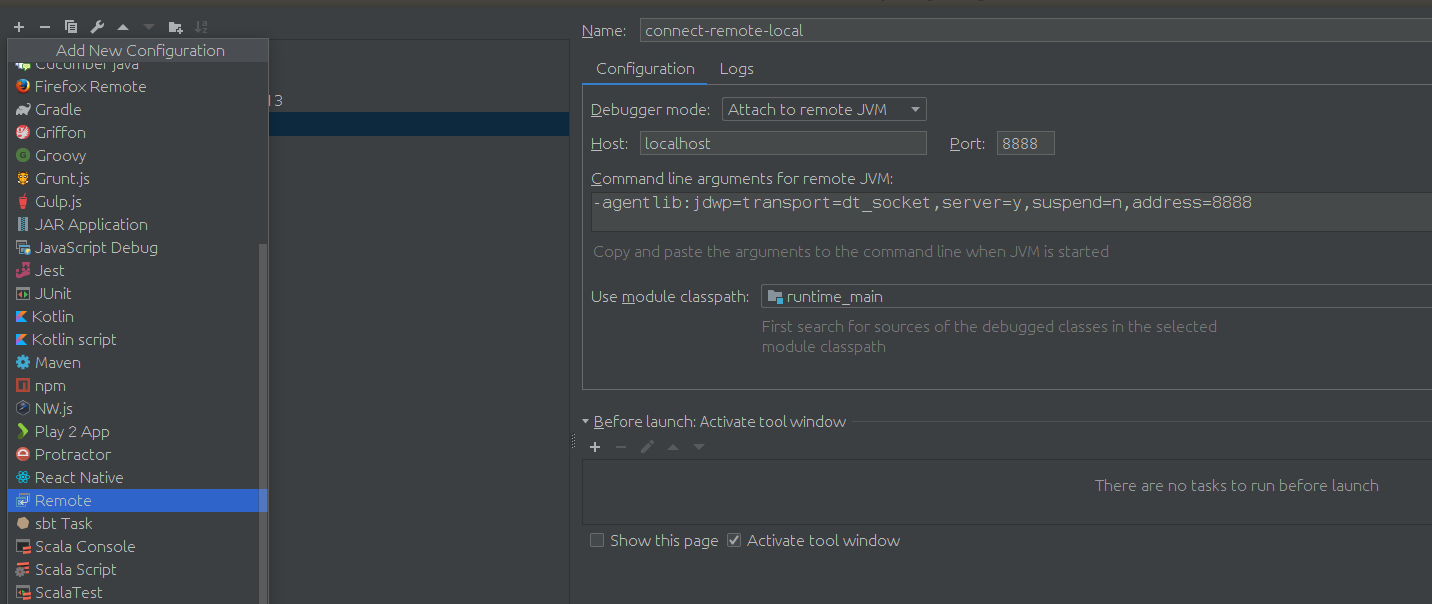
after setup the debugg setting, just client debugging, is ok now. show a screenshot of my scenario.
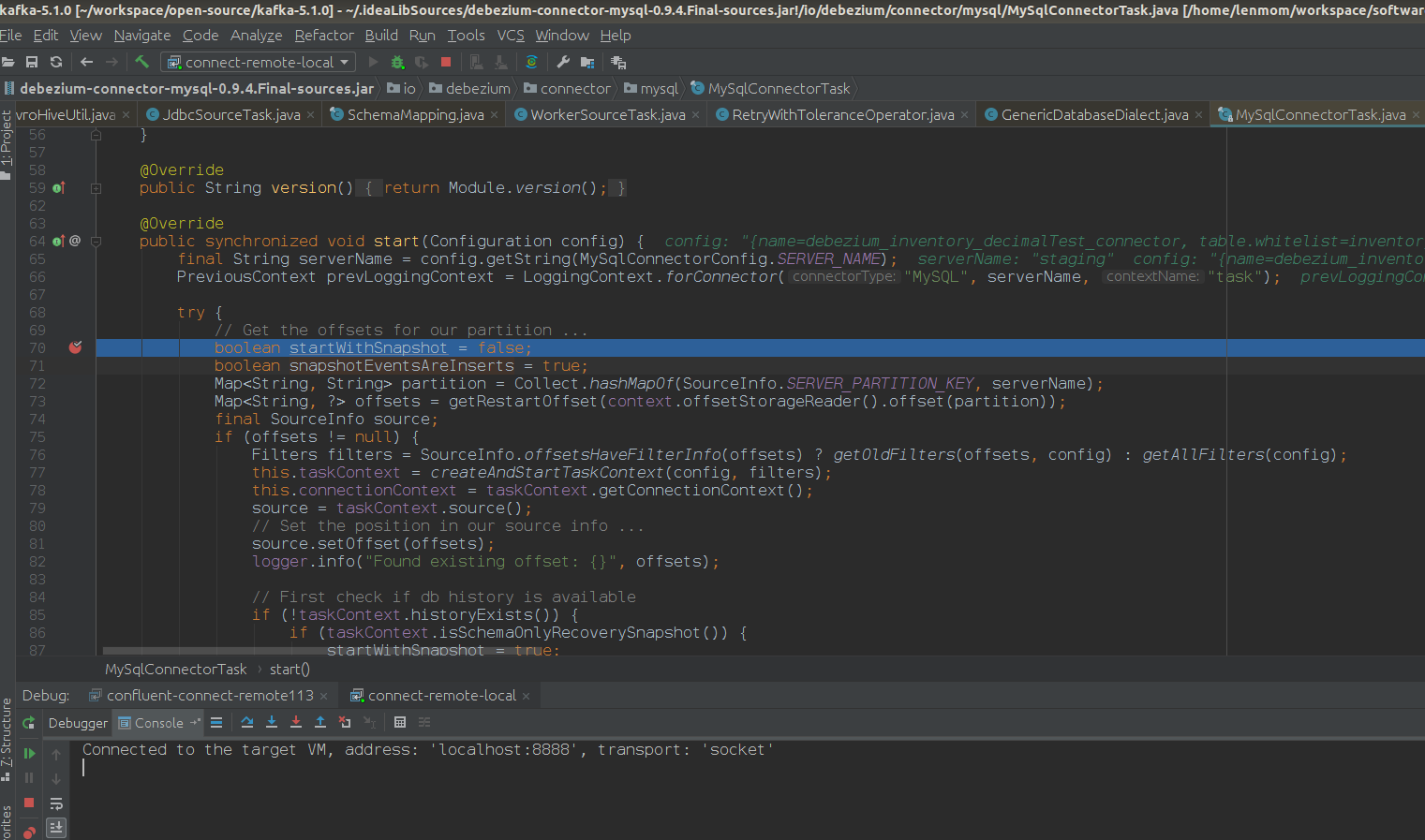
Have fun!
confluent kafka connect remote debugging的更多相关文章
- Oracle GoldenGate to Confluent with Kafka Connect
Confluent is a company founded by the team that built Apache Kafka. It builds a platform around Kafk ...
- Debugging Kafka connect
1. setup debug configuration mainClass: org.apache.kafka.connect.cli.ConnectDistributed VMOption: -D ...
- Streaming data from Oracle using Oracle GoldenGate and Kafka Connect
This is a guest blog from Robin Moffatt. Robin Moffatt is Head of R&D (Europe) at Rittman Mead, ...
- Kafka connect in practice(3): distributed mode mysql binlog ->kafka->hive
In the previous post Kafka connect in practice(1): standalone, I have introduced about the basics of ...
- Build an ETL Pipeline With Kafka Connect via JDBC Connectors
This article is an in-depth tutorial for using Kafka to move data from PostgreSQL to Hadoop HDFS via ...
- Kafka connect快速构建数据ETL通道
摘要: 作者:Syn良子 出处:http://www.cnblogs.com/cssdongl 转载请注明出处 业余时间调研了一下Kafka connect的配置和使用,记录一些自己的理解和心得,欢迎 ...
- 以Kafka Connect作为实时数据集成平台的基础架构有什么优势?
Kafka Connect是一种用于在Kafka和其他系统之间可扩展的.可靠的流式传输数据的工具,可以更快捷和简单地将大量数据集合移入和移出Kafka的连接器.Kafka Connect为DataPi ...
- DataPipeline联合Confluent Kafka Meetup上海站
Confluent作为国际数据“流”处理技术领先者,提供实时数据处理解决方案,在市场上拥有大量企业客户,帮助企业轻松访问各类数据.DataPipeline作为国内首家原生支持Kafka解决方案的“iP ...
- 打造实时数据集成平台——DataPipeline基于Kafka Connect的应用实践
导读:传统ETL方案让企业难以承受数据集成之重,基于Kafka Connect构建的新型实时数据集成平台被寄予厚望. 在4月21日的Kafka Beijing Meetup第四场活动上,DataPip ...
随机推荐
- linux网络编程之system v消息队列(一)
经过上次对于进程通讯的一些理论的认识之后,接下来会通过实验来进一步加深对进程通讯的认识,话不多说,进入正题: 其实还可以通过管道,但是,管道是基于字节流的,所以通常会将它称为流管道,数据与数据之间是没 ...
- [课本10.1.4]JDBC数据库连接池- C3P0数据源--通过构造方法创建数据源对象--通过配置文件创建数据源对象[推荐]
JDBC- C3P0数据源 /*重点提醒*/ 连接数据库的较低的jar包版本会与较高版本的mysql版本有冲突; 通过把mysql 8.0的版本降到5.5, jar包仍使用较高的 mysql-conn ...
- eclipse cdt 代码对齐
ctrl + shift + F 快速对齐 平时对小节太不重视了 .
- 大数据之路week07--day04 (YARN,Hadoop的优化,combline,join思想,)
hadoop 的计算特点:将计算任务向数据靠拢,而不是将数据向计算靠拢. 特点:数据本地化,减少网络io. 首先需要知道,hadoop数据本地化是指的map任务,reduce任务并不具备数据本地化特征 ...
- 清除MSSQL历史记录
declare @dt datetime select @dt = cast(N'2019-05-21T14:13:45' as datetime) exec msdb.dbo.sp_delete_b ...
- [cf920E][set+dfs]
https://codeforc.es/contest/920/problem/E E. Connected Components? time limit per test 2 seconds mem ...
- Miniprofiler 监控ef执行详解
首先NuGet添加 相对应ef版本的Miniprofiler.ef引用 web.config文件中添加 <system.webServer> <handlers> <a ...
- Git - Q
GIT :实现版本控制的软件 命令: git init # 初始 git (先执行这个才能执行接下来的) git status # 查看当前文件夹状态 git add 文件名 # 对指定文件进行版本控 ...
- python定义函数时的参数&调用函数时的传参
一.定义函数: 1.位置参数:直接定义参数 2.默认参数(或者关键字参数):参数名 = "默认值" 3.位置参数必须在默认参数之前 二.调用函数: 1.按位置传,直接写参数的值 2 ...
- jq 字符串转数组
一般我们在添加关键词时 会添加几组关键词 上传时怎么取值呢 取值时用以下格式 就能取到值 var FTag = "" //AAA,BBB if (FTag1 != &qu ...