
SpringMVC源码解析-DispatcherServlet启动流程和初始化
在使用springmvc框架,会在web.xml文件配置一个DispatcherServlet,这正是web容器开始初始化,同时会在建立自己的上下文来持有SpringMVC的bean对象。
先从DispatcherServlet入手,从名字来看,它是一个Servlet。它的定义如下:
public class DispatcherServlet extends FrameworkServlet {
它是继承FrameworkServlet,来看一下整个的继承关系。
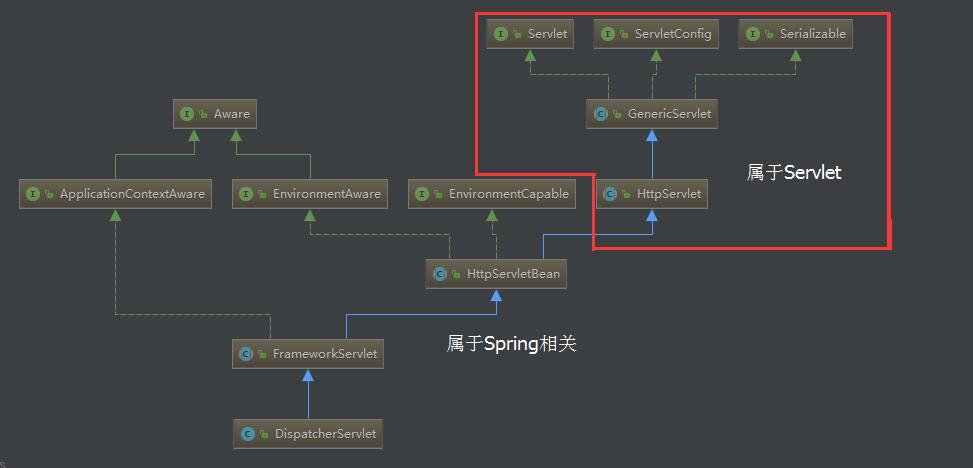
从继承关系来看,DispatcherServlet继承FrameworkServlet和HttpServletBean而继承HttpServlet,通过使用Servlet API 来对HTTP请求进行响应,成为SpringMVC的前端处理器。
先看一个时序图
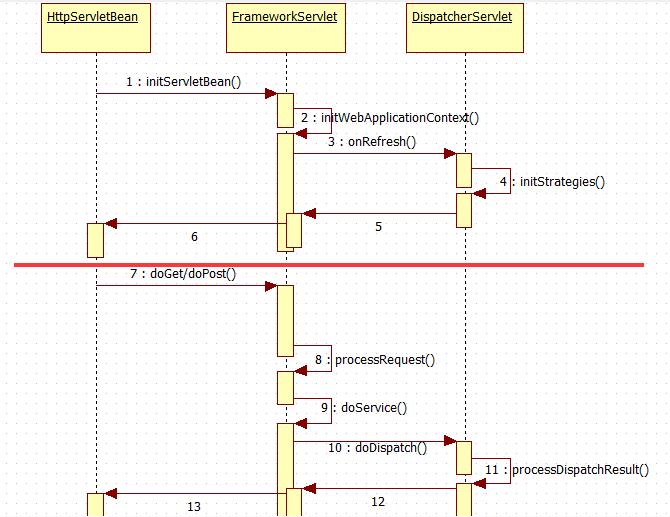
注:作为Servlet,DispatcherServlet的启动和Servlet的启动相关联的。在Servlet初始化过程中,Servlet的init方法会被调用,以进行初始化,然而DispatcherServlet的基类,所以从HttpServletBean中的初始化过程开始。
DispatcherServlet的工作分为2部分,一部分是初始化(也就是图的上半部分),有initServletBean()启动,通过initWebApplicationContext()方法最终调用DispatcherServlet中的initStrategies()方法。另一部分(也就是图的下半部分),是对HTTP请求进行响应,作为Servlet,Web容器会调用Servlet的doGet()和doPost()方法,在经过FrameworkServlet的processRequest()简单处理后,会调用DispatcherServlet的doService方法,在这个方法调用中封装了doDispatch(),继续调用processDispatchResult方法返回调用信息。
接下来看看初始化的源码的流程:
HttpServletBean.init方法
/**

	 * Map config parameters onto bean properties of this servlet, and

	 * invoke subclass initialization.

	 * @throws ServletException if bean properties are invalid (or required

	 * properties are missing), or if subclass initialization fails.

	 */

	@Override

	public final void init() throws ServletException {

		if (logger.isDebugEnabled()) {

			logger.debug("Initializing servlet '" + getServletName() + "'");

		}

          //获取Servlet初始化参数

		// Set bean properties from init parameters.

		try {

			PropertyValues pvs = new ServletConfigPropertyValues(getServletConfig(), this.requiredProperties);

			BeanWrapper bw = PropertyAccessorFactory.forBeanPropertyAccess(this);

			ResourceLoader resourceLoader = new ServletContextResourceLoader(getServletContext());

			bw.registerCustomEditor(Resource.class, new ResourceEditor(resourceLoader, getEnvironment()));

			initBeanWrapper(bw);

			bw.setPropertyValues(pvs, true);

		}

		catch (BeansException ex) {

			logger.error("Failed to set bean properties on servlet '" + getServletName() + "'", ex);

			throw ex;

		}

                //调用子类的方法

		// Let subclasses do whatever initialization they like.

		initServletBean();

		if (logger.isDebugEnabled()) {

			logger.debug("Servlet '" + getServletName() + "' configured successfully");

		}

	}
例如web.xml中配置参数:
<servlet>

    <servlet-name>TestServlet</servlet-name>

    <servlet-class>com.lzyer.TestServlet</servlet-class>

    <!--配置参数,可以通过ServletConfig获取参数-->

    <init-param>

        <param-name>servlet-name</param-name>

        <param-value>TestServlet</param-value>

    </init-param>

 </servlet>

 <servlet-mapping>

    <servlet-name>TestServlet</servlet-name>

    <url-pattern>/TestServlet</url-pattern>

  </servlet-mapping>
FrameworkServlet.initServletBean方法
/**

	 * Overridden method of {@link HttpServletBean}, invoked after any bean properties

	 * have been set. Creates this servlet's WebApplicationContext.

	 */

	@Override

	protected final void initServletBean() throws ServletException {

		getServletContext().log("Initializing Spring FrameworkServlet '" + getServletName() + "'");

		if (this.logger.isInfoEnabled()) {

			this.logger.info("FrameworkServlet '" + getServletName() + "': initialization started");

		}

		long startTime = System.currentTimeMillis();

		try {

                         //创建Web应用上下文

			this.webApplicationContext = initWebApplicationContext();

			initFrameworkServlet();

		}

		catch (ServletException ex) {

			this.logger.error("Context initialization failed", ex);

			throw ex;

		}

		catch (RuntimeException ex) {

			this.logger.error("Context initialization failed", ex);

			throw ex;

		}

		if (this.logger.isInfoEnabled()) {

			long elapsedTime = System.currentTimeMillis() - startTime;

			this.logger.info("FrameworkServlet '" + getServletName() + "': initialization completed in " +

					elapsedTime + " ms");

		}

	}
FrameworkServlet.initWebApplicationContext()
/**

	 * Initialize and publish the WebApplicationContext for this servlet.

	 * <p>Delegates to {@link #createWebApplicationContext} for actual creation

	 * of the context. Can be overridden in subclasses.

	 * @return the WebApplicationContext instance

	 * @see #FrameworkServlet(WebApplicationContext)

	 * @see #setContextClass

	 * @see #setContextConfigLocation

	 */

	protected WebApplicationContext initWebApplicationContext() {

		WebApplicationContext rootContext =

				WebApplicationContextUtils.getWebApplicationContext(getServletContext());

		WebApplicationContext wac = null;

		if (this.webApplicationContext != null) {

			// A context instance was injected at construction time -> use it

			wac = this.webApplicationContext;

			if (wac instanceof ConfigurableWebApplicationContext) {

				ConfigurableWebApplicationContext cwac = (ConfigurableWebApplicationContext) wac;

				if (!cwac.isActive()) {

					// The context has not yet been refreshed -> provide services such as

					// setting the parent context, setting the application context id, etc

					if (cwac.getParent() == null) {

						// The context instance was injected without an explicit parent -> set

						// the root application context (if any; may be null) as the parent

						cwac.setParent(rootContext);

					}

					configureAndRefreshWebApplicationContext(cwac);

				}

			}

		}

		if (wac == null) {

			// No context instance was injected at construction time -> see if one

			// has been registered in the servlet context. If one exists, it is assumed

			// that the parent context (if any) has already been set and that the

			// user has performed any initialization such as setting the context id

			wac = findWebApplicationContext();

		}

		if (wac == null) {

			// No context instance is defined for this servlet -> create a local one

			wac = createWebApplicationContext(rootContext);

		}

		if (!this.refreshEventReceived) {

			// Either the context is not a ConfigurableApplicationContext with refresh

			// support or the context injected at construction time had already been

			// refreshed -> trigger initial onRefresh manually here.

			onRefresh(wac);

		}

		if (this.publishContext) {

			// Publish the context as a servlet context attribute.

			String attrName = getServletContextAttributeName();

			getServletContext().setAttribute(attrName, wac);

			if (this.logger.isDebugEnabled()) {

				this.logger.debug("Published WebApplicationContext of servlet '" + getServletName() +

						"' as ServletContext attribute with name [" + attrName + "]");

			}

		}

		return wac;

	}
先看WebApplicationContextUtils.getWebApplicationContext(getServletContext()),,主要是从ServletContext获取WebApplicationContext
public static WebApplicationContext getWebApplicationContext(ServletContext sc, String attrName) {

		Assert.notNull(sc, "ServletContext must not be null");
                //从ServletContext中获取

		Object attr = sc.getAttribute(attrName);

		if (attr == null) {

			return null;

		}

		if (attr instanceof RuntimeException) {

			throw (RuntimeException) attr;

		}

		if (attr instanceof Error) {

			throw (Error) attr;

		}

		if (attr instanceof Exception) {

			throw new IllegalStateException((Exception) attr);

		}

		if (!(attr instanceof WebApplicationContext)) {

			throw new IllegalStateException("Context attribute is not of type WebApplicationContext: " + attr);

		}

		return (WebApplicationContext) attr;

	}
findWebApplicationContext和上面一样从ContextServlet中查找,如果不存在就调用下面的createWebApplicationContext方法。
protected WebApplicationContext createWebApplicationContext(ApplicationContext parent) {
          //获取contextClass

		Class<?> contextClass = getContextClass();

		if (this.logger.isDebugEnabled()) {

			this.logger.debug("Servlet with name '" + getServletName() +

					"' will try to create custom WebApplicationContext context of class '" +

					contextClass.getName() + "'" + ", using parent context [" + parent + "]");

		}

		if (!ConfigurableWebApplicationContext.class.isAssignableFrom(contextClass)) {

			throw new ApplicationContextException(

					"Fatal initialization error in servlet with name '" + getServletName() +

					"': custom WebApplicationContext class [" + contextClass.getName() +

					"] is not of type ConfigurableWebApplicationContext");

		}
                //通过反射获取实例

		ConfigurableWebApplicationContext wac =

				(ConfigurableWebApplicationContext) BeanUtils.instantiateClass(contextClass);

		wac.setEnvironment(getEnvironment());
                //设置双亲上下文

		wac.setParent(parent);

		wac.setConfigLocation(getContextConfigLocation());

                //配置和刷新应用

		configureAndRefreshWebApplicationContext(wac);

		return wac;

	}
看一下getContextClass()到底是哪个类? XmlWebApplicationContext.class
最后configureAndRefreshWebApplicationContext调用refresh方法启动容器。
回到initWebApplicationContext方法中
if (!this.refreshEventReceived) {

			// Either the context is not a ConfigurableApplicationContext with refresh

			// support or the context injected at construction time had already been

			// refreshed -> trigger initial onRefresh manually here.

			onRefresh(wac);

		}
这个会触发SpringMVC初始化策略
/**

	 * This implementation calls {@link #initStrategies}.

	 */

	@Override

	protected void onRefresh(ApplicationContext context) {

		initStrategies(context);

	}

	/**

	 * Initialize the strategy objects that this servlet uses.

	 * <p>May be overridden in subclasses in order to initialize further strategy objects.

	 */

	protected void initStrategies(ApplicationContext context) {

		initMultipartResolver(context);

		initLocaleResolver(context);

		initThemeResolver(context);
                //映射关系

		initHandlerMappings(context);

		initHandlerAdapters(context);

		initHandlerExceptionResolvers(context);

		initRequestToViewNameTranslator(context);

		initViewResolvers(context);

		initFlashMapManager(context);

	}
到此,SpringMVC的初始化的流程大概就是这样,下篇就是SpringMVC请求流程。
SpringMVC源码解析-DispatcherServlet启动流程和初始化的更多相关文章
- Flume-ng源码解析之启动流程
今天我们通过阅读Flume-NG的源码来看看Flume的整个启动流程,废话不多说,翠花,上源码!! 1 主类也是启动类 在这里我贴出Application中跟启动有关的方法,其他你们可以自己看源码,毕 ...
- SpringMVC源码分析和启动流程
https://yq.aliyun.com/articles/707995 在Spring的web容器启动时会去读取web.xml文件,相关启动顺序为:<context-param> -- ...
- springMVC源码解析--ViewResolver视图解析器执行(三)
之前两篇博客springMVC源码分析--ViewResolver视图解析器(一)和springMVC源码解析--ViewResolverComposite视图解析器集合(二)中我们已经简单介绍了一些 ...
- SpringMVC源码剖析1——执行流程
SpringMVC源码剖析1——执行流程 00.SpringMVC执行流程file:///C:/Users/WANGGA~1/AppData/Local/Temp/enhtmlclip/Image.p ...
- SpringMVC源码解析- HandlerAdapter - ModelFactory(转)
ModelFactory主要是两个职责: 1. 初始化model 2. 处理器执行后将modle中相应参数设置到SessionAttributes中 我们来看看具体的处理逻辑(直接充当分析目录): 1 ...
- SpringMVC源码解析- HandlerAdapter - ModelFactory
ModelFactory主要是两个职责: 1. 初始化model 2. 处理器执行后将modle中相应参数设置到SessionAttributes中 我们来看看具体的处理逻辑(直接充当分析目录): 1 ...
- Netty源码解析—客户端启动
Netty源码解析-客户端启动 Bootstrap示例 public final class EchoClient { static final boolean SSL = System.getPro ...
- Sentinel源码解析一(流程总览)
引言 Sentinel作为ali开源的一款轻量级流控框架,主要以流量为切入点,从流量控制.熔断降级.系统负载保护等多个维度来帮助用户保护服务的稳定性.相比于Hystrix,Sentinel的设计更加简 ...
- [源码解析] PyTorch分布式(6) -------- DistributedDataParallel -- 初始化&store
[源码解析] PyTorch分布式(6) ---DistributedDataParallel -- 初始化&store 目录 [源码解析] PyTorch分布式(6) ---Distribu ...
随机推荐
- window上小而美的软件(推荐度按排名)
window上小而美的软件,推荐度按排名 Notepad++ 更好用更强大的笔记本 QTranslate 本地翻译神器 7-zip 解压缩软件 Wox 程序/文件/快捷 神器 1! Everthing ...
- [JSON].getObj( keyPath )
语法:[JSON].getObj( keyPath ) 返回:[JSON] 说明:返回指定键名路径的JSON对象,指定键名路径不存在时返回空的toJson对象(强烈建议使用 [JSON].exists ...
- chorme打开网页的技巧
恢复之前关闭的网页 ctr l+ shift + t 打开之前不小心关闭的网页 临时书签 在设置书签中有 为打开的网页添加书签 的选项, 清除地址栏搜索记录 首先需要退出个人谷歌账户,账户上的搜索记录 ...
- spark集群安装部署
通过Ambari(HDP)或者Cloudera Management (CDH)等集群管理服务安装和部署在此不多介绍,只需要在界面直接操作和配置即可,本文主要通过原生安装,熟悉安装配置流程. 1.选取 ...
- solidity中的memory和 storage详解
Solidity是一种智能合约高级语言,运行在Ethereum虚拟机(EVM)之上.这里我会讲解一下关键字storage和memory的区别. storage的结构是在合约部署创建时,根据你的合约中状 ...
- CryptoZombies学习笔记——Lesson4
第四课主要介绍payable函数相关. chapter1: payable修饰函数 以太坊允许同时调用函数和eth转账.msg.value显示发送到合约的以太币数,ether是内置整型数.如果函数没有 ...
- C#通过gridview导出excel
[CustomAuthorize] public FileResult ExportQuestionCenterExcel(SearchBaseQuestion search) ...
- 应用Response.Write实现带有进度条的多文件上传
前几天,写过一篇随笔“使用RESPONSE.WRITE实现在页面的生命周期中前后台的交互”.说是交互,实际上也主要是在ASP.NET的页面周期中 从后台利用RESPONSE.WRITE向前台即时的推送 ...
- 编译安装hadoop2.6.3
一.安装环境 1.1 JAVA 安装java1.7 下载jdk1.7: [root@node1~]# wget http://download.oracle.com/otn-pub/java/jd ...
- POJ 3525/UVA 1396 Most Distant Point from the Sea(二分+半平面交)
Description The main land of Japan called Honshu is an island surrounded by the sea. In such an isla ...