
Flutter Widgets 对话框-Dialog

注意:无特殊说明,Flutter版本及Dart版本如下:
- Flutter版本: 1.12.13+hotfix.5
- Dart版本: 2.7.0
当应用程序进行重要操作时经常需要用户进行2次确认,以避免用户的误操作,比如删除文件时,一般会弹出提示“是否要删除当前文件”,用户点击确认后才会进行删除操作,这时我们可以使用提示框(AlertDialog或者CupertinoAlertDialog)。
根据设计的不同,我们可以选择Material风格的AlertDialog或者Cupertino(ios)风格的CupertinoAlertDialog,
Material风格基础用法如下:
RaisedButton(

  child: Text('切换'),

  onPressed: () {

    showDialog(

        context: context,

        builder: (context) {

          return AlertDialog(

            title: Text('提示'),

            content: Text('确认删除吗?'),

            actions: <Widget>[

              FlatButton(child: Text('取消'),onPressed: (){},),

              FlatButton(child: Text('确认'),onPressed: (){},),

            ],

          );

        });

  },

)
Material风格效果:
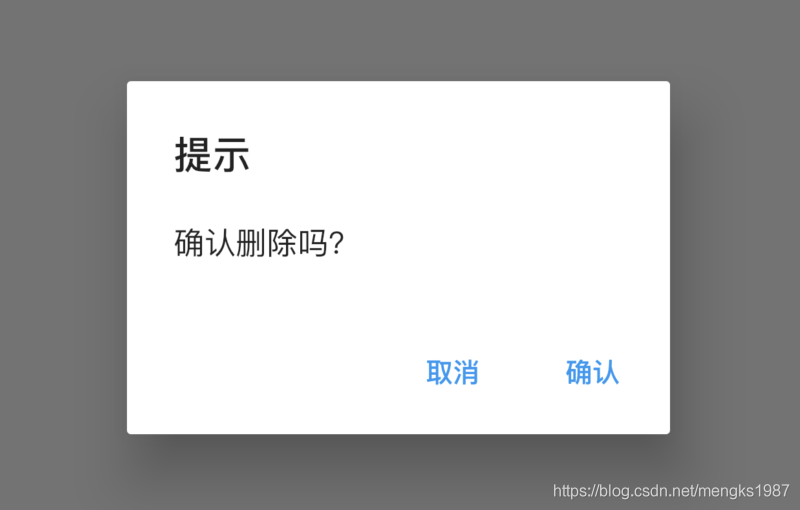
Cupertino(ios)风格基础用法如下:
RaisedButton(

  child: Text('切换'),

  onPressed: () {

    showCupertinoDialog(

        context: context,

        builder: (context) {

          return CupertinoAlertDialog(

            title: Text('提示'),

            content: Text('确认删除吗?'),

            actions: <Widget>[

              CupertinoDialogAction(child: Text('取消'),onPressed: (){},),

              CupertinoDialogAction(child: Text('确认'),onPressed: (){},),

            ],

          );

        });

  },

)
Cupertino(ios)风格效果如下:
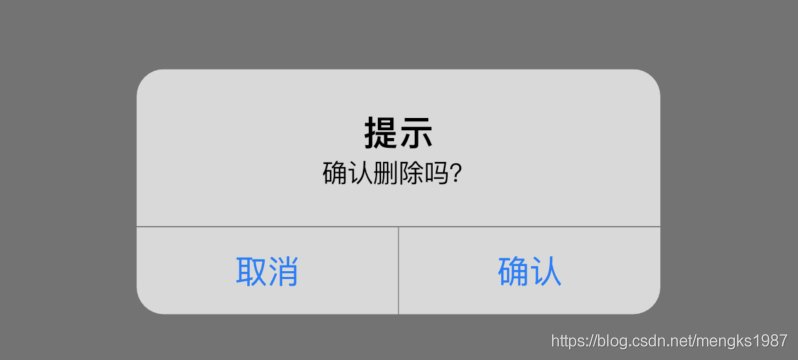
showDialog和AlertDialog配合使用展示Material风格对话框,showCupertinoDialog和CupertinoAlertDialog配合使用展示iOS风格对话框,showCupertinoDialog点击空白处是无法退出对话框的,而showDialog点击空白处默认退出对话框,barrierDismissible属性控制点击空白处的行为,用法如下:
showDialog(

    barrierDismissible: false,

    )
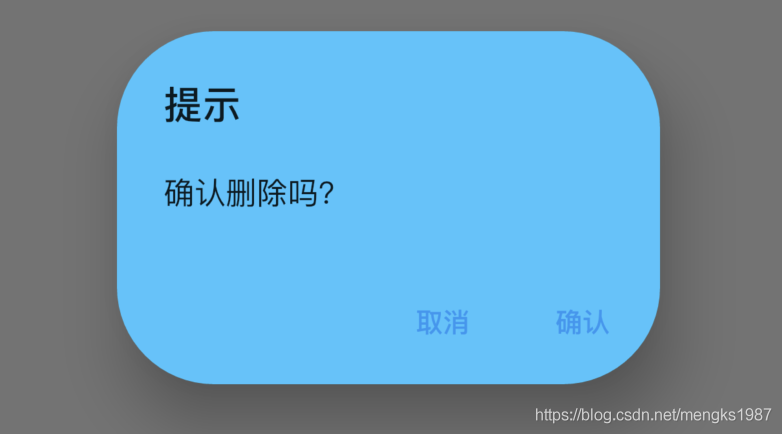
AlertDialog的属性相对比较丰富,可以设置title样式、content样式、背景颜色、阴影值,设置是形状:
AlertDialog(

  title: Text('提示'),

  content: Text('确认删除吗?'),

  backgroundColor: Colors.lightBlueAccent,

  elevation: 24,

  shape: RoundedRectangleBorder(borderRadius: BorderRadius.circular(50)),

  actions: <Widget>[

    FlatButton(child: Text('取消'),onPressed: (){},),

    FlatButton(child: Text('确认'),onPressed: (){},),

  ],

)
用户点击“取消”或者“确定”按钮后退出对话框,App需要知道知道用户选择了哪个选项,用法如下:
RaisedButton(

  child: Text('切换'),

  onPressed: () async {

    var result = await showDialog(

        context: context,

        builder: (context) {

          return AlertDialog(

            title: Text('提示'),

            content: Text('确认删除吗?'),

            actions: <Widget>[

              FlatButton(

                child: Text('取消'),

                onPressed: () {

                  Navigator.of(context).pop('cancel');

                },

              ),

              FlatButton(

                child: Text('确认'),

                onPressed: () {

                  Navigator.of(context).pop('ok');

                },

              ),

            ],

          );

        });

    print('$result');

  },

)
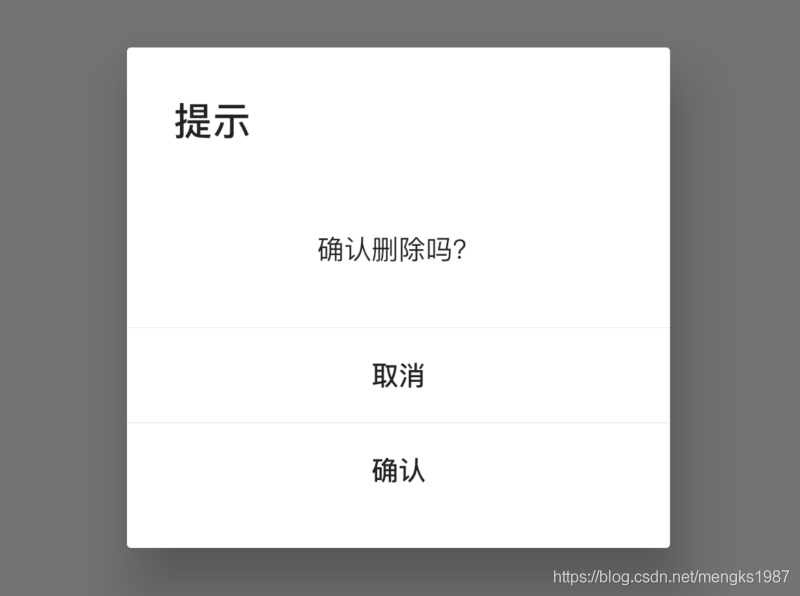
如果你觉得系统提供的这2个风格的对话框不够个性,你可以试试SimpleDialog,用法和AlertDialog基本相同,如下:
SimpleDialog(

  title: Text('提示'),

  children: <Widget>[

    Container(

      height: 80,

      alignment: Alignment.center,

      child: Text('确认删除吗?'),

    ),

    Divider(height: 1,),

    FlatButton(

      child: Text('取消'),

      onPressed: () {

        Navigator.of(context).pop('cancel');

      },

    ),

    Divider(height: 1,),

    FlatButton(

      child: Text('确认'),

      onPressed: () {

        Navigator.of(context).pop('ok');

      },

    ),

  ],

)
效果如下:
如果你觉得这还是不够个性,那可以祭出终极大法了,直接使用Dialog,Dialog可以定制任何对话框,只需将对话框的内容给child属性:
Dialog(

  child: MyDialog(),

);
当然一般情况下,系统提供的对话框就够用了,这几个对话框组件用法基本一样,不同的地方仅仅是灵活性和使用简易程度的不要,Dialog最灵活,但使用起来比AlertDialog复杂一些,AlertDialog使用起来非常简单,但布局和基本样式都已经固定好,不如Dialog灵活。
今天的文章对大家是否有帮助?如果有,请在文章底部留言和点赞,以表示对我的支持,你们的留言、点赞和转发关注是我持续更新的动力!

更多相关阅读:
- Flutter系列文章总览
- Flutter Widgets 之 Expanded和Flexible
- Flutter Widgets 之 AnimatedList
- Flutter Widgets 之 SliverAppBar
Flutter Widgets 对话框-Dialog的更多相关文章
- 【Flutter Widgets大全】电子书开源
[Flutter Widgets大全]是老孟耗费大量精力整理的,总共有330多个组件的详细用法,开源到Github上,希望可以帮助到大家,开源不易,点个赞可不可以. [Flutter Widgets ...
- Android 对话框(Dialog)大全 建立你自己的对话框
Android 对话框(Dialog)大全 建立你自己的对话框 原文地址: http://www.cnblogs.com/salam/archive/2010/11/15/1877512.html A ...
- 转 Android 对话框(Dialog)大全 建立你自己的对话框
Activities提供了一种方便管理的创建.保存.回复的对话框机制,例如 onCreateDialog(int), onPrepareDialog(int, Dialog), showDialog( ...
- 95秀-自定义对话框 dialog 合集
普通的确认对话框 NormalDialog.java import android.app.Dialog; import android.content.Context; import android ...
- Android 常用对话框Dialog封装
Android 6种 常用对话框Dialog封装 包括: 消息对话框.警示(含确认.取消)对话框.单选对话框. 复选对话框.列表对话框.自定义视图(含确认.取消)对话框 分别如下图所示: ...
- Android项目实战(三十二):圆角对话框Dialog
前言: 项目中多处用到对话框,用系统对话框太难看,就自己写一个自定义对话框. 对话框包括:1.圆角 2.app图标 , 提示文本,关闭对话框的"确定"按钮 难点:1.对话框边框圆角 ...
- Android 对话框(Dialog)大全
转自: http://www.cnblogs.com/salam/archive/2010/11/15/1877512.html Activities提供了一种方便管理的创建.保存.回复的对话框机制, ...
- Android 对话框(Dialog)
Activities提供了一种方便管理的创建.保存.回复的对话框机制,例如 onCreateDialog(int), onPrepareDialog(int, Dialog), showDialog( ...
- Android 对话框(Dialog) 及 自己定义Dialog
Activities提供了一种方便管理的创建.保存.回复的对话框机制,比如 onCreateDialog(int), onPrepareDialog(int, Dialog), showDialog( ...
随机推荐
- 从 0 到 1 到完美,写一个 js 库、node 库、前端组件库
之前讲了很多关于项目工程化.前端架构.前端构建等方面的技术,这次说说怎么写一个完美的第三方库. 1. 选择合适的规范来写代码 js 模块化的发展大致有这样一个过程 iife => commonj ...
- ASP.NET防止连续多次点击提交按钮 导致页面重复提交
PS:实际使用中发现,第①种方法在火狐浏览中有时候有问题.第2种方法,在各个浏览器中都没问题 近做项目遇到了这样的情况: 公司网络比平常慢了不少,在点击保存按钮提交页面后需等待挺长的一段时间,忍不住手 ...
- Normally Distributed|
6.1Introducing Normally Distributed Variables Why the word “normal”? Because, in the last half of th ...
- android geendao简单使用
引入依赖 implementation 'org.greenrobot:greendao:3.2.2'implementation 'com.github.yuweiguocn:GreenDaoUpg ...
- 让mybatis不再难懂(二)
上一篇文章写了mybatis的基本原理和配置文件的基本使用,这一篇写mybatis的使用,主要包括与sping集成.动态sql.还有mapper的xml文件一下复杂配置等.值得注意的是,导图17和18 ...
- Yii框架的学习指南(策码秀才篇)1-3 我是这么学习的yii framework (不间断更新中)
Ⅰ.基本概念一.入口文件入口文件内容:一般格式如下:<?php $yii=dirname(__FILE__).'/../../framework/yii.php';//Yii框架位置$confi ...
- keras使用、函数功能
#1. keras.engine.input_layer.Input() def Input(shape=None, batch_shape=None, name=None, dtype=None ...
- sqlserver开窗函数改造样例
作一个查询的性能优化. 先清缓存 DBCC DROPCLEANBUFFERS DBCC FREEPROCCACHE 原查询 前人遗留. ) ),) select @total=sum(price*pe ...
- 发现个很有意思的angularjs +grunt 复习项目
最近作运维工作 docker 接触到一个开源webui dockerui 原项目地址 https://github.com/crosbymichael/dockerui 用angular框架实现,项目 ...
- <SCOI2008>奖励关
emmm第一道期望dp+个状压 真有趣.. #include<cstdio> #include<iostream> #include<cstring> #inclu ...