
Vue.js(4)- 生命周期
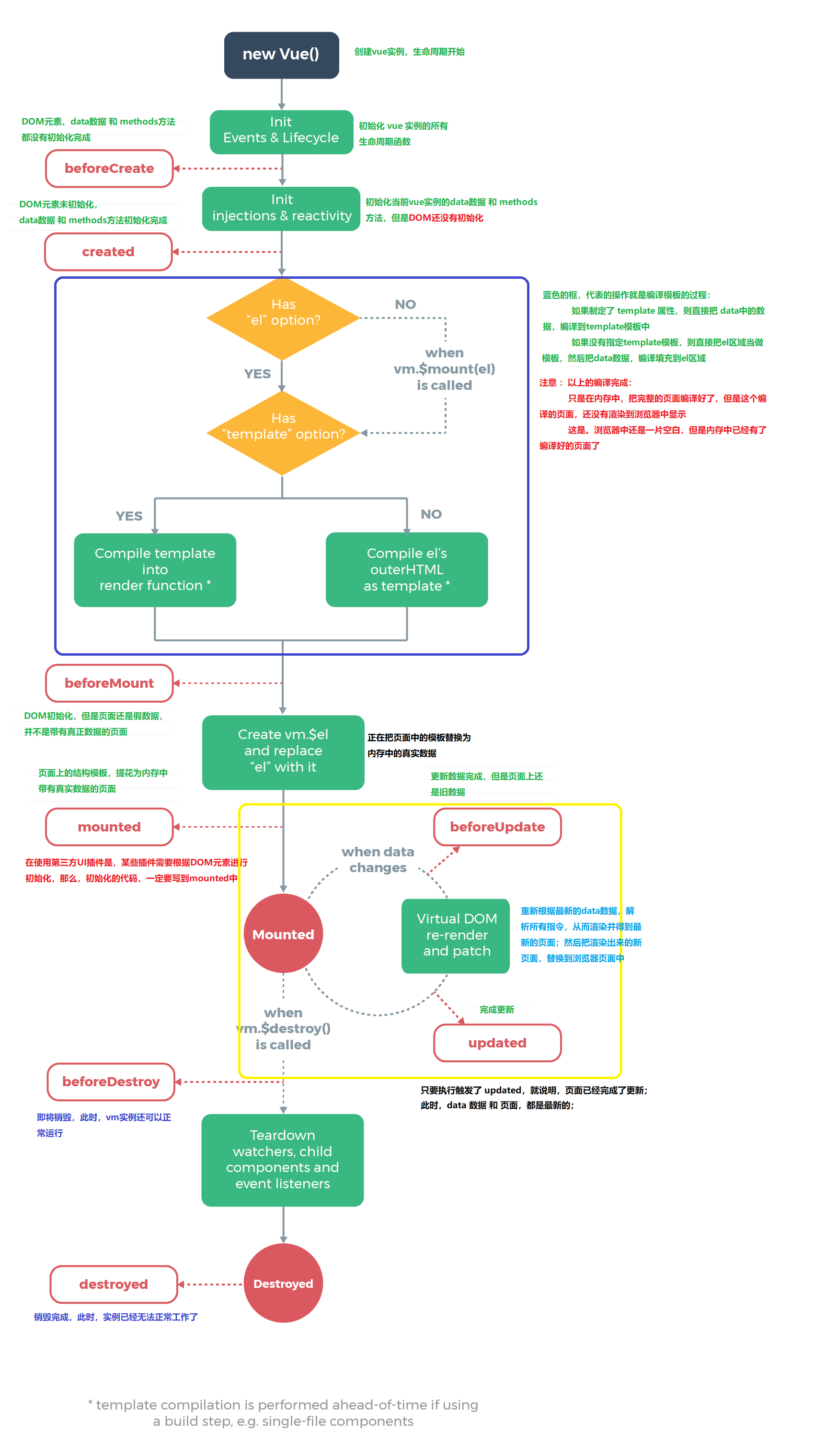
当new的时候,就创建了一个vue实例,这个实例就是vue框架的入口,也是VM层
<!DOCTYPE html>

<html lang="en">

<head>

  <meta charset="UTF-8">

  <meta name="viewport" content="width=device-width, initial-scale=1.0">

  <meta http-equiv="X-UA-Compatible" content="ie=edge">

  <title>Document</title>

  <script src="./vue-2.5.16.js"></script>

</head>

<body>

  <div id="app">

    <input type="text" v-model="message">

    <h2>{{message}}</h2>

  </div>

  <script>

    var vm = new Vue({

      el: "#app",

      data: {

        message: 'my words'

      },

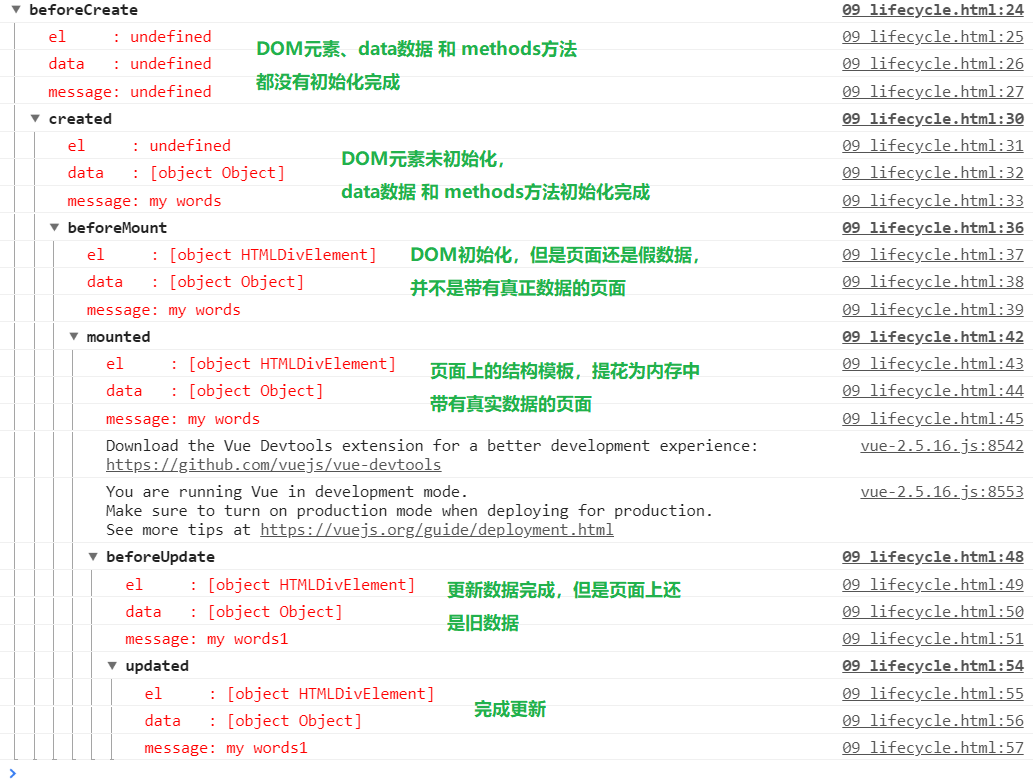
      beforeCreate() {

        console.group("beforeCreate");

        console.log("%c%s", "color:red", "el     : " + this.$el);

        console.log("%c%s", "color:red", "data   : " + this.$data);

        console.log("%c%s", "color:red", "message: " + this.message)

      },

      created() {

        console.group("created");

        console.log("%c%s", "color:red", "el     : " + this.$el);

        console.log("%c%s", "color:red", "data   : " + this.$data);

        console.log("%c%s", "color:red", "message: " + this.message)

      },

      beforeMount() {

        console.group("beforeMount");

        console.log("%c%s", "color:red", "el     : " + this.$el);

        console.log("%c%s", "color:red", "data   : " + this.$data);

        console.log("%c%s", "color:red", "message: " + this.message)

      },

      mounted() {

        console.group("mounted");

        console.log("%c%s", "color:red", "el     : " + this.$el);

        console.log("%c%s", "color:red", "data   : " + this.$data);

        console.log("%c%s", "color:red", "message: " + this.message)

      },

      beforeUpdate() {

        console.group("beforeUpdate");

        console.log("%c%s", "color:red", "el     : " + this.$el);

        console.log("%c%s", "color:red", "data   : " + this.$data);

        console.log("%c%s", "color:red", "message: " + this.message)

      },

      updated() {

        console.group("updated");

        console.log("%c%s", "color:red", "el     : " + this.$el);

        console.log("%c%s", "color:red", "data   : " + this.$data);

        console.log("%c%s", "color:red", "message: " + this.message)

      },

      beforeDestroy() {

        console.group("beforeDestroy");

        console.log("%c%s", "color:red", "el     : " + this.$el);

        console.log("%c%s", "color:red", "data   : " + this.$data);

        console.log("%c%s", "color:red", "message: " + this.message)

      },

      destroyed() {

        console.group("destroyed");

        console.log("%c%s", "color:red", "el     : " + this.$el);

        console.log("%c%s", "color:red", "data   : " + this.$data);

        console.log("%c%s", "color:red", "message: " + this.message)

      },

    })

  </script>

</body>

</html>
Vue.js(4)- 生命周期的更多相关文章
- Vue js 的生命周期详解
Vue 实例的生命周期 Vue 实例有一个完整的生命周期,也就是从开始创建.初始化数据.编译模板.挂载Dom→渲染.更新→渲染.卸载等一系列 过程,我们称这是 Vue 的生命周期.通俗说就是 Vue ...
- vue.js之生命周期,防止闪烁,计算属性的使用,vue实例简单方法和循环重复数据
摘要:今天是比较糟糕的一天没怎么学习,原因是学校的wifi连不上了~~.今天学习一下vue的生命周期,如何防止闪烁(也就是用户看得到花括号),计算属性的使用,vue实例简单方法,以及当有重复数据时如何 ...
- Vue js 的生命周期(看了就懂)
转自: https://blog.csdn.net/qq_24073885/article/details/60143856 用Vue框架,熟悉它的生命周期可以让开发更好的进行. 首先先看看官网的图, ...
- Vue.js之生命周期
有时候,我们需要在实例创建过程中进行一些初始化的工作,以帮助我们完成项目中更复杂更丰富的需求开发,针对这样的需求,Vue提供给我们一系列的钩子函数. vue生命周期 beforeCreate 在实例初 ...
- vue.js的生命周期 及其created和mounted的部分
网上很多人有所总结,转载自: https://segmentfault.com/a/1190000008570622 关于created和mounted的部分,也可以参考: https://blo ...
- Vue.js——5.生命周期
Vue的生命周期 创建阶段new Vue1,beforeCreate() 表示在实例没有被创建出来之前会执行它加载data和methods2,caeated() data 和methods被初始化了 ...
- 从零开始学 Web 之 Vue.js(三)Vue实例的生命周期
大家好,这里是「 从零开始学 Web 系列教程 」,并在下列地址同步更新...... github:https://github.com/Daotin/Web 微信公众号:Web前端之巅 博客园:ht ...
- Vue01 Vue介绍、Vue使用、Vue实例的创建、数据绑定、Vue实例的生命周期、差值与表达式、指令与事件、语法糖
1 Vue介绍 1.1 官方介绍 vue是一个简单小巧的渐进式的技术栈,它提供了Web开发中常用的高级功能:视图和数据的解耦.组件的服用.路由.状态管理.虚拟DOM 说明:简单小巧 -> 压缩后 ...
- Vue.js-07:第七章 - Vue 实例的生命周期
一.前言 在之前的 Vue 学习中,我们在使用 Vue 时,都会创建一个 Vue 的实例,而每个 Vue 实例在被创建时都要经过一系列的初始化过程.例如,需要设置数据监听.编译模板.将实例挂载到 D ...
- vue 项目实战 (生命周期钩子)
开篇先来一张图 下图是官方展示的生命周期图 Vue实例的生命周期钩子函数(8个) 1. beforeCreate 刚 new了一个组件,无法访问到数据和真实的do ...
随机推荐
- PHP处理大数据量老用户头像更新的操作--解决数据量大超时的问题
/** * @title 老用户头像更新--每3秒调用一次接口,每次更新10条数据 * @example user/createHeadPicForOldUser? * @method GET * @ ...
- 002、创建第一个Java程序HelloWord
代码如下: package TIANPAN; public class TestDemo { public static void main(String args[]) { System.out.p ...
- 图片与byte相互转换
一.图片转byte public byte[] ImageToByte() { string imagefile = @"http://192.168.0.212/pass/T-1.jpg& ...
- Webstorm常用快捷键备忘
WebStorm 是jetbrains公司旗下一款JavaScript 开发工具.被广大中国JS开发者誉为“Web前端开发神器”.“最强大的HTML5编辑器”.“最智能的JavaSscript IDE ...
- 京东首页如何实现pc端和移动端加载不同的html的?
进入www.jd.com后代码判断是手机的话就跳转m.jd.com let ua = window.navigator.userAgent.toLocaleLowerCase() let murl = ...
- 十、Vue:Vuex实现data(){}内数据多个组件间共享
一.概述 官方文档:https://vuex.vuejs.org/zh/installation.html 1.1vuex有什么用 Vuex:实现data(){}内数据多个组件间共享一种解决方案(类似 ...
- POJ - 3468 A Simple Problem with Integers (线段树区间更新---间接修改)
题意:区间add,区间求和. #include<cstdio> #include<cstring> #include<cstdlib> #include<cc ...
- pl/sql远程连接oracle数据库乱码
1. --在PLSQL Developer中查询select userenv('language') from dual ; 我的查询结果为:AMERICAN_AMERICA.ZHS16GBK 2.新 ...
- HttpServletRequest HttpServletResponse接口详解
HttpServletRequest接口最常用的方法就是获得请求中的参数,这些参数一般是客户端表单中的数据.同时,HttpServletRequest接口可以获取由客户端传送的名称,也可以获取产生请求 ...
- opencv.js双边滤波 磨皮处理
<!DOCTYPE html> <html> <head> <meta charset="UTF-8"> <meta http ...